Creation of geometries by Coordinate system methods using AutoCad
Create the geometries from P1 to P2 using all the coordinates system methods. You need to use the Line tool to create the geometries. Where required you need to use the circle tool.
Please read the drawings and find out the missing dimensions before working on the sketches.
Note: Use the Imperial Template and the Decimal Units to draft the features. Dimensions are there for
references.
A) Now we draw the given drawings using the co-ordinate system methods in autocad. And that should be drawn and discussed in detail.
AIM:
a. Create the geometries from P1 to P8 using all the co-ordinate system methods. And we need to use line tool, and find the missing dimensions.
b. Civil related problems: Draw the profile and the trusses using any co-ordinate system methods. The dimensions are there for references.
Introduction:
- Before going to the drawing we should know about the co-ordinates sysytems.
- In Autocad there are two co-ordinate sysytems. Cartesian and polar.
- To these co-ordinates systems the absolute and relative co-ordinates of Autocad as are applicable
- Also co-ordinates in AutoCAD can be set by mouse, input(setting) the values of co-ordinates in the command line and enter co-ordinates using dynamic input.
There are three types of co-ordinate systems.
1. Absolute co-ordinate systems
2. Relative co-ordinate systems
i. Relative rectangular co-ordinates
ii. Relative polar co-ordinates
3. Direct distance entry
Commands used:
1. Line command
2. Dimlinear command
3. Text command
4. Circle command
Procedure:
Starting AutoCAD software(new drawing is to be created):
- Go to START MENU, select AutoCAD 2021
- Click on START DRAWING
- In the command line type in : STARTUP [ENTER]
- Enter new value of startup: 1
- Go to Application Menu and select New
- In the 'Create New Drawing' dialog box, we select the ' imperial' sysytem in the 'start from scratch option.
- Next we select the 'Decimal' unit system from the 'Advanced Setup' option
- Set the limits by entering LIMITS in the Command tab. The lower-left corner is specified as 0,0 and upper -right corner is specified as 100,100
P1:
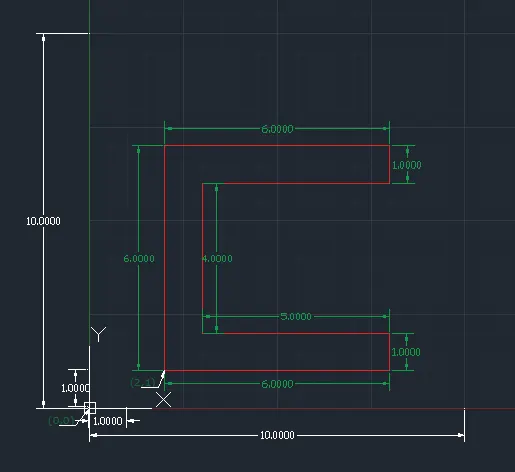
ABSOLUTE CO-ORDINATE SYSTEM:
- Select the line tool by entering 'LINE' in the command tab.
- Specify the starting co-ordinate of point:2,1
- Specify the next co-ordinate of point:8,1
- Specify the next co-ordinate of point:8,2
- Specify the next co-ordinate of point:3,2
- Specify the next co-ordinate of point:3,6
- Specify the next co-ordinate of point:8,6
- Specify the next co-ordinate of point:8,7
- Specify the next co-ordinate of point:2,7
- Specify the last point:2,1 or Click 'Close'
RELATIVE RECTANGULAR CO-ORDINATE SYSTEM:
- Select the line tool by entering 'LINE' command in the command tab.
- Specify the starting co-ordinate of point:2,1
- Specify the next co-ordinate of point:@0,6
- Specify the next co-ordinate of point:@6,0
- Specify the next co-ordinate of point:@0,-1
- Specify the next co-ordinate of point:@-5,0
- Specify the next co-ordinate of point:@0,-4
- Specify the next co-ordinate of point:@5,0
- Specify the next co-ordinate of point:@0,-1
- Specify last point:@-6,0 or Click 'Close'
RELATIVE POLAR CO-ORDINATE SYSTEM:
- Select the line tool by entering 'LINE' command in the command tab.
- Specify the starting co-ordinate of point:2,1
- Specify the next co-ordinate of point:@6<90
- Specify the next co-ordinate of point:@6<0
- Specify the next co-ordinate of point:@1<270
- Specify the next co-ordinate of point:@5<180
- Specify the next co-ordinate of point:@4<270
- Specify the next co-ordinate of point:@5<0
- Specify the next co-ordinate of point:@1<270
- Specify last point:@6<180 or Click 'Close'
DIRECT DISTANCE ENTRY METHOD(ORTHO ON):
- Select the line tool by entering 'LINE' command in the command tab.
- Specify the starting co-ordinate of point:2,1
- Specify the next co-ordinate of point:"UP", 6
- Specify the next co-ordinate of point:"RIGHT", 6
- Specify the next co-ordinate of point:"DOWN", 1
- Specify the next co-ordinate of point:"LEFT", 5
- Specify the next co-ordinate of point:"DOWN", 4
- Specify the next co-ordinate of point:"RIGHT", 5
- Specify the next co-ordinate of point:"DOWN", 1
- Specify last point:"LEFT", 6 or Click 'Close'
P2:
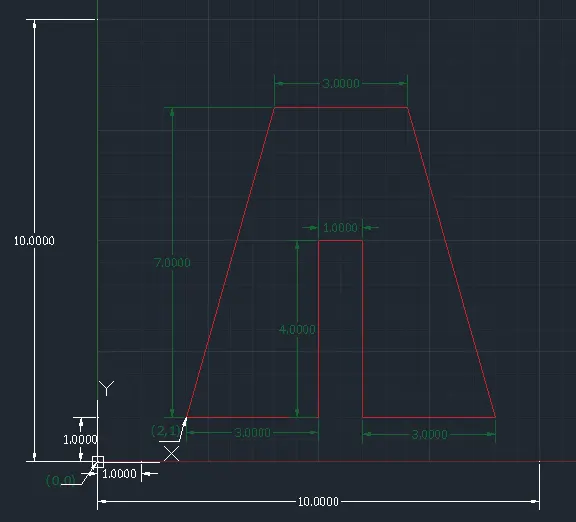
ABSOLUTE CO-ORDINATE SYSTEM:
- Select the line tool by entering 'LINE' command in the command tab.
- Specify the starting co-ordinate of point:2,1
- Specify the next co-ordinate of point:5,1
- Specify the next co-ordinate of point:5,5
- Specify the next co-ordinate of point:6,5
- Specify the next co-ordinate of point:6,1
- Specify the next co-ordinate of point:9,1
- Specify the next co-ordinate of point:7,8
- Specify the next co-ordinate of point:4,8
- Specify last point:2,1 or Click 'Close'
RELATIVE RECTANGULAR CO-ORDINATE SYSTEM:
- Select the line tool by entering 'LINE' command in the command tab.
- Specify the starting co-ordinate of point:2,1
- Specify the next co-ordinate of point:@2,7
- Specify the next co-ordinate of point:@3,0
- Specify the next co-ordinate of point:@2,-7
- Specify the next co-ordinate of point:@-3,0
- Specify the next co-ordinate of point:@0,4
- Specify the next co-ordinate of point:@-1,0
- Specify the next co-ordinate of point:@0,-4
- Specify last point:@-3,0 or Click 'Close'
RELATIVE POLAR CO-ORDINATE SYSTEM:
- Select the line tool by entering 'LINE' command in the command tab.
- Specify the starting co-ordinate of point:2,1
- Specify the next co-ordinate of point:@7.28<74.05
- Specify the next co-ordinate of point:@3<0
- Specify the next co-ordinate of point:@7.25<-74.05
- Specify the next co-ordinate of point:@3<180
- Specify the next co-ordinate of point:@4<90
- Specify the next co-ordinate of point:@1<180
- Specify the next co-ordinate of point:@4<270
- Specify last point:@3<180 or Click 'Close'
DIRECT DISTANCE ENTRY METHOD(ORTHO ON):
- Select the line tool by entering 'LINE' command in the command tab.
- Specify the starting co-ordinate of point:2,1
- Specify the next co-ordinate of point:"AT<74.05", 7.28
- Specify the next co-ordinate of point:"RIGHT", 3
- Specify the next co-ordinate of point:"AT<-74.05(285.95)", 7.28
- Specify the next co-ordinate of point:"LEFT", 3
- Specify the next co-ordinate of point:"UP", 4
- Specify the next co-ordinate of point:"LEFT", 1
- Specify the next co-ordinate of point:"DOWN", 4
- Specify last point:"LEFT", 3 or Click 'Close'
P4:
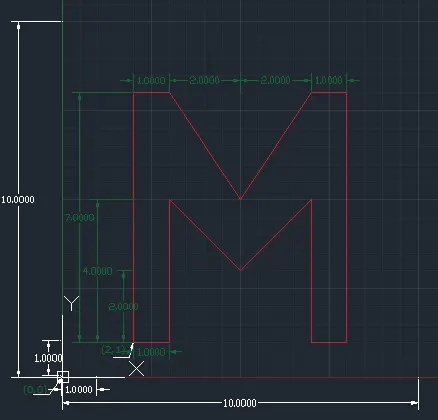
ABSOLUTE CO-ORDINATE SYSTEM:
- Select the line tool by entering 'LINE' command in the command tab.
- Specify the starting co-ordinate of point:2,1
- Specify the next co-ordinate of point:3,1
- Specify the next co-ordinate of point:3,5
- Specify the next co-ordinate of point:5,3
- Specify the next co-ordinate of point:7,5
- Specify the next co-ordinate of point:7,1
- Specify the next co-ordinate of point:8,1
- Specify the next co-ordinate of point:8,8
- Specify the next co-ordinate of point:7,8
- Specify the next co-ordinate of point:5,5
- Specify the next co-ordinate of point:3,8
- Specify the next co-ordinate of point:2,8
- Specify last point:2,1 or Click 'Close'
RELATIVE RECTANGULAR CO-ORDINATE SYSTEM:
- Select the line tool by entering 'LINE' command in the command tab.
- Specify the starting co-ordinate of point:2,1
- Specify the next co-ordinate of point:@0,7
- Specify the next co-ordinate of point:@1,0
- Specify the next co-ordinate of point:@2,-3
- Specify the next co-ordinate of point:@2,3
- Specify the next co-ordinate of point:@1,0
- Specify the next co-ordinate of point:@0,-7
- Specify the next co-ordinate of point:@-1,0
- Specify the next co-ordinate of point:@0,4
- Specify the next co-ordinate of point:@-2,-2
- Specify the next co-ordinate of point:@-2,2
- Specify the next co-ordinate of point:@0,-4
- Specify last point:@-1,0 or Click 'Close'
RELATIVE POLAR CO-ORDINATE SYSTEM:
- Select the line tool by entering 'LINE' command in the command tab.
- Specify the starting co-ordinate of point:2,1
- Specify the next co-ordinate of point:@7<90
- Specify the next co-ordinate of point:@1<0
- Specify the next co-ordinate of point:@3.61<-56.31
- Specify the next co-ordinate of point:@3.61<-56.31
- Specify the next co-ordinate of point:@1<0
- Specify the next co-ordinate of point:@7<270
- Specify the next co-ordinate of point:@1<180
- Specify the next co-ordinate of point:@4<90
- Specify the next co-ordinate of point:@2.83<-135
- Specify the next co-ordinate of point:@2.83<135
- Specify the next co-ordinate of point:@4<270
- Specify last point:@1<180 or Click 'Close'
DIRECT DISTANCE ENTRY METHOD(ORTHO ON):
- Select the line tool by entering 'LINE' command in the command tab.
- Specify the starting co-ordinate of point:2,1
- Specify the next co-ordinate of point:"UP", 7
- Specify the next co-ordinate of point:"RIGHT", 1
- Specify the next co-ordinate of point:"AT <-56.31(303.69)", 3.61
- Specify the next co-ordinate of point:"AT <56.31", 3.61
- Specify the next co-ordinate of point:"RIGHT", 1
- Specify the next co-ordinate of point:"DOWN", 7
- Specify the next co-ordinate of point:"LEFT", 1
- Specify the next co-ordinate of point:"UP", 4
- Specify the next co-ordinate of point:"AT <-135(225)", 2.83
- Specify the next co-ordinate of point:"AT <135(225)", 2.83
- Specify the next co-ordinate of point:"DOWN", 4
- Specify last point:"LEFT", 3 or Click 'Close'
P5:
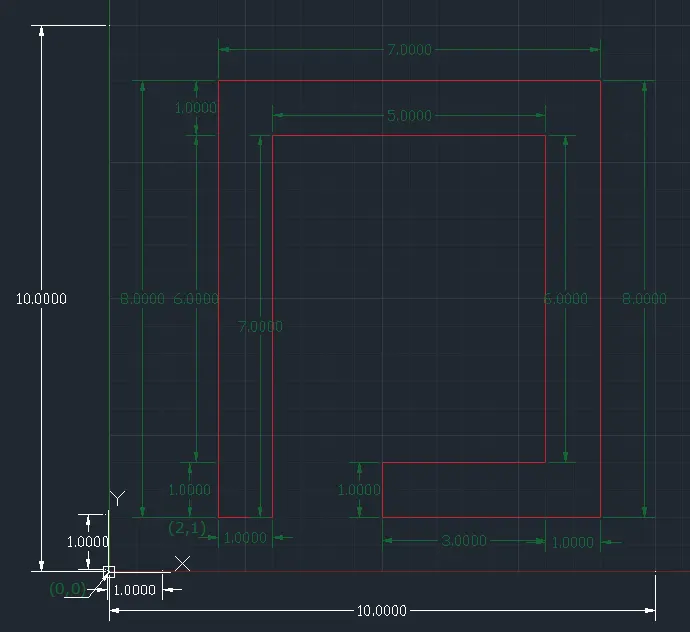
ABSOLUTE CO-ORDINATE SYSTEM:
- Select the line tool by entering 'LINE' command in the command tab.
- Specify the starting co-ordinate of point:2,1
- Specify the next co-ordinate of point:2,9
- Specify the next co-ordinate of point:9,9
- Specify the next co-ordinate of point:9,1
- Specify the next co-ordinate of point:5,1
- Specify the next co-ordinate of point:5,2
- Specify the next co-ordinate of point:8,2
- Specify the next co-ordinate of point:8,8
- Specify the next co-ordinate of point:3,8
- Specify the next co-ordinate of point:3,1
- Specify last point:2,1 or Click 'Close'
RELATIVE RECTANGULAR CO-ORDINATE SYSTEM:
- Select the line tool by entering 'LINE' command in the command tab.
- Specify the starting co-ordinate of point:2,1
- Specify the next co-ordinate of point:@0,8
- Specify the next co-ordinate of point:@7,0
- Specify the next co-ordinate of point:@0,-8
- Specify the next co-ordinate of point:@-4,0
- Specify the next co-ordinate of point:@0,1
- Specify the next co-ordinate of point:@3,0
- Specify the next co-ordinate of point:@0,6
- Specify the next co-ordinate of point:@-5,0
- Specify the next co-ordinate of point:@0,-7
- Specify last point:@-1,0 or Click 'Close'
RELATIVE POLAR CO-ORDINATE SYSTEM:
- Select the line tool by entering 'LINE' command in the command tab.
- Specify the starting co-ordinate of point:2,1
- Specify the next co-ordinate of point:@8<90
- Specify the next co-ordinate of point:@7<0
- Specify the next co-ordinate of point:@8<270
- Specify the next co-ordinate of point:@4<180
- Specify the next co-ordinate of point:@1<90
- Specify the next co-ordinate of point:@3<180
- Specify the next co-ordinate of point:@6<90
- Specify the next co-ordinate of point:@5<180
- Specify the next co-ordinate of point:@7<270
- Specify last point:@1<180 or Click 'Close'
DIRECT DISTANCE ENTRY METHOD(ORTHO ON):
- Select the line tool by entering 'LINE' command in the command tab.
- Specify the starting co-ordinate of point:2,1
- Specify the next co-ordinate of point:"UP", 8
- Specify the next co-ordinate of point:"RIGHT", 7
- Specify the next co-ordinate of point:"DOWN", 8
- Specify the next co-ordinate of point:"LEFT", 4
- Specify the next co-ordinate of point:"UP", 1
- Specify the next co-ordinate of point:"RIGHT", 3
- Specify the next co-ordinate of point:"UP", 6
- Specify the next co-ordinate of point:"LEFT", 5
- Specify the next co-ordinate of point:"DOWN", 7
- Specify last point:"LEFT", 1 or Click 'Close'
P7:
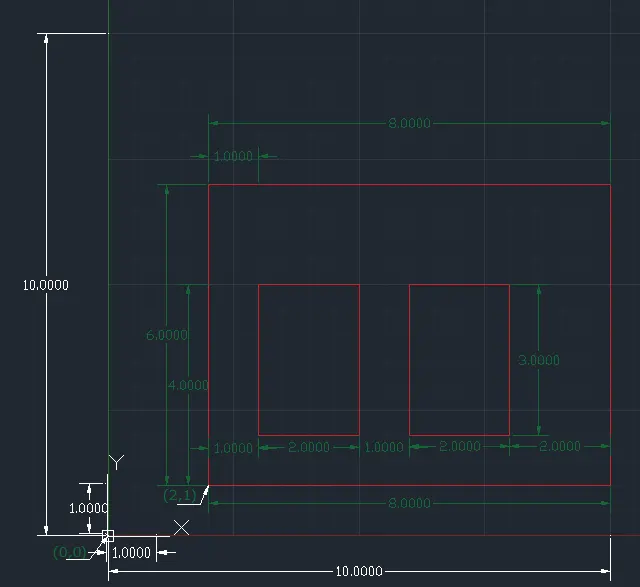
ABSOLUTE CO-ORDINATE SYSTEM:
- Select the line tool by entering 'LINE' command in the command tab.
- Specify the starting co-ordinate of point:2,1
- Specify the next co-ordinate of point:10,1
- Specify the next co-ordinate of point:10,7
- Specify the next co-ordinate of point:2,7
- Specify the Last point as 2,1
- Click 'Close' on the command line.
- Specify the next co-ordinate of point:3,2
- Specify the next co-ordinate of point:5,2
- Specify the next co-ordinate of point:5,5
- Specify the next co-ordinate of point:3,5
- Specify the Last point as 3,2
- Click 'Close' on the command line.
- Specify the next co-ordinate of point:6,2
- Specify the next co-ordinate of point:8,2
- Specify the next co-ordinate of point:8,5
- Specify the next co-ordinate of point:6,5
- Specify the Last point as 6,2 or Click 'Close' on the command line.
RELATIVE RECTANGULAR CO-ORDINATE SYSTEM:
- Select the line tool by entering 'LINE' command in the command tab.
- Specify the starting co-ordinate of point:2,1
- Specify the next co-ordinate of point:@0,6
- Specify the next co-ordinate of point:@8,0
- Specify the next co-ordinate of point:@0,-6
- Specify the Last point as@-8,0 or close
- Secify the line Tool
- Specify the next co-ordinate of point:3,2
- Specify the next co-ordinate of point:@0,3
- Specify the next co-ordinate of point:@2,0
- Specify the next co-ordinate of point:@0,-3
- Specify the Last point as @-2,0 or close
- Specify the line Tool
- Specify the next co-ordinate of point:6,2
- Specify the next co-ordinate of point:@0,3
- Specify the next co-ordinate of point:@2,0
- Specify the next co-ordinate of point:@0,-3
- Specify the Last point as @-2,0 or Click 'Close' on the command line.
RELATIVE POLAR CO-ORDINATE SYSTEM:
- Select the line tool by entering 'LINE' command in the command tab.
- Specify the starting co-ordinate of point:2,1
- Specify the next co-ordinate of point:@6<90
- Specify the next co-ordinate of point:@8<0
- Specify the next co-ordinate of point:@6<270
- Specify the Last point as@8<180 or close
- Secify the line Tool
- Specify the next co-ordinate of point:3,2
- Specify the next co-ordinate of point:@3<90
- Specify the next co-ordinate of point:@2<0
- Specify the next co-ordinate of point:@3<270
- Specify the Last point as @2<180 or close
- Specify the line Tool
- Specify the next co-ordinate of point:6,2
- Specify the next co-ordinate of point:@3<90
- Specify the next co-ordinate of point:@2<0
- Specify the next co-ordinate of point:@3<270
- Specify the Last point as @2<180 or Click 'Close' on the command line.
DIRECT DISTANCE ENTRY METHOD(ORTHO ON):
- Select the line tool by entering 'LINE' command in the command tab.
- Specify the starting co-ordinate of point:2,1
- Specify the next co-ordinate of point:"UP", 6
- Specify the next co-ordinate of point:"RIGHT", 8
- Specify the next co-ordinate of point:"DOWN", 6
- Specify the Last point:"LEFT", 8 or Click 'Close'
- Specify the line Tool
- Specify the first co-ordinate of point:3,2
- Specify the next co-ordinate of point:"UP", 3
- Specify the next co-ordinate of point:"RIGHT", 2
- Specify the next co-ordinate of point:"DOWN", 3
- Specify the Last point as"LEFT", 2 or Click 'Close'
- Specify the line Tool
- Specify the first co-ordinate of point:6,2
- Specify the next co-ordinate of point:"UP", 3
- Specify the next co-ordinate of point:"RIGHT", 2
- Specify the next co-ordinate of point:"DOWN", 3
- Specify the Last point as "LEFT", 2 or Click 'Close' on the command line.
P8:
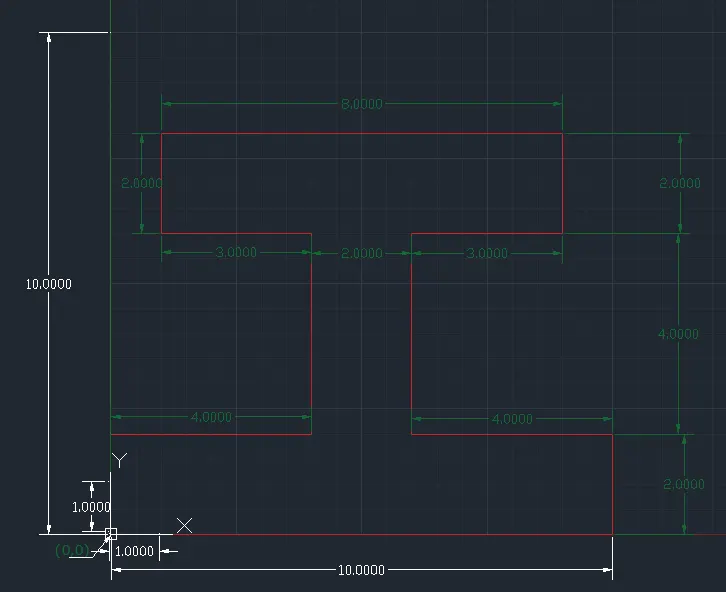
ABSOLUTE CO-ORDINATE SYSTEM:
- Select the line tool by entering 'LINE' command in the command tab.
- Specify the starting co-ordinate of point:0,0
- Specify the next co-ordinate of point:0,2
- Specify the next co-ordinate of point:4,2
- Specify the next co-ordinate of point:4,6
- Specify the next co-ordinate of point:1,6
- Specify the next co-ordinate of point:1,8
- Specify the next co-ordinate of point:9,8
- Specify the next co-ordinate of point:9,7
- Specify the next co-ordinate of point:6,7
- Specify the next co-ordinate of point:6,2
- Specify the next co-ordinate of point:10,2
- Specify the next co-ordinate of point:0,0
- Click 'Close' on the command line.
RELATIVE RECTANGULAR CO-ORDINATE SYSTEM:
- Select the line tool by entering 'LINE' command in the command tab.
- Specify the starting co-ordinate of point:0,0
- Specify the next co-ordinate of point:@0,2
- Specify the next co-ordinate of point:@4,0
- Specify the next co-ordinate of point:@0,4
- Specify the next co-ordinate of point:@-3,0
- Specify the next co-ordinate of point:@0,2
- Specify the next co-ordinate of point:@8,0
- Specify the next co-ordinate of point:@0,-2
- Specify the next co-ordinate of point:@-3,0
- Specify the next co-ordinate of point:@0,-4
- Specify the next co-ordinate of point:@4,0
- Specify the next co-ordinate of point:0,-2
- Specify the last point:@-10,0 orClick 'Close'
RELATIVE POLAR CO-ORDINATE SYSTEM:
- Select the line tool by entering 'LINE' command in the command tab.
- Specify the starting co-ordinate of point:0,0
- Specify the next co-ordinate of point:@2<90
- Specify the next co-ordinate of point:@4<0
- Specify the next co-ordinate of point:@4<90
- Specify the next co-ordinate of point:@3<180
- Specify the next co-ordinate of point:@2<90
- Specify the next co-ordinate of point:@8<0
- Specify the next co-ordinate of point:@2<270
- Specify the next co-ordinate of point:@3<180
- Specify the next co-ordinate of point:@4<270
- Specify the next co-ordinate of point:@4<0
- Specify the next co-ordinate of point:@2<270
- Specify the last point:@10<180 or Click 'Close'
DIRECT DISTANCE ENTRY METHOD(ORTHO ON):
- Select the line tool by entering 'LINE' command in the command tab.
- Specify the starting co-ordinate of point:0,0
- Specify the next co-ordinate of point:"UP"2
- Specify the next co-ordinate of point:"RIGHT"4
- Specify the next co-ordinate of point:"UP"4
- Specify the next co-ordinate of point:"LEFT"3
- Specify the next co-ordinate of point:"UP"2
- Specify the next co-ordinate of point:"RIGHT"8
- Specify the next co-ordinate of point:"DOWN"2
- Specify the next co-ordinate of point:"LEFT"3
- Specify the next co-ordinate of point:"DOWN"4
- Specify the next co-ordinate of point:"RIGHT"4
- Specify the next co-ordinate of point:"DOWN"2
- Specify the last point:"LEFT", 10 OTClick 'Close'
P9:
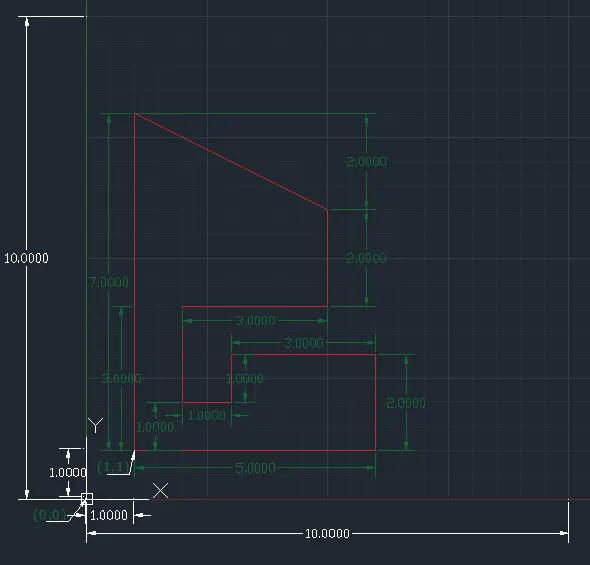
ABSOLUTE CO-ORDINATE SYSTEM:
- Select the line tool by entering 'LINE' command in the command tab.
- Specify the starting co-ordinate of point:1,1
- Specify the next co-ordinate of point:1,8
- Specify the next co-ordinate of point:5,6
- Specify the next co-ordinate of point:5,4
- Specify the next co-ordinate of point:2,4
- Specify the next co-ordinate of point:2,2
- Specify the next co-ordinate of point:3,2
- Specify the next co-ordinate of point:3,3
- Specify the next co-ordinate of point:6,3
- Specify the next co-ordinate of point:6,1
- Specify the last point:1,1 or Click 'Close'
RELATIVE RECTANGULAR CO-ORDINATE SYSTEM:
- Select the line tool by entering 'LINE' command in the command tab.
- Specify the starting co-ordinate of point:1,1
- Specify the next co-ordinate of point:@0,7
- Specify the next co-ordinate of point:@4,2
- Specify the next co-ordinate of point:@0,-2
- Specify the next co-ordinate of point:@-3,0
- Specify the next co-ordinate of point:@0,-2
- Specify the next co-ordinate of point:@1,0
- Specify the next co-ordinate of point:@0,1
- Specify the next co-ordinate of point:@3,0
- Specify the next co-ordinate of point:@0,-2
- Specify the last point: @-5,0 or Click 'Close'
RELATIVE POLAR CO-ORDINATE SYSTEM:
- Select the line tool by entering 'LINE' command in the command tab.
- Specify the starting co-ordinate of point:1,1
- Specify the next co-ordinate of point:@7<90
- Specify the next co-ordinate of point:@4.47<-26.57
- Specify the next co-ordinate of point:@2<270
- Specify the next co-ordinate of point:@3<180
- Specify the next co-ordinate of point:@2<270
- Specify the next co-ordinate of point:@1<0
- Specify the next co-ordinate of point:@1<90
- Specify the next co-ordinate of point:@3<0
- Specify the next co-ordinate of point:@2<270
- Specify the last point: @5<180 or Click 'Close'
DIRECT DISTANCE ENTRY METHOD(ORTHO ON):
- Select the line tool by entering 'LINE' command in the command tab.
- Specify the starting co-ordinate of point:1,1
- Specify the next co-ordinate of point:"UP", 7
- Specify the next co-ordinate of point:"AT<-26.57(333.43)", 4.47
- Specify the next co-ordinate of point:"DOWN", 2
- Specify the next co-ordinate of point:"LEFT", 3
- Specify the next co-ordinate of point:"DOWN", 2
- Specify the next co-ordinate of point:"RIGHT", 1
- Specify the next co-ordinate of point:"UP", 1
- Specify the next co-ordinate of point:"RIGHT", 3
- Specify the next co-ordinate of point:"DOWN", 2
- Specify the last point: "left", 5 or Click 'Close'
P10:
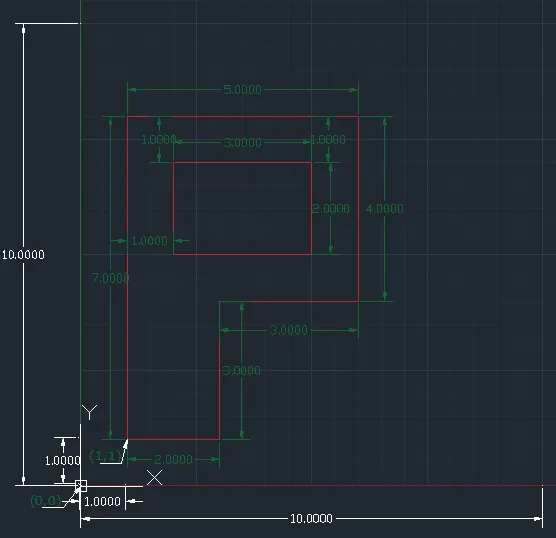
ABSOLUTE CO-ORDINATE SYSTEM:
- Select the line tool by entering 'LINE' command in the command tab.
- Specify the starting co-ordinate of point:1,1
- Specify the next co-ordinate of point:1,8
- Specify the next co-ordinate of point:6,8
- Specify the next co-ordinate of point:6,4
- Specify the next co-ordinate of point:3,4
- Specify the next co-ordinate of point:3,1
- Click 'Close'
- Select the Line Tool
- Specify the next co-ordinate of point2,5
- Specify the next co-ordinate of point:2,7
- Specify the next co-ordinate of point:5,7
- Specify the next co-ordinate of point:5,5
- Specify the last point:2,5 or Click 'Close'
RELATIVE RECTANGULAR CO-ORDINATE SYSTEM:
- Select the line tool by entering 'LINE' command in the command tab.
- Specify the starting co-ordinate of point:@1,1
- Specify the next co-ordinate of point:@0,7
- Specify the next co-ordinate of point:@5,0
- Specify the next co-ordinate of point:@0,-4
- Specify the next co-ordinate of point:@-3,0
- Specify the next co-ordinate of point:@0,-3
- Specify the last point:@ 2,0 or Click 'Close'
- Select the Line Tool
- Specify the next co-ordinate of point:2,5
- Specify the next co-ordinate of point:@0,2
- Specify the next co-ordinate of point:@3,0
- Specify the next co-ordinate of point:@0,-2
- pecify the last point:@-3,0 or Click 'Close'
RELATIVE POLAR CO-ORDINATE SYSTEM:
- Select the line tool by entering 'LINE' command in the command tab.
- Specify the starting co-ordinate of point:@1,1
- Specify the next co-ordinate of point:@7<90
- Specify the next co-ordinate of point:@5< 0
- Specify the next co-ordinate of point:@4<270
- Specify the next co-ordinate of point:@3<180
- Specify the next co-ordinate of point:@3<270
- Specify the last point:@2<180 or Click 'Close'
- Select the Line Tool
- Specify the next co-ordinate of point:2,5
- Specify the next co-ordinate of point:@2<90
- Specify the next co-ordinate of point:@3<0
- Specify the next co-ordinate of point:@2<270
- Specify the last point:@3<180 or Click 'Close'
DIRECT DISTANCE ENTRY METHOD(ORTHO ON):
- Select the line tool by entering 'LINE' command in the command tab.
- Specify the starting co-ordinate of point:1,1
- Specify the next co-ordinate of point:"UP", 7
- Specify the next co-ordinate of point:"RIGHT", 5
- Specify the next co-ordinate of point: "DOWN", 4
- Specify the next co-ordinate of point: "LEFT", 3
- Specify the last co-ordinate of point: "DOWN", 3
- Click 'Close' on the command line.
- Specify the Line Tool
- Specify the next co-ordinate of point: "UP", 2
- Specify the next co-ordinate of point: "RIGHT", 3
- Specify the next co-ordinate of point:"DOWN", 2
- Specify the last co-ordinate of point: "LEFT", 3
- Click 'Close' on the command line.
Civil Related Problems:Draw the profile and the trusses using any coordinate system methods. The dimensions are there for references.
PROFILE-WOOD:
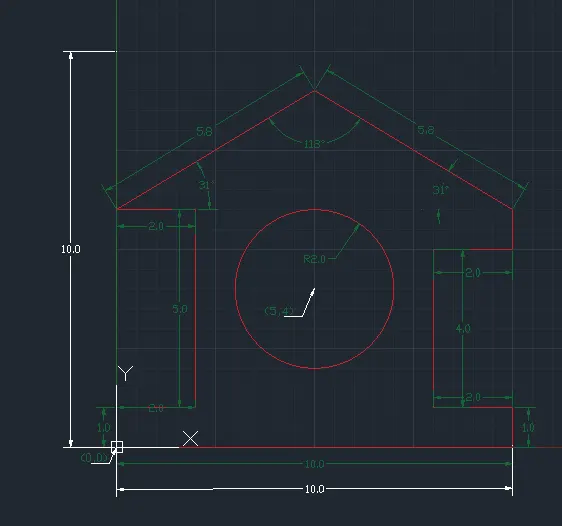
- Select the line tool by entering 'LINE' command in the command tab.
- Specify the starting co-ordinate of point:0,0
- Specify the next co-ordinate of point:@1<90
- Specify the next co-ordinate of point:@2<0
- Specify the next co-ordinate of point:@5<90
- Specify the next co-ordinate of point:@2<180
- Specify the next co-ordinate of point:@2<90
- Specify the next co-ordinate of point:@5.831<30.964
- Specify the next co-ordinate of point:@5.831<-30.964
- Specify the next co-ordinate of point:@1<270
- Specify the next co-ordinate of point:@2<180
- Specify the next co-ordinate of point:@4<270
- Specify the next co-ordinate of point:@2<0
- Specify the next co-ordinate of point:@1<270
- Specify the last point:@10<180 OR Click 'Close'
- Specify the Circle tool
- Specify the first point:5,4
- Specify radius:2
QUEEN POST TRUSS:
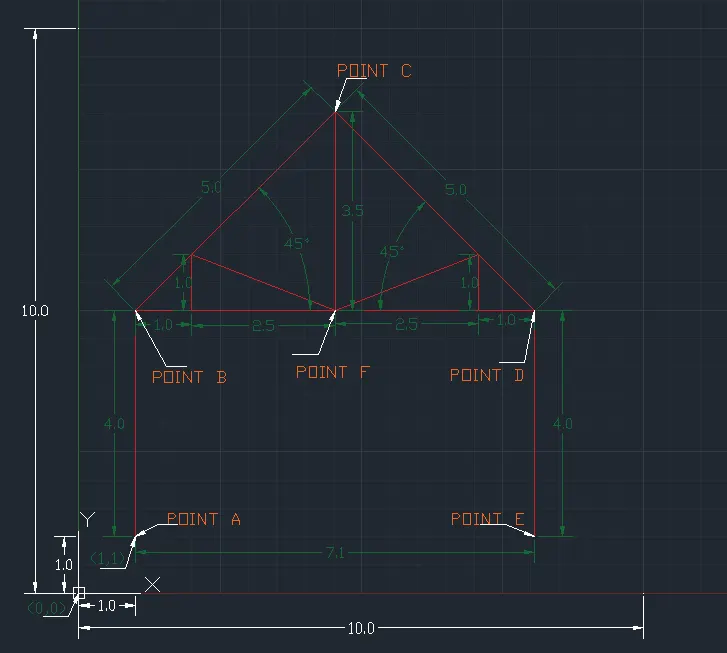
- Select the line tool by entering 'LINE' command in the command tab.
- Specify the starting co-ordinate of point:1,1(Point A)
- Specify the next co-ordinate of point:@4<90 (Point B)
- Specify the next co-ordinate of point:@5<45(Point C)
- Specify the next co-ordinate of point:@5<-45 (Point D)
- Specify the next co-ordinate of point:@4<270(Point E) End
- Specify the Line tool
- Connect (Point B) and (Point D)
- Set mid point of lines as (Point F), End
- Specify the Line tool
- Connect (Point C) and (Point F) End
- Specify the Line tool
- Specify the next co-ordinate of point:2,5
- Specify the next co-ordinate of point:@1<90
- Specify the next co-ordinate of point:@2.726<-21.524
- Specify the next co-ordinate of point:@2.726<21.524
- Specify the next co-ordinate of point:@1<270, End
MONO PITCH:
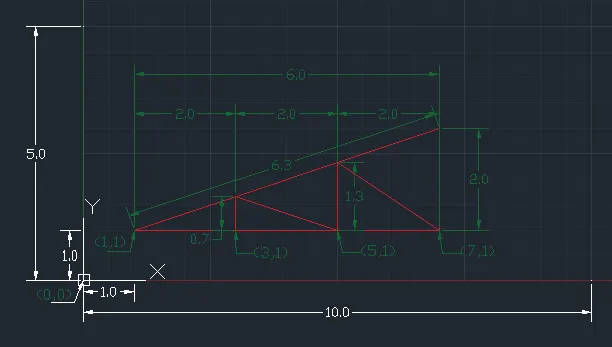
- Select the line tool by entering 'LINE' command in the command tab.
- Specify the starting co-ordinate of point:1,1
- Specify the next co-ordinate of point:7,2
- Specify the next co-ordinate of point:7,1
- Specify the next co-ordinate of point:1,1 OR CLOSE
- Specify the Line Tool
- Specify the next co-ordinate of point:3,1
- Specify the next co-ordinate of point:@0.667<90
- Specify the next co-ordinate of point:5,1
- Specify the next co-ordinate of point:@1.333<90
- Specify the next co-ordinate of point:7,1 , End