Creation of Column Schedule and Drawing Template using AutoCad
AIM: Creating a column schedule with the help of lines. Also, insert text with the help of Dtext command or Single Line text.
INTRUDUCTION: Line command , Offcet command , Command D text or single line text
Current text style : romans shx
Text height : 8"
Annotative : No
PROCCEDURE:
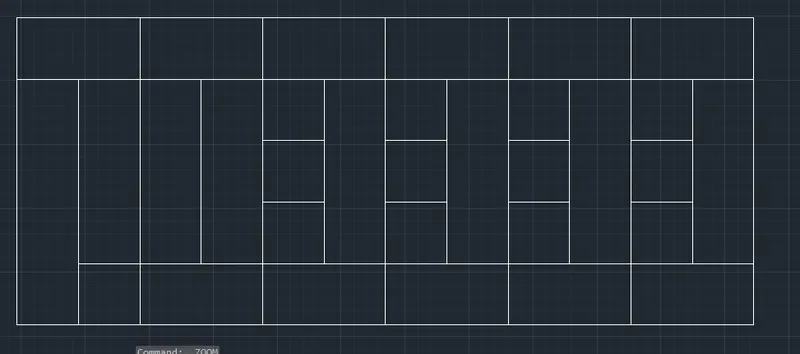
COMMAND : LINE
Specify the first point of line :
Specify the second point of line: line in x direction
Specify the next point of line : line in y direction
Specify the next point of line : line in -x direction
Specify the next point of line : line in-y direction or c enter
Command : offcet
Specify the offcet distance : 8'
specify the offcet distance : to five point
Command : offcet
Specify the offcet distance : 4'
specify the offcet distance : to five point 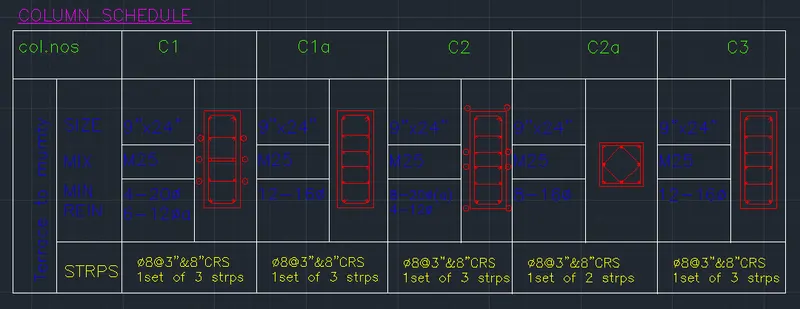
Command D text or single line text
Current text style : romans shx
Text height : 8"
Annotative : No
Command co
Copy the rext command to the required column
command : Text edit
Edit all the command to the required titte name
Command : Line
Specify the first point of line :
Specify the second point of line: 9" line in x direction
Specify the next point of line : 24" line in y direction
Specify the next point of line : 9" line in -x direction
Specify the next point of line : 24" line in-y direction or c enter
Command : offcet
Specify the offcet distance as : 4"
Specify the offcet distance as : 10"
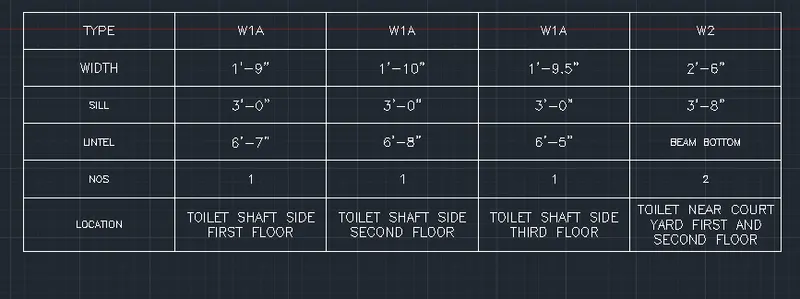
AIM: Creating a window schedule
INTRUDUCTION: Ribbon , Annonate , table
PROCCEDURE:
Specify command table :
Specify the no of column : 5
Specify the no of rows : 6
Enter the text in the rows
AIM: Creating the drawing template
INTRUDUCTION: Ribbon , Annonate , multi line text
PROCCEDURE: 
Specify the command multy text
Type the note and Template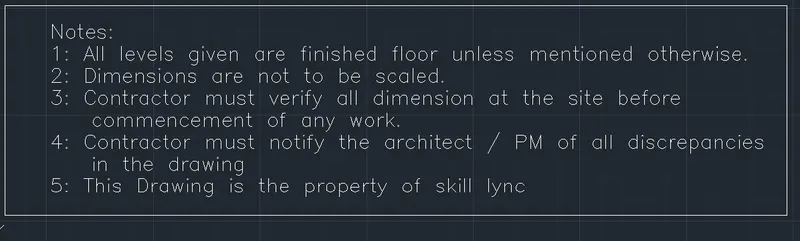
Command Line
Specify the first point of line:
Specify the next point of line: line in x direction
Specify the next point of line: line in y direction
Specify the next point of ine : line in - x direction
Specify the next point of line or close
Command : Offecet:
Specify the offcet distance :
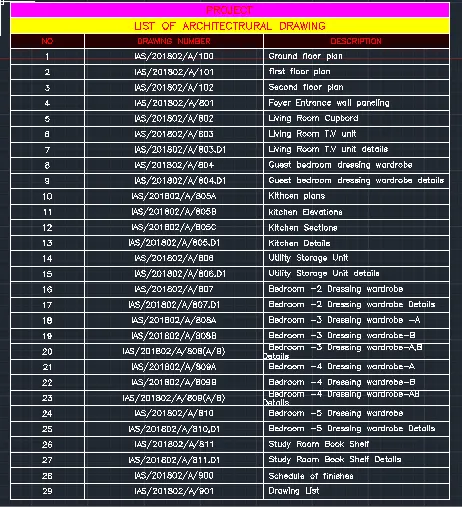
AIM: Creating the list of drawing schedule
INTRUDUCTION: Ribbon , Annonate , table
PROCCEDURE:
Go to Ribbon then to Annonate
open table
Specify the 31 no of rows
Specify the 3 no column
Specify the alignment to mid center to the text
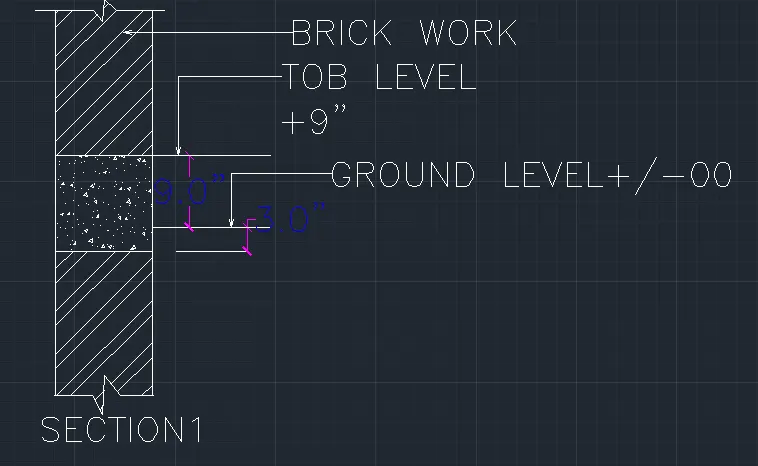
AIM: Creating the beam details
INTRUDUCTION: line , Break line , Hatch , Leader, Single line Text.
PROCCEDURE:
Specify the first point of line :
Specify the next point of line : line in x axis
Specify the next point of line : line in y axis
Specify the next point of line : line in x axis
Specify the next point : close
Command : H Hatch
Pick internal point : of beam as concrete
Pick internal point : of beam as brick work
Command: mleader
Specify leader arrowhead location :
Specify next point:
Specify leader landing location: type the text of leader as brick wall
Command: mleader
Specify leader arrowhead location :
Specify next point:
Specify leader landing location: type the text of leader as tob level
Command: mleader
Specify leader arrowhead location :
Specify next point:
Specify leader landing location: type the text of leader as Ground level
Command: text
Current text style: romans shx
Text height: 0'-8"
Justify: Left
Specify rotation angle of text :0