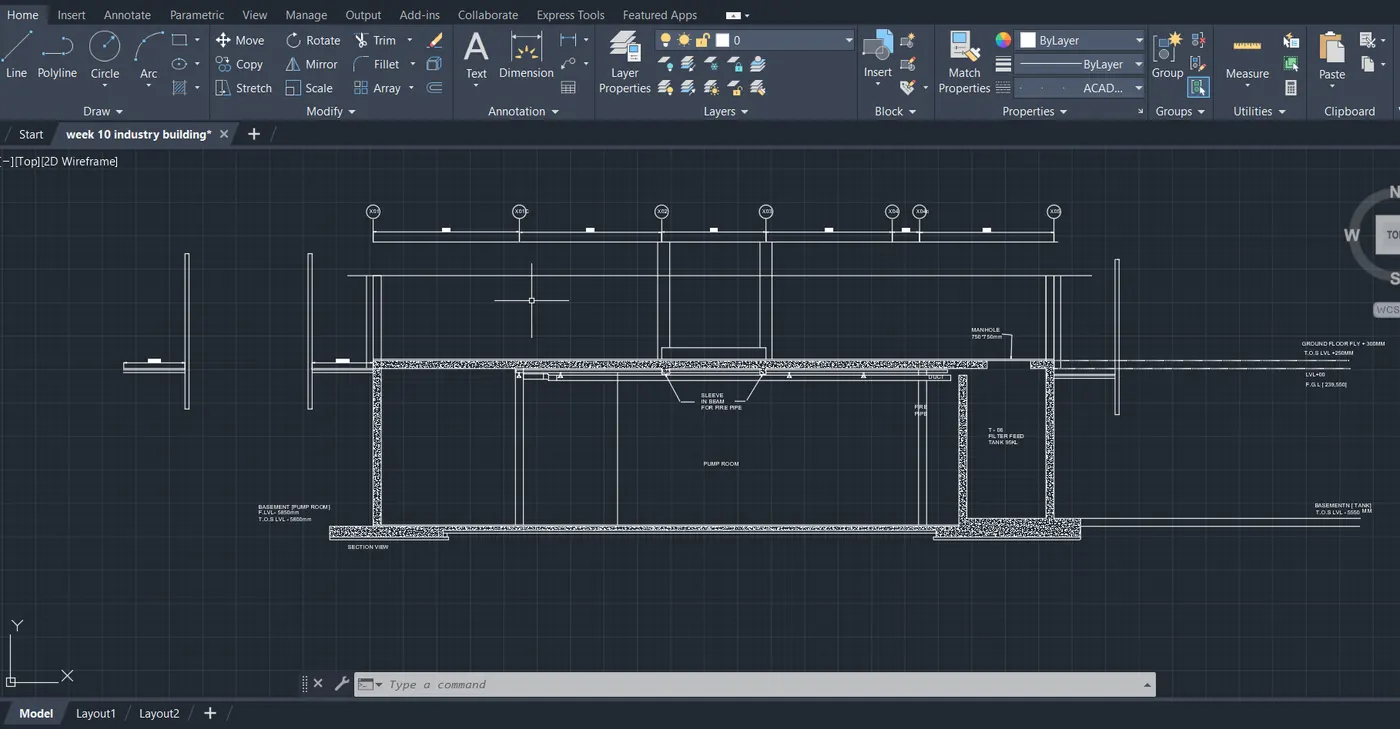
Creating Kitchen layout, Hatching of Architectural elements and sectional view of an Industrial Building in AutoCad
AIM:
To draw a kitchen layout
comments :
- line
- fillet
- offset
- hatch
- text
- arc
- trim etc...
Procedure:
Command:
Command:
Command:
Command: D
DIMSTYLE
Command: UNITS
Command: REC
RECTANG
Specify first corner point or [Chamfer/Elevation/Fillet/Thickness/Width]:
Specify other corner point or [Area/Dimensions/Rotation]: 4300,3200
Command: Regenerating model.
Crossing Lasso Press Spacebar to cycle options
Command: M
MOVE 1 found
Specify base point or [Displacement] <Displacement>:
Specify second point or <use first point as displacement>:
Command: Regenerating model.
Regenerating model.
Window Lasso Press Spacebar to cycle options
Crossing Lasso Press Spacebar to cycle options
Command: M
MOVE 1 found
Specify base point or [Displacement] <Displacement>:
Specify second point or <use first point as displacement>:
Command: OFFSET
Current settings: Erase source=No Layer=Source OFFSETGAPTYPE=0
Specify offset distance or [Through/Erase/Layer] <Through>:
Select object to offset or [Exit/Undo] <Exit>:
Specify through point or [Exit/Multiple/Undo] <Exit>: 230
Select object to offset or [Exit/Undo] <Exit>: *Cancel*
Command: L
LINE
Specify first point:
Specify next point or [Undo]: 1165
Specify next point or [Undo]:
Specify next point or [Close/Undo]: <Ortho on> *Cancel*
Command: Specify opposite corner or [Fence/WPolygon/CPolygon]:
Crossing Lasso Press Spacebar to cycle options
Command: *Cancel*
Window Lasso Press Spacebar to cycle options
Window Lasso Press Spacebar to cycle options
Command: _.erase 1 found
Command: L
LINE
Specify first point:
Specify next point or [Undo]:
Specify next point or [Undo]: *Cancel*
Command:
LINE
Specify first point:
Specify next point or [Undo]:
Specify next point or [Undo]: *Cancel*
Command: L
LINE
Specify first point:
Specify next point or [Undo]: 1000
Specify next point or [Undo]:
Specify next point or [Close/Undo]: *Cancel*
Crossing Lasso Press Spacebar to cycle options
Command: *Cancel*
Window Lasso Press Spacebar to cycle options
Window Lasso Press Spacebar to cycle options
Command: _.erase 1 found
Command:
Automatic save to C:\Users\Welcome\appdata\local\temp\Drawing1_1_2783_9667.sv$ ...
Command:
Command:
.ERASE
Select objects:
Command: L
LINE
Specify first point:
Specify next point or [Undo]: 1400
Specify next point or [Undo]:
Specify next point or [Close/Undo]: *Cancel*
Command: _.erase 1 found
Command:
.ERASE
Select objects: *Cancel*
Command: L
LINE
Specify first point:
Specify next point or [Undo]:
Specify next point or [Undo]: *Cancel*
Command:
Command: *Cancel*
Command: *Cancel*
Command: Specify opposite corner or [Fence/WPolygon/CPolygon]:
Crossing Lasso Press Spacebar to cycle options
Command: *Cancel*
Command: <Osnap off>
Command: <Osnap on>
Command: <Object Snap Tracking off>
Command: <Object Snap Tracking on>
Command:
Command: *Cancel*
Command: L
LINE
Specify first point:
Specify next point or [Undo]: 450
Specify next point or [Undo]:
Specify next point or [Close/Undo]: *Cancel*
Command:
Command: *Cancel*
Command: OFFSET
Current settings: Erase source=No Layer=Source OFFSETGAPTYPE=0
Specify offset distance or [Through/Erase/Layer] <Through>:
Select object to offset or [Exit/Undo] <Exit>:
Specify through point or [Exit/Multiple/Undo] <Exit>: 900
Select object to offset or [Exit/Undo] <Exit>: *Cancel*
Command: TR
TRIM
Current settings: Projection=UCS, Edge=None
Select cutting edges ...
Select objects or <select all>:
Select object to trim or shift-select to extend or
[Fence/Crossing/Project/Edge/eRase/Undo]:
Select object to trim or shift-select to extend or
[Fence/Crossing/Project/Edge/eRase/Undo]:
Select object to trim or shift-select to extend or
[Fence/Crossing/Project/Edge/eRase/Undo]:
Does not intersect with the cutting edge.
Select object to trim or shift-select to extend or
[Fence/Crossing/Project/Edge/eRase/Undo]: *Cancel*
Command: Specify opposite corner or [Fence/WPolygon/CPolygon]:
Command: _.erase 1 found
Command: L
LINE
Specify first point:
Specify next point or [Undo]:
Specify next point or [Undo]: 900
Specify next point or [Close/Undo]:
Specify next point or [Close/Undo]: *Cancel*
Command: OFF
Unknown command "OFF". Press F1 for help.
Command:
LINE
Specify first point:
Specify next point or [Undo]: *Cancel*
Command: *Cancel*
Command: OFFSET
Current settings: Erase source=No Layer=Source OFFSETGAPTYPE=0
Specify offset distance or [Through/Erase/Layer] <Through>:
Select object to offset or [Exit/Undo] <Exit>:
Specify through point or [Exit/Multiple/Undo] <Exit>: 300
Select object to offset or [Exit/Undo] <Exit>: *Cancel*
Command: L
LINE
Specify first point:
Specify next point or [Undo]: *Cancel*
Command:
Command:
Command: _dimlinear
Specify first extension line origin or <select object>:
Specify second extension line origin:
Specify dimension line location or
[Mtext/Text/Angle/Horizontal/Vertical/Rotated]:
Dimension text = 824.559
Crossing Lasso Press Spacebar to cycle options
Command: *Cancel*
Command: D
DIMSTYLE
Crossing Lasso Press Spacebar to cycle options
Command:
** STRETCH **
Specify stretch point or [Base point/Copy/Undo/eXit]:
Command:
** STRETCH **
Specify stretch point or [Base point/Copy/Undo/eXit]:
Dimension extension disassociated.
Command:
** STRETCH **
Specify stretch point or [Base point/Copy/Undo/eXit]:
Command:
** STRETCH **
Specify stretch point or [Base point/Copy/Undo/eXit]:
Command:
** STRETCH **
Specify stretch point or [Base point/Copy/Undo/eXit]: *Cancel*
Command: *Cancel*
Command: L
LINE
Specify first point:
Specify next point or [Undo]: 600
Specify next point or [Undo]: *Cancel*
Command:
Command: _.erase 1 found
Command: L
LINE
Specify first point: *Cancel*
Command: L
LINE
Specify first point: <Object Snap Tracking off>
Specify next point or [Undo]: _u
All segments already undone.
Specify first point:
Specify next point or [Undo]: 1000
Specify next point or [Undo]: *Cancel*
Automatic save to C:\Users\Welcome\appdata\local\temp\Drawing1_1_2783_9667.sv$ ...
Command:
Command: Specify opposite corner or [Fence/WPolygon/CPolygon]:
Window Lasso Press Spacebar to cycle options
Crossing Lasso Press Spacebar to cycle options
Command: MOVE
1 found
Specify base point or [Displacement] <Displacement>:
Specify second point or <use first point as displacement>:
Command:
Command: MOVE
1 found
Specify base point or [Displacement] <Displacement>:
Specify second point or <use first point as displacement>:
Command: *Cancel*
Command:
Command:
** STRETCH **
Specify stretch point or [Base point/Copy/Undo/eXit]:*Cancel*
Command:
Command:
Command: _properties
Command: Regenerating model.
_.erase 1 found
Command: *Cancel*
Command: LINE
Specify first point:
Specify next point or [Undo]: 600
Specify next point or [Undo]: 600
Specify next point or [Close/Undo]: 600
Specify next point or [Close/Undo]:
Specify next point or [Close/Undo]: *Cancel*
Command: OFFSET
Current settings: Erase source=No Layer=Source OFFSETGAPTYPE=0
Specify offset distance or [Through/Erase/Layer] <Through>:
Select object to offset or [Exit/Undo] <Exit>:
Specify through point or [Exit/Multiple/Undo] <Exit>: 50
Select object to offset or [Exit/Undo] <Exit>:
Specify through point or [Exit/Multiple/Undo] <Exit>: 50
Select object to offset or [Exit/Undo] <Exit>:
Specify through point or [Exit/Multiple/Undo] <Exit>: 25
Select object to offset or [Exit/Undo] <Exit>:
Specify through point or [Exit/Multiple/Undo] <Exit>: 25
Select object to offset or [Exit/Undo] <Exit>: *Cancel*
Command: tr
TRIM
Current settings: Projection=UCS, Edge=None
Select cutting edges ...
Select objects or <select all>:
Select object to trim or shift-select to extend or
[Fence/Crossing/Project/Edge/eRase/Undo]:
Select object to trim or shift-select to extend or
[Fence/Crossing/Project/Edge/eRase/Undo]:
Select object to trim or shift-select to extend or
[Fence/Crossing/Project/Edge/eRase/Undo]:
Select object to trim or shift-select to extend or
[Fence/Crossing/Project/Edge/eRase/Undo]:
Select object to trim or shift-select to extend or
[Fence/Crossing/Project/Edge/eRase/Undo]: *Cancel*
Window Lasso Press Spacebar to cycle options
Window Lasso Press Spacebar to cycle options
Crossing Lasso Press Spacebar to cycle options
Command: COPY
8 found
Current settings: Copy mode = Multiple
Specify base point or [Displacement/mOde] <Displacement>:
Specify second point or [Array] <use first point as displacement>: <Ortho off> *Cancel*
Window Lasso Press Spacebar to cycle options
Window Lasso Press Spacebar to cycle options
Command: COPY
8 found
Current settings: Copy mode = Multiple
Specify base point or [Displacement/mOde] <Displacement>:
Specify second point or [Array] <use first point as displacement>:
Specify second point or [Array/Exit/Undo] <Exit>:
Specify second point or [Array/Exit/Undo] <Exit>:
Specify second point or [Array/Exit/Undo] <Exit>: _u
Specify second point or [Array/Exit/Undo] <Exit>: _u
Specify second point or [Array/Exit/Undo] <Exit>: _u
Command has been completely undone.
Specify second point or [Array] <use first point as displacement>:
Specify second point or [Array/Exit/Undo] <Exit>: *Cancel*
Window Lasso Press Spacebar to cycle options
Crossing Lasso Press Spacebar to cycle options
Command: COPY
8 found
Current settings: Copy mode = Multiple
Specify base point or [Displacement/mOde] <Displacement>:
Specify second point or [Array] <use first point as displacement>:
Specify second point or [Array/Exit/Undo] <Exit>: *Cancel*
Crossing Lasso Press Spacebar to cycle options
Command: *Cancel*
Command: L
LINE
Specify first point:
Specify next point or [Undo]: 450
Specify next point or [Undo]: *Cancel*
Command:
Command: OFFSET
Current settings: Erase source=No Layer=Source OFFSETGAPTYPE=0
Specify offset distance or [Through/Erase/Layer] <Through>:
Specify through point or [Exit/Multiple/Undo] <Exit>: 25
Select object to offset or [Exit/Undo] <Exit>:
Specify through point or [Exit/Multiple/Undo] <Exit>: 12.5
Select object to offset or [Exit/Undo] <Exit>:
Specify through point or [Exit/Multiple/Undo] <Exit>: 12.5
Select object to offset or [Exit/Undo] <Exit>: *Cancel*
Automatic save to C:\Users\Welcome\appdata\local\temp\Drawing1_1_2783_9667.sv$ ...
Command:
Command:
Command:
** STRETCH **
Specify stretch point or [Base point/Copy/Undo/eXit]:
Command: *Cancel*
Command: TR
TRIM
Current settings: Projection=UCS, Edge=None
Select cutting edges ...
Select objects or <select all>:
Select object to trim or shift-select to extend or
[Fence/Crossing/Project/Edge/eRase/Undo]:
Command:
TRIM
Current settings: Projection=UCS, Edge=None
Select cutting edges ...
Select objects or <select all>:
Select object to trim or shift-select to extend or
[Fence/Crossing/Project/Edge/eRase/Undo]:
Select object to trim or shift-select to extend or
[Fence/Crossing/Project/Edge/eRase/Undo]:
Select object to trim or shift-select to extend or
[Fence/Crossing/Project/Edge/eRase/Undo]:
Select object to trim or shift-select to extend or
[Fence/Crossing/Project/Edge/eRase/Undo]:
Does not intersect with the cutting edge.
Select object to trim or shift-select to extend or
[Fence/Crossing/Project/Edge/eRase/Undo]:
Select object to trim or shift-select to extend or
[Fence/Crossing/Project/Edge/eRase/Undo]:
Select object to trim or shift-select to extend or
[Fence/Crossing/Project/Edge/eRase/Undo]:
Select object to trim or shift-select to extend or
[Fence/Crossing/Project/Edge/eRase/Undo]: *Cancel*
Command:
Command: _.erase 1 found
Window Lasso Press Spacebar to cycle options
Crossing Lasso Press Spacebar to cycle options
Command: _.erase 7 found
Crossing Lasso Press Spacebar to cycle options
Command: _.erase 4 found
Window Lasso Press Spacebar to cycle options
Command: _.erase 1 found
Command: L
LINE
Specify first point: l
Invalid point.
Specify first point:
Specify next point or [Undo]: <Ortho on> 550
Specify next point or [Undo]: 450
Specify next point or [Close/Undo]: 550
Specify next point or [Close/Undo]:
Specify next point or [Close/Undo]: *Cancel*
Command:
Command: *Cancel*
Crossing Lasso Press Spacebar to cycle options
Crossing Lasso Press Spacebar to cycle options
Command:
Command:
Command: MOVE
8 found
Specify base point or [Displacement] <Displacement>:
Specify second point or <use first point as displacement>:
Command:
Command:
** STRETCH **
Specify stretch point or [Base point/Copy/Undo/eXit]:50
Command:
Command:
** STRETCH **
Specify stretch point or [Base point/Copy/Undo/eXit]:
Command:
** STRETCH **
Specify stretch point or [Base point/Copy/Undo/eXit]:_u
Command has been completely undone.
** STRETCH **
Specify stretch point or [Base point/Copy/Undo/eXit]:*Cancel*
Command: _u Grip Edit
Command: _u Grip Edit
Command:
Command:
** STRETCH **
Specify stretch point or [Base point/Copy/Undo/eXit]:50
Command: *Cancel*
Command:
Command:
** STRETCH **
Specify stretch point or [Base point/Copy/Undo/eXit]:50
Command:
Command: *Cancel*
Command:
Command:
** STRETCH **
Specify stretch point or [Base point/Copy/Undo/eXit]:50
Command: *Cancel*
Command: Specify opposite corner or [Fence/WPolygon/CPolygon]: *Cancel*
Command:
Command:
** STRETCH **
Specify stretch point or [Base point/Copy/Undo/eXit]: 50
Command:
Command: *Cancel*
Command:
Command:
** STRETCH **
Specify stretch point or [Base point/Copy/Undo/eXit]: 50
Command: *Cancel*
Command: OFFSET
Current settings: Erase source=No Layer=Source OFFSETGAPTYPE=0
Specify offset distance or [Through/Erase/Layer] <Through>:
Select object to offset or [Exit/Undo] <Exit>:
Specify through point or [Exit/Multiple/Undo] <Exit>: 50
Select object to offset or [Exit/Undo] <Exit>:
Specify through point or [Exit/Multiple/Undo] <Exit>: 50
Select object to offset or [Exit/Undo] <Exit>:
Specify through point or [Exit/Multiple/Undo] <Exit>: 25
Select object to offset or [Exit/Undo] <Exit>:
Specify through point or [Exit/Multiple/Undo] <Exit>: 25
Select object to offset or [Exit/Undo] <Exit>: *Cancel*
Command: TR
TRIM
Current settings: Projection=UCS, Edge=None
Select cutting edges ...
Select objects or <select all>:
Select object to trim or shift-select to extend or
[Fence/Crossing/Project/Edge/eRase/Undo]:
Select object to trim or shift-select to extend or
[Fence/Crossing/Project/Edge/eRase/Undo]:
Select object to trim or shift-select to extend or
[Fence/Crossing/Project/Edge/eRase/Undo]:
Select object to trim or shift-select to extend or
[Fence/Crossing/Project/Edge/eRase/Undo]:
Select object to trim or shift-select to extend or
[Fence/Crossing/Project/Edge/eRase/Undo]: *Cancel*
Window Lasso Press Spacebar to cycle options
Command: COPY
8 found
Current settings: Copy mode = Multiple
Specify base point or [Displacement/mOde] <Displacement>:
Specify second point or [Array] <use first point as displacement>: <Ortho off>
Specify second point or [Array/Exit/Undo] <Exit>: *Cancel*
Command:
Command: _.erase 1 found
Command: L
LINE
Specify first point:
Specify next point or [Undo]: <Ortho on> 550
Specify next point or [Undo]: 300
Specify next point or [Close/Undo]: 550
Specify next point or [Close/Undo]:
Specify next point or [Close/Undo]: *Cancel*
Command: OFFSET
Current settings: Erase source=No Layer=Source OFFSETGAPTYPE=0
Specify offset distance or [Through/Erase/Layer] <Through>:
Select object to offset or [Exit/Undo] <Exit>:
Specify through point or [Exit/Multiple/Undo] <Exit>: 50
Select object to offset or [Exit/Undo] <Exit>:
Specify through point or [Exit/Multiple/Undo] <Exit>: 50
Select object to offset or [Exit/Undo] <Exit>:
Specify through point or [Exit/Multiple/Undo] <Exit>: 25
Select object to offset or [Exit/Undo] <Exit>:
Specify through point or [Exit/Multiple/Undo] <Exit>: 25
Select object to offset or [Exit/Undo] <Exit>: *Cancel*
Command: TR
TRIM
Current settings: Projection=UCS, Edge=None
Select cutting edges ...
Select objects or <select all>:
Select object to trim or shift-select to extend or
[Fence/Crossing/Project/Edge/eRase/Undo]:
Select object to trim or shift-select to extend or
[Fence/Crossing/Project/Edge/eRase/Undo]:
Select object to trim or shift-select to extend or
[Fence/Crossing/Project/Edge/eRase/Undo]:
Select object to trim or shift-select to extend or
[Fence/Crossing/Project/Edge/eRase/Undo]:
Select object to trim or shift-select to extend or
[Fence/Crossing/Project/Edge/eRase/Undo]: *Cancel*
Window Lasso Press Spacebar to cycle options
Window Lasso Press Spacebar to cycle options
Command: COPY
8 found
Current settings: Copy mode = Multiple
Specify base point or [Displacement/mOde] <Displacement>:
Specify second point or [Array] <use first point as displacement>: <Ortho off>
Specify second point or [Array/Exit/Undo] <Exit>: *Cancel*
Command:
Command: *Cancel*
Crossing Lasso Press Spacebar to cycle options
Crossing Lasso Press Spacebar to cycle options
Command:
Command:
Command: MOVE
8 found
Specify base point or [Displacement] <Displacement>:
Specify second point or <use first point as displacement>:
Command:
Command:
** STRETCH **
Specify stretch point or [Base point/Copy/Undo/eXit]:50
Command:
Command:
** STRETCH **
Specify stretch point or [Base point/Copy/Undo/eXit]:
Command:
** STRETCH **
Specify stretch point or [Base point/Copy/Undo/eXit]:_u
Command has been completely undone.
** STRETCH **
Specify stretch point or [Base point/Copy/Undo/eXit]:*Cancel*
Command: _u Grip Edit
Command: _u Grip Edit
Command:
Command:
** STRETCH **
Specify stretch point or [Base point/Copy/Undo/eXit]:50
Command: *Cancel*
Command:
Command:
** STRETCH **
Specify stretch point or [Base point/Copy/Undo/eXit]:50
Command:
Command: *Cancel*
Command:
Command:
** STRETCH **
Specify stretch point or [Base point/Copy/Undo/eXit]:50
Command: *Cancel*
Command: Specify opposite corner or [Fence/WPolygon/CPolygon]: *Cancel*
Command:
Command:
** STRETCH **
Specify stretch point or [Base point/Copy/Undo/eXit]: 50
Command:
Command: *Cancel*
Command:
Command:
** STRETCH **
Specify stretch point or [Base point/Copy/Undo/eXit]: 50
Command: *Cancel*
Command: OFFSET
Current settings: Erase source=No Layer=Source OFFSETGAPTYPE=0
Specify offset distance or [Through/Erase/Layer] <Through>:
Select object to offset or [Exit/Undo] <Exit>:
Specify through point or [Exit/Multiple/Undo] <Exit>: 50
Select object to offset or [Exit/Undo] <Exit>:
Specify through point or [Exit/Multiple/Undo] <Exit>: 50
Select object to offset or [Exit/Undo] <Exit>:
Specify through point or [Exit/Multiple/Undo] <Exit>: 25
Select object to offset or [Exit/Undo] <Exit>:
Specify through point or [Exit/Multiple/Undo] <Exit>: 25
Select object to offset or [Exit/Undo] <Exit>: *Cancel*
Command: TR
TRIM
Current settings: Projection=UCS, Edge=None
Select cutting edges ...
Select objects or <select all>:
Select object to trim or shift-select to extend or
[Fence/Crossing/Project/Edge/eRase/Undo]:
Select object to trim or shift-select to extend or
[Fence/Crossing/Project/Edge/eRase/Undo]:
Select object to trim or shift-select to extend or
[Fence/Crossing/Project/Edge/eRase/Undo]:
Select object to trim or shift-select to extend or
[Fence/Crossing/Project/Edge/eRase/Undo]:
Select object to trim or shift-select to extend or
[Fence/Crossing/Project/Edge/eRase/Undo]: *Cancel*
Window Lasso Press Spacebar to cycle options
Command: COPY
8 found
Current settings: Copy mode = Multiple
Specify base point or [Displacement/mOde] <Displacement>:
Specify second point or [Array] <use first point as displacement>: <Ortho off>
Specify second point or [Array/Exit/Undo] <Exit>: *Cancel*
Command:
Command: _.erase 1 found
Command: L
LINE
Specify first point:
Specify next point or [Undo]: <Ortho on> 550
Specify next point or [Undo]: 300
Specify next point or [Close/Undo]: 550
Specify next point or [Close/Undo]:
Specify next point or [Close/Undo]: *Cancel*
Command: OFFSET
Current settings: Erase source=No Layer=Source OFFSETGAPTYPE=0
Specify offset distance or [Through/Erase/Layer] <Through>:
Select object to offset or [Exit/Undo] <Exit>:
Specify through point or [Exit/Multiple/Undo] <Exit>: 50
Select object to offset or [Exit/Undo] <Exit>:
Specify through point or [Exit/Multiple/Undo] <Exit>: 50
Select object to offset or [Exit/Undo] <Exit>:
Specify through point or [Exit/Multiple/Undo] <Exit>: 25
Select object to offset or [Exit/Undo] <Exit>:
Specify through point or [Exit/Multiple/Undo] <Exit>: 25
Select object to offset or [Exit/Undo] <Exit>: *Cancel*
Command: TR
TRIM
Current settings: Projection=UCS, Edge=None
Select cutting edges ...
Select objects or <select all>:
Select object to trim or shift-select to extend or
[Fence/Crossing/Project/Edge/eRase/Undo]:
Select object to trim or shift-select to extend or
[Fence/Crossing/Project/Edge/eRase/Undo]:
Select object to trim or shift-select to extend or
[Fence/Crossing/Project/Edge/eRase/Undo]:
Select object to trim or shift-select to extend or
[Fence/Crossing/Project/Edge/eRase/Undo]:
Select object to trim or shift-select to extend or
[Fence/Crossing/Project/Edge/eRase/Undo]: *Cancel*
Window Lasso Press Spacebar to cycle options
Window Lasso Press Spacebar to cycle options
Command: COPY
8 found
Current settings: Copy mode = Multiple
Specify base point or [Displacement/mOde] <Displacement>:
Specify second point or [Array] <use first point as displacement>: <Ortho off>
Specify second point or [Array/Exit/Undo] <Exit>: *Cancel*
Command:
Automatic save to C:\Users\Welcome\appdata\local\temp\Drawing1_1_2783_9667.sv$ ...
Command:
Crossing Lasso Press Spacebar to cycle options
Command: COPY
8 found
Current settings: Copy mode = Multiple
Specify base point or [Displacement/mOde] <Displacement>:
Specify second point or [Array] <use first point as displacement>:
Specify second point or [Array/Exit/Undo] <Exit>: *Cancel*
Command: MI
MIRROR
Select objects: 1 found
Crossing Lasso Press Spacebar to cycle options8 found (1 duplicate), 8 total
Select objects: 1 found (1 duplicate), 8 total
Select objects: *Cancel*
Command: *Cancel*
Crossing Lasso Press Spacebar to cycle options
Command: MI
MIRROR 8 found
Specify first point of mirror line:
Specify second point of mirror line:
Erase source objects? [Yes/No] <No>: N
Crossing Lasso Press Spacebar to cycle options
Command: _.erase 4 found
Command: L
LINE
Specify first point:
Specify next point or [Undo]:
Specify next point or [Undo]: *Cancel*
Crossing Lasso Press Spacebar to cycle options
Command: COPY
13 found
Current settings: Copy mode = Multiple
Specify base point or [Displacement/mOde] <Displacement>:
Specify second point or [Array] <use first point as displacement>:
Specify second point or [Array/Exit/Undo] <Exit>: *Cancel*
Command: _u INTELLIPAN INTELLIZOOM
Command: _u COPY
Command: L
LINE
Specify first point:
Specify next point or [Undo]: <Ortho on> 550
Specify next point or [Undo]: 700
Specify next point or [Close/Undo]: 550
Specify next point or [Close/Undo]:
Specify next point or [Close/Undo]: *Cancel*
Command: OFFSET
Current settings: Erase source=No Layer=Source OFFSETGAPTYPE=0
Specify offset distance or [Through/Erase/Layer] <Through>:
Select object to offset or [Exit/Undo] <Exit>:
Specify through point or [Exit/Multiple/Undo] <Exit>: 50
Select object to offset or [Exit/Undo] <Exit>:
Specify through point or [Exit/Multiple/Undo] <Exit>: 50
Select object to offset or [Exit/Undo] <Exit>:
Specify through point or [Exit/Multiple/Undo] <Exit>: 25
Select object to offset or [Exit/Undo] <Exit>:
Specify through point or [Exit/Multiple/Undo] <Exit>: 25
Select object to offset or [Exit/Undo] <Exit>: *Cancel*
Command: TR
TRIM
Current settings: Projection=UCS, Edge=None
Select cutting edges ...
Select objects or <select all>:
Select object to trim or shift-select to extend or
[Fence/Crossing/Project/Edge/eRase/Undo]:
Select object to trim or shift-select to extend or
[Fence/Crossing/Project/Edge/eRase/Undo]:
Select object to trim or shift-select to extend or
[Fence/Crossing/Project/Edge/eRase/Undo]:
Select object to trim or shift-select to extend or
[Fence/Crossing/Project/Edge/eRase/Undo]:
Select object to trim or shift-select to extend or
[Fence/Crossing/Project/Edge/eRase/Undo]: *Cancel*
Crossing Lasso Press Spacebar to cycle options
Crossing Lasso Press Spacebar to cycle options
Command: PEDIT
Select polyline or [Multiple]:
Object selected is not a polyline
Do you want to turn it into one? <Y> *Cancel*
Select polyline or [Multiple]: *Cancel*
Command: *Cancel*
Command: *Cancel*
Command: PEDIT
Select polyline or [Multiple]:
Select polyline or [Multiple]:
Object selected is not a polyline
Do you want to turn it into one? <Y>
Enter an option [Close/Join/Width/Edit vertex/Fit/Spline/Decurve/Ltype gen/Reverse/Undo]: J
Select objects: 1 found
Crossing Lasso Press Spacebar to cycle options8 found (1 duplicate), 8 total
Select objects:
3 segments added to polyline
Enter an option [Open/Join/Width/Edit vertex/Fit/Spline/Decurve/Ltype gen/Reverse/Undo]: J
Can't join to a closed polyline
Enter an option [Open/Join/Width/Edit vertex/Fit/Spline/Decurve/Ltype gen/Reverse/Undo]: *Cancel*
Command:
Command:
Command: *Cancel*
Crossing Lasso Press Spacebar to cycle options
Command: COPY
5 found
Current settings: Copy mode = Multiple
Specify base point or [Displacement/mOde] <Displacement>:
Specify second point or [Array] <use first point as displacement>: <Ortho off>
Specify second point or [Array/Exit/Undo] <Exit>:
Specify second point or [Array/Exit/Undo] <Exit>: *Cancel*
Crossing Lasso Press Spacebar to cycle options
Command: COPY
8 found
Current settings: Copy mode = Multiple
Specify base point or [Displacement/mOde] <Displacement>:
Specify second point or [Array] <use first point as displacement>:
Specify second point or [Array/Exit/Undo] <Exit>: *Cancel*
Command: *Cancel*
Command:
Command:
Command:
** STRETCH **
Specify stretch point or [Base point/Copy/Undo/eXit]:
Command:
** STRETCH **
Specify stretch point or [Base point/Copy/Undo/eXit]:
Command:
Command:
** STRETCH **
Specify stretch point or [Base point/Copy/Undo/eXit]:
Command:
Command:
** STRETCH **
Specify stretch point or [Base point/Copy/Undo/eXit]:_u
Command has been completely undone.
** STRETCH **
Specify stretch point or [Base point/Copy/Undo/eXit]:_u
Command has been completely undone.
** STRETCH **
Specify stretch point or [Base point/Copy/Undo/eXit]:*Cancel*
Command:
** STRETCH **
Specify stretch point or [Base point/Copy/Undo/eXit]:
Command: *Cancel*
Command:
Command:
** STRETCH **
Specify stretch point or [Base point/Copy/Undo/eXit]:
Command: *Cancel*
Command:
** STRETCH **
Specify stretch point or [Base point/Copy/Undo/eXit]:
Command: *Cancel*
Specify stretch point or [Base point/Copy/Undo/eXit]:
Command:
** STRETCH **
Specify stretch point or [Base point/Copy/Undo/eXit]:
Command: *Cancel*
Crossing Lasso Press Spacebar to cycle options
Command: COPY
2 found
Current settings: Copy mode = Multiple
Specify base point or [Displacement/mOde] <Displacement>:
Specify second point or [Array] <use first point as displacement>:
Specify second point or [Array/Exit/Undo] <Exit>: *Cancel*
Command:
Command: _.erase 1 found
Window Lasso Press Spacebar to cycle options
Command: MI
MIRROR
Select objects: 1 found
Select objects: 1 found (1 duplicate), 1 total
Select objects: Specify opposite corner: 5 found (1 duplicate), 5 total
Select objects: *Cancel*
Command: MI
MIRROR
Select objects:
Command: Specify opposite corner or [Fence/WPolygon/CPolygon]:
Command: MI
MIRROR 2 found
Specify first point of mirror line:
Specify second point of mirror line:
Erase source objects? [Yes/No] <No>: *Cancel*
Command:
MIRROR
Select objects:
Command:
MIRROR
1 found
Specify first point of mirror line:
Invalid 2D point.
Specify first point of mirror line:
Specify second point of mirror line:
Erase source objects? [Yes/No] <No>: N
Command: M
MOVE 1 found
Specify base point or [Displacement] <Displacement>:
Specify second point or <use first point as displacement>:
Command:
Command: _.erase 1 found
Command:
Command: COPY
1 found
Current settings: Copy mode = Multiple
Specify base point or [Displacement/mOde] <Displacement>:
Specify second point or [Array] <use first point as displacement>: *Cancel*
Crossing Lasso Press Spacebar to cycle options
Command: CO
COPY 1 found
Current settings: Copy mode = Multiple
Specify base point or [Displacement/mOde] <Displacement>:
Specify second point or [Array] <use first point as displacement>:
Specify second point or [Array/Exit/Undo] <Exit>: *Cancel*
Command:
Command: MOVE
1 found
Specify base point or [Displacement] <Displacement>:
Specify second point or <use first point as displacement>:
Command: *Cancel*
Command:
Automatic save to C:\Users\Welcome\appdata\local\temp\week 6 kitchen_1_29221_9162.sv$ ...
Command:
Command: L
LINE
Specify first point:
Specify next point or [Undo]: Zero length line created at (34600.5118, 15747.1526, 0.0000)
Specify next point or [Undo]:
Specify next point or [Close/Undo]:
Specify next point or [Close/Undo]:
Specify next point or [Close/Undo]: *Cancel*
Command:
Command:
** STRETCH **
Specify stretch point or [Base point/Copy/Undo/eXit]:
Command: <Ortho on>
Command:
** STRETCH **
Specify stretch point or [Base point/Copy/Undo/eXit]:*Cancel*
** STRETCH **
Specify stretch point or [Base point/Copy/Undo/eXit]:*Cancel*
Command: *Cancel*
Command:
Command: _.erase 1 found
Command: L
LINE
Specify first point:
Specify next point or [Undo]:
Specify next point or [Undo]: *Cancel*
Command: *Cancel*
Command:
Command: _.erase 1 found
Command: L
LINE
Specify first point: *Cancel*
Command:
Command: *Cancel*
Command:
Command: _.erase 1 found
Command: L
LINE
Specify first point:
Specify next point or [Undo]:
Specify next point or [Undo]:
Specify next point or [Close/Undo]: *Cancel*
Command: '_base Enter base point <0.0000,0.0000,0.0000>:
Command: Specify opposite corner or [Fence/WPolygon/CPolygon]:
Command: Specify opposite corner or [Fence/WPolygon/CPolygon]:
Command: Specify opposite corner or [Fence/WPolygon/CPolygon]:
Command:
Command:
Command: _block
Command: Specify opposite corner or [Fence/WPolygon/CPolygon]: *Cancel*
Command: L
LINE
Specify first point:
Specify next point or [Undo]: 50
Specify next point or [Undo]: 50
Specify next point or [Close/Undo]: 50
Specify next point or [Close/Undo]:
Specify next point or [Close/Undo]: *Cancel*
Command: PEDIT
Select polyline or [Multiple]:
Object selected is not a polyline
Do you want to turn it into one? <Y>
Enter an option [Close/Join/Width/Edit vertex/Fit/Spline/Decurve/Ltype gen/Reverse/Undo]: J
Select objects: 1 found
Select objects: 1 found, 2 total
Select objects: 1 found, 3 total
Select objects: 1 found, 4 total
Select objects:
3 segments added to polyline
Enter an option [Open/Join/Width/Edit vertex/Fit/Spline/Decurve/Ltype gen/Reverse/Undo]: J
Can't join to a closed polyline
Enter an option [Open/Join/Width/Edit vertex/Fit/Spline/Decurve/Ltype gen/Reverse/Undo]: *Cancel*
Command: L
LINE
Specify first point:
Specify next point or [Undo]:
Specify next point or [Undo]: *Cancel*
Command:
Command: COPY
1 found
Current settings: Copy mode = Multiple
Specify base point or [Displacement/mOde] <Displacement>:
Specify second point or [Array] <use first point as displacement>:
Specify second point or [Array/Exit/Undo] <Exit>: *Cancel*
Window Lasso Press Spacebar to cycle options
Command: *Cancel*
Command: PEDIT
Select polyline or [Multiple]:
Enter an option [Open/Join/Width/Edit vertex/Fit/Spline/Decurve/Ltype gen/Reverse/Undo]: J
Can't join to a closed polyline
Enter an option [Open/Join/Width/Edit vertex/Fit/Spline/Decurve/Ltype gen/Reverse/Undo]: J
Can't join to a closed polyline
Enter an option [Open/Join/Width/Edit vertex/Fit/Spline/Decurve/Ltype gen/Reverse/Undo]: *Cancel*
Crossing Lasso Press Spacebar to cycle options
Command: COPY
3 found
Current settings: Copy mode = Multiple
Specify base point or [Displacement/mOde] <Displacement>:
Specify second point or [Array] <use first point as displacement>: <Ortho off>
Specify second point or [Array/Exit/Undo] <Exit>: *Cancel*
Crossing Lasso Press Spacebar to cycle options
Command:
** STRETCH **
Specify stretch point or [Base point/Copy/Undo/eXit]:
Command:
** STRETCH **
Specify stretch point or [Base point/Copy/Undo/eXit]:
Command:
** STRETCH **
Specify stretch point or [Base point/Copy/Undo/eXit]:_u
Command has been completely undone.
** STRETCH **
Specify stretch point or [Base point/Copy/Undo/eXit]:*Cancel*
Command: _u Grip Edit
Command: _u Grip Edit
Command: Specify opposite corner or [Fence/WPolygon/CPolygon]:
Command: *Cancel*
Command: Specify opposite corner or [Fence/WPolygon/CPolygon]:
Command:
** STRETCH **
Specify stretch point or [Base point/Copy/Undo/eXit]:
Command:
** STRETCH **
Specify stretch point or [Base point/Copy/Undo/eXit]:
Command:
** STRETCH **
Specify stretch point or [Base point/Copy/Undo/eXit]:10
Command:
** STRETCH **
Specify stretch point or [Base point/Copy/Undo/eXit]:20
Command:
** STRETCH **
Specify stretch point or [Base point/Copy/Undo/eXit]:10
Command: *Cancel*
Command: Specify opposite corner or [Fence/WPolygon/CPolygon]:
Command:
Window Lasso Press Spacebar to cycle options
Command: *Cancel*
Command: Specify opposite corner or [Fence/WPolygon/CPolygon]:
Command:
Command: MOVE
1 found
Specify base point or [Displacement] <Displacement>:
Specify second point or <use first point as displacement>:
Command: *Cancel*
Crossing Lasso Press Spacebar to cycle options
Command: COPY
3 found
Current settings: Copy mode = Multiple
Specify base point or [Displacement/mOde] <Displacement>:
Specify second point or [Array] <use first point as displacement>:
Specify second point or [Array/Exit/Undo] <Exit>: *Cancel*
Command: Specify opposite corner or [Fence/WPolygon/CPolygon]:
Command:
** STRETCH **
Specify stretch point or [Base point/Copy/Undo/eXit]:10
Command:
** STRETCH **
Specify stretch point or [Base point/Copy/Undo/eXit]:20
Command: *Cancel*
Command:
Command:
** STRETCH **
Specify stretch point:
Command:
** STRETCH **
Specify stretch point:
Command: *Cancel*
Command:
Command:
** STRETCH **
Specify stretch point:
Command:
** STRETCH **
Specify stretch point:
Command:
** STRETCH **
Specify stretch point:
Command: *Cancel*
Command:
Command:
** STRETCH **
Specify stretch point or [Base point/Copy/Undo/eXit]:5
Command: *Cancel*
Command:
Command:
** STRETCH **
Specify stretch point:
Command: *Cancel*
Command: H
HATCH
Pick internal point or [Select objects/Undo/seTtings]: Selecting everything...
Selecting everything visible...
Analyzing the selected data...
Analyzing internal islands...
Pick internal point or [Select objects/Undo/seTtings]: Selecting everything...
Selecting everything visible...
Analyzing the selected data...
Analyzing internal islands...
Pick internal point or [Select objects/Undo/seTtings]: Selecting everything...
Selecting everything visible...
Analyzing the selected data...
Analyzing internal islands...
Pick internal point or [Select objects/Undo/seTtings]: Selecting everything...
Selecting everything visible...
Analyzing the selected data...
Analyzing internal islands...
Pick internal point or [Select objects/Undo/seTtings]: Selecting everything...
Selecting everything visible...
Analyzing the selected data...
Analyzing internal islands...
Pick internal point or [Select objects/Undo/seTtings]: *Cancel*
Command: *Cancel*
Command: Specify opposite corner:
Command:
Command:
Command: _properties
Command:
Command:
Command: *Cancel*
Command:
Command:
Command:
Command:
Command: *Cancel*
Command:
Command:
Window Lasso Press Spacebar to cycle options
Command: Specify opposite corner or [Fence/WPolygon/CPolygon]:
Command: _.erase 2 found
Command:
.ERASE
Select objects:
Command:
.ERASE
Select objects: 1 found
Select objects: _u
Select objects: *Cancel*
Command: OFFSET
Current settings: Erase source=No Layer=Source OFFSETGAPTYPE=0
Specify offset distance or [Through/Erase/Layer] <Through>:
Select object to offset or [Exit/Undo] <Exit>:
Specify through point or [Exit/Multiple/Undo] <Exit>: 650
Select object to offset or [Exit/Undo] <Exit>:
Specify through point or [Exit/Multiple/Undo] <Exit>: 50
Select object to offset or [Exit/Undo] <Exit>:
Specify through point or [Exit/Multiple/Undo] <Exit>: 50
Select object to offset or [Exit/Undo] <Exit>:
Specify through point or [Exit/Multiple/Undo] <Exit>: 350
Select object to offset or [Exit/Undo] <Exit>:
Specify through point or [Exit/Multiple/Undo] <Exit>: 50
Select object to offset or [Exit/Undo] <Exit>:
Specify through point or [Exit/Multiple/Undo] <Exit>: 50
Select object to offset or [Exit/Undo] <Exit>:
Specify through point or [Exit/Multiple/Undo] <Exit>: 600
Select object to offset or [Exit/Undo] <Exit>:
Specify through point or [Exit/Multiple/Undo] <Exit>: 50
Select object to offset or [Exit/Undo] <Exit>:
Specify through point or [Exit/Multiple/Undo] <Exit>: 50
Select object to offset or [Exit/Undo] <Exit>:
Specify through point or [Exit/Multiple/Undo] <Exit>: 350
Select object to offset or [Exit/Undo] <Exit>:
Specify through point or [Exit/Multiple/Undo] <Exit>: 50
Select object to offset or [Exit/Undo] <Exit>:
Specify through point or [Exit/Multiple/Undo] <Exit>: 50
Select object to offset or [Exit/Undo] <Exit>:
Specify through point or [Exit/Multiple/Undo] <Exit>: 350
Select object to offset or [Exit/Undo] <Exit>:
Specify through point or [Exit/Multiple/Undo] <Exit>: 50
Select object to offset or [Exit/Undo] <Exit>:
Specify through point or [Exit/Multiple/Undo] <Exit>: 50
Select object to offset or [Exit/Undo] <Exit>:
Specify through point or [Exit/Multiple/Undo] <Exit>: 350
Select object to offset or [Exit/Undo] <Exit>:
Specify through point or [Exit/Multiple/Undo] <Exit>: 50
Select object to offset or [Exit/Undo] <Exit>:
Specify through point or [Exit/Multiple/Undo] <Exit>: 50
Select object to offset or [Exit/Undo] <Exit>:
Specify through point or [Exit/Multiple/Undo] <Exit>: 500
Select object to offset or [Exit/Undo] <Exit>:
Specify through point or [Exit/Multiple/Undo] <Exit>: 50
Select object to offset or [Exit/Undo] <Exit>:
Select object to offset or [Exit/Undo] <Exit>:
Cannot offset that object.
Select object to offset or [Exit/Undo] <Exit>: *Cancel*
Command: *Cancel*
Command: Specify opposite corner or [Fence/WPolygon/CPolygon]:
Command: _.erase 2 found
Command: OFFSET
Current settings: Erase source=No Layer=Source OFFSETGAPTYPE=0
Specify offset distance or [Through/Erase/Layer] <Through>:
Select object to offset or [Exit/Undo] <Exit>:
Specify through point or [Exit/Multiple/Undo] <Exit>: 560
Select object to offset or [Exit/Undo] <Exit>:
Specify through point or [Exit/Multiple/Undo] <Exit>: *Cancel*
Command: L
LINE
Specify first point:
Specify next point or [Undo]:
Specify next point or [Undo]:
Specify next point or [Close/Undo]:
Specify next point or [Close/Undo]:
Specify next point or [Close/Undo]:
Specify next point or [Close/Undo]:
Specify next point or [Close/Undo]:
Specify next point or [Close/Undo]:
Specify next point or [Close/Undo]:
Specify next point or [Close/Undo]:
Specify next point or [Close/Undo]:
Specify next point or [Close/Undo]:
Specify next point or [Close/Undo]:
Specify next point or [Close/Undo]:
Specify next point or [Close/Undo]:
Specify next point or [Close/Undo]:
Specify next point or [Close/Undo]:
Specify next point or [Close/Undo]:
Specify next point or [Close/Undo]:
Specify next point or [Close/Undo]:
Specify next point or [Close/Undo]: *Cancel*
Window Lasso Press Spacebar to cycle options
Crossing Lasso Press Spacebar to cycle options
Crossing Lasso Press Spacebar to cycle options
Command: MOVE
38 found
Specify base point or [Displacement] <Displacement>:
Specify second point or <use first point as displacement>:
Window Lasso Press Spacebar to cycle options
Crossing Lasso Press Spacebar to cycle options
Command: Specify opposite corner or [Fence/WPolygon/CPolygon]:
Window Lasso Press Spacebar to cycle options
Crossing Lasso Press Spacebar to cycle options
Command: MOVE
25 found
Specify base point or [Displacement] <Displacement>:
Specify second point or <use first point as displacement>:
Window Lasso Press Spacebar to cycle options
Crossing Lasso Press Spacebar to cycle options
Command: MOVE
13 found
Specify base point or [Displacement] <Displacement>:
Specify second point or <use first point as displacement>:
Command: L
LINE
Specify first point:
Specify next point or [Undo]:
Specify next point or [Undo]: *Cancel*
Command:
LINE
Specify first point:
Specify next point or [Undo]:
Specify next point or [Undo]: *Cancel*
Command:
Command: *Cancel*
Command:
Command:
Command:
Command:
Command: Specify opposite corner or [Fence/WPolygon/CPolygon]:
Command:
Command: _.erase 15 found
Window Lasso Press Spacebar to cycle options
Command: _.erase 7 found
Command: L
LINE
Specify first point:
Specify next point or [Undo]:
Specify next point or [Undo]: *Cancel*
Command: OFFSET
Current settings: Erase source=No Layer=Source OFFSETGAPTYPE=0
Specify offset distance or [Through/Erase/Layer] <Through>:
Select object to offset or [Exit/Undo] <Exit>:
Specify through point or [Exit/Multiple/Undo] <Exit>: 25
Select object to offset or [Exit/Undo] <Exit>: *Cancel*
Command: O
OFFSET
Current settings: Erase source=No Layer=Source OFFSETGAPTYPE=0
Specify offset distance or [Through/Erase/Layer] <Through>:
Select object to offset or [Exit/Undo] <Exit>:
Specify through point or [Exit/Multiple/Undo] <Exit>: 50
Select object to offset or [Exit/Undo] <Exit>: *Cancel*
Command: L
LINE
Specify first point:
Specify next point or [Undo]:
Specify next point or [Undo]: *Cancel*
Command: L
LINE
Specify first point:
Specify next point or [Undo]:
Specify next point or [Undo]: *Cancel*
Command: TR
TRIM
Current settings: Projection=UCS, Edge=None
Select cutting edges ...
Select objects or <select all>:
Select object to trim or shift-select to extend or
[Fence/Crossing/Project/Edge/eRase/Undo]:
Select object to trim or shift-select to extend or
[Fence/Crossing/Project/Edge/eRase/Undo]:
Select object to trim or shift-select to extend or
[Fence/Crossing/Project/Edge/eRase/Undo]:
Select object to trim or shift-select to extend or
[Fence/Crossing/Project/Edge/eRase/Undo]:
Select object to trim or shift-select to extend or
[Fence/Crossing/Project/Edge/eRase/Undo]:
Select object to trim or shift-select to extend or
[Fence/Crossing/Project/Edge/eRase/Undo]:
Select object to trim or shift-select to extend or
[Fence/Crossing/Project/Edge/eRase/Undo]:
Select object to trim or shift-select to extend or
[Fence/Crossing/Project/Edge/eRase/Undo]:
Select object to trim or shift-select to extend or
[Fence/Crossing/Project/Edge/eRase/Undo]:
Select object to trim or shift-select to extend or
[Fence/Crossing/Project/Edge/eRase/Undo]:
Select object to trim or shift-select to extend or
[Fence/Crossing/Project/Edge/eRase/Undo]:
Select object to trim or shift-select to extend or
[Fence/Crossing/Project/Edge/eRase/Undo]:
Select object to trim or shift-select to extend or
[Fence/Crossing/Project/Edge/eRase/Undo]:
Select object to trim or shift-select to extend or
[Fence/Crossing/Project/Edge/eRase/Undo]: *Cancel*
Automatic save to C:\Users\Welcome\appdata\local\temp\week 6 kitchen_1_29221_9162.sv$ ...
Command:
Command: OFFSET
Current settings: Erase source=No Layer=Source OFFSETGAPTYPE=0
Specify offset distance or [Through/Erase/Layer] <Through>:
Select object to offset or [Exit/Undo] <Exit>:
Specify through point or [Exit/Multiple/Undo] <Exit>: 500
Select object to offset or [Exit/Undo] <Exit>:
Specify through point or [Exit/Multiple/Undo] <Exit>: 50
Select object to offset or [Exit/Undo] <Exit>: _u
Select object to offset or [Exit/Undo] <Exit>:
Specify through point or [Exit/Multiple/Undo] <Exit>: 500
Select object to offset or [Exit/Undo] <Exit>:
Specify through point or [Exit/Multiple/Undo] <Exit>: 500
Select object to offset or [Exit/Undo] <Exit>:
Specify through point or [Exit/Multiple/Undo] <Exit>: 500
Select object to offset or [Exit/Undo] <Exit>:
Specify through point or [Exit/Multiple/Undo] <Exit>: 500
Select object to offset or [Exit/Undo] <Exit>:
Specify through point or [Exit/Multiple/Undo] <Exit>: 500
Select object to offset or [Exit/Undo] <Exit>:
Specify through point or [Exit/Multiple/Undo] <Exit>: 500
Select object to offset or [Exit/Undo] <Exit>: *Cancel*
Command:
Command: _.erase 1 found
Command: LINE
Specify first point:
Specify next point or [Undo]:
Specify next point or [Undo]:
Specify next point or [Close/Undo]:
Specify next point or [Close/Undo]: *Cancel*
Command: CIRCLE
Specify center point for circle or [3P/2P/Ttr (tan tan radius)]:
Specify radius of circle or [Diameter]:
Command:
CIRCLE
Specify center point for circle or [3P/2P/Ttr (tan tan radius)]:
Specify radius of circle or [Diameter] <55.4235>:
Command:
CIRCLE
Specify center point for circle or [3P/2P/Ttr (tan tan radius)]:
Specify radius of circle or [Diameter] <78.3074>:
Command:
Command:
** STRETCH **
Specify stretch point or [Base point/Copy/Undo/eXit]:
Command:
** STRETCH **
Specify stretch point or [Base point/Copy/Undo/eXit]:
Command:
Command:
Command:
Command: *Cancel*
Command:
Command:
Command: *Cancel*
Command:
Command: CO
COPY 1 found
Current settings: Copy mode = Multiple
Specify base point or [Displacement/mOde] <Displacement>:
Specify second point or [Array] <use first point as displacement>: <Ortho off>
Specify second point or [Array/Exit/Undo] <Exit>: *Cancel*
Command:
Command: MOVE
1 found
Specify base point or [Displacement] <Displacement>:
Specify second point or <use first point as displacement>:
Command: Specify opposite corner or [Fence/WPolygon/CPolygon]:
Command:
Command: M
MOVE 1 found
Specify base point or [Displacement] <Displacement>:
Specify second point or <use first point as displacement>:
Command: Specify opposite corner or [Fence/WPolygon/CPolygon]:
Command:
Command: M
MOVE 1 found
Specify base point or [Displacement] <Displacement>:
Specify second point or <use first point as displacement>:
Command: Specify opposite corner or [Fence/WPolygon/CPolygon]:
Command: M
MOVE 1 found
Specify base point or [Displacement] <Displacement>:
Specify second point or <use first point as displacement>:
Command: MT
MTEXT
Current text style: "Standard" Text height: 0.2000 Annotative: No
Specify first corner:
Specify opposite corner or [Height/Justify/Line spacing/Rotation/Style/Width/Columns]:
Command: *Cancel*
Command: TEXT
Current text style: "Standard" Text height: 0.2000 Annotative: No Justify: Left
Specify start point of text or [Justify/Style]:
Specify height <0.2000>:
Specify rotation angle of text <0>: 0
Automatic save to C:\Users\Welcome\appdata\local\temp\week 6 kitchen_1_29221_9162.sv$ ...
Command:
Command:
Command:
Command:
Command: Specify opposite corner or [Fence/WPolygon/CPolygon]:
Command:
Command: _.erase 15 found
Window Lasso Press Spacebar to cycle options
Command: _.erase 7 found
Command: L
LINE
Specify first point:
Specify next point or [Undo]:
Specify next point or [Undo]: *Cancel*
Command: OFFSET
Current settings: Erase source=No Layer=Source OFFSETGAPTYPE=0
Specify offset distance or [Through/Erase/Layer] <Through>:
Select object to offset or [Exit/Undo] <Exit>:
Specify through point or [Exit/Multiple/Undo] <Exit>: 25
Select object to offset or [Exit/Undo] <Exit>: *Cancel*
Command: O
OFFSET
Current settings: Erase source=No Layer=Source OFFSETGAPTYPE=0
Specify offset distance or [Through/Erase/Layer] <Through>:
Select object to offset or [Exit/Undo] <Exit>:
Specify through point or [Exit/Multiple/Undo] <Exit>: 50
Select object to offset or [Exit/Undo] <Exit>: *Cancel*
Command: L
LINE
Specify first point:
Specify next point or [Undo]:
Specify next point or [Undo]: *Cancel*
Command: L
LINE
Specify first point:
Specify next point or [Undo]:
Specify next point or [Undo]: *Cancel*
Command: TR
TRIM
Current settings: Projection=UCS, Edge=None
Select cutting edges ...
Select objects or <select all>:
Select object to trim or shift-select to extend or
[Fence/Crossing/Project/Edge/eRase/Undo]:
Select object to trim or shift-select to extend or
[Fence/Crossing/Project/Edge/eRase/Undo]:
Select object to trim or shift-select to extend or
[Fence/Crossing/Project/Edge/eRase/Undo]:
Select object to trim or shift-select to extend or
[Fence/Crossing/Project/Edge/eRase/Undo]:
Select object to trim or shift-select to extend or
[Fence/Crossing/Project/Edge/eRase/Undo]:
Select object to trim or shift-select to extend or
[Fence/Crossing/Project/Edge/eRase/Undo]:
Select object to trim or shift-select to extend or
[Fence/Crossing/Project/Edge/eRase/Undo]:
Select object to trim or shift-select to extend or
[Fence/Crossing/Project/Edge/eRase/Undo]:
Select object to trim or shift-select to extend or
[Fence/Crossing/Project/Edge/eRase/Undo]:
Select object to trim or shift-select to extend or
[Fence/Crossing/Project/Edge/eRase/Undo]:
Select object to trim or shift-select to extend or
[Fence/Crossing/Project/Edge/eRase/Undo]:
Select object to trim or shift-select to extend or
[Fence/Crossing/Project/Edge/eRase/Undo]:
Select object to trim or shift-select to extend or
[Fence/Crossing/Project/Edge/eRase/Undo]:
Select object to trim or shift-select to extend or
[Fence/Crossing/Project/Edge/eRase/Undo]: *Cancel*
Automatic save to C:\Users\Welcome\appdata\local\temp\week 6 kitchen_1_29221_9162.sv$ ...
Command:
Command: OFFSET
Current settings: Erase source=No Layer=Source OFFSETGAPTYPE=0
Specify offset distance or [Through/Erase/Layer] <Through>:
Select object to offset or [Exit/Undo] <Exit>:
Specify through point or [Exit/Multiple/Undo] <Exit>: 500
Select object to offset or [Exit/Undo] <Exit>:
Specify through point or [Exit/Multiple/Undo] <Exit>: 50
Select object to offset or [Exit/Undo] <Exit>: _u
Select object to offset or [Exit/Undo] <Exit>:
Specify through point or [Exit/Multiple/Undo] <Exit>: 500
Select object to offset or [Exit/Undo] <Exit>:
Specify through point or [Exit/Multiple/Undo] <Exit>: 500
Select object to offset or [Exit/Undo] <Exit>:
Specify through point or [Exit/Multiple/Undo] <Exit>: 500
Select object to offset or [Exit/Undo] <Exit>:
Specify through point or [Exit/Multiple/Undo] <Exit>: 500
Select object to offset or [Exit/Undo] <Exit>:
Specify through point or [Exit/Multiple/Undo] <Exit>: 500
Select object to offset or [Exit/Undo] <Exit>:
Specify through point or [Exit/Multiple/Undo] <Exit>: 500
Select object to offset or [Exit/Undo] <Exit>: *Cancel*
Command:
Command: _.erase 1 found
Command: LINE
Specify first point:
Specify next point or [Undo]:
Specify next point or [Undo]:
Specify next point or [Close/Undo]:
Specify next point or [Close/Undo]: *Cancel*
Command: CIRCLE
Specify center point for circle or [3P/2P/Ttr (tan tan radius)]:
Specify radius of circle or [Diameter]:
Command:
CIRCLE
Specify center point for circle or [3P/2P/Ttr (tan tan radius)]:
Specify radius of circle or [Diameter] <55.4235>:
Command:
CIRCLE
Specify center point for circle or [3P/2P/Ttr (tan tan radius)]:
Specify radius of circle or [Diameter] <78.3074>:
Command:
Command:
** STRETCH **
Specify stretch point or [Base point/Copy/Undo/eXit]:
Command:
** STRETCH **
Specify stretch point or [Base point/Copy/Undo/eXit]:
Command:
Command:
Command:
Command: *Cancel*
Command:
Command:
Command: *Cancel*
Command:
Command: CO
COPY 1 found
Current settings: Copy mode = Multiple
Specify base point or [Displacement/mOde] <Displacement>:
Specify second point or [Array] <use first point as displacement>: <Ortho off>
Specify second point or [Array/Exit/Undo] <Exit>: *Cancel*
Command:
Command: MOVE
1 found
Specify base point or [Displacement] <Displacement>:
Specify second point or <use first point as displacement>:
Command: Specify opposite corner or [Fence/WPolygon/CPolygon]:
Command:
Command: M
MOVE 1 found
Specify base point or [Displacement] <Displacement>:
Specify second point or <use first point as displacement>:
Command: Specify opposite corner or [Fence/WPolygon/CPolygon]:
Command:
Command: M
MOVE 1 found
Specify base point or [Displacement] <Displacement>:
Specify second point or <use first point as displacement>:
Command: Specify opposite corner or [Fence/WPolygon/CPolygon]:
Command: M
MOVE 1 found
Specify base point or [Displacement] <Displacement>:
Specify second point or <use first point as displacement>:
Command: MT
MTEXT
Current text style: "Standard" Text height: 0.2000 Annotative: No
Specify first corner:
Specify opposite corner or [Height/Justify/Line spacing/Rotation/Style/Width/Columns]:
Command: *Cancel*
Command: TEXT
Current text style: "Standard" Text height: 0.2000 Annotative: No Justify: Left
Specify start point of text or [Justify/Style]:
Specify height <0.2000>:
Specify rotation angle of text <0>: 0
Automatic save to C:\Users\Welcome\appdata\local\temp\week 6 kitchen_1_29221_9162.sv$ ...
Command:
Command:
Command:
Command: *Cancel*
Crossing Lasso Press Spacebar to cycle options
Command: Specify opposite corner or [Fence/WPolygon/CPolygon]:
Command:
Command:
Crossing Lasso Press Spacebar to cycle options
Command:
Crossing Lasso Press Spacebar to cycle options
Command: Specify opposite corner or [Fence/WPolygon/CPolygon]:
Crossing Lasso Press Spacebar to cycle options
Window Lasso Press Spacebar to cycle options
Crossing Lasso Press Spacebar to cycle options
Window Lasso Press Spacebar to cycle options
Command:
Command:
Command:
Command: *Cancel*
Command:
Command: M
MOVE 1 found
Specify base point or [Displacement] <Displacement>:
Specify second point or <use first point as displacement>:
Command:
Command: M
MOVE 1 found
Specify base point or [Displacement] <Displacement>:
Specify second point or <use first point as displacement>:
Command:
Command: M
MOVE 1 found
Specify base point or [Displacement] <Displacement>:
Specify second point or <use first point as displacement>:
Command:
Command: M
MOVE 1 found
Specify base point or [Displacement] <Displacement>:
Specify second point or <use first point as displacement>:
Command:
Command: M
MOVE 1 found
Specify base point or [Displacement] <Displacement>:
Specify second point or <use first point as displacement>:
Command:
Command:
** STRETCH **
Specify stretch point or [Base point/Copy/Undo/eXit]:
Command: M
MOVE 1 found
Specify base point or [Displacement] <Displacement>:
Specify second point or <use first point as displacement>:
Command:
Command: M
MOVE 1 found
Specify base point or [Displacement] <Displacement>:
Specify second point or <use first point as displacement>:
Command:
Command: M
MOVE 1 found
Specify base point or [Displacement] <Displacement>:
Specify second point or <use first point as displacement>:
Command: Specify opposite corner or [Fence/WPolygon/CPolygon]:
Command:
Command: M
MOVE 1 found
Specify base point or [Displacement] <Displacement>:
Specify second point or <use first point as displacement>:
Command:
Command: M
MOVE 1 found
Specify base point or [Displacement] <Displacement>:
Specify second point or <use first point as displacement>:
Command:
Command: M
MOVE 1 found
Specify base point or [Displacement] <Displacement>:
Specify second point or <use first point as displacement>:
Command:
Command:
Command: _polygon Enter number of sides <4>: 6
Specify center of polygon or [Edge]:
Enter an option [Inscribed in circle/Circumscribed about circle] <I>: I
Specify radius of circle:
Command: Specify opposite corner or [Fence/WPolygon/CPolygon]:
Command:
** STRETCH **
Specify stretch point or [Base point/Copy/Undo/eXit]:
Command: _u Grip Edit
Command:
Command: *Cancel*
Crossing Lasso Press Spacebar to cycle options
Command: M
MOVE 1 found
Specify base point or [Displacement] <Displacement>:
Specify second point or <use first point as displacement>:
Command:
Command: M
MOVE 1 found
Specify base point or [Displacement] <Displacement>:
Specify second point or <use first point as displacement>:
Command:
Command: *Cancel*
Command:
Command: M
MOVE 1 found
Specify base point or [Displacement] <Displacement>:
Specify second point or <use first point as displacement>:
Command:
Command:
** STRETCH **
Specify stretch point or [Base point/Copy/Undo/eXit]:
Command:
** STRETCH **
Specify stretch point or [Base point/Copy/Undo/eXit]:
Command:
** STRETCH **
Specify stretch point or [Base point/Copy/Undo/eXit]:
Command:
** STRETCH **
Specify stretch point or [Base point/Copy/Undo/eXit]:
Command:
** STRETCH **
Specify stretch point or [Base point/Copy/Undo/eXit]:
Command: *Cancel*
Command:
Command: _.erase 1 found
Command:
Command:
Command: _pline
Specify start point:
Current line-width is 0.0000
Specify next point or [Arc/Halfwidth/Length/Undo/Width]:
Specify next point or [Arc/Close/Halfwidth/Length/Undo/Width]:
Specify next point or [Arc/Close/Halfwidth/Length/Undo/Width]:
Specify next point or [Arc/Close/Halfwidth/Length/Undo/Width]:
Specify next point or [Arc/Close/Halfwidth/Length/Undo/Width]:
Specify next point or [Arc/Close/Halfwidth/Length/Undo/Width]:
Specify next point or [Arc/Close/Halfwidth/Length/Undo/Width]: *Cancel*
Command: Specify opposite corner or [Fence/WPolygon/CPolygon]:
Command: Specify opposite corner or [Fence/WPolygon/CPolygon]:
Command: Specify opposite corner or [Fence/WPolygon/CPolygon]:
Command: *Cancel*
Command: Specify opposite corner or [Fence/WPolygon/CPolygon]: *Cancel*
Automatic save to C:\Users\Welcome\appdata\local\temp\week 6 kitchen_1_29221_9162.sv$ ...
Command:
Specify next point or [Undo]:
Specify next point or [Undo]: *Cancel*
Command:
Command: *Cancel*
Command: O
OFFSET
Current settings: Erase source=No Layer=Source OFFSETGAPTYPE=0
Specify offset distance or [Through/Erase/Layer] <Through>:
Select object to offset or [Exit/Undo] <Exit>:
Specify through point or [Exit/Multiple/Undo] <Exit>: 50
Select object to offset or [Exit/Undo] <Exit>:
Select object to offset or [Exit/Undo] <Exit>:
Specify through point or [Exit/Multiple/Undo] <Exit>: 10
Select object to offset or [Exit/Undo] <Exit>:
Specify through point or [Exit/Multiple/Undo] <Exit>: 10
Select object to offset or [Exit/Undo] <Exit>: *Cancel*
Command:
Command: Specify opposite corner or [Fence/WPolygon/CPolygon]:
Command:
Command: _.erase 2 found
Command: L
LINE
Specify first point:
Specify next point or [Undo]: <Ortho on> 350
Specify next point or [Undo]:
Specify next point or [Close/Undo]: *Cancel*
Command:
Command: _.erase 1 found
Command: L
LINE
Specify first point:
Specify next point or [Undo]:
Specify next point or [Undo]: *Cancel*
Crossing Lasso Press Spacebar to cycle options
Command: *Cancel*
Crossing Lasso Press Spacebar to cycle options
Command: *Cancel*
Crossing Lasso Press Spacebar to cycle options
Command: *Cancel*
Crossing Lasso Press Spacebar to cycle options
Command: *Cancel*
Window Lasso Press Spacebar to cycle options
Crossing Lasso Press Spacebar to cycle options
Automatic save to C:\Users\Welcome\appdata\local\temp\week 6 kitchen_1_29221_9162.sv$ ...
Command:
Command: *Cancel*
Command: *Cancel*
Window Lasso Press Spacebar to cycle options
Command: _.erase 1 found
Command: OFFSET
Current settings: Erase source=No Layer=Source OFFSETGAPTYPE=0
Specify offset distance or [Through/Erase/Layer] <Through>:
Select object to offset or [Exit/Undo] <Exit>:
Specify through point or [Exit/Multiple/Undo] <Exit>: 50
Select object to offset or [Exit/Undo] <Exit>:
Specify through point or [Exit/Multiple/Undo] <Exit>: 275
Select object to offset or [Exit/Undo] <Exit>:
Specify through point or [Exit/Multiple/Undo] <Exit>: 575
Select object to offset or [Exit/Undo] <Exit>: *Cancel*
Command: TR
TRIM
Current settings: Projection=UCS, Edge=None
Select cutting edges ...
Select objects or <select all>:
Select object to trim or shift-select to extend or
[Fence/Crossing/Project/Edge/eRase/Undo]: Specify opposite corner: Specify opposite corner:
Select object to trim or shift-select to extend or
[Fence/Crossing/Project/Edge/eRase/Undo]: Specify opposite corner: Specify opposite corner:
Select object to trim or shift-select to extend or
[Fence/Crossing/Project/Edge/eRase/Undo]: Specify opposite corner: Specify opposite corner:
Select object to trim or shift-select to extend or
[Fence/Crossing/Project/Edge/eRase/Undo]:
*Cancel*
Command: OFFSET
Current settings: Erase source=No Layer=Source OFFSETGAPTYPE=0
Specify offset distance or [Through/Erase/Layer] <Through>:
Select object to offset or [Exit/Undo] <Exit>:
Specify through point or [Exit/Multiple/Undo] <Exit>: 50
Select object to offset or [Exit/Undo] <Exit>:
Specify through point or [Exit/Multiple/Undo] <Exit>: *Cancel*
Command: TR
TRIM
Current settings: Projection=UCS, Edge=None
Select cutting edges ...
Select objects or <select all>:
Select object to trim or shift-select to extend or
[Fence/Crossing/Project/Edge/eRase/Undo]:
Select object to trim or shift-select to extend or
[Fence/Crossing/Project/Edge/eRase/Undo]: Specify opposite corner: Specify opposite corner:
No objects crossed by crossing window.
Select object to trim or shift-select to extend or
[Fence/Crossing/Project/Edge/eRase/Undo]:
Select object to trim or shift-select to extend or
[Fence/Crossing/Project/Edge/eRase/Undo]:
Select object to trim or shift-select to extend or
[Fence/Crossing/Project/Edge/eRase/Undo]:
Select object to trim or shift-select to extend or
[Fence/Crossing/Project/Edge/eRase/Undo]:
Select object to trim or shift-select to extend or
[Fence/Crossing/Project/Edge/eRase/Undo]:
Select object to trim or shift-select to extend or
[Fence/Crossing/Project/Edge/eRase/Undo]:
Select object to trim or shift-select to extend or
[Fence/Crossing/Project/Edge/eRase/Undo]:
Select object to trim or shift-select to extend or
[Fence/Crossing/Project/Edge/eRase/Undo]: Specify opposite corner: Specify opposite corner:
Select object to trim or shift-select to extend or
[Fence/Crossing/Project/Edge/eRase/Undo]:
Select object to trim or shift-select to extend or
[Fence/Crossing/Project/Edge/eRase/Undo]:
Select object to trim or shift-select to extend or
[Fence/Crossing/Project/Edge/eRase/Undo]: *Cancel*
Command:
Command:
Command: _dimlinear
Specify first extension line origin or <select object>:
Specify second extension line origin:
Specify dimension line location or
[Mtext/Text/Angle/Horizontal/Vertical/Rotated]: *Cancel*
Command:
Command:
Command: _dimlinear
Specify first extension line origin or <select object>:
Specify second extension line origin:
Specify dimension line location or
[Mtext/Text/Angle/Horizontal/Vertical/Rotated]:
Dimension text = 35.881
Command:
Command:
Command: _dimcontinue
Specify second extension line origin or [Select/Undo] <Select>: *Cancel*
Command:
Command:
Command: _dimcontinue
Specify second extension line origin or [Select/Undo] <Select>:
Dimension text = 965.000
Specify second extension line origin or [Select/Undo] <Select>:
Dimension text = 600.000
Specify second extension line origin or [Select/Undo] <Select>:
Dimension text = 2645.889
Specify second extension line origin or [Select/Undo] <Select>: *Cancel*
Command:
Command:
** STRETCH **
Specify stretch point or [Base point/Copy/Undo/eXit]:
Dimension disassociated.
Command: *Cancel*
Command:
Command:
Command: _dimlinear
Specify first extension line origin or <select object>:
Specify second extension line origin: *Cancel*
Command:
Command:
Command: _dimlinear
Specify first extension line origin or <select object>:
Specify second extension line origin:
Specify dimension line location or
[Mtext/Text/Angle/Horizontal/Vertical/Rotated]:
Dimension text = 350.000
Command:
Command:
Command: _dimlinear
Specify first extension line origin or <select object>:
Specify second extension line origin:
Specify dimension line location or
[Mtext/Text/Angle/Horizontal/Vertical/Rotated]:
Dimension text = 599.999
Command:
Command:
** STRETCH **
Specify stretch point or [Base point/Copy/Undo/eXit]:
Command: *Cancel*
Command:
Command:
Command: _dimlinear
Specify first extension line origin or <select object>:
Specify second extension line origin:
Specify dimension line location or
[Mtext/Text/Angle/Horizontal/Vertical/Rotated]:
Dimension text = 50.000
Command:
Command:
Command: _dimcontinue
Specify second extension line origin or [Select/Undo] <Select>:
Dimension text = 450.000
Specify second extension line origin or [Select/Undo] <Select>:
Dimension text = 900.000
Specify second extension line origin or [Select/Undo] <Select>:
Dimension text = 950.000
Specify second extension line origin or [Select/Undo] <Select>:
Dimension text = 900.000
Specify second extension line origin or [Select/Undo] <Select>:
Dimension text = 953.385
Specify second extension line origin or [Select/Undo] <Select>:
Dimension text = 43.385
Specify second extension line origin or [Select/Undo] <Select>: *Cancel*
Command:
Automatic save to C:\Users\Welcome\appdata\local\temp\week 6 kitchen_1_29221_9162.sv$ ...
Command:
Command: C
CIRCLE
Specify center point for circle or [3P/2P/Ttr (tan tan radius)]:
Specify radius of circle or [Diameter] <123.8878>:
Command:
Command:
Command: _dimlinear
Specify first extension line origin or <select object>:
Specify second extension line origin:
Non-associative dimension created.
Specify dimension line location or
[Mtext/Text/Angle/Horizontal/Vertical/Rotated]:
Dimension text = 1661.580
Command:
Command: *Cancel*
Command: Specify opposite corner or [Fence/WPolygon/CPolygon]:
Crossing Lasso Press Spacebar to cycle options
Command:
Command:
Command:
Command:
Command:
Command:
Command:
Command:
Command:
Command:
Command:
Command:
Command:
Dimension disassociated.
Command: *Cancel*
Command: TEDIT
TEXTEDIT
Current settings: Edit mode = Multiple
Select an annotation object or [Undo/Mode]:
Select an annotation object or [Undo/Mode]:
Select an annotation object or [Undo/Mode]:
Select an annotation object or [Undo/Mode]:
Select an annotation object or [Undo/Mode]:
Select an annotation object or [Undo/Mode]:
Select an annotation object or [Undo/Mode]:
Select an annotation object or [Undo/Mode]:
Select an annotation object or [Undo/Mode]: *Cancel*
Command:
Command:
Command:
** STRETCH **
Specify stretch point or [Base point/Copy/Undo/eXit]:
Command: *Cancel*
Command:
Command:
Command:
Command: _TEXTEDIT
Current settings: Edit mode = Multiple
Select an annotation object or [Undo/Mode]: *Cancel*
Command:
Command: MOVE
1 found
Specify base point or [Displacement] <Displacement>:
Specify second point or <use first point as displacement>: <Ortho off>
Crossing Lasso Press Spacebar to cycle options
Command: MOVE
1 found
Specify base point or [Displacement] <Displacement>:
Specify second point or <use first point as displacement>:
Command:
Command: CO
COPY 1 found
Current settings: Copy mode = Multiple
Specify base point or [Displacement/mOde] <Displacement>:
Specify second point or [Array] <use first point as displacement>:
Specify second point or [Array/Exit/Undo] <Exit>:
Specify second point or [Array/Exit/Undo] <Exit>: *Cancel*
Window Lasso Press Spacebar to cycle options
Command: MOVE
1 found
Specify base point or [Displacement] <Displacement>:
Specify second point or <use first point as displacement>:
Window Lasso Press Spacebar to cycle options
Crossing Lasso Press Spacebar to cycle options
Command: MOVE
1 found
Specify base point or [Displacement] <Displacement>:
Specify second point or <use first point as displacement>:
Crossing Lasso Press Spacebar to cycle options
Command: MOVE
1 found
Specify base point or [Displacement] <Displacement>:
Specify second point or <use first point as displacement>:
Command:
Command: M
MOVE 1 found
Specify base point or [Displacement] <Displacement>:
Specify second point or <use first point as displacement>:
Command:
Command:
Dimension extension disassociated.
Command: *Cancel*
Automatic save to C:\Users\Welcome\appdata\local\temp\week 6 kitchen_1_29221_9162.sv$ ...
Command:
Window Lasso Press Spacebar to cycle options
Command: _.erase 1 found
Command:
Command:
Command:
Command:
Command: _textedit
Current settings: Edit mode = Multiple
Select an annotation object or [Undo/Mode]:
Select an annotation object or [Undo/Mode]: *Cancel*
Crossing Lasso Press Spacebar to cycle options
Command: _.erase 51 found
Crossing Lasso Press Spacebar to cycle options
Command: _.erase 3 found
Window Lasso Press Spacebar to cycle options
Command: _.erase 2 found
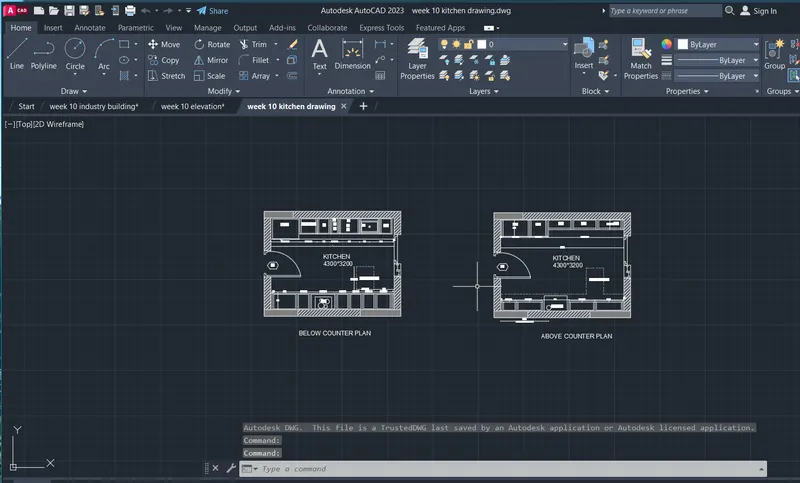
AIM:
To draw a ELEVATION PLAN
comments :
- line
- fillet
- offset
- text
- arc
- trim
Procedure:
Command: L
LINE
Specify first point:
Specify next point or [Undo]: 3050
Specify next point or [Undo]: *Cancel*
Crossing Lasso Press Spacebar to cycle options
Crossing Lasso Press Spacebar to cycle options
Command: CP
COPY 3 found
Current settings: Copy mode = Multiple
Specify base point or [Displacement/mOde] <Displacement>:
Specify second point or [Array] <use first point as displacement>:
Specify second point or [Array/Exit/Undo] <Exit>: *Cancel*
Crossing Lasso Press Spacebar to cycle options
Crossing Lasso Press Spacebar to cycle options
Command: MORE
MESHSMOOTHMORE
3 object(s) found.
Not a valid object type.
Command: MOVE
Select objects: 1 found
Select objects: 1 found, 2 total
Select objects: 1 found, 3 total
Select objects:
Specify base point or [Displacement] <Displacement>:
Specify second point or <use first point as displacement>:
Automatic save to C:\Users\Welcome\AppData\Local\Temp\week 10 elevation_1_4940_d90ac005.sv$ ...
Command:
Command: *Cancel*
Command:
Command:
** STRETCH **
Specify stretch point or [Base point/Copy/Undo/eXit]:
Command: *Cancel*
Crossing Lasso Press Spacebar to cycle options
Command: *Cancel*
Crossing Lasso Press Spacebar to cycle options
Command: STRETCH
Stretching selected objects by last window...15 found
Specify base point or [Displacement] <Displacement>:
Specify second point or <use first point as displacement>:
Command:
Command:
** STRETCH **
Specify stretch point:
Command:
Command:
** STRETCH **
Specify stretch point or [Base point/Copy/Undo/eXit]:
Command:
Command: *Cancel*
Crossing Lasso Press Spacebar to cycle options
Command: _.erase 1 found
Command: Regenerating model.
L
LINE
Specify first point:
Specify next point or [Undo]:
Specify next point or [Undo]: *Cancel*
Command: Specify opposite corner or [Fence/WPolygon/CPolygon]:
Command:
Command:
** STRETCH **
Specify stretch point or [Base point/Copy/Undo/eXit]:
Command: *Cancel*
Command: OFFSET
Current settings: Erase source=No Layer=Source OFFSETGAPTYPE=0
Specify offset distance or [Through/Erase/Layer] <Through>:
Select object to offset or [Exit/Undo] <Exit>:
Specify through point or [Exit/Multiple/Undo] <Exit>: 60
Select object to offset or [Exit/Undo] <Exit>:
Specify through point or [Exit/Multiple/Undo] <Exit>: 100
Select object to offset or [Exit/Undo] <Exit>:
Specify through point or [Exit/Multiple/Undo] <Exit>: 50
Select object to offset or [Exit/Undo] <Exit>: *Cancel*
Command: Specify opposite corner or [Fence/WPolygon/CPolygon]:
Command: _.erase 1 found
Command: REC
RECTANG
Specify first corner point or [Chamfer/Elevation/Fillet/Thickness/Width]:
Specify other corner point or [Area/Dimensions/Rotation]:
Crossing Lasso Press Spacebar to cycle options
Command: CP
COPY 1 found
Current settings: Copy mode = Multiple
Specify base point or [Displacement/mOde] <Displacement>:
Specify second point or [Array] <use first point as displacement>:
Specify second point or [Array/Exit/Undo] <Exit>:
Specify second point or [Array/Exit/Undo] <Exit>:
Specify second point or [Array/Exit/Undo] <Exit>: *Cancel*
Command: REC
RECTANG
Specify first corner point or [Chamfer/Elevation/Fillet/Thickness/Width]:
Specify other corner point or [Area/Dimensions/Rotation]:
Command: Specify opposite corner or [Fence/WPolygon/CPolygon]:
Command:
** STRETCH **
Specify stretch point:
Command: *Cancel*
Crossing Lasso Press Spacebar to cycle options
Command: CP
COPY 1 found
Current settings: Copy mode = Multiple
Specify base point or [Displacement/mOde] <Displacement>:
Specify second point or [Array] <use first point as displacement>:
Specify second point or [Array/Exit/Undo] <Exit>:
Specify second point or [Array/Exit/Undo] <Exit>:
Specify second point or [Array/Exit/Undo] <Exit>: *Cancel*
Command:
Command: *Cancel*
Command: L
LINE
Specify first point:
Specify next point or [Undo]:
Specify next point or [Undo]: *Cancel*
Command:
Command:
** STRETCH **
Specify stretch point or [Base point/Copy/Undo/eXit]:
Command: *Cancel*
Command: L
LINE
Specify first point:
Specify next point or [Undo]:
Specify next point or [Undo]: *Cancel*
Command:
Command:
** STRETCH **
Specify stretch point or [Base point/Copy/Undo/eXit]:
Command: *Cancel*
Command:
Command: *Cancel*
Command: L
LINE
Specify first point:
Specify next point or [Undo]:
Specify next point or [Undo]: *Cancel*
Command:
Command:
** STRETCH **
Specify stretch point or [Base point/Copy/Undo/eXit]:
Command: *Cancel*
Crossing Lasso Press Spacebar to cycle options
Command: CP
COPY 52 found
Current settings: Copy mode = Multiple
Specify base point or [Displacement/mOde] <Displacement>:
Specify second point or [Array] <use first point as displacement>:
Specify second point or [Array/Exit/Undo] <Exit>:
Specify second point or [Array/Exit/Undo] <Exit>:
Specify second point or [Array/Exit/Undo] <Exit>: *Cancel*
Command: Regenerating model.
L
LINE
Specify first point:
Specify next point or [Undo]: 200
Specify next point or [Undo]: _u
Specify next point or [Undo]: 1500
Specify next point or [Undo]:
Specify next point or [Close/Undo]:
Specify next point or [Close/Undo]: *Cancel*
Command: REC
RECTANG
Specify first corner point or [Chamfer/Elevation/Fillet/Thickness/Width]:
Specify other corner point or [Area/Dimensions/Rotation]:
Command: OFFSET
Current settings: Erase source=No Layer=Source OFFSETGAPTYPE=0
Specify offset distance or [Through/Erase/Layer] <Through>:
Select object to offset or [Exit/Undo] <Exit>:
Specify through point or [Exit/Multiple/Undo] <Exit>: 25
Select object to offset or [Exit/Undo] <Exit>: *Cancel*
Crossing Lasso Press Spacebar to cycle options
Command: CP
COPY 2 found
Current settings: Copy mode = Multiple
Specify base point or [Displacement/mOde] <Displacement>:
Specify second point or [Array] <use first point as displacement>:
Specify second point or [Array/Exit/Undo] <Exit>:
Specify second point or [Array/Exit/Undo] <Exit>:
Specify second point or [Array/Exit/Undo] <Exit>:
Specify second point or [Array/Exit/Undo] <Exit>:
Specify second point or [Array/Exit/Undo] <Exit>: *Cancel*
Command: L
LINE
Specify first point:
Specify next point or [Undo]: 1500
Specify next point or [Undo]:
Specify next point or [Close/Undo]:
Specify next point or [Close/Undo]: *Cancel*
Command:
Command:
** STRETCH **
Specify stretch point or [Base point/Copy/Undo/eXit]:
Command: *Cancel*
Command: L
LINE
Specify first point:
Specify next point or [Undo]: 100
Specify next point or [Undo]: 900
Specify next point or [Close/Undo]:
Specify next point or [Close/Undo]:
Specify next point or [Close/Undo]: *Cancel*
Automatic save to C:\Users\Welcome\AppData\Local\Temp\week 10 elevation_1_4940_d90ac005.sv$ ...
Command:
Command:
Command:
** STRETCH **
Specify stretch point or [Base point/Copy/Undo/eXit]:
Command: *Cancel*
Command: L
LINE
Specify first point:
Specify next point or [Undo]:
Specify next point or [Undo]:
Specify next point or [Close/Undo]:
Specify next point or [Close/Undo]: *Cancel*
Command: Specify opposite corner or [Fence/WPolygon/CPolygon]:
Command:
Command:
** STRETCH **
Specify stretch point or [Base point/Copy/Undo/eXit]:
Command: *Cancel*
Command: REC
RECTANG
Specify first corner point or [Chamfer/Elevation/Fillet/Thickness/Width]:
Specify other corner point or [Area/Dimensions/Rotation]:
Command: OFFSET
Current settings: Erase source=No Layer=Source OFFSETGAPTYPE=0
Specify offset distance or [Through/Erase/Layer] <Through>:
Select object to offset or [Exit/Undo] <Exit>:
Specify through point or [Exit/Multiple/Undo] <Exit>: 30
Select object to offset or [Exit/Undo] <Exit>: *Cancel*
Command: OFFSET
Current settings: Erase source=No Layer=Source OFFSETGAPTYPE=0
Specify offset distance or [Through/Erase/Layer] <Through>:
Select object to offset or [Exit/Undo] <Exit>:
Select object to offset or [Exit/Undo] <Exit>:
Specify through point or [Exit/Multiple/Undo] <Exit>: 200
Select object to offset or [Exit/Undo] <Exit>: *Cancel*
Command: REC
RECTANG
Specify first corner point or [Chamfer/Elevation/Fillet/Thickness/Width]:
Specify other corner point or [Area/Dimensions/Rotation]:
Command:
Command:
** STRETCH **
Specify stretch point:
Command:
** STRETCH **
Specify stretch point:
Command: Specify opposite corner or [Fence/WPolygon/CPolygon]: *Cancel*
Command:
** STRETCH **
Specify stretch point:
Command:
** STRETCH **
Specify stretch point:
Command: _u Grip Edit
Command: *Cancel*
Command:
Command:
** STRETCH **
Specify stretch point:50
Command:
** STRETCH **
Specify stretch point:20
Command: *Cancel*
Command:
Command: CP
COPY 1 found
Current settings: Copy mode = Multiple
Specify base point or [Displacement/mOde] <Displacement>:
Specify second point or [Array] <use first point as displacement>:
Specify second point or [Array/Exit/Undo] <Exit>: *Cancel*
Command:
Command:
** STRETCH **
Specify stretch point:40
Command: *Cancel*
Crossing Lasso Press Spacebar to cycle options
Command: _.erase 3036 found
Crossing Lasso Press Spacebar to cycle options
Command: _.erase 3 found
Crossing Lasso Press Spacebar to cycle options
Command: MOVE
208 found
Specify base point or [Displacement] <Displacement>:
Specify second point or <use first point as displacement>: <Ortho off>
Command: *Cancel*
Command: Regenerating model.
DT
TEXT
Current text style: "Standard" Text height: 2.5 Annotative: No Justify: Left
Specify start point of text or [Justify/Style]:
Specify height <2.5>: <Ortho on>
Specify rotation angle of text <0>: 0
Command:
Command:
Command: _qsave
Command: Specify opposite corner or [Fence/WPolygon/CPolygon]:
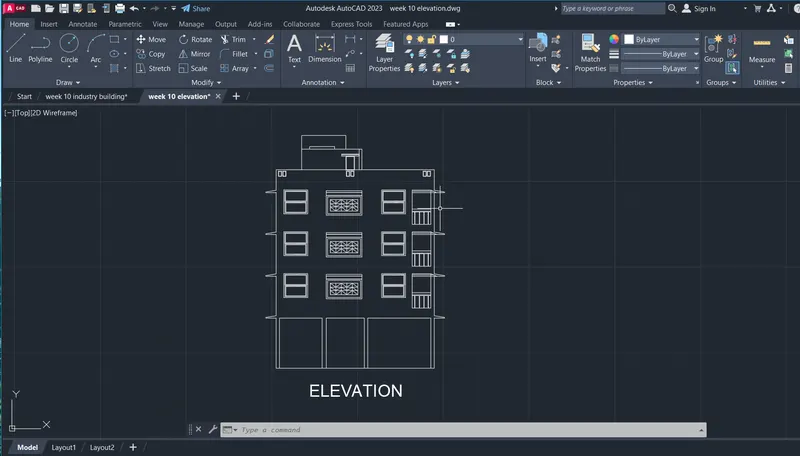
AIM:
To draw a Industrial building
comments :
- line
- fillet
- offset
- hatch
- text
- arc
- trim
Procedure:
Select object to trim or shift-select to extend or
[cuTting edges/Crossing/mOde/Project/eRase/Undo]:
Select object to trim or shift-select to extend or
[cuTting edges/Crossing/mOde/Project/eRase/Undo]:
Specify next fence point or [Undo]:
Specify next fence point or [Undo]:
Select object to trim or shift-select to extend or
[cuTting edges/Crossing/mOde/Project/eRase/Undo]:
Select object to trim or shift-select to extend or
[cuTting edges/Crossing/mOde/Project/eRase/Undo]:
Specify next fence point or [Undo]:
Specify next fence point or [Undo]:
Select object to trim or shift-select to extend or
[cuTting edges/Crossing/mOde/Project/eRase/Undo]: *Cancel*
Command:
Command: *Cancel*
Command: L
LINE
Specify first point:
Specify next point or [Undo]: 300
Specify next point or [Undo]:
Specify next point or [Close/Undo]: *Cancel*
Command:
Command:
** STRETCH **
Specify stretch point or [Base point/Copy/Undo/eXit]:
Command: *Cancel*
Command:
Command: _.erase 1 found
Command:
Command:
** STRETCH **
Specify stretch point or [Base point/Copy/Undo/eXit]:
Command:
** STRETCH **
Specify stretch point or [Base point/Copy/Undo/eXit]:300
Command: *Cancel*
Command: L
LINE
Specify first point:
Specify next point or [Undo]:
Specify next point or [Undo]: *Cancel*
Command:
Crossing Lasso Press Spacebar to cycle options
Crossing Lasso Press Spacebar to cycle options
Command: CP
COPY 4 found
Current settings: Copy mode = Multiple
Specify base point or [Displacement/mOde] <Displacement>:
Specify second point or [Array] <use first point as displacement>:
Specify second point or [Array/Exit/Undo] <Exit>: *Cancel*
Command:
Command: *Cancel*
Command:
Command:
** STRETCH **
Specify stretch point or [Base point/Copy/Undo/eXit]:
Command:
Command: *Cancel*
Command: Specify opposite corner or [Fence/WPolygon/CPolygon]:
Command:
Command:
** STRETCH **
Specify stretch point or [Base point/Copy/Undo/eXit]:
Command: *Cancel*
Command:
Command: *Cancel*
Command:
Command: *Cancel*
Command:
Command: _.erase 1 found
Command:
Command: Specify opposite corner or [Fence/WPolygon/CPolygon]:
Command:
** STRETCH **
Specify stretch point or [Base point/Copy/Undo/eXit]:
Command:
Command:
** STRETCH **
Specify stretch point or [Base point/Copy/Undo/eXit]:
Command: *Cancel*
Command: L
LINE
Specify first point:
Specify next point or [Undo]:
Specify next point or [Undo]: 150
Specify next point or [Close/Undo]: 100
Specify next point or [Close/Undo]: 100
Specify next point or [Close/Undo]: 5500
Specify next point or [Close/Undo]: 100
Specify next point or [Close/Undo]:
Specify next point or [Close/Undo]: *Cancel*
Command: L
LINE
Specify first point:
Specify next point or [Undo]:
Specify next point or [Undo]:
Specify next point or [Close/Undo]: *Cancel*
Command: Specify opposite corner or [Fence/WPolygon/CPolygon]: *Cancel*
Command:
Command:
** STRETCH **
Specify stretch point or [Base point/Copy/Undo/eXit]:
Command: *Cancel*
Command:
Command:
** STRETCH **
Specify stretch point or [Base point/Copy/Undo/eXit]:
Command: *Cancel*
Command: REC
RECTANG
Specify first corner point or [Chamfer/Elevation/Fillet/Thickness/Width]:
Specify other corner point or [Area/Dimensions/Rotation]:
Specify other corner point or [Area/Dimensions/Rotation]: 150
Command: TR
TRIM
Current settings: Projection=UCS, Edge=None, Mode=Quick
Select object to trim or shift-select to extend or
[cuTting edges/Crossing/mOde/Project/eRase]:
Select object to trim or shift-select to extend or
[cuTting edges/Crossing/mOde/Project/eRase/Undo]:
Select object to trim or shift-select to extend or
[cuTting edges/Crossing/mOde/Project/eRase/Undo]:
Specify next fence point or [Undo]:
Specify next fence point or [Undo]:
Select object to trim or shift-select to extend or
[cuTting edges/Crossing/mOde/Project/eRase/Undo]: *Cancel*
Command: H
HATCH
Pick internal point or [Select objects/Undo/seTtings]: Selecting everything...
Selecting everything visible...
Analyzing the selected data...
Valid hatch boundary not found.
Pick internal point or [Select objects/Undo/seTtings]:
Valid hatch boundary not found.
Pick internal point or [Select objects/Undo/seTtings]:
Valid hatch boundary not found.
Analyzing internal islands...
Pick internal point or [Select objects/Undo/seTtings]:
Analyzing internal islands...
Pick internal point or [Select objects/Undo/seTtings]:
Analyzing internal islands...
Pick internal point or [Select objects/Undo/seTtings]: Selecting everything...
Selecting everything visible...
Analyzing the selected data...
Analyzing internal islands...
Pick internal point or [Select objects/Undo/seTtings]: *Cancel*
Automatic save to C:\Users\Welcome\AppData\Local\Temp\week 10 industry building_1_4940_8ab59cc7.sv$ ...
Command:
Command:
Command:
** STRETCH **
Specify stretch point or [Base point/Copy/Undo/eXit]:
Command:
Command:
** STRETCH **
Specify stretch point or [Base point/Copy/Undo/eXit]:
Command: *Cancel*
Command:
Command: _.erase 1 found
Command:
Command:
** STRETCH **
Specify stretch point or [Base point/Copy/Undo/eXit]:
Command:
Command:
** STRETCH **
Specify stretch point or [Base point/Copy/Undo/eXit]:
Command: TR
TRIM
Current settings: Projection=UCS, Edge=None, Mode=Quick
Select cutting edges ...2 found
Select object to trim or shift-select to extend or
[cuTting edges/Crossing/mOde/Project/eRase]:
Select object to trim or shift-select to extend or
[cuTting edges/Crossing/mOde/Project/eRase/Undo]: *Cancel*
Command: TR
TRIM
Current settings: Projection=UCS, Edge=None, Mode=Quick
Select object to trim or shift-select to extend or
[cuTting edges/Crossing/mOde/Project/eRase]:
Select object to trim or shift-select to extend or
[cuTting edges/Crossing/mOde/Project/eRase/Undo]:
Specify next fence point or [Undo]:
Specify next fence point or [Undo]:
Select object to trim or shift-select to extend or
[cuTting edges/Crossing/mOde/Project/eRase/Undo]: *Cancel*
Command: LT
LINETYPE
Command:
LINETYPE
Command: L
LINE
Specify first point: *Cancel*
Command:
Command: _properties
Command:
Command: L
LINE
Specify first point:
Specify next point or [Undo]:
Specify next point or [Undo]: *Cancel*
Command:
LINE
Specify first point:
Specify next point or [Undo]:
Specify next point or [Undo]: *Cancel*
Command:
Command: _.erase 1 found
Crossing Lasso Press Spacebar to cycle options
Command:
Command:
Command:
Command:
Command: *Cancel*
Command: L
LINE
Specify first point:
Specify next point or [Undo]:
Specify next point or [Undo]: *Cancel*
Command:
LINE
Specify first point:
Specify next point or [Undo]:
Specify next point or [Undo]: *Cancel*
Command: DT
TEXT
Current text style: "Standard" Text height: 2.5000 Annotative: No Justify: Left
Specify start point of text or [Justify/Style]:
Specify height <2.5000>: 150
Specify rotation angle of text <0>: 0
Command: QLEADER
Specify first leader point, or [Settings] <Settings>:
Specify next point: *Cancel*
Command:
QLEADER
Specify first leader point, or [Settings] <Settings>:
Specify next point: <Ortho off>
Specify next point:
Specify text width <0>:
Enter first line of annotation text <Mtext>: *Cancel*
Command:
QLEADER
Specify first leader point, or [Settings] <Settings>:
Specify next point:
Specify next point: <Ortho on>
Specify text width <0>:
Enter first line of annotation text <Mtext>:
Command:
QLEADER
Specify first leader point, or [Settings] <Settings>:
Specify next point: <Ortho off>
Specify next point: <Ortho on>
Specify text width <0>:
Enter first line of annotation text <Mtext>: *Cancel*
Command: L
LINE
Specify first point:
Specify next point or [Undo]:
Specify next point or [Undo]: *Cancel*
Automatic save to C:\Users\Welcome\AppData\Local\Temp\week 10 industry building_1_4940_8ab59cc7.sv$ ...
Command:
Crossing Lasso Press Spacebar to cycle options
Command: CP
COPY 1 found
Current settings: Copy mode = Multiple
Specify base point or [Displacement/mOde] <Displacement>: *Cancel*
Command: C
CIRCLE
Specify center point for circle or [3P/2P/Ttr (tan tan radius)]: 250
Specify radius of circle or [Diameter]: 250
Crossing Lasso Press Spacebar to cycle options
Crossing Lasso Press Spacebar to cycle options
Command: *Cancel*
Command: DT
TEXT
Current text style: "Standard" Text height: 150.0000 Annotative: No Justify: Left
Specify start point of text or [Justify/Style]:
Command: DT
TEXT
Current text style: "Standard" Text height: 150.0000 Annotative: No Justify: Left
Specify start point of text or [Justify/Style]:
Specify height <150.0000>: 150
Specify rotation angle of text <0>: 0
Crossing Lasso Press Spacebar to cycle options
Crossing Lasso Press Spacebar to cycle options
Command: CP
COPY 3 found
Current settings: Copy mode = Multiple
Specify base point or [Displacement/mOde] <Displacement>:
Specify second point or [Array] <use first point as displacement>:
Specify second point or [Array/Exit/Undo] <Exit>:
Specify second point or [Array/Exit/Undo] <Exit>:
Specify second point or [Array/Exit/Undo] <Exit>:
Specify second point or [Array/Exit/Undo] <Exit>:
Specify second point or [Array/Exit/Undo] <Exit>:
Specify second point or [Array/Exit/Undo] <Exit>: *Cancel*
Command:
Command:
Command:
Command: _textedit
Current settings: Edit mode = Multiple
Select an annotation object or [Undo/Mode]:
Select an annotation object or [Undo/Mode]:
Select an annotation object or [Undo/Mode]:
Select an annotation object or [Undo/Mode]:
Select an annotation object or [Undo/Mode]:
Select an annotation object or [Undo/Mode]:
Select an annotation object or [Undo/Mode]:
Select an annotation object or [Undo/Mode]:
Select an annotation object or [Undo/Mode]:
Select an annotation object or [Undo/Mode]: *Cancel*