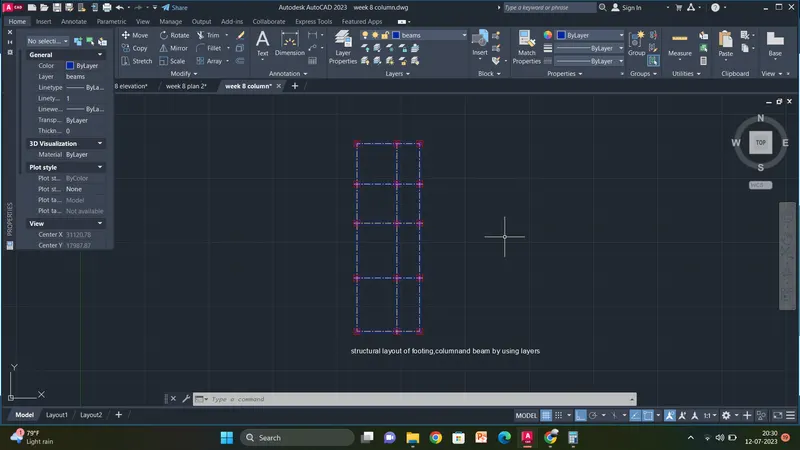
Project 1 _Creating an Architectural plan for the provided plot size and develop relevant basic structural drawings
AIM:
To draw a architectural and structural plan of the plot
comments :
- line
- fillet
- offset
- hatch
- text
- arc
- trim
- layers
Procedure for plan :
Window Lasso Press Spacebar to cycle options
Command:
Command:
** STRETCH **
Specify stretch point or [Base point/Copy/Undo/eXit]:
Command:
** STRETCH **
Specify stretch point or [Base point/Copy/Undo/eXit]:
Command:
** STRETCH **
Specify stretch point or [Base point/Copy/Undo/eXit]:
Command:
Command:
Command: _bcparameter
Enter an option [Linear/Horizontal/Vertical/Aligned/ANgular/Radius/Diameter/Convert] <Linear>: _linear
Specify first constraint point or [Object] <Object>:
Specify second constraint point:
The object or point is already selected. Select a different object or constraint point.
Specify second constraint point:
Specify dimension line location:
1 constraint(s) removed
Command:
Command:
Command: _bcparameter
Enter an option [Linear/Horizontal/Vertical/Aligned/ANgular/Radius/Diameter/Convert] <Linear>: _linear
Specify first constraint point or [Object] <Object>:
Specify second constraint point:
Specify dimension line location:
Command: *Cancel*
Crossing Lasso Press Spacebar to cycle options
Command: _.erase 1 found
1 constraint(s) removed
Command:
Command:
Command:
Command: _qsave Regenerating model.
Regenerating model.
Regenerating model.
Regenerating model.
Command: Regenerating model.
Command:
Command: _bcparameter
Enter an option [Linear/Horizontal/Vertical/Aligned/ANgular/Radius/Diameter/Convert] <Linear>: _linear
Specify first constraint point or [Object] <Object>:
Specify second constraint point:
The object or point is already selected. Select a different object or constraint point.
Specify second constraint point:
Specify dimension line location:
Command:
Command:
** STRETCH **
Specify stretch point or [Base point/Copy/Undo/eXit]:
Command:
** STRETCH **
Specify stretch point or [Base point/Copy/Undo/eXit]:
Command:
** STRETCH **
Specify stretch point or [Base point/Copy/Undo/eXit]:
Command:
** STRETCH **
Specify stretch point or [Base point/Copy/Undo/eXit]:
Command:
** STRETCH **
Specify stretch point or [Base point/Copy/Undo/eXit]:
Command: *Cancel*
Command:
Command: _.erase 1 found
1 constraint(s) removed
Command:
Command:
Command: _bcparameter
Enter an option [Linear/Horizontal/Vertical/Aligned/ANgular/Radius/Diameter/Convert] <Linear>: _linear
Specify first constraint point or [Object] <Object>:
Specify second constraint point:
The object or point is already selected. Select a different object or constraint point.
Specify second constraint point:
The object or point is already selected. Select a different object or constraint point.
Specify second constraint point:
No valid constraint point found.
Specify second constraint point:
Specify dimension line location:
Command: 3"
Unknown command "3"". Press F1 for help.
Command: *Cancel*
Command:
Command:
** STRETCH **
Specify stretch point or [Base point/Copy/Undo/eXit]:
Command: *Cancel*
Command:
Command: _.erase 1 found
1 constraint(s) removed
Command: Specify opposite corner or [Fence/WPolygon/CPolygon]:
Command: Specify opposite corner or [Fence/WPolygon/CPolygon]:
Command:
Command:
** STRETCH **
Specify stretch point or [Base point/Copy/Undo/eXit]:
Command: *Cancel*
Command:
Command:
Command: _BSAVE
Command:
Command:
Command: _BCLOSE Regenerating model.
Automatic save to C:\Users\Welcome\AppData\Local\Temp\week 8 plan 2_1_6624_2459ed39.sv$ ...
Command:
Crossing Lasso Press Spacebar to cycle options
Command: *Cancel*
Crossing Lasso Press Spacebar to cycle options
Command: Specify opposite corner or [Fence/WPolygon/CPolygon]:
Command: STRETCH
Stretching selected objects by last window...7 found
Specify base point or [Displacement] <Displacement>:
Specify second point or <use first point as displacement>: *Cancel*
Command:
Command:
** STRETCH **
Specify stretch point or [Base point/Copy/Undo/eXit]:
Command:
** STRETCH **
Specify stretch point or [Base point/Copy/Undo/eXit]:
Command:
** STRETCH **
Specify stretch point or [Base point/Copy/Undo/eXit]:
Command:
** STRETCH **
Specify stretch point or [Base point/Copy/Undo/eXit]: <Ortho off>
Command: *Cancel*
Crossing Lasso Press Spacebar to cycle options
Command: *Cancel*
Command: Specify opposite corner or [Fence/WPolygon/CPolygon]:
Command:
** STRETCH **
Specify stretch point or [Base point/Copy/Undo/eXit]:
Command: *Cancel*
Command:
Command:
Command:
Command: _TEXTEDIT
Current settings: Edit mode = Multiple
Select an annotation object or [Undo/Mode]:
Select an annotation object or [Undo/Mode]: *Cancel*
Command:
Command:
** STRETCH **
Specify stretch point or [Base point/Copy/Undo/eXit]:
Dimension disassociated.
Command: *Cancel*
Command: L
LINE
Specify first point:
Specify next point or [Undo]:
Specify next point or [Undo]: *Cancel*
*Cancel*
Command:
Command:
** STRETCH **
Specify stretch point or [Base point/Copy/Undo/eXit]:
Command: *Cancel*
Command:
Command:
** STRETCH **
Specify stretch point or [Base point/Copy/Undo/eXit]:
Command: *Cancel*
Command: TR
TRIM
Current settings: Projection=UCS, Edge=None, Mode=Quick
Select object to trim or shift-select to extend or
[cuTting edges/Crossing/mOde/Project/eRase]:
Select object to trim or shift-select to extend or
[cuTting edges/Crossing/mOde/Project/eRase/Undo]:
Select object to trim or shift-select to extend or
[cuTting edges/Crossing/mOde/Project/eRase/Undo]:
Specify next fence point or [Undo]:
Specify next fence point or [Undo]:
Select object to trim or shift-select to extend or
[cuTting edges/Crossing/mOde/Project/eRase/Undo]:
Select object to trim or shift-select to extend or
[cuTting edges/Crossing/mOde/Project/eRase/Undo]:
Specify next fence point or [Undo]:
Specify next fence point or [Undo]:
Select object to trim or shift-select to extend or
[cuTting edges/Crossing/mOde/Project/eRase/Undo]:
Select object to trim or shift-select to extend or
[cuTting edges/Crossing/mOde/Project/eRase/Undo]:
Specify next fence point or [Undo]:
Specify next fence point or [Undo]:
Select object to trim or shift-select to extend or
[cuTting edges/Crossing/mOde/Project/eRase/Undo]:
Select object to trim or shift-select to extend or
[cuTting edges/Crossing/mOde/Project/eRase/Undo]:
Select object to trim or shift-select to extend or
[cuTting edges/Crossing/mOde/Project/eRase/Undo]:
Specify next fence point or [Undo]:
Specify next fence point or [Undo]:
Specify next fence point or [Undo]:
Specify next fence point or [Undo]:
Cannot TRIM this object.
Select object to trim or shift-select to extend or
[cuTting edges/Crossing/mOde/Project/eRase/Undo]:
Select object to trim or shift-select to extend or
[cuTting edges/Crossing/mOde/Project/eRase/Undo]:
Specify next fence point or [Undo]:
Specify next fence point or [Undo]:
Cannot TRIM this object.
Select object to trim or shift-select to extend or
[cuTting edges/Crossing/mOde/Project/eRase/Undo]:
Select object to trim or shift-select to extend or
[cuTting edges/Crossing/mOde/Project/eRase/Undo]:
Specify next fence point or [Undo]:
Specify next fence point or [Undo]:
Cannot TRIM this object.
Select object to trim or shift-select to extend or
[cuTting edges/Crossing/mOde/Project/eRase/Undo]:
Select object to trim or shift-select to extend or
[cuTting edges/Crossing/mOde/Project/eRase/Undo]: *Cancel*
Command:
Command:
** STRETCH **
Specify stretch point or [Base point/Copy/Undo/eXit]:
Command:
** STRETCH **
Specify stretch point or [Base point/Copy/Undo/eXit]:
Command: *Cancel*
Command:
Command: *Cancel*
Window Lasso Press Spacebar to cycle options
Window Lasso Press Spacebar to cycle options
Command:
Command:
** STRETCH **
Specify stretch point or [Base point/Copy/Undo/eXit]:
Command: *Cancel*
Command:
Command:
** STRETCH **
Specify stretch point or [Base point/Copy/Undo/eXit]:
Command: *Cancel*
Command:
Command:
** STRETCH **
Specify stretch point or [Base point/Copy/Undo/eXit]:
Command:
Command:
** STRETCH **
Specify stretch point or [Base point/Copy/Undo/eXit]:
Command: *Cancel*
Command:
Command:
** STRETCH **
Specify stretch point or [Base point/Copy/Undo/eXit]:
Command:
Command:
** STRETCH **
Specify stretch point or [Base point/Copy/Undo/eXit]:
Command: *Cancel*
Crossing Lasso Press Spacebar to cycle options
Command:
** STRETCH **
Specify stretch point or [Base point/Copy/Undo/eXit]:
Command: *Cancel*
Command:
Crossing Lasso Press Spacebar to cycle options
Command:
** STRETCH **
Specify stretch point or [Base point/Copy/Undo/eXit]:
Command: *Cancel*
Command:
Command:
Command: _dim
Select objects or specify first extension line origin or [Angular/Baseline/Continue/Ordinate/aliGn/Distribute/Layer/Undo]:
Specify first extension line origin or [Angular/Baseline/Continue/Ordinate/aliGn/Distribute/Layer/Undo]:
Specify second extension line origin or [Undo]:
Specify dimension line location or second line for angle [Mtext/Text/text aNgle/Undo]:
Select objects or specify first extension line origin or [Angular/Baseline/Continue/Ordinate/aliGn/Distribute/Layer/Undo]:
Specify first extension line origin or [Angular/Baseline/Continue/Ordinate/aliGn/Distribute/Layer/Undo]:
Specify second extension line origin or [Undo]: <Ortho on>
Specify dimension line location or second line for angle [Mtext/Text/text aNgle/Undo]:
Non-associative dimension created.
Select objects or specify first extension line origin or [Angular/Baseline/Continue/Ordinate/aliGn/Distribute/Layer/Undo]:
Specify first extension line origin or [Angular/Baseline/Continue/Ordinate/aliGn/Distribute/Layer/Undo]:
Specify second extension line origin or [Undo]:
Specify dimension line location or second line for angle [Mtext/Text/text aNgle/Undo]:
Non-associative dimension created.
Select objects or specify first extension line origin or [Angular/Baseline/Continue/Ordinate/aliGn/Distribute/Layer/Undo]:
Specify first extension line origin or [Angular/Baseline/Continue/Ordinate/aliGn/Distribute/Layer/Undo]:
Specify second extension line origin or [Undo]:
Specify dimension line location or second line for angle [Mtext/Text/text aNgle/Undo]:
Non-associative dimension created.
Select objects or specify first extension line origin or [Angular/Baseline/Continue/Ordinate/aliGn/Distribute/Layer/Undo]:
Specify first extension line origin or [Angular/Baseline/Continue/Ordinate/aliGn/Distribute/Layer/Undo]:
Specify second extension line origin or [Undo]:
Specify dimension line location or second line for angle [Mtext/Text/text aNgle/Undo]:
Select objects or specify first extension line origin or [Angular/Baseline/Continue/Ordinate/aliGn/Distribute/Layer/Undo]:
Specify first extension line origin or [Angular/Baseline/Continue/Ordinate/aliGn/Distribute/Layer/Undo]:
Specify second extension line origin or [Undo]:
Specify dimension line location or second line for angle [Mtext/Text/text aNgle/Undo]:
Non-associative dimension created.
Select objects or specify first extension line origin or [Angular/Baseline/Continue/Ordinate/aliGn/Distribute/Layer/Undo]:
Specify first extension line origin or [Angular/Baseline/Continue/Ordinate/aliGn/Distribute/Layer/Undo]:
Specify second extension line origin or [Undo]:
Specify dimension line location or second line for angle [Mtext/Text/text aNgle/Undo]:
Non-associative dimension created.
Select objects or specify first extension line origin or [Angular/Baseline/Continue/Ordinate/aliGn/Distribute/Layer/Undo]:
Specify first extension line origin or [Angular/Baseline/Continue/Ordinate/aliGn/Distribute/Layer/Undo]:
Specify second extension line origin or [Undo]:
Specify dimension line location or second line for angle [Mtext/Text/text aNgle/Undo]:
Non-associative dimension created.
Select objects or specify first extension line origin or [Angular/Baseline/Continue/Ordinate/aliGn/Distribute/Layer/Undo]:
Specify first extension line origin or [Angular/Baseline/Continue/Ordinate/aliGn/Distribute/Layer/Undo]:
Specify second extension line origin or [Undo]:
Specify dimension line location or second line for angle [Mtext/Text/text aNgle/Undo]:
Non-associative dimension created.
Select objects or specify first extension line origin or [Angular/Baseline/Continue/Ordinate/aliGn/Distribute/Layer/Undo]:
Specify first extension line origin or [Angular/Baseline/Continue/Ordinate/aliGn/Distribute/Layer/Undo]:
Specify second extension line origin or [Undo]:
Specify dimension line location or second line for angle [Mtext/Text/text aNgle/Undo]:
Non-associative dimension created.
Select objects or specify first extension line origin or [Angular/Baseline/Continue/Ordinate/aliGn/Distribute/Layer/Undo]:
Specify first extension line origin or [Angular/Baseline/Continue/Ordinate/aliGn/Distribute/Layer/Undo]:
Specify second extension line origin or [Undo]:
Specify dimension line location or second line for angle [Mtext/Text/text aNgle/Undo]:
Non-associative dimension created.
Select objects or specify first extension line origin or [Angular/Baseline/Continue/Ordinate/aliGn/Distribute/Layer/Undo]:
Specify first extension line origin or [Angular/Baseline/Continue/Ordinate/aliGn/Distribute/Layer/Undo]:
Specify second extension line origin or [Undo]:
Specify dimension line location or second line for angle [Mtext/Text/text aNgle/Undo]:
Select objects or specify first extension line origin or [Angular/Baseline/Continue/Ordinate/aliGn/Distribute/Layer/Undo]:
Select extension line origin to continue or [Baseline]:*Cancel*
Command: Specify opposite corner or [Fence/WPolygon/CPolygon]:
Automatic save to C:\Users\Welcome\AppData\Local\Temp\week 8 plan 2_1_6624_2459ed39.sv$ ...
Command:
Command: _.erase 1 found
Command:
Command:
Command: _dim
Select objects or specify first extension line origin or [Angular/Baseline/Continue/Ordinate/aliGn/Distribute/Layer/Undo]:
Specify first extension line origin or [Angular/Baseline/Continue/Ordinate/aliGn/Distribute/Layer/Undo]:
Specify second extension line origin or [Undo]:
Specify dimension line location or second line for angle [Mtext/Text/text aNgle/Undo]:
Select objects or specify first extension line origin or [Angular/Baseline/Continue/Ordinate/aliGn/Distribute/Layer/Undo]:
Specify first extension line origin or [Angular/Baseline/Continue/Ordinate/aliGn/Distribute/Layer/Undo]:
Specify second extension line origin or [Undo]:
Specify dimension line location or second line for angle [Mtext/Text/text aNgle/Undo]:
Non-associative dimension created.
Select objects or specify first extension line origin or [Angular/Baseline/Continue/Ordinate/aliGn/Distribute/Layer/Undo]:
Specify first extension line origin or [Angular/Baseline/Continue/Ordinate/aliGn/Distribute/Layer/Undo]:
Specify second extension line origin or [Undo]:
Specify dimension line location or second line for angle [Mtext/Text/text aNgle/Undo]:
Non-associative dimension created.
Select objects or specify first extension line origin or [Angular/Baseline/Continue/Ordinate/aliGn/Distribute/Layer/Undo]:
Specify first extension line origin or [Angular/Baseline/Continue/Ordinate/aliGn/Distribute/Layer/Undo]:
Specify second extension line origin or [Undo]:
Specify dimension line location or second line for angle [Mtext/Text/text aNgle/Undo]:
Non-associative dimension created.
Select objects or specify first extension line origin or [Angular/Baseline/Continue/Ordinate/aliGn/Distribute/Layer/Undo]:
Specify first extension line origin or [Angular/Baseline/Continue/Ordinate/aliGn/Distribute/Layer/Undo]:
Specify second extension line origin or [Undo]:
Specify dimension line location or second line for angle [Mtext/Text/text aNgle/Undo]:
Non-associative dimension created.
Select objects or specify first extension line origin or [Angular/Baseline/Continue/Ordinate/aliGn/Distribute/Layer/Undo]:
Specify first extension line origin or [Angular/Baseline/Continue/Ordinate/aliGn/Distribute/Layer/Undo]:
Specify second extension line origin or [Undo]:
Specify dimension line location or second line for angle [Mtext/Text/text aNgle/Undo]:
Non-associative dimension created.
Select objects or specify first extension line origin or [Angular/Baseline/Continue/Ordinate/aliGn/Distribute/Layer/Undo]:
Specify first extension line origin or [Angular/Baseline/Continue/Ordinate/aliGn/Distribute/Layer/Undo]:
Specify second extension line origin or [Undo]:
Specify dimension line location or second line for angle [Mtext/Text/text aNgle/Undo]:
Non-associative dimension created.
Select objects or specify first extension line origin or [Angular/Baseline/Continue/Ordinate/aliGn/Distribute/Layer/Undo]:
Specify first extension line origin or [Angular/Baseline/Continue/Ordinate/aliGn/Distribute/Layer/Undo]:
Specify second extension line origin or [Undo]:
Specify dimension line location or second line for angle [Mtext/Text/text aNgle/Undo]:
Non-associative dimension created.
Select objects or specify first extension line origin or [Angular/Baseline/Continue/Ordinate/aliGn/Distribute/Layer/Undo]:
Specify first extension line origin or [Angular/Baseline/Continue/Ordinate/aliGn/Distribute/Layer/Undo]:
Specify second extension line origin or [Undo]:
Specify dimension line location or second line for angle [Mtext/Text/text aNgle/Undo]:
Non-associative dimension created.
Select objects or specify first extension line origin or [Angular/Baseline/Continue/Ordinate/aliGn/Distribute/Layer/Undo]:
Specify first extension line origin or [Angular/Baseline/Continue/Ordinate/aliGn/Distribute/Layer/Undo]:
Specify second extension line origin or [Undo]:
Specify dimension line location or second line for angle [Mtext/Text/text aNgle/Undo]:
Non-associative dimension created.
Select objects or specify first extension line origin or [Angular/Baseline/Continue/Ordinate/aliGn/Distribute/Layer/Undo]:
Specify first extension line origin or [Angular/Baseline/Continue/Ordinate/aliGn/Distribute/Layer/Undo]:
Specify second extension line origin or [Undo]:
Specify dimension line location or second line for angle [Mtext/Text/text aNgle/Undo]:
Non-associative dimension created.
Select objects or specify first extension line origin or [Angular/Baseline/Continue/Ordinate/aliGn/Distribute/Layer/Undo]:
Specify first extension line origin or [Angular/Baseline/Continue/Ordinate/aliGn/Distribute/Layer/Undo]:
Specify second extension line origin or [Undo]:
Specify dimension line location or second line for angle [Mtext/Text/text aNgle/Undo]:
Non-associative dimension created.
Select objects or specify first extension line origin or [Angular/Baseline/Continue/Ordinate/aliGn/Distribute/Layer/Undo]:
Select objects or specify first extension line origin or [Angular/Baseline/Continue/Ordinate/aliGn/Distribute/Layer/Undo]:
Command:
Command:
Command:
Automatic save to C:\Users\Welcome\AppData\Local\Temp\week 8 plan 2_1_6624_2459ed39.sv$ ...
Command:
Command:
Command:
Automatic save to C:\Users\Welcome\AppData\Local\Temp\week 8 plan 2_1_6624_2459ed39.sv$ ...
Command:
Command:
Command: Specify opposite corner or [Fence/WPolygon/CPolygon]:
Command:
Command:
Command: _.erase 3 found
Window Lasso Press Spacebar to cycle options
Window Lasso Press Spacebar to cycle options
Command: _.erase 2 found
Command:
Crossing Lasso Press Spacebar to cycle options
Command: _.erase 3 found
Window Lasso Press Spacebar to cycle options
Crossing Lasso Press Spacebar to cycle options
Command: _.erase 4 found
Crossing Lasso Press Spacebar to cycle options
Command: _.erase 2 found
Crossing Lasso Press Spacebar to cycle options
Command: _.erase 1 found
Crossing Lasso Press Spacebar to cycle options
Command: _.erase 2 found
Command:
Automatic save to C:\Users\Welcome\AppData\Local\Temp\week 8 plan 2_1_6624_2459ed39.sv$ ...
Command:
Crossing Lasso Press Spacebar to cycle options
Command: _.erase 9 found
Crossing Lasso Press Spacebar to cycle options
Command: _.erase 10 found
Crossing Lasso Press Spacebar to cycle options
Command: _.erase 2 found
Crossing Lasso Press Spacebar to cycle options
Command: _.erase 2 found
Command: L
LINE
Specify first point: *Cancel*
Command:
Command: _properties
Command: *Cancel*
Command: LT
LINETYPE
Command: L
LINE
Specify first point:
Specify next point or [Undo]:
Specify next point or [Undo]: *Cancel*
Command:
Command:
Command:
Command: _properties
Command:
Command: *Cancel*
Command: *Cancel*
Command: L
LINE
Specify first point:
Specify next point or [Undo]:
Specify next point or [Undo]: <Ortho off>
Specify next point or [Close/Undo]: *Cancel*
Crossing Lasso Press Spacebar to cycle options
Command: COPY
2 found
Current settings: Copy mode = Multiple
Specify base point or [Displacement/mOde] <Displacement>:
Specify second point or [Array] <use first point as displacement>:
Specify second point or [Array/Exit/Undo] <Exit>: *Cancel*
Crossing Lasso Press Spacebar to cycle options
Command: MI
MIRROR 2 found
Specify first point of mirror line:
Specify second point of mirror line:
Erase source objects? [Yes/No] <No>: Y
Command: TEXT
Current text style: "Standard" Text height: 0'-10" Annotative: No Justify: Left
Specify start point of text or [Justify/Style]:
Specify height <0'-10">: <Ortho on>
Specify rotation angle of text <0>:
Command:
Command:
Command: *Cancel*
Crossing Lasso Press Spacebar to cycle options
Command: RO
ROTATE
Current positive angle in UCS: ANGDIR=counterclockwise ANGBASE=0
1 found
Specify base point:
Specify rotation angle or [Copy/Reference] <270>:
Command:
Command:
** STRETCH **
Specify stretch point or [Base point/Copy/Undo/eXit]:
Command:
** STRETCH **
Specify stretch point or [Base point/Copy/Undo/eXit]:
Command: *Cancel*
Command:
Command: COPY
1 found
Current settings: Copy mode = Multiple
Specify base point or [Displacement/mOde] <Displacement>:
Specify second point or [Array] <use first point as displacement>:
Specify second point or [Array/Exit/Undo] <Exit>: *Cancel*
Command:
Automatic save to C:\Users\Welcome\AppData\Local\Temp\week 8 plan 2_1_6624_2459ed39.sv$ ...
Command:
Command:
Automatic save to C:\Users\Welcome\AppData\Local\Temp\week 8 plan 2_1_6624_2459ed39.sv$ ...
Command:
Command:
Command:
Command:
Command:
Command:
Automatic save to C:\Users\Welcome\AppData\Local\Temp\week 8 plan 2_1_6624_2459ed39.sv$ ...
Command:
Command:
Command:
Command:
Command:
Command: _dim
Select objects or specify first extension line origin or [Angular/Baseline/Continue/Ordinate/aliGn/Distribute/Layer/Undo]:
Specify first extension line origin or [Angular/Baseline/Continue/Ordinate/aliGn/Distribute/Layer/Undo]:
Specify second extension line origin or [Undo]:
Specify dimension line location or second line for angle [Mtext/Text/text aNgle/Undo]:
Select objects or specify first extension line origin or [Angular/Baseline/Continue/Ordinate/aliGn/Distribute/Layer/Undo]:
Select extension line origin to continue or [Baseline]:
Specify second extension line origin or [Select/Undo] <Select>: *Cancel*
Select objects or specify first extension line origin or [Angular/Baseline/Continue/Ordinate/aliGn/Distribute/Layer/Undo]:
Select extension line origin to continue or [Baseline]:
Specify second extension line origin or [Select/Undo] <Select>: *Cancel*
Select objects or specify first extension line origin or [Angular/Baseline/Continue/Ordinate/aliGn/Distribute/Layer/Undo]:
Select extension line origin to continue or [Baseline]:*Cancel*
Command:
Command:
** STRETCH **
Specify stretch point or [Base point/Copy/Undo/eXit]:
Dimension extension disassociated.
Command:
** STRETCH **
Specify stretch point or [Base point/Copy/Undo/eXit]:
Command:
** STRETCH **
Specify stretch point or [Base point/Copy/Undo/eXit]:
Command:
** STRETCH **
Specify stretch point or [Base point/Copy/Undo/eXit]:
Command: _.erase 1 found
Command: L
LINE
Specify first point:
Specify next point or [Undo]:
Specify next point or [Undo]: *Cancel*
Command:
Command:
Command: _dim
Select objects or specify first extension line origin or [Angular/Baseline/Continue/Ordinate/aliGn/Distribute/Layer/Undo]:
Specify first extension line origin or [Angular/Baseline/Continue/Ordinate/aliGn/Distribute/Layer/Undo]:
Specify second extension line origin or [Undo]:
Specify dimension line location or second line for angle [Mtext/Text/text aNgle/Undo]:
Select objects or specify first extension line origin or [Angular/Baseline/Continue/Ordinate/aliGn/Distribute/Layer/Undo]:
Select extension line origin to continue or [Baseline]:*Cancel*
Command:
Command:
Automatic save to C:\Users\Welcome\AppData\Local\Temp\week 8 plan 2_1_6624_2459ed39.sv$ ...
Command:
Command:
Command:
Command:
Command: _.erase 1 found
Command:
Command:
Command: _dim
Select objects or specify first extension line origin or [Angular/Baseline/Continue/Ordinate/aliGn/Distribute/Layer/Undo]:
Specify first extension line origin or [Angular/Baseline/Continue/Ordinate/aliGn/Distribute/Layer/Undo]:
Specify second extension line origin or [Undo]:
Specify dimension line location or second line for angle [Mtext/Text/text aNgle/Undo]:
Select objects or specify first extension line origin or [Angular/Baseline/Continue/Ordinate/aliGn/Distribute/Layer/Undo]:
Select objects or specify first extension line origin or [Angular/Baseline/Continue/Ordinate/aliGn/Distribute/Layer/Undo]:
Command:
Command:
Command:
Command:
Command: _dim
Select objects or specify first extension line origin or [Angular/Baseline/Continue/Ordinate/aliGn/Distribute/Layer/Undo]:
Specify first extension line origin or [Angular/Baseline/Continue/Ordinate/aliGn/Distribute/Layer/Undo]:
Specify second extension line origin or [Undo]:
Command:
Command: _.erase 1 found
Command:
Command:
Command: _dim
Select objects or specify first extension line origin or [Angular/Baseline/Continue/Ordinate/aliGn/Distribute/Layer/Undo]:
Specify first extension line origin or [Angular/Baseline/Continue/Ordinate/aliGn/Distribute/Layer/Undo]:
Specify second extension line origin or [Undo]:
Specify dimension line location or second line for angle [Mtext/Text/text aNgle/Undo]:
Select objects or specify first extension line origin or [Angular/Baseline/Continue/Ordinate/aliGn/Distribute/Layer/Undo]:
Select extension line origin to continue or [Baseline]:*Cancel*
Command:
Command: _.erase 1 found
Command:
Command: *Cancel*
Command:
Automatic save to C:\Users\Welcome\AppData\Local\Temp\week 8 plan 2_1_6624_2459ed39.sv$ ...
Command:
Command:
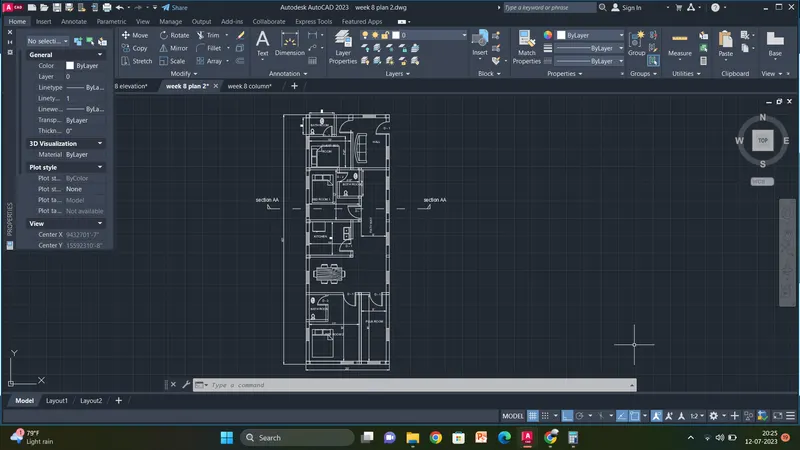
procedure for plan by using layers:
Command:
Command:
Command:
Command:
Command:
Command:
Command:
Command:
Command:
Command:
Command: *Cancel*
Command:
Command:
Command:
Command:
Command:
Command:
** STRETCH **
Specify stretch point or [Base point/Copy/Undo/eXit]:
Command:
** STRETCH **
Specify stretch point or [Base point/Copy/Undo/eXit]:
Command:
** STRETCH **
Specify stretch point or [Base point/Copy/Undo/eXit]:
Command:
** STRETCH **
Specify stretch point or [Base point/Copy/Undo/eXit]: <Ortho off>
Command: *Cancel*
Crossing Lasso Press Spacebar to cycle options
Command: *Cancel*
Command: Specify opposite corner or [Fence/WPolygon/CPolygon]:
Command:
** STRETCH **
Specify stretch point or [Base point/Copy/Undo/eXit]:
Command: *Cancel*
Command:
Command:
Command:
Command: _TEXTEDIT
Current settings: Edit mode = Multiple
Select an annotation object or [Undo/Mode]:
Select an annotation object or [Undo/Mode]: *Cancel*
Command:
Command:
** STRETCH **
Specify stretch point or [Base point/Copy/Undo/eXit]:
Dimension disassociated.
Command: *Cancel*
Command: L
LINE
Specify first point:
Specify next point or [Undo]:
Specify next point or [Undo]: *Cancel*
*Cancel*
Command:
Command:
** STRETCH **
Specify stretch point or [Base point/Copy/Undo/eXit]:
Command: *Cancel*
Command:
Command:
** STRETCH **
Specify stretch point or [Base point/Copy/Undo/eXit]:
Command: *Cancel*
Command: TR
TRIM
Current settings: Projection=UCS, Edge=None, Mode=Quick
Select object to trim or shift-select to extend or
[cuTting edges/Crossing/mOde/Project/eRase]:
Select object to trim or shift-select to extend or
[cuTting edges/Crossing/mOde/Project/eRase/Undo]:
Select object to trim or shift-select to extend or
[cuTting edges/Crossing/mOde/Project/eRase/Undo]:
Specify next fence point or [Undo]:
Specify next fence point or [Undo]:
Select object to trim or shift-select to extend or
[cuTting edges/Crossing/mOde/Project/eRase/Undo]:
Select object to trim or shift-select to extend or
[cuTting edges/Crossing/mOde/Project/eRase/Undo]:
Specify next fence point or [Undo]:
Specify next fence point or [Undo]:
Select object to trim or shift-select to extend or
[cuTting edges/Crossing/mOde/Project/eRase/Undo]:
Select object to trim or shift-select to extend or
[cuTting edges/Crossing/mOde/Project/eRase/Undo]:
Specify next fence point or [Undo]:
Specify next fence point or [Undo]:
Select object to trim or shift-select to extend or
[cuTting edges/Crossing/mOde/Project/eRase/Undo]:
Select object to trim or shift-select to extend or
[cuTting edges/Crossing/mOde/Project/eRase/Undo]:
Select object to trim or shift-select to extend or
[cuTting edges/Crossing/mOde/Project/eRase/Undo]:
Specify next fence point or [Undo]:
Specify next fence point or [Undo]:
Specify next fence point or [Undo]:
Specify next fence point or [Undo]:
Cannot TRIM this object.
Select object to trim or shift-select to extend or
[cuTting edges/Crossing/mOde/Project/eRase/Undo]:
Select object to trim or shift-select to extend or
[cuTting edges/Crossing/mOde/Project/eRase/Undo]:
Specify next fence point or [Undo]:
Specify next fence point or [Undo]:
Cannot TRIM this object.
Select object to trim or shift-select to extend or
[cuTting edges/Crossing/mOde/Project/eRase/Undo]:
Select object to trim or shift-select to extend or
[cuTting edges/Crossing/mOde/Project/eRase/Undo]:
Specify next fence point or [Undo]:
Specify next fence point or [Undo]:
Cannot TRIM this object.
Select object to trim or shift-select to extend or
[cuTting edges/Crossing/mOde/Project/eRase/Undo]:
Select object to trim or shift-select to extend or
[cuTting edges/Crossing/mOde/Project/eRase/Undo]: *Cancel*
Command:
Command:
** STRETCH **
Specify stretch point or [Base point/Copy/Undo/eXit]:
Command:
** STRETCH **
Specify stretch point or [Base point/Copy/Undo/eXit]:
Command: *Cancel*
Command:
Command: *Cancel*
Window Lasso Press Spacebar to cycle options
Window Lasso Press Spacebar to cycle options
Command:
Command:
** STRETCH **
Specify stretch point or [Base point/Copy/Undo/eXit]:
Command: *Cancel*
Command:
Command:
** STRETCH **
Specify stretch point or [Base point/Copy/Undo/eXit]:
Command: *Cancel*
Command:
Command:
** STRETCH **
Specify stretch point or [Base point/Copy/Undo/eXit]:
Command:
Command:
** STRETCH **
Specify stretch point or [Base point/Copy/Undo/eXit]:
Command: *Cancel*
Command:
Command:
** STRETCH **
Specify stretch point or [Base point/Copy/Undo/eXit]:
Command:
Command:
** STRETCH **
Specify stretch point or [Base point/Copy/Undo/eXit]:
Command: *Cancel*
Crossing Lasso Press Spacebar to cycle options
Command:
** STRETCH **
Specify stretch point or [Base point/Copy/Undo/eXit]:
Command: *Cancel*
Command:
Crossing Lasso Press Spacebar to cycle options
Command:
** STRETCH **
Specify stretch point or [Base point/Copy/Undo/eXit]:
Command: *Cancel*
Command:
Command:
Command: _dim
Select objects or specify first extension line origin or [Angular/Baseline/Continue/Ordinate/aliGn/Distribute/Layer/Undo]:
Specify first extension line origin or [Angular/Baseline/Continue/Ordinate/aliGn/Distribute/Layer/Undo]:
Specify second extension line origin or [Undo]:
Specify dimension line location or second line for angle [Mtext/Text/text aNgle/Undo]:
Select objects or specify first extension line origin or [Angular/Baseline/Continue/Ordinate/aliGn/Distribute/Layer/Undo]:
Specify first extension line origin or [Angular/Baseline/Continue/Ordinate/aliGn/Distribute/Layer/Undo]:
Specify second extension line origin or [Undo]: <Ortho on>
Specify dimension line location or second line for angle [Mtext/Text/text aNgle/Undo]:
Non-associative dimension created.
Select objects or specify first extension line origin or [Angular/Baseline/Continue/Ordinate/aliGn/Distribute/Layer/Undo]:
Specify first extension line origin or [Angular/Baseline/Continue/Ordinate/aliGn/Distribute/Layer/Undo]:
Specify second extension line origin or [Undo]:
Specify dimension line location or second line for angle [Mtext/Text/text aNgle/Undo]:
Non-associative dimension created.
Select objects or specify first extension line origin or [Angular/Baseline/Continue/Ordinate/aliGn/Distribute/Layer/Undo]:
Specify first extension line origin or [Angular/Baseline/Continue/Ordinate/aliGn/Distribute/Layer/Undo]:
Specify second extension line origin or [Undo]:
Specify dimension line location or second line for angle [Mtext/Text/text aNgle/Undo]:
Non-associative dimension created.
Select objects or specify first extension line origin or [Angular/Baseline/Continue/Ordinate/aliGn/Distribute/Layer/Undo]:
Specify first extension line origin or [Angular/Baseline/Continue/Ordinate/aliGn/Distribute/Layer/Undo]:
Specify second extension line origin or [Undo]:
Specify dimension line location or second line for angle [Mtext/Text/text aNgle/Undo]:
Select objects or specify first extension line origin or [Angular/Baseline/Continue/Ordinate/aliGn/Distribute/Layer/Undo]:
Specify first extension line origin or [Angular/Baseline/Continue/Ordinate/aliGn/Distribute/Layer/Undo]:
Specify second extension line origin or [Undo]:
Specify dimension line location or second line for angle [Mtext/Text/text aNgle/Undo]:
Non-associative dimension created.
Select objects or specify first extension line origin or [Angular/Baseline/Continue/Ordinate/aliGn/Distribute/Layer/Undo]:
Specify first extension line origin or [Angular/Baseline/Continue/Ordinate/aliGn/Distribute/Layer/Undo]:
Specify second extension line origin or [Undo]:
Specify dimension line location or second line for angle [Mtext/Text/text aNgle/Undo]:
Non-associative dimension created.
Select objects or specify first extension line origin or [Angular/Baseline/Continue/Ordinate/aliGn/Distribute/Layer/Undo]:
Specify first extension line origin or [Angular/Baseline/Continue/Ordinate/aliGn/Distribute/Layer/Undo]:
Specify second extension line origin or [Undo]:
Specify dimension line location or second line for angle [Mtext/Text/text aNgle/Undo]:
Non-associative dimension created.
Select objects or specify first extension line origin or [Angular/Baseline/Continue/Ordinate/aliGn/Distribute/Layer/Undo]:
Specify first extension line origin or [Angular/Baseline/Continue/Ordinate/aliGn/Distribute/Layer/Undo]:
Specify second extension line origin or [Undo]:
Specify dimension line location or second line for angle [Mtext/Text/text aNgle/Undo]:
Non-associative dimension created.
Select objects or specify first extension line origin or [Angular/Baseline/Continue/Ordinate/aliGn/Distribute/Layer/Undo]:
Specify first extension line origin or [Angular/Baseline/Continue/Ordinate/aliGn/Distribute/Layer/Undo]:
Specify second extension line origin or [Undo]:
Specify dimension line location or second line for angle [Mtext/Text/text aNgle/Undo]:
Non-associative dimension created.
Select objects or specify first extension line origin or [Angular/Baseline/Continue/Ordinate/aliGn/Distribute/Layer/Undo]:
Specify first extension line origin or [Angular/Baseline/Continue/Ordinate/aliGn/Distribute/Layer/Undo]:
Specify second extension line origin or [Undo]:
Specify dimension line location or second line for angle [Mtext/Text/text aNgle/Undo]:
Non-associative dimension created.
Select objects or specify first extension line origin or [Angular/Baseline/Continue/Ordinate/aliGn/Distribute/Layer/Undo]:
Specify first extension line origin or [Angular/Baseline/Continue/Ordinate/aliGn/Distribute/Layer/Undo]:
Specify second extension line origin or [Undo]:
Specify dimension line location or second line for angle [Mtext/Text/text aNgle/Undo]:
Select objects or specify first extension line origin or [Angular/Baseline/Continue/Ordinate/aliGn/Distribute/Layer/Undo]:
Select extension line origin to continue or [Baseline]:*Cancel*
Command: Specify opposite corner or [Fence/WPolygon/CPolygon]:
Automatic save to C:\Users\Welcome\AppData\Local\Temp\week 8 plan 2_1_6624_2459ed39.sv$ ...
Command:
Command: _.erase 1 found
Command:
Command:
Command: _dim
Select objects or specify first extension line origin or [Angular/Baseline/Continue/Ordinate/aliGn/Distribute/Layer/Undo]:
Specify first extension line origin or [Angular/Baseline/Continue/Ordinate/aliGn/Distribute/Layer/Undo]:
Specify second extension line origin or [Undo]:
Specify dimension line location or second line for angle [Mtext/Text/text aNgle/Undo]:
Select objects or specify first extension line origin or [Angular/Baseline/Continue/Ordinate/aliGn/Distribute/Layer/Undo]:
Specify first extension line origin or [Angular/Baseline/Continue/Ordinate/aliGn/Distribute/Layer/Undo]:
Specify second extension line origin or [Undo]:
Specify dimension line location or second line for angle [Mtext/Text/text aNgle/Undo]:
Non-associative dimension created.
Select objects or specify first extension line origin or [Angular/Baseline/Continue/Ordinate/aliGn/Distribute/Layer/Undo]:
Specify first extension line origin or [Angular/Baseline/Continue/Ordinate/aliGn/Distribute/Layer/Undo]:
Specify second extension line origin or [Undo]:
Specify dimension line location or second line for angle [Mtext/Text/text aNgle/Undo]:
Non-associative dimension created.
Select objects or specify first extension line origin or [Angular/Baseline/Continue/Ordinate/aliGn/Distribute/Layer/Undo]:
Specify first extension line origin or [Angular/Baseline/Continue/Ordinate/aliGn/Distribute/Layer/Undo]:
Specify second extension line origin or [Undo]:
Specify dimension line location or second line for angle [Mtext/Text/text aNgle/Undo]:
Non-associative dimension created.
Select objects or specify first extension line origin or [Angular/Baseline/Continue/Ordinate/aliGn/Distribute/Layer/Undo]:
Specify first extension line origin or [Angular/Baseline/Continue/Ordinate/aliGn/Distribute/Layer/Undo]:
Specify second extension line origin or [Undo]:
Specify dimension line location or second line for angle [Mtext/Text/text aNgle/Undo]:
Non-associative dimension created.
Select objects or specify first extension line origin or [Angular/Baseline/Continue/Ordinate/aliGn/Distribute/Layer/Undo]:
Specify first extension line origin or [Angular/Baseline/Continue/Ordinate/aliGn/Distribute/Layer/Undo]:
Specify second extension line origin or [Undo]:
Specify dimension line location or second line for angle [Mtext/Text/text aNgle/Undo]:
Non-associative dimension created.
Select objects or specify first extension line origin or [Angular/Baseline/Continue/Ordinate/aliGn/Distribute/Layer/Undo]:
Specify first extension line origin or [Angular/Baseline/Continue/Ordinate/aliGn/Distribute/Layer/Undo]:
Specify second extension line origin or [Undo]:
Specify dimension line location or second line for angle [Mtext/Text/text aNgle/Undo]:
Non-associative dimension created.
Select objects or specify first extension line origin or [Angular/Baseline/Continue/Ordinate/aliGn/Distribute/Layer/Undo]:
Specify first extension line origin or [Angular/Baseline/Continue/Ordinate/aliGn/Distribute/Layer/Undo]:
Specify second extension line origin or [Undo]:
Specify dimension line location or second line for angle [Mtext/Text/text aNgle/Undo]:
Non-associative dimension created.
Select objects or specify first extension line origin or [Angular/Baseline/Continue/Ordinate/aliGn/Distribute/Layer/Undo]:
Specify first extension line origin or [Angular/Baseline/Continue/Ordinate/aliGn/Distribute/Layer/Undo]:
Specify second extension line origin or [Undo]:
Specify dimension line location or second line for angle [Mtext/Text/text aNgle/Undo]:
Non-associative dimension created.
Select objects or specify first extension line origin or [Angular/Baseline/Continue/Ordinate/aliGn/Distribute/Layer/Undo]:
Specify first extension line origin or [Angular/Baseline/Continue/Ordinate/aliGn/Distribute/Layer/Undo]:
Specify second extension line origin or [Undo]:
Specify dimension line location or second line for angle [Mtext/Text/text aNgle/Undo]:
Non-associative dimension created.
Select objects or specify first extension line origin or [Angular/Baseline/Continue/Ordinate/aliGn/Distribute/Layer/Undo]:
Specify first extension line origin or [Angular/Baseline/Continue/Ordinate/aliGn/Distribute/Layer/Undo]:
Specify second extension line origin or [Undo]:
Specify dimension line location or second line for angle [Mtext/Text/text aNgle/Undo]:
Non-associative dimension created.
Select objects or specify first extension line origin or [Angular/Baseline/Continue/Ordinate/aliGn/Distribute/Layer/Undo]:
Specify first extension line origin or [Angular/Baseline/Continue/Ordinate/aliGn/Distribute/Layer/Undo]:
Specify second extension line origin or [Undo]:
Specify dimension line location or second line for angle [Mtext/Text/text aNgle/Undo]:
Non-associative dimension created.
Select objects or specify first extension line origin or [Angular/Baseline/Continue/Ordinate/aliGn/Distribute/Layer/Undo]:
Select objects or specify first extension line origin or [Angular/Baseline/Continue/Ordinate/aliGn/Distribute/Layer/Undo]:
Command:
Command:
Command:
Automatic save to C:\Users\Welcome\AppData\Local\Temp\week 8 plan 2_1_6624_2459ed39.sv$ ...
Command:
Command:
Command:
Automatic save to C:\Users\Welcome\AppData\Local\Temp\week 8 plan 2_1_6624_2459ed39.sv$ ...
Command:
Command:
Command: Specify opposite corner or [Fence/WPolygon/CPolygon]:
Command:
Command:
Command: _.erase 3 found
Window Lasso Press Spacebar to cycle options
Window Lasso Press Spacebar to cycle options
Command: _.erase 2 found
Command:
Crossing Lasso Press Spacebar to cycle options
Command: _.erase 3 found
Window Lasso Press Spacebar to cycle options
Crossing Lasso Press Spacebar to cycle options
Command: _.erase 4 found
Crossing Lasso Press Spacebar to cycle options
Command: _.erase 2 found
Crossing Lasso Press Spacebar to cycle options
Command: _.erase 1 found
Crossing Lasso Press Spacebar to cycle options
Command: _.erase 2 found
Command:
Automatic save to C:\Users\Welcome\AppData\Local\Temp\week 8 plan 2_1_6624_2459ed39.sv$ ...
Command:
Crossing Lasso Press Spacebar to cycle options
Command: _.erase 9 found
Crossing Lasso Press Spacebar to cycle options
Command: _.erase 10 found
Crossing Lasso Press Spacebar to cycle options
Command: _.erase 2 found
Crossing Lasso Press Spacebar to cycle options
Command: _.erase 2 found
Command: L
LINE
Specify first point: *Cancel*
Command:
Command: _properties
Command: *Cancel*
Command: LT
LINETYPE
Command: L
LINE
Specify first point:
Specify next point or [Undo]:
Specify next point or [Undo]: *Cancel*
Command:
Command:
Command:
Command: _properties
Command:
Command: *Cancel*
Command: *Cancel*
Command: L
LINE
Specify first point:
Specify next point or [Undo]:
Specify next point or [Undo]: <Ortho off>
Specify next point or [Close/Undo]: *Cancel*
Crossing Lasso Press Spacebar to cycle options
Command: COPY
2 found
Current settings: Copy mode = Multiple
Specify base point or [Displacement/mOde] <Displacement>:
Specify second point or [Array] <use first point as displacement>:
Specify second point or [Array/Exit/Undo] <Exit>: *Cancel*
Crossing Lasso Press Spacebar to cycle options
Command: MI
MIRROR 2 found
Specify first point of mirror line:
Specify second point of mirror line:
Erase source objects? [Yes/No] <No>: Y
Command: TEXT
Current text style: "Standard" Text height: 0'-10" Annotative: No Justify: Left
Specify start point of text or [Justify/Style]:
Specify height <0'-10">: <Ortho on>
Specify rotation angle of text <0>:
Command:
Command:
Command: *Cancel*
Crossing Lasso Press Spacebar to cycle options
Command: RO
ROTATE
Current positive angle in UCS: ANGDIR=counterclockwise ANGBASE=0
1 found
Specify base point:
Specify rotation angle or [Copy/Reference] <270>:
Command:
Command:
** STRETCH **
Specify stretch point or [Base point/Copy/Undo/eXit]:
Command:
** STRETCH **
Specify stretch point or [Base point/Copy/Undo/eXit]:
Command: *Cancel*
Command:
Command: COPY
1 found
Current settings: Copy mode = Multiple
Specify base point or [Displacement/mOde] <Displacement>:
Specify second point or [Array] <use first point as displacement>:
Specify second point or [Array/Exit/Undo] <Exit>: *Cancel*
Command:
Automatic save to C:\Users\Welcome\AppData\Local\Temp\week 8 plan 2_1_6624_2459ed39.sv$ ...
Command:
Command:
Automatic save to C:\Users\Welcome\AppData\Local\Temp\week 8 plan 2_1_6624_2459ed39.sv$ ...
Command:
Command:
Command:
Command:
Command:
Command:
Automatic save to C:\Users\Welcome\AppData\Local\Temp\week 8 plan 2_1_6624_2459ed39.sv$ ...
Command:
Command:
Command:
Command:
Command:
Command: _dim
Select objects or specify first extension line origin or [Angular/Baseline/Continue/Ordinate/aliGn/Distribute/Layer/Undo]:
Specify first extension line origin or [Angular/Baseline/Continue/Ordinate/aliGn/Distribute/Layer/Undo]:
Specify second extension line origin or [Undo]:
Specify dimension line location or second line for angle [Mtext/Text/text aNgle/Undo]:
Select objects or specify first extension line origin or [Angular/Baseline/Continue/Ordinate/aliGn/Distribute/Layer/Undo]:
Select extension line origin to continue or [Baseline]:
Specify second extension line origin or [Select/Undo] <Select>: *Cancel*
Select objects or specify first extension line origin or [Angular/Baseline/Continue/Ordinate/aliGn/Distribute/Layer/Undo]:
Select extension line origin to continue or [Baseline]:
Specify second extension line origin or [Select/Undo] <Select>: *Cancel*
Select objects or specify first extension line origin or [Angular/Baseline/Continue/Ordinate/aliGn/Distribute/Layer/Undo]:
Select extension line origin to continue or [Baseline]:*Cancel*
Command:
Command:
** STRETCH **
Specify stretch point or [Base point/Copy/Undo/eXit]:
Dimension extension disassociated.
Command:
** STRETCH **
Specify stretch point or [Base point/Copy/Undo/eXit]:
Command:
** STRETCH **
Specify stretch point or [Base point/Copy/Undo/eXit]:
Command:
** STRETCH **
Specify stretch point or [Base point/Copy/Undo/eXit]:
Command: _.erase 1 found
Command: L
LINE
Specify first point:
Specify next point or [Undo]:
Specify next point or [Undo]: *Cancel*
Command:
Command:
Command: _dim
Select objects or specify first extension line origin or [Angular/Baseline/Continue/Ordinate/aliGn/Distribute/Layer/Undo]:
Specify first extension line origin or [Angular/Baseline/Continue/Ordinate/aliGn/Distribute/Layer/Undo]:
Specify second extension line origin or [Undo]:
Specify dimension line location or second line for angle [Mtext/Text/text aNgle/Undo]:
Select objects or specify first extension line origin or [Angular/Baseline/Continue/Ordinate/aliGn/Distribute/Layer/Undo]:
Select extension line origin to continue or [Baseline]:*Cancel*
Command:
Command:
Automatic save to C:\Users\Welcome\AppData\Local\Temp\week 8 plan 2_1_6624_2459ed39.sv$ ...
Command:
Command:
Command:
Command:
Command: _.erase 1 found
Command:
Command:
Command: _dim
Select objects or specify first extension line origin or [Angular/Baseline/Continue/Ordinate/aliGn/Distribute/Layer/Undo]:
Specify first extension line origin or [Angular/Baseline/Continue/Ordinate/aliGn/Distribute/Layer/Undo]:
Specify second extension line origin or [Undo]:
Specify dimension line location or second line for angle [Mtext/Text/text aNgle/Undo]:
Select objects or specify first extension line origin or [Angular/Baseline/Continue/Ordinate/aliGn/Distribute/Layer/Undo]:
Select objects or specify first extension line origin or [Angular/Baseline/Continue/Ordinate/aliGn/Distribute/Layer/Undo]:
Command:
Command:
Command:
Command:
Command: _dim
Select objects or specify first extension line origin or [Angular/Baseline/Continue/Ordinate/aliGn/Distribute/Layer/Undo]:
Specify first extension line origin or [Angular/Baseline/Continue/Ordinate/aliGn/Distribute/Layer/Undo]:
Specify second extension line origin or [Undo]:
Command:
Command: _.erase 1 found
Command:
Command:
Command: _dim
Select objects or specify first extension line origin or [Angular/Baseline/Continue/Ordinate/aliGn/Distribute/Layer/Undo]:
Specify first extension line origin or [Angular/Baseline/Continue/Ordinate/aliGn/Distribute/Layer/Undo]:
Specify second extension line origin or [Undo]:
Specify dimension line location or second line for angle [Mtext/Text/text aNgle/Undo]:
Select objects or specify first extension line origin or [Angular/Baseline/Continue/Ordinate/aliGn/Distribute/Layer/Undo]:
Select extension line origin to continue or [Baseline]:*Cancel*
Command:
Command: _.erase 1 foundCommand:
Command: _laylck
Select an object on the layer to be locked:
Layer "window" has been locked.
Command:
Command:
Command: *Cancel*
Command:
Command:
Command:
1 was on a locked layer.
Command:
Command:
Command:
Command:
1 was on a locked layer.
Command:
Command:
Command: *Cancel*
Command: _u DROPGEOM GROUP
Command:
Command:
Command: _laylck
Select an object on the layer to be locked: *Cancel*
Command:
Command: _layulk
Select an object on the layer to be unlocked: *Cancel*
Command:
Command: _layulk
Select an object on the layer to be unlocked: *Cancel*
Command:
Command: _layulk
Select an object on the layer to be unlocked: *Cancel*
Command:
Command: _layulk
Select an object on the layer to be unlocked: *Cancel*
Command:
Command: _layulk
Select an object on the layer to be unlocked: *Cancel*
Command:
Command: _layulk
Select an object on the layer to be unlocked: *Cancel*
Command:
Command: _layulk
Select an object on the layer to be unlocked: *Cancel*
Command:
Command: _layulk
Select an object on the layer to be unlocked: *Cancel*
Command:
Command: _layulk
Select an object on the layer to be unlocked: *Cancel*
Command:
Command: _layulk
Select an object on the layer to be unlocked: *Cancel*
Command:
Command: _layulk
Select an object on the layer to be unlocked: *Cancel*
Command:
Command: _layulk
Select an object on the layer to be unlocked: *Cancel*
Command:
Command: _layulk
Select an object on the layer to be unlocked: *Cancel*
Command:
Command: _layulk
Select an object on the layer to be unlocked: *Cancel*
Command:
Command: _layulk
Select an object on the layer to be unlocked: *Cancel*
Command:
Command: _layulk
Select an object on the layer to be unlocked:
Layer "exterior wall" is already unlocked.
Command:
Command:
Command:
Command:
Command: _layulk
Select an object on the layer to be unlocked: *Cancel*
Command:
Command:
Command:
1 was on a locked layer.
Command: *Cancel*
Command: *Cancel*
Command:
Command:
Command: _layulk
Select an object on the layer to be unlocked: *Cancel*
Command:
Command: _layulk
Select an object on the layer to be unlocked: *Cancel*
Command:
Command: _layulk
Select an object on the layer to be unlocked: *Cancel*
Command:
Command: _laylck
Select an object on the layer to be locked: *Cancel*
Command:
Command: _laylck
Select an object on the layer to be locked:
Command:
Command: '_.-LAYER
Current layer: "window"
>>Enter an option [?/Make/Set/New/Rename/ON/OFF/Color/Ltype/LWeight/TRansparency/MATerial/Plot/Freeze/Thaw/LOck/Unlock/stAte/Description/rEconcile/Xref]: _UNLOCK
>>Enter name list of layer(s) to unlock or <select objects>: =window
>>Enter an option [?/Make/Set/New/Rename/ON/OFF/Color/Ltype/LWeight/TRansparency/MATerial/Plot/Freeze/Thaw/LOck/Unlock/stAte/Description/rEconcile/Xref]:
Resuming LAYLCK command.
Command: *Cancel*
Command:
Command:
Command:
Command:
Command:
Command:
Command:
Command:
Command:
Command: Specify opposite corner or [Fence/WPolygon/CPolygon]:
Command: Specify opposite corner or [Fence/WPolygon/CPolygon]:
Command: '_.quickproperties
Command:
Command:
Command:
Command:
Command:
Command:
Command:
Command:
Command: *Cancel*
Command: Specify opposite corner or [Fence/WPolygon/CPolygon]:
Command:
Command:
Command:
Command:
Command: Specify opposite corner or [Fence/WPolygon/CPolygon]:
Command:
Command:
Command:
Command: Specify opposite corner or [Fence/WPolygon/CPolygon]: '_.quickproperties Specify opposite corner or [Fence/WPolygon/CPolygon]:
Crossing Lasso Press Spacebar to cycle options
Crossing Lasso Press Spacebar to cycle options
Command:
Command:
Command:
Command: Specify opposite corner or [Fence/WPolygon/CPolygon]:
Command: '_.quickproperties
Command: Specify opposite corner or [Fence/WPolygon/CPolygon]:
Crossing Lasso Press Spacebar to cycle options
Command: *Cancel*
Command:
Command: *Cancel*
Command:
Automatic save to C:\Users\Welcome\AppData\Local\Temp\Drawing1_1_26782_b0ecb136.sv$ ...
Command:
Crossing Lasso Press Spacebar to cycle options
Window Lasso Press Spacebar to cycle options
Crossing Lasso Press Spacebar to cycle options
Crossing Lasso Press Spacebar to cycle options
Window Lasso Press Spacebar to cycle options
Crossing Lasso Press Spacebar to cycle options
Crossing Lasso Press Spacebar to cycle options
Crossing Lasso Press Spacebar to cycle options
Crossing Lasso Press Spacebar to cycle options
Window Lasso Press Spacebar to cycle options
Crossing Lasso Press Spacebar to cycle options
Crossing Lasso Press Spacebar to cycle options
Crossing Lasso Press Spacebar to cycle options
Crossing Lasso Press Spacebar to cycle options
Crossing Lasso Press Spacebar to cycle options
Crossing Lasso Press Spacebar to cycle options
Crossing Lasso Press Spacebar to cycle options
Window Lasso Press Spacebar to cycle options
Window Lasso Press Spacebar to cycle options
Crossing Lasso Press Spacebar to cycle options
Crossing Lasso Press Spacebar to cycle options
Crossing Lasso Press Spacebar to cycle options
Crossing Lasso Press Spacebar to cycle options
Window Lasso Press Spacebar to cycle options
Window Lasso Press Spacebar to cycle options
Crossing Lasso Press Spacebar to cycle options
Crossing Lasso Press Spacebar to cycle options
Command: *Cancel*
Command:
Command:
Command: _QSave
Command:
Command:
** STRETCH **
Specify stretch point or [Base point/Copy/Undo/eXit]:
Command: *Cancel*
Command:
Command:
** STRETCH **
Specify stretch point or [Base point/Copy/Undo/eXit]:
Command: *Cancel*
Crossing Lasso Press Spacebar to cycle options
Command: *Cancel*
Command:
Command: *Cancel*
Window Lasso Press Spacebar to cycle options
Crossing Lasso Press Spacebar to cycle options
Command:
Crossing Lasso Press Spacebar to cycle options
Crossing Lasso Press Spacebar to cycle options
Crossing Lasso Press Spacebar to cycle options
Crossing Lasso Press Spacebar to cycle options
Command:
Window Lasso Press Spacebar to cycle options
Crossing Lasso Press Spacebar to cycle options
Crossing Lasso Press Spacebar to cycle options
Crossing Lasso Press Spacebar to cycle options
Crossing Lasso Press Spacebar to cycle options
Crossing Lasso Press Spacebar to cycle options
Command: Specify opposite corner or [Fence/WPolygon/CPolygon]:
Crossing Lasso Press Spacebar to cycle options
Command:
Command:
Command:
Command:
Command:
Command:
Crossing Lasso Press Spacebar to cycle options
Command:
Crossing Lasso Press Spacebar to cycle options
Window Lasso Press Spacebar to cycle options
Crossing Lasso Press Spacebar to cycle options
Crossing Lasso Press Spacebar to cycle options
Command:
Crossing Lasso Press Spacebar to cycle options
Crossing Lasso Press Spacebar to cycle options
Crossing Lasso Press Spacebar to cycle options
Crossing Lasso Press Spacebar to cycle options
Command: Specify opposite corner or [Fence/WPolygon/CPolygon]:
Crossing Lasso Press Spacebar to cycle options
Command: Specify opposite corner or [Fence/WPolygon/CPolygon]:
Crossing Lasso Press Spacebar to cycle options
Command:
Command:
Command: *Cancel*
Command:
Command: *Cancel*
Command:
Command:
Command: _qsave
Command: DED
DIMEDIT
Enter type of dimension editing [Home/New/Rotate/Oblique] <Home>: N
Command: DED
DIMEDIT
Enter type of dimension editing [Home/New/Rotate/Oblique] <Home>: H
Select objects: 0 found
Select objects: 0 found, 0 total
Select objects: 0 found, 0 total
Select objects: 0 found, 0 total
Window Lasso Press Spacebar to cycle options0 found, 0 total
Select objects: Specify opposite corner: 0 found, 0 total
Select objects: *Cancel*
Command:
Automatic save to C:\Users\Welcome\AppData\Local\Temp\week 8 layers_1_19840_e730882e.sv$ ...
Command:
Command:
Command:
Command: *Cancel*
Command:
Command: *Cancel*
Command: LW
LWEIGHT
Command:
Command: *Cancel*
Command: *Cancel*
Command:
Automatic save to C:\Users\Welcome\AppData\Local\Temp\week 8 layers_1_19840_e730882e.sv$ ...
Command:
Command:
Command:
Command:
Command:
Command: _qsave
Command:
Command:
Command:
Automatic save to C:\Users\Welcome\AppData\Local\Temp\week 8 layers_1_31254_b48d554a.sv$ ...
Command:
Command:
Command:
Automatic save to C:\Users\Welcome\AppData\Local\Temp\week 8 layers_1_31254_b48d554a.sv$ ...
Command:
Command:
Command:
Command:
Automatic save to C:\Users\Welcome\AppData\Local\Temp\week 8 layers_1_31254_b48d554a.sv$ ...
Command:
Command:
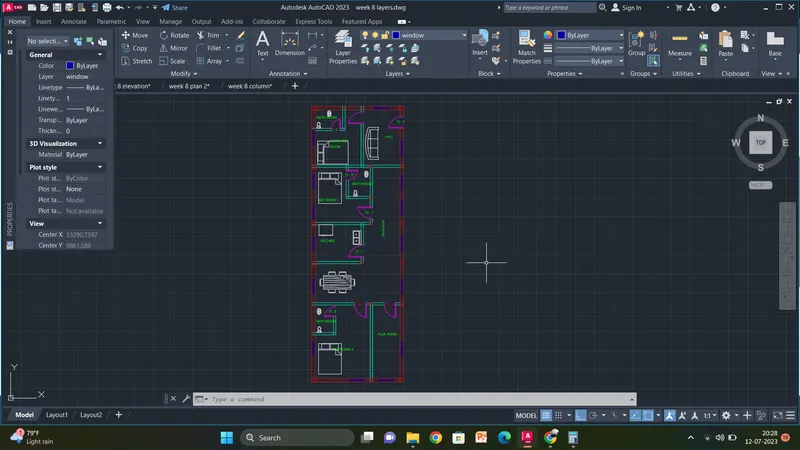
procedure for elevation:
Select object to trim or shift-select to extend or
[cuTting edges/Crossing/mOde/Project/eRase/Undo]:
Specify next fence point or [Undo]:
Specify next fence point or [Undo]:
Select object to trim or shift-select to extend or
[cuTting edges/Crossing/mOde/Project/eRase/Undo]:
Select object to trim or shift-select to extend or
[cuTting edges/Crossing/mOde/Project/eRase/Undo]:
Specify next fence point or [Undo]:
Specify next fence point or [Undo]:
Select object to trim or shift-select to extend or
[cuTting edges/Crossing/mOde/Project/eRase/Undo]:
Select object to trim or shift-select to extend or
[cuTting edges/Crossing/mOde/Project/eRase/Undo]:
Specify next fence point or [Undo]:
Specify next fence point or [Undo]:
Select object to trim or shift-select to extend or
[cuTting edges/Crossing/mOde/Project/eRase/Undo]:
Select object to trim or shift-select to extend or
[cuTting edges/Crossing/mOde/Project/eRase/Undo]:
Specify next fence point or [Undo]:
Specify next fence point or [Undo]:
Select object to trim or shift-select to extend or
[cuTting edges/Crossing/mOde/Project/eRase/Undo]: _u
Select object to trim or shift-select to extend or
[cuTting edges/Crossing/mOde/Project/eRase/Undo]:
Select object to trim or shift-select to extend or
[cuTting edges/Crossing/mOde/Project/eRase/Undo]:
Specify next fence point or [Undo]:
Specify next fence point or [Undo]:
Select object to trim or shift-select to extend or
[cuTting edges/Crossing/mOde/Project/eRase/Undo]: *Cancel*
Command:
Command:
** STRETCH **
Specify stretch point or [Base point/Copy/Undo/eXit]:
Command: *Cancel*
Command: Specify opposite corner or [Fence/WPolygon/CPolygon]:
Command:
** STRETCH **
Specify stretch point or [Base point/Copy/Undo/eXit]:
Command: *Cancel*
Command:
Automatic save to C:\Users\Welcome\AppData\Local\Temp\week 8 elevation_1_15189_ad90074b.sv$ ...
Command:
Command:
Crossing Lasso Press Spacebar to cycle options
Command: _.erase 1 found
Window Lasso Press Spacebar to cycle options
Crossing Lasso Press Spacebar to cycle options
Command: _.erase 1 found
Hatch boundary associativity removed.
Crossing Lasso Press Spacebar to cycle options
Command: _.erase 2 found
Crossing Lasso Press Spacebar to cycle options
Command: _.erase 2 found
Command:
Command:
Command: *Cancel*
Command: OFFSET
Current settings: Erase source=No Layer=Source OFFSETGAPTYPE=0
Specify offset distance or [Through/Erase/Layer] <Through>:
Select object to offset or [Exit/Undo] <Exit>:
Specify through point or [Exit/Multiple/Undo] <Exit>: 5"
Select object to offset or [Exit/Undo] <Exit>: *Cancel*
Command:
Command: *Cancel*
Command:
Command: *Cancel*
Command:
Command: _.erase 1 found
Hatch boundary associativity removed.
Command:
Command: *Cancel*
Command: Specify opposite corner or [Fence/WPolygon/CPolygon]:
Command: *Cancel*
Command: H
HATCH
Pick internal point or [Select objects/Undo/seTtings]: Selecting everything...
Selecting everything visible...
Analyzing the selected data...
Analyzing internal islands...
Pick internal point or [Select objects/Undo/seTtings]:
Analyzing internal islands...
Pick internal point or [Select objects/Undo/seTtings]:
Analyzing internal islands...
Pick internal point or [Select objects/Undo/seTtings]:
Analyzing internal islands...
Pick internal point or [Select objects/Undo/seTtings]:
Analyzing internal islands...
Pick internal point or [Select objects/Undo/seTtings]: *Cancel*
Command:
Command: _properties
Command: *Cancel*
Command: *Cancel*
Command: Specify opposite corner or [Fence/WPolygon/CPolygon]: *Cancel*
Command: Specify opposite corner or [Fence/WPolygon/CPolygon]: *Cancel*
Command: *Cancel*
Command: Specify opposite corner or [Fence/WPolygon/CPolygon]:
Command: Specify opposite corner or [Fence/WPolygon/CPolygon]:
Command: '_zoom
Specify corner of window, enter a scale factor (nX or nXP), or
[All/Center/Dynamic/Extents/Previous/Scale/Window/Object] <real time>:
Press ESC or ENTER to exit, or right-click to display shortcut menu.
Command: HATCH
Pick internal point or [Select objects/Undo/seTtings]: Selecting everything...
Selecting everything visible...
Analyzing the selected data...
Analyzing internal islands...
Pick internal point or [Select objects/Undo/seTtings]: Selecting everything...
Selecting everything visible...
Analyzing the selected data...
This area has already been specified.
Pick internal point or [Select objects/Undo/seTtings]: Selecting everything...
Selecting everything visible...
Analyzing the selected data...
Analyzing internal islands...
Pick internal point or [Select objects/Undo/seTtings]: Selecting everything...
Selecting everything visible...
Analyzing the selected data...
Analyzing internal islands...
Pick internal point or [Select objects/Undo/seTtings]: Selecting everything...
Selecting everything visible...
Analyzing the selected data...
Analyzing internal islands...
Pick internal point or [Select objects/Undo/seTtings]: *Cancel*
Command:
Command: '_-hatchedit_pAR-CONC
Command: '_-hatchedit
1 found
Enter hatch option [DIsassociate/Style/Properties/DRaw order/ADd boundaries/Remove boundaries/recreate Boundary/ASsociate/separate Hatches/Origin/ANnotative/hatch COlor/LAyer/Transparency] <Properties>: _p
Enter a pattern name or [?/Solid/User defined/Gradient] <AR-CONC>: AR-CONC
Specify a scale for the pattern <1.0000>:
Specify an angle for the pattern <0>:
Command: MORE
MESHSMOOTHMORE
1 object(s) found.
Not a valid object type.
Command:
Command:
Command:
Command: _properties
Command:
Command:
Command:
Command: *Cancel*
Command:
Command:
Command: *Cancel*
Command:
Command: *Cancel*
Command:
Command:
Command: *Cancel*
Command: OFFSET
Current settings: Erase source=No Layer=Source OFFSETGAPTYPE=0
Specify offset distance or [Through/Erase/Layer] <Through>:
Select object to offset or [Exit/Undo] <Exit>:
Specify through point or [Exit/Multiple/Undo] <Exit>: 3'
Select object to offset or [Exit/Undo] <Exit>: *Cancel*
Command:
Command:
** STRETCH **
Specify stretch point or [Base point/Copy/Undo/eXit]:*Cancel*
Command:
Command:
** STRETCH **
Specify stretch point or [Base point/Copy/Undo/eXit]: 6"
Command: *Cancel*
Command:
Command:
** STRETCH **
Specify stretch point or [Base point/Copy/Undo/eXit]:
Command: *Cancel*
Command:
Command:
** STRETCH **
Specify stretch point or [Base point/Copy/Undo/eXit]:
Command: *Cancel*
Command:
Command:
** STRETCH **
Specify stretch point or [Base point/Copy/Undo/eXit]:
Command: Specify opposite corner or [Fence/WPolygon/CPolygon]:
Command:
Command:
** STRETCH **
Specify stretch point or [Base point/Copy/Undo/eXit]:
Command:
Command: '_.quickproperties
Command:
** STRETCH **
Specify stretch point or [Base point/Copy/Undo/eXit]:
Command:
Command:
** STRETCH **
Specify stretch point or [Base point/Copy/Undo/eXit]:
Command:
Command:
** STRETCH **
Specify stretch point or [Base point/Copy/Undo/eXit]:
Command:
Command: '_.quickproperties
Command:
** STRETCH **
Specify stretch point or [Base point/Copy/Undo/eXit]:
Command:
Command:
** STRETCH **
Specify stretch point or [Base point/Copy/Undo/eXit]:
Window Lasso Press Spacebar to cycle options
Command:
Command: '_.quickproperties
Command:
** STRETCH **
Specify stretch point or [Base point/Copy/Undo/eXit]:
Command:
Command:
** STRETCH **
Specify stretch point or [Base point/Copy/Undo/eXit]:
Command:
Command: '_.quickproperties
Command:
** STRETCH **
Specify stretch point or [Base point/Copy/Undo/eXit]:
Command: *Cancel*
Command: TR
TRIM
Current settings: Projection=UCS, Edge=None, Mode=Quick
Select object to trim or shift-select to extend or
[cuTting edges/Crossing/mOde/Project/eRase]:
Select object to trim or shift-select to extend or
[cuTting edges/Crossing/mOde/Project/eRase/Undo]:
Select object to trim or shift-select to extend or
[cuTting edges/Crossing/mOde/Project/eRase/Undo]:
Specify next fence point or [Undo]:
Specify next fence point or [Undo]:
Select object to trim or shift-select to extend or
[cuTting edges/Crossing/mOde/Project/eRase/Undo]:
Select object to trim or shift-select to extend or
[cuTting edges/Crossing/mOde/Project/eRase/Undo]:
Specify next fence point or [Undo]:
Specify next fence point or [Undo]:
Select object to trim or shift-select to extend or
[cuTting edges/Crossing/mOde/Project/eRase/Undo]:
Select object to trim or shift-select to extend or
[cuTting edges/Crossing/mOde/Project/eRase/Undo]:
Specify next fence point or [Undo]:
Specify next fence point or [Undo]:
Select object to trim or shift-select to extend or
[cuTting edges/Crossing/mOde/Project/eRase/Undo]:
Select object to trim or shift-select to extend or
[cuTting edges/Crossing/mOde/Project/eRase/Undo]:
Specify next fence point or [Undo]:
Specify next fence point or [Undo]:
Select object to trim or shift-select to extend or
[cuTting edges/Crossing/mOde/Project/eRase/Undo]:
Select object to trim or shift-select to extend or
[cuTting edges/Crossing/mOde/Project/eRase/Undo]:
Specify next fence point or [Undo]:
Specify next fence point or [Undo]:
Select object to trim or shift-select to extend or
[cuTting edges/Crossing/mOde/Project/eRase/Undo]:
Select object to trim or shift-select to extend or
[cuTting edges/Crossing/mOde/Project/eRase/Undo]:
Specify next fence point or [Undo]:
Specify next fence point or [Undo]:
Select object to trim or shift-select to extend or
[cuTting edges/Crossing/mOde/Project/eRase/Undo]: *Cancel*
Command:
Command:
** STRETCH **
Specify stretch point:
Command:
** STRETCH **
Specify stretch point or [Base point/Copy/Undo/eXit]:
Command:
** STRETCH **
Specify stretch point or [Base point/Copy/Undo/eXit]:
Command: *Cancel*
Command:
Command:
** STRETCH **
Specify stretch point:*Cancel*
Command:
** STRETCH **
Specify stretch point or [Base point/Copy/Undo/eXit]:
Command:
** STRETCH **
Specify stretch point or [Base point/Copy/Undo/eXit]:
Command:
** STRETCH **
Specify stretch point or [Base point/Copy/Undo/eXit]:
Command:
** STRETCH **
Specify stretch point or [Base point/Copy/Undo/eXit]:
Command:
** STRETCH **
Specify stretch point or [Base point/Copy/Undo/eXit]:
Command:
** STRETCH **
Specify stretch point or [Base point/Copy/Undo/eXit]:
Command:
** STRETCH **
Specify stretch point or [Base point/Copy/Undo/eXit]:
Command:
** STRETCH **
Specify stretch point or [Base point/Copy/Undo/eXit]:
Command:
Command:
** STRETCH **
Specify stretch point or [Base point/Copy/Undo/eXit]:
Command:
** STRETCH **
Specify stretch point or [Base point/Copy/Undo/eXit]:
Command: *Cancel*
Command:
Command:
Command: _qsave
Command:
Command:
Command: *Cancel*
Command:
Command:
Automatic save to C:\Users\Welcome\AppData\Local\Temp\week 8 elevation_1_27797_2245ec6c.sv$ ...
Command:
Command:
Command:
Command:
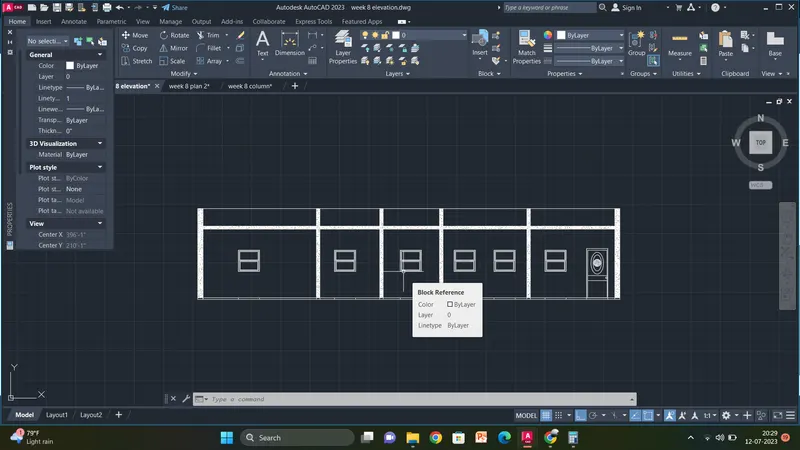
procedure for structural components:
Specify next point or [Close/Undo]: 300
Specify next point or [Close/Undo]:
Command: L
LINE
Specify first point:
Specify next point or [Undo]: 150
Specify next point or [Undo]:
Specify next point or [Close/Undo]: *Cancel*
Command:
Command: _.erase 1 found
Command: Specify opposite corner or [Fence/WPolygon/CPolygon]:
Command: Specify opposite corner or [Fence/WPolygon/CPolygon]:
Command: CP
COPY 5 found
Current settings: Copy mode = Multiple
Specify base point or [Displacement/mOde] <Displacement>:
Specify second point or [Array] <use first point as displacement>: <Ortho off> 150
Specify second point or [Array/Exit/Undo] <Exit>: 150
Specify second point or [Array/Exit/Undo] <Exit>: 150
Specify second point or [Array/Exit/Undo] <Exit>: 150
Specify second point or [Array/Exit/Undo] <Exit>: 150
Specify second point or [Array/Exit/Undo] <Exit>: 150
Specify second point or [Array/Exit/Undo] <Exit>: 150
Specify second point or [Array/Exit/Undo] <Exit>: 150
Specify second point or [Array/Exit/Undo] <Exit>: 150
Specify second point or [Array/Exit/Undo] <Exit>: 150
Specify second point or [Array/Exit/Undo] <Exit>: 150
Specify second point or [Array/Exit/Undo] <Exit>: 150
Specify second point or [Array/Exit/Undo] <Exit>: 150
Specify second point or [Array/Exit/Undo] <Exit>: 150
Specify second point or [Array/Exit/Undo] <Exit>: 150
Specify second point or [Array/Exit/Undo] <Exit>: *Cancel*
Crossing Lasso Press Spacebar to cycle options
Command: *Cancel*
Command:
Command:
Command:
Command:
Command:
Command: _.erase 5 found
Command:
Command:
** STRETCH **
Specify stretch point or [Base point/Copy/Undo/eXit]:
Command:
** STRETCH **
Specify stretch point or [Base point/Copy/Undo/eXit]:
Command: _.erase 1 found
Command: _u ERASE
Command:
Command: _.erase 1 found
Crossing Lasso Press Spacebar to cycle options
Command: *Cancel*
Command:
Command: _.erase 1 found
Command:
Command: _.erase 1 found
Command:
Command: _.erase 1 found
Command:
Command: _.erase 1 found
Command:
Command: _.erase 1 found
Command:
Command: _.erase 1 found
Command:
Command: _.erase 1 found
Command:
Command: _.erase 1 found
Command:
Command: _.erase 1 found
Command:
Command: _.erase 1 found
Command:
Automatic save to C:\Users\Welcome\AppData\Local\Temp\week 8 column_1_2136_2a05a64c.sv$ ...
Command:
Command: _.erase 1 found
Command:
Command: _.erase 1 found
Command:
Command: _.erase 1 found
Command:
Command: _.erase 1 found
Command:
Command: _.erase 1 found
Command:
Command: _.erase 1 found
Command: *Cancel*
Crossing Lasso Press Spacebar to cycle options
Crossing Lasso Press Spacebar to cycle options
Command: COPY
5 found
Current settings: Copy mode = Multiple
Specify base point or [Displacement/mOde] <Displacement>:
Specify second point or [Array] <use first point as displacement>: 150
Specify second point or [Array/Exit/Undo] <Exit>: 150
Specify second point or [Array/Exit/Undo] <Exit>: 150
Specify second point or [Array/Exit/Undo] <Exit>: *Cancel*
Crossing Lasso Press Spacebar to cycle options
Command: _.erase 1 found
Command:
Command: _.erase 1 found
Command:
Command: _.erase 1 found
Command:
Command:
Command:
Command:
Command:
Command: *Cancel*
Crossing Lasso Press Spacebar to cycle options*Cancel*
Command: TR
TRIM
Current settings: Projection=UCS, Edge=None, Mode=Quick
Select object to trim or shift-select to extend or
[cuTting edges/Crossing/mOde/Project/eRase]:
Select object to trim or shift-select to extend or
[cuTting edges/Crossing/mOde/Project/eRase/Undo]:
Select object to trim or shift-select to extend or
[cuTting edges/Crossing/mOde/Project/eRase/Undo]:
Specify next fence point or [Undo]:
Specify next fence point or [Undo]:
Select object to trim or shift-select to extend or
[cuTting edges/Crossing/mOde/Project/eRase/Undo]:
Select object to trim or shift-select to extend or
[cuTting edges/Crossing/mOde/Project/eRase/Undo]:
Specify next fence point or [Undo]:
Specify next fence point or [Undo]:
Select object to trim or shift-select to extend or
[cuTting edges/Crossing/mOde/Project/eRase/Undo]:
Select object to trim or shift-select to extend or
[cuTting edges/Crossing/mOde/Project/eRase/Undo]:
Specify next fence point or [Undo]:
Specify next fence point or [Undo]:
Select object to trim or shift-select to extend or
[cuTting edges/Crossing/mOde/Project/eRase/Undo]: *Cancel*
Window Lasso Press Spacebar to cycle options
Command: _.erase 10 found
Command: L
LINE
Specify first point:
Specify next point or [Undo]:
Specify next point or [Undo]: *Cancel*
Command:
LINE
Specify first point:
Specify next point or [Undo]:
Specify next point or [Undo]: *Cancel*
Command: L
LINE
Specify first point:
Specify next point or [Undo]:
Specify next point or [Undo]: *Cancel*
Command:
LINE
Specify first point:
Specify next point or [Undo]:
Specify next point or [Undo]: *Cancel*
Command: L
LINE
Specify first point:
Specify next point or [Undo]:
Specify next point or [Undo]:
Specify next point or [Close/Undo]:
Specify next point or [Close/Undo]:
Specify next point or [Close/Undo]:
Specify next point or [Close/Undo]:
Specify next point or [Close/Undo]:
Specify next point or [Close/Undo]:
Specify next point or [Close/Undo]: *Cancel*
Command:
LINE
Specify first point:
Specify next point or [Undo]: <Ortho on>
Specify next point or [Undo]:
Specify next point or [Close/Undo]:
Specify next point or [Close/Undo]:
Specify next point or [Close/Undo]:
Specify next point or [Close/Undo]:
Specify next point or [Close/Undo]:
Specify next point or [Close/Undo]: *Cancel*
Command:
Command:
Command: _.erase 2 found
Command:
Command:
Command: _.erase 2 found
Command:
Command:
Command: _.erase 2 found
Command:
Command: _.erase 1 found
Command: L
LINE
Specify first point:
Specify next point or [Undo]:
Specify next point or [Undo]:
Specify next point or [Close/Undo]:
Specify next point or [Close/Undo]:
Specify next point or [Close/Undo]:
Specify next point or [Close/Undo]:
Specify next point or [Close/Undo]:
Specify next point or [Close/Undo]:
Specify next point or [Close/Undo]:
Specify next point or [Close/Undo]:
Specify next point or [Close/Undo]:
Specify next point or [Close/Undo]:
Specify next point or [Close/Undo]:
Specify next point or [Close/Undo]:
Specify next point or [Close/Undo]:
Specify next point or [Close/Undo]:
Specify next point or [Close/Undo]:
Specify next point or [Close/Undo]:
Specify next point or [Close/Undo]:
Specify next point or [Close/Undo]:
Specify next point or [Close/Undo]:
Specify next point or [Close/Undo]:
Specify next point or [Close/Undo]:
Specify next point or [Close/Undo]:
Specify next point or [Close/Undo]: *Cancel*
Command:
Command:
Command:
Command:
Command:
Command: _.erase 5 found
Command:
Command:
Command: _.erase 2 found
Command:
Command:
Command: _.erase 2 found
Command:
Command: _.erase 1 found
Command:
Command: _.erase 1 found
Command:
Command: _.erase 1 found
Command: L
LINE
Specify first point:
Specify next point or [Undo]:
Specify next point or [Undo]:
Specify next point or [Close/Undo]:
Specify next point or [Close/Undo]:
Specify next point or [Close/Undo]:
Specify next point or [Close/Undo]:
Specify next point or [Close/Undo]:
Specify next point or [Close/Undo]: *Cancel*
Command: Specify opposite corner or [Fence/WPolygon/CPolygon]:
Command:
Command:
Command:
Command: _.erase 3 found
Crossing Lasso Press Spacebar to cycle options
Crossing Lasso Press Spacebar to cycle options
Crossing Lasso Press Spacebar to cycle options
Command: Specify opposite corner or [Fence/WPolygon/CPolygon]:
Command: CP
COPY 4 found
Current settings: Copy mode = Multiple
Specify base point or [Displacement/mOde] <Displacement>:
Specify second point or [Array] <use first point as displacement>:
Specify second point or [Array/Exit/Undo] <Exit>:
Specify second point or [Array/Exit/Undo] <Exit>: *Cancel*
Command:
Command:
Command:
Command:
Command:
Command:
Command:
Command:
Command: CP
COPY 8 found
Current settings: Copy mode = Multiple
Specify base point or [Displacement/mOde] <Displacement>:
Specify second point or [Array] <use first point as displacement>:
Specify second point or [Array/Exit/Undo] <Exit>: *Cancel*
Command: DT
TEXT
Current text style: "Standard" Text height: 2.50 Annotative: No Justify: Left
Specify start point of text or [Justify/Style]:
Specify height <2.50>:
Specify rotation angle of text <0>:
Command:
Command: RO
ROTATE
Current positive angle in UCS: ANGDIR=counterclockwise ANGBASE=0
1 found
Specify base point:
Specify rotation angle or [Copy/Reference] <90>:
Command:
Command:
Command:
Command: _textedit
Current settings: Edit mode = Multiple
Select an annotation object or [Undo/Mode]:
Select an annotation object or [Undo/Mode]:
Select an annotation object or [Undo/Mode]:
Select an annotation object or [Undo/Mode]:
Select an annotation object or [Undo/Mode]: *Cancel*
Command:
Command:
Command:
Command:
Command: *Cancel*
Command: *Cancel*
Automatic save to C:\Users\Welcome\AppData\Local\Temp\week 8 column_1_2136_2a05a64c.sv$ ...
Command:
Command: