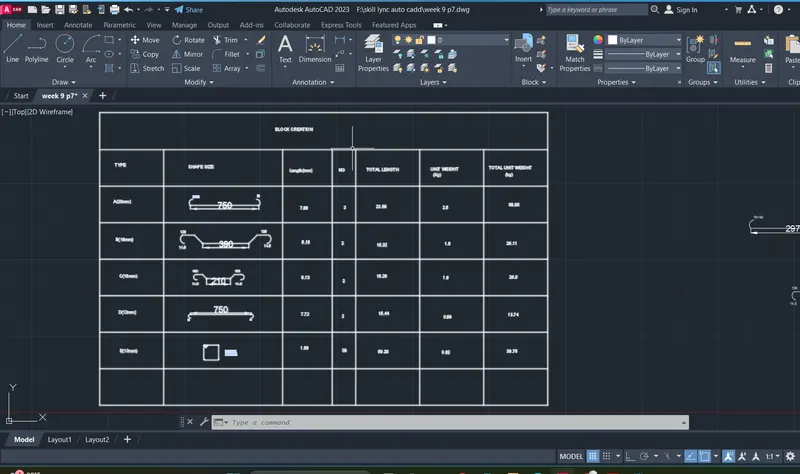
Creating Bar Bending schedule, Different Door types, and Creation of standard drawing templates using AutoCad
AIM:
To draw a template
comments :
- line
- fillet
- offset
- text
- trim
Procedure:
Regenerating model.
*Cancel*
AutoCAD menu utilities loaded.
Command:
Autodesk DWG. This file is a TrustedDWG last saved by an Autodesk application or Autodesk licensed application.
Command:
Command:
Crossing Lasso Press Spacebar to cycle options
Command: _.erase 348 found
Crossing Lasso Press Spacebar to cycle options
Command: _.erase 38 found
Command: _u INTELLIZOOM INTELLIPAN INTELLIZOOM INTELLIPAN INTELLIPAN INTELLIZOOM INTELLIPAN INTELLIZOOM INTELLIZOOM INTELLIPAN INTELLIZOOM INTELLIPAN INTELLIZOOM INTELLIZOOM INTELLIPAN INTELLIZOOM
Command: _u ERASE
Command: _u INTELLIZOOM
Command: _u ERASE
Command: *Cancel*
Command: *Cancel*
Command: <Switching to: Layout1>
Regenerating layout.
Regenerating layout.
Regenerating model - caching viewports.
Crossing Lasso Press Spacebar to cycle options
Command: Specify opposite corner or [Fence/WPolygon/CPolygon]: *Cancel*
Command: *Cancel*
Command: *Cancel*
Command: *Cancel*
Command: <Switching to: Model>
Restoring cached viewports.
Crossing Lasso Press Spacebar to cycle options
Command: CP
COPY 375 found
Current settings: Copy mode = Multiple
Specify base point or [Displacement/mOde] <Displacement>:
Specify second point or [Array] <use first point as displacement>: <Ortho off>
Specify second point or [Array/Exit/Undo] <Exit>: *Cancel*
Command:
Command: _.erase 1 found
Command:
Command: _.erase 1 found
Command:
Command: _.erase 1 found
Command: OFFSET
Current settings: Erase source=No Layer=Source OFFSETGAPTYPE=0
Specify offset distance or [Through/Erase/Layer] <Through>:
Select object to offset or [Exit/Undo] <Exit>:
Specify through point or [Exit/Multiple/Undo] <Exit>: 45
Select object to offset or [Exit/Undo] <Exit>:
Specify through point or [Exit/Multiple/Undo] <Exit>: 45
Select object to offset or [Exit/Undo] <Exit>:
Specify through point or [Exit/Multiple/Undo] <Exit>: 45
Select object to offset or [Exit/Undo] <Exit>: *Cancel*
Command: TR
TRIM
Current settings: Projection=UCS, Edge=None, Mode=Quick
Select object to trim or shift-select to extend or
[cuTting edges/Crossing/mOde/Project/eRase]:
Select object to trim or shift-select to extend or
[cuTting edges/Crossing/mOde/Project/eRase/Undo]:
Select object to trim or shift-select to extend or
[cuTting edges/Crossing/mOde/Project/eRase/Undo]:
Specify next fence point or [Undo]:
Specify next fence point or [Undo]:
Select object to trim or shift-select to extend or
[cuTting edges/Crossing/mOde/Project/eRase/Undo]: _u
Command has been completely undone.
Select object to trim or shift-select to extend or
[cuTting edges/Crossing/mOde/Project/eRase]:
Select object to trim or shift-select to extend or
[cuTting edges/Crossing/mOde/Project/eRase/Undo]:
Specify next fence point or [Undo]:
Specify next fence point or [Undo]:
Select object to trim or shift-select to extend or
[cuTting edges/Crossing/mOde/Project/eRase/Undo]: *Cancel*
Command:
Command: *Cancel*
Command: TR
TRIM
Current settings: Projection=UCS, Edge=None, Mode=Quick
Select object to trim or shift-select to extend or
[cuTting edges/Crossing/mOde/Project/eRase]:
Select object to trim or shift-select to extend or
[cuTting edges/Crossing/mOde/Project/eRase/Undo]:
Specify next fence point or [Undo]:
Specify next fence point or [Undo]:
Select object to trim or shift-select to extend or
[cuTting edges/Crossing/mOde/Project/eRase/Undo]: *Cancel*
Command:
Command:
Command:
Command: _.erase 3 found
Command: DT
TEXT
Current text style: "Standard" Text height: 2.5 Annotative: No Justify: Left
Specify start point of text or [Justify/Style]:
Specify height <2.5>: 2.5
Specify rotation angle of text <0>: 0
Window Lasso Press Spacebar to cycle options
Command:
Command:
Command:
** STRETCH **
Specify stretch point or [Base point/Copy/Undo/eXit]:
Command:
** STRETCH **
Specify stretch point or [Base point/Copy/Undo/eXit]:
Command:
** STRETCH **
Specify stretch point or [Base point/Copy/Undo/eXit]:
Command:
** STRETCH **
Specify stretch point or [Base point/Copy/Undo/eXit]:
Command: *Cancel*
Command:
Command:
Command:
Command:
Command:
Command: *Cancel*
Command:
Command: CP
COPY 1 found
Current settings: Copy mode = Multiple
Specify base point or [Displacement/mOde] <Displacement>:
Specify second point or [Array] <use first point as displacement>:
Specify second point or [Array/Exit/Undo] <Exit>:
Specify second point or [Array/Exit/Undo] <Exit>:
Specify second point or [Array/Exit/Undo] <Exit>: *Cancel*
Command: Specify opposite corner or [Fence/WPolygon/CPolygon]:
Command:
** STRETCH **
Specify stretch point or [Base point/Copy/Undo/eXit]:
Command:
** STRETCH **
Specify stretch point or [Base point/Copy/Undo/eXit]:
Command: Specify opposite corner or [Fence/WPolygon/CPolygon]: *Cancel*
Command: *Cancel*
Command:
Command:
Command:
Command:
Command:
Command:
Command: CP
COPY 1 found
Current settings: Copy mode = Multiple
Specify base point or [Displacement/mOde] <Displacement>:
Specify second point or [Array] <use first point as displacement>:
Specify second point or [Array/Exit/Undo] <Exit>:
Specify second point or [Array/Exit/Undo] <Exit>:
Specify second point or [Array/Exit/Undo] <Exit>: *Cancel*
Command:
Command:
** STRETCH **
Specify stretch point or [Base point/Copy/Undo/eXit]:
Command:
Command:
Command:
Command:
Command:
Command: _u DROPGEOM GROUP
Command:
Command:
Command:
Command:
Command:
Command:
Command:
Command:
Command:
Command:
Command:
Command: CP
COPY 1 found
Current settings: Copy mode = Multiple
Specify base point or [Displacement/mOde] <Displacement>:
Specify second point or [Array] <use first point as displacement>:
Specify second point or [Array/Exit/Undo] <Exit>:
Specify second point or [Array/Exit/Undo] <Exit>:
Specify second point or [Array/Exit/Undo] <Exit>: *Cancel*
Crossing Lasso Press Spacebar to cycle options
Window Lasso Press Spacebar to cycle options
Crossing Lasso Press Spacebar to cycle options
Command: _.erase 303 found
Crossing Lasso Press Spacebar to cycle options
Command: _.erase 31 found
Crossing Lasso Press Spacebar to cycle options
Command: _.erase 41 found
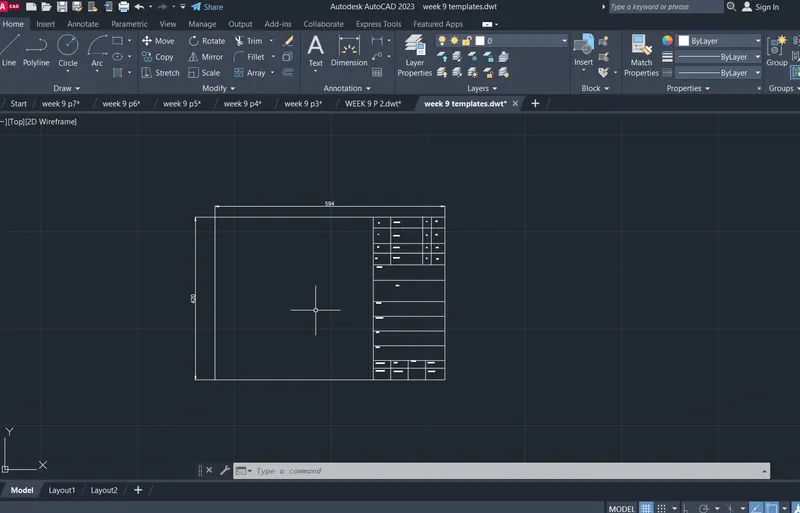
AIM:
To draw a template
comments :
- line
- fillet
- offset
- hatch
- text
- arc
- trim
Procedure:
Command has been completely undone.
Select object to trim or shift-select to extend or
[cuTting edges/Crossing/mOde/Project/eRase]:
Select object to trim or shift-select to extend or
[cuTting edges/Crossing/mOde/Project/eRase/Undo]:
Specify next fence point or [Undo]:
Specify next fence point or [Undo]:
Select object to trim or shift-select to extend or
[cuTting edges/Crossing/mOde/Project/eRase/Undo]:
Cancel
Command: OFFSET
Current settings: Erase source=No Layer=Source OFFSETGAPTYPE=0
Specify offset distance or [Through/Erase/Layer] <Through>:
Select object to offset or [Exit/Undo] <Exit>:
Specify through point or [Exit/Multiple/Undo] <Exit>: 125
Select object to offset or [Exit/Undo] <Exit>:
Specify through point or [Exit/Multiple/Undo] <Exit>: 25
Select object to offset or [Exit/Undo] <Exit>:
Specify through point or [Exit/Multiple/Undo] <Exit>: 25
Select object to offset or [Exit/Undo] <Exit>:
Specify through point or [Exit/Multiple/Undo] <Exit>: 35
Select object to offset or [Exit/Undo] <Exit>:
Specify through point or [Exit/Multiple/Undo] <Exit>: 25
Select object to offset or [Exit/Undo] <Exit>: Cancel
Command: TR
TRIM
Current settings: Projection=UCS, Edge=None, Mode=Quick
Select object to trim or shift-select to extend or
[cuTting edges/Crossing/mOde/Project/eRase]:
Select object to trim or shift-select to extend or
[cuTting edges/Crossing/mOde/Project/eRase/Undo]:
Select object to trim or shift-select to extend or
[cuTting edges/Crossing/mOde/Project/eRase/Undo]:
Specify next fence point or [Undo]:
Specify next fence point or [Undo]:
Select object to trim or shift-select to extend or
[cuTting edges/Crossing/mOde/Project/eRase/Undo]:
Select object to trim or shift-select to extend or
[cuTting edges/Crossing/mOde/Project/eRase/Undo]:
Specify next fence point or [Undo]:
Specify next fence point or [Undo]:
Select object to trim or shift-select to extend or
[cuTting edges/Crossing/mOde/Project/eRase/Undo]: Cancel
Command: OFFSET
Current settings: Erase source=No Layer=Source OFFSETGAPTYPE=0
Specify offset distance or [Through/Erase/Layer] <Through>:
Select object to offset or [Exit/Undo] <Exit>:
Specify through point or [Exit/Multiple/Undo] <Exit>: 20
Select object to offset or [Exit/Undo] <Exit>:
Specify through point or [Exit/Multiple/Undo] <Exit>: 25
Select object to offset or [Exit/Undo] <Exit>:
Specify through point or [Exit/Multiple/Undo] <Exit>: 20
Select object to offset or [Exit/Undo] <Exit>: Cancel
Command: TR
TRIM
Current settings: Projection=UCS, Edge=None, Mode=Quick
Select object to trim or shift-select to extend or
[cuTting edges/Crossing/mOde/Project/eRase]:
Select object to trim or shift-select to extend or
[cuTting edges/Crossing/mOde/Project/eRase/Undo]:
Select object to trim or shift-select to extend or
[cuTting edges/Crossing/mOde/Project/eRase/Undo]:
Specify next fence point or [Undo]:
Specify next fence point or [Undo]:
Select object to trim or shift-select to extend or
[cuTting edges/Crossing/mOde/Project/eRase/Undo]:
Select object to trim or shift-select to extend or
[cuTting edges/Crossing/mOde/Project/eRase/Undo]:
Specify next fence point or [Undo]:
Specify next fence point or [Undo]:
Select object to trim or shift-select to extend or
[cuTting edges/Crossing/mOde/Project/eRase/Undo]: Cancel
Command:
Command:
Command: _offset
Current settings: Erase source=No Layer=Source OFFSETGAPTYPE=0
Specify offset distance or [Through/Erase/Layer] <Through>: Cancel
Command:
Command: _offset
Current settings: Erase source=No Layer=Source OFFSETGAPTYPE=0
Specify offset distance or [Through/Erase/Layer] <Through>: Cancel
Command:
Command: _offset
Current settings: Erase source=No Layer=Source OFFSETGAPTYPE=0
Specify offset distance or [Through/Erase/Layer] <Through>: Cancel
Command:
Command: _offset
Current settings: Erase source=No Layer=Source OFFSETGAPTYPE=0
Specify offset distance or [Through/Erase/Layer] <Through>: Cancel
Command:
Command: _offset
Current settings: Erase source=No Layer=Source OFFSETGAPTYPE=0
Specify offset distance or [Through/Erase/Layer] <Through>: Cancel
Command:
Command: _offset
Current settings: Erase source=No Layer=Source OFFSETGAPTYPE=0
Specify offset distance or [Through/Erase/Layer] <Through>:
Select object to offset or [Exit/Undo] <Exit>:
Specify through point or [Exit/Multiple/Undo] <Exit>: 48.5
Select object to offset or [Exit/Undo] <Exit>:
Specify through point or [Exit/Multiple/Undo] <Exit>: 48.5
Select object to offset or [Exit/Undo] <Exit>:
Specify through point or [Exit/Multiple/Undo] <Exit>: 48.5
Select object to offset or [Exit/Undo] <Exit>:
Specify through point or [Exit/Multiple/Undo] <Exit>: 32.5
Select object to offset or [Exit/Undo] <Exit>: Cancel
Command:
Command:
* STRETCH *
Specify stretch point or [Base point/Copy/Undo/eXit]:
Command: Cancel
Crossing Lasso Press Spacebar to cycle options
Command: _.erase 344 found
Command:
Command:
Command: _pdfimport
Select PDF underlay or [File] <File>: _file
Command: XFER
XREF
Command:
Command:
Command: _pdfimport
Select PDF underlay or [File] <File>: _file
Importing page 2 of PDF file: C:\Users\Welcome\Downloads\Challenges 8.pdf...
Crossing Lasso Press Spacebar to cycle options
Crossing Lasso Press Spacebar to cycle options
Crossing Lasso Press Spacebar to cycle options
Command: RO
ROTATE
Current positive angle in UCS: ANGDIR=counterclockwise ANGBASE=0
344 found
Specify base point:
Invalid point.
Specify base point:
Too many objects selected for INTERSECT
Specify rotation angle or [Copy/Reference] <90>: <Ortho on>
Crossing Lasso Press Spacebar to cycle options
Command: SC
SCALE 344 found
Specify base point:
Checking 703 intersections...
Specify scale factor or [Copy/Reference]:
Crossing Lasso Press Spacebar to cycle options
Command:
Command:
Command:
Command:
Crossing Lasso Press Spacebar to cycle options
Command:
Command:
Command:
Command:
Command: Specify opposite corner or [Fence/WPolygon/CPolygon]: Cancel
Command: DT
TEXT
Current text style: "Standard" Text height: 2.5000 Annotative: No Justify: Left
Specify start point of text or [Justify/Style]:
Specify height <2.5000>:
Specify rotation angle of text <0>: 0
Automatic save to C:\Users\Welcome\AppData\Local\Temp\week -9 p 2_1_4940_02d16ff0.sv$ ...
Command:
Command:
Command:
Command:
Command:
Command: _textedit
Current settings: Edit mode = Multiple
Select an annotation object or [Undo/Mode]: Cancel
Command:
Command:
Command:
Command: _properties
Command:
Command: Cancel
Command: Specify opposite corner or [Fence/WPolygon/CPolygon]: Cancel
Command:
Command: CP
COPY 1 found
Current settings: Copy mode = Multiple
Specify base point or [Displacement/mOde] <Displacement>:
Specify second point or [Array] <use first point as displacement>:
Specify second point or [Array/Exit/Undo] <Exit>: <Ortho off> Cancel
Command: Specify opposite corner or [Fence/WPolygon/CPolygon]:
Command: CP
COPY 1 found
Current settings: Copy mode = Multiple
Specify base point or [Displacement/mOde] <Displacement>:
Specify second point or [Array] <use first point as displacement>:
Specify second point or [Array/Exit/Undo] <Exit>:
Specify second point or [Array/Exit/Undo] <Exit>: Cancel
Command:
Command: CP
COPY 1 found
Current settings: Copy mode = Multiple
Specify base point or [Displacement/mOde] <Displacement>:
Specify second point or [Array] <use first point as displacement>:
Specify second point or [Array/Exit/Undo] <Exit>:
Specify second point or [Array/Exit/Undo] <Exit>:
Specify second point or [Array/Exit/Undo] <Exit>: Cancel
Command:
Command: _.erase 1 found
Command:
Command:
Command:
Command:
Command:
Command:
Command: Cancel
Command:
Command:
Command: Cancel
Command:
Command:
Command:
Command:
Command:
Command:
Command: Cancel
Command:
Command: _.erase 1 found
Command: _u INTELLIZOOM INTELLIZOOM
Command: _u ERASE
Command: _u INTELLIPAN INTELLIZOOM INTELLIZOOM INTELLIZOOM INTELLIPAN INTELLIZOOM INTELLIZOOM INTELLIPAN
Command:
Command:
* STRETCH *
Specify stretch point or [Base point/Copy/Undo/eXit]:
Command: Cancel
Command:
Command: Specify opposite corner or [Fence/WPolygon/CPolygon]:
Command:
Command:
Command:
Command:
Command:
Command: Specify opposite corner or [Fence/WPolygon/CPolygon]:
Command:
Command:
Command: Cancel
Command:
Command:
Command:
Command:
Command:
Command:
Command:
Command:
Command:
Command:
Command:
Command:
Command:
Command:
Command:
Command:
Command:
Command:
Command:
Command:
Command:
Command:
Command:
Command:
Command:
Command: Cancel
Command:
Command: CP
COPY 1 found
Current settings: Copy mode = Multiple
Specify base point or [Displacement/mOde] <Displacement>:
Specify second point or [Array] <use first point as displacement>:
Specify second point or [Array/Exit/Undo] <Exit>:
Specify second point or [Array/Exit/Undo] <Exit>: Cancel
Command:
Command: CP
COPY 1 found
Current settings: Copy mode = Multiple
Specify base point or [Displacement/mOde] <Displacement>:
Specify second point or [Array] <use first point as displacement>:
Specify second point or [Array/Exit/Undo] <Exit>:
Specify second point or [Array/Exit/Undo] <Exit>:
Specify second point or [Array/Exit/Undo] <Exit>:
Specify second point or [Array/Exit/Undo] <Exit>: Cancel
Command:
Command:
Command:
Command: _textedit
Current settings: Edit mode = Multiple
Select an annotation object or [Undo/Mode]:
Select an annotation object or [Undo/Mode]: Cancel
Window Lasso Press Spacebar to cycle options
Command: _.erase 47 found
Crossing Lasso Press Spacebar to cycle options
Command: _.erase 44 found
Crossing Lasso Press Spacebar to cycle options
Command: _.erase 77 found
Crossing Lasso Press Spacebar to cycle options
Command: _.erase 161 found
Crossing Lasso Press Spacebar to cycle options
Command: _.erase 13 found
Command: Cancel
Crossing Lasso Press Spacebar to cycle options
Command: _.erase 2 found
Command:
Command:
Command: _qsave
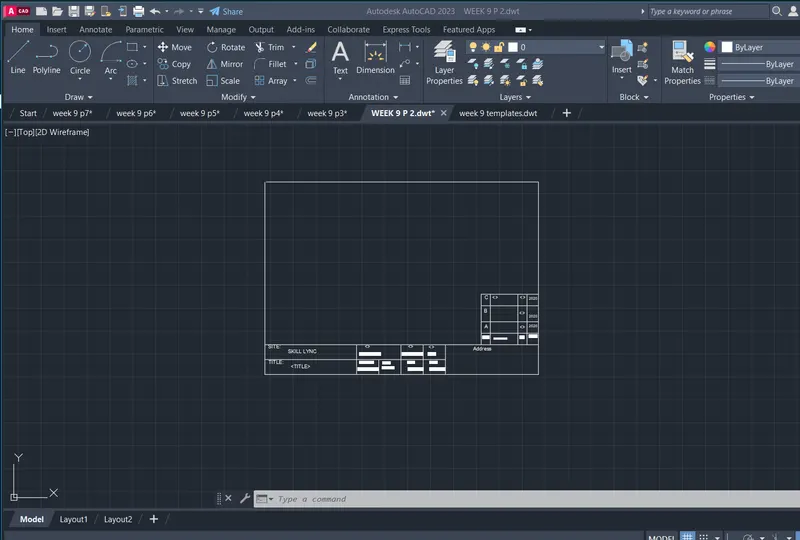
AIM:
To draw a door
comments :
- line
- fillet
- offset
- hatch
- text
- arc
- trim
Procedure:
Specify first point:
Specify next point or [Undo]:
Specify next point or [Undo]: 20
Specify next point or [Close/Undo]: *Cancel*
Command:
Command:
Command:
Command: _dim
Select objects or specify first extension line origin or [Angular/Baseline/Continue/Ordinate/aliGn/Distribute/Layer/Undo]:
Select line to specify extension lines origin:
Specify dimension line location or second line for angle [Mtext/Text/text aNgle/Undo]:
Select objects or specify first extension line origin or [Angular/Baseline/Continue/Ordinate/aliGn/Distribute/Layer/Undo]:
Select objects or specify first extension line origin or [Angular/Baseline/Continue/Ordinate/aliGn/Distribute/Layer/Undo]:
Command:
Command: _.erase 1 found
Command:
Command: _.erase 1 found
Crossing Lasso Press Spacebar to cycle options
Window Lasso Press Spacebar to cycle options
Command:
Command:
Command:
Command:
Command: _u DROPGEOM GROUP
Window Lasso Press Spacebar to cycle options
Crossing Lasso Press Spacebar to cycle options
Command: *Cancel*
Crossing Lasso Press Spacebar to cycle options
Window Lasso Press Spacebar to cycle options
Crossing Lasso Press Spacebar to cycle options
Crossing Lasso Press Spacebar to cycle options
Crossing Lasso Press Spacebar to cycle options
Window Lasso Press Spacebar to cycle options
Crossing Lasso Press Spacebar to cycle options
Crossing Lasso Press Spacebar to cycle options
Command: MOVE
11 found
Specify base point or [Displacement] <Displacement>:
Specify second point or <use first point as displacement>:
Command:
Command: _.erase 1 found
Command:
Command: CP
COPY 1 found
Current settings: Copy mode = Multiple
Specify base point or [Displacement/mOde] <Displacement>:
Specify second point or [Array] <use first point as displacement>: <Ortho on>
Specify second point or [Array/Exit/Undo] <Exit>:
Specify second point or [Array/Exit/Undo] <Exit>: *Cancel*
Command:
Command: MOVE
1 found
Specify base point or [Displacement] <Displacement>:
Specify second point or <use first point as displacement>:
Command: *Cancel*
Crossing Lasso Press Spacebar to cycle options
Command: CP
COPY 11 found
Current settings: Copy mode = Multiple
Specify base point or [Displacement/mOde] <Displacement>:
Specify second point or [Array] <use first point as displacement>: <Ortho off>
Specify second point or [Array/Exit/Undo] <Exit>: *Cancel*
Command: Specify opposite corner or [Fence/WPolygon/CPolygon]:
Command: CP
COPY 48 found
Current settings: Copy mode = Multiple
Specify base point or [Displacement/mOde] <Displacement>:
Specify second point or [Array] <use first point as displacement>:
Specify second point or [Array/Exit/Undo] <Exit>:
Specify second point or [Array/Exit/Undo] <Exit>: *Cancel*
Crossing Lasso Press Spacebar to cycle options
Command: _.erase 1 found
Dimension disassociated.
Crossing Lasso Press Spacebar to cycle options
Command: *Cancel*
Crossing Lasso Press Spacebar to cycle options
Command: _.erase 2 found
Command:
Command: _.erase 1 found
Command:
Command: _.erase 1 found
Crossing Lasso Press Spacebar to cycle options
Command: _.erase 1 found
Crossing Lasso Press Spacebar to cycle options
Command: _.erase 1 found
Crossing Lasso Press Spacebar to cycle options
Command: _.erase 1 found
Command:
Command:
Command:
Command:
Command:
Crossing Lasso Press Spacebar to cycle options
Command: _.erase 7 found
Command:
Command:
Command:
Command:
Command: _.erase 4 found
Command:
Command:
** STRETCH **
Specify stretch point or [Base point/Copy/Undo/eXit]:
Command: *Cancel*
Command:
Command:
** STRETCH **
Specify stretch point or [Base point/Copy/Undo/eXit]:
Command: *Cancel*
Automatic save to C:\Users\Welcome\AppData\Local\Temp\week 9 p3_1_18662_ae592acb.sv$ ...
Command:
Command:
Command: _.erase 1 found
Command:
Command: *Cancel*
Command:
Command: *Cancel*
Command: L
LINE
Specify first point:
Specify next point or [Undo]:
Specify next point or [Undo]: *Cancel*
Command:
Command: *Cancel*
Command:
Command:
Command: _pline
Specify start point:
Current line-width is 0.0
Specify next point or [Arc/Halfwidth/Length/Undo/Width]: 250
Specify next point or [Arc/Close/Halfwidth/Length/Undo/Width]: _u
Specify next point or [Arc/Halfwidth/Length/Undo/Width]: <Ortho on> 250
Specify next point or [Arc/Close/Halfwidth/Length/Undo/Width]: <Ortho off> 45
Specify next point or [Arc/Close/Halfwidth/Length/Undo/Width]: *Cancel*
Crossing Lasso Press Spacebar to cycle options
Command: *Cancel*
Crossing Lasso Press Spacebar to cycle options
Command: MI
MIRROR 1 found
Specify first point of mirror line: *Cancel*
Command: *Cancel*
Command: L
LINE
Specify first point:
Specify next point or [Undo]: 135
Specify next point or [Undo]: 30
Specify next point or [Close/Undo]:
Specify next point or [Close/Undo]:
Specify next point or [Close/Undo]: *Cancel*
Crossing Lasso Press Spacebar to cycle options
Command: MI
MIRROR 4 found
Specify first point of mirror line:
Specify second point of mirror line: <Ortho on>
Erase source objects? [Yes/No] <No>: *Cancel*
Crossing Lasso Press Spacebar to cycle options
Command: MI
MIRROR 4 found
Specify first point of mirror line:
Specify second point of mirror line:
Erase source objects? [Yes/No] <No>: N
Crossing Lasso Press Spacebar to cycle options
Command: CP
COPY 9 found
Current settings: Copy mode = Multiple
Specify base point or [Displacement/mOde] <Displacement>:
Specify second point or [Array] <use first point as displacement>:
Specify second point or [Array/Exit/Undo] <Exit>: *Cancel*
Crossing Lasso Press Spacebar to cycle options
Command: RO
ROTATE
Current positive angle in UCS: ANGDIR=counterclockwise ANGBASE=0
9 found
Specify base point:
Specify rotation angle or [Copy/Reference] <90>:
Crossing Lasso Press Spacebar to cycle options
Command: CP
COPY 9 found
Current settings: Copy mode = Multiple
Specify base point or [Displacement/mOde] <Displacement>:
Specify second point or [Array] <use first point as displacement>:
Specify second point or [Array/Exit/Undo] <Exit>:
Specify second point or [Array/Exit/Undo] <Exit>: *Cancel*
Crossing Lasso Press Spacebar to cycle options
Command: _.erase 3 found
Crossing Lasso Press Spacebar to cycle options
Command: _.erase 1 found
Window Lasso Press Spacebar to cycle options
Command: Specify opposite corner or [Fence/WPolygon/CPolygon]:
Command: _.erase 2 found
Command:
Command: _.erase 1 found
Command:
Command: _.erase 1 found
Command: Specify opposite corner or [Fence/WPolygon/CPolygon]:
Command: _.erase 1 found
Crossing Lasso Press Spacebar to cycle options
Command: CP
COPY 27 found
Current settings: Copy mode = Multiple
Specify base point or [Displacement/mOde] <Displacement>:
Specify second point or [Array] <use first point as displacement>: <Ortho off> *Cancel*
Crossing Lasso Press Spacebar to cycle options
Command: SC
SCALE 27 found
Specify base point:
Specify scale factor or [Copy/Reference]:
Crossing Lasso Press Spacebar to cycle options
Crossing Lasso Press Spacebar to cycle options
Command: CP
COPY 27 found
Current settings: Copy mode = Multiple
Specify base point or [Displacement/mOde] <Displacement>:
Specify second point or [Array] <use first point as displacement>:
Specify second point or [Array/Exit/Undo] <Exit>: *Cancel*
Window Lasso Press Spacebar to cycle options
Command: _.erase 3 found
Command:
Command:
** STRETCH **
Specify stretch point or [Base point/Copy/Undo/eXit]:
Command: *Cancel*
Command: B
BLOCK Specify insertion base point:
Window Lasso Press Spacebar to cycle options184 found
Select objects:
Command: Specify opposite corner or [Fence/WPolygon/CPolygon]:
Command: *Cancel*
Command:
Automatic save to C:\Users\Welcome\AppData\Local\Temp\week 9 p3_1_18662_ae592acb.sv$ ...
Command:
Window Lasso Press Spacebar to cycle options
Crossing Lasso Press Spacebar to cycle options
Crossing Lasso Press Spacebar to cycle options
Crossing Lasso Press Spacebar to cycle options
Command: _.erase 220 found
Crossing Lasso Press Spacebar to cycle options
Command: _.erase 3 found
Command: L
LINE
Specify first point:
Specify next point or [Undo]: <Ortho on> 2330
Specify next point or [Undo]: 2750
Specify next point or [Close/Undo]: 2330
Specify next point or [Close/Undo]:
Specify next point or [Close/Undo]: *Cancel*
Crossing Lasso Press Spacebar to cycle options
Command: *Cancel*
Command: OFFSET
Current settings: Erase source=No Layer=Source OFFSETGAPTYPE=0
Specify offset distance or [Through/Erase/Layer] <Through>:
Select object to offset or [Exit/Undo] <Exit>:
Specify through point or [Exit/Multiple/Undo] <Exit>: 100
Select object to offset or [Exit/Undo] <Exit>:
Specify through point or [Exit/Multiple/Undo] <Exit>: 10
Select object to offset or [Exit/Undo] <Exit>:
Specify through point or [Exit/Multiple/Undo] <Exit>: 20
Select object to offset or [Exit/Undo] <Exit>:
Specify through point or [Exit/Multiple/Undo] <Exit>: 10
Select object to offset or [Exit/Undo] <Exit>:
Specify through point or [Exit/Multiple/Undo] <Exit>: 25
Select object to offset or [Exit/Undo] <Exit>:
Specify through point or [Exit/Multiple/Undo] <Exit>: 540
Select object to offset or [Exit/Undo] <Exit>:
Specify through point or [Exit/Multiple/Undo] <Exit>: 540
Select object to offset or [Exit/Undo] <Exit>:
Specify through point or [Exit/Multiple/Undo] <Exit>: 540
Select object to offset or [Exit/Undo] <Exit>:
Specify through point or [Exit/Multiple/Undo] <Exit>: 20
Select object to offset or [Exit/Undo] <Exit>:
Specify through point or [Exit/Multiple/Undo] <Exit>: 20
Select object to offset or [Exit/Undo] <Exit>:
Specify through point or [Exit/Multiple/Undo] <Exit>: 20
Select object to offset or [Exit/Undo] <Exit>:
Specify through point or [Exit/Multiple/Undo] <Exit>: 10
Select object to offset or [Exit/Undo] <Exit>:
Specify through point or [Exit/Multiple/Undo] <Exit>: 10
Select object to offset or [Exit/Undo] <Exit>:
Specify through point or [Exit/Multiple/Undo] <Exit>: 30
Select object to offset or [Exit/Undo] <Exit>: *Cancel*
Command:
Command: _.erase 1 found
Window Lasso Press Spacebar to cycle options
Command: CP
COPY 27 found
Current settings: Copy mode = Multiple
Specify base point or [Displacement/mOde] <Displacement>:
Specify second point or [Array] <use first point as displacement>: <Ortho off>
Specify second point or [Array/Exit/Undo] <Exit>: *Cancel*
Crossing Lasso Press Spacebar to cycle options
Command: M
MOVE 44 found
Specify base point or [Displacement] <Displacement>:
Specify second point or <use first point as displacement>:
Command: B
BLOCK Specify insertion base point:
Window Lasso Press Spacebar to cycle options37 found
Window Lasso Press Spacebar to cycle options44 found (37 duplicate), 44 total
Select objects:
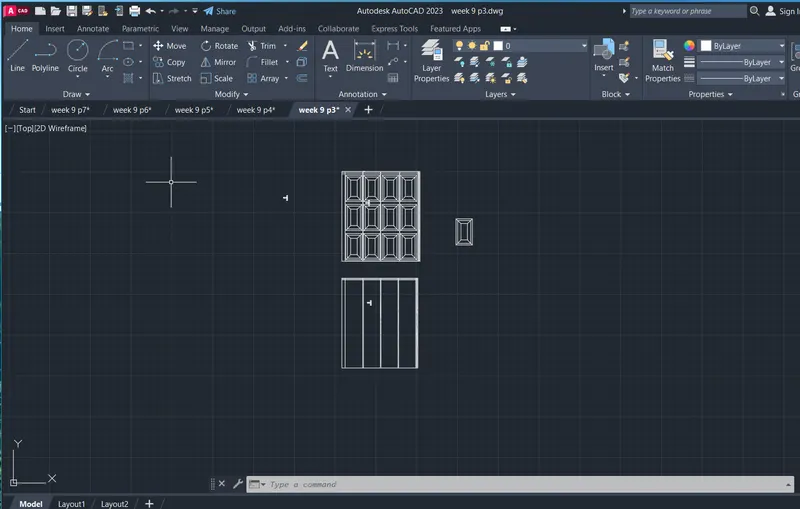
AIM:
To draw a symbols
comments :
- line
- fillet
- offset
- hatch
- text
- arc
- trim
Procedure:
Specify base point or [Displacement/mOde] <Displacement>:
Specify second point or [Array] <use first point as displacement>:
Specify second point or [Array/Exit/Undo] <Exit>: *Cancel*
Crossing Lasso Press Spacebar to cycle options
Command: CP
COPY 2 found
Current settings: Copy mode = Multiple
Specify base point or [Displacement/mOde] <Displacement>:
Specify second point or [Array] <use first point as displacement>: *Cancel*
Command: Specify opposite corner:
Command: *Cancel*
Command: Specify opposite corner:
Command: *Cancel*
Command:
Command:
Command:
Command: CP
COPY 3 found
Current settings: Copy mode = Multiple
Specify base point or [Displacement/mOde] <Displacement>:
Specify second point or [Array] <use first point as displacement>:
Specify second point or [Array/Exit/Undo] <Exit>: *Cancel*
Command: C
CIRCLE
Specify center point for circle or [3P/2P/Ttr (tan tan radius)]:
Specify radius of circle or [Diameter] <60.0000>:
Command: *Cancel*
Command: H
HATCH
Pick internal point or [Select objects/Undo/seTtings]: Selecting everything...
Selecting everything visible...
Analyzing the selected data...
Analyzing internal islands...
Pick internal point or [Select objects/Undo/seTtings]: '_-hatchedit_pANSI32'_-hatchedit_pAR-BRSTD'_-hatchedit_pAR-RROOF'_-hatchedit_pAR-RSHKE'_-hatchedit_pAR-BRSTD'_-hatchedit_pAR-CONC
Command: '_-hatchedit
>>Enter hatch option [DIsassociate/Style/Properties/DRaw order/ADd boundaries/Remove boundaries/recreate Boundary/ASsociate/separate Hatches/Origin/ANnotative/hatch COlor/LAyer/Transparency] <Properties>: _p
>>Enter a pattern name or [?/Solid/User defined/Gradient] <ANGLE>: AR-CONC
>>Specify a scale for the pattern <1.0000>:
>>Specify an angle for the pattern <0>:
Command: '_-hatchedit_pAR-BRSTD'_-hatchedit_pGOST_GLASS'_-hatchedit_p_G
Command: '_-hatchedit
>>Enter hatch option [DIsassociate/Style/Properties/DRaw order/ADd boundaries/Remove boundaries/recreate Boundary/ASsociate/separate Hatches/Origin/ANnotative/hatch COlor/LAyer/Transparency] <Properties>: _p
>>Enter a pattern name or [?/Solid/User defined/Gradient] <AR-CONC>: _G
>>Enter a gradient name or [?/Single color/Two color] <GR_LINEAR>:
>>Specify an angle for the gradient <0>:
>>Center the gradient [Yes/No] <Yes>:
Command: '_-hatchedit_p_G*Cancel*
Command: Specify opposite corner:
Command: *Cancel*
Command:
Command:
Command:
Command:
Command: CP
COPY 4 found
Current settings: Copy mode = Multiple
Specify base point or [Displacement/mOde] <Displacement>:
Specify second point or [Array] <use first point as displacement>:
Specify second point or [Array/Exit/Undo] <Exit>: *Cancel*
Command: Specify opposite corner:
Command: *Cancel*
Command: Specify opposite corner:
Command: *Cancel*
Command:
Command:
Command:
Command:
Command:
Command: CP
COPY 5 found
Current settings: Copy mode = Multiple
Specify base point or [Displacement/mOde] <Displacement>:
Specify second point or [Array] <use first point as displacement>:
Specify second point or [Array/Exit/Undo] <Exit>: *Cancel*
Command:
Command: Specify opposite corner:
Command: *Cancel*
Command: Specify opposite corner:
Command: *Cancel*
Command: Specify opposite corner:
Command: Specify opposite corner:
Command: CP
COPY 2 found
Current settings: Copy mode = Multiple
Specify base point or [Displacement/mOde] <Displacement>:
Specify second point or [Array] <use first point as displacement>:
Specify second point or [Array/Exit/Undo] <Exit>:
Specify second point or [Array/Exit/Undo] <Exit>: *Cancel*
Command: Specify opposite corner:
Command: *Cancel*
Command:
Command:
Command: Specify opposite corner:
Command:
Command:
Command: CP
COPY 5 found
Current settings: Copy mode = Multiple
Specify base point or [Displacement/mOde] <Displacement>:
Specify second point or [Array] <use first point as displacement>:
Specify second point or [Array/Exit/Undo] <Exit>: *Cancel*
Command: Specify opposite corner:
Command: *Cancel*
Command:
Command: Specify opposite corner:
Command:
Command:
Command: MOVE
4 found
Specify base point or [Displacement] <Displacement>:
Specify second point or <use first point as displacement>:
Command: *Cancel*
Command:
Command: MOVE
1 found
Specify base point or [Displacement] <Displacement>:
Specify second point or <use first point as displacement>:
Command: *Cancel*
Command: Specify opposite corner:
Command: *Cancel*
Command:
Command:
** STRETCH **
Specify stretch point or [Base point/Copy/Undo/eXit]: *Cancel*
Command:
** STRETCH **
Specify stretch point or [Base point/Copy/Undo/eXit]:
Command: *Cancel*
Command:
Command:
** STRETCH **
Specify stretch point or [Base point/Copy/Undo/eXit]:
Command: *Cancel*
Command:
Command:
Command:
** STRETCH **
Specify stretch point or [Base point/Copy/Undo/eXit]:
Command: *Cancel*
Command: Specify opposite corner:
Command: *Cancel*
Command:
Command:
Command: Specify opposite corner:
Command: Specify opposite corner:
Command: *Cancel*
Command:
Command:
Command:
Command:
Command: Specify opposite corner:
Command: M
MOVE 5 found
Specify base point or [Displacement] <Displacement>:
Specify second point or <use first point as displacement>:
Command: Specify opposite corner:
Command: *Cancel*
Command: Specify opposite corner:
Command: *Cancel*
Command: Specify opposite corner:
Command: *Cancel*
Command:
Command:
Command:
Command:
Command: Specify opposite corner:
Command: Specify opposite corner: Specify opposite corner:
Command: MOVE
5 found
Specify base point or [Displacement] <Displacement>:
Specify second point or <use first point as displacement>:
Command: Specify opposite corner:
Command: *Cancel*
Command:
Command:
Command: COPY
2 found
Current settings: Copy mode = Multiple
Specify base point or [Displacement/mOde] <Displacement>:
Specify second point or [Array] <use first point as displacement>:
Specify second point or [Array/Exit/Undo] <Exit>:
Specify second point or [Array/Exit/Undo] <Exit>:
Specify second point or [Array/Exit/Undo] <Exit>: *Cancel*
Command: Specify opposite corner:
Command: *Cancel*
Command:
Command:
Command: RO
ROTATE
Current positive angle in UCS: ANGDIR=counterclockwise ANGBASE=0
2 found
Specify base point:
Specify rotation angle or [Copy/Reference] <90>:
Command: Specify opposite corner:
Command: *Cancel*
Command:
Command:
Command: MI
MIRROR 2 found
Specify first point of mirror line:
Specify second point of mirror line:
Erase source objects? [Yes/No] <No>: Y
Command:
Command:
Command: RO
ROTATE
Current positive angle in UCS: ANGDIR=counterclockwise ANGBASE=0
2 found
Specify base point:
Specify rotation angle or [Copy/Reference] <250>:
Command: Specify opposite corner:
Command: *Cancel*
Command:
Command:
Command: RO
ROTATE
Current positive angle in UCS: ANGDIR=counterclockwise ANGBASE=0
2 found
Specify base point:
Specify rotation angle or [Copy/Reference] <180>: *Cancel*
Command:
Command:
Command: MI
MIRROR 2 found
Specify first point of mirror line:
Specify second point of mirror line:
Erase source objects? [Yes/No] <No>: *Cancel*
Command: MI
MIRROR
Select objects: 1 found
Select objects: 1 found, 2 total
Select objects:
Specify first point of mirror line:
Specify second point of mirror line:
Erase source objects? [Yes/No] <No>: Y
Command:
Command:
Command: MOVE
2 found
Specify base point or [Displacement] <Displacement>:
Specify second point or <use first point as displacement>:
Command: *Cancel*
Command: Specify opposite corner:
Command: *Cancel*
Command:
Pick a table cell:
Invalid point.
Pick a table cell: *Cancel*
Command:
Command:
Automatic save to C:\Users\Welcome\AppData\Local\Temp\week 9 p4_1_30900_547a93ea.sv$ ...
Command:
Command: RO
ROTATE
Current positive angle in UCS: ANGDIR=counterclockwise ANGBASE=0
2 found
Specify base point:
Specify rotation angle or [Copy/Reference] <180>: *Cancel*
Command: RO
ROTATE
Current positive angle in UCS: ANGDIR=counterclockwise ANGBASE=0
Select objects: 1 found
Select objects: 1 found, 2 total
Select objects:
Specify base point:
Specify rotation angle or [Copy/Reference] <180>:
Command: Specify opposite corner:
Command: *Cancel*
Command:
Command:
Command:
Command: CP
COPY 3 found
Current settings: Copy mode = Multiple
Specify base point or [Displacement/mOde] <Displacement>:
Specify second point or [Array] <use first point as displacement>:
Specify second point or [Array/Exit/Undo] <Exit>: *Cancel*
Command: Specify opposite corner:
Command: *Cancel*
Command:
Command:
Command: CP
COPY 2 found
Current settings: Copy mode = Multiple
Specify base point or [Displacement/mOde] <Displacement>:
Specify second point or [Array] <use first point as displacement>:
Specify second point or [Array/Exit/Undo] <Exit>: *Cancel*
Command:
Command:
Command: ROTATE
Current positive angle in UCS: ANGDIR=counterclockwise ANGBASE=0
2 found
Specify base point:
Specify rotation angle or [Copy/Reference] <60>: *Cancel*
Command: MI
MIRROR
Select objects: 1 found
Select objects: 1 found, 2 total
Select objects:
Specify first point of mirror line:
Specify second point of mirror line:
Erase source objects? [Yes/No] <No>: Y
Command:
Command:
Command: RO
ROTATE
Current positive angle in UCS: ANGDIR=counterclockwise ANGBASE=0
2 found
Specify base point:
Specify rotation angle or [Copy/Reference] <60>:
Command:
Command: CP
COPY 1 found
Current settings: Copy mode = Multiple
Specify base point or [Displacement/mOde] <Displacement>:
Specify second point or [Array] <use first point as displacement>:
Specify second point or [Array/Exit/Undo] <Exit>: *Cancel*
Command:
Command:
Command: _pline
Specify start point: *Cancel*
Command:
Command: _arc
Specify start point of arc or [Center]:
Specify second point of arc or [Center/End]:
Specify end point of arc:
Command:
Command:
** STRETCH **
Specify stretch point or [Base point/Copy/Undo/eXit]:
Command: *Cancel*
Command: L
LINE
Specify first point:
Specify next point or [Undo]: <Ortho on>
Specify next point or [Undo]: *Cancel*
Command:
Command:
** STRETCH **
Specify stretch point or [Base point/Copy/Undo/eXit]:
Command: *Cancel*
Crossing Lasso Press Spacebar to cycle options
Command: CO
COPY 3 found
Current settings: Copy mode = Multiple
Specify base point or [Displacement/mOde] <Displacement>:
Specify second point or [Array] <use first point as displacement>: <Ortho off>
Specify second point or [Array/Exit/Undo] <Exit>: *Cancel*
Command: Specify opposite corner:
Command: *Cancel*
Command: Specify opposite corner:
Command: *Cancel*
Command:
Command:
Command:
Command: RO
ROTATE
Current positive angle in UCS: ANGDIR=counterclockwise ANGBASE=0
3 found
Specify base point:
Specify rotation angle or [Copy/Reference] <60>:
Command:
Command:
** STRETCH **
Specify stretch point or [Base point/Copy/Undo/eXit]:
Command: *Cancel*
Command:
Command: Specify opposite corner:
Command: *Cancel*
Command: Specify opposite corner:
Command: *Cancel*
Command:
Command:
** STRETCH **
Specify stretch point or [Base point/Copy/Undo/eXit]:
Command: *Cancel*
Crossing Lasso Press Spacebar to cycle options
Command: RO
ROTATE
Current positive angle in UCS: ANGDIR=counterclockwise ANGBASE=0
3 found
Specify base point:
Specify rotation angle or [Copy/Reference] <180>:
Command:
Command:
** STRETCH **
Specify stretch point or [Base point/Copy/Undo/eXit]:
Command: *Cancel*
Crossing Lasso Press Spacebar to cycle options
Command: CO
COPY 3 found
Current settings: Copy mode = Multiple
Specify base point or [Displacement/mOde] <Displacement>:
Specify second point or [Array] <use first point as displacement>:
Specify second point or [Array/Exit/Undo] <Exit>: *Cancel*
Command: L
LINE
Specify first point:
Specify next point or [Undo]: <Ortho on>
Specify next point or [Undo]: *Cancel*
*Cancel*
Window Lasso Press Spacebar to cycle options
Command: CP
COPY 3 found
Current settings: Copy mode = Multiple
Specify base point or [Displacement/mOde] <Displacement>:
Specify second point or [Array] <use first point as displacement>: <Ortho off>
Specify second point or [Array/Exit/Undo] <Exit>:
Specify second point or [Array/Exit/Undo] <Exit>: *Cancel*
Crossing Lasso Press Spacebar to cycle options
Command: CP
COPY 3 found
Current settings: Copy mode = Multiple
Specify base point or [Displacement/mOde] <Displacement>:
Specify second point or [Array] <use first point as displacement>:
Specify second point or [Array/Exit/Undo] <Exit>: *Cancel*
Command: REC
RECTANG
Specify first corner point or [Chamfer/Elevation/Fillet/Thickness/Width]:
Specify other corner point or [Area/Dimensions/Rotation]:
Command:
Command:
** STRETCH **
Specify stretch point:
Command: *Cancel*
Command:
Command:
** STRETCH **
Specify stretch point:
Command: *Cancel*
Command:
Command:
** STRETCH **
Specify stretch point or [Base point/Copy/Undo/eXit]:
Command:
** STRETCH **
Specify stretch point or [Base point/Copy/Undo/eXit]:
Command:
** STRETCH **
Specify stretch point or [Base point/Copy/Undo/eXit]:
Command: *Cancel*
Command: Specify opposite corner: *Cancel*
Command: Specify opposite corner:
Command:
Command:
Command:
Command:
Command: CP
COPY 4 found
Current settings: Copy mode = Multiple
Specify base point or [Displacement/mOde] <Displacement>:
Specify second point or [Array] <use first point as displacement>:
Specify second point or [Array/Exit/Undo] <Exit>: *Cancel*
Command:
Command: CP
COPY 1 found
Current settings: Copy mode = Multiple
Specify base point or [Displacement/mOde] <Displacement>:
Specify second point or [Array] <use first point as displacement>:
Specify second point or [Array/Exit/Undo] <Exit>: *Cancel*
Command: Specify opposite corner:
Command: *Cancel*
Command:
Command:
Command:
Command: Specify opposite corner:
Command: Specify opposite corner:
Command:
Command: Specify opposite corner:
Command: Specify opposite corner:
Command: *Cancel*
Command:
Command:
Command:
Command:
Command:
Command:
Command: CP
COPY 6 found
Current settings: Copy mode = Multiple
Specify base point or [Displacement/mOde] <Displacement>:
Specify second point or [Array] <use first point as displacement>:
Specify second point or [Array/Exit/Undo] <Exit>: *Cancel*
Command: REG
REGION
Select objects: *Cancel*
None found.
Command: *Cancel*
Command: REC
RECTANG
Specify first corner point or [Chamfer/Elevation/Fillet/Thickness/Width]:
Specify other corner point or [Area/Dimensions/Rotation]:
Command: Specify opposite corner:
Command: *Cancel*
Command:
Command:
** STRETCH **
Specify stretch point:
Command:
** STRETCH **
Specify stretch point:
Command:
** STRETCH **
Specify stretch point or [Base point/Copy/Undo/eXit]:
Command:
** STRETCH **
Specify stretch point or [Base point/Copy/Undo/eXit]:
Command:
** STRETCH **
Specify stretch point or [Base point/Copy/Undo/eXit]:
Command:
** STRETCH **
Specify stretch point or [Base point/Copy/Undo/eXit]:
Command:
** STRETCH **
Specify stretch point or [Base point/Copy/Undo/eXit]:
Command:
** STRETCH **
Specify stretch point or [Base point/Copy/Undo/eXit]:
Command:
** STRETCH **
Specify stretch point or [Base point/Copy/Undo/eXit]:
Command:
** STRETCH **
Specify stretch point or [Base point/Copy/Undo/eXit]:
Command:
** STRETCH **
Specify stretch point or [Base point/Copy/Undo/eXit]:
Command: Specify opposite corner:
Command: Specify opposite corner:
Command: *Cancel*
Window Lasso Press Spacebar to cycle options
Command: CP
COPY 3 found
Current settings: Copy mode = Multiple
Specify base point or [Displacement/mOde] <Displacement>:
Specify second point or [Array] <use first point as displacement>:
Specify second point or [Array/Exit/Undo] <Exit>: *Cancel*
Crossing Lasso Press Spacebar to cycle options
Command: CP
COPY 3 found
Current settings: Copy mode = Multiple
Specify base point or [Displacement/mOde] <Displacement>:
Specify second point or [Array] <use first point as displacement>:
Specify second point or [Array/Exit/Undo] <Exit>: *Cancel*
Automatic save to C:\Users\Welcome\AppData\Local\Temp\week 9 p4_1_30900_547a93ea.sv$ ...
Command:
Command: Specify opposite corner:
Command: *Cancel*
Command:
Command:
Command:
Command:
Command:
Command:
Command: CP
COPY 6 found
Current settings: Copy mode = Multiple
Specify base point or [Displacement/mOde] <Displacement>:
Specify second point or [Array] <use first point as displacement>:
Specify second point or [Array/Exit/Undo] <Exit>: *Cancel*
Command:
Command:
Command:
Command: CP
COPY 3 found
Current settings: Copy mode = Multiple
Specify base point or [Displacement/mOde] <Displacement>:
Specify second point or [Array] <use first point as displacement>:
Specify second point or [Array/Exit/Undo] <Exit>: *Cancel*
Command:
Command:
Command:
Command:
Command:
Command:
Command:
Command:
Command:
Command: SC
SCALE 9 found
Specify base point:
Specify scale factor or [Copy/Reference]:
Extremely small scale factor ignored.
Extremely small scale factor ignored.
Extremely small scale factor ignored.
Extremely small scale factor ignored.
Command:
Command: *Cancel*
Crossing Lasso Press Spacebar to cycle options
Command: CP
COPY 6 found
Current settings: Copy mode = Multiple
Specify base point or [Displacement/mOde] <Displacement>:
Specify second point or [Array] <use first point as displacement>:
Specify second point or [Array/Exit/Undo] <Exit>: *Cancel*
Crossing Lasso Press Spacebar to cycle options
Command: CP
COPY 6 found
Current settings: Copy mode = Multiple
Specify base point or [Displacement/mOde] <Displacement>:
Specify second point or [Array] <use first point as displacement>:
Specify second point or [Array/Exit/Undo] <Exit>: *Cancel*
Crossing Lasso Press Spacebar to cycle options
Command: CP
COPY 4 found
Current settings: Copy mode = Multiple
Specify base point or [Displacement/mOde] <Displacement>:
Specify second point or [Array] <use first point as displacement>:
Specify second point or [Array/Exit/Undo] <Exit>: *Cancel*
Crossing Lasso Press Spacebar to cycle options
Command: _.erase 226 found
Crossing Lasso Press Spacebar to cycle options
Command: _.erase 849 found
Command:
Command:
Command: _qsave
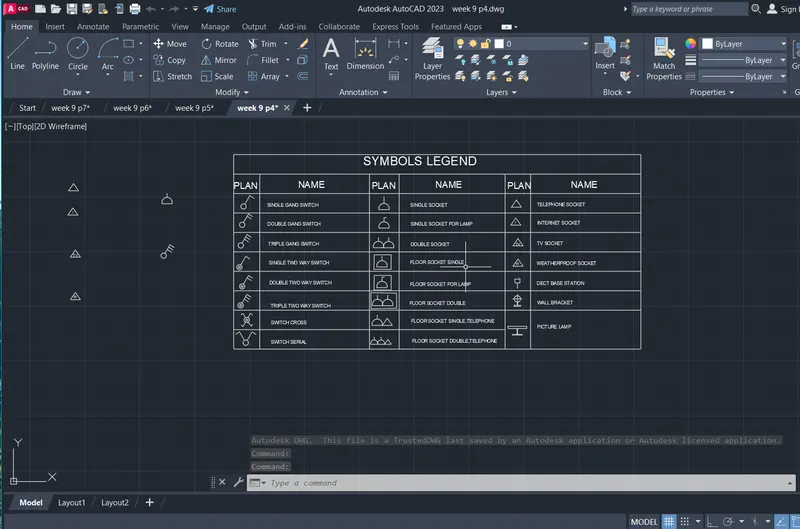
AIM:
To draw a D1,D2 and D3
comments :
- line
- fillet
- offset
- hatch
- text
- arc
- trim
Procedure:
** STRETCH **
Specify stretch point:1"
Command: Specify opposite corner or [Fence/WPolygon/CPolygon]:
Command:
** STRETCH **
Specify stretch point:1"
Command:
Command:
** STRETCH **
Specify stretch point:
>>Enter new value for ORTHOMODE <1>:
Resuming GRIP_STRETCH command.
Specify stretch point:1"
Command: _u Grip Edit
Command:
Command:
** STRETCH **
Specify stretch point:1"
Command:
Command:
** STRETCH **
Specify stretch point:1"
Command: *Cancel*
Crossing Lasso Press Spacebar to cycle options
Command: CP
COPY 8 found
Current settings: Copy mode = Multiple
Specify base point or [Displacement/mOde] <Displacement>:
Specify second point or [Array] <use first point as displacement>:
Specify second point or [Array/Exit/Undo] <Exit>: _u
Command has been completely undone.
Specify second point or [Array] <use first point as displacement>:
Specify second point or [Array/Exit/Undo] <Exit>:
Specify second point or [Array/Exit/Undo] <Exit>: *Cancel*
Automatic save to C:\Users\Welcome\AppData\Local\Temp\week 9 p5_1_4940_39722333.sv$ ...
Command:
Command:
Command: _.erase 1 found
Window Lasso Press Spacebar to cycle options
Window Lasso Press Spacebar to cycle options
Command: Specify opposite corner or [Fence/WPolygon/CPolygon]:
Command:
Command: CP
COPY 1 found
Current settings: Copy mode = Multiple
Specify base point or [Displacement/mOde] <Displacement>:
Specify second point or [Array] <use first point as displacement>:
Specify second point or [Array/Exit/Undo] <Exit>: *Cancel*
Command:
Command:
Command:
Command: _textedit
Current settings: Edit mode = Multiple
Select an annotation object or [Undo/Mode]: *Cancel*
Crossing Lasso Press Spacebar to cycle options
Crossing Lasso Press Spacebar to cycle options
Crossing Lasso Press Spacebar to cycle options
Command: CP
COPY 10 found
Current settings: Copy mode = Multiple
Specify base point or [Displacement/mOde] <Displacement>:
Specify second point or [Array] <use first point as displacement>:
Specify second point or [Array/Exit/Undo] <Exit>: *Cancel*
Command:
Command:
** STRETCH **
Specify stretch point or [Base point/Copy/Undo/eXit]:7"
Command: *Cancel*
Command:
Command:
** STRETCH **
Specify stretch point or [Base point/Copy/Undo/eXit]:
Command:
Command:
Command: *Cancel*
Command:
Command:
** STRETCH **
Specify stretch point or [Base point/Copy/Undo/eXit]:
Command: *Cancel*
Command: Specify opposite corner or [Fence/WPolygon/CPolygon]:
Command: *Cancel*
Crossing Lasso Press Spacebar to cycle options
Command: MOVE
3 found
Specify base point or [Displacement] <Displacement>:
Specify second point or <use first point as displacement>:
Command: *Cancel*
Command: TR
TRIM
Current settings: Projection=UCS, Edge=None, Mode=Quick
Select object to trim or shift-select to extend or
[cuTting edges/Crossing/mOde/Project/eRase]:
Select object to trim or shift-select to extend or
[cuTting edges/Crossing/mOde/Project/eRase/Undo]:
Select object to trim or shift-select to extend or
[cuTting edges/Crossing/mOde/Project/eRase/Undo]:
Specify next fence point or [Undo]:
Specify next fence point or [Undo]:
Select object to trim or shift-select to extend or
[cuTting edges/Crossing/mOde/Project/eRase/Undo]:
Select object to trim or shift-select to extend or
[cuTting edges/Crossing/mOde/Project/eRase/Undo]:
Specify next fence point or [Undo]:
Specify next fence point or [Undo]:
Select object to trim or shift-select to extend or
[cuTting edges/Crossing/mOde/Project/eRase/Undo]: *Cancel*
Command:
Command:
Command: _dim
Select objects or specify first extension line origin or [Angular/Baseline/Continue/Ordinate/aliGn/Distribute/Layer/Undo]:
Specify first extension line origin or [Angular/Baseline/Continue/Ordinate/aliGn/Distribute/Layer/Undo]:
Specify second extension line origin or [Undo]:
Specify dimension line location or second line for angle [Mtext/Text/text aNgle/Undo]:
Select objects or specify first extension line origin or [Angular/Baseline/Continue/Ordinate/aliGn/Distribute/Layer/Undo]:
Select objects or specify first extension line origin or [Angular/Baseline/Continue/Ordinate/aliGn/Distribute/Layer/Undo]:
Command: Specify opposite corner or [Fence/WPolygon/CPolygon]:
Command: Specify opposite corner or [Fence/WPolygon/CPolygon]:
Command: *Cancel*
Command: Specify opposite corner or [Fence/WPolygon/CPolygon]:
Command: Specify opposite corner or [Fence/WPolygon/CPolygon]:
Command: _.erase 1 found
Command:
Command: Specify opposite corner or [Fence/WPolygon/CPolygon]:
Command:
Command: SC
SCALE 3 found
Specify base point:
Specify scale factor or [Copy/Reference]:
Command: CP
COPY
Select objects: 1 found
Select objects: 1 found, 2 total
Select objects: 1 found, 3 total
Select objects:
Current settings: Copy mode = Multiple
Specify base point or [Displacement/mOde] <Displacement>:
Specify second point or [Array] <use first point as displacement>:
Specify second point or [Array/Exit/Undo] <Exit>: *Cancel*
Crossing Lasso Press Spacebar to cycle options
Command: CP
COPY 3 found
Current settings: Copy mode = Multiple
Specify base point or [Displacement/mOde] <Displacement>:
Specify second point or [Array] <use first point as displacement>:
Specify second point or [Array/Exit/Undo] <Exit>: *Cancel*
Command: OFFSET
Current settings: Erase source=No Layer=Source OFFSETGAPTYPE=0
Specify offset distance or [Through/Erase/Layer] <Through>:
Select object to offset or [Exit/Undo] <Exit>:
Specify through point or [Exit/Multiple/Undo] <Exit>: 2"
Select object to offset or [Exit/Undo] <Exit>:
Specify through point or [Exit/Multiple/Undo] <Exit>: 1"
Select object to offset or [Exit/Undo] <Exit>:
Specify through point or [Exit/Multiple/Undo] <Exit>: 1"
Select object to offset or [Exit/Undo] <Exit>:
Specify through point or [Exit/Multiple/Undo] <Exit>: 1"
Select object to offset or [Exit/Undo] <Exit>:
Specify through point or [Exit/Multiple/Undo] <Exit>: 1"
Select object to offset or [Exit/Undo] <Exit>:
Specify through point or [Exit/Multiple/Undo] <Exit>: 1"
Select object to offset or [Exit/Undo] <Exit>: *Cancel*
Command: TR
TRIM
Current settings: Projection=UCS, Edge=None, Mode=Quick
Select object to trim or shift-select to extend or
[cuTting edges/Crossing/mOde/Project/eRase]:
Select object to trim or shift-select to extend or
[cuTting edges/Crossing/mOde/Project/eRase/Undo]:
Select object to trim or shift-select to extend or
[cuTting edges/Crossing/mOde/Project/eRase/Undo]:
Specify next fence point or [Undo]:
Specify next fence point or [Undo]:
Select object to trim or shift-select to extend or
[cuTting edges/Crossing/mOde/Project/eRase/Undo]:
Select object to trim or shift-select to extend or
[cuTting edges/Crossing/mOde/Project/eRase/Undo]:
Specify next fence point or [Undo]:
Specify next fence point or [Undo]:
Select object to trim or shift-select to extend or
[cuTting edges/Crossing/mOde/Project/eRase/Undo]:
Select object to trim or shift-select to extend or
[cuTting edges/Crossing/mOde/Project/eRase/Undo]:
Specify next fence point or [Undo]:
Specify next fence point or [Undo]:
Select object to trim or shift-select to extend or
[cuTting edges/Crossing/mOde/Project/eRase/Undo]:
Select object to trim or shift-select to extend or
[cuTting edges/Crossing/mOde/Project/eRase/Undo]:
Specify next fence point or [Undo]:
Specify next fence point or [Undo]:
Select object to trim or shift-select to extend or
[cuTting edges/Crossing/mOde/Project/eRase/Undo]: *Cancel*
Command:
Command:
** STRETCH **
Specify stretch point or [Base point/Copy/Undo/eXit]:
Command: *Cancel*
Window Lasso Press Spacebar to cycle options
Crossing Lasso Press Spacebar to cycle options
Command: CP
COPY 3 found
Current settings: Copy mode = Multiple
Specify base point or [Displacement/mOde] <Displacement>:
Specify second point or [Array] <use first point as displacement>: <Ortho off>
Specify second point or [Array/Exit/Undo] <Exit>: *Cancel*
Crossing Lasso Press Spacebar to cycle options
Command: *Cancel*
Crossing Lasso Press Spacebar to cycle options
Command: CP
COPY 2 found
Current settings: Copy mode = Multiple
Specify base point or [Displacement/mOde] <Displacement>:
Specify second point or [Array] <use first point as displacement>:
Specify second point or [Array/Exit/Undo] <Exit>: *Cancel*
Command:
Command:
Command: _hatch
Pick internal point or [Select objects/Undo/seTtings]: Selecting everything...
Selecting everything visible...
Analyzing the selected data...
Analyzing internal islands...
Pick internal point or [Select objects/Undo/seTtings]: '_-hatchedit_pANSI31'_-hatchedit_pANSI32'_-hatchedit_pANSI35'_-hatchedit_pANSI38'_-hatchedit_pAR-BRELM'_-hatchedit_pANSI37
Command: '_-hatchedit
>>Enter hatch option [DIsassociate/Style/Properties/DRaw order/ADd boundaries/Remove boundaries/recreate Boundary/ASsociate/separate Hatches/Origin/ANnotative/hatch COlor/LAyer/Transparency] <Properties>: _p
>>Enter a pattern name or [?/Solid/User defined/Gradient] <ANGLE>: ANSI37
>>Specify a scale for the pattern <1.0000>:
>>Specify an angle for the pattern <0>:
Command: *Cancel*
Command:
Command:
Command:
Command: _properties
Command:
Command:
Command:
Command: *Cancel*
Command:
Command: CP
COPY 1 found
Current settings: Copy mode = Multiple
Specify base point or [Displacement/mOde] <Displacement>:
Specify second point or [Array] <use first point as displacement>: <Ortho on>
Specify second point or [Array/Exit/Undo] <Exit>: *Cancel*
Command:
Command:
Command:
Command: _textedit
Current settings: Edit mode = Multiple
Select an annotation object or [Undo/Mode]: *Cancel*
Crossing Lasso Press Spacebar to cycle options
Command: _.erase 4 found
Crossing Lasso Press Spacebar to cycle options
Automatic save to C:\Users\Welcome\AppData\Local\Temp\week 9 p5_1_4940_39722333.sv$ ...
Command:
Command: _.erase 2 found
Crossing Lasso Press Spacebar to cycle options
Crossing Lasso Press Spacebar to cycle options
Window Lasso Press Spacebar to cycle options
Command: _.erase 141 found
Crossing Lasso Press Spacebar to cycle options
Command: _.erase 57 found
Crossing Lasso Press Spacebar to cycle options
Window Lasso Press Spacebar to cycle options
Command: MOVE
71 found
Specify base point or [Displacement] <Displacement>:
Specify second point or <use first point as displacement>:
Crossing Lasso Press Spacebar to cycle options
Window Lasso Press Spacebar to cycle options
Command: MOVE
26 found
Specify base point or [Displacement] <Displacement>:
Specify second point or <use first point as displacement>:
Command: *Cancel*
Command:
Command:
Command: _dim
Select objects or specify first extension line origin or [Angular/Baseline/Continue/Ordinate/aliGn/Distribute/Layer/Undo]:
Select line to specify extension lines origin:
Specify dimension line location or second line for angle [Mtext/Text/text aNgle/Undo]:
Select objects or specify first extension line origin or [Angular/Baseline/Continue/Ordinate/aliGn/Distribute/Layer/Undo]:
Select line to specify extension lines origin:
Specify dimension line location or second line for angle [Mtext/Text/text aNgle/Undo]:
Select objects or specify first extension line origin or [Angular/Baseline/Continue/Ordinate/aliGn/Distribute/Layer/Undo]:
Select line to specify extension lines origin:
Specify dimension line location or second line for angle [Mtext/Text/text aNgle/Undo]:
Select objects or specify first extension line origin or [Angular/Baseline/Continue/Ordinate/aliGn/Distribute/Layer/Undo]:
Select line to specify extension lines origin:
Specify dimension line location or second line for angle [Mtext/Text/text aNgle/Undo]:
Select objects or specify first extension line origin or [Angular/Baseline/Continue/Ordinate/aliGn/Distribute/Layer/Undo]:
Select objects or specify first extension line origin or [Angular/Baseline/Continue/Ordinate/aliGn/Distribute/Layer/Undo]:
Crossing Lasso Press Spacebar to cycle options
Command: B
BLOCK 16 found
Specify insertion base point:
Window Lasso Press Spacebar to cycle options16 found
Select objects:
Window Lasso Press Spacebar to cycle options
Command: *Cancel*
Command: B
BLOCK Specify insertion base point:
Window Lasso Press Spacebar to cycle options47 found
Select objects:
Command: B
BLOCK Specify insertion base point:
Window Lasso Press Spacebar to cycle options28 found
Select objects:
Command:
Command:
Command: _qsave
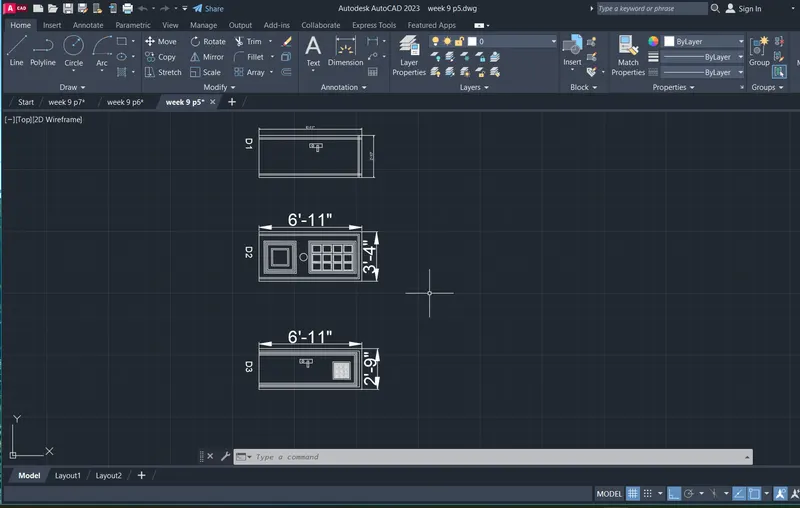
AIM:
To draw a templates
comments :
- line
- fillet
- offset
- hatch
- text
- arc
- trim
Procedure:
Command:
Command:
Command: _dim
Select objects or specify first extension line origin or [Angular/Baseline/Continue/Ordinate/aliGn/Distribute/Layer/Undo]:
Select line to specify extension lines origin:
Specify dimension line location or second line for angle [Mtext/Text/text aNgle/Undo]:
Select objects or specify first extension line origin or [Angular/Baseline/Continue/Ordinate/aliGn/Distribute/Layer/Undo]:
Select objects or specify first extension line origin or [Angular/Baseline/Continue/Ordinate/aliGn/Distribute/Layer/Undo]:
Command:
Command: CP
COPY 1 found
Current settings: Copy mode = Multiple
Specify base point or [Displacement/mOde] <Displacement>:
Specify second point or [Array] <use first point as displacement>: <Ortho off>
Specify second point or [Array/Exit/Undo] <Exit>:
Specify second point or [Array/Exit/Undo] <Exit>: *Cancel*
Command:
Command:
Command:
Command: _textedit
Current settings: Edit mode = Multiple
Select an annotation object or [Undo/Mode]:
Select an annotation object or [Undo/Mode]: *Cancel*
Command: L
LINE
Specify first point:
Specify next point or [Undo]: <Ortho on> 23
Specify next point or [Undo]: 3
Specify next point or [Close/Undo]: *Cancel*
Automatic save to C:\Users\Welcome\AppData\Local\Temp\week 9 p7_1_4940_2679a571.sv$ ...
Command:
Window Lasso Press Spacebar to cycle options
Crossing Lasso Press Spacebar to cycle options
Command: _.erase 2 found
Command: L
LINE
Specify first point:
Specify next point or [Undo]: 100
Specify next point or [Undo]: 100
Specify next point or [Close/Undo]: 100
Specify next point or [Close/Undo]:
Specify next point or [Close/Undo]: *Cancel*
Command:
Command:
Command: _fillet
Current settings: Mode = TRIM, Radius = 0.0
Select first object or [Undo/Polyline/Radius/Trim/Multiple]: *Cancel*
Command:
Command: _fillet
Current settings: Mode = TRIM, Radius = 0.0
Select first object or [Undo/Polyline/Radius/Trim/Multiple]:
Select second object or shift-select to apply corner or [Radius]:
Command:
Command:
** STRETCH **
Specify stretch point or [Base point/Copy/Undo/eXit]:
Command:
** STRETCH **
Specify stretch point or [Base point/Copy/Undo/eXit]:5
Command: *Cancel*
Command:
Command:
** STRETCH **
Specify stretch point or [Base point/Copy/Undo/eXit]:5
Command: *Cancel*
Command: Specify opposite corner or [Fence/WPolygon/CPolygon]:
Command:
Command:
** STRETCH **
Specify stretch point or [Base point/Copy/Undo/eXit]:5
Command:
** STRETCH **
Specify stretch point or [Base point/Copy/Undo/eXit]:5
Command:
Command:
** STRETCH **
Specify stretch point or [Base point/Copy/Undo/eXit]:5
Command:
** STRETCH **
Specify stretch point or [Base point/Copy/Undo/eXit]:5
Command:
Command:
** STRETCH **
Specify stretch point or [Base point/Copy/Undo/eXit]:5
Command:
** STRETCH **
Specify stretch point or [Base point/Copy/Undo/eXit]:5
Command: *Cancel*
Command:
Command:
Command: _fillet
Current settings: Mode = TRIM, Radius = 0.0
Select first object or [Undo/Polyline/Radius/Trim/Multiple]: *Cancel*
Command:
Command: _fillet
Current settings: Mode = TRIM, Radius = 0.0
Select first object or [Undo/Polyline/Radius/Trim/Multiple]:
Select second object or shift-select to apply corner or [Radius]:
Command: _u INTELLIPAN INTELLIZOOM
Command: _u FILLET GROUP
Command: FILLET
Current settings: Mode = TRIM, Radius = 0.0
Select first object or [Undo/Polyline/Radius/Trim/Multiple]: R
Specify fillet radius <0.0>: 3
Select first object or [Undo/Polyline/Radius/Trim/Multiple]:
Select second object or shift-select to apply corner or [Radius]:
Command:
FILLET
Current settings: Mode = TRIM, Radius = 3.0
Select first object or [Undo/Polyline/Radius/Trim/Multiple]:
Select second object or shift-select to apply corner or [Radius]:
Command:
Command:
Command: *Cancel*
Command:
FILLET
Current settings: Mode = TRIM, Radius = 3.0
Select first object or [Undo/Polyline/Radius/Trim/Multiple]:
Select second object or shift-select to apply corner or [Radius]:
Command:
FILLET
Current settings: Mode = TRIM, Radius = 3.0
Select first object or [Undo/Polyline/Radius/Trim/Multiple]:
Select second object or shift-select to apply corner or [Radius]:
Command: L
LINE
Specify first point:
Specify next point or [Undo]: <Ortho off> 35
Specify next point or [Undo]: *Cancel*
Command:
Command: CP
COPY 1 found
Current settings: Copy mode = Multiple
Specify base point or [Displacement/mOde] <Displacement>:
Specify second point or [Array] <use first point as displacement>:
Specify second point or [Array/Exit/Undo] <Exit>: *Cancel*
Command: DT
TEXT
Current text style: "Standard" Text height: 21.1 Annotative: No Justify: Left
Specify start point of text or [Justify/Style]:
Specify height <21.1>: 10
Specify rotation angle of text <0>: 0
Command:
Command:
Command:
Command: _textedit
Current settings: Edit mode = Multiple
Select an annotation object or [Undo/Mode]: *Cancel*
Command:
Command: CP
COPY 1 found
Current settings: Copy mode = Multiple
Specify base point or [Displacement/mOde] <Displacement>:
Specify second point or [Array] <use first point as displacement>:
Specify second point or [Array/Exit/Undo] <Exit>: *Cancel*
Command:
Command:
Command:
Command: _textedit
Current settings: Edit mode = Multiple
Select an annotation object or [Undo/Mode]:
Select an annotation object or [Undo/Mode]:
Select an annotation object or [Undo/Mode]:
Select an annotation object or [Undo/Mode]:
Select an annotation object or [Undo/Mode]:
Select an annotation object or [Undo/Mode]:
Select an annotation object or [Undo/Mode]: *Cancel*
Command:
Command: CP
COPY 1 found
Current settings: Copy mode = Multiple
Specify base point or [Displacement/mOde] <Displacement>:
Specify second point or [Array] <use first point as displacement>:
Specify second point or [Array/Exit/Undo] <Exit>:
Specify second point or [Array/Exit/Undo] <Exit>: *Cancel*
Command: Specify opposite corner or [Fence/WPolygon/CPolygon]:
Command:
Command:
Command:
Command: _textedit
Current settings: Edit mode = Multiple
Select an annotation object or [Undo/Mode]:
Select an annotation object or [Undo/Mode]:
Select an annotation object or [Undo/Mode]:
Select an annotation object or [Undo/Mode]: *Cancel*
Crossing Lasso Press Spacebar to cycle options
Command: CO
COPY 6 found
Current settings: Copy mode = Multiple
Specify base point or [Displacement/mOde] <Displacement>:
Specify second point or [Array] <use first point as displacement>:
Specify second point or [Array/Exit/Undo] <Exit>: *Cancel*
Command: Specify opposite corner:
Command: *Cancel*
Command:
Command:
Command:
Command:
Command:
Command:
Command: SC
SCALE 6 found
Specify base point:
Specify scale factor or [Copy/Reference]:
Extremely small scale factor ignored.
Extremely small scale factor ignored.
Extremely small scale factor ignored.
Extremely small scale factor ignored.
Command: Specify opposite corner:
Command: *Cancel*
Command:
Command:
Command: Specify opposite corner:
Command: Specify opposite corner:
Command: *Cancel*
Command:
Command:
Command:
Command:
Command:
Command:
Command:
Command:
Command:
Command:
Command: *Cancel*
Crossing Lasso Press Spacebar to cycle options
Command: SC
SCALE 6 found
Specify base point:
Specify scale factor or [Copy/Reference]:
Crossing Lasso Press Spacebar to cycle options
Crossing Lasso Press Spacebar to cycle options
Command: SC
SCALE 12 found
Specify base point:
Specify scale factor or [Copy/Reference]:
Crossing Lasso Press Spacebar to cycle options
Command: *Cancel*
Crossing Lasso Press Spacebar to cycle options
Command: SC
SCALE 12 found
Specify base point:
Specify scale factor or [Copy/Reference]:
Window Lasso Press Spacebar to cycle options
Crossing Lasso Press Spacebar to cycle options
Crossing Lasso Press Spacebar to cycle options
Command: SC
SCALE 6 found
Specify base point:
Specify scale factor or [Copy/Reference]:
Value must be positive and nonzero.
Specify scale factor or [Copy/Reference]:
Crossing Lasso Press Spacebar to cycle options
Crossing Lasso Press Spacebar to cycle options
Command: SC
SCALE 15 found
Specify base point:
Specify scale factor or [Copy/Reference]:
Crossing Lasso Press Spacebar to cycle options
Command: CP
COPY 15 found
Current settings: Copy mode = Multiple
Specify base point or [Displacement/mOde] <Displacement>:
Specify second point or [Array] <use first point as displacement>:
Specify second point or [Array/Exit/Undo] <Exit>: *Cancel*
Crossing Lasso Press Spacebar to cycle options
Command: CP
COPY 6 found
Current settings: Copy mode = Multiple
Specify base point or [Displacement/mOde] <Displacement>:
Specify second point or [Array] <use first point as displacement>:
Specify second point or [Array/Exit/Undo] <Exit>: *Cancel*
Crossing Lasso Press Spacebar to cycle options
Command: CP
COPY 12 found
Current settings: Copy mode = Multiple
Specify base point or [Displacement/mOde] <Displacement>:
Specify second point or [Array] <use first point as displacement>:
Specify second point or [Array/Exit/Undo] <Exit>: *Cancel*
Command: L
LINE
Specify first point:
Specify next point or [Undo]:
Specify next point or [Undo]: *Cancel*
Automatic save to C:\Users\Welcome\AppData\Local\Temp\week 9 p7_1_4940_2679a571.sv$ ...
Command:
Crossing Lasso Press Spacebar to cycle options
Command: CP
COPY 12 found
Current settings: Copy mode = Multiple
Specify base point or [Displacement/mOde] <Displacement>:
Specify second point or [Array] <use first point as displacement>:
Specify second point or [Array/Exit/Undo] <Exit>: *Cancel*
Command:
Command:
Command:
Command: _TEXTEDIT
Current settings: Edit mode = Multiple
Select an annotation object or [Undo/Mode]:
Select an annotation object or [Undo/Mode]:
Select an annotation object or [Undo/Mode]:
Select an annotation object or [Undo/Mode]: *Cancel*
Command: Specify opposite corner:
Command: _.erase 1 found
Window Lasso Press Spacebar to cycle options
Command:
** STRETCH **
Specify stretch point or [Base point/Copy/Undo/eXit]:
Command: B
BLOCK 15 found
Specify insertion base point:
Window Lasso Press Spacebar to cycle options93 found
Select objects:
Command: