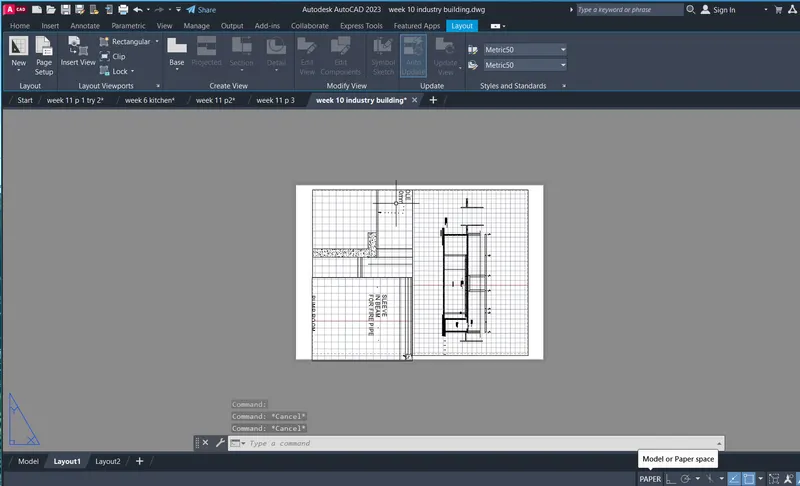
Creation of Multiple viewports, Scaling the drawing and setting in Template in AutoCad
AIM:
To create a viewport of the drawing
comments :
- mv
- insert
- scale
-ps
-attedit
Procedure:
Regenerating model.
AutoCAD menu utilities loaded.
Command:
Command:
Command:
Command:
Command:
Command: _OPEN
Command:
Command:
Command:
Command:
Command:
Command: _QSave
Command:
Command: Regenerating model.
Regenerating model.
Command:
Command: _pasteclip Specify insertion point:
Command:
Command: Regenerating model.
Regenerating model.
Command:
Command: _pasteclip Specify insertion point:
Command: Cancel
Command: Cancel
Command: <Switching to: Layout1>
Regenerating layout.
Regenerating layout.
Regenerating model - caching viewports.
Command: Regenerating layout.
Specify opposite corner or [Fence/WPolygon/CPolygon]:
Command:
Command:
Command:
Command: Specify opposite corner or [Fence/WPolygon/CPolygon]: Cancel
Command: Cancel
Crossing Lasso Press Spacebar to cycle options
Command: Specify opposite corner or [Fence/WPolygon/CPolygon]: Cancel
Command: _.MSPACE
Command: Specify opposite corner or [Fence/WPolygon/CPolygon]:
Window Lasso Press Spacebar to cycle options
Command:
Command: _.erase 1 found
Command: Specify opposite corner or [Fence/WPolygon/CPolygon]:
Command:
Command: _.erase 1 found
Command: Specify opposite corner or [Fence/WPolygon/CPolygon]:
Command: Specify opposite corner or [Fence/WPolygon/CPolygon]:
Command: Specify opposite corner or [Fence/WPolygon/CPolygon]:
Crossing Lasso Press Spacebar to cycle options
Command: _.erase 1 found
Command: PS
PSPACE
Command:
Command:
* STRETCH *
Specify stretch point or [Base point/Copy/Undo/eXit]:
Command:
* STRETCH *
Specify stretch point or [Base point/Copy/Undo/eXit]:
Command:
Command:
Command: _dim
Select objects or specify first extension line origin or [Angular/Baseline/Continue/Ordinate/aliGn/Distribute/Layer/Undo]:
Specify first extension line origin or [Angular/Baseline/Continue/Ordinate/aliGn/Distribute/Layer/Undo]:
Specify second extension line origin or [Undo]:
Specify dimension line location or second line for angle [Mtext/Text/text aNgle/Undo]:
Select objects or specify first extension line origin or [Angular/Baseline/Continue/Ordinate/aliGn/Distribute/Layer/Undo]:
Specify first extension line origin or [Angular/Baseline/Continue/Ordinate/aliGn/Distribute/Layer/Undo]:
Command: Specify opposite corner or [Fence/WPolygon/CPolygon]: Cancel
Command:
Command: _.erase 1 found
Command: REC
RECTANG
Specify first corner point or [Chamfer/Elevation/Fillet/Thickness/Width]:
Specify other corner point or [Area/Dimensions/Rotation]:
Specify other corner point or [Area/Dimensions/Rotation]: 475
Command: Specify opposite corner or [Fence/WPolygon/CPolygon]:
Command: Specify opposite corner or [Fence/WPolygon/CPolygon]: Cancel
Command: _.MSPACE
Crossing Lasso Press Spacebar to cycle options
Crossing Lasso Press Spacebar to cycle options
Command: Specify opposite corner or [Fence/WPolygon/CPolygon]:
Command: REMOVE
PURGE Purged *D10.
Purged *D11.
Command: Specify opposite corner or [Fence/WPolygon/CPolygon]:
Command: Specify opposite corner or [Fence/WPolygon/CPolygon]:
Command: Specify opposite corner or [Fence/WPolygon/CPolygon]:
Command: Specify opposite corner or [Fence/WPolygon/CPolygon]:
Window Lasso Press Spacebar to cycle options
Command: MOVE
501 found
Specify base point or [Displacement] <Displacement>:
Specify second point or <use first point as displacement>:
Command:
Command:
Command: _dim
Select objects or specify first extension line origin or [Angular/Baseline/Continue/Ordinate/aliGn/Distribute/Layer/Undo]:
Select objects or specify first extension line origin or [Angular/Baseline/Continue/Ordinate/aliGn/Distribute/Layer/Undo]:
Command: PS
PSPACE
Command: REC
RECTANG
Specify first corner point or [Chamfer/Elevation/Fillet/Thickness/Width]:
Specify other corner point or [Area/Dimensions/Rotation]: 375
Command: Specify opposite corner or [Fence/WPolygon/CPolygon]:
Command:
* STRETCH *
Specify stretch point or [Base point/Copy/Undo/eXit]:
Command:
* STRETCH *
Specify stretch point:100
Command:
RECTANG
Specify first corner point or [Chamfer/Elevation/Fillet/Thickness/Width]:
Specify other corner point or [Area/Dimensions/Rotation]: Cancel
Specify other corner point or [Area/Dimensions/Rotation]: Cancel
Command: Cancel
Command:
Command:
* STRETCH *
Specify stretch point:
Command: Cancel
Command: Specify opposite corner or [Fence/WPolygon/CPolygon]: Cancel
Command: _.MSPACE
Command: Regenerating model.
Regenerating model.
PS
PSPACE
Command: Cancel
Command:
Command: Specify opposite corner or [Fence/WPolygon/CPolygon]:
Command: Specify opposite corner or [Fence/WPolygon/CPolygon]:
Automatic save to C:\Users\Welcome\AppData\Local\Temp\week 11 p 1 try 2_1_30900_fe7cd87b.sv$ ...
Command:
Command: Cancel
Command:
Command:
Command:
Command: _properties
Command: Specify opposite corner or [Fence/WPolygon/CPolygon]:
Command:
Command:
* STRETCH *
Specify stretch point or [Base point/Copy/Undo/eXit]:
Command:
* STRETCH *
Specify stretch point or [Base point/Copy/Undo/eXit]:
Command:
* STRETCH *
Specify stretch point or [Base point/Copy/Undo/eXit]:
Command:
* STRETCH *
Specify stretch point or [Base point/Copy/Undo/eXit]:
Command: Cancel
Command:
Command: Cancel
Command: Cancel
Command: <Switching to: Model>
Restoring cached viewports.
Regenerating 504 modified entities.
AIM:
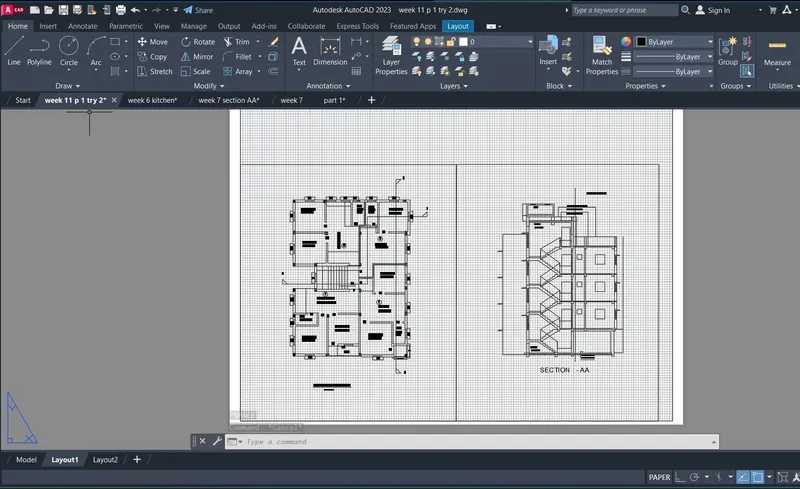
To create a viewport of the drawing
comments :
- mv
- insert
- scale
-ps
-attedit
Procedure:
Regenerating model.
AutoCAD menu utilities loaded.
Command:
Command:
Command:
Command:
Command:
Command: _QSave
Command:
Command:
Command:
Command: _pasteclip
Specify insertion point:
Command: Specify opposite corner:
Command: Cancel
Command: Specify opposite corner:
Command: _.erase 1 found
Command: Cancel
Command: Cancel
Command: Cancel
Command: Cancel
Command:
Command:
Command:
Command: Regenerating model.
Command:
Command: _pasteclip Specify insertion point:
Command: Cancel
Command: Cancel
Command: <Switching to: Layout1>
Regenerating layout.
Regenerating layout.
Regenerating model - caching viewports.
Command: Specify opposite corner or [Fence/WPolygon/CPolygon]:
Command: _.erase 1 found
Command: MV
MVIEW
Specify corner of viewport or [ON/OFF/Fit/Shadeplot/Lock/NEw/NAmed/Object/Polygonal/Restore/LAyer/2/3/4] <Fit>:
Specify opposite corner: Cancel
Command:
Command:
Command: _pagesetup
Command: MV
MVIEW
Specify corner of viewport or [ON/OFF/Fit/Shadeplot/Lock/NEw/NAmed/Object/Polygonal/Restore/LAyer/2/3/4] <Fit>:
Specify opposite corner: 105,148.5
Regenerating model.
Command:
Command:
* STRETCH *
Specify stretch point or [Base point/Copy/Undo/eXit]:
Command:
* STRETCH *
Specify stretch point or [Base point/Copy/Undo/eXit]:
Command: Cancel
Crossing Lasso Press Spacebar to cycle options
Command: CP
COPY 1 found
Current settings: Copy mode = Multiple
Specify base point or [Displacement/mOde] <Displacement>:
Specify second point or [Array] <use first point as displacement>: Regenerating model.
Specify second point or [Array/Exit/Undo] <Exit>: Regenerating model.
Specify second point or [Array/Exit/Undo] <Exit>: Regenerating model.
Specify second point or [Array/Exit/Undo] <Exit>: Cancel
Command:
Command:
* STRETCH *
Specify stretch point or [Base point/Copy/Undo/eXit]:
Command: Cancel
Command:
Command:
* STRETCH *
Specify stretch point or [Base point/Copy/Undo/eXit]:
Command:
Command:
* STRETCH *
Specify stretch point or [Base point/Copy/Undo/eXit]:
Command: Cancel
Command:
Command:
* STRETCH *
Specify stretch point or [Base point/Copy/Undo/eXit]:
Command:
* STRETCH *
Specify stretch point or [Base point/Copy/Undo/eXit]: 10
Command:
Command:
* STRETCH *
Specify stretch point or [Base point/Copy/Undo/eXit]:
Command: Cancel
Command:
Command:
* STRETCH *
Specify stretch point or [Base point/Copy/Undo/eXit]:
Command:
* STRETCH *
Specify stretch point or [Base point/Copy/Undo/eXit]:
Command:
* STRETCH *
Specify stretch point or [Base point/Copy/Undo/eXit]:
Command: Cancel
Command:
Command:
* STRETCH *
Specify stretch point or [Base point/Copy/Undo/eXit]:
Command:
Command:
* STRETCH *
Specify stretch point or [Base point/Copy/Undo/eXit]:
Command:
* STRETCH *
Specify stretch point or [Base point/Copy/Undo/eXit]:
Command:
* STRETCH *
Specify stretch point or [Base point/Copy/Undo/eXit]:
Command:
* STRETCH *
Specify stretch point or [Base point/Copy/Undo/eXit]:
Command: Cancel
Command:
Command: Specify opposite corner or [Fence/WPolygon/CPolygon]:
Command: Specify opposite corner or [Fence/WPolygon/CPolygon]:
Command: Cancel
Command: Specify opposite corner or [Fence/WPolygon/CPolygon]: Cancel
Command: _.MSPACE
Command: PS
PSPACE
Command: Specify opposite corner or [Fence/WPolygon/CPolygon]:
Command: Cancel
Command: _.MSPACE
Command: Specify opposite corner or [Fence/WPolygon/CPolygon]:
Command: _.erase 181 found
Command: Specify opposite corner or [Fence/WPolygon/CPolygon]:
Command: _.erase 98 found
Dimension extension disassociated.
Hatch boundary associativity removed.
Hatch boundary associativity removed.
Command: _u INTELLIPAN
Command: _u ERASE
Command: _u ERASE
Command:
Command:
Command: _MVIEW
Switching to Paper space.
Specify corner of viewport or [ON/OFF/Fit/Shadeplot/Lock/NEw/NAmed/Object/Polygonal/Restore/LAyer/2/3/4] <Fit>: _NEW Regenerating model.
Regenerating layout.
Regenerating model - caching viewports.
Specify first corner:
Specify opposite corner:
Specify first corner (or press ENTER to accept):
Specify opposite corner:
Specify first corner (or press ENTER to accept):
Regenerating layout.
Regenerating model - caching viewports.
Specify location of view or <Right-click to change scale>: Regenerating model.
Switching to Model space.
Command: Specify opposite corner or [Fence/WPolygon/CPolygon]:
Command: PS
PSPACE
Command:
Command: _.erase 1 found
Command: Specify opposite corner or [Fence/WPolygon/CPolygon]: Cancel
Command: _.MSPACE
Command:
Viewport is view-locked. Switching to Paper space.
Switching back to Model space.
Viewport is view-locked. Switching to Paper space.
Switching back to Model space.
Command:
Viewport is view-locked. Switching to Paper space.
Switching back to Model space.
Viewport is view-locked. Switching to Paper space.
Switching back to Model space.
Command:
Viewport is view-locked. Switching to Paper space.
Switching back to Model space.
Viewport is view-locked. Switching to Paper space.
Switching back to Model space.
Command:
Viewport is view-locked. Switching to Paper space.
Regenerating layout.
Switching back to Model space.
Viewport is view-locked. Switching to Paper space.
Switching back to Model space.
Command:
Viewport is view-locked. Switching to Paper space.
Switching back to Model space.
Viewport is view-locked. Switching to Paper space.
Switching back to Model space.
Command:
Viewport is view-locked. Switching to Paper space.
Switching back to Model space.
Viewport is view-locked. Switching to Paper space.
Switching back to Model space.
Command:
Viewport is view-locked. Switching to Paper space.
Switching back to Model space.
Viewport is view-locked. Switching to Paper space.
Switching back to Model space.
Command:
Viewport is view-locked. Switching to Paper space.
Switching back to Model space.
Viewport is view-locked. Switching to Paper space.
Switching back to Model space.
Command:
Viewport is view-locked. Switching to Paper space.
Switching back to Model space.
Viewport is view-locked. Switching to Paper space.
Switching back to Model space.
Command:
Viewport is view-locked. Switching to Paper space.
Switching back to Model space.
Viewport is view-locked. Switching to Paper space.
Switching back to Model space.
Command:
Viewport is view-locked. Switching to Paper space.
Switching back to Model space.
Viewport is view-locked. Switching to Paper space.
Switching back to Model space.
Command:
Viewport is view-locked. Switching to Paper space.
Switching back to Model space.
Viewport is view-locked. Switching to Paper space.
Switching back to Model space.
Command:
Viewport is view-locked. Switching to Paper space.
Switching back to Model space.
Viewport is view-locked. Switching to Paper space.
Switching back to Model space.
Command:
Viewport is view-locked. Switching to Paper space.
Switching back to Model space.
Viewport is view-locked. Switching to Paper space.
Switching back to Model space.
Command:
Viewport is view-locked. Switching to Paper space.
Switching back to Model space.
Viewport is view-locked. Switching to Paper space.
Switching back to Model space.
Command:
Viewport is view-locked. Switching to Paper space.
Switching back to Model space.
Viewport is view-locked. Switching to Paper space.
Switching back to Model space.
Command:
Viewport is view-locked. Switching to Paper space.
Switching back to Model space.
Viewport is view-locked. Switching to Paper space.
Switching back to Model space.
Command:
Viewport is view-locked. Switching to Paper space.
Switching back to Model space.
Viewport is view-locked. Switching to Paper space.
Switching back to Model space.
Command:
Viewport is view-locked. Switching to Paper space.
Switching back to Model space.
Viewport is view-locked. Switching to Paper space.
Switching back to Model space.
Command:
Viewport is view-locked. Switching to Paper space.
Switching back to Model space.
Viewport is view-locked. Switching to Paper space.
Switching back to Model space.
Command:
Viewport is view-locked. Switching to Paper space.
Regenerating layout.
Switching back to Model space.
Viewport is view-locked. Switching to Paper space.
Switching back to Model space.
Command:
Viewport is view-locked. Switching to Paper space.
Switching back to Model space.
Viewport is view-locked. Switching to Paper space.
Switching back to Model space.
There are no active Model space viewports.
Command: Specify opposite corner or [Fence/WPolygon/CPolygon]: Cancel
Command: _.MSPACE
Command:
Viewport is view-locked. Switching to Paper space.
Switching back to Model space.
Viewport is view-locked. Switching to Paper space.
Switching back to Model space.
Command:
Viewport is view-locked. Switching to Paper space.
Switching back to Model space.
Viewport is view-locked. Switching to Paper space.
Switching back to Model space.
Command:
Viewport is view-locked. Switching to Paper space.
Switching back to Model space.
Viewport is view-locked. Switching to Paper space.
Switching back to Model space.
Command:
Viewport is view-locked. Switching to Paper space.
Switching back to Model space.
Viewport is view-locked. Switching to Paper space.
Switching back to Model space.
Command:
Viewport is view-locked. Switching to Paper space.
Switching back to Model space.
Viewport is view-locked. Switching to Paper space.
Switching back to Model space.
Command: PS
PSPACE
Command:
Command:
* STRETCH *
Specify stretch point or [Base point/Copy/Undo/eXit]:
Command:
* STRETCH *
Specify stretch point or [Base point/Copy/Undo/eXit]:
Command:
* STRETCH *
Specify stretch point or [Base point/Copy/Undo/eXit]:
Command:
* STRETCH *
Specify stretch point or [Base point/Copy/Undo/eXit]: Cancel
Command: Specify opposite corner or [Fence/WPolygon/CPolygon]:
Command: Specify opposite corner or [Fence/WPolygon/CPolygon]: Cancel
Command: _.MSPACE
Command:
Command:
Command: _vpclip
Switching to Paper space.
Select viewport to clip: No object found.
Select viewport to clip: No object found.
Select viewport to clip: Cancel
Command:
Command: _MVIEW
Specify corner of viewport or [ON/OFF/Fit/Shadeplot/Lock/NEw/NAmed/Object/Polygonal/Restore/LAyer/2/3/4] <Fit>: _NEW Regenerating model.
Regenerating layout.
Regenerating model - caching viewports.
Specify first corner:
Specify opposite corner:
Specify first corner (or press ENTER to accept):
Regenerating layout.
Regenerating model - caching viewports.
Specify location of view or <Right-click to change scale>: Regenerating model.
Command:
Command: _.erase 1 found
Command: Specify opposite corner or [Fence/WPolygon/CPolygon]:
Command:
Command:
* STRETCH *
Specify stretch point or [Base point/Copy/Undo/eXit]:
Command: _.erase 1 found
Command: _u ERASE Regenerating layout.
Regenerating model.
Command: Specify opposite corner or [Fence/WPolygon/CPolygon]:
Command: Specify opposite corner or [Fence/WPolygon/CPolygon]:
Command:
Command:
Command: Specify opposite corner or [Fence/WPolygon/CPolygon]:
Command: Specify opposite corner or [Fence/WPolygon/CPolygon]:
Command:
Command: Regenerating layout.
* STRETCH *
Specify stretch point or [Base point/Copy/Undo/eXit]:
Command: Regenerating layout.
* STRETCH *
Specify stretch point or [Base point/Copy/Undo/eXit]:
Automatic save to C:\Users\Welcome\AppData\Local\Temp\week 11 p2_1_17578_9b421368.sv$ ...
Command:
Command:
* STRETCH *
Specify stretch point or [Base point/Copy/Undo/eXit]:
Command: Specify opposite corner or [Fence/WPolygon/CPolygon]:
Command: Specify opposite corner or [Fence/WPolygon/CPolygon]: Cancel
Command: _.MSPACE
Command:
Viewport is view-locked. Switching to Paper space.
Switching back to Model space.
Viewport is view-locked. Switching to Paper space.
Switching back to Model space.
Command:
Viewport is view-locked. Switching to Paper space.
Switching back to Model space.
Viewport is view-locked. Switching to Paper space.
Switching back to Model space.
Command:
Viewport is view-locked. Switching to Paper space.
Switching back to Model space.
Viewport is view-locked. Switching to Paper space.
Switching back to Model space.
Command:
Viewport is view-locked. Switching to Paper space.
Switching back to Model space.
Viewport is view-locked. Switching to Paper space.
Switching back to Model space.
Command:
Viewport is view-locked. Switching to Paper space.
Switching back to Model space.
Viewport is view-locked. Switching to Paper space.
Switching back to Model space.
Command:
Viewport is view-locked. Switching to Paper space.
Switching back to Model space.
Viewport is view-locked. Switching to Paper space.
Switching back to Model space.
Command:
Viewport is view-locked. Switching to Paper space.
Switching back to Model space.
Viewport is view-locked. Switching to Paper space.
Switching back to Model space.
Command:
Viewport is view-locked. Switching to Paper space.
Switching back to Model space.
Viewport is view-locked. Switching to Paper space.
Switching back to Model space.
Command:
Viewport is view-locked. Switching to Paper space.
Switching back to Model space.
Viewport is view-locked. Switching to Paper space.
Switching back to Model space.
Command:
Viewport is view-locked. Switching to Paper space.
Switching back to Model space.
Viewport is view-locked. Switching to Paper space.
Switching back to Model space.
Command:
Viewport is view-locked. Switching to Paper space.
Switching back to Model space.
Viewport is view-locked. Switching to Paper space.
Switching back to Model space.
Command:
Viewport is view-locked. Switching to Paper space.
Switching back to Model space.
Viewport is view-locked. Switching to Paper space.
Switching back to Model space.
Command: Specify opposite corner or [Fence/WPolygon/CPolygon]:
Command: Specify opposite corner or [Fence/WPolygon/CPolygon]: Cancel
Command: Cancel
Window Lasso Press Spacebar to cycle options
Command: _u _CVPORT
Command: _u _CVPORT
Command: _u INTELLIZOOM INTELLIZOOM INTELLIZOOM INTELLIZOOM INTELLIZOOM INTELLIZOOM INTELLIZOOM INTELLIZOOM INTELLIZOOM INTELLIZOOM INTELLIZOOM INTELLIZOOM
Command: _u MSPACE
Command: _u INTELLIZOOM
Command: _u Grip Edit
Command: _u INTELLIZOOM
Command: _u Grip Edit
Command: _u
Command: _u INTELLIPAN INTELLIZOOM
Command: _u Grip Edit
Command: _u INTELLIPAN INTELLIZOOM
Command: _u
Command: _u Grip Edit
Command: _u Grip Edit
Command: Specify opposite corner or [Fence/WPolygon/CPolygon]:
Command: Specify opposite corner or [Fence/WPolygon/CPolygon]: Cancel
Command: _.MSPACE
Command: ZOOM
Viewport is view-locked. Switching to Paper space.
Specify corner of window, enter a scale factor (nX or nXP), or
[All/Center/Dynamic/Extents/Previous/Scale/Window/Object] <real time>:
Press ESC or ENTER to exit, or right-click to display shortcut menu.
Switching back to Model space.
Command: Specify opposite corner or [Fence/WPolygon/CPolygon]:
Viewport is view-locked. Switching to Paper space.
Switching back to Model space.
Viewport is view-locked. Switching to Paper space.
Switching back to Model space.
Command:
Command:
Viewport is view-locked. Switching to Paper space.
Switching back to Model space.
Viewport is view-locked. Switching to Paper space.
Switching back to Model space.
Command:
Viewport is view-locked. Switching to Paper space.
Switching back to Model space.
Viewport is view-locked. Switching to Paper space.
Switching back to Model space.
Command:
Viewport is view-locked. Switching to Paper space.
Switching back to Model space.
Viewport is view-locked. Switching to Paper space.
Switching back to Model space.
Command:
Viewport is view-locked. Switching to Paper space.
Switching back to Model space.
Viewport is view-locked. Switching to Paper space.
Switching back to Model space.
Command:
Viewport is view-locked. Switching to Paper space.
Switching back to Model space.
Viewport is view-locked. Switching to Paper space.
Switching back to Model space.
Command:
Viewport is view-locked. Switching to Paper space.
Switching back to Model space.
Viewport is view-locked. Switching to Paper space.
Switching back to Model space.
Command:
Viewport is view-locked. Switching to Paper space.
Switching back to Model space.
Viewport is view-locked. Switching to Paper space.
Switching back to Model space.
Command: Cancel
Command: Cancel
Command: PS
PSPACE
Command:
Command:
Command:
Command: _properties
Command:
Command:
Command:
Command:
Command:
Command:
Command: Specify opposite corner or [Fence/WPolygon/CPolygon]: Cancel
Command: _.MSPACE
Command: Cancel
Command: PS
PSPACE
Command:
Command: Specify opposite corner or [Fence/WPolygon/CPolygon]:
Command:
Command:
* STRETCH *
Specify stretch point or [Base point/Copy/Undo/eXit]:
Command:
* STRETCH *
Specify stretch point or [Base point/Copy/Undo/eXit]:
Command: Specify opposite corner or [Fence/WPolygon/CPolygon]: Cancel
Command: _.MSPACE
Command: PS
PSPACE
Command:
Command:
Command:
Automatic save to C:\Users\Welcome\AppData\Local\Temp\week 11 p2_1_17578_9b421368.sv$ ...
Command:
Command: Specify opposite corner or [Fence/WPolygon/CPolygon]:
Command: Cancel
Command: _.MSPACE
Command:
Command:
Command: _MVIEW
Switching to Paper space.
Specify corner of viewport or [ON/OFF/Fit/Shadeplot/Lock/NEw/NAmed/Object/Polygonal/Restore/LAyer/2/3/4] <Fit>: _NEW Regenerating model.
Regenerating layout.
Regenerating model - caching viewports.
Specify first corner:
Specify opposite corner:
Specify first corner (or press ENTER to accept):
Regenerating layout.
Regenerating model - caching viewports.
Specify location of view or <Right-click to change scale>: Regenerating model.
Switching to Model space.
Command: PS
PSPACE
Command:
Command: _.erase 1 found
Command: Specify opposite corner or [Fence/WPolygon/CPolygon]:
Command: Specify opposite corner or [Fence/WPolygon/CPolygon]:
Command:
Command: Specify opposite corner or [Fence/WPolygon/CPolygon]:
Command:
* STRETCH *
Specify stretch point or [Base point/Copy/Undo/eXit]:
Command:
* STRETCH *
Specify stretch point or [Base point/Copy/Undo/eXit]:
Command:
* STRETCH *
Specify stretch point or [Base point/Copy/Undo/eXit]:
Command:
Command: Regenerating layout.
Command: Specify opposite corner or [Fence/WPolygon/CPolygon]:
Command: Specify opposite corner or [Fence/WPolygon/CPolygon]:
Command: Specify opposite corner or [Fence/WPolygon/CPolygon]:
Command: Specify opposite corner or [Fence/WPolygon/CPolygon]:
Window Lasso Press Spacebar to cycle options
Command: Specify opposite corner or [Fence/WPolygon/CPolygon]: Cancel
Command: Cancel
Command:
Automatic save to C:\Users\Welcome\AppData\Local\Temp\week 11 p2_1_17578_9b421368.sv$ ...
Command:
Command:
Command: Cancel
Command: Cancel
Command: <Switching to: Model>
Regenerating model - caching viewports.
AIM:
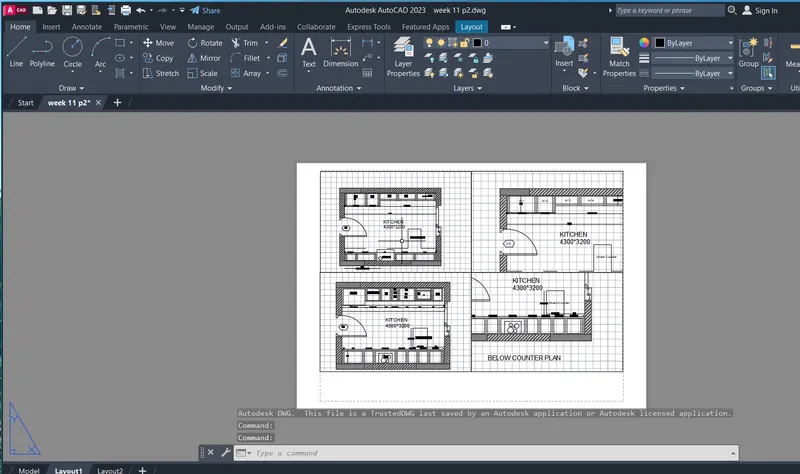
To create a viewport of the drawing
comments :
- mv
- insert
- scale
-ps
-attedit
Procedure:
Opening an AutoCAD 2018 format file.
Regenerating model.
AutoCAD menu utilities loaded.
Command:
Autodesk DWG. This file is a TrustedDWG last saved by an Autodesk application or Autodesk licensed application.
Command:
Command:
Command: Cancel
Command: Cancel
Command: <Switching to: Layout1>
Regenerating layout.
Regenerating layout.
Regenerating model - caching viewports.
Command:
Command:
* STRETCH *
Specify stretch point or [Base point/Copy/Undo/eXit]:
Command:
* STRETCH *
Specify stretch point or [Base point/Copy/Undo/eXit]:
Command:
* STRETCH *
Specify stretch point or [Base point/Copy/Undo/eXit]:
Command:
* STRETCH *
Specify stretch point or [Base point/Copy/Undo/eXit]:
Command:
* STRETCH *
Specify stretch point or [Base point/Copy/Undo/eXit]:
Command:
* STRETCH *
Specify stretch point or [Base point/Copy/Undo/eXit]:
Command: _.erase 1 found
Command: MV
MVIEW
Specify corner of viewport or [ON/OFF/Fit/Shadeplot/Lock/NEw/NAmed/Object/Polygonal/Restore/LAyer/2/3/4] <Fit>:
Specify opposite corner: Regenerating model.
Command: Regenerating layout.
Specify opposite corner or [Fence/WPolygon/CPolygon]: Cancel
Command: _.MSPACE
Crossing Lasso Press Spacebar to cycle options
Crossing Lasso Press Spacebar to cycle options
Command: Regenerating model.
Crossing Lasso Press Spacebar to cycle options
Command: RO
ROTATE
Current positive angle in UCS: ANGDIR=counterclockwise ANGBASE=0
282 found
Specify base point:
Specify rotation angle or [Copy/Reference] <0>:
Hatch boundary associativity removed.
Command: ZOOM
Specify corner of window, enter a scale factor (nX or nXP), or
[All/Center/Dynamic/Extents/Previous/Scale/Window/Object] <real time>:
Specify opposite corner:
Command: PS
PSPACE
Command: MV
MVIEW
Specify corner of viewport or [ON/OFF/Fit/Shadeplot/Lock/NEw/NAmed/Object/Polygonal/Restore/LAyer/2/3/4] <Fit>:
Specify opposite corner: Regenerating model.
Command:
Command: _.erase 1 found
Command:
Command:
Command: _MVIEW
Specify corner of viewport or [ON/OFF/Fit/Shadeplot/Lock/NEw/NAmed/Object/Polygonal/Restore/LAyer/2/3/4] <Fit>: _NEW Regenerating model.
Regenerating layout.
Regenerating model - caching viewports.
Specify first corner:
Specify opposite corner:
Specify first corner (or press ENTER to accept):
Regenerating layout.
Regenerating model - caching viewports.
Specify location of view or <Right-click to change scale>: Regenerating model.
Command:
Command:
* STRETCH *
Specify stretch point or [Base point/Copy/Undo/eXit]:
Command:
* STRETCH *
Specify stretch point or [Base point/Copy/Undo/eXit]:
Command:
* STRETCH *
Specify stretch point or [Base point/Copy/Undo/eXit]:
Command:
Command: Specify opposite corner or [Fence/WPolygon/CPolygon]:
Command: _.erase 2 found
Command: _u ERASE Regenerating layout.
Regenerating model.
Command:
Command:
* STRETCH *
Specify stretch point or [Base point/Copy/Undo/eXit]:
Command:
* STRETCH *
Specify stretch point or [Base point/Copy/Undo/eXit]:
Command: STRETCH
1 found
Specify base point or [Displacement] <Displacement>:
Specify second point or <use first point as displacement>:
Command:
Command:
* STRETCH *
Specify stretch point or [Base point/Copy/Undo/eXit]:
Command:
* STRETCH *
Specify stretch point or [Base point/Copy/Undo/eXit]:
Command:
* STRETCH *
Specify stretch point or [Base point/Copy/Undo/eXit]:
Command:
Command:
Command:
Command:
Command:
Command:
* STRETCH *
Specify stretch point or [Base point/Copy/Undo/eXit]:
Command:
* STRETCH *
Specify stretch point or [Base point/Copy/Undo/eXit]:
Command:
* STRETCH *
Specify stretch point or [Base point/Copy/Undo/eXit]:
Command: MOVE
1 found
Specify base point or [Displacement] <Displacement>:
Specify second point or <use first point as displacement>:
Command:
Command:
* STRETCH *
Specify stretch point or [Base point/Copy/Undo/eXit]:
Command: MO
PROPERTIES
Command: Cancel
Command:
Command: MOVE
1 found
Specify base point or [Displacement] <Displacement>:
Specify second point or <use first point as displacement>: <Ortho off>
Crossing Lasso Press Spacebar to cycle options
Command: MOVE
1 found
Specify base point or [Displacement] <Displacement>:
Specify second point or <use first point as displacement>:
Crossing Lasso Press Spacebar to cycle options
Command: MOVE
1 found
Specify base point or [Displacement] <Displacement>:
Specify second point or <use first point as displacement>: Cancel
Command: L
LINE
Specify first point:
Specify next point or [Undo]:
Specify next point or [Undo]:
Specify next point or [Close/Undo]:
Specify next point or [Close/Undo]: Cancel
Command:
Command: _.erase 1 found
Crossing Lasso Press Spacebar to cycle options
Command: MOVE
1 found
Specify base point or [Displacement] <Displacement>:
Specify second point or <use first point as displacement>:
Command: Cancel
Command:
Command: _.erase 1 found
Crossing Lasso Press Spacebar to cycle options
Command: Cancel
Command: Cancel
Command:
Command: _.erase 1 found
Command:
Command:
* STRETCH *
Specify stretch point or [Base point/Copy/Undo/eXit]:
Command: Specify opposite corner or [Fence/WPolygon/CPolygon]: Cancel
Command: Cancel
Command: Specify opposite corner or [Fence/WPolygon/CPolygon]:
Command: Regenerating layout.
Specify opposite corner or [Fence/WPolygon/CPolygon]:
Command: Specify opposite corner or [Fence/WPolygon/CPolygon]: Cancel
Command: _.MSPACE
Command:
Viewport is view-locked. Switching to Paper space.
Switching back to Model space.
Viewport is view-locked. Switching to Paper space.
Switching back to Model space.
Command:
Viewport is view-locked. Switching to Paper space.
Switching back to Model space.
Viewport is view-locked. Switching to Paper space.
Switching back to Model space.
Command:
Viewport is view-locked. Switching to Paper space.
Switching back to Model space.
Viewport is view-locked. Switching to Paper space.
Switching back to Model space.
Command:
Viewport is view-locked. Switching to Paper space.
Switching back to Model space.
Viewport is view-locked. Switching to Paper space.
Switching back to Model space.
Command:
Viewport is view-locked. Switching to Paper space.
Switching back to Model space.
Viewport is view-locked. Switching to Paper space.
Switching back to Model space.
Command:
Viewport is view-locked. Switching to Paper space.
Switching back to Model space.
Viewport is view-locked. Switching to Paper space.
Switching back to Model space.
Command: Cancel
Command: ps
PSPACE
Command: Specify opposite corner or [Fence/WPolygon/CPolygon]:
Command:
Command:
Command: _MVIEW
Specify corner of viewport or [ON/OFF/Fit/Shadeplot/Lock/NEw/NAmed/Object/Polygonal/Restore/LAyer/2/3/4] <Fit>: _NEW Regenerating model.
Regenerating layout.
Regenerating model - caching viewports.
Specify first corner:
Specify opposite corner:
Invalid window specification.
Regenerating layout.
Regenerating model - caching viewports.
Command:
Command:
Command: _MVIEW
Specify corner of viewport or [ON/OFF/Fit/Shadeplot/Lock/NEw/NAmed/Object/Polygonal/Restore/LAyer/2/3/4] <Fit>: _NEW Regenerating model.
Regenerating layout.
Regenerating model - caching viewports.
Specify first corner: Cancel
Regenerating layout.
Regenerating model - caching viewports.
Command: Cancel
Command: Cancel
Command: <Switching to: Model>
Regenerating model - caching viewports.
Command: Cancel
Command: Cancel
Command: <Switching to: Layout1>
Restoring cached viewports - Regenerating layout.
Command:
Command:
Command: _MVIEW
Specify corner of viewport or [ON/OFF/Fit/Shadeplot/Lock/NEw/NAmed/Object/Polygonal/Restore/LAyer/2/3/4] <Fit>: _NEW Regenerating model.
Regenerating layout.
Regenerating model - caching viewports.
Specify first corner:
Specify opposite corner:
Specify first corner (or press ENTER to accept):
Regenerating layout.
Regenerating model - caching viewports.
Specify location of view or <Right-click to change scale>: Regenerating model.
Command:
Command:
* STRETCH *
Specify stretch point or [Base point/Copy/Undo/eXit]:
Command:
* STRETCH *
Specify stretch point or [Base point/Copy/Undo/eXit]:
Command:
* STRETCH *
Specify stretch point or [Base point/Copy/Undo/eXit]:
Command: MOVE
1 found
Specify base point or [Displacement] <Displacement>:
Specify second point or <use first point as displacement>:
Command:
Command:
* STRETCH *
Specify stretch point or [Base point/Copy/Undo/eXit]:
Command:
* STRETCH *
Specify stretch point or [Base point/Copy/Undo/eXit]:
Command: Cancel
Command: Specify opposite corner or [Fence/WPolygon/CPolygon]: Cancel
Command: _.MSPACE
Command:
Viewport is view-locked. Switching to Paper space.
Switching back to Model space.
Viewport is view-locked. Switching to Paper space.
Switching back to Model space.
Command:
Viewport is view-locked. Switching to Paper space.
Switching back to Model space.
Viewport is view-locked. Switching to Paper space.
Switching back to Model space.
Command:
Viewport is view-locked. Switching to Paper space.
Switching back to Model space.
Viewport is view-locked. Switching to Paper space.
Switching back to Model space.
Command:
Viewport is view-locked. Switching to Paper space.
Switching back to Model space.
Viewport is view-locked. Switching to Paper space.
Switching back to Model space.
Command:
Viewport is view-locked. Switching to Paper space.
Switching back to Model space.
Viewport is view-locked. Switching to Paper space.
Switching back to Model space.
Command:
Viewport is view-locked. Switching to Paper space.
Switching back to Model space.
Viewport is view-locked. Switching to Paper space.
Switching back to Model space.
Command:
Viewport is view-locked. Switching to Paper space.
Switching back to Model space.
Viewport is view-locked. Switching to Paper space.
Switching back to Model space.
Command:
Viewport is view-locked. Switching to Paper space.
Switching back to Model space.
Viewport is view-locked. Switching to Paper space.
Switching back to Model space.
Command:
Viewport is view-locked. Switching to Paper space.
Switching back to Model space.
Viewport is view-locked. Switching to Paper space.
Switching back to Model space.
Command:
Viewport is view-locked. Switching to Paper space.
Switching back to Model space.
Viewport is view-locked. Switching to Paper space.
Switching back to Model space.
Command:
Viewport is view-locked. Switching to Paper space.
Switching back to Model space.
Viewport is view-locked. Switching to Paper space.
Switching back to Model space.
Command:
Viewport is view-locked. Switching to Paper space.
Switching back to Model space.
Command:
Viewport is view-locked. Switching to Paper space.
Switching back to Model space.
Viewport is view-locked. Switching to Paper space.
Switching back to Model space.
Command:
Viewport is view-locked. Switching to Paper space.
Switching back to Model space.
Viewport is view-locked. Switching to Paper space.
Switching back to Model space.
Command:
Viewport is view-locked. Switching to Paper space.
Switching back to Model space.
Viewport is view-locked. Switching to Paper space.
Switching back to Model space.
Command:
Viewport is view-locked. Switching to Paper space.
Switching back to Model space.
Viewport is view-locked. Switching to Paper space.
Switching back to Model space.
Command:
Viewport is view-locked. Switching to Paper space.
Switching back to Model space.
Viewport is view-locked. Switching to Paper space.
Switching back to Model space.
Command:
Viewport is view-locked. Switching to Paper space.
Switching back to Model space.
Viewport is view-locked. Switching to Paper space.
Switching back to Model space.
Command:
Viewport is view-locked. Switching to Paper space.
Switching back to Model space.
Viewport is view-locked. Switching to Paper space.
Switching back to Model space.
Command:
Viewport is view-locked. Switching to Paper space.
Switching back to Model space.
Viewport is view-locked. Switching to Paper space.
Switching back to Model space.
Viewport is view-locked. Switching to Paper space.
Switching back to Model space.
Viewport is view-locked. Switching to Paper space.
Switching back to Model space.
Command:
Viewport is view-locked. Switching to Paper space.
Switching back to Model space.
Viewport is view-locked. Switching to Paper space.
Switching back to Model space.
Command:
Viewport is view-locked. Switching to Paper space.
Command:
Viewport is view-locked. Switching to Paper space.
Regenerating layout.
Switching back to Model space.
Viewport is view-locked. Switching to Paper space.
Switching back to Model space.
Command:
Viewport is view-locked. Switching to Paper space.
Switching back to Model space.
Viewport is view-locked. Switching to Paper space.
Switching back to Model space.
Command:
Viewport is view-locked. Switching to Paper space.
Switching back to Model space.
Viewport is view-locked. Switching to Paper space.
Switching back to Model space.
Command:
Viewport is view-locked. Switching to Paper space.
Switching back to Model space.
Viewport is view-locked. Switching to Paper space.
Switching back to Model space.
Command:
Switching back to Model space.
Viewport is view-locked. Switching to Paper space.
Switching back to Model space.
Command:
Viewport is view-locked. Switching to Paper space.
Switching back to Model space.
Viewport is view-locked. Switching to Paper space.
Switching back to Model space.
Command:
Viewport is view-locked. Switching to Paper space.
Switching back to Model space.
Viewport is view-locked. Switching to Paper space.
Switching back to Model space.
Command:
Viewport is view-locked. Switching to Paper space.
Switching back to Model space.
Viewport is view-locked. Switching to Paper space.
Switching back to Model space.
Command:
Viewport is view-locked. Switching to Paper space.
Switching back to Model space.
Viewport is view-locked. Switching to Paper space.
Switching back to Model space.
Command:
Viewport is view-locked. Switching to Paper space.
Switching back to Model space.
Viewport is view-locked. Switching to Paper space.
Switching back to Model space.
Command:
Viewport is view-locked. Switching to Paper space.
Switching back to Model space.
Viewport is view-locked. Switching to Paper space.
Switching back to Model space.
Command: Cancel
Command: ps
PSPACE
Command: Specify opposite corner or [Fence/WPolygon/CPolygon]:
Command:
Command:
Command: _MVIEW
Specify corner of viewport or [ON/OFF/Fit/Shadeplot/Lock/NEw/NAmed/Object/Polygonal/Restore/LAyer/2/3/4] <Fit>: _NEW Regenerating model.
Regenerating layout.
Regenerating model - caching viewports.
Specify first corner:
Specify opposite corner:
Invalid window specification.
Regenerating layout.
Regenerating model - caching viewports.
Command:
Command:
Command: _MVIEW
Specify corner of viewport or [ON/OFF/Fit/Shadeplot/Lock/NEw/NAmed/Object/Polygonal/Restore/LAyer/2/3/4] <Fit>: _NEW Regenerating model.
Regenerating layout.
Regenerating model - caching viewports.
Specify first corner: Cancel
Regenerating layout.
Regenerating model - caching viewports.
Command: Cancel
Command: Cancel
Command: <Switching to: Model>
Regenerating model - caching viewports.
Command: Cancel
Command: Cancel
Command: <Switching to: Layout1>
Restoring cached viewports - Regenerating layout.
Command:
Command:
Command: _MVIEW
Specify corner of viewport or [ON/OFF/Fit/Shadeplot/Lock/NEw/NAmed/Object/Polygonal/Restore/LAyer/2/3/4] <Fit>: _NEW Regenerating model.
Regenerating layout.
Regenerating model - caching viewports.
Specify first corner:
Specify opposite corner:
Specify first corner (or press ENTER to accept):
Regenerating layout.
Regenerating model - caching viewports.
Specify location of view or <Right-click to change scale>: Regenerating model.
Command:
Command:
* STRETCH *
Specify stretch point or [Base point/Copy/Undo/eXit]:
Command:
* STRETCH *
Specify stretch point or [Base point/Copy/Undo/eXit]:
Command:
* STRETCH *
Specify stretch point or [Base point/Copy/Undo/eXit]:
Command: MOVE
1 found
Specify base point or [Displacement] <Displacement>:
Specify second point or <use first point as displacement>:
Command:
Command:
* STRETCH *
Specify stretch point or [Base point/Copy/Undo/eXit]:
Command:
* STRETCH *
Specify stretch point or [Base point/Copy/Undo/eXit]:
Command: Cancel
Command: Specify opposite corner or [Fence/WPolygon/CPolygon]: Cancel
Command: _.MSPACE
Command:
Viewport is view-locked. Switching to Paper space.
Switching back to Model space.
Viewport is view-locked. Switching to Paper space.
Switching back to Model space.
Command:
Viewport is view-locked. Switching to Paper space.
Switching back to Model space.
Viewport is view-locked. Switching to Paper space.
Switching back to Model space.
Command:
Viewport is view-locked. Switching to Paper space.
Switching back to Model space.
Viewport is view-locked. Switching to Paper space.
Switching back to Model space.
Command:
Viewport is view-locked. Switching to Paper space.
Switching back to Model space.
Viewport is view-locked. Switching to Paper space.
Switching back to Model space.
Command:
Viewport is view-locked. Switching to Paper space.
Switching back to Model space.
Viewport is view-locked. Switching to Paper space.
Switching back to Model space.
Command:
Viewport is view-locked. Switching to Paper space.
Switching back to Model space.
Viewport is view-locked. Switching to Paper space.
Switching back to Model space.
Command:
Viewport is view-locked. Switching to Paper space.
Switching back to Model space.
Viewport is view-locked. Switching to Paper space.
Switching back to Model space.
Command:
Viewport is view-locked. Switching to Paper space.
Switching back to Model space.
Viewport is view-locked. Switching to Paper space.
Switching back to Model space.
Command:
Viewport is view-locked. Switching to Paper space.
Switching back to Model space.
Viewport is view-locked. Switching to Paper space.
Switching back to Model space.
Command:
Viewport is view-locked. Switching to Paper space.
Switching back to Model space.
Viewport is view-locked. Switching to Paper space.
Switching back to Model space.
Command:
Viewport is view-locked. Switching to Paper space.
Switching back to Model space.
Viewport is view-locked. Switching to Paper space.
Switching back to Model space.
Command:
Viewport is view-locked. Switching to Paper space.
Switching back to Model space.
Viewport is view-locked. Switching to Paper space.
Switching back to Model space.
Command:
Viewport is view-locked. Switching to Paper space.
Switching back to Model space.
Viewport is view-locked. Switching to Paper space.
Switching back to Model space.
Command:
Viewport is view-locked. Switching to Paper space.
Switching back to Model space.
Viewport is view-locked. Switching to Paper space.
Switching back to Model space.
Command:
Viewport is view-locked. Switching to Paper space.
Switching back to Model space.
Viewport is view-locked. Switching to Paper space.
Switching back to Model space.
Command:
Viewport is view-locked. Switching to Paper space.
Switching back to Model space.
Viewport is view-locked. Switching to Paper space.
Switching back to Model space.
Command:
Viewport is view-locked. Switching to Paper space.
Switching back to Model space.
Viewport is view-locked. Switching to Paper space.
Switching back to Model space.
Command:
Viewport is view-locked. Switching to Paper space.
Switching back to Model space.
Viewport is view-locked. Switching to Paper space.
Switching back to Model space.
Command:
Viewport is view-locked. Switching to Paper space.
Switching back to Model space.
Viewport is view-locked. Switching to Paper space.
Switching back to Model space.
Command:
Viewport is view-locked. Switching to Paper space.
Switching back to Model space.
Viewport is view-locked. Switching to Paper space.
Switching back to Model space.
Command:
Viewport is view-locked. Switching to Paper space.
Switching back to Model space.
Viewport is view-locked. Switching to Paper space.
Switching back to Model space.
Command:
Viewport is view-locked. Switching to Paper space.
Switching back to Model space.
Viewport is view-locked. Switching to Paper space.
Switching back to Model space.
Command:
Viewport is view-locked. Switching to Paper space.
Switching back to Model space.
Viewport is view-locked. Switching to Paper space.
Switching back to Model space.
Command:
Viewport is view-locked. Switching to Paper space.
Regenerating layout.
Switching back to Model space.
Viewport is view-locked. Switching to Paper space.
Switching back to Model space.
Command:
Viewport is view-locked. Switching to Paper space.
Switching back to Model space.
Viewport is view-locked. Switching to Paper space.
Switching back to Model space.
Command:
Viewport is view-locked. Switching to Paper space.
Switching back to Model space.
Viewport is view-locked. Switching to Paper space.
Switching back to Model space.
Command:
Viewport is view-locked. Switching to Paper space.
Switching back to Model space.
Viewport is view-locked. Switching to Paper space.
Switching back to Model space.
Command:
Viewport is view-locked. Switching to Paper space.
Switching back to Model space.
Viewport is view-locked. Switching to Paper space.
Switching back to Model space.
Command:
Viewport is view-locked. Switching to Paper space.
Switching back to Model space.
Viewport is view-locked. Switching to Paper space.
Switching back to Model space.
Command:
Viewport is view-locked. Switching to Paper space.
Switching back to Model space.
Viewport is view-locked. Switching to Paper space.
Switching back to Model space.
Command:
Viewport is view-locked. Switching to Paper space.
Switching back to Model space.
Viewport is view-locked. Switching to Paper space.
Switching back to Model space.
Command:
Viewport is view-locked. Switching to Paper space.
Switching back to Model space.
Viewport is view-locked. Switching to Paper space.
Switching back to Model space.
Command:
Viewport is view-locked. Switching to Paper space.
Switching back to Model space.
Viewport is view-locked. Switching to Paper space.
Switching back to Model space.
Command:
Viewport is view-locked. Switching to Paper space.
Switching back to Model space.
Viewport is view-locked. Switching to Paper space.
Switching back to Model space.
Command:
Viewport is view-locked. Switching to Paper space.
Switching back to Model space.
Viewport is view-locked. Switching to Paper space.
Switching back to Model space.
Command: Cancel
Command:
Viewport is view-locked. Switching to Paper space.
Switching back to Model space.
Viewport is view-locked. Switching to Paper space.
Switching back to Model space.
Command:
Viewport is view-locked. Switching to Paper space.
Switching back to Model space.
Viewport is view-locked. Switching to Paper space.
Switching back to Model space.
Command:
Viewport is view-locked. Switching to Paper space.
Switching back to Model space.
Viewport is view-locked. Switching to Paper space.
Switching back to Model space.
Command:
Command: Cancel
Command:
Command: Cancel
Command: Cancel
Command: PS
PSPACE
Command: Specify opposite corner or [Fence/WPolygon/CPolygon]:
Command: Specify opposite corner or [Fence/WPolygon/CPolygon]:
Command:
Command:
* STRETCH *
Specify stretch point or [Base point/Copy/Undo/eXit]:
Command:
* STRETCH *
Specify stretch point or [Base point/Copy/Undo/eXit]:
Command:
* STRETCH *
Specify stretch point or [Base point/Copy/Undo/eXit]:
Command: Cancel
Command:
Command:
Command: Cancel
Command: Cancel
Command:
Automatic save to C:\Users\Welcome\AppData\Local\Temp\week 10 industry building_1_13007_755dc55c.sv$ ...
Command:
Command: Cancel
Command: Cancel
Command: <Switching to: Model>
Restoring cached viewports.