Creating a Residence Layout, Seating plan, Toilet and Utility room plan using AutoCad
AIM:
To Create layout plan for the given residence using AUTOCAD.
INTRODUCTION:
Following are the commands which are used to draw the objects in AUTOCAD:
- Rectangle(REC): It is used to create a rectangle with the desired dimension.
- Polygon(POL): It is used to create a polygon by giving the no. of sides and circumscribed about the circle or Inscribed in a circle.
- Lines(L): Used to create a line. each line is created independently.
- Polyline(PL): Used to create a set of lines and curves(if any) to create an object of the desired dimension.
Following are the commands which are used to modify the objects in AUTOCAD:
- Move(M): It is used to move objects.
- Copy(CO): it is used to create multiple copies of the object selected.
- Offset(O): It is used to create offset from a selected object by giving the offset distance.
- Rotate(RO): It is used to rotate objects.
- Scale(SC): it is used to make the selected objects bigger or smaller by changing the scale factor.
- Fillet(F): It is used to create curved edges at the junction of two lines. radius can be adjusted as per requirement.
- Chamfer(CH): It is used to create straight edges at the junction of two lines, chamfer distance is can be adjusted.
- Snap tool(DS): It is used to set the minimum distance to move in the x & y-direction.
- Trim(TR): It is used to trim the extended part of the object at a desired place.
- Erase(E): it is used to erase the object which is not required.
PROCEDURE:
Command: L LINE
Specify first point:
Specify next point or [Undo]: 25'
Specify next point or [Undo]:
Command: Regenerating model.
Regenerating model.
O OFFSET
Current settings: Erase source=No Layer=Source OFFSETGAPTYPE=0
Specify offset distance or [Through/Erase/Layer] : 43'6.5"
Select object to offset or [Exit/Undo] :
Specify point on side to offset or [Exit/Multiple/Undo] :
Select object to offset or [Exit/Undo] :
Command: OFFSET
Current settings: Erase source=No Layer=Source OFFSETGAPTYPE=0
Specify offset distance or [Through/Erase/Layer] <43'-6.5">: 9"
Select object to offset or [Exit/Undo] :
Specify point on side to offset or [Exit/Multiple/Undo] :
Select object to offset or [Exit/Undo] :
Command: OFFSET
Current settings: Erase source=No Layer=Source OFFSETGAPTYPE=0
Specify offset distance or [Through/Erase/Layer] <0'-9.0">: 12'
Select object to offset or [Exit/Undo] :
Specify point on side to offset or [Exit/Multiple/Undo] :
Select object to offset or [Exit/Undo] :
Command: OFFSET
Current settings: Erase source=No Layer=Source OFFSETGAPTYPE=0
Specify offset distance or [Through/Erase/Layer] <12'-0.0">: 4.5"
Select object to offset or [Exit/Undo] :
Specify point on side to offset or [Exit/Multiple/Undo] :
Select object to offset or [Exit/Undo] :
Command: OFFSET
Current settings: Erase source=No Layer=Source OFFSETGAPTYPE=0
Specify offset distance or [Through/Erase/Layer] <0'-4.5">: 4'6"
Select object to offset or [Exit/Undo] :
Specify point on side to offset or [Exit/Multiple/Undo] :
Select object to offset or [Exit/Undo] :
Command: OFFSET
Current settings: Erase source=No Layer=Source OFFSETGAPTYPE=0
Specify offset distance or [Through/Erase/Layer] <4'-6.0">: 4.5"
Select object to offset or [Exit/Undo] :
Specify point on side to offset or [Exit/Multiple/Undo] :
Select object to offset or [Exit/Undo] :
Command: O OFFSET
Current settings: Erase source=No Layer=Source OFFSETGAPTYPE=0
Specify offset distance or [Through/Erase/Layer] <0'-4.5">: 11'
Select object to offset or [Exit/Undo] :
Specify point on side to offset or [Exit/Multiple/Undo] :
Select object to offset or [Exit/Undo] :
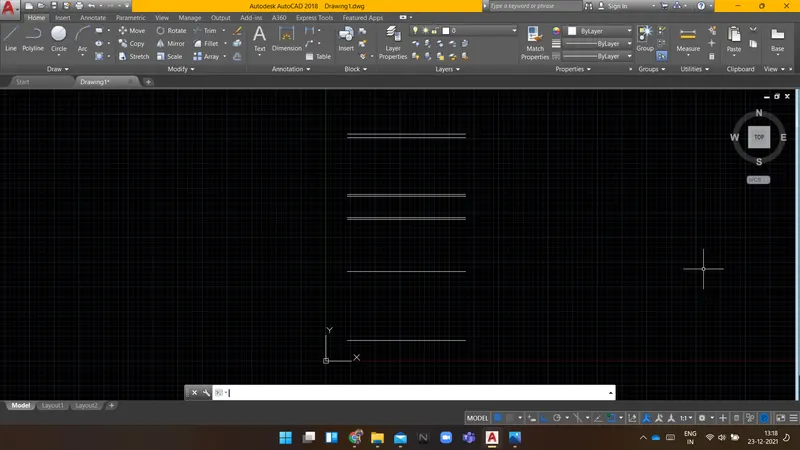
Command: L LINE
Specify first point:
Specify next point or [Undo]:
Specify next point or [Undo]:
Specify next point or [Close/Undo]:
Specify next point or [Close/Undo]:
Specify next point or [Close/Undo]:
Specify next point or [Close/Undo]:
Specify next point or [Close/Undo]:
Specify next point or [Close/Undo]:
Command: O OFFSET
Current settings: Erase source=No Layer=Source OFFSETGAPTYPE=0
Specify offset distance or [Through/Erase/Layer] <11'-0.0">: 11'7.5"
Select object to offset or [Exit/Undo] :
Specify point on side to offset or [Exit/Multiple/Undo] :
Select object to offset or [Exit/Undo] :
Specify point on side to offset or [Exit/Multiple/Undo] :
Select object to offset or [Exit/Undo] :
Specify point on side to offset or [Exit/Multiple/Undo] :
Select object to offset or [Exit/Undo] :
Command: OFFSET
Current settings: Erase source=No Layer=Source OFFSETGAPTYPE=0
Specify offset distance or [Through/Erase/Layer] <11'-7.5">: 4.5"
Select object to offset or [Exit/Undo] :
Select object to offset or [Exit/Undo] :
Specify point on side to offset or [Exit/Multiple/Undo] :
Select object to offset or [Exit/Undo] :
Specify point on side to offset or [Exit/Multiple/Undo] :
Select object to offset or [Exit/Undo] :
Specify point on side to offset or [Exit/Multiple/Undo] :
Select object to offset or [Exit/Undo] :
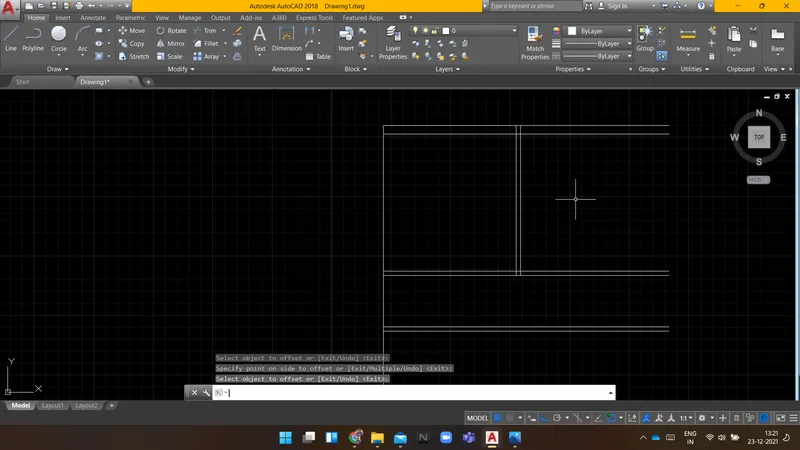
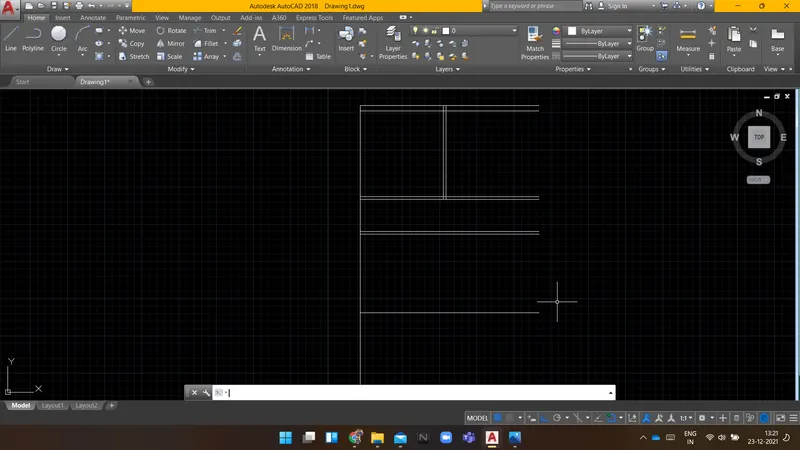
Command: O OFFSET
Current settings: Erase source=No Layer=Source OFFSETGAPTYPE=0
Specify offset distance or [Through/Erase/Layer] <0'-4.5">: 9"
Select object to offset or [Exit/Undo] :
Specify point on side to offset or [Exit/Multiple/Undo] :
Select object to offset or [Exit/Undo] :
Specify point on side to offset or [Exit/Multiple/Undo] :
Select object to offset or [Exit/Undo] :
Specify point on side to offset or [Exit/Multiple/Undo] :
Select object to offset or [Exit/Undo] :
Specify point on side to offset or [Exit/Multiple/Undo] :
Select object to offset or [Exit/Undo] :
Command: Specify opposite corner or [Fence/WPolygon/CPolygon]:
Command: m MOVE 6 found
Specify base point or [Displacement] :
Specify second point or : 9"
Command: O OFFSET
Current settings: Erase source=No Layer=Source OFFSETGAPTYPE=0
Specify offset distance or [Through/Erase/Layer] <0'-9.0">:
Select object to offset or [Exit/Undo] :
Specify point on side to offset or [Exit/Multiple/Undo] :
Select object to offset or [Exit/Undo] :
Specify point on side to offset or [Exit/Multiple/Undo] :
Select object to offset or [Exit/Undo] :
Specify point on side to offset or [Exit/Multiple/Undo] :
Select object to offset or [Exit/Undo] :
Specify point on side to offset or [Exit/Multiple/Undo] :
Select object to offset or [Exit/Undo] : o*Cancel*
o
Command: O OFFSET
Current settings: Erase source=No Layer=Source OFFSETGAPTYPE=0
Specify offset distance or [Through/Erase/Layer] <0'-9.0">: 8'3"
Select object to offset or [Exit/Undo] :
Specify point on side to offset or [Exit/Multiple/Undo] :
Select object to offset or [Exit/Undo] :
Specify point on side to offset or [Exit/Multiple/Undo] :
Select object to offset or [Exit/Undo] :
Specify point on side to offset or [Exit/Multiple/Undo] :
Select object to offset or [Exit/Undo] :
Command: OFFSET
Current settings: Erase source=No Layer=Source OFFSETGAPTYPE=0
Specify offset distance or [Through/Erase/Layer] <8'-3.0">: 4.5"
Select object to offset or [Exit/Undo] :
Specify point on side to offset or [Exit/Multiple/Undo] :
Select object to offset or [Exit/Undo] :
Specify point on side to offset or [Exit/Multiple/Undo] :
Select object to offset or [Exit/Undo] :
Specify point on side to offset or [Exit/Multiple/Undo] :
Select object to offset or [Exit/Undo] :
Specify point on side to offset or [Exit/Multiple/Undo] :
Select object to offset or [Exit/Undo] :
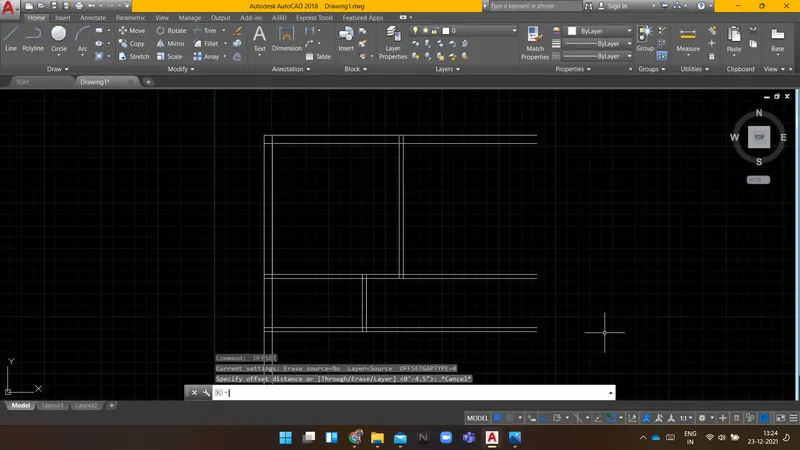
Automatic save to C:\Users\ACER\appdata\local\temp\Drawing1_1_23043_0622.sv$ ...
Command:
Command: OFFSET
Current settings: Erase source=No Layer=Source OFFSETGAPTYPE=0
Specify offset distance or [Through/Erase/Layer] <0'-4.5">: *Cancel*
Command: O OFFSET
Current settings: Erase source=No Layer=Source OFFSETGAPTYPE=0
Specify offset distance or [Through/Erase/Layer] <0'-4.5">: 11'6"
Select object to offset or [Exit/Undo] :
Specify point on side to offset or [Exit/Multiple/Undo] :
Select object to offset or [Exit/Undo] :
Specify point on side to offset or [Exit/Multiple/Undo] :
Select object to offset or [Exit/Undo] :
Specify point on side to offset or [Exit/Multiple/Undo] :
Select object to offset or [Exit/Undo] :
Command: OFFSET
Current settings: Erase source=No Layer=Source OFFSETGAPTYPE=0
Specify offset distance or [Through/Erase/Layer] <11'-6.0">: 9"
Select object to offset or [Exit/Undo] :
Specify point on side to offset or [Exit/Multiple/Undo] :
Select object to offset or [Exit/Undo] :
Specify point on side to offset or [Exit/Multiple/Undo] :
Select object to offset or [Exit/Undo] :
Specify point on side to offset or [Exit/Multiple/Undo] :
Select object to offset or [Exit/Undo] :
Command: Specify opposite corner or [Fence/WPolygon/CPolygon]:
Command: co COPY 6 found
Current settings: Copy mode = Multiple
Specify base point or [Displacement/mOde] :
Specify second point or [Array] :
Specify second point or [Array/Exit/Undo] :
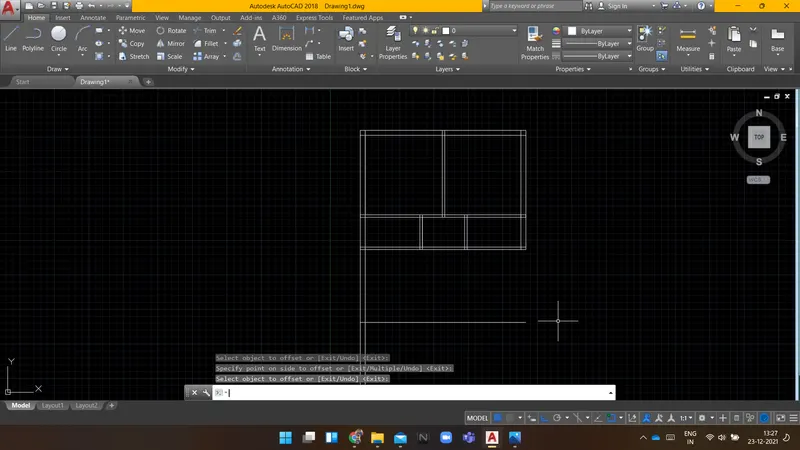
Command: O OFFSET
Current settings: Erase source=No Layer=Source OFFSETGAPTYPE=0
Specify offset distance or [Through/Erase/Layer] <0'-9.0">: 8'1.5"
Select object to offset or [Exit/Undo] :
Specify point on side to offset or [Exit/Multiple/Undo] :
Select object to offset or [Exit/Undo] :
Specify point on side to offset or [Exit/Multiple/Undo] :
Select object to offset or [Exit/Undo] :
Specify point on side to offset or [Exit/Multiple/Undo] :
Select object to offset or [Exit/Undo] :
Command: OFFSET
Current settings: Erase source=No Layer=Source OFFSETGAPTYPE=0
Specify offset distance or [Through/Erase/Layer] <8'-1.5">: 4.5"
Select object to offset or [Exit/Undo] :
Specify point on side to offset or [Exit/Multiple/Undo] :
Select object to offset or [Exit/Undo] :
Specify point on side to offset or [Exit/Multiple/Undo] :
Select object to offset or [Exit/Undo] :
Specify point on side to offset or [Exit/Multiple/Undo] :
Select object to offset or [Exit/Undo] :
Command: L LINE
Specify first point:
Specify next point or [Undo]: 9"
Specify next point or [Undo]:
Specify next point or [Close/Undo]:
Command: O OFFSET
Current settings: Erase source=No Layer=Source OFFSETGAPTYPE=0
Specify offset distance or [Through/Erase/Layer] <0'-4.5">: 6'
Select object to offset or [Exit/Undo] :
Specify point on side to offset or [Exit/Multiple/Undo] :
Select object to offset or [Exit/Undo] :
Command: OFFSET
Current settings: Erase source=No Layer=Source OFFSETGAPTYPE=0
Specify offset distance or [Through/Erase/Layer] <6'-0.0">: 9"
Select object to offset or [Exit/Undo] :
Specify point on side to offset or [Exit/Multiple/Undo] :
Select object to offset or [Exit/Undo] :
Command: L LINE
Specify first point:
Specify next point or [Undo]:
Specify next point or [Undo]:
Command: O OFFSET
Current settings: Erase source=No Layer=Source OFFSETGAPTYPE=0
Specify offset distance or [Through/Erase/Layer] <0'-9.0">:
Select object to offset or [Exit/Undo] :
Specify point on side to offset or [Exit/Multiple/Undo] :
Select object to offset or [Exit/Undo] :
Specify point on side to offset or [Exit/Multiple/Undo] :
Select object to offset or [Exit/Undo] :
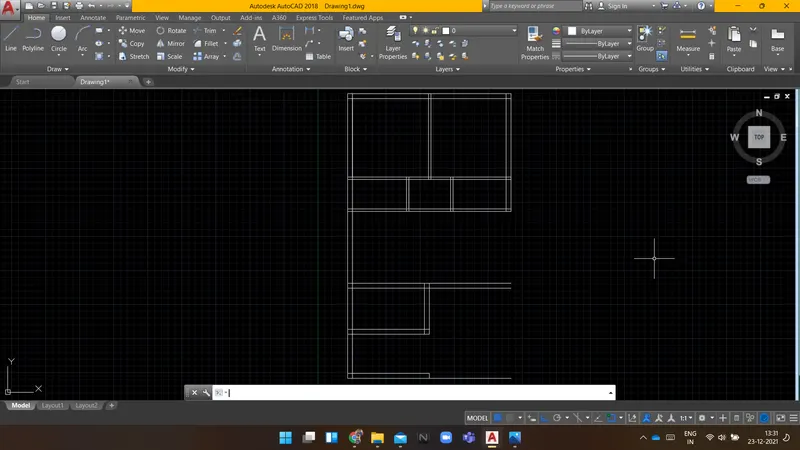
Command: Specify opposite corner or [Fence/WPolygon/CPolygon]:
Command: CO COPY 4 found
Current settings: Copy mode = Multiple
Specify base point or [Displacement/mOde] :
Specify second point or [Array] :
Specify second point or [Array/Exit/Undo] :
Command: COPY
Select objects:
Command: TR TRIM
Current settings: Projection=UCS, Edge=None
Select cutting edges ...
Select objects or
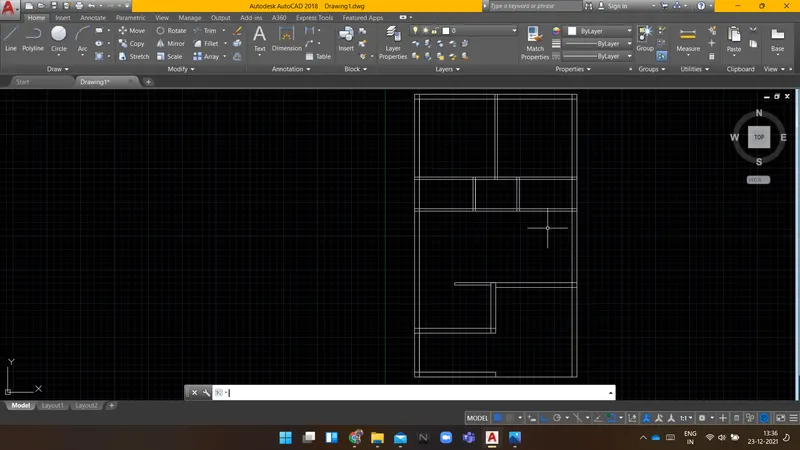
Command:
Command:
Command: _line
Specify first point: *Cancel*
Command:
Command: _line
Specify first point:
Specify next point or [Undo]: 3'
Specify next point or [Undo]:
Specify next point or [Close/Undo]:
Command: O OFFSET
Current settings: Erase source=No Layer=Source OFFSETGAPTYPE=0
Specify offset distance or [Through/Erase/Layer] <0'-9.0">: 1'
Select object to offset or [Exit/Undo] :
Specify point on side to offset or [Exit/Multiple/Undo] : m
Specify point on side to offset or [Exit/Undo] :
Specify point on side to offset or [Exit/Undo] :
Specify point on side to offset or [Exit/Undo] :
Specify point on side to offset or [Exit/Undo] :
Specify point on side to offset or [Exit/Undo] :
Specify point on side to offset or [Exit/Undo] :
Specify point on side to offset or [Exit/Undo] :
Specify point on side to offset or [Exit/Undo] :
Specify point on side to offset or [Exit/Undo] :
Select object to offset or [Exit/Undo] :
Specify point on side to offset or [Exit/Undo] : m
Specify point on side to offset or [Exit/Undo] :
Specify point on side to offset or [Exit/Undo] :
Specify point on side to offset or [Exit/Undo] :
Specify point on side to offset or [Exit/Undo] :
Specify point on side to offset or [Exit/Undo] :
Specify point on side to offset or [Exit/Undo] :
Specify point on side to offset or [Exit/Undo] :
Specify point on side to offset or [Exit/Undo] :
Specify point on side to offset or [Exit/Undo] :
Select object to offset or [Exit/Undo] : l
*Invalid selection*
Expects a point or Exit
Select object to offset or [Exit/Undo] :
Command: L LINE
Specify first point:
Specify next point or [Undo]:
Specify next point or [Undo]:
Automatic save to C:\Users\ACER\appdata\local\temp\Drawing1_1_23043_0622.sv$ ...
Command:
Command: O OFFSET
Current settings: Erase source=No Layer=Source OFFSETGAPTYPE=0
Specify offset distance or [Through/Erase/Layer] <1'-0.0">: 2"
Select object to offset or [Exit/Undo] :
Specify point on side to offset or [Exit/Multiple/Undo] :
Command: OFFSET
Current settings: Erase source=No Layer=Source OFFSETGAPTYPE=0
Specify offset distance or [Through/Erase/Layer] <0'-2.0">: 1"
Select object to offset or [Exit/Undo] :
Specify point on side to offset or [Exit/Multiple/Undo] :
Select object to offset or [Exit/Undo] :
Specify point on side to offset or [Exit/Multiple/Undo] :
Select object to offset or [Exit/Undo] :
Command: E ERASE
Select objects: 1 found
Select objects:
Command: TR TRIM
Current settings: Projection=UCS, Edge=None
Select cutting edges ...
Select objects or
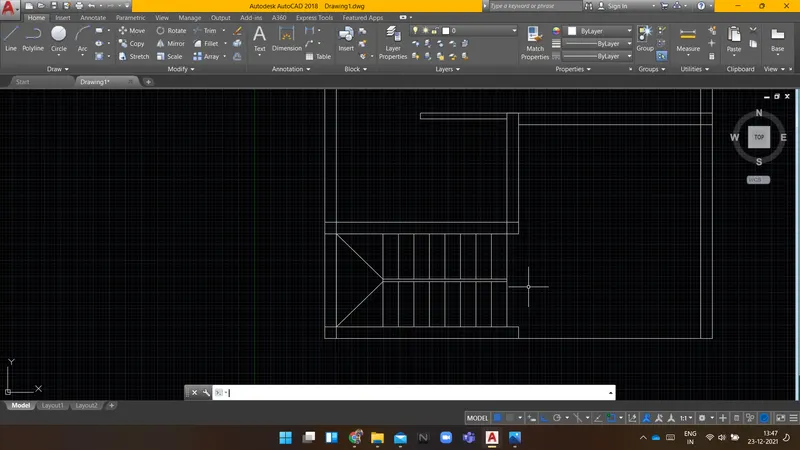
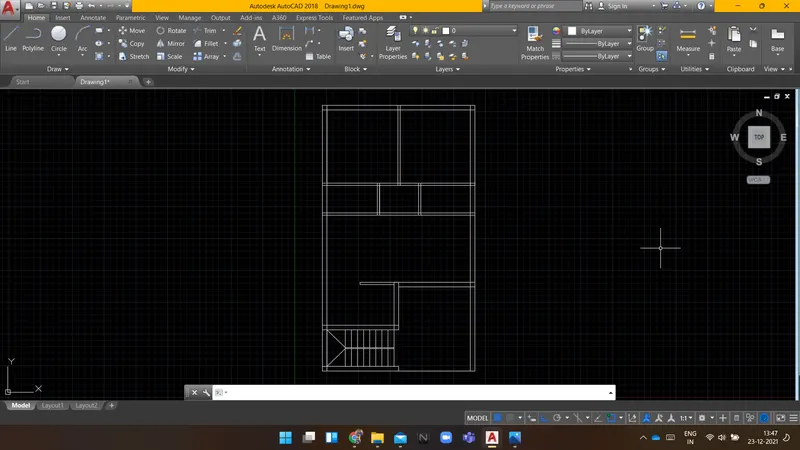
Command: TR TRIM
Current settings: Projection=UCS, Edge=None
Select cutting edges ...
Select objects or
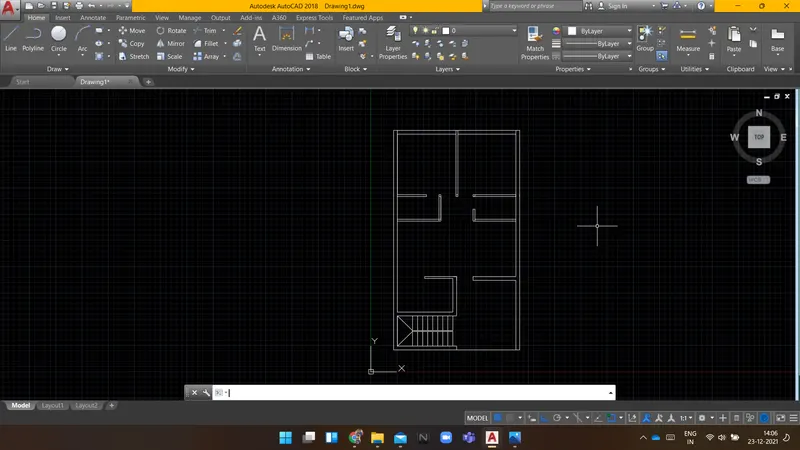
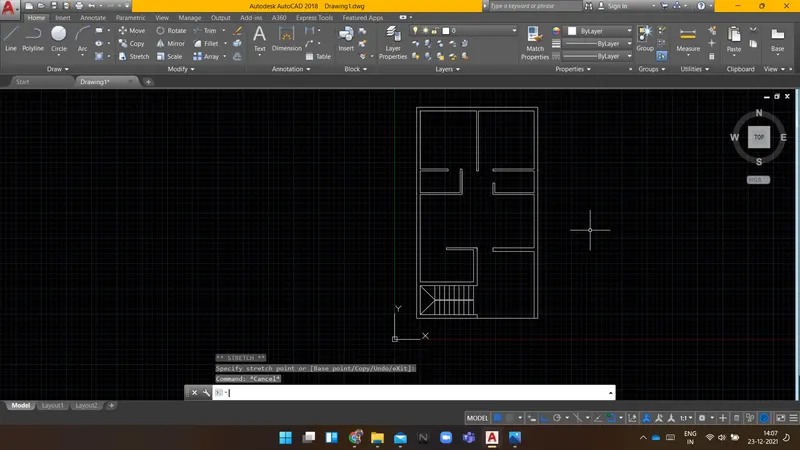
Command: _QSAVE
Command:
Command:
Command: _rectang
Specify first corner point or [Chamfer/Elevation/Fillet/Thickness/Width]:
Specify other corner point or [Area/Dimensions/Rotation]: d
Specify length for rectangles <0'-10.0">: 2"
Specify width for rectangles <0'-10.0">: 3"
Specify other corner point or [Area/Dimensions/Rotation]:
Command:
Command: Specify opposite corner or [Fence/WPolygon/CPolygon]:
Command: *Cancel*
Command:
Command: CO
COPY 1 found
Current settings: Copy mode = Multiple
Specify base point or [Displacement/mOde] :
Specify displacement <0'-0.0", 0'-0.0", 0'-0.0">:
Command: CO COPY
Select objects: 1 found
Select objects:
Current settings: Copy mode = Multiple
Specify base point or [Displacement/mOde] :
Specify second point or [Array] :
Specify second point or [Array/Exit/Undo] : *Cancel*
Command: *Cancel*
Command: *Cancel*
Command: *Cancel*
Command:
Command: _.erase 1 found
Command: co COPY
Select objects: 1 found
Select objects:
Current settings: Copy mode = Multiple
Specify base point or [Displacement/mOde] :
Specify second point or [Array] :
Specify second point or [Array/Exit/Undo] :
Specify second point or [Array/Exit/Undo] :
Specify second point or [Array/Exit/Undo] :
Specify second point or [Array/Exit/Undo] :
Command:
Command: CO COPY 1 found
Current settings: Copy mode = Multiple
Specify base point or [Displacement/mOde] :
Specify second point or [Array] :
Specify second point or [Array/Exit/Undo] :
Specify second point or [Array/Exit/Undo] :
Specify second point or [Array/Exit/Undo] :
Specify second point or [Array/Exit/Undo] :
Command: RO ROTATE
Current positive angle in UCS: ANGDIR=counterclockwise ANGBASE=0
Select objects: Specify opposite corner: 1 found
Select objects:
Specify base point:
Specify rotation angle or [Copy/Reference] <0>:
Command:
Command: M MOVE 1 found
Specify base point or [Displacement] :
Specify second point or :
Command: MOVE
Select objects: *Cancel*
Command: M MOVE
Select objects: *Cancel*
Command: CO COPY
Select objects: 1 found
Select objects:
Current settings: Copy mode = Multiple
Specify base point or [Displacement/mOde] :
Specify second point or [Array] :
Specify second point or [Array/Exit/Undo] : *Cancel*
Command:
Command:
Command: _line
Specify first point:
Specify next point or [Undo]: *Cancel*
Command: *Cancel*
Command:
Command:
Command: _line
Specify first point:
Specify next point or [Undo]:
Specify next point or [Undo]:
Command: LINE
Specify first point:
Specify next point or [Undo]:
Specify next point or [Undo]:
Command: LINE
Specify first point:
Specify next point or [Undo]:
Specify next point or [Undo]:
Command: LINE
Specify first point:
Specify next point or [Undo]:
Specify next point or [Undo]:
Command: LINE
Specify first point:
Specify next point or [Undo]:
Specify next point or [Undo]:
Command:
Command: *Cancel*
Command: *Cancel*
Command: *Cancel*
Command: *Cancel*
Command: RO ROTATE
Current positive angle in UCS: ANGDIR=counterclockwise ANGBASE=0
Select objects: 1 found
Select objects:
Specify base point:
Specify rotation angle or [Copy/Reference] <270>:
Command:
Command:
Command: _arc
Specify start point of arc or [Center]:
Specify second point of arc or [Center/End]:
Specify end point of arc: *Cancel*
Command:
Command:
Command: _arc
Specify start point of arc or [Center]:
Specify second point of arc or [Center/End]:
Specify end point of arc: *Cancel*
Command:
Command:
Command: _arc
Specify start point of arc or [Center]:
Specify second point of arc or [Center/End]: _c
Specify center point of arc:
Specify end point of arc (hold Ctrl to switch direction) or [Angle/chord Length]:
Command:
Command: RO ROTATE
Current positive angle in UCS: ANGDIR=counterclockwise ANGBASE=0
1 found
Specify base point:
Specify rotation angle or [Copy/Reference] <270>:
Command:
Command:
Command: _arc
Specify start point of arc or [Center]:
Specify second point of arc or [Center/End]: _c
Specify center point of arc:
Specify end point of arc (hold Ctrl to switch direction) or [Angle/chord Length]: *Cancel*
Command: ARC
Specify start point of arc or [Center]:
Specify second point of arc or [Center/End]:
Specify end point of arc: *Cancel*
Command:
Command:
Command: _arc
Specify start point of arc or [Center]:
Specify second point of arc or [Center/End]: _c
Specify center point of arc:
Specify end point of arc (hold Ctrl to switch direction) or [Angle/chord Length]:
Command:
Command: ro ROTATE
Current positive angle in UCS: ANGDIR=counterclockwise ANGBASE=0
1 found
Specify base point:
Specify rotation angle or [Copy/Reference] <90>:
Command:
Command:
Command: _arc
Specify start point of arc or [Center]:
Specify second point of arc or [Center/End]: _c
Specify center point of arc:
Specify end point of arc (hold Ctrl to switch direction) or [Angle/chord Length]: *Cancel*
Command:
Command:
Command: _arc
Specify start point of arc or [Center]:
Specify second point of arc or [Center/End]: _c
Specify center point of arc:
Specify end point of arc (hold Ctrl to switch direction) or [Angle/chord Length]:
Command:
Command: RO ROTATE
Current positive angle in UCS: ANGDIR=counterclockwise ANGBASE=0
1 found
Specify base point:
Specify rotation angle or [Copy/Reference] <90>:
Command:
Command:
Command: _arc
Specify start point of arc or [Center]:
Specify second point of arc or [Center/End]: _c
Specify center point of arc:
Specify end point of arc (hold Ctrl to switch direction) or [Angle/chord Length]:
Command:
Command: RO ROTATE
Current positive angle in UCS: ANGDIR=counterclockwise ANGBASE=0
1 found
Specify base point:
Specify rotation angle or [Copy/Reference] <90>:
Command:
Command:
Command: _arc
Specify start point of arc or [Center]:
Specify second point of arc or [Center/End]: _c
Specify center point of arc:
Specify end point of arc (hold Ctrl to switch direction) or [Angle/chord Length]:
Command: *Cancel*
Command: Specify opposite corner or [Fence/WPolygon/CPolygon]:
Command: _.erase 1 found
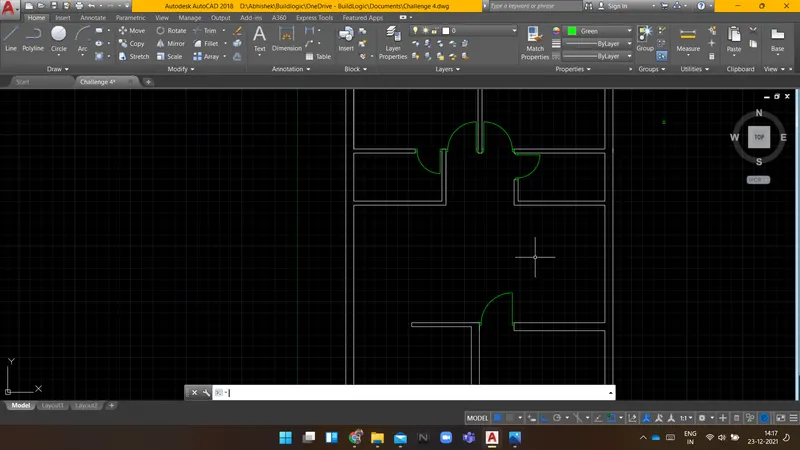
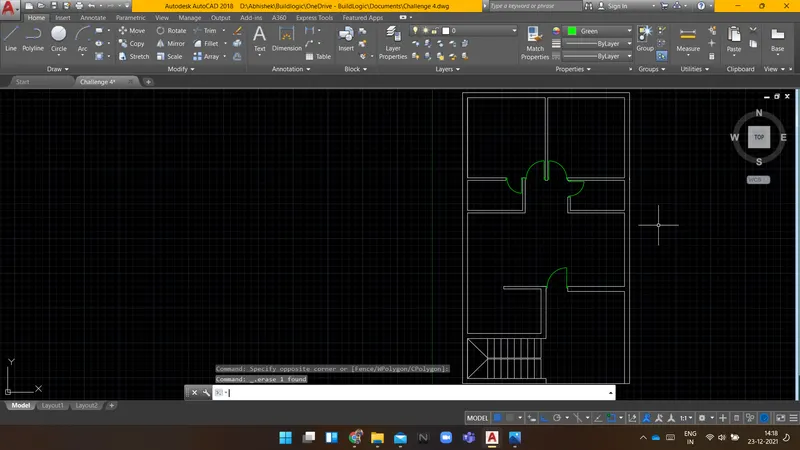
Command: _pline
Specify start point:
Current line-width is 0'-0.0"
Specify next point or [Arc/Halfwidth/Length/Undo/Width]:
Specify next point or [Arc/Close/Halfwidth/Length/Undo/Width]:
Specify next point or [Arc/Close/Halfwidth/Length/Undo/Width]:
Command: O OFFSET
Current settings: Erase source=No Layer=Source OFFSETGAPTYPE=0
Specify offset distance or [Through/Erase/Layer] <3'-3.0">: 2'
Select object to offset or [Exit/Undo] :
Specify point on side to offset or [Exit/Multiple/Undo] :
Select object to offset or [Exit/Undo] : *Cancel*
Command:
Command: _line
Specify first point:
Specify next point or [Undo]:
Specify next point or [Undo]:
Command: LINE
Specify first point:
Specify next point or [Undo]:
Specify next point or [Undo]:
Command:
Command:
Command:
Command:
Command:
Command:
Command: _join 4 found
4 segments joined into 1 polyline
Command: *Cancel*
Command:
Command: *Cancel*
Command:
Command: '_.-LAYER
Current layer: "0"
Enter an option [?/Make/Set/New/Rename/ON/OFF/Color/Ltype/LWeight/TRansparency/MATerial/Plot/Freeze/Thaw/LOck/Unlock/stAte/Description/rEconcile]: _OFF
Enter name list of layer(s) to turn off or
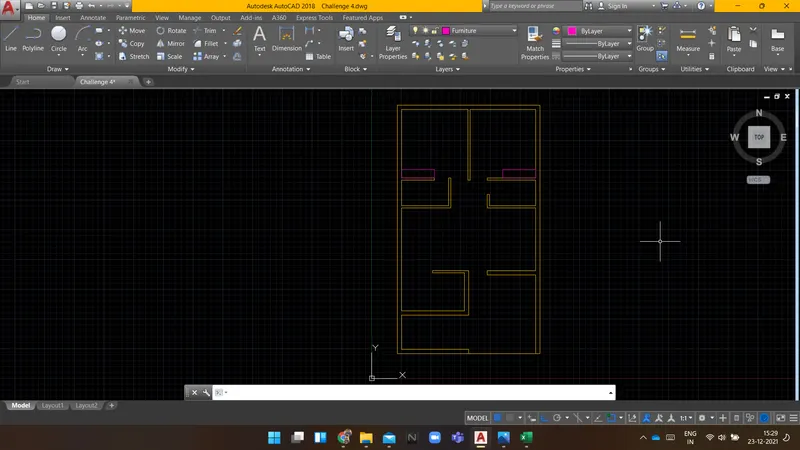
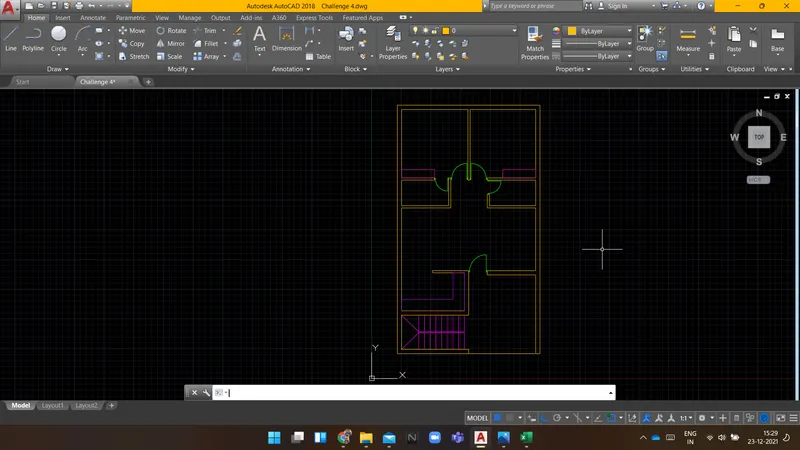
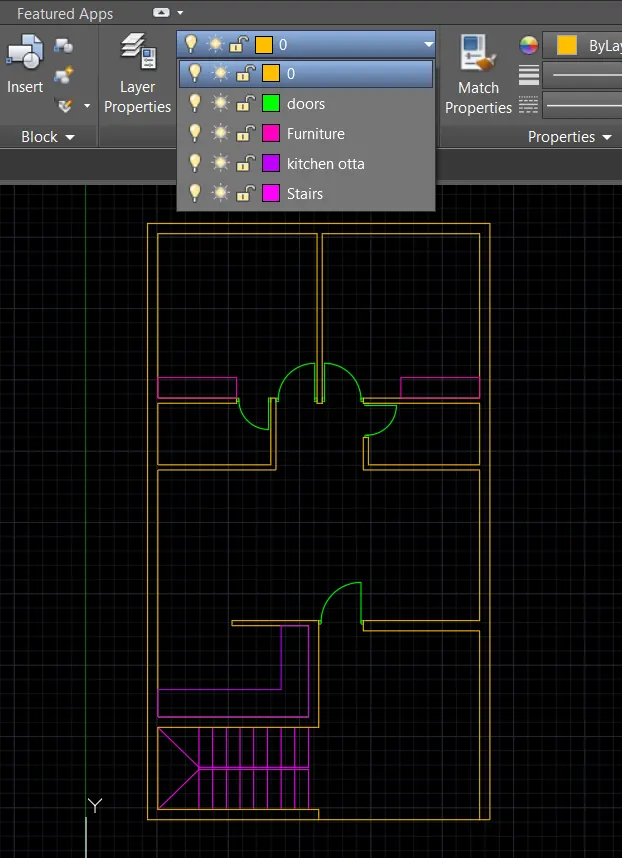
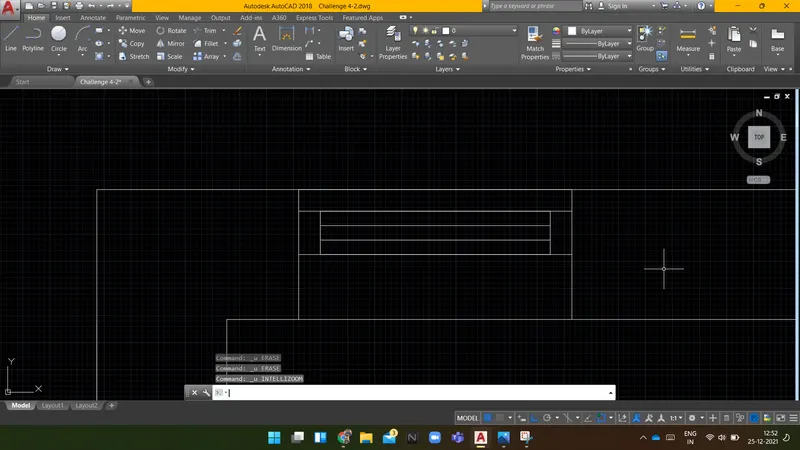
Result: Following is the layout plan for the given residence.
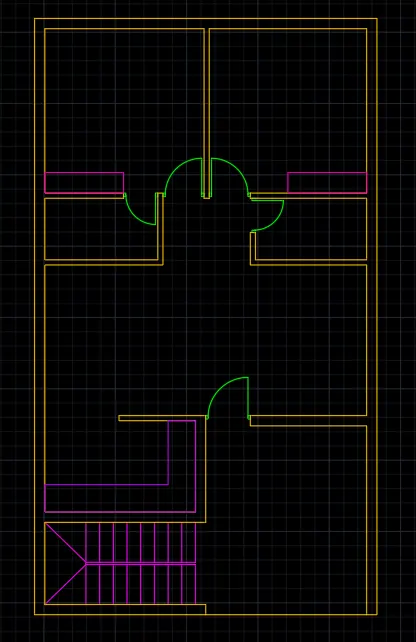
Layer details used in this drawing.
-------------------------------------------------------------------------------------------------------------------------------------------
AIM:
To Create an outdoor canopy using AUTOCAD.
INTRODUCTION:
Following are the commands which are used to draw the objects in AUTOCAD:
- Rectangle(REC): It is used to create a rectangle with the desired dimension.
- Polygon(POL): It is used to create a polygon by giving the no. of sides and circumscribed about the circle or Inscribed in a circle.
- Lines(L): Used to create a line. each line is created independently.
- Polyline(PL): Used to create a set of lines and curves(if any) to create an object of the desired dimension.
Following are the commands which are used to modify the objects in AUTOCAD:
- Move(M): It is used to move objects.
- Copy(CO): it is used to create multiple copies of the object selected.
- Offset(O): It is used to create offset from a selected object by giving the offset distance.
- Rotate(RO): It is used to rotate objects.
- Scale(SC): it is used to make the selected objects bigger or smaller by changing the scale factor.
- Fillet(F): It is used to create curved edges at the junction of two lines. radius can be adjusted as per requirement.
- Chamfer(CH): It is used to create straight edges at the junction of two lines, chamfer distance is can be adjusted.
- Snap tool(DS): It is used to set the minimum distance to move in the x & y-direction.
- Trim(TR): It is used to trim the extended part of the object at a desired place.
- Erase(E): it is used to erase the object which is not required.
PROCEDURE:
Command: C CIRCLE
Specify center point for circle or [3P/2P/Ttr (tan tan radius)]:
Specify radius of circle or [Diameter] <452.0000>: 1398
Command: C CIRCLE
Specify center point for circle or [3P/2P/Ttr (tan tan radius)]:
Specify radius of circle or [Diameter] <1398.0000>: 452
Command: L LINE
Specify first point:
Specify next point or [Undo]:
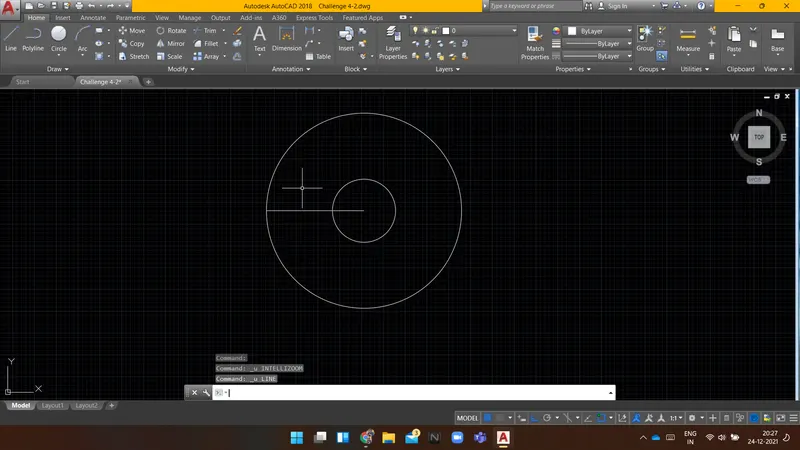
Specify next point or [Undo]:
Command: L LINE
Specify first point:
Specify next point or [Undo]: 150
Specify next point or [Undo]: 200
Specify next point or [Close/Undo]: 300
Specify next point or [Close/Undo]: 400
Specify next point or [Close/Undo]:
Specify next point or [Close/Undo]:
Specify next point or [Close/Undo]:
Command:
Command: _.erase 1 found
Command: l LINE
Specify first point:
Specify next point or [Undo]: 150
Specify next point or [Undo]:
Command:
Command:
Command: _arc
Specify start point of arc or [Center]:
Specify second point of arc or [Center/End]:
Specify end point of arc:
Command: ARC
Specify start point of arc or [Center]:
Specify end point of arc (hold Ctrl to switch direction): *Cancel*
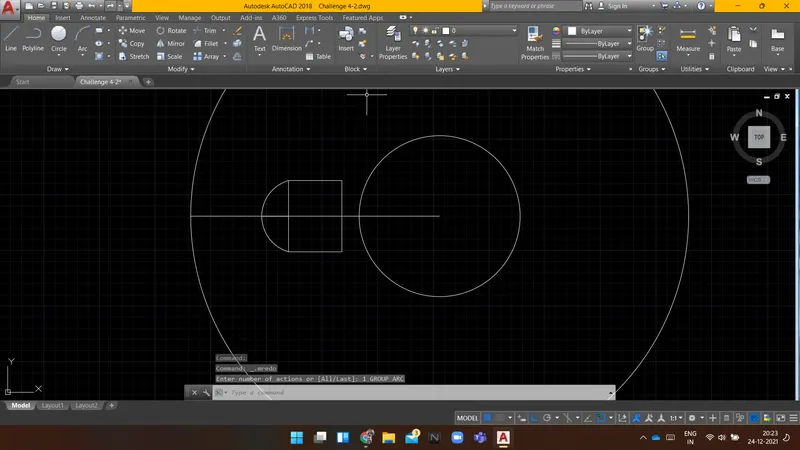
Command: F FILLET
Current settings: Mode = TRIM, Radius = 0.0000
Select first object or [Undo/Polyline/Radius/Trim/Multiple]: r
Specify fillet radius <0.0000>: 50
Select first object or [Undo/Polyline/Radius/Trim/Multiple]:
Select second object or shift-select to apply corner or [Radius]:
Command: FILLET
Current settings: Mode = TRIM, Radius = 50.0000
Select first object or [Undo/Polyline/Radius/Trim/Multiple]:
Select second object or shift-select to apply corner or [Radius]:
Command: FILLET
Current settings: Mode = TRIM, Radius = 50.0000
Select first object or [Undo/Polyline/Radius/Trim/Multiple]: *Cancel*
Command: E ERASE
Select objects: 1 found
Select objects:
Command:
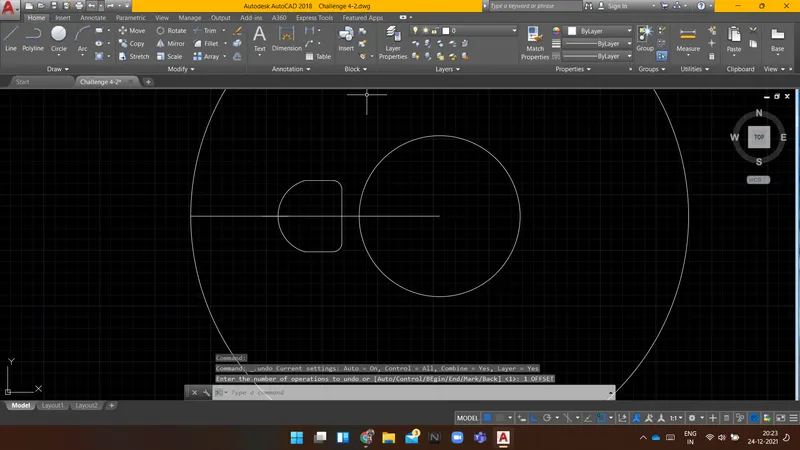
Command:
** STRETCH **
Specify stretch point or [Base point/Copy/Undo/eXit]:
Command: *Cancel*
Command: tr TRIM
Current settings: Projection=UCS, Edge=None
Select cutting edges ...
Select objects or
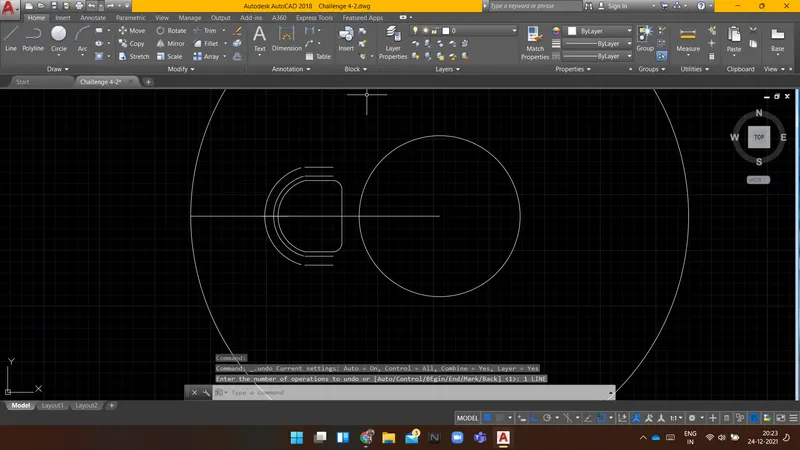
Command: L LINE
Specify first point:
Specify next point or [Undo]:
Specify next point or [Undo]:
Command: LINE
Specify first point:
Specify next point or [Undo]:
Specify next point or [Undo]:
Command: LINE
Specify first point:
Specify next point or [Undo]:
Specify next point or [Undo]:
Command: LINE
Specify first point:
Specify next point or [Undo]:
Specify next point or [Undo]:
Command: LINE
Specify first point:
Specify next point or [Undo]:
Specify next point or [Undo]:
Command: LINE
Specify first point:
Specify next point or [Undo]:
Specify next point or [Undo]: _u
Specify next point or [Undo]:
Specify next point or [Undo]:
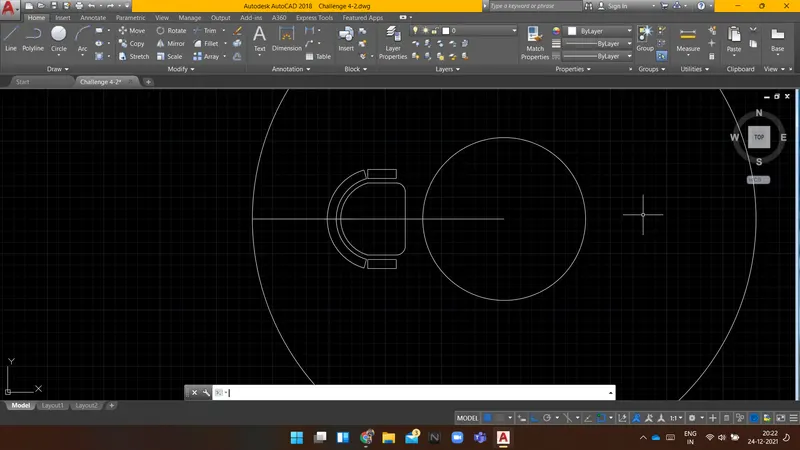
Command: F FILLET
Current settings: Mode = TRIM, Radius = 50.0000
Select first object or [Undo/Polyline/Radius/Trim/Multiple]:
Select second object or shift-select to apply corner or [Radius]:
Command: FILLET
Current settings: Mode = TRIM, Radius = 50.0000
Select first object or [Undo/Polyline/Radius/Trim/Multiple]:
Select second object or shift-select to apply corner or [Radius]:
No valid fillet with radius 50.0000
Select second object or shift-select to apply corner or [Radius]: *Cancel*
Command: *Cancel*
Command: *Cancel*
Command: F FILLET
Current settings: Mode = TRIM, Radius = 50.0000
Select first object or [Undo/Polyline/Radius/Trim/Multiple]: r Specify fillet radius <50.0000>: 25
Select first object or [Undo/Polyline/Radius/Trim/Multiple]:
Select second object or shift-select to apply corner or [Radius]: *Cancel*
Command: *Cancel*
Command: _u FILLET
Command: _u FILLET
Command: _u FILLET
Command: F FILLET
Current settings: Mode = TRIM, Radius = 50.0000
Select first object or [Undo/Polyline/Radius/Trim/Multiple]:
Select second object or shift-select to apply corner or [Radius]: *Cancel*
Command: F FILLET
Current settings: Mode = TRIM, Radius = 50.0000
Select first object or [Undo/Polyline/Radius/Trim/Multiple]: r Specify fillet radius <50.0000>: 25
Select first object or [Undo/Polyline/Radius/Trim/Multiple]:
Select second object or shift-select to apply corner or [Radius]:
Command: FILLET
Current settings: Mode = TRIM, Radius = 25.0000
Select first object or [Undo/Polyline/Radius/Trim/Multiple]:
Select second object or shift-select to apply corner or [Radius]:
Command: FILLET
Current settings: Mode = TRIM, Radius = 25.0000
Select first object or [Undo/Polyline/Radius/Trim/Multiple]:
Select second object or shift-select to apply corner or [Radius]:
Command: FILLET
Current settings: Mode = TRIM, Radius = 25.0000
Select first object or [Undo/Polyline/Radius/Trim/Multiple]:
Select second object or shift-select to apply corner or [Radius]:
Automatic save to C:\Users\ACER\appdata\local\temp\Challenge 4-2_1_25797_1174.sv$ ...
Command:
Command: FILLET
Current settings: Mode = TRIM, Radius = 25.0000
Select first object or [Undo/Polyline/Radius/Trim/Multiple]:
Select second object or shift-select to apply corner or [Radius]:
Command: FILLET
Current settings: Mode = TRIM, Radius = 25.0000
Select first object or [Undo/Polyline/Radius/Trim/Multiple]:
Select second object or shift-select to apply corner or [Radius]:
Command: FILLET
Current settings: Mode = TRIM, Radius = 25.0000
Select first object or [Undo/Polyline/Radius/Trim/Multiple]:
Select first object or [Undo/Polyline/Radius/Trim/Multiple]:
Select second object or shift-select to apply corner or [Radius]:
Command: FILLET
Current settings: Mode = TRIM, Radius = 25.0000
Select first object or [Undo/Polyline/Radius/Trim/Multiple]:
Select second object or shift-select to apply corner or [Radius]:
Command: FILLET
Current settings: Mode = TRIM, Radius = 25.0000
Select first object or [Undo/Polyline/Radius/Trim/Multiple]:
Select second object or shift-select to apply corner or [Radius]:
Command: FILLET
Current settings: Mode = TRIM, Radius = 25.0000
Select first object or [Undo/Polyline/Radius/Trim/Multiple]:
Select second object or shift-select to apply corner or [Radius]:
Command: FILLET
Current settings: Mode = TRIM, Radius = 25.0000
Select first object or [Undo/Polyline/Radius/Trim/Multiple]:
Select second object or shift-select to apply corner or [Radius]:
Select second object or shift-select to apply corner or [Radius]:
Command: FILLET
Current settings: Mode = TRIM, Radius = 25.0000
Select first object or [Undo/Polyline/Radius/Trim/Multiple]:
Select second object or shift-select to apply corner or [Radius]:
Command: FILLET
Current settings: Mode = TRIM, Radius = 25.0000
Select first object or [Undo/Polyline/Radius/Trim/Multiple]: *Cancel*
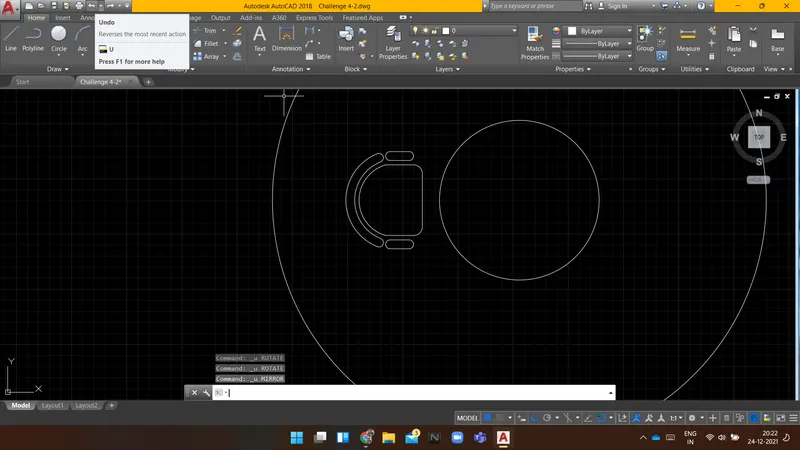
Command:
Command: *Cancel*
Command: E ERASE
Select objects: 1 found
Select objects: 1 found, 2 total
Select objects:
Command: Specify opposite corner or [Fence/WPolygon/CPolygon]:
Command: MI MIRROR 31 found
Specify first point of mirror line:
Specify second point of mirror line:
Erase source objects? [Yes/No] :
Command: RO ROTATE
Current positive angle in UCS: ANGDIR=counterclockwise ANGBASE=0
Select objects: Specify opposite corner: 31 found
Select objects:
Specify base point:
Specify rotation angle or [Copy/Reference] <0>: c Rotating a copy of the selected objects.
Specify rotation angle or [Copy/Reference] <0>:
Command: RO ROTATE
Current positive angle in UCS: ANGDIR=counterclockwise ANGBASE=0
Select objects: Specify opposite corner: 62 found
Select objects:
Specify base point:
Specify rotation angle or [Copy/Reference] <0>: c Rotating a copy of the selected objects.
Specify rotation angle or [Copy/Reference] <0>:
Command: Specify opposite corner or [Fence/WPolygon/CPolygon]:
Command: MI MIRROR 62 found
Specify first point of mirror line:
Specify second point of mirror line:
Erase source objects? [Yes/No] :
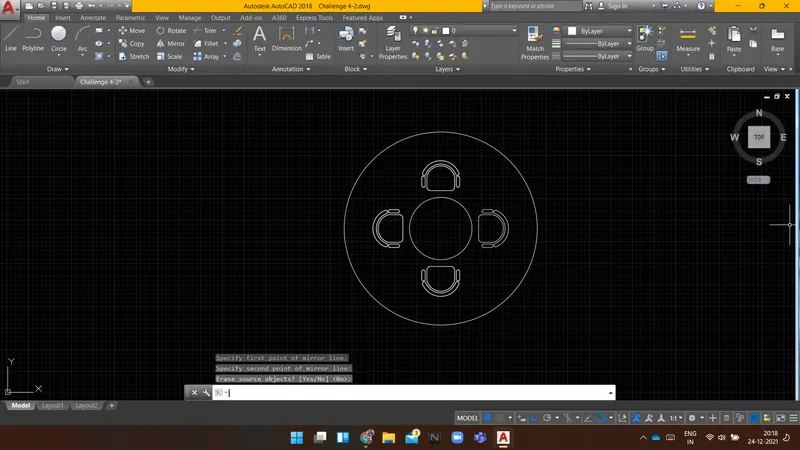
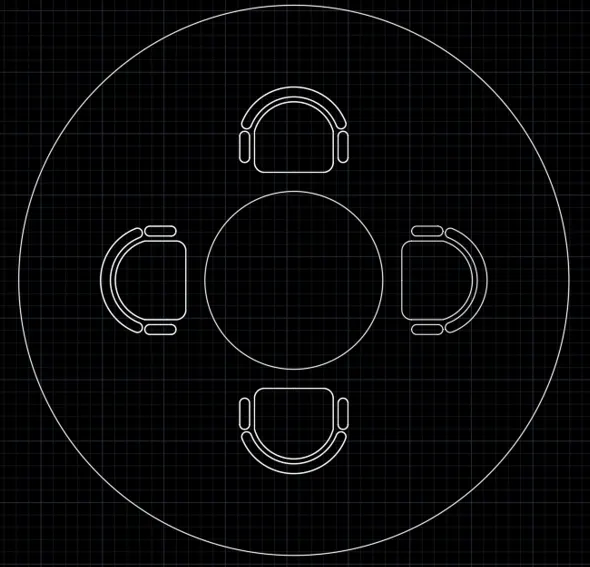
Result: Following is the drawing of an outdoor canopy.
-------------------------------------------------------------------------------------------------------------------------------------------
AIM:
To sketch the part plan for the toilers and utilities room using AUTOCAD.
INTRODUCTION:
Following are the commands which are used to draw the objects in AUTOCAD:
- Rectangle(REC): It is used to create a rectangle with the desired dimension.
- Polygon(POL): It is used to create a polygon by giving the no. of sides and circumscribed about the circle or Inscribed in a circle.
- Lines(L): Used to create a line. each line is created independently.
- Polyline(PL): Used to create a set of lines and curves(if any) to create an object of the desired dimension.
Following are the commands which are used to modify the objects in AUTOCAD:
- Move(M): It is used to move objects.
- Copy(CO): it is used to create multiple copies of the object selected.
- Offset(O): It is used to create offset from a selected object by giving the offset distance.
- Rotate(RO): It is used to rotate objects.
- Scale(SC): it is used to make the selected objects bigger or smaller by changing the scale factor.
- Fillet(F): It is used to create curved edges at the junction of two lines. radius can be adjusted as per requirement.
- Chamfer(CH): It is used to create straight edges at the junction of two lines, chamfer distance is can be adjusted.
- Snap tool(DS): It is used to set the minimum distance to move in the x & y-direction.
- Trim(TR): It is used to trim the extended part of the object at the desired place.
- Erase(E): it is used to erase the object which is not required.
PROCEDURE:
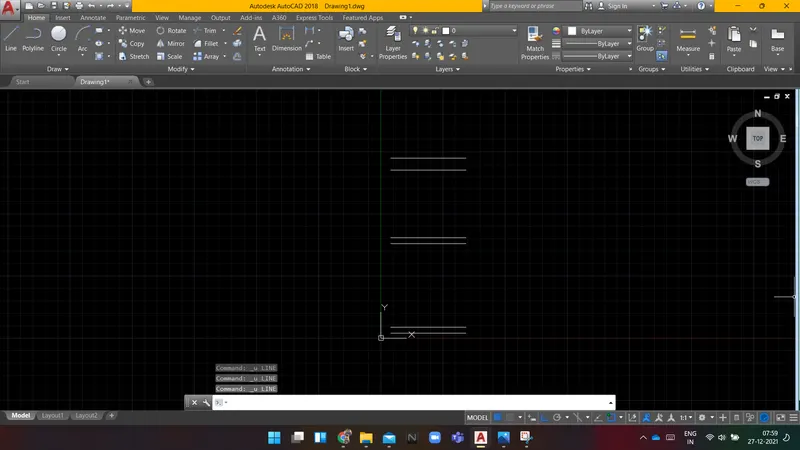
Command: l LINE
Specify first point:
Specify next point or [Undo]: 1900
Specify next point or [Undo]:
Command: O OFFSET
Current settings: Erase source=No Layer=Source OFFSETGAPTYPE=0
Specify offset distance or [Through/Erase/Layer] <832.0000>: 150
Select object to offset or [Exit/Undo] <Exit>:
Specify point on side to offset or [Exit/Multiple/Undo] <Exit>:
Select object to offset or [Exit/Undo] <Exit>:
Command: OFFSET
Current settings: Erase source=No Layer=Source OFFSETGAPTYPE=0
Specify offset distance or [Through/Erase/Layer] <150.0000>: 2100
Select object to offset or [Exit/Undo] <Exit>:
Specify point on side to offset or [Exit/Multiple/Undo] <Exit>:
Select object to offset or [Exit/Undo] <Exit>:
Command:
OFFSET
Current settings: Erase source=No Layer=Source OFFSETGAPTYPE=0
Specify offset distance or [Through/Erase/Layer] <2100.0000>: 150
Select object to offset or [Exit/Undo] <Exit>:
Specify point on side to offset or [Exit/Multiple/Undo] <Exit>:
Select object to offset or [Exit/Undo] <Exit>:
Command: OFFSET
Current settings: Erase source=No Layer=Source OFFSETGAPTYPE=0
Specify offset distance or [Through/Erase/Layer] <150.0000>: 1700
Select object to offset or [Exit/Undo] <Exit>:
Specify point on side to offset or [Exit/Multiple/Undo] <Exit>:
Select object to offset or [Exit/Undo] <Exit>:
Command: OFFSET
Current settings: Erase source=No Layer=Source OFFSETGAPTYPE=0
Specify offset distance or [Through/Erase/Layer] <1700.0000>: 300
Select object to offset or [Exit/Undo] <Exit>:
Specify point on side to offset or [Exit/Multiple/Undo] <Exit>:
Select object to offset or [Exit/Undo] <Exit>:
Command:
Command:
Command: _line
Specify first point:
Specify next point or [Undo]:
Specify next point or [Undo]:
Command: LINE
Specify first point:
Specify next point or [Undo]:
Specify next point or [Undo]:
Command: O OFFSET
Current settings: Erase source=No Layer=Source OFFSETGAPTYPE=0
Specify offset distance or [Through/Erase/Layer] <300.0000>:
Select object to offset or [Exit/Undo] <Exit>:
Specify point on side to offset or [Exit/Multiple/Undo] <Exit>:
Select object to offset or [Exit/Undo] <Exit>:
Specify point on side to offset or [Exit/Multiple/Undo] <Exit>:
Select object to offset or [Exit/Undo] <Exit>:
Command: L LINE
Specify first point:
Specify next point or [Undo]: 210
Specify next point or [Undo]: *Cancel*
Command: e ERASE
Select objects: 1 found
Select objects:
Command: L LINE
Specify first point:
Specify next point or [Undo]: 201
Specify next point or [Undo]: 402
Specify next point or [Close/Undo]:
Specify next point or [Close/Undo]:
Command: LINE
Specify first point:
Specify next point or [Undo]:
Command: O OFFSET
Current settings: Erase source=No Layer=Source OFFSETGAPTYPE=0
Specify offset distance or [Through/Erase/Layer] <300.0000>: 150
Select object to offset or [Exit/Undo] <Exit>:
Specify point on side to offset or [Exit/Multiple/Undo] <Exit>:
Select object to offset or [Exit/Undo] <Exit>:
Specify point on side to offset or [Exit/Multiple/Undo] <Exit>:
Select object to offset or [Exit/Undo] <Exit>:
Specify point on side to offset or [Exit/Multiple/Undo] <Exit>:
Select object to offset or [Exit/Undo] <Exit>:
Specify point on side to offset or [Exit/Multiple/Undo] <Exit>:
Select object to offset or [Exit/Undo] <Exit>:
Command: E ERASE
Select objects: 1 found
Select objects:
Command: F FILLET
Current settings: Mode = TRIM, Radius = 0.0000
Select first object or [Undo/Polyline/Radius/Trim/Multiple]:
Select second object or shift-select to apply corner or [Radius]:
Command: FILLET
Current settings: Mode = TRIM, Radius = 0.0000
Select first object or [Undo/Polyline/Radius/Trim/Multiple]:
Select second object or shift-select to apply corner or [Radius]:
Command: FILLET
Current settings: Mode = TRIM, Radius = 0.0000
Select first object or [Undo/Polyline/Radius/Trim/Multiple]:
Select second object or shift-select to apply corner or [Radius]:
Command: FILLET
Current settings: Mode = TRIM, Radius = 0.0000
Select first object or [Undo/Polyline/Radius/Trim/Multiple]:
Select second object or shift-select to apply corner or [Radius]:
Command: FILLET
Current settings: Mode = TRIM, Radius = 0.0000
Select first object or [Undo/Polyline/Radius/Trim/Multiple]:
Select second object or shift-select to apply corner or [Radius]:
Command: FILLET
Current settings: Mode = TRIM, Radius = 0.0000
Select first object or [Undo/Polyline/Radius/Trim/Multiple]:
Select second object or shift-select to apply corner or [Radius]:
Command: FILLET
Current settings: Mode = TRIM, Radius = 0.0000
Select first object or [Undo/Polyline/Radius/Trim/Multiple]:
Select second object or shift-select to apply corner or [Radius]:
Command: FILLET
Current settings: Mode = TRIM, Radius = 0.0000
Select first object or [Undo/Polyline/Radius/Trim/Multiple]:
Select second object or shift-select to apply corner or [Radius]:
Command: FILLET
Current settings: Mode = TRIM, Radius = 0.0000
Select first object or [Undo/Polyline/Radius/Trim/Multiple]:
Select second object or shift-select to apply corner or [Radius]:
Command: FILLET
Current settings: Mode = TRIM, Radius = 0.0000
Select first object or [Undo/Polyline/Radius/Trim/Multiple]:
Command: TR TRIM
Current settings: Projection=UCS, Edge=None
Select cutting edges ...
Select objects or <select all>:
Select object to trim or shift-select to extend or
[Fence/Crossing/Project/Edge/eRase/Undo]:
Select object to trim or shift-select to extend or
[Fence/Crossing/Project/Edge/eRase/Undo]:
Does not intersect with the cutting edge.
Select object to trim or shift-select to extend or
[Fence/Crossing/Project/Edge/eRase/Undo]:
Does not intersect with the cutting edge.
Select object to trim or shift-select to extend or
[Fence/Crossing/Project/Edge/eRase/Undo]:
Does not intersect with the cutting edge.
Select object to trim or shift-select to extend or
[Fence/Crossing/Project/Edge/eRase/Undo]:
Select object to trim or shift-select to extend or
[Fence/Crossing/Project/Edge/eRase/Undo]:
Does not intersect with the cutting edge.
Select object to trim or shift-select to extend or
[Fence/Crossing/Project/Edge/eRase/Undo]:
Command: TRIM
Current settings: Projection=UCS, Edge=None
Select cutting edges ...
Select objects or <select all>:
Select object to trim or shift-select to extend or
[Fence/Crossing/Project/Edge/eRase/Undo]:
Does not intersect with the cutting edge.
Select object to trim or shift-select to extend or
[Fence/Crossing/Project/Edge/eRase/Undo]:
Select object to trim or shift-select to extend or
[Fence/Crossing/Project/Edge/eRase/Undo]:
Does not intersect with the cutting edge.
Select object to trim or shift-select to extend or
[Fence/Crossing/Project/Edge/eRase/Undo]:
Select object to offset or [Exit/Undo] <Exit>: tr*Cancel*
tr
Command: TR TRIM
Current settings: Projection=UCS, Edge=None
Select cutting edges ...
Select objects or <select all>: 1 found
Select objects: 1 found, 2 total
Select objects:
Select object to trim or shift-select to extend or
[Fence/Crossing/Project/Edge/eRase/Undo]:
Select object to trim or shift-select to extend or
[Fence/Crossing/Project/Edge/eRase/Undo]:
Select object to trim or shift-select to extend or
[Fence/Crossing/Project/Edge/eRase/Undo]:
Command:
Command:
Command: _line
Specify first point:
Specify next point or [Undo]:
Specify next point or [Undo]:
Command: Specify opposite corner or [Fence/WPolygon/CPolygon]:
Command: mi MIRROR 7 found
Specify first point of mirror line:
Specify second point of mirror line:
Erase source objects? [Yes/No] <No>:
Command: Specify opposite corner or [Fence/WPolygon/CPolygon]:
Command: co COPY 9 found
Current settings: Copy mode = Multiple
Specify base point or [Displacement/mOde] <Displacement>:
Specify second point or [Array] <use first point as displacement>:
Specify second point or [Array/Exit/Undo] <Exit>:
Command: O OFFSET
Current settings: Erase source=No Layer=Source OFFSETGAPTYPE=0
Specify offset distance or [Through/Erase/Layer] <828.0000>: 832
Select object to offset or [Exit/Undo] <Exit>:
Specify point on side to offset or [Exit/Multiple/Undo] <Exit>:
Select object to offset or [Exit/Undo] <Exit>:
Command: TR TRIM
Current settings: Projection=UCS, Edge=None
Select cutting edges ...
Select objects or <select all>: 1 found
Select objects: 1 found, 2 total
Select objects:
Select object to trim or shift-select to extend or
[Fence/Crossing/Project/Edge/eRase/Undo]:
Select object to trim or shift-select to extend or
[Fence/Crossing/Project/Edge/eRase/Undo]:
Select object to trim or shift-select to extend or
[Fence/Crossing/Project/Edge/eRase/Undo]:
Command: L LINE
Specify first point:
Specify next point or [Undo]:
Specify next point or [Undo]:
Command: Specify opposite corner or [Fence/WPolygon/CPolygon]:
Command: mi MIRROR 9 found
Specify first point of mirror line:
Specify second point of mirror line:
Erase source objects? [Yes/No] <No>:
Command:
Command:
Command: _pline
Specify start point:
Current line-width is 0.0000
Specify next point or [Arc/Halfwidth/Length/Undo/Width]:
Specify next point or [Arc/Close/Halfwidth/Length/Undo/Width]:
Specify next point or [Arc/Close/Halfwidth/Length/Undo/Width]:
Specify next point or [Arc/Close/Halfwidth/Length/Undo/Width]:
Specify next point or [Arc/Close/Halfwidth/Length/Undo/Width]:
Command:
Command:
Command: _pline
Specify start point:
Current line-width is 0.0000
Specify next point or [Arc/Halfwidth/Length/Undo/Width]:
Specify next point or [Arc/Close/Halfwidth/Length/Undo/Width]:
Specify next point or [Arc/Close/Halfwidth/Length/Undo/Width]:
Specify next point or [Arc/Close/Halfwidth/Length/Undo/Width]:
Specify next point or [Arc/Close/Halfwidth/Length/Undo/Width]:
Command: RO ROTATE
Current positive angle in UCS: ANGDIR=counterclockwise ANGBASE=0
Select objects: 1 found
Select objects:
Specify base point:
Specify rotation angle or [Copy/Reference] <0>:
Command:
Command:
** STRETCH **
Specify stretch point:
Command: ROTATE
Current positive angle in UCS: ANGDIR=counterclockwise ANGBASE=0
1 found
Specify base point: *Cancel*
Command:
Command: m MOVE 1 found
Specify base point or [Displacement] <Displacement>:
Specify second point or <use first point as displacement>:
Command: *Cancel*
Command:
Command:
** STRETCH **
Specify stretch point or [Base point/Copy/Undo/eXit]:
Command: *Cancel*
Command:
Command: RO ROTATE
Current positive angle in UCS: ANGDIR=counterclockwise ANGBASE=0
1 found
Specify base point:
Specify rotation angle or [Copy/Reference] <90>:
Command:
Command:
** STRETCH **
Specify stretch point:
Command: *Cancel*
Command:
Command:
** STRETCH **
Specify stretch point or [Base point/Copy/Undo/eXit]:
Command: *Cancel*
Command:
Command: M MOVE 1 found
Specify base point or [Displacement] <Displacement>:
Specify second point or <use first point as displacement>:
Command: MOVE
Select objects:
Command:
Command:
Command: _arc
Specify start point of arc or [Center]:
Specify second point of arc or [Center/End]: _c
Specify center point of arc:
Specify end point of arc (hold Ctrl to switch direction) or [Angle/chord Length]:
Command: ARC
Specify start point of arc or [Center]: *Cancel*
Command:
Command: _arc
Specify start point of arc or [Center]:
Specify second point of arc or [Center/End]: _c
Specify center point of arc:
Specify end point of arc (hold Ctrl to switch direction) or [Angle/chord Length]:
Command: ARC
Specify start point of arc or [Center]: tr
Point or option keyword required.
Specify start point of arc or [Center]:
Specify end point of arc (hold Ctrl to switch direction): *Cancel*
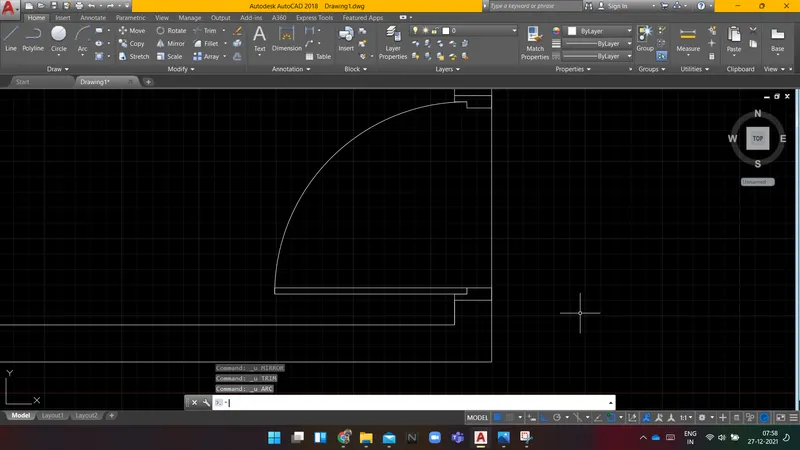
Command: *Cancel*
Command: TR TRIM
Current settings: Projection=UCS, Edge=None
Select cutting edges ...
Select objects or <select all>:
Select object to trim or shift-select to extend or
[Fence/Crossing/Project/Edge/eRase/Undo]:
Select object to trim or shift-select to extend or
[Fence/Crossing/Project/Edge/eRase/Undo]:
Select object to trim or shift-select to extend or
[Fence/Crossing/Project/Edge/eRase/Undo]:
Does not intersect with the cutting edge.
Select object to trim or shift-select to extend or
[Fence/Crossing/Project/Edge/eRase/Undo]: *Cancel*
Command: *Cancel*
Command: *Cancel*
Command: Specify opposite corner or [Fence/WPolygon/CPolygon]:
Command: MI MIRROR 10 found
Specify first point of mirror line:
Specify second point of mirror line:
Erase source objects? [Yes/No] <No>:
Command: Specify opposite corner or [Fence/WPolygon/CPolygon]:
Command: M MOVE 10 found
Specify base point or [Displacement] <Displacement>:
Specify second point or <use first point as displacement>:
Command:
Command: *Cancel*
Command: *Cancel*
Command: *Cancel*
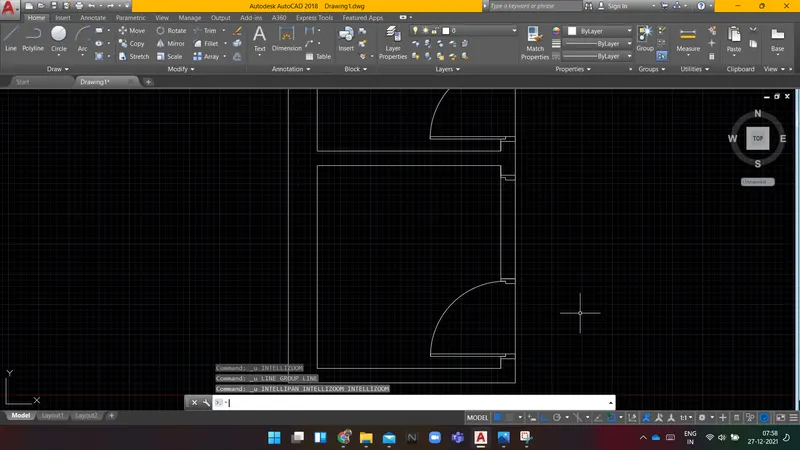
Command:
Command:
Command: _line
Specify first point:
Specify next point or [Undo]: *Cancel*
Command: l LINE
Specify first point:
Specify next point or [Undo]: 50
Specify next point or [Undo]: 50
Specify next point or [Close/Undo]: 50
Specify next point or [Close/Undo]:
Specify next point or [Close/Undo]:
Command:
Command:
** STRETCH **
Specify stretch point or [Base point/Copy/Undo/eXit]:
Command:
Command: *Cancel*
Command:
Command: _.erase 1 found
Command:
Command:
** STRETCH **
Specify stretch point or [Base point/Copy/Undo/eXit]:
Command: *Cancel*
Command:
Automatic save to C:\Users\ACER\appdata\local\temp\Drawing1_1_21056_8263.sv$ ...
Command:
Command: o OFFSET
Current settings: Erase source=No Layer=Source OFFSETGAPTYPE=0
Specify offset distance or [Through/Erase/Layer] <832.0000>: 728
Select object to offset or [Exit/Undo] <Exit>:
Specify point on side to offset or [Exit/Multiple/Undo] <Exit>:
Select object to offset or [Exit/Undo] <Exit>:
Command: TR TRIM
Current settings: Projection=UCS, Edge=None
Select cutting edges ...
Select objects or <select all>: 1 found
Select objects: 1 found, 2 total
Select objects:
Select object to trim or shift-select to extend or
[Fence/Crossing/Project/Edge/eRase/Undo]:
Select object to trim or shift-select to extend or
[Fence/Crossing/Project/Edge/eRase/Undo]:
Select object to trim or shift-select to extend or
[Fence/Crossing/Project/Edge/eRase/Undo]:
Command: Specify opposite corner or [Fence/WPolygon/CPolygon]:
Command: *Cancel*
Command: Specify opposite corner or [Fence/WPolygon/CPolygon]:
Command: *Cancel*
Command:
Command:
Command: _line
Specify first point:
Specify next point or [Undo]:
Specify next point or [Undo]:
Command: LINE
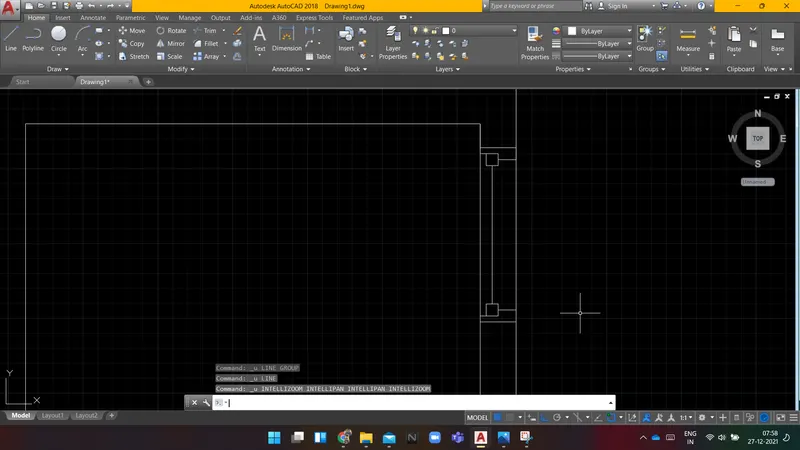
Specify first point:
Specify next point or [Undo]:
Specify next point or [Undo]:
Command: Specify opposite corner or [Fence/WPolygon/CPolygon]:
Command: MI MIRROR 6 found
Specify first point of mirror line:
Specify second point of mirror line:
Erase source objects? [Yes/No] <No>:
Command: l LINE
Specify first point:
Specify next point or [Undo]:
Specify next point or [Undo]:
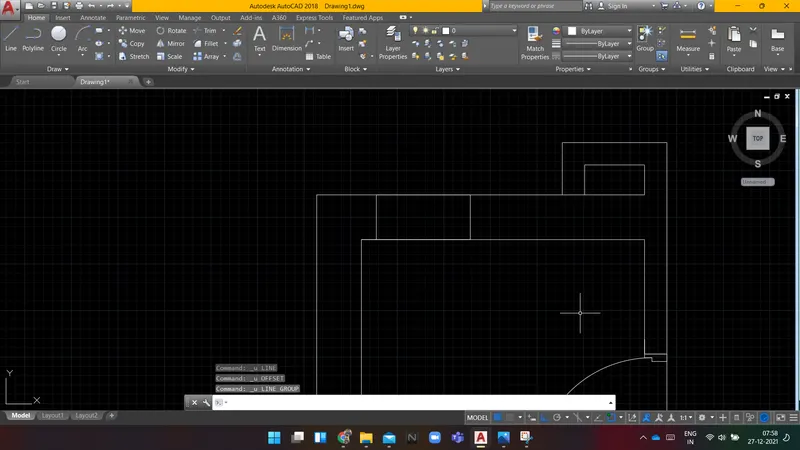
Command: L LINE
Specify first point:
Specify next point or [Undo]: 100
Specify next point or [Undo]:
Specify next point or [Close/Undo]: 631
Specify next point or [Close/Undo]:
Specify next point or [Close/Undo]:
Specify next point or [Close/Undo]:
Command:
Command:
Command: _line
Specify first point:
Specify next point or [Undo]:
Specify next point or [Undo]:
Command: O OFFSET
Current settings: Erase source=No Layer=Source OFFSETGAPTYPE=0
Specify offset distance or [Through/Erase/Layer] <728.0000>: 25
Select object to offset or [Exit/Undo] <Exit>:
Specify point on side to offset or [Exit/Multiple/Undo] <Exit>:
Select object to offset or [Exit/Undo] <Exit>:
Specify point on side to offset or [Exit/Multiple/Undo] <Exit>:
Select object to offset or [Exit/Undo] <Exit>:
Specify point on side to offset or [Exit/Multiple/Undo] <Exit>:
Select object to offset or [Exit/Undo] <Exit>:
Specify point on side to offset or [Exit/Multiple/Undo] <Exit>:
Select object to offset or [Exit/Undo] <Exit>: l
*Invalid selection*
Expects a point or Exit
Select object to offset or [Exit/Undo] <Exit>:
Command: l LINE
Specify first point:
Specify next point or [Undo]: 50
Specify next point or [Undo]:
Specify next point or [Close/Undo]:
Command: LINE
Specify first point:
Specify next point or [Undo]: 50
Specify next point or [Undo]:
Specify next point or [Close/Undo]:
Command: TR TRIM
Current settings: Projection=UCS, Edge=None
Select cutting edges ...
Select objects or <select all>: 1 found
Select objects: 1 found, 2 total
Select objects:
Select object to trim or shift-select to extend or
[Fence/Crossing/Project/Edge/eRase/Undo]:
Select object to trim or shift-select to extend or
[Fence/Crossing/Project/Edge/eRase/Undo]:
Select object to trim or shift-select to extend or
[Fence/Crossing/Project/Edge/eRase/Undo]:
Select object to trim or shift-select to extend or
[Fence/Crossing/Project/Edge/eRase/Undo]:
Does not intersect with the cutting edge.
Select object to trim or shift-select to extend or
[Fence/Crossing/Project/Edge/eRase/Undo]:
Does not intersect with the cutting edge.
Select object to trim or shift-select to extend or
[Fence/Crossing/Project/Edge/eRase/Undo]:
Select object to trim or shift-select to extend or
[Fence/Crossing/Project/Edge/eRase/Undo]:
Select object to trim or shift-select to extend or
[Fence/Crossing/Project/Edge/eRase/Undo]:
Select object to trim or shift-select to extend or
[Fence/Crossing/Project/Edge/eRase/Undo]:
Does not intersect with the cutting edge.
Select object to trim or shift-select to extend or
[Fence/Crossing/Project/Edge/eRase/Undo]: u
Select object to trim or shift-select to extend or
[Fence/Crossing/Project/Edge/eRase/Undo]:
Does not intersect with the cutting edge.
Select object to trim or shift-select to extend or
[Fence/Crossing/Project/Edge/eRase/Undo]:
Select object to trim or shift-select to extend or
[Fence/Crossing/Project/Edge/eRase/Undo]:
Does not intersect with the cutting edge.
Select object to trim or shift-select to extend or
[Fence/Crossing/Project/Edge/eRase/Undo]:
Command:
Command: _.erase 1 found
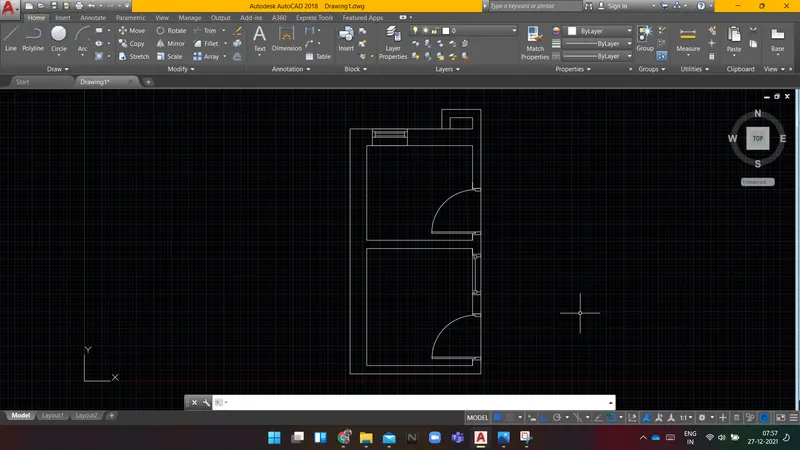
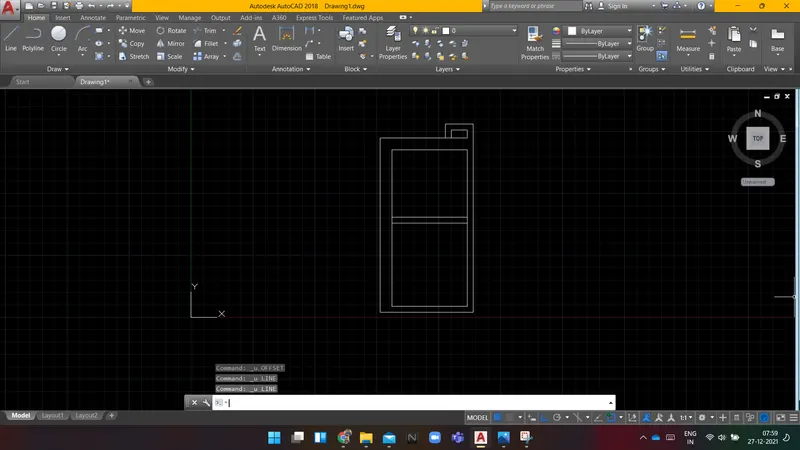
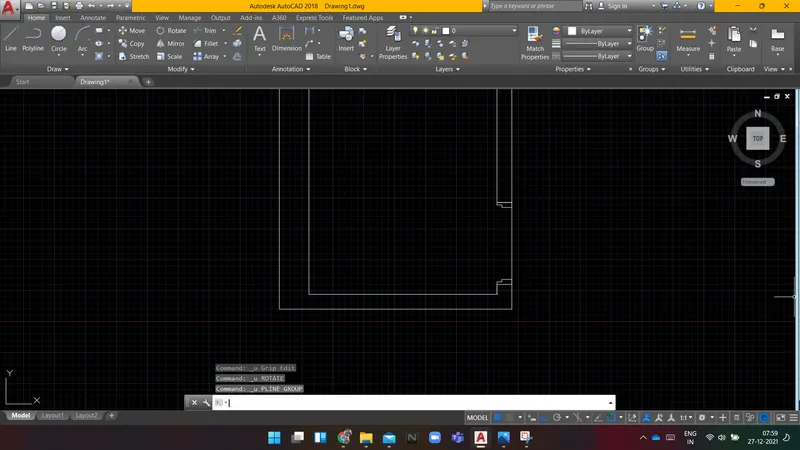
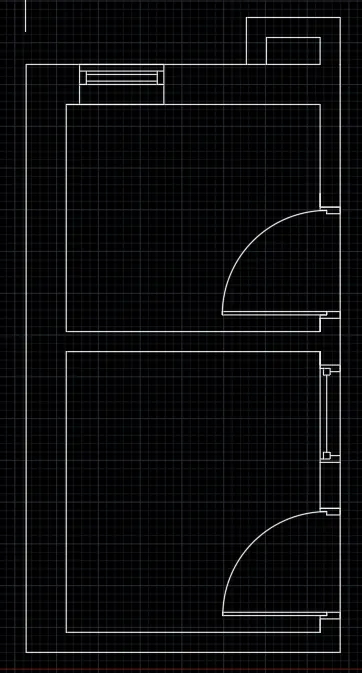
RESULT: Following is the sketch of part plan for the toilers and utilities room.
-------------------------------------------------------------------------------------------------------------------------------------------