Comparison Of Spring Mass Damper System Using Simulink and Simscape
AIM:
- To Open the “Mass-Spring-Damper in Simulink and Simscape” model and solve the following problems:
- Derive the Governing equation for the Model.
- Change the value of Mass, Damper, and spring for the Simscape model and Plot the Results. Change the value of Mass x0 = 2 in the Simulink Model and Plot the Results.
- Make the Response from Simscape and Simulink as two separate Displays.
SYSTEM SPECIFICATION:
- Manufacturer – Acer
- Model – ASPIRE E1-531
- Operating System – windows 7 Ultimate
- Processor – Intel(R) Pentium(R) CPU B960 @ 2.20GHz 20GHz
- RAM – 4 GB
OBJECTIVE:
- In Simulink, Open “Mass-Spring-Damper in Simulink and Simscape” Model and Derive the governing Equation for the model. Change the value of Mass X0 = 2 in the Simulink Model and Plot the Results. Make the Response from Simscape and Simulink as two separate Displays.
COMPARISON OF SPRING MASS DAMPER SYSTEM USING SIMULINK AND SIMSCAPE:
THEORY:-
SIMULINK- Simulink uses a block diagram approach and the signal flow is unidirectional
SIMSCAPE- Simscape uses physical modeling approach (Real Time Environment). The signal flow is bi-directional between blocks.
BLOCKED USED:-
- Gain Block - To multiply with constant value to the input given.
- Subtract – For solving the Equation.
- Integrator Block - To integrate the velocity and distance values.
- Goto Block - To send the Signal from any Subsystem or in main model to any place.
- From Block - To receive the sent signal from Goto Block.
- Scope - To plot Graph between two parameters.
- Ideal Translation Motion Sensor – To sense the movement (velocity) of the system.
- Damper, spring, Mass Block- To model a Spring Mass Damper System.
- Mechanical Reference – To make sure that all the components are clamped to the Ground.
- Solver Configuration – It specifies the solver parameter before starting the Simulation.
SIMULINK & SIMSCAPE MODEL (original model):-
link:https://in.mathworks.com/help/physmod/simscape/ug/mass-spring-damper-in-simulink-and-simscape.html
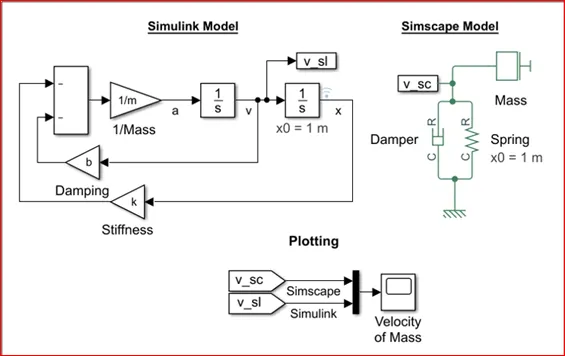
Flow Process:-
- The mass (m), spring constant (k), Damping co-efficient (b) and Spring Displacement (x0 = 1) are inputted from MATLAB Workspace window.
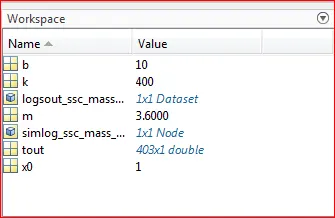
Then the Damping Force is generated from the entered Damping co-efficient (b) and velocity (`dx/dt`).
`F=b dx/dt`
Next the Spring restoration force is generated by the entered Spring Constant (k) and thye distance (x).
`F=kx`
Then both the Force are subtracted because it’s is in the opposite direction.
`F= -b dx/dt- kx`
Now acceleration is calculated.
`a= F/m`
`a = (-b dx/dt- kx)/m`
`a= m/s^2`
Then velocity is calculated by integrating.
`v=∫▒〖a.d.s〗`
`v= ∫▒m/s^2`
`v= m/s (si-unit)`
Final value `v= dx/dt`
Again the integrating distance is calculated.
`d= ∫▒〖v.d.s〗`
`d= ∫▒(m/s) ds`
`d= m (si-unit)`
Final value `d=x`
- This process continues according to the input value (b, k and m) provided by user.
- When the calculation is stopped the velocity results are plotted using scope for both Simulink and Simscape Models.
RESULTS:-
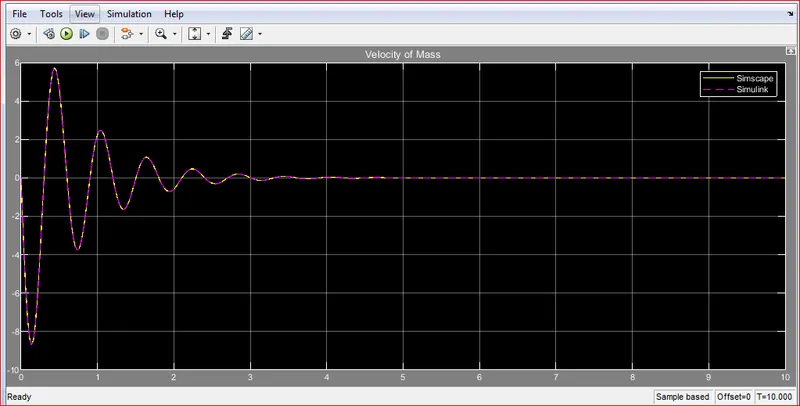
Here both the velocity of Simulink and Simscape are same because there is no change in any parameter in the system.
TASK I – DERIVATION OF GOVERNING EQUATION:-
In this Model we are using Spring Mass Damper System with Simple Harmonic Motion.
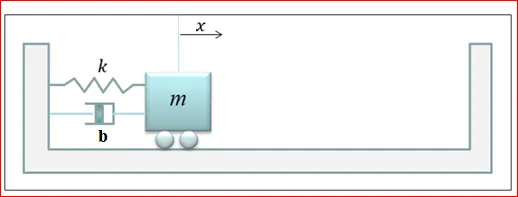
From Newton’s 2nd Law of Motion,
`F=m .a`
The restoration force of spring i.e. returning to Equilibrium position,
`F_sp= kx`
The Damping Force in the system
`Fd= b .v =b . dx/dt`
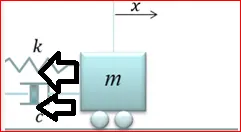
Looking at the free body diagram it appears that the spring and damper force acting in the negative direction compared to the displacement then replacing F in 1st equation.
So,
`-F_sp- Fd=ma`
So now,
`ma+fd+ f_sp=0`
Substituting:`fd=b.v & f_sp=kx` from above equations, we get
`ma+b.v+kx=0`
In order to pull all the equation in the “x” variable:
`a= d_v/d_t`
And `v= d_x/d_t`
Now,
`a= d_v/d_t`
`a= (d/d_t ) . v`
`a= (d/d_t )(d_x/d_t )`
`a= (d^2 x)/〖dt〗^2`
WKT,
`F=m.a`
`F=m . (d^2 x)/〖dt〗^2`
By equating,
`F=m .a`
`-kx-bdx/dt=m (d^2 x)/〖dt〗^2`
`m (d^2 x)/〖dt〗^2 + b dx/dt+kx=0`
Where,
`m= Mass(kg)`
`dx/dt= Velocity (m/s)`
`k= Spring Constant`
`b= Damping Co-efficient (Ns/m)`
`x= Distance from Reference point`
`(d^2 x)/〖dt〗^2 = Acceleration(m/s^2)`
TASK II - CHANGING THE PARAMETER IN SIMSCAPE MODEL:
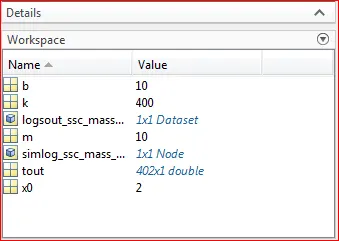
The parameter being change in simulink model is mass (m), initial spring position (x0 = 2) and then plot the results.
ORIGINAL PARAMETER CHANGED PARAMETER
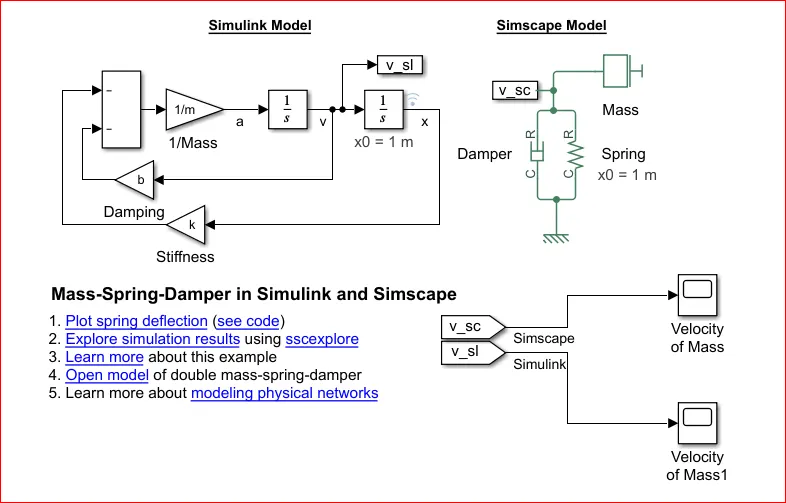
SIMULINK MODEL:-
RESULTS:-
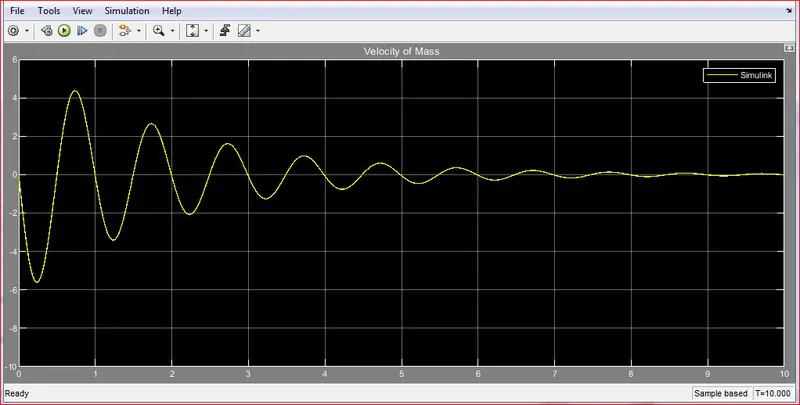
The parameter were succesfully changed and the results are obtained in the manner that the generated velocity is damped out
TASK II - CHANGING THE PARAMETER IN SIMULINK MODEL:
The parameter being change in simulink model is mass (m), initial spring position (x0 = 2) and then plot the results.
ORIGINAL PARAMETER CHANGED PARAMETER
SIMULINK MODEL:-
RESULTS:-
The parameter were succesfully changed and the results are obtained in the manner that the generated velocity is damped out.
TASK III - CHANGING THE PARAMETER IN SIMSCAPE MODEL:
The parameter being change in simulink model is mass (m), initial spring position (x0 = 2) and then plot the results.
ORIGINAL PARAMETER CHANGED PARAMETER
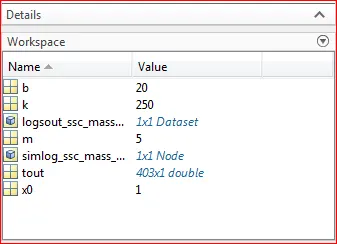
SIMULINK MODEL:-
SUB-SYSTEM:-
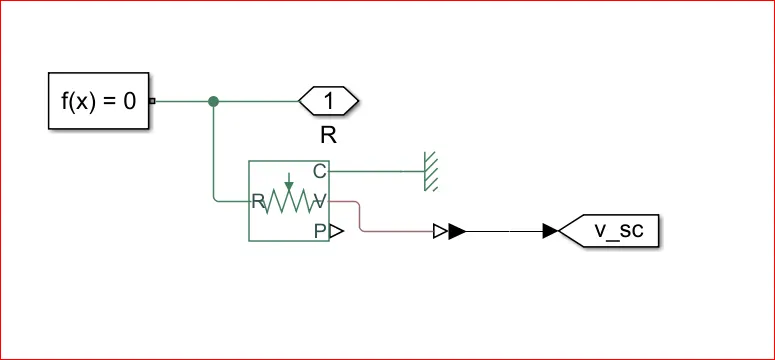
In this sub-system Ideal Translation Motion Sensor is used to read the velocity(motion) of the spring mass damper system.
RESULTS:-
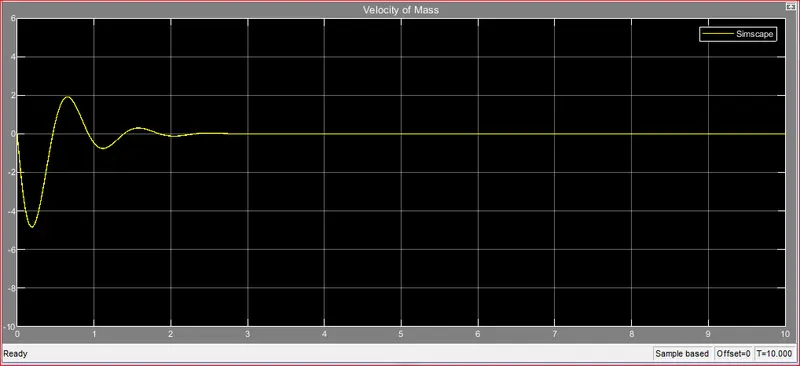
the parameter are successfully changed and the results are obtained in the manner that the general velocity is damped out.
CONCLUSION:-
The workdone by shaping machine, solving the equation with array dataset and comparing spring mass damper system with Simulink and Simscape was completed successful.
REFERENCE:-