Assignment 4-RADIOSS Material Laws Challenge
objective
To perform simulation and analyize seven different cases with changing the material properties for the same model
procedur:
case 1
- import the FAILURE_JOHNSON_0000.rad file
- without changing anything Run the model by using the radioss tool, by saving the result files as Law2_epsmax_failure
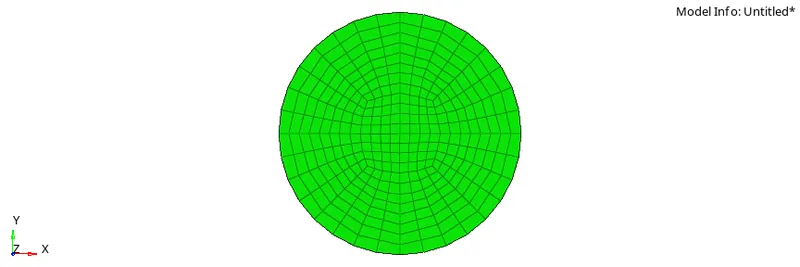
- after pressing the radioss button, the solver window pops up and we have to wait till the solver solves the program and give the end results.
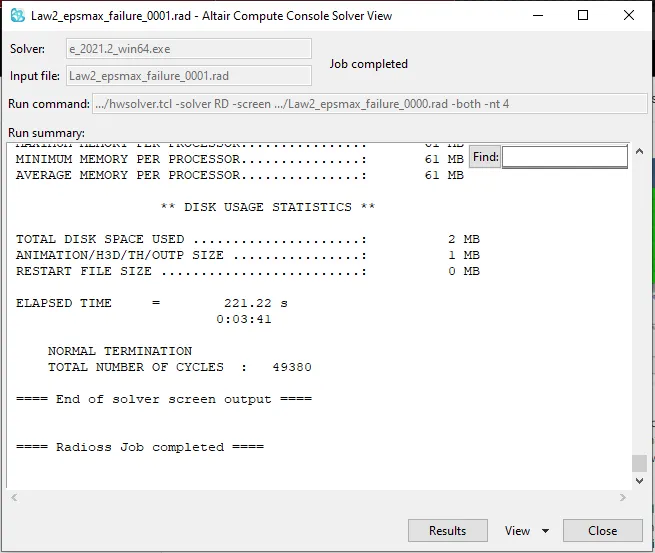
- from the above solver we can see the total number of cycles are 49380 and the elapsed time is 221.22 approx 03:41s
- We click on the view option the solver and select the output which gives the output data of the model
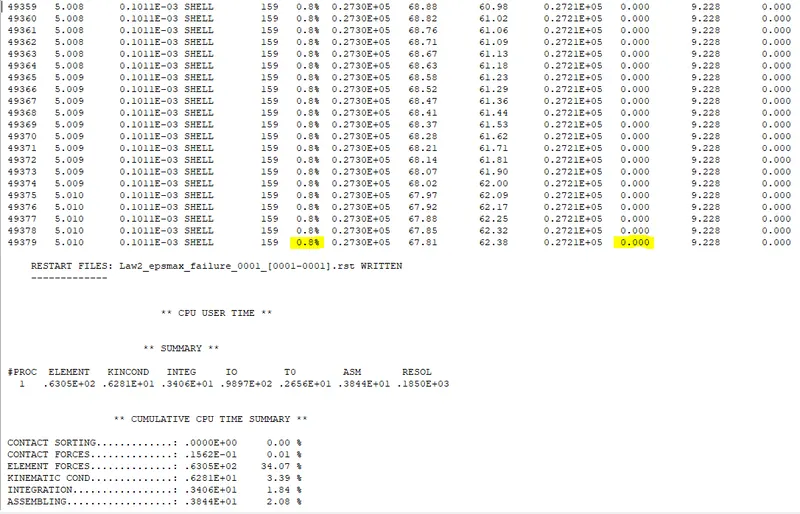
- From the above data we can see that the energy error is 0.8% anf the mass error is 0.0%
- Now we switch to hyperview
- Upload the the h3d or the A001 file for model simulation
- Select the contour option the toolbar, here we can select result type to van misses stress and averaging to advanced and press apply
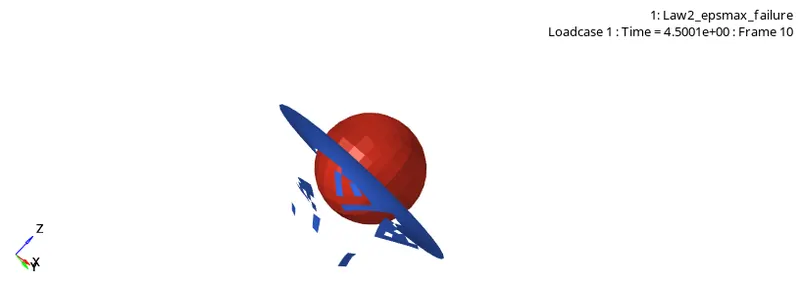
- As we can see from the above simulation, we can see that after reaching the maximum strain or ultimate tensile strain it breaks into pieces
- we can see the above failure condition looks unatural due to the way the elements are breaking
- now we switch to hypergraph 2d
- We now upload the T01 file which is the time history file
- Now we plot the graphs for internal energy, kinetic energy, total energy and resultant force
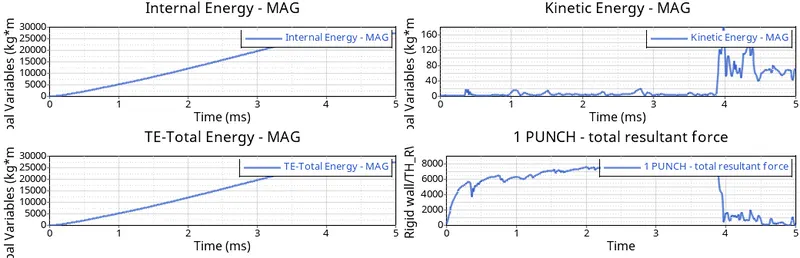
- As we can see the internal and total enrgies keep increasing to certain pont and stay constant at that point.
- The kinetic fairly remains constant with few jerks untill the ball breaks through the rigid body. the spike in kinetic energy is because of the energy geerated during the breaking of the rigid body which causes vibrations in the nodes and hence increase in kE
- The resultant force by the rigid wall slowly increasing from the contact until it breaks, after that the resultant force instantly falls as there is no body to apply opposite force on the sphere
CASE 2
- We upload the Law2_epsmax_failure file
- Now in the johnson failure card, we give some extra values for Dadv, ifail_sh and ixfem
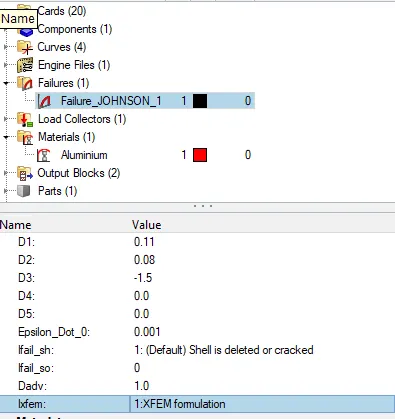
- Now name the model as Law2_epsmax_crack. and run it in radioss
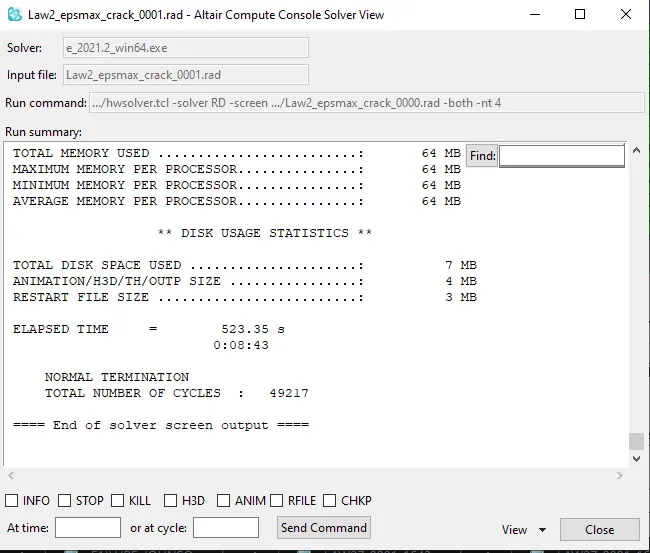
- Here we can see the elapsed time is 8:43 s and the total number of cycles are 49217
- The output files is
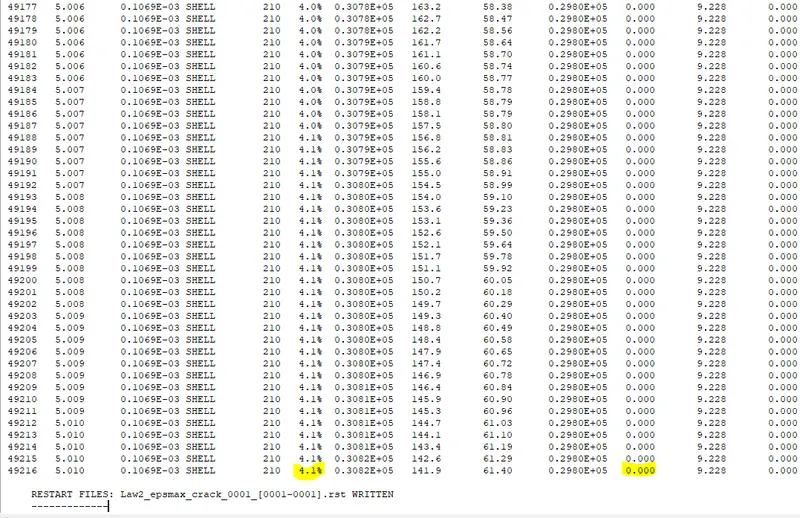
- Here we can see the energy error is 4.14% and the mass error is 0.0%
- Now we switch to hyperview and ulpad the h3d file
- We run the simulation with van misses stress contour and averaging as advanced
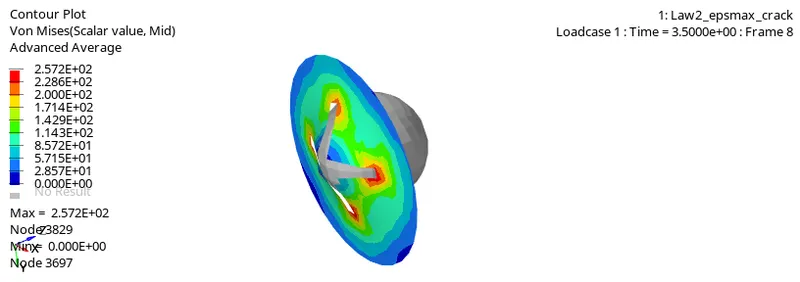
- Here we can see due to adding of Dadv, ixfem and ifail_sh, now we can the crack in the rigid body and the the elements break properly
- Now we switch to hypergraph 2d and upload the T01 file
- Now we plot the energies
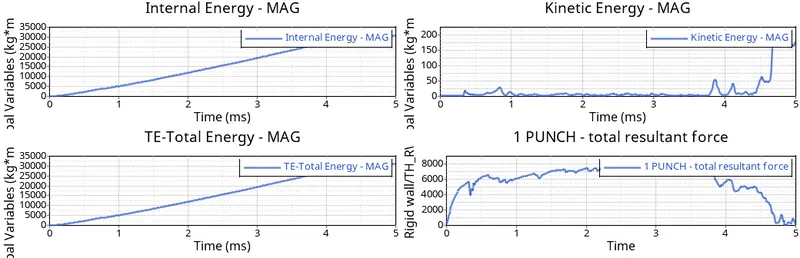
- Here we can see the internal and total energies remains same as both the values are considered equal
- In the kinetci we can see there is steady raise in kinetic energy compared to the previous case, this is because the elements are breaking evenly and crack formation which results in little bit steady raise in kinetic energy
- In total resultant force we can see that the drop is not sudden but slowly decreasing as time goes, this is due to the use of IXFEM snd Dadv commands which made the cracking and breaking evenly
CASE 3
- import the Law2_epsmax_crack_0000.rad file
- Now we delete the johnson failure card and name the model Law2_epsmax_nofail_0000.rad and click on radioss
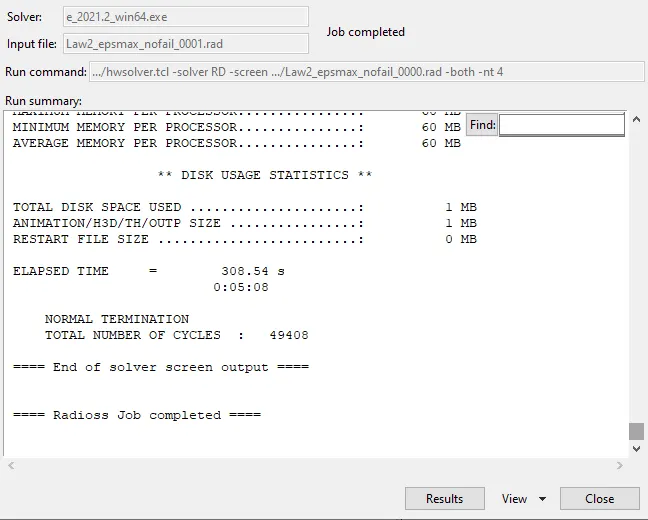
- Here we can see the time elapsed is 05:08 s and the total number of cycles are 49408
- Now we click on the output file
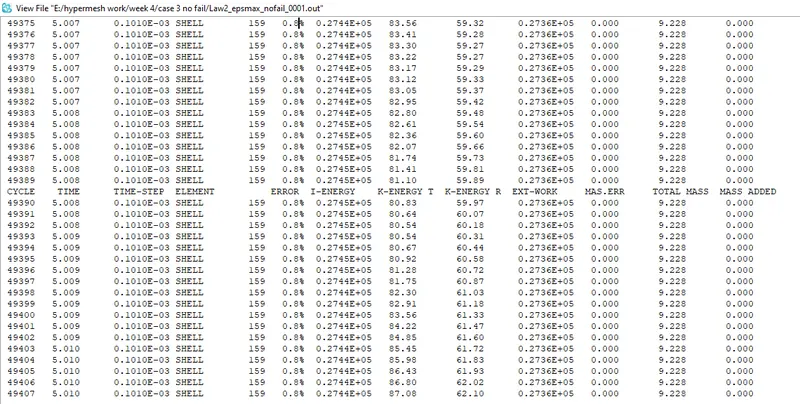
- Here we can see the energy error is 0.84% and the mass error is 0.0%
- Now we switch to hyperview and upload the h3d file
- Select the van misses stress in result type and advanced in average and apply and run the simulation
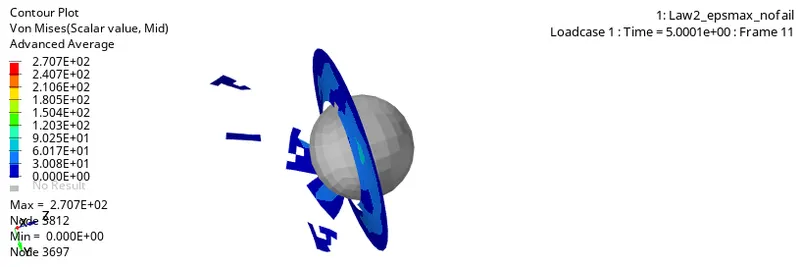
- Here we can see the breaking of the elements is in chunks and there were no cracks
- Now we switch to hypergraph 2d and plot the energy graphs
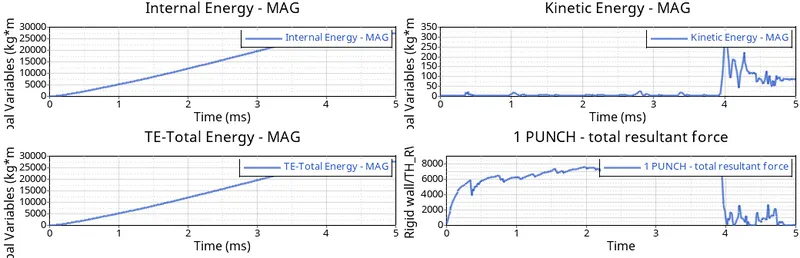
- Here we can see there is steady raise and stable line in internal enrrgy and TE enrgy
- Since there were no crack formation and the sudden braking of the rigid body, there is sudden raise in kinetic energy
- Due to the suddent breaking of the elements there is a sudden fall in the total resultant force
CASE 4
- Import the file Law2_epsmax_nofail_0000.rad
- Now we change the EPS_p_max value to 0 in the material card
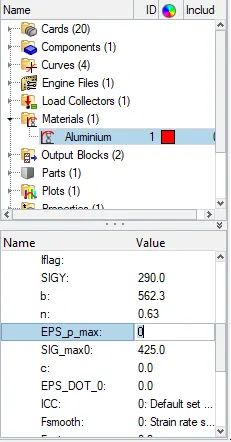
- Now change the name of the file to Law2_noepsmax_nofail and click on radioss
- we get
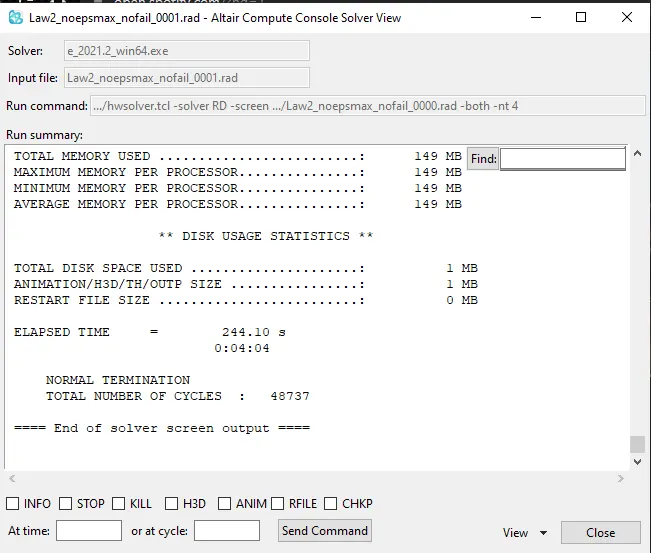
- From the above results we can say that the elapsed time is 04:04s and total number of cycles are 48737
- now we select the out file
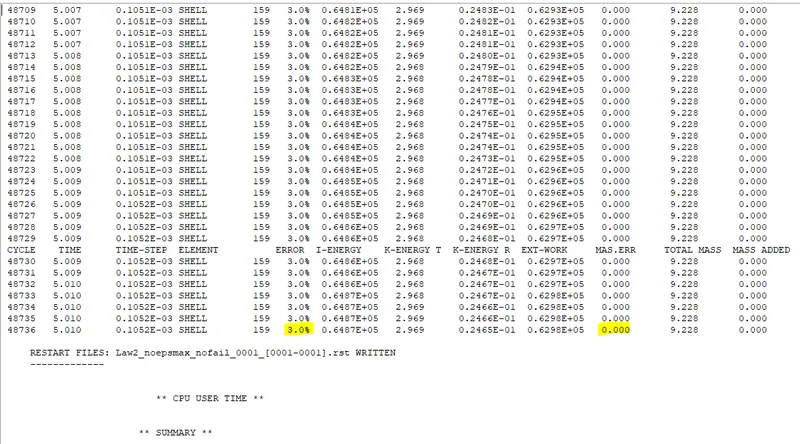
- From the above output file we can see that the energy erro is 3.04% and the total mass error 0.0%.
- Now we change to hyperview and upload the h3d file
- Now we select van misses stress for result type and advanced for avergaing and click on apply for simulation
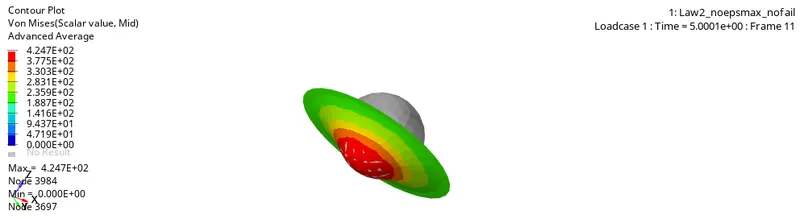
- Since there are no failure conditions the rigid body does not break and only deforms under extreme stress
- now we switch to hypergraph2d and upload the T01 file and plot the energy graphs
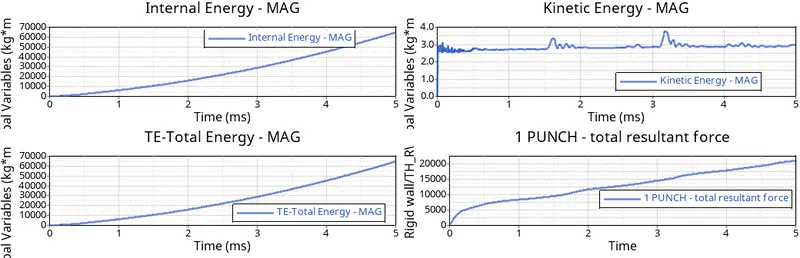
- Fwe can see the steady increase in internal TE enrgy curves as there is no breaking and the energy keeps increasing
- The kinetic enrgy starts very high as the elemnts only deforms and not break, due to this the energy keep in steady as no much vibrations are produced
- The total resultant force keep increasing as there is only deformation and rigid body keeps exterting the resultant force on the sphere.
CASE 5
- import the Law2_noepsmax_nofail_0000.rad file
- Now change the material formulation from 2(JOHNSON) to 1(elastic)
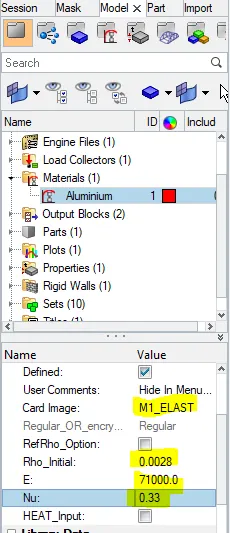
- Now save the name to Law1_Elastic_0000.rad and click on radioss
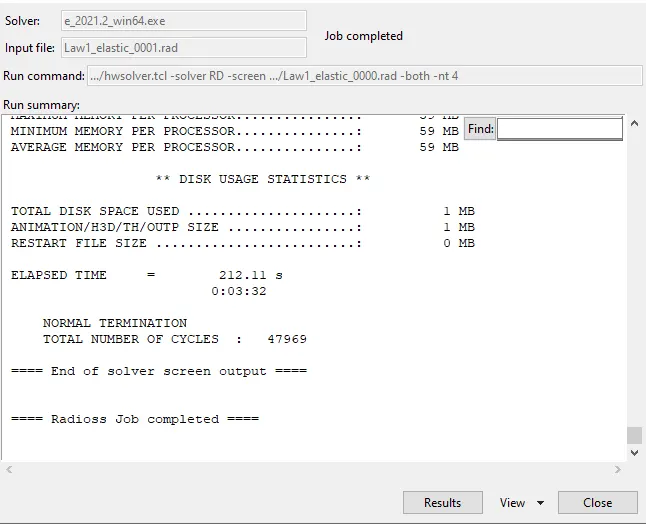
- we can see the elapsed time is 03.32 s and the total number of cycles are 47969
- Now we check for the output file
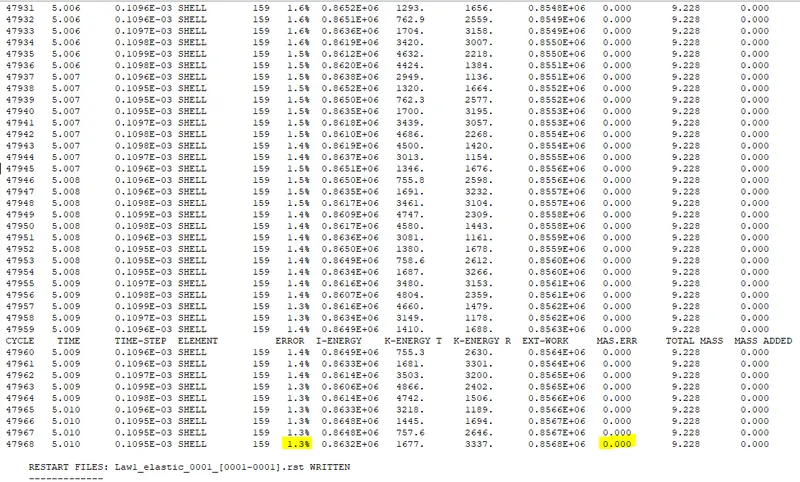
- Here the energy error is 1.34% and the mass error is 0.0%.
- Now we change to hyperview and upload the h3d file
- We select van misses stress under the result type and advanced in the averaging and press apply for the simulation
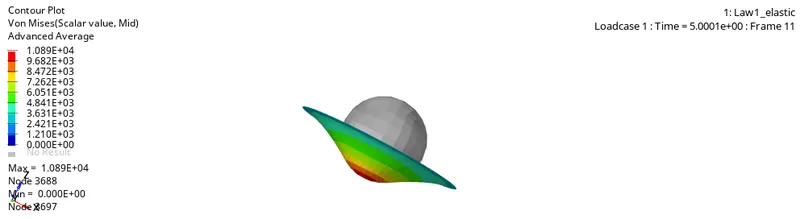
- Here we can see perfect deformation because of the perfectly elastic nature of the material
- Now we change to hypergraph 2d and upload the T01 file and plot the energy graphs
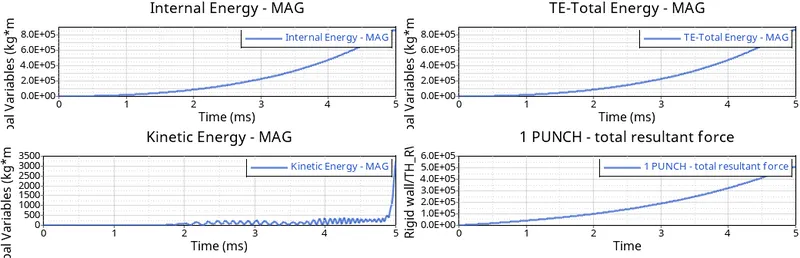
- Here the internal energy and total enrgy have a steady slope due to perfect deformation
- The kinetic energy here slowly tends to rise.. as the deformation becomes more and more the kinetic energy keeps increasing and it reaches peak value at the extreme deformation
- The total resultant force also follows a steady slope as the resultant force from the rigid body keeps increasing as the deformation in it keeps increasing without any crack or rupture
CASE 6
- Import the Law2_epsmax_failure_0000.rad file
- Now change the material property fromulation from M2 to M36 (plastic_tab)
- We fill the material card from the information given
- Now we fill the curve for the function
- For that we refer to the given data for the points in the curve
- We create new curve card and save the curve
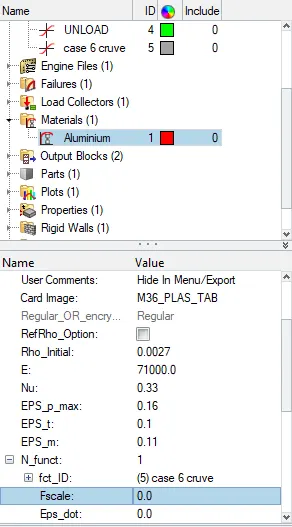
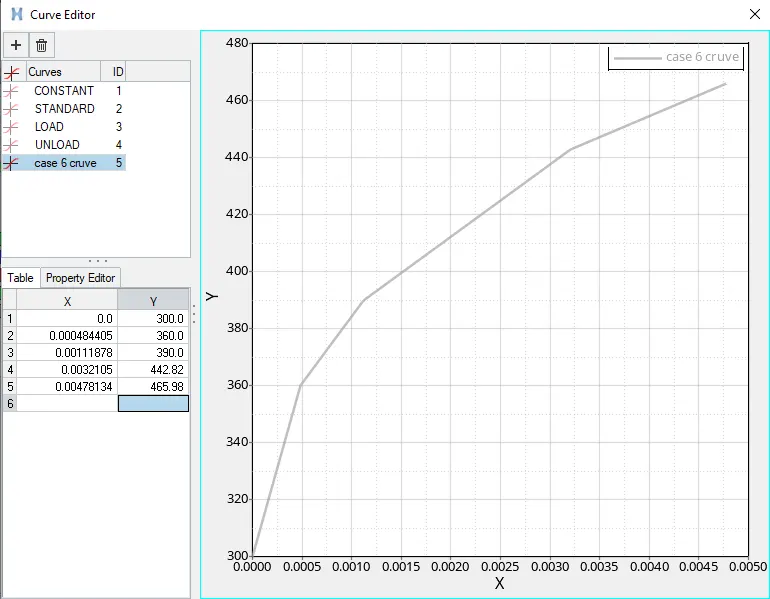
- After this we save the file name as Law36_0000.rad file and click on radioss
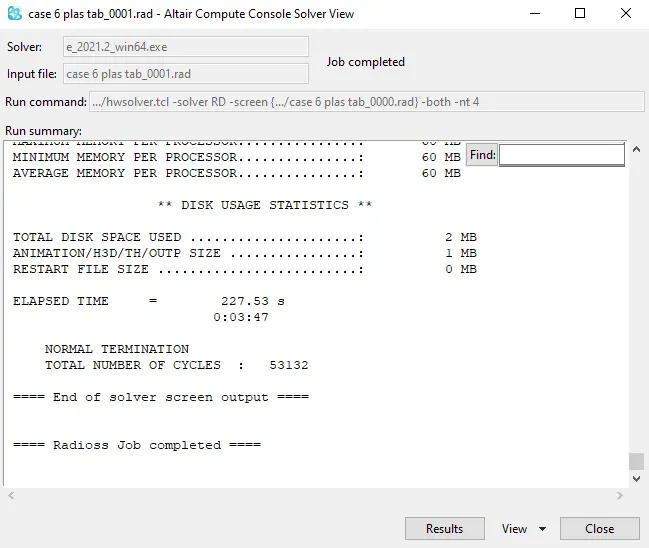
- From the above curve we can see the elapsed time is 03:47 s and the total number of cycles are 53132
- now we switch to output file
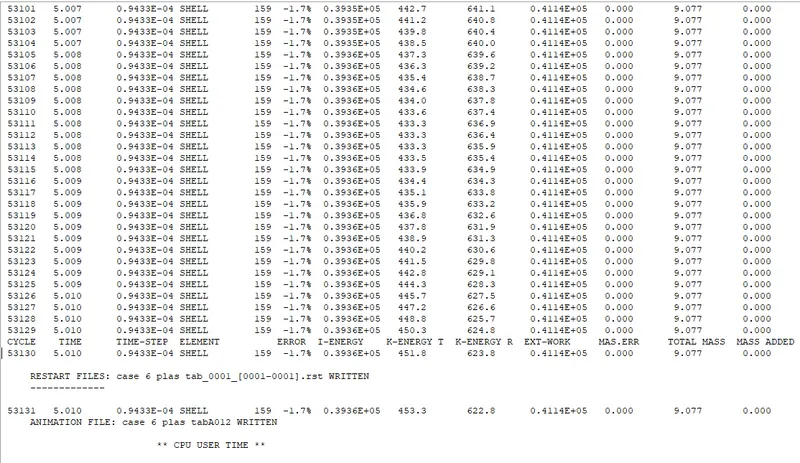
- From the file we can see that the energy error is -1.74 and the mass error is 0.0%
- now we switch to hyperbiew and upload the h3d file
- we select van misses stress in the result type and advanced in average for the simulation in the contour
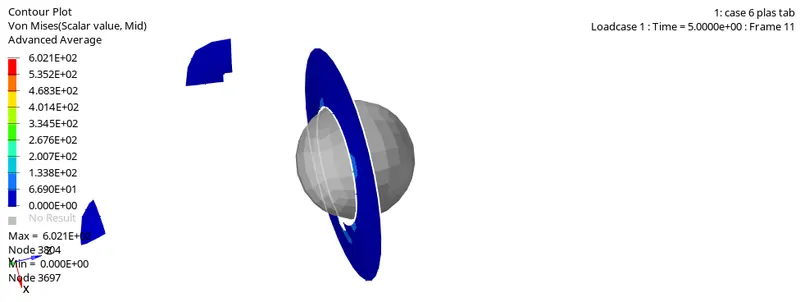
- from the simulation we can see that the cracks are formed after that the elemnts are broken, but the breaking of elemnts looks unreal as they are broken in chunks
- now we change to hypergraph2d and upload the T01 file and plot the energy graphs
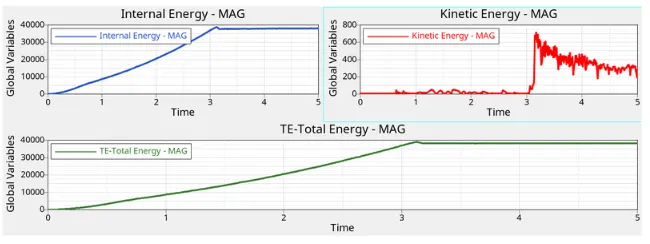
- We can see that the internal energy and the total energy increase till a point and goes steady, as that is the point where the rigid body completly breaks due to the sphere and the internal energies doesnt change
- We can also see sudden spike in the kinetic energy which a is result of cracking and breaking of the rigit body. the KE then slowly drops aftet that
CASE 7
- import the Law27_0000.rad file
- We add the given material properties
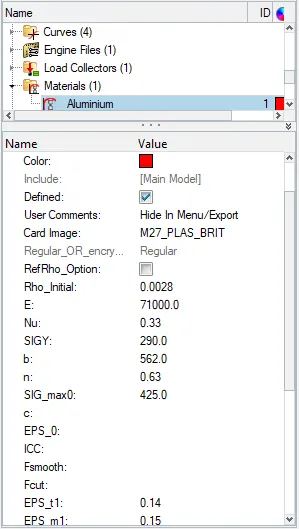
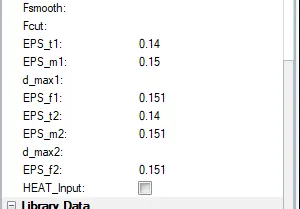
- Now we save the file to Law27_0000.rad file and click on radioss
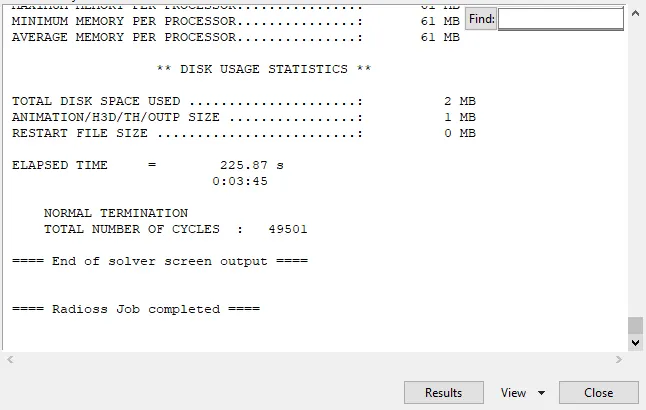
- The elaspsed time is 03:45 s and the total number of cycles are 49501
- lets check the output file
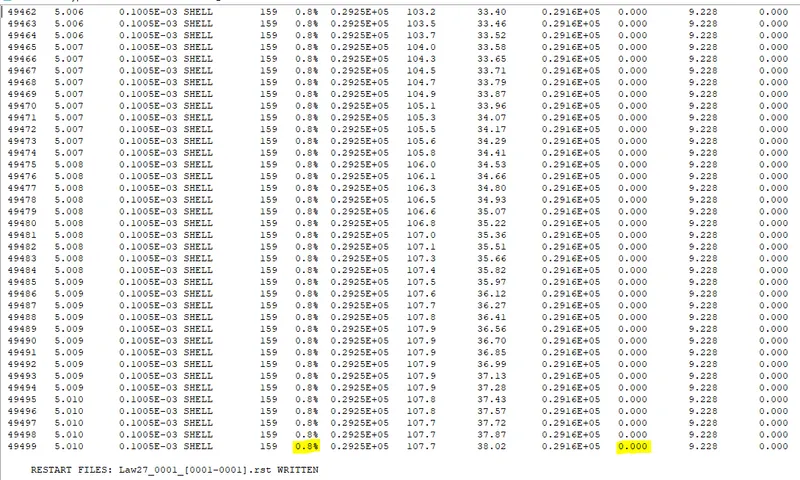
- we can see the energy error is 0.84% and mass error is 0.0%
- now lets change to hyperview and upload the h3d file
- now select van misses stress for result type and advanced for averaging in contour for simulation
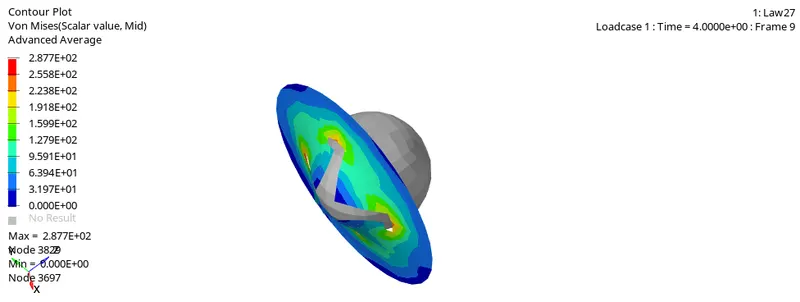
- Since the material is brittle it breaks under very less stress but it forms cracks before breaking. there is not much deforming
- now lets change to hypergraph2d and upload the T01 file for ploating the energy graphs
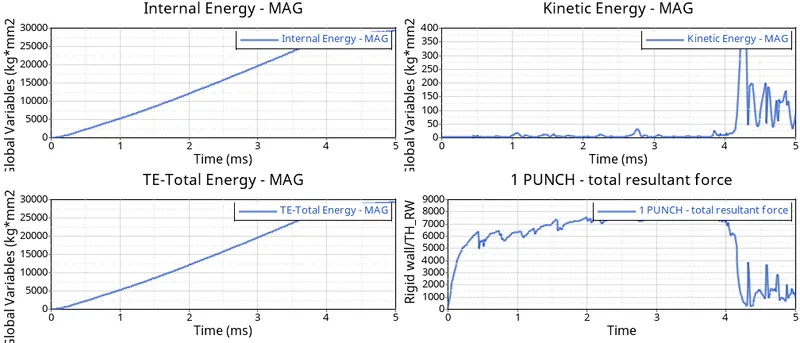
- We can see there is steady rise in internal enrgy and TE till a point and it goes constant after that. that point the breaking point or ultimatae tensile strain of the material
- The kinetic energy of the material suddenly reacings its peak during the breaking, as the material is brittle there isnt much deformation hence there were not many initial spiking in the KE
- the resultant force of suddenly falls as the material breaks and there is no more resultant force produced as as a result. Hence the suddent drop, yet there is little force due to the side wall of the rigid body
The tabular columns decribing all the cases
| case | no of cycles | mass error | final error energy | elapsed time | condition of elements under stress |
| case 1(Law2_espmax_failure) | 49380 | 0 | 0.8% | 221.22 | deleted |
|
case 2(Law2_espmax_crack) |
49217 | 0 | 4.1% | 523.35 | elemnts undergo crack fromation and deleted |
| case 3(Law2_espmax_nofail) | 49408 | 0 | 0.8% | 308.5 | deleted |
| case 4(Law2_noespmax_n0fail) | 48737 | 0 | 1.1% | 244.1 | cannot be deleted due to lack of failure card and high default eps max value |
| case 5(Law1) | 47969 | 0 | 1.3% | 212.11 | cannot be deleted due to elastic card property |
| case 6(Law36) | 53143 | 0 | -1.7% | 227.53 | deleted |
| case 7(Law27) | 49508 | 0 | 0.8% | 225.8 | deleted |
CONCLUSION
the learning outcome were
- How different material formulations affect the nature of the component
- Finding how energies are affected by the materials
- comparing different energies and understanding of graphs
- how to use hyperview and hypergrpah2d
- comparing different material laws and their significance