Assignment 3
- Objective: To run the given simulation with default element properties and then with the recommended properties and compare the results of simulation.
Describe Hourglass Effect, its causes and the steps to avoid it.
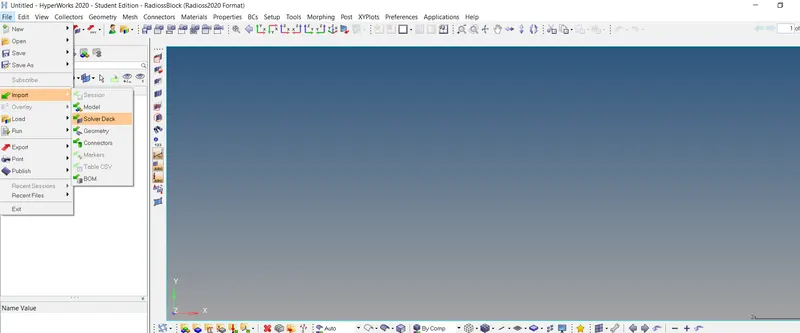
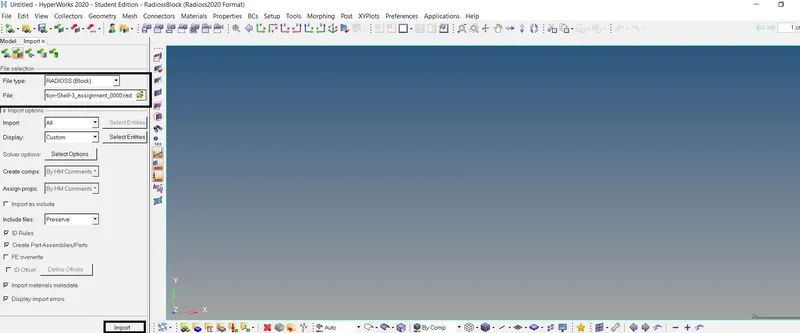
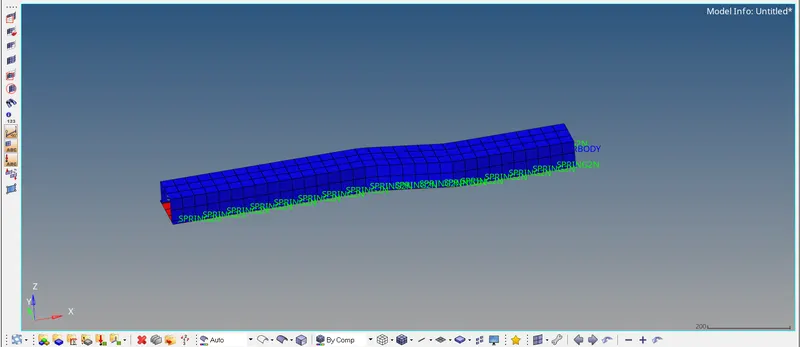
- Procedure: First we need to import the 0000.rad file. Go to File > Import > Solver deck. Select the file type as Radioss and select the .0000rad file. Click on import. The file will be imported as seen below.
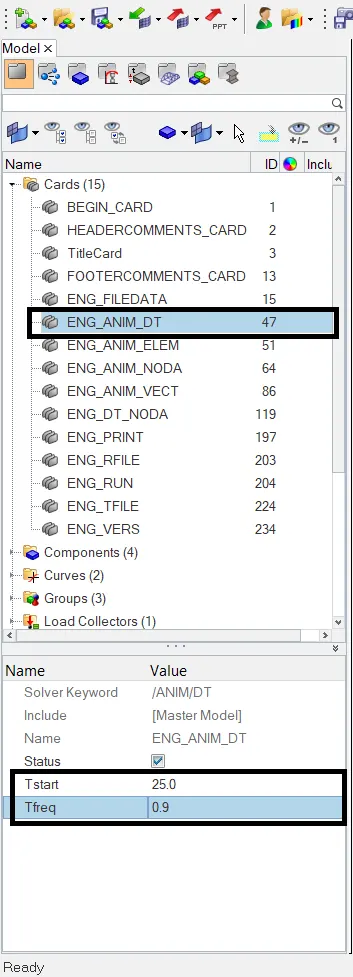
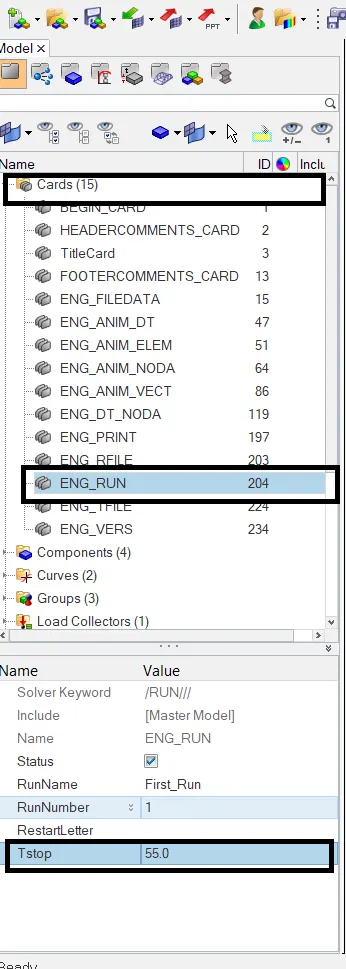
We have to change the run time to 55 ms and change the number of animation steps during simulation to a minimum of 25 and maximum of 60. In the Modal view click on Cards > ENG_RUN and enter
Tstop = 55. In the ENG_ANIM_DT set start time = 25 and Tfreq = 0.9.
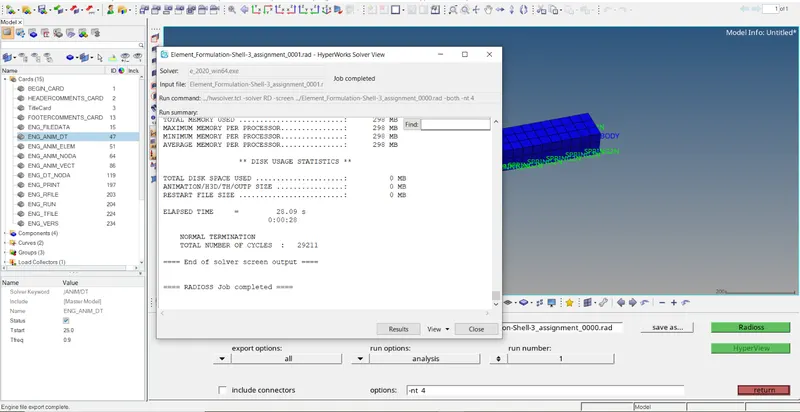
Now go to Analysis > Radioss. In the Save as tab, give the path where you want to save the file. Then click on Radioss. The simulation will start and it's status will be showed in the pop-up as seen below.
We will revive the results later. Now start new model and again import the original file. Make the changes in the solver run time and Tstart and Tfreq as discussed earlier. Now we need to change the shell
formulation algorithm to the one that are recommended and update other properties. In the model view click on Properties collector. We need to make change in the element shell formulaton and other
parameters. Select the Hat section and make following changes in element properties.
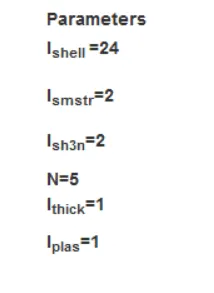
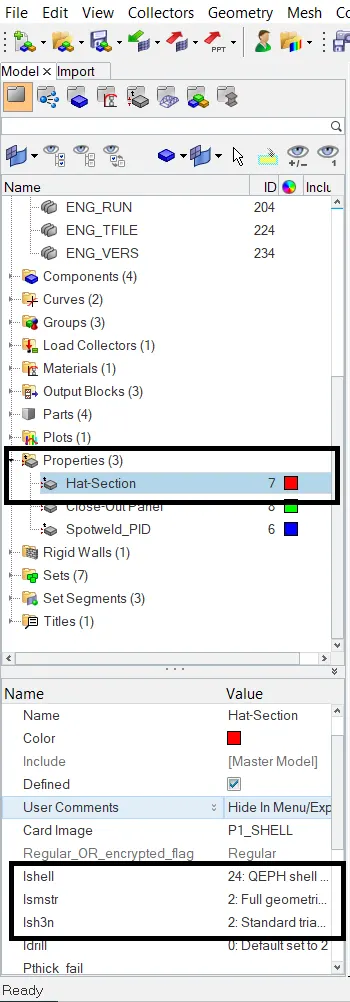
Change the properties of Close-Out Panel as well. Go to Analysis > Radioss. Define the path to where the file must be saved and then click on Radioss and run the simulation. Now we can compare the results
of both cases of simulation. There are DEF_SHELL cards specified, so any element property in Case 1 with 0 as triggering algorithm will take the default value. Accordingly -
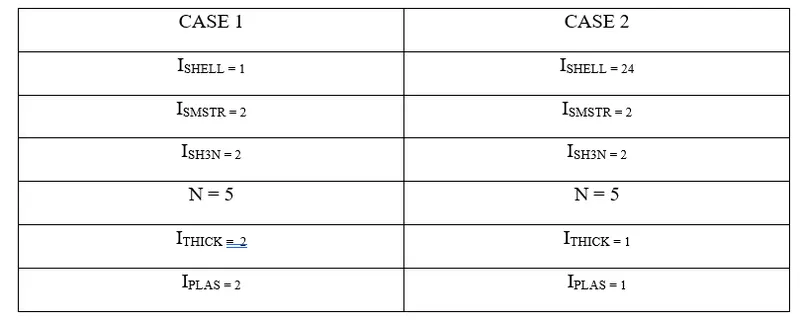
- Comparison of results of CASE 1 and CASE 2:
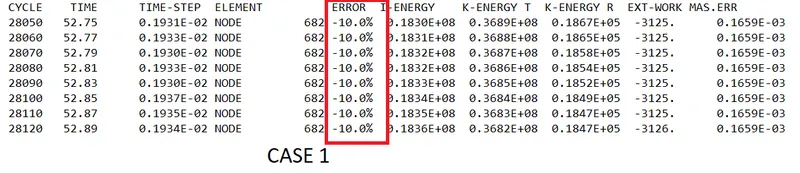

As seen in Case 1, the energy error is -10% and in case 2 it is -0.1%.
What is Energy error? How is it computed? Energy error is computed as :
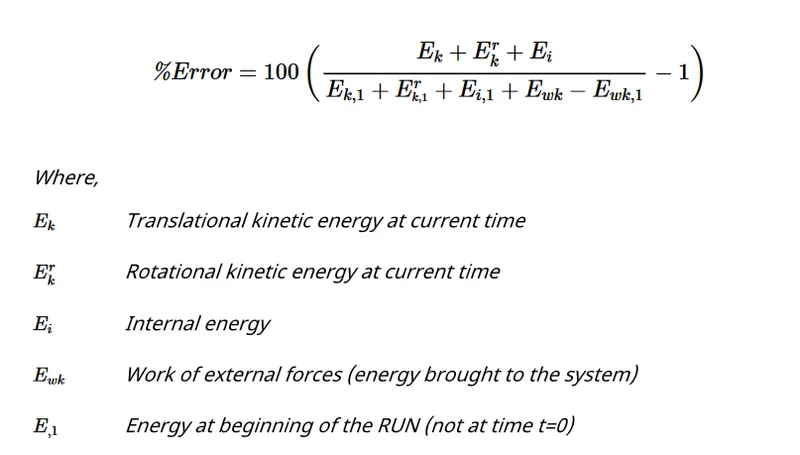
If the energy error is negative, it indicates that the energy is dissipated. Also it is seen that the above equation do not account for the Hourglass energy. Normally Hourglass energy accounts for 10-15%.
In the Case 1, since Q4 element formulation is used, there is Hourglass energy introduced in the system to control the Hourglass effect and this energy is not accounted in the energy error. This can explain
the -10% energy error in Case 1. On the other hand, in Case 2, QEPH element formulation is used in which the hourglass mode deformation is controlled at the material level by artifically adding stiffness to
the elements and yields accurate results. Energy error can be positive in QEPH as there is no hourglass. An positive error upto +2 % is acceptable in this case. If it is greater than 2%, then the source of this
energy should be identified. Since energy error in both cases is less than 15%, it is considerable. Energy error below -5% are acceptable.
Mass error occurs due to imposing of high time steps. Mass error upto 2-3% are acceptable. In both case, mass error is 0.165E-03 and is acceptable. Now we can plot the graph for rigid wall forces, internal
energy, hourglass energy, contact energy, total energy of the simulations.
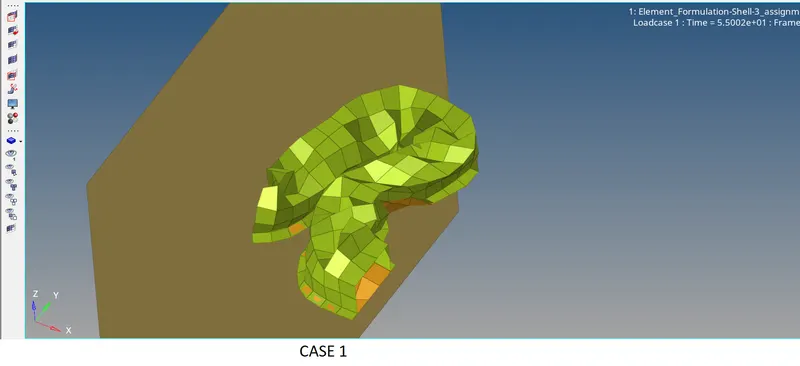
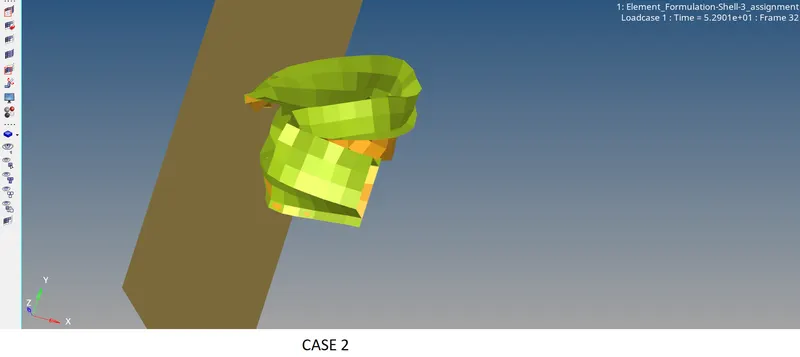
The deformation in case 2 appears more natural and realistic compared to case 1. The way in which the elements deform in Case 1 is unusual. The crush beam is observed to bend in the middle. Ideally,
the component should buckle a little in the middle and the contact area it should have with the rigid wall should be with the frontal area of the crush beam as in case 2.
To plot the Graph, go to HyperGraph 2D. In the data file, select the Time History file (T01 file). In the Y type, select Global variables. In the Y request, select Internal energy, Kinetic Energy, Hourglass
Energy and contact energy. In the Y component selector, select MAG and click on apply. The plot will be generated as seen below.
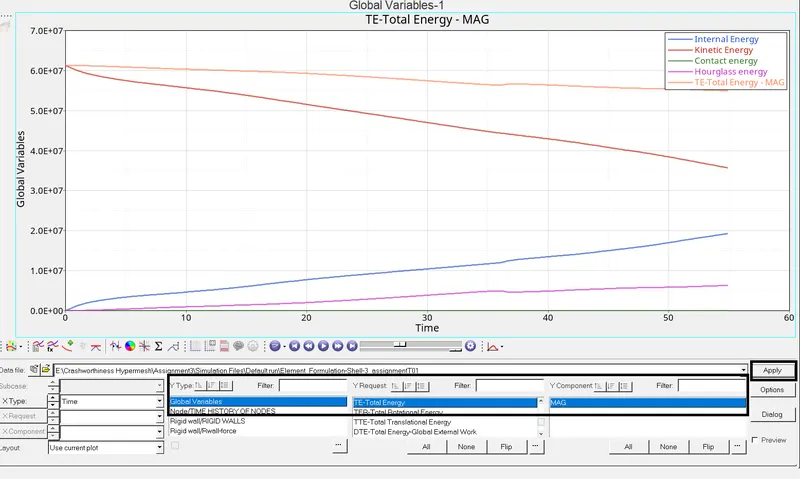
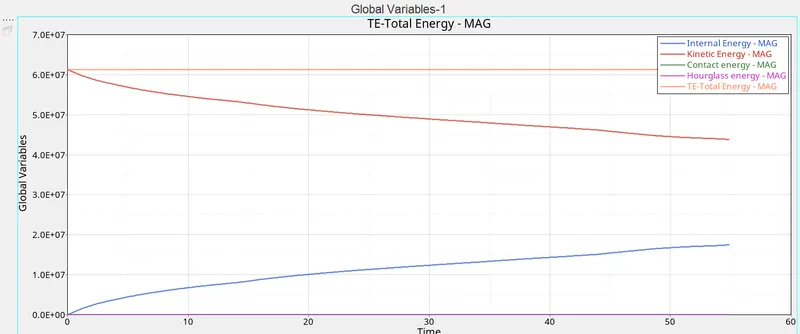
As seen in both cases, the kinetic energy is maximum in both cases in the beginning given the initial velocity and the mass of the object and decreases linearly wrt time as it hits the rigid wall. As it hits the
wall, the crush beam deforms. As a result of deformation, increase in the internal energy of the system is observed in both cases. As kinetic energy decreases, internal energy increases. Also in Case 1, the
total energydecreases slighltly. This may be accounted to the increase in hourglass energy. Where as in case 2, the hourglass is 0 and the total energy is constant. Contact energy is 0 in both cases.
To plot the rigid wall force, in the Y type, select Rwall force and in the Y component, select Resultant Normal Force
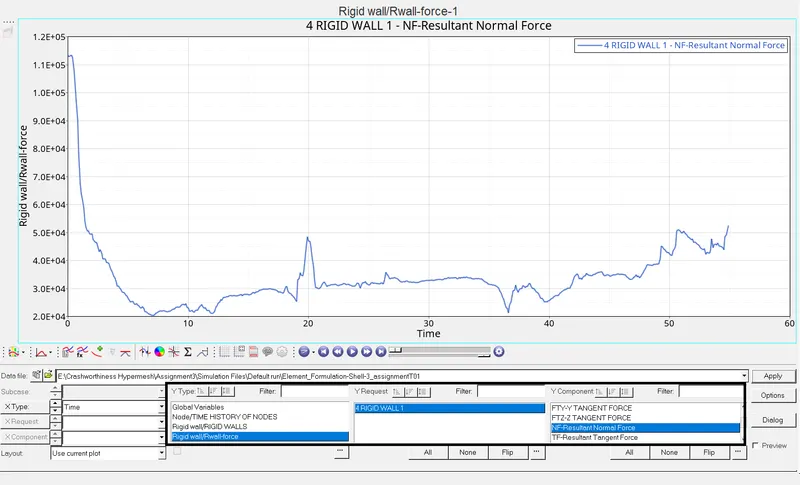
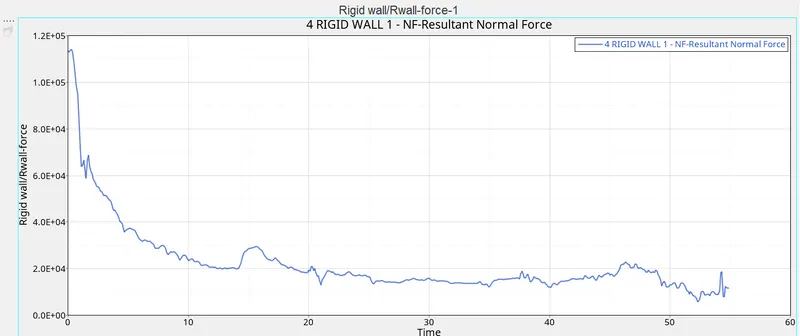
To summarize, QEPH element formulation used in case 2 gives more accurate results due to less energy error and no hourglass effect. The result is also improved in QEPH formulation by using Iplas = 1
which accounts for the computation of new thickness and integration points if Von Mises stress is greater than yield stress by using improved method. Ithick = 1 takes into account change in thickness
and computes stress and strain using true thickness.
- Hourglass Effect:
When the elements in the model deform and no strain energy is not calculated for that deformation, then this results in hourglass deformation. This can be clearly seen in the post-processing stage where the
elements will have a zig-zag formation.
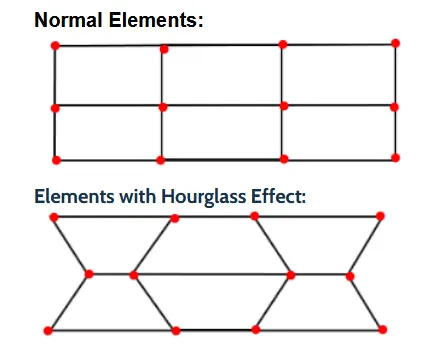
Cause: The Hourglass phenomenon occurs in the underintegrated elements because they have only single integration point.
Method to avoid Hourglass:
- By adding stiffness to the reduced integrated element at material level. This is done by using different cards in different solvers.
- By using fully integrated elements, Hourglass effect can be avoided.
- By adding a damping force on the nodes for stabilization if the Hourglass effect is observed. This is also done by using different cards in solvers.
- Mesh refinement will also help in avoiding this Hourglass deformation. Coarse mesh along with less integration point is more prone to Hourglass deformation.