Assignment 2-RADIOSS Engine File Editing & 3D Meshing Challenge
1) Calculate the speed of sound in steel rail
Sol: Formula for "Speed of sound" C=">√E/ρ">ρ
From the given _0000.rad file we can get the Material properties of steel rail
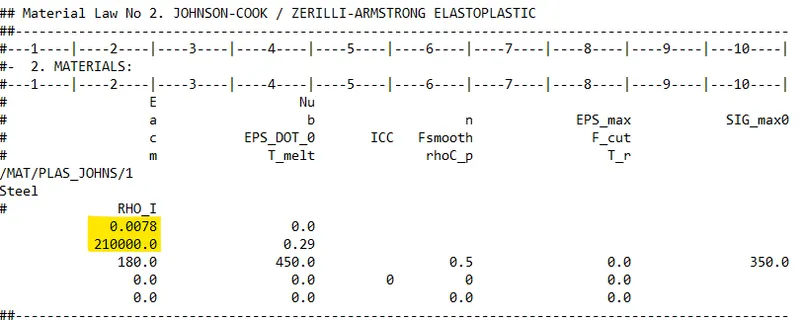
From the above image we can evaluate the value of E = 210000 N/mm^2 & `ρ`=0.0078 g/mm^3
Now using the formula for Speed of sound,
C=">√E/ρ">ρ
=">√210000/0.0078
C =5188.75 m/s
2) Calculate time taken for shock wave to cross the rail of 1000mm
So, formula for time taken for shock wave to cross the rail
Δt=l/c
l=1000mm , ∴ l=1m
c=5188.75 m/s
Putting the values in above formula
Δt=1/5188.75
Δt=0.1927ms
3) Time for sound to travel length of rail is = 0.1927ms
4) Edit the engine file so that the stress wave can be monitored, moving from one end of the rail to the other during impact -this will require a termination time equal to the time it takes for the sound to travel the length of the rail(set on/RUN card)
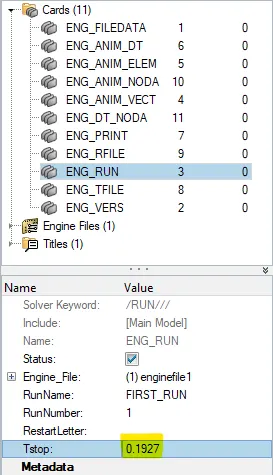
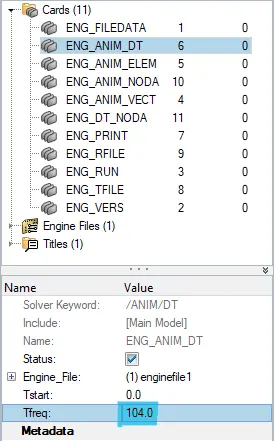
5)Set the frequency of animation output to a time that will give 20 animation steps(/ANIM/DT)
Frequency=(l/c)*time
=(1/0.1927)*20
=104Hz
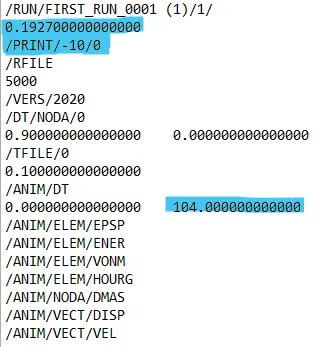
Now putting all the values in _0000.rad files
6)Change /print -10.

Now after putting all the values , export the solver deck file in .rad format
Objective:
- To mesh the given file and connect it by any one 1D connector.
Steps:-
- Directly open the .hm file into the software
- Mesh both the surfaces

- Go to 1D>connectors>rods select any two nodes to connect,
- Now the connection is done , after which new property card should be assigned to the component with property card image of "P2_Trus"
- New hyper beam has to be created , go to hyperbeam and select required cross section and give the required dimension as shown below
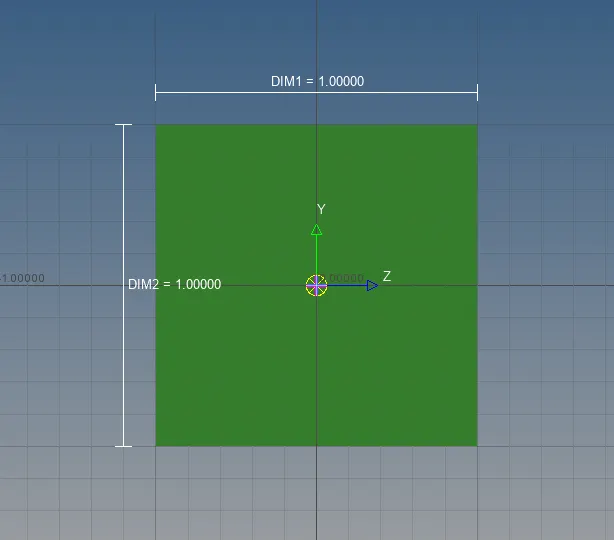

The final result is shown in below image
Steps for 3d tetra mesh model:-

- Check for any geometrical error, in this case we dont have any so carry on with 2d mesh first.
- Mesh the each components according to the given quality criteria with tria elements.

- Now we have to convert the 2d mesh element to tetra elements by 3d>tetramesh select the elements and mesh with required tet collapse value
- Do the same to the other components and make sure no tet collpase errors should be present.

Final Project:-

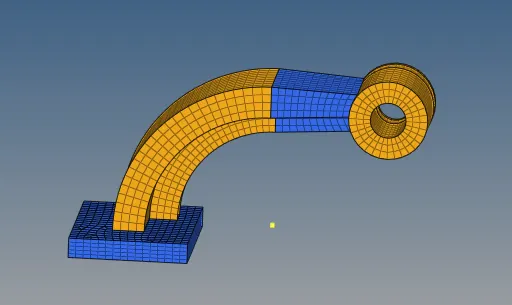
Steps for 3D hexa mesh 0f arm bracket model:
- In this model we have four components , one by one we will be meshing the model
- We have different methods to perform 3d hexa mesh like Element offset, spin,Linear solid, solid map...etc
- We will be using these methods to perfrom hexa mesh on each component, depending upon the components geometry
- Firstly the base , it is just a rectangular cube it is better to mesh the top surface with only quad element and use element offset option.
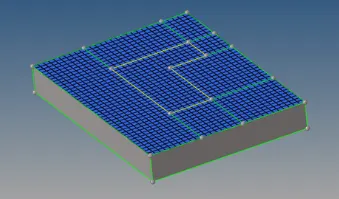
- Next component is curved arm, to mesh this model select the common 2d element between base and arm curve component , spin the element using base node and axis to rotate.

- To mesh the arm straight component , use 3d>linear solid option
- We should mesh each end by 2d element and join the same in this method
- Already one end of arm stright component is meshed by hexa element , to extract 2d element from hexa element , go to tools>faces extract faces option
- One end of the component will have 2d elements, mesh the other end with same number of elements to avoid penta elements.

- To mesh the boss component we will be using Solid map option
- Mesh the boss one side and solid map the element to the ither end by nodes
- Now after meshing all the components by hexa elements we have to delete all the 2d elements present in the model
- Go to delete option select elements by config option and slect quad 4 element, now all the 2 element will be deleted.
CONCLUSION:
- Understood how to calculate speed of sound in different material, frequency, time step
- Understood how to read input radioss file
- Understood how import the radioss solver deck file anf feed the value
- Understood how to export the file in .rad format
- Got to know how to create 3d tetra mesh and hexa mesh
- Learnt how to give diffrent type of 1D connection and hyperbeam concept.