2R ROBOTIC ARM USING MATLAB
AIM
Write a program in Matlab to simulate the forward kinematics of a 2R Robotic Arm, as shown in the video. Also create an animation file of the plot.
PRE-REQUISITES
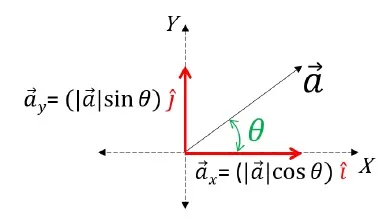
RESOLUTION OF VECTORS - Vector resolution is a process where one vector is broken down into two or more smaller vectors.
MATLAB FUNCTIONS USED
- linspace(x,y,z)
- plot()
- title()
- xlabel() & ylabel()
- axis()
- pause()
- getframe()
- VideoWriter('filename','format')
- open() & close()
- writeVideo()
- movie()
PROCEDURE
- The inputs like length, angle of inclination, rectangular coordinatesof origin & the joint of both the the link 1 & link 2.
- The angle of inclination is defined as an array using linspace().
- The for loop is defined with iteration from 1 to the array length of angle of inclination of the link 1.
- Since the link one is fixed to the origin, for each orientation of link 1, link 2 will can execute its every orientation. So we will define another for loop inside the 1st for loop with iteration from 1 to the array length of angle of inclination of the link 2.
- NOTE: In both the for loops the first statement will be a variable to assign the array value of the angle of inclination corresponding to the iteration (.i.e. THETA1 and THETA2 for the 1st & 2nd for loops)
- Inside the 2nd for lop, we will define the rectangular coordinates of the origin (X1,Y1), joint (X2,Y2) & manipulator (X3,Y3).
- The values of (X2,Y2) & (X3,Y3) are defined by the resolution of vector principle.
- Now inside the 2nd for loop itself, we will define the plotting statements.
- the plot is given the required title and axes are labelled.
- As the orientation of the two links changes the axes also changes, and hence for consistency, we will difine a common axis for orientation of the links using the axis(). Also a pause().
- for making the animation, we will store all the frames obtain from each orientation into an array M. Also for knowing the iterations, we will define a counter variable (.i.e. ct=1).
- Atlast, we will define the function movie outside the 1st for loop to create a movie filr by the matlab using the frames of plots obtained from the above for loops.
- to create the movie, the matalab requires a variable to store the file name and file format(.i.e. videofile).
- This variable is opened using open() and the frames are converted into video format using the movie().
- Atlast the file is closed to make it saved in the destination folder.
CODE:-
% MATLAB PROGRAM FOR 2R ROBOTIC ARM

% REQUIRED INPUTS

% LINK1 INPUTS
L1=4;
theta1 = linspace(0,360,10);
X1=0;
Y1=0;
A=0.33;
B=0.66;

% LINK2 INPUTS
L2=4;
theta2 = linspace(360,0,10);
% X2 and Y2 ARE DEFINED IN THE FOR LOOP

ct=1;

for i=1:length(theta1)
    THETA1 = theta1(i);

    for j=1:length(theta2)
        THETA2 = theta2(j);

        X1 = 0;
        Y1 = 0;

        X2 = (-L1/3)*cosd(THETA2);
        Y2 = (-L1/3)*sind(THETA2);

        X3 = (0.66*L1)*cosd(THETA1);
        Y3 = (0.66*L1)*sind(THETA1);

        X4 = X2+(0.5*L2)*cosd(THETA1);
        Y4 = Y2+(0.5*L2)*sind(THETA1);

        X5 = X2+(0.5*L2)*cosd(THETA2);
        Y5 = Y2+(0.5*L2)*sind(THETA2);


        % PLOTTING
        plot([X1 X2],[Y1 Y2],[X2 X3],[Y2 Y3],'linewidth',3)
        title('Forward Kinematics of 2R Robotic Arm');
        xlabel('X-axis');
        ylabel('Y-axis');
        axis([-3 3 -3 3])
        pause(0.03)
        M(ct) = getframe(gcf);
        ct = ct+1;
   end
end
movie(M)
videofile = VideoWriter('Forward_kinematics','MPEG-4');
open(videofile)
writeVideo(videofile,M)
close(videofile)
ERRORS
(NOTE: The screenshots of all the errors are attached below)
- the graph was plotted using the line() for each link separately.
- The axis was not consistent hence, for each orientation the plot was changing.
- the icremented counter value was defined before defining the array variable for storing the plot frames (.i.e. M).
- the VideoWriter() & writeVideo() was wrongly execute.
CORRECTION CARRIED OUT
- the graph is plotted using the plot().
- The axis() was introduced.
- the icremented counter value is defined after defining the array variable for storing the plot frames (.i.e. M).
- the VideoWriter() & writeVideo() was executeD, correctly.
IMPORTANT LINKS
youtube link - https://youtu.be/Rq3EbcuxNgg
google drive link - https://drive.google.com/file/d/1b9kpSwa9a392xg6UZ5n4uQC6uH47niCj/view?usp=sharing