File Parsing using MATLAB - NASA thermodynamic data
AIM
Understand file parsing using MATLAB software.
REQUIREMENTS
NASA came up with polynomials that can be used to evaluate thermodynamic properties such as Cp, H and S. They have also documented the co-efficients that are required to evaluate these polynomials for 1000+ species. The file is with coefficent is as follows:-https://drive.google.com/file/d/1AikCHDlz9s_fu8whE81qee_GD4AyYpCP/view
OBJECTIVE-1 :- Write a function that extracts the 14 co-efficients .
OBJECTIVE-2 :- Calculates the enthalpy, entropy and specific heats for all the species in the data file.
OBJECTIVE-3 :- Calculate the molecular weight of each species and display it in the command window.
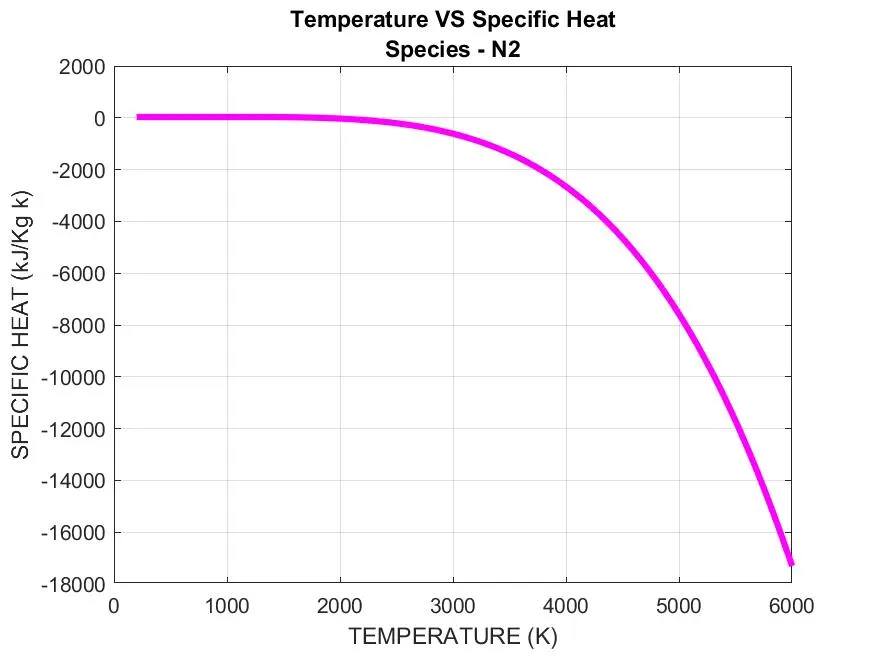
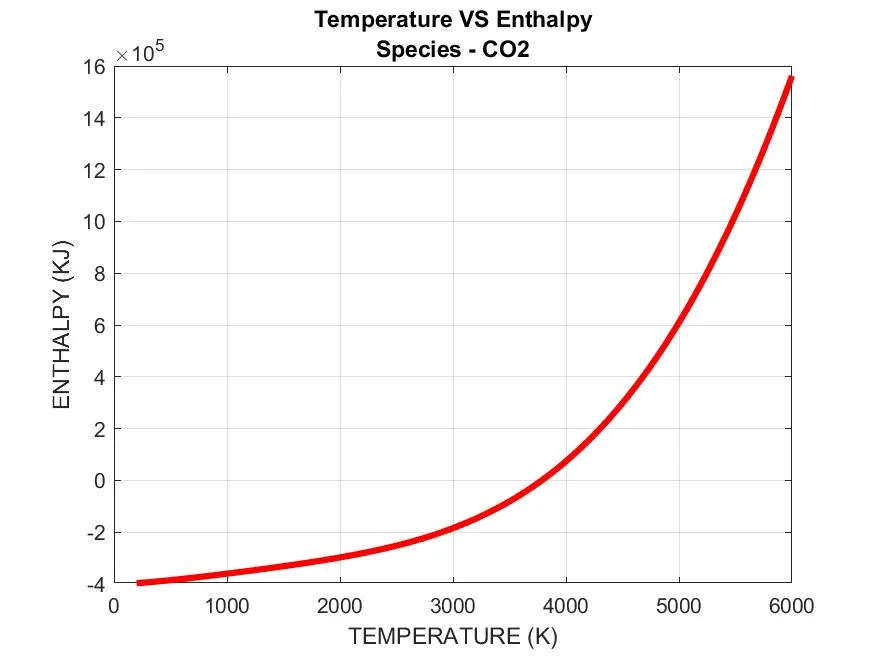
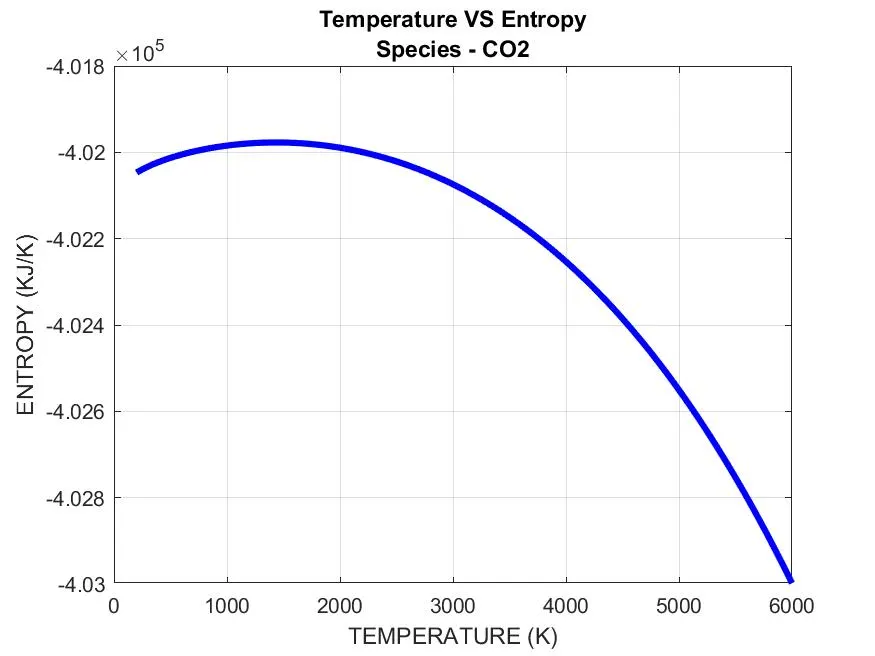
OBJECTIVE-4 :- Plot the Cp, Enthalpy and Entropy for the local temperature range (low temperature : high temperature) specific for each species.
OBJECTIVE-5 :- Save the plots as images with appropriate names and dump them in separate folders for each species with suitable name. All these should be generated automatically.
PRE-REQUISITES
FILE PARSING:- It is "the splitting of a file or other input into pieces of data that can be easily stored or manipulated." So we are splitting a string into parts then recognizing the parts to convert it into something simpler than a string.
It means, to a computer, about what “reading text” means to a human being. You scan it, from start to finish, and figure out what it means as you go - whether you’re” a person reading text or a computer parsing a file.
Why use parsing functions? :-Because user input is nearly always in the form of strings. Before you can convert it to a MATLAB data type that you can actually work with, you usually need to parse it.
The exception is when you are working with ordinary text. In that case, you leave the string as a string, and just use string functions to manipulate it, by changing case, or splitting into substrings, or whatever.
Understanding Parsing using an Example:-
consider this calculation: "4+10"
To a computer this has no meaning, it is a '4' then a '+' then a '1' then a '0'. For the computer to perform the calculation it must first parse this expression and understand the calculation to be performed. A parser program would identify the '+' as meaning addition and from this it knows that the symbols it saw in front and after this '+' should be numerical digits and represent the two numbers to be added together. It will then make a new structure to represent this information better for the next part of the program to understand so "4" becomes the binary number 100 and "10" becomes the binary number 1010 and "4+10" becomes something like this: ADD 100 1010
EQUATIONS REQUIRED
R `to` universal gas constant, T is the temeprature
a1, a2, a3, a3, a4, a5, a6, a7 `to` HIGH-temperature coefficients
a8, a9, a10, a11, a12, a13, a14 `to` LOW-temperature coefficients
T `to` Local Temperature
FUNCTIONS USED
- fopen(
filename,permissionfilename, for binary read access, and returns an integer file identifier equal to or greater than 3. Iffopencannot open the file, thenfileIDis-1. - getl(filenameid) `to` returns the next line of the specified file, removing the newline characters. If the file is nonempty, then
fgetlreturnstlineas a character vector. If the file is empty and contains only the end-of-file marker, thenfgetlreturnstlineas a numeric value-1. - strsplit(str,'delimiter') `to` splits
strat the delimiters specified bydelimiter. Ifstrhas consecutive delimiters, with no other characters between them, thenstrsplittreats them as one delimiter. - str2num(chr) `to` converts a character array or string scalar to a numeric matrix.
- sscanf(str,formatspec) `to` reads data from
str, converts it according to the format specified byformatSpec, and returns the results in an array - findstr(str1,str2) `to` searches the longer of the two input strings for any occurrences of the shorter string, returning the starting index of each such occurrence in the double array k . If no occurrences are found, then findstr returns the empty array, [] .
- strcmp() `to` takes two input arguments (two strings) and returns either true or false, just like any boolean expression. Strcmp will only return true if every character of both strings is the same and they are the same length.
- mkdir('dirname') `to` creates the specified folder and returns a status of 1 if the operation is successful or if the folder exists. Otherwise, mkdir returns 0 and does not throw a warning or error to the Command Window.
- cd(newfolder) `to` changes the current folder to
newFolder. saveas(fig,filname) `to`saves the figurespecified by fig to file filename.
PROCEDURE
OBJECTIVE-1
- Here, the first step is to save the file "THERMO.DAT" file in the same directory as that of MATLAB coding file.
- The we ask the MATLAB to open the file and start reading the file using fopen(), followed by the input 'r' for reading. The output must be a positive number.
%FILE IS OPENED TO READ
fid = fopen('THERMO.DAT','r') % the file is opened by MATLAB and asked to read OUTPUT:-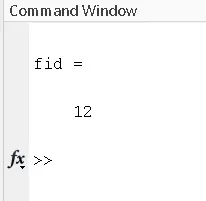
- After that, if you have gone through the file, you can see the 1st line is the header information, 2nd line is global temperature values and from 3rd to 5th line is comments, which are meant to be ignored.

- NOTE:- Here we should know about the function fgetl(). This function reads the file line by line based on its execution order. We will use this function to read the header and global temperature values.
% HEADER OF THE FILE
Header = fgetl(fid) % for reading the header of the file as a string. OUTPUT:-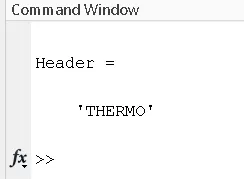
- Then the global temperature values are read using fgetl(), and it is subjected to splitting.Because the line read by fgetl() is in string format and we need them in number format. So we will split the gobal temperature string value using strsplit() based on the delimiter " ". Then atlast the golbal values are converted to number format by means of str2num().
NOTE:- The indexing in global_low_temp is starting from indexing 2, because in the file there is a leading space before '300' starts. For that space, the index 1 is utilised.
% GLOBAL TEMPERATURE VALUES
global_temp_line = fgetl(fid)                         % for reading the global temperature values as a string
a1 = strsplit(global_temp_line,' ')                   % the string of global temperature value  is split based on the delimiter ' '
global_low_temp = str2num(a1{2})                      % the global low temperature is in string type and it is converted to number type
global_mid_temp = str2num(a1{3})                      % the global mid temperature is in string type and it is converted to number type
global_high_temp = str2num(a1{4})                     % the global high temperature is in string type and it is converted to number type
OUTPUT:-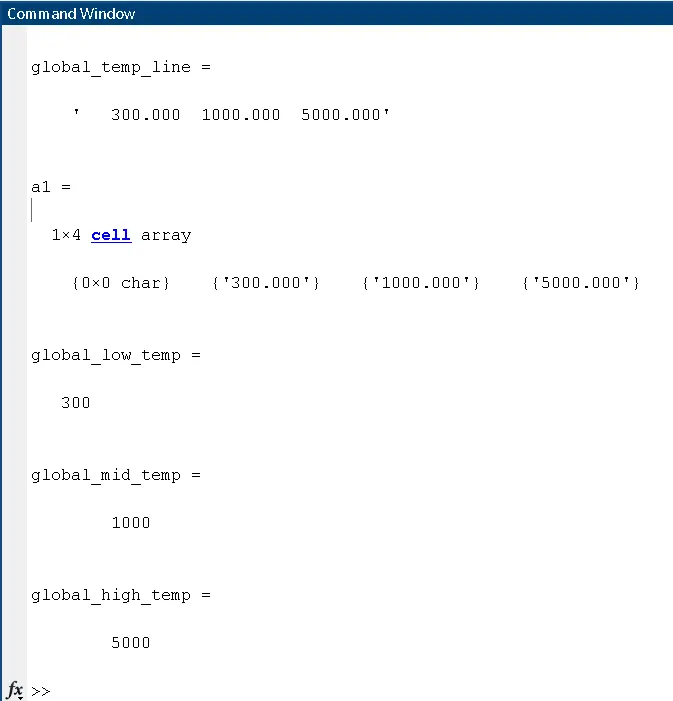
- Now, the 3 comments are read using fgetl() cosecutively, and ignored
% COMMENTS NEEDED TO BE ELIMAINATED
comment_1 = fgetl(fid)                                %
comment_2 = fgetl(fid)                                % the comments are eliminated by means of line 14 to 16
comment_3 = fgetl(fid)                                %
OUTPUT:-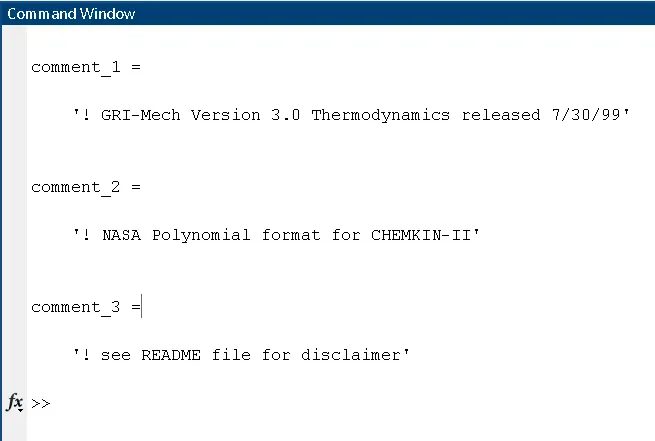
- Then we have to know how many species are there, without calculating the header, global temperature values and comments (i.e. the first 5 lines). This can be done by means of while loop. The loop is executed till the end of the file. Also the starting point of the position indicator is not from from the begining, as it will include all the header info. There are 6 statemets in this while loop.
- As per the last getl(). now the cursor is at the first species (i.e. oxygen (O)). so it will be easy to use the next getl() inside the while loop as the first statement.
- After that we will read the whole texts in the file from the current cursor position to the end of the file using the sscanf(str,formatspec)and store it as a coloumn vector. The format spec is %c becasue it can include both letters and numbers.
- Then. a submatrix of the above coloumn matrix of size 3 by 1 is made.
- Another variable to store the end of the file.
- We will use if loop to compare the submatrix with the end of the file line.
- A counter variable (i.e. coef_line) is defined.
- Atlast the counter variable is divided by 4 to get the number of total species. Because for each species 4 lines are present.
The while loop is as follows:-
% TOTAL NUMBER OF SPECIES IN THE FILE
coef_line=0;                                          % the initial coefficent line of a species is assigned 0
while ~feof(fid)                                      % the while loop executes till the end of the file is reached
    line=fgetl(fid);                                  % the position indicator right now is at the first species (i.e.oxygen (O). From there the whole line is  returned
    a=sscanf(line,'%c');                              % the whole text is read from the current position (i.e. oxygen) till the the last line and stored as a coloun vector

    c=a(1:3);                                         % prints out the first 3 charactes of each line
    d='END';                                          % variable d is assigned the string 'END'

    if c==d                                           % checking whether the position indicator HAS reached the 'END' or not, as it is end of the file 'THERMO.DAT'
        break                                         % if the if loop is satisfied break out of the if loop
    end                                               % the if loop ends
    coef_line=coef_line+1;                            % each time the while loop is executed the variable coef_line acts as a counter
end                                                   % while loop ends
Total_Number_of_Species=(coef_line)/4                 % for each species the coefficents are arranged in 4 lines (1st line-species name & 2nd,3rd,4th lines are coefficent values).Hence divide by 4 to get the total no: of species
OUTPUT:-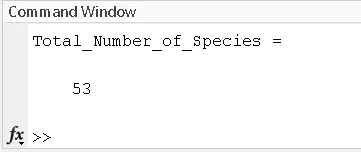
- Now comes the program to extract the 14 coefficents of all the species. Here we have used for loops to do the iterations. The cursor point is brought back to the begining of the file. Then, a for loop alone for eliminatiing the first 5 lines is defined.
Then, another for loop which iterates till the total species are run. There are 4 segments of statement inside this for loop. They are:-
1. The iteration starts from line no: 6. The line 6 is read using fgetl() and stored in a variable "line1". Then it is split using strsplit() with ' ' as the delimiter.Then the species name is assigned.
2. The line 6 also contains local temperature values, wich is extracted by splitting the "line 1" using strsplit() by 'G' as the delimiter. Then separately, low, mid and high temperatures are calculated.
3. Then the 2nd line each species is read using fgetl() and stored in a variable "line2". It is split using strplit() with 'E' as the delimitter. After that the first 5 coefficents of the species is calculated.
4. Similarly , the 3rd line is read and splitted for finding the next 5 coefficents of the species.
5. 4th line is read and splitted for finding the next 4 coefficents of the species.
The code is as shown below:-
% EXTRACTING THE COEFFICENTS

frewind(fid)                                                        % the position identifier is brought to begining
for i=1:5                                                           %
    [line] = fgetl(fid);                                            % the for loop to neglect the first 5 lines of the file
    i=i+1;                                                          %
end                                                                 %


for i=1:Total_Number_of_Species                                     % for loop to extract the 14 coefficents of all the species

    line1 = fgetl(fid);                                             % the 6th line from the file is read for the first iteration (i.e i=1) and stored in 'line1'
    split1 = strsplit(line1,' ');                                   % the 6th line is split based on the delimiter ' ' and the right side is a cell aray
    species_na = split1(1);                                         % the first element of the cell array is stored in the variable 'species_na'
    species_name = char(species_na);                                % the cell array is converted into character array and stored in the variable 'species_name'

    split2 = strsplit(line1,'G ');                                  % the line 6th is split to find the local temperatures using 'G ' as the delimitter
    local_temp = str2num(split2{2});                                % we get a row vector of size 1 by 2 matrix. The element (1,2)of row matrix is asigned to local_temp
    local_low_temperature = local_temp(1);                          % this row matrix also contains 3 elements which are basically cell array. Hence they have to converted to numbers before using
    local_mid_temperature = local_temp(3);
    local_high_temperature = local_temp(2);

    line2 = fgetl(fid);                                             % the 2nd line of the species is read and stored in line2
    coeff1to5 = findstr(line2,'E');                                 % the 2nd line is in string format and the position of string 'E' is calculated
    A1 = str2num(line2(1:coeff1to5(1)+3));                          % the first coefficent is calculated
    A2 = str2num(line2(coeff1to5(1)+4:coeff1to5(2)+3));             % the second coefficent is calculated
    A3 = str2num(line2(coeff1to5(2)+4:coeff1to5(3)+3));             % the third coefficent is calculated
    A4 = str2num(line2(coeff1to5(3)+4:coeff1to5(4)+3));             % the fourth coefficent is calculated
    A5 = str2num(line2(coeff1to5(4)+4:coeff1to5(5)+3));             % the fifth coefficent is calculated

    line3 = fgetl(fid);                                             % the 3rd line of the species is read and stored in line3
    coeff6to10 = findstr(line3,'E');                                % the 3rd line is in string format and the position of string 'E' is calculated
    A6 = str2num(line3(1:coeff6to10(1)+3));                         % the sixth coefficent is calculated
    A7 = str2num(line3(coeff6to10(1)+4:coeff6to10(2)+3));           % the seventh coefficent is calculated
    A8 = str2num(line3(coeff6to10(2)+4:coeff6to10(3)+3));           % the eighth coefficent is calculated
    A9 = str2num(line3(coeff6to10(3)+4:coeff6to10(4)+3));           % the ninth coefficent is calculated
    A10 = str2num(line3(coeff6to10(4)+4:coeff6to10(5)+3));          % the tenth coefficent is calculated

    line4 = fgetl(fid);                                             % the 4th line of the species is read and stored in line4
    coeff11to14 = findstr(line4,'E');                               % the 4th line is in string format and the position of string 'E' is calculated
    A11 = str2num(line4(1:coeff11to14(1)+3));                       % the eleventh coefficent is calculated
    A12 = str2num(line4(coeff11to14(1)+4:coeff11to14(2)+3));        % the twelvth coefficent is calculated
    A13 = str2num(line4(coeff11to14(2)+4:coeff11to14(3)+3));        % the thirteenth coefficent is calculated
    A14 = str2num(line4(coeff11to14(3)+4:coeff11to14(4)+3));        % the forteenth coefficent is calculated
end
OBJECTIVE-2 - (SUB- FUNCTION DEFINITIONS)
- NOTE:- the below codes are defined inside the above for loop. As we need to find the same values for every species. Hence it is better to define all the important calculation inside the for loop
- This is done by defining 3 function blocks separately for specific heat, enthalpy and entropy. Each functions input are the 14 coefficents and the local mid temoerature. Inside each function we will define a temperature array from low to high local temperature, followed by an if else statement. This conditional statement is for finding the function values separately. If the temperature is more than the local mid temperature, then use the first 7 low temperature coefficent and if less than the local mid temperature, find the function values using the last seven coefficents.
The function codes are as follows:-
% CALLING FUNCTIONS ENTHALPY, SPECIFIC HEAT AND ENTROPY
T = linspace(200,6000,500);
cp = specific_heat(A1,A2,A3,A4,A5,A6,A7,A8,A9,A10,A11,A12,A13,A14,local_low_temperature);      % the function 'specific_enthalpy' is called
H = enthalpy(A1,A2,A3,A4,A5,A6,A7,A8,A9,A10,A11,A12,A13,A14,local_low_temperature);                % the function 'enthalpy' is called
S = entropy(A1,A2,A3,A4,A5,A6,A7,A8,A9,A10,A11,A12,A13,A14,local_low_temperature);                 % the function 'entropy' is called
% CALCULATION OF SPECIFIC HEAT OF EACH SPECIES
function cp = specific_heat(a1,a2,a3,a4,a5,a6,a7,a8,a9,a10,a11,a12,a13,a14,local_low)
T = linspace(200,6000,500); % the temperature array is defined
if(T>local_low) % if loop to satisfy the first 7 coefficents to be more than local low temperature
cp = (a1 + (a2*T) + (a3*T.^2) + (a4*T.^3) + (a5*T.^4))*8.314;
else
cp = (a8 + (a9*T) + (a10*T.^2) + (a11*T.^3) + (a12*T.^4))*8.314;
end
end
% CALCULATION OF ENTHALPY OF EACH SPECIES


function H = enthalpy(a1,a2,a3,a4,a5,a6,a7,a8,a9,a10,a11,a12,a13,a14,local_low)

          T = linspace(200,6000,500);                                                                       % the temperature array is defined

         if(T>local_low)
            H = (a1 + (a2*T./2) + (a3*(T.^2)./3) + (a4*(T.^3)./4) + (a5*(T.^4)./5)+ (a6./T))*8.314.*T;     % if loop to satisfy the first 7 coefficents to be more than local low temperature
         else
            H = (a8 + (a9*T./2) + (a10*(T.^2)./3) + (a11*(T.^3)./4) + (a12*(T.^4)./5)+ (a13./T))*8.314.*T;
         end

end
% CALCULATION OF ENTHALPY OF EACH SPECIES
function H = enthalpy(a1,a2,a3,a4,a5,a6,a7,a8,a9,a10,a11,a12,a13,a14,local_low)
T = linspace(200,6000,500); % the temperature array is defined
if(T>local_low)
H = (a1 + (a2*T./2) + (a3*(T.^2)./3) + (a4*(T.^3)./4) + (a5*(T.^4)./5)+ (a6./T))*8.314.*T; % if loop to satisfy the first 7 coefficents to be more than local low temperature
else
H = (a8 + (a9*T./2) + (a10*(T.^2)./3) + (a11*(T.^3)./4) + (a12*(T.^4)./5)+ (a13./T))*8.314.*T;
end
end% CALCULATION OF entropy OF EACH SPECIES
function S = entropy(a1,a2,a3,a4,a5,a6,a7,a8,a9,a10,a11,a12,a13,a14,local_low)
T = linspace(200,6000,500); % the temperature array is defined
if(T>local_low)
S = ((a1*log(T)) + (a2.*T) + (a3*T.^2./2) + (a4*T.^3./T) + (a5*T.^4./4) + a7)*8.314; % if loop to satisfy the first 7 coefficents to be more than local low temperature
else
S = ((a8*log(T)) + (a9.*T) + (a10*T.^2./2) + (a11*T.^3./T) + (a12*T.^4./4) + a13)*8.314;
end
end
OBJECTIVE - 3 - (FINDING MOLECULAR MASS)
- The molecular weight calculation is caried out. Here also we will define a separate function for the same. It takes the input as the conerted cell rray (i.e. species array).The functionas called as follows:-
% CALCULATION OF MOLECULAR MASS
MM= molecular_mass(species_name); % the molecular mass function is called- Inside the above function, the first statement is to convet the input species name into uppercase. Then followed by element wise constituents of each species is separately defined inside an array. Another array for the respective atomic weights. The molecuar mass is defined inside a nested for loop. The nested for loop will compare the species name element-wise with the constituent array. If it is satisfied, then the molecular mass is assigned with the respective constituents atomic mass. Then outside for loop will convert each letters of the species name into number format from string format.
The codeis as shown below:-
% CALCULATIONS FOR FINDING MOLECULAR MASS OF SPECIES

function [mm] = molecular_mass(species_name)                                                      % molecular_mass function definition with species_name as the input is defined

species =  upper(species_name);                                                                   % the input arguement is converted to uppercase letters
constituents = ['H','C','N','O','A','S'];                                                         % the species element array is defined
atomic_weights = [1.00794 12.0107 14.0067 15.9994 39.948 32.065];                                 % the atomic weights of each element in the species is defined
mm = 0;                                                                                           % molecular mass variable is defined as 0, initially
u=0;
for i=1:length(species)                                                                           % for loop till the species length
    for j=1:length(constituents)                                                                  % for loop is for comparing each and every elelments of species with the constituent array
        if (strcmp(species(i),constituents(j)))                                                   % if loop to check the each of species element with
            mm = mm + atomic_weights(j);
            u=j;
        end
    end


    n = str2num(species(i));
    if n>1
        mm = mm + atomic_weights(u)*(n-1);
    end
end

fprintf('The molecular mass of %s is %0.0fn',species,mm)

end
OUTPUT:-
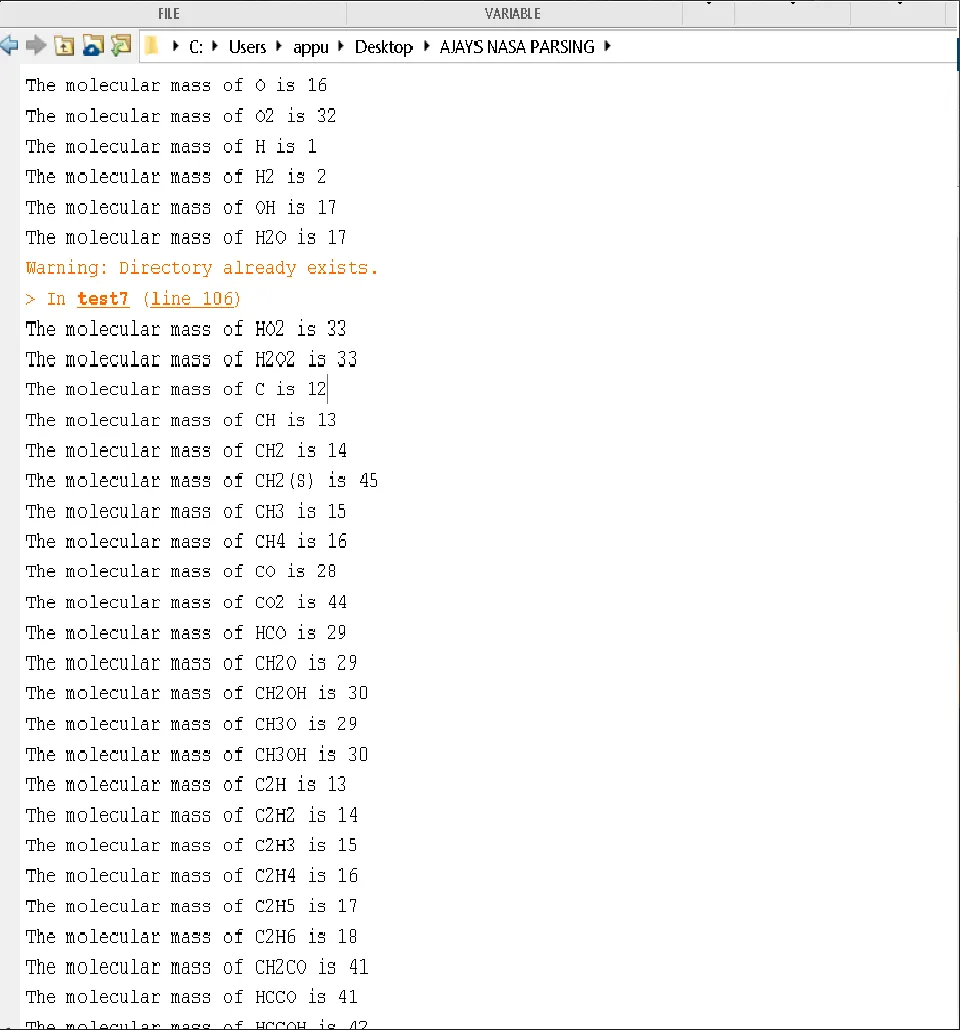
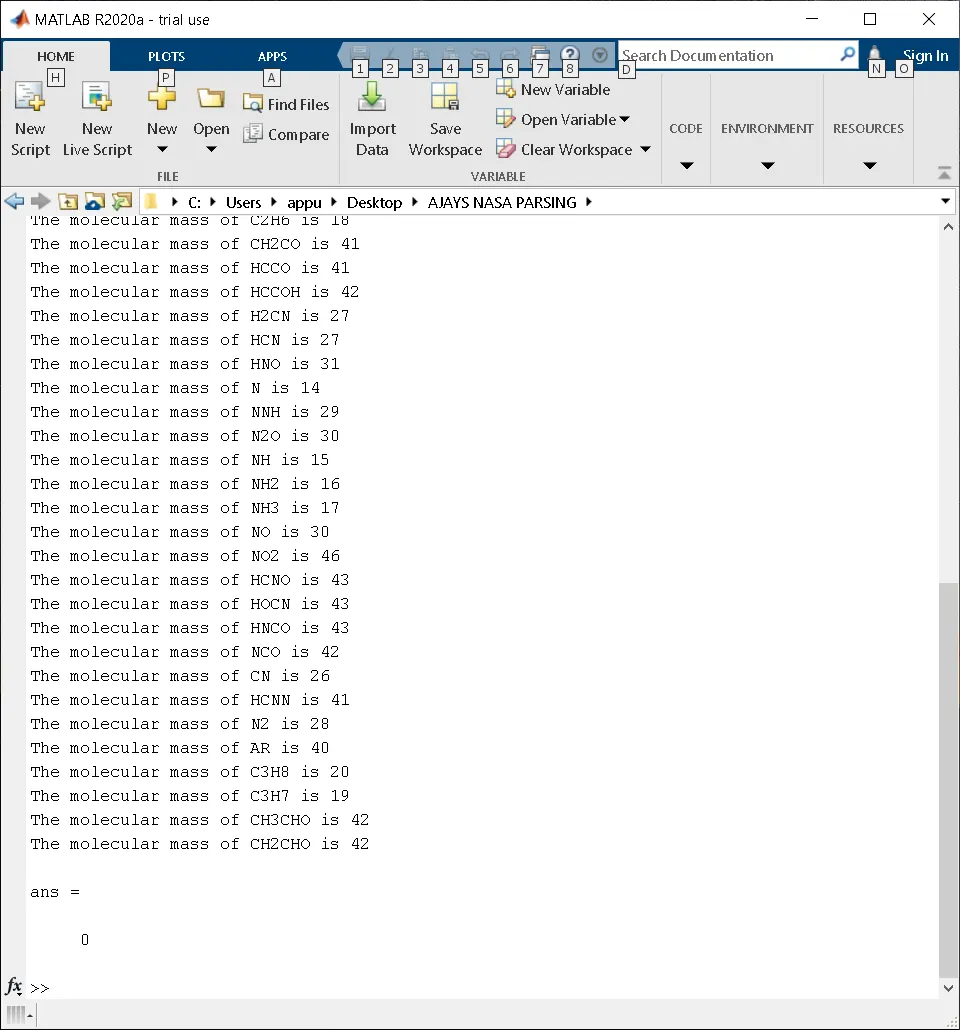
OBJECTIVE - 4 - (PLOTS OF SPECIES)
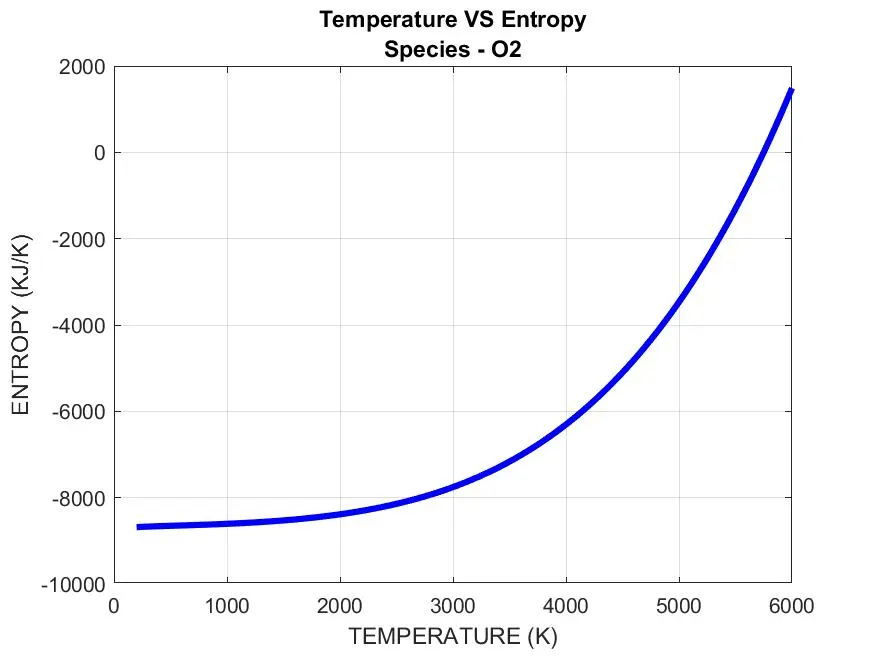
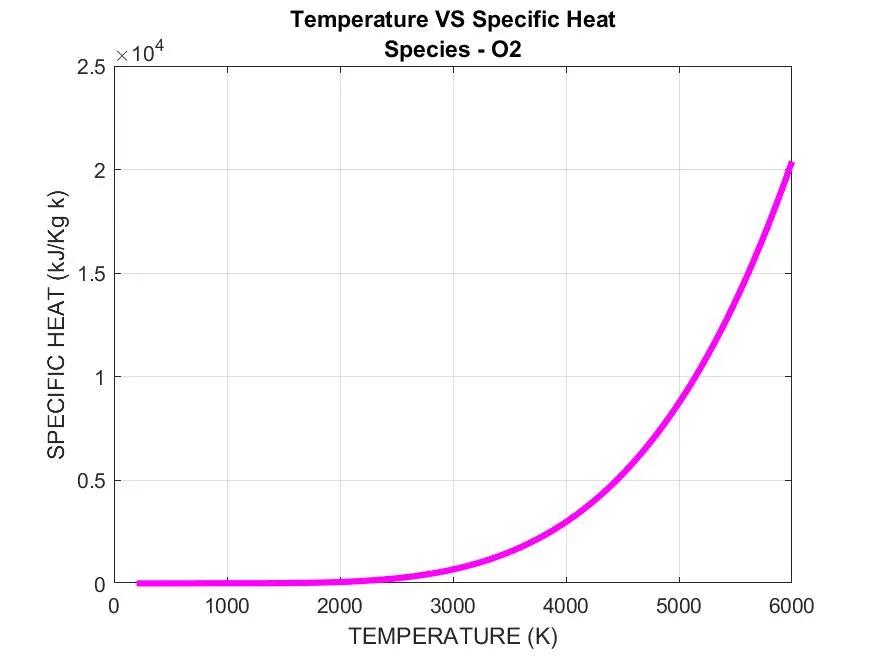
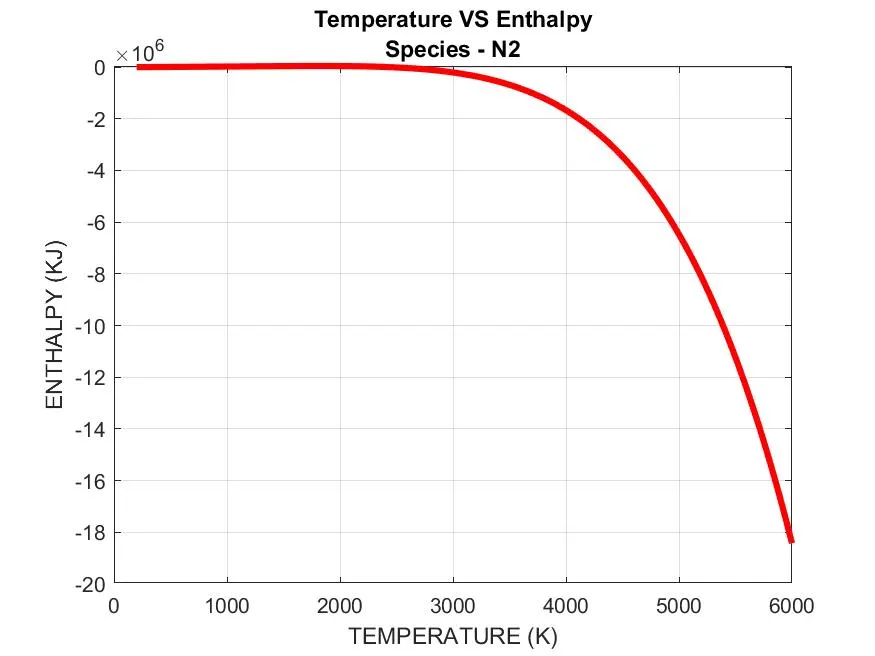
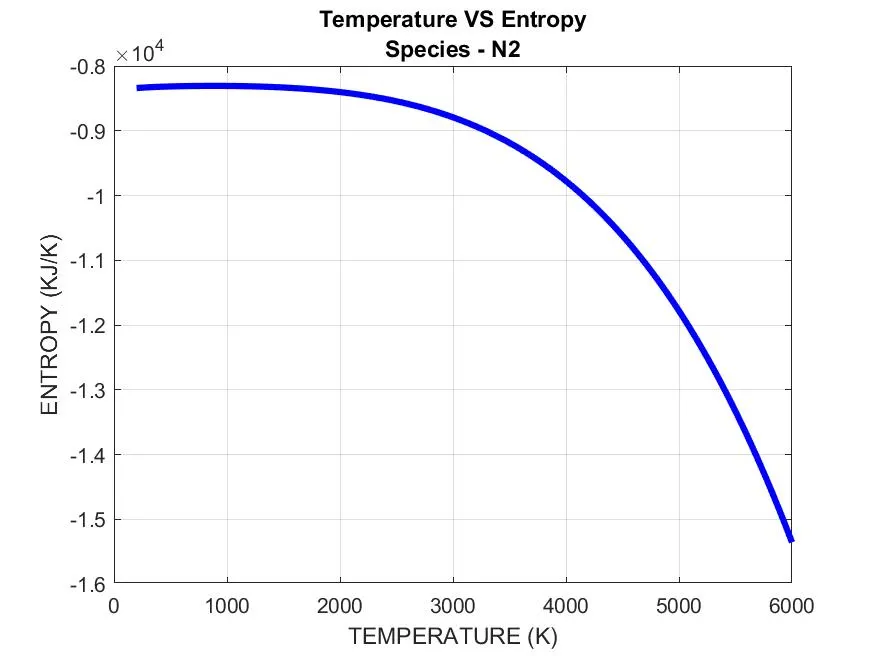
- The 3 sets of plotting is carried out. The specific heat, enthalpy and entropy is plottted with temperature as per the below codes:-
% PLOTTING
figure(1)                                                     % new figure 1 window is opened
plot(T,cp,'linewidth',3,'color','m')                          % the plot between tempeature & specific heat
xlabel('TEMPERATURE (K)')                                     % x-axis is labelled
ylabel('SPECIFIC HEAT (kJ/Kg k)')                             % y-axis is labelled
title({'Temperature VS Specific Heat',['Species - ',species_name]})                                           % respective species name is put as the title
grid on

figure(2)                                                     % new figure 2 window is opened
plot(T,H,'linewidth',3,'color','r')                           % the plot between tempeature & enthalpy
xlabel('TEMPERATURE (K)')                                     % x-axis is labelled
ylabel('ENTHALPY (KJ)')                                       % y-axis is labelled
title({'Temperature VS Enthalpy',['Species - ',species_name]})                                           % respective species name is put as the title
grid on

figure(3)                                                     % new figure 3 window is opened
plot(T,S,'linewidth',3,'color','b')                           % the plot between tempeature & entropy
xlabel('TEMPERATURE (K)')                                     % x-axis is labelled
ylabel('ENTROPY (KJ/K)')                                      % y-axis is labelled
title({'Temperature VS Entropy',['Species - ',species_name]})                                           % respective species name is put as the title
grid on
OBJECTIVE - 5 - (FILE SAVING)
- Now we have to save the plots separately for each species. First we have to create a folder for all the species folder to be saved. And inside each species folder, we will save the 3 plots of each species. Hence the first folder (i.e. AJAYS NASA SPECIES) is created using 'mkdir' command. This command requires the file path and the file name . Then we will declare 'cd'command. Because 'mkdir' file only creates the folder, but 'cd' command navigates between the program directory to the saving folder. Followed by the plots are saved by 'saveas' command. Atlast the program is brought back to the program directry using 'cd..' command. The below code will generate the folders and save them in their respective olders, automatically and the code is as shown below:-
% CREATING A FOLDER TO SAVE THE PLOTS
mkdir(['C:UsersappuDesktopAJAYS NASA PARSINGSPECIES',species_name]);                                    % creating the directory (i.e.file path) and a folder named 'species'
% CHANGING THE DIRECTORY
cd(['C:UsersappuDesktopAJAYS NASA PARSINGSPECIES',species_name]); % this statement navigates the whole program to the directory and folder 'species'
% SAVING THE PLOTS
saveas(1,'Temperature vs Specific heat','jpg'); % the plots of Temperature vs Specific heat is saved as jpg format
saveas(2,'Temperature vs Enthalpy','jpg'); % the plots of Temperature vs Enthalpy is saved as jpg format
saveas(3,'Temperature vs Entropy','jpg'); % the plots of Temperature vs Entropy is saved as jpg format
cd .. % this command bring back the whole program back to where it was
PROGRAM
Function definition for Specific Heat:-
% CALCULATION OF SPECIFIC HEAT OF EACH SPECIES
function cp = specific_heat(a1,a2,a3,a4,a5,a6,a7,a8,a9,a10,a11,a12,a13,a14,local_mid)
T = linspace(200,6000,500); % the temperature array is defined
if(T>local_mid) % specific heat formula to be used when the temperature is more than local mid temperature
cp = (a1 + (a2*T) + (a3*T.^2) + (a4*T.^3) + (a5*T.^4))*8.314;
else
cp = (a8 + (a9*T) + (a10*T.^2) + (a11*T.^3) + (a12*T.^4))*8.314; % to be used when the temperature is less than local mid temperature
end
end
Function definition for Enthalpy:-
% CALCULATION OF ENTHALPY OF EACH SPECIES
function H = enthalpy(a1,a2,a3,a4,a5,a6,a7,a8,a9,a10,a11,a12,a13,a14,local_mid)
T = linspace(200,6000,500); % the temperature array is defined
if(T>local_mid)
H = (a1 + (a2*T./2) + (a3*(T.^2)./3) + (a4*(T.^3)./4) + (a5*(T.^4)./5)+ (a6./T))*8.314.*T; % enthalpy formula to be used when the temperature is more than local mid temperature
else
H = (a8 + (a9*T./2) + (a10*(T.^2)./3) + (a11*(T.^3)./4) + (a12*(T.^4)./5)+ (a13./T))*8.314.*T; % enthalpy formula to be used when the temperature is less than local mid temperature
end
endFunction definition for Entropy:-
% CALCULATION OF entropy OF EACH SPECIES
function S = entropy(a1,a2,a3,a4,a5,a6,a7,a8,a9,a10,a11,a12,a13,a14,local_mid)
T = linspace(200,6000,500); % the temperature array is defined
if(T>local_mid)
S = ((a1*log(T)) + (a2.*T) + (a3*T.^2./2) + (a4*T.^3./T) + (a5*T.^4./4) + a7)*8.314; % entropy formula to be used when the temperature is more than local mid temperature
else
S = ((a8*log(T)) + (a9.*T) + (a10*T.^2./2) + (a11*T.^3./T) + (a12*T.^4./4) + a13)*8.314; % entropy formula to be used when the temperature is less than local mid temperature
end
end
Function definition for Molecular Mass:-
% CALCULATIONS FOR FINDING MOLECULAR MASS OF SPECIES
function [mm] = molecular_mass(species_name) % molecular_mass function definition with species_name as the input is defined
species = upper(species_name); % the input arguement is converted to uppercase letters
constituents = ['H','C','N','O','A','S']; % the species element array is defined
atomic_weights = [1.00794 12.0107 14.0067 15.9994 39.948 32.065]; % the atomic weights of each element in the species is defined
mm = 0; % molecular mass variable is defined as 0, initially
u=0;
for i=1:length(species) % for loop till the species length
for j=1:length(constituents) % for loop is for comparing each and every elelments of species with the constituent array
if (strcmp(species(i),constituents(j))) % if loop to check the each of species element with
mm = mm + atomic_weights(j);
u=j;
end
end
end
n = str2num(species(i));
if n>1
mm = mm + atomic_weights(u)*(n-1);
end
%end
fprintf('The molecular mass of %s is %0.0fn',species,mm)
end
Main Program:-
%MATLAB PROGRAM PARSE THE NASA THERMO FILE
close all
clear all
clc
%FILE IS OPENED TO READ
fid = fopen('THERMO.DAT','r'); % the file is opened by MATLAB and asked to read
% HEADER OF THE FILE
Header = fgetl(fid); % for reading the header of the file as a string.
% GLOBAL TEMPERATURE VALUES
global_temp_line = fgetl(fid); % for reading the global temperature values as a string
a1 = strsplit(global_temp_line,' ');
global_low_temp = str2num(a1{1});
global_mid_temp = str2num(a1{2});
global_high_temp = str2num(a1{3});
% COMMENTS NEEDED TO BE ELIMAINATED
comment_1 = fgetl(fid); %
comment_2 = fgetl(fid); % the comments are eliminated by means of line 14 to 16
comment_3 = fgetl(fid); %
% TOTAL NUMBER OF SPECIES IN THE FILE
coef_line=0; % the initial coefficent line of a species is assigned 0
while ~feof(fid) % the while loop executes till the end of the file is reached
line=fgetl(fid); % the position indicator right now is at the first species (i.e.oxygen (O). From there the whole line is returned
a=sscanf(line,'%c'); % the whole text is read from the current position (i.e. oxygen) till the the last line and stored as a coloun vector
c=a(1:3); % prints out the first 3 charactes of each line
d='END'; % variable d is assigned the string 'END'
if c==d % checking whether the position indicator HAS reached the 'END' or not, as it is end of the file 'THERMO.DAT'
break % if the if loop is satisfied break out of the if loop
end % the if loop ends
coef_line=coef_line+1; % each time the while loop is executed the variable coef_line acts as a counter
end % while loop ends
Total_Number_of_Species=(coef_line)/4; % for each species the coefficents are arranged in 4 lines (1st line-species name & 2nd,3rd,4th lines are coefficent values).Hence divide by 4 to get the total no: of species
% EXTRACTING THE COEFFICENTS
frewind(fid) % the position identifier is brought to begining
for i=1:5 %
[line] = fgetl(fid); % the for loop to neglect the first 5 lines of the file
i=i+1; %
end %
for i=1:Total_Number_of_Species % for loop to extract the 14 coefficents of all the species
line1 = fgetl(fid); % the 6th line from the file is read for the first iteration (i.e i=1) and stored in 'line1'
split1 = strsplit(line1,' '); % the 6th line is split based on the delimiter ' ' and the right side is a cell aray
species_na = split1(1); % the first element of the cell array is stored in the variable 'species_na'
species_name = char(species_na); % the cell array is converted into character array and stored in the variable 'species_name'
split2 = strsplit(line1,'G '); % the line 6th is split to find the local temperatures using 'G ' as the delimitter
local_temp = str2num(split2{2}); % we get a row vector of size 1 by 2 matrix. The element (1,2)of row matrix is asigned to local_temp
local_low_temperature = local_temp(1); % this row matrix also contains 3 elements which are basically cell array. Hence they have to converted to numbers before using
local_mid_temperature = local_temp(3);
local_high_temperature = local_temp(2);
line2 = fgetl(fid); % the 2nd line of the species is read and stored in line2
coeff1to5 = findstr(line2,'E'); % the 2nd line is in string format and the position of string 'E' is calculated
A1 = str2num(line2(1:coeff1to5(1)+3)); % the first coefficent is calculated
A2 = str2num(line2(coeff1to5(1)+4:coeff1to5(2)+3)); % the second coefficent is calculated
A3 = str2num(line2(coeff1to5(2)+4:coeff1to5(3)+3)); % the third coefficent is calculated
A4 = str2num(line2(coeff1to5(3)+4:coeff1to5(4)+3)); % the fourth coefficent is calculated
A5 = str2num(line2(coeff1to5(4)+4:coeff1to5(5)+3)); % the fifth coefficent is calculated
line3 = fgetl(fid); % the 3rd line of the species is read and stored in line3
coeff6to10 = findstr(line3,'E'); % the 3rd line is in string format and the position of string 'E' is calculated
A6 = str2num(line3(1:coeff6to10(1)+3)); % the sixth coefficent is calculated
A7 = str2num(line3(coeff6to10(1)+4:coeff6to10(2)+3)); % the seventh coefficent is calculated
A8 = str2num(line3(coeff6to10(2)+4:coeff6to10(3)+3)); % the eighth coefficent is calculated
A9 = str2num(line3(coeff6to10(3)+4:coeff6to10(4)+3)); % the ninth coefficent is calculated
A10 = str2num(line3(coeff6to10(4)+4:coeff6to10(5)+3)); % the tenth coefficent is calculated
line4 = fgetl(fid); % the 4th line of the species is read and stored in line4
coeff11to14 = findstr(line4,'E'); % the 4th line is in string format and the position of string 'E' is calculated
A11 = str2num(line4(1:coeff11to14(1)+3)); % the eleventh coefficent is calculated
A12 = str2num(line4(coeff11to14(1)+4:coeff11to14(2)+3)); % the twelvth coefficent is calculated
A13 = str2num(line4(coeff11to14(2)+4:coeff11to14(3)+3)); % the thirteenth coefficent is calculated
A14 = str2num(line4(coeff11to14(3)+4:coeff11to14(4)+3)); % the forteenth coefficent is calculated
% CALLING FUNCTIONS ENTHALPY, SPECIFIC HEAT AND ENTROPY
T = linspace(200,6000,500);
cp = specific_heat(A1,A2,A3,A4,A5,A6,A7,A8,A9,A10,A11,A12,A13,A14,local_mid_temperature); % the function 'specific_enthalpy' is called
H = enthalpy(A1,A2,A3,A4,A5,A6,A7,A8,A9,A10,A11,A12,A13,A14,local_mid_temperature); % the function 'enthalpy' is called
S = entropy(A1,A2,A3,A4,A5,A6,A7,A8,A9,A10,A11,A12,A13,A14,local_mid_temperature); % the function 'entropy' is called
% CALCULATION OF MOLECULAR MASS
MM= molecular_mass(species_name); % the molecular mass function is called
% CREATING A FOLDER TO SAVE THE PLOTS
mkdir(['C:UsersappuDesktopAJAYS NASA PARSINGSPECIES',species_name]); % creating the directory (i.e.file path) and a folder named 'species'
% PLOTTING
figure(1) % new figure 1 window is opened
plot(T,cp,'linewidth',3,'color','m') % the plot between tempeature & specific heat
xlabel('TEMPERATURE (K)') N % x-axis is labelled
ylabel('SPECIFIC HEAT (kJ/Kg k)') % y-axis is labelled
title({'Temperature VS Specific Heat',['Species - ',species_name]}) % respective species name is put as the title
grid on
figure(2) % new figure 2 window is opened
plot(T,H,'linewidth',3,'color','r') % the plot between tempeature & enthalpy
xlabel('TEMPERATURE (K)') % x-axis is labelled
ylabel('ENTHALPY (KJ)') % y-axis is labelled
title({'Temperature VS Enthalpy',['Species - ',species_name]}) % respective species name is put as the title
grid on
figure(3) % new figure 3 window is opened
plot(T,S,'linewidth',3,'color','b') % the plot between tempeature & entropy
xlabel('TEMPERATURE (K)') % x-axis is labelled
ylabel('ENTROPY (KJ/K)') % y-axis is labelled
title({'Temperature VS Entropy',['Species - ',species_name]}) % respective species name is put as the title
grid on
% CHANGING THE DIRECTORY
cd(['C:UsersappuDesktopAJAYS NASA PARSINGSPECIES',species_name]);                                   % this statement navigates the whole program to the directory and folder 'species'

% SAVING THE PLOTS
saveas(1,'Temperature vs Specific heat','jpg');                 % the plots of Temperature vs Specific heat is saved as jpg format
saveas(2,'Temperature vs Enthalpy','jpg');                      % the plots of Temperature vs Enthalpy is saved as jpg format
saveas(3,'Temperature vs Entropy','jpg');                       % the plots of Temperature vs Entropy is saved as jpg format
cd ..                                                           % this command bring back the whole program back to where it was
end % the for loop ends
fclose(fid) % the file 'THERMO.DAT' is closed
OUTPUT:-
- O2 PLOT
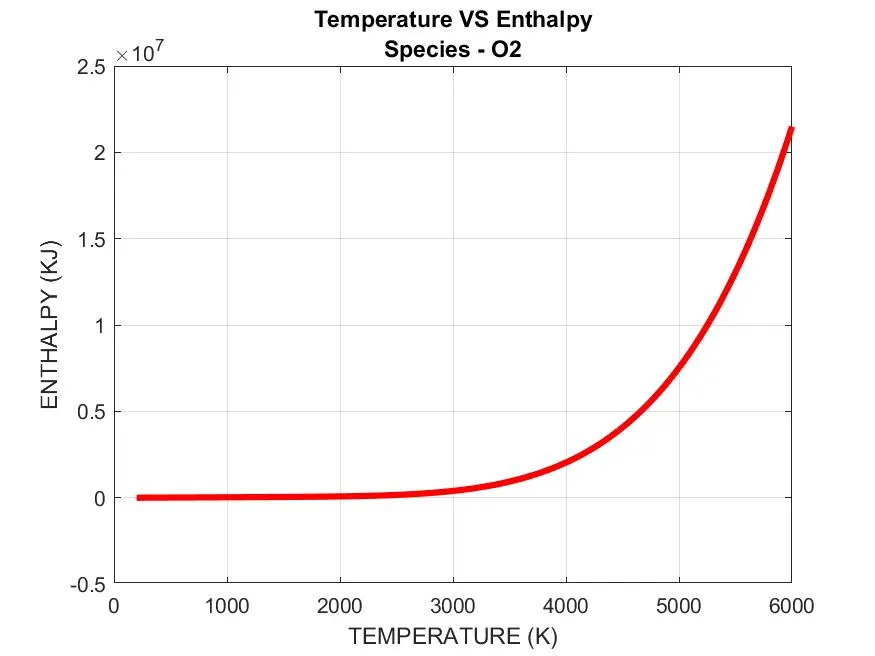
- N2 PLOT
- CO2 PLOT
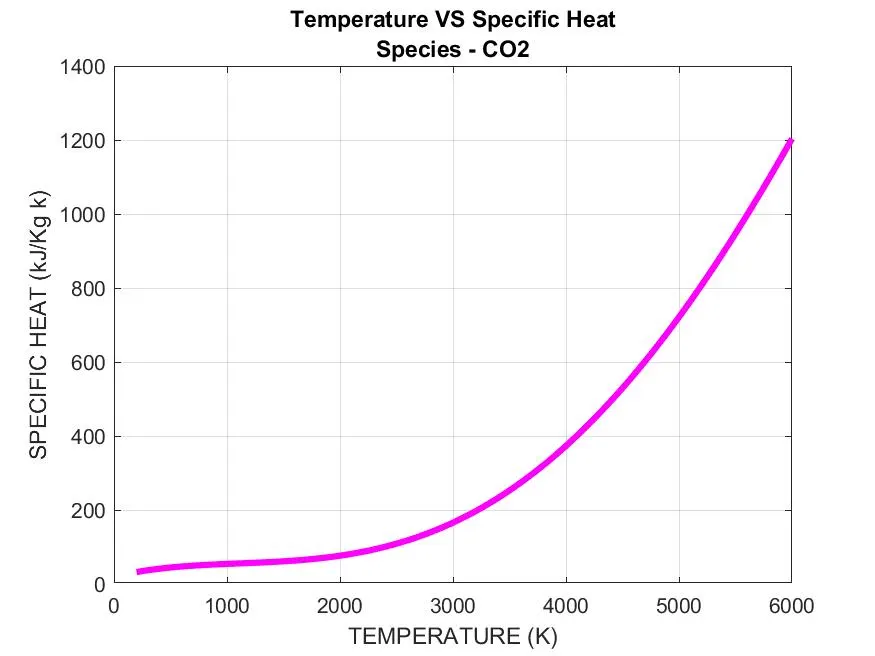
SCREENSHOT OF THE WINDOW

RESULT
- All the 5 objectives were met.
- Each species has varied curves depending upon the values provided in the file.
- The calculations were made using local temperatures
REFERENCES
https://www.quora.com/What-exactly-does-parsing-mean-in-programming