Text-to-CAD and AI CAD Copilots: What They Can Model Today, and Where They Break
Four different tools all get called AI CAD: copilots, text-to-CAD generators, generative design and design-review agents. We explain each, follow one sheet-metal bracket from prompt to code to solid, and show the review that catches what the AI quietly got wrong.
 Skill-Lync·25 Oct 2026·10 min read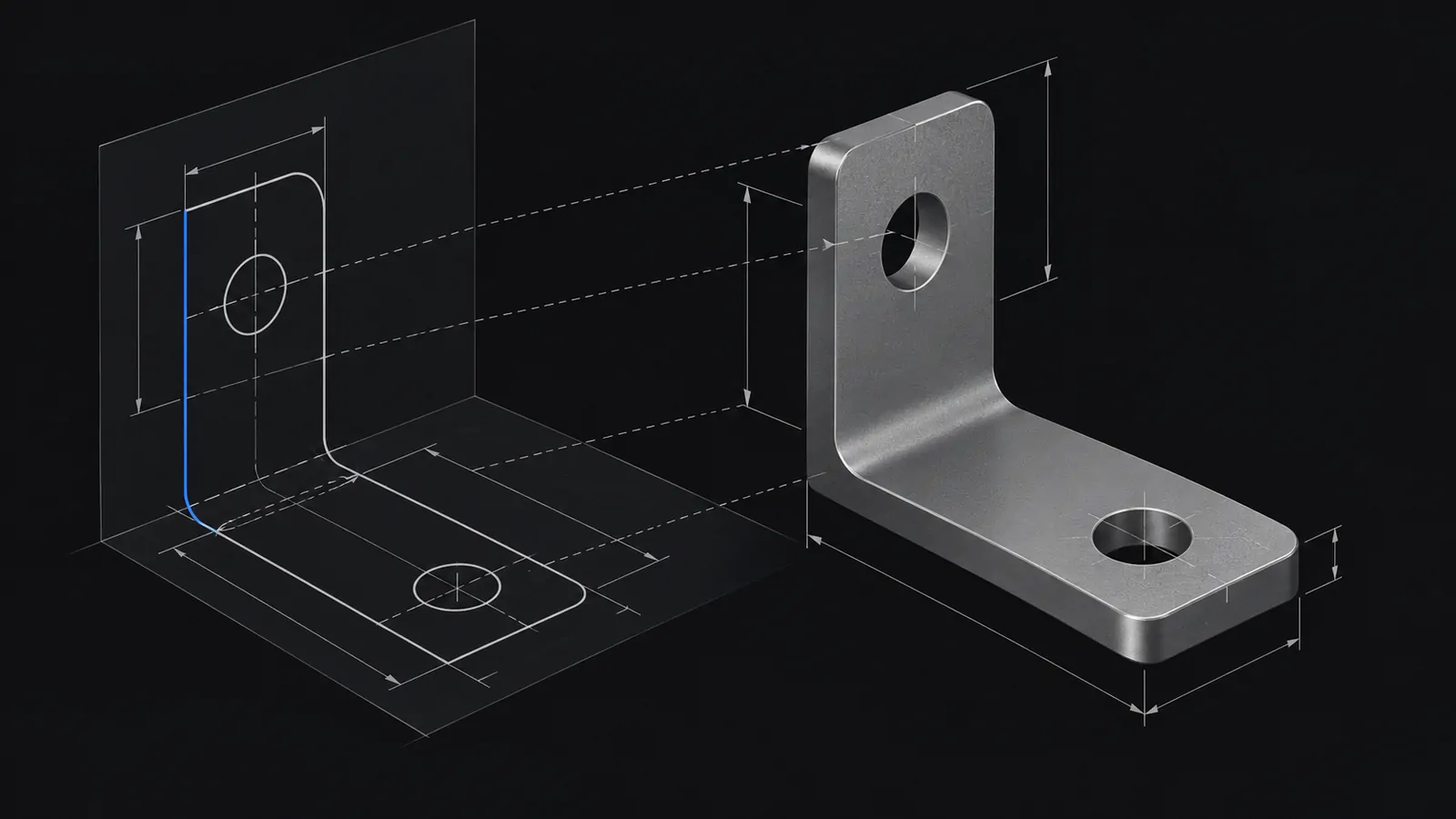
In short
- "AI CAD" covers four different tools: copilots that help you use CAD, text-to-CAD generators that build parts from a description, generative design that shapes parts from loads, and review agents that check designs.
- Most text-to-CAD tools do not draw. A language model writes modelling code, a CAD kernel runs it, and the result is exported as a solid.
- Benchmarks published in 2026 agree: current models handle basic geometry reasonably well and degrade on complex topology and advanced features.
- A model that matches every dimension in the prompt can still be wrong for manufacturing. Design intent, tolerances and DFM rules are where the engineer earns their place.
Type "an L-bracket with two M8 holes" and get a solid model back. That is the promise of text-to-CAD, and in 2026 it works for simple parts. It is also one of the most over-promised corners of engineering AI, because a part that looks right on screen can fail the moment someone tries to make it.
This guide sorts out what the different "AI CAD" tools actually are, follows one bracket from prompt to code to solid, and shows the review that catches what the generator got wrong.
Four things people call "AI CAD"
| Type | What it does | Examples (as described by vendors and trade press) | Your role |
|---|---|---|---|
| CAD copilot | Helps you use the CAD tool: finds commands, answers questions, increasingly runs actions | Siemens Design Copilot NX; Autodesk Assistant in Fusion, Inventor, Moldflow and Vault | You model; it assists |
| Text-to-CAD generator | Turns a description (or a sketch, photo or drawing) into a 3D model | Zoo; Backflip AI's drawing-to-CAD and photo-to-CAD; research systems | You specify and review |
| Generative design | Grows the best shape for given loads, supports, keep-out zones and a material, using physics-based optimisation | The physics-based generative brackets supporting the hatch on GM's Corvette | You define the problem and pick from results |
| Design-review agent | Reads CAD and drawings and flags DFM issues, tolerance problems and standards violations | bananaz Design Agent; Leo AI Inspection Agent | You decide which flags matter |
The distinction matters because the failure modes are different. A copilot's mistake is a bad suggestion you can ignore. A generator's mistake is a plausible-looking part with a hidden flaw. A generative design result is physically optimal for the problem you defined, which is only as good as the loads you gave it.
How text-to-CAD works under the hood
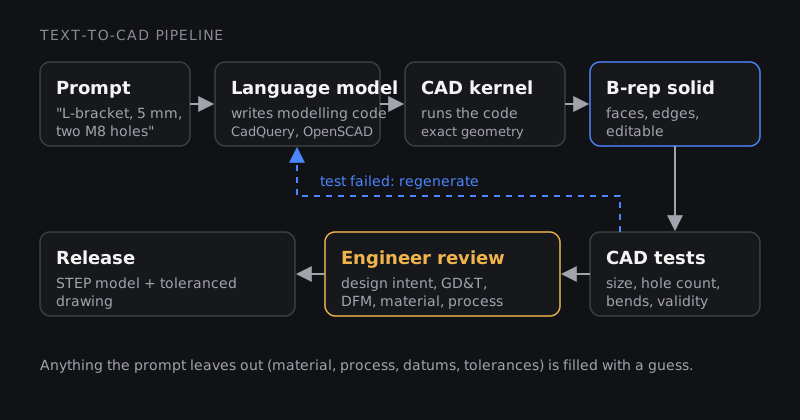
The language model is not sketching. It is writing a recipe, usually code in a CAD scripting language such as CadQuery (Python), OpenSCAD or a vendor's own language, and a geometry kernel cooks it. That has three consequences:
- The output can be a real CAD solid. A boundary representation, or B-rep, describes a part by its exact faces, edges and vertices, the way NX or SolidWorks does. You can change a hole diameter in a B-rep model. A mesh (the triangles in an STL file) only approximates the surface, and editing it is painful. Ask any tool which one it produces. Zoo says its tools create "fully editable 3D models in one prompt"; Leo AI's CEO told engineering.com that "everything is in B-Rep, everything is editable".
- Errors are code errors. A wrong selector, a missing feature or a mis-placed hole is a bug in the generated program. That makes them testable.
- The model only knows what you said. Anything you did not specify, the model fills with a guess.
CAD copilots are converging on the same pattern from the other side. Autodesk says its Assistant in Fusion now has "prompt to API" access to almost all of Fusion's functionality, and in April 2026 it published a Fusion MCP server, a standard interface that lets outside AI assistants such as Claude Desktop or Cursor run Fusion commands while Fusion is open.
Worked example: one bracket, from prompt to review
The prompt: "L-shaped mounting bracket bent from 5 mm aluminium 5052 sheet. Base 100 mm, upright 80 mm, width 60 mm, inside bend radius 5 mm. Two M8 clearance holes in the base, 70 mm apart, centred on the base."
What a generator might produce
Here is the kind of CadQuery program a text-to-CAD tool writes for that prompt. We wrote it to show typical behaviour; it runs, and the part it builds has the right overall size.
import cadquery as cq

T, W = 5.0, 60.0          # thickness and width (mm)
BASE, WALL = 100.0, 80.0  # flange lengths (mm)
HOLE = 9.0                # M8 clearance, ISO 273 medium series (mm)
PITCH = 70.0              # hole spacing (mm)

base = cq.Workplane("XY").box(BASE, W, T, centered=(False, True, False))
wall = cq.Workplane("XY").box(T, W, WALL, centered=(False, True, False))

mid = (T + BASE) / 2      # centre of the flat part of the base
holes = (cq.Workplane("XY")
         .pushPoints([(mid - PITCH / 2, 0), (mid + PITCH / 2, 0)])
         .circle(HOLE / 2).extrude(T))

bracket = base.union(wall).cut(holes)
cq.exporters.export(bracket, "bracket.step")
Open the STEP file and it looks like an L-bracket with two holes. The bounding box is exactly 100 × 60 × 80 mm. The holes are 9 mm, the correct medium-series clearance for M8 in ISO 273, and exactly 70 mm apart. A quick visual check passes.
What the review catches
- It is not a sheet-metal part. The model is two blocks glued together, with a sharp inside corner. The 5 mm inside bend radius in the prompt was silently dropped. There is no bend, so the CAD system cannot produce a flat pattern, and the shop cannot cut a blank from it. This "feature quietly missing" failure is the most common one in practice.
- The holes are too close to the bend. The first hole centre sits at 17.5 mm from the outside of the upright, so its edge is 13 mm from the outside face and only 8 mm from the inside face. A common rule of thumb in sheet-metal design guides keeps a hole's edge at least 2.5 times the thickness plus the inside bend radius from the bend (Fabcon's DFM guide, for example): 2.5 × 5 + 5 = 17.5 mm. At 8 mm, the hole will distort when the bracket is bent. Check your own supplier's rule, but this one fails any version of it.
- The design intent is wrong. The holes are positioned from the outside corner of the model, not from the bend or from a datum that matters for assembly. Change the thickness and the holes move relative to the bend. A human modeller would dimension them from the feature that controls the fit.
- Nothing is toleranced. There is no hole position tolerance, no flatness and no datum scheme. For a bracket bolting to a mating part, the hole pattern needs a position tolerance relative to datums. Our GD&T symbols guide covers how to specify that.
- The material is only a comment. 5052 appears nowhere in the model, so mass properties and the drawing's material block are blank.
None of these show up in a screenshot. All of them would show up the first time the part went to a fabricator.
Turn the review into tests
Because text-to-CAD output is code, you can test it like code. A 2026 research benchmark, CADTestBench, does exactly this: it scores generated models with executable tests that check the geometric and topological requirements of the prompt, and its authors found that such tests can also guide generation. You can do the same on your own work:
solid = bracket.val()
assert solid.isValid()                         # a closed, valid solid
bb = solid.BoundingBox()
assert abs(bb.xlen - 100) < 0.01               # base length
assert abs(bb.zlen - 80) < 0.01                # upright height

# 2 hole walls + inner and outer bend surfaces = 4 cylindrical faces
n_cyl = len(bracket.faces("%CYLINDER").vals())
assert n_cyl == 4, f"expected 4 cylindrical faces, found {n_cyl}"
On the generated bracket, the size tests pass and the last test fails with "found 2", because the bend surfaces do not exist. That is the point: dimension checks confirm what is easy, and only tests written around design intent catch what is missing. Writing those tests is engineering work.
What the research says about accuracy
Two benchmarks published in May 2026 give a clear picture.
- Text2CAD-Bench contains 600 human-curated examples in four levels, from basic geometry with standard features up to complex topology, freeform surfaces and real-world parts beyond traditional mechanical components. Its authors report that current models "perform reasonably on basic geometry but degrade substantially on complex topology and advanced features".
- CADTestBench introduced the test-based evaluation described above, and found that simple test-guided baselines could outperform current text-to-CAD methods.
In other words, a bracket, a flange or a spacer is within reach. A cast housing with drafts, ribs, shells and blended surfaces is not, yet. That matches what engineering.com's editor wrote about one start-up's impressive design-agent demo: intriguing, but shown as a fast pre-recorded video, so he would "wait and see".
Generative design is a different tool
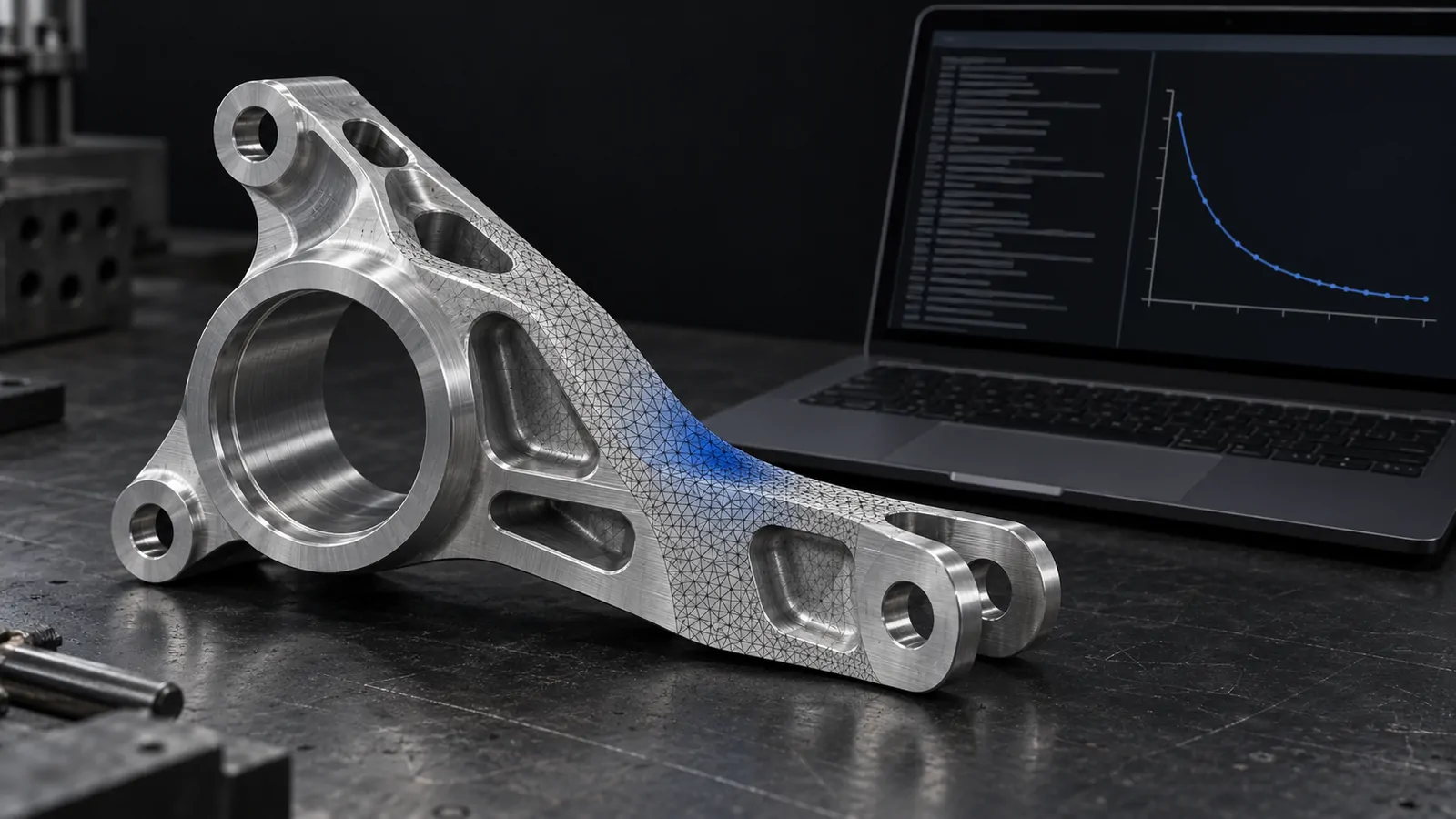
Generative design, or topology optimisation, starts from physics, not language. You give it a design space, the loads, the supports, the material and a goal such as minimum mass at a target stiffness. The algorithm then removes material wherever it carries little load, a bit like water erosion leaving only the rock that matters. The organic, branch-like shapes it produces are the load paths.
IEEE Spectrum reported that GM used generative, physics-based design for the brackets supporting the Corvette's composite hatch, producing a shape GM describes as lighter, stiffer and more durable than the original. That is a production part, which is the clearest sign of maturity in this list. The engineer's job there is defining the load cases correctly and making the result manufacturable, often by casting or additive manufacturing.
Where design-review agents fit
Review agents run the checks from the worked example automatically. bananaz says its Design Agent reads CAD files and drawings, flags DFM issues, runs tolerance stack-ups and checks against standards including ASME Y14.5-2018 and ISO 1101:2017, plus a company's own rules. Leo AI describes an Inspection Agent that looks for DFM issues and misalignment with standards and project requirements.
These are useful as a tireless second reviewer, with one caution: they enforce the rules they are given. If your shop's minimum hole-to-bend distance or your company's datum conventions are not in the rule set, the agent will not catch them. Knowing the rules is still your job. Our post on design for manufacturing and assembly is a good primer.
What this means for design engineers
- Specification becomes a core skill. A good prompt reads like a good drawing note: material, process, critical dimensions, datums, tolerances. Vague input produces confident guesses.
- Parametric modelling fundamentals matter more, not less. You cannot judge design intent in generated geometry if you have never built a robust parametric model yourself. The PG Program in CAD covers this across NX and CATIA.
- GD&T and DFM are the checks AI skips. They decide whether a part can be made and assembled. See Geometric Dimensioning and Tolerancing and Design for Manufacturability (DFM).
- CAD scripting is a multiplier. If you can read and write CadQuery, NX Open or a Fusion script, you can review generated code, write tests and automate your own work. Python for Mechanical Engineers is the place to start.
McKinsey's operations practice lists "prompt to CAD 3D models" among the AI use cases hardware companies are already piloting. The engineers who benefit will be those who can tell a correct part from a convincing one. Our overview of AI agents for mechanical engineering puts this in the wider picture.
Frequently asked questions
Can AI generate a production-ready CAD model today?
For simple prismatic parts, it can produce a usable starting model. For anything with complex topology, sheet-metal rules, castings or tolerancing, expect to rework it. Published benchmarks show performance dropping on complex features.
Is text-to-CAD the same as generative design?
No. Text-to-CAD builds what you describe in words. Generative design computes a shape from loads, supports and a material. They solve different problems and fail in different ways.
Which file format should a text-to-CAD tool give me?
A B-rep format such as STEP, or a native parametric model, if you want to edit it. Mesh formats such as STL are for viewing and 3D printing, not for further design.
Will AI CAD tools replace CAD designers?
They will absorb routine modelling of simple parts and some drafting. Specification, design intent, GD&T, manufacturability and assembly decisions remain human work, and they are where the worked example above went wrong.
Is it safe to upload company CAD to an AI tool?
Check your company's policy first. Cloud tools process files on external servers. Many vendors offer enterprise terms or local deployment; Autodesk's Fusion MCP server, for example, runs locally alongside Fusion.
Sources and further reading
- L. Wang et al., Text2CAD-Bench: A Benchmark for LLM-based Text-to-Parametric CAD Generation, arXiv:2605.18430 (May 2026)
- D. Mallis et al., Text-to-CAD Evaluation with CADTests, arXiv:2605.07807 (May 2026)
- engineering.com, Autodesk announces Fusion MCP servers and more AI updates (22 Apr 2026)
- engineering.com, Multiphysics gets MCP server and Onshape gets SimScale agent (23 Sep 2026)
- Fabcon, Sheet Metal Design for Manufacturability Guide (hole-to-bend spacing)
- engineering.com, The agentic era for mechanical design (12 Aug 2026)
- engineering.com, bananaz launches AI design agent for mechanical engineers (2 Oct 2025)
- Digital Engineering 24/7, Siemens Brings AI Copilot, Immersive Design to NX (10 Jul 2025)
- IEEE Spectrum, General Motors Is Cutting Its Development Cycles in Half (17 Jun 2026)
- McKinsey & Company, Transforming R&D with AI: Breaking barriers and boosting productivity (podcast transcript)
- Zoo, Text-to-CAD (product page)
- CadQuery, documentation