SOLIDWORKS 2027 New Features: What Changed, Release Status and AI Reality
Every SOLIDWORKS 2027 change checked against Dassault's own documents: chord-width fillets with the maths, stamps across sheet metal bends, ISO drawing options, nonlinear bolt preload, which AI features need the cloud, where the release date stands, and how Save to Version handles older releases.

In short
- Status on 17 Nov 2026: Dassault's What's New pages for SOLIDWORKS 2027 are live and the launch event ran on 15 Oct 2026. The production build (SP0) is not yet listed: the online release notes are still titled "Prerelease", and the support lifecycle table still stops at 2026.
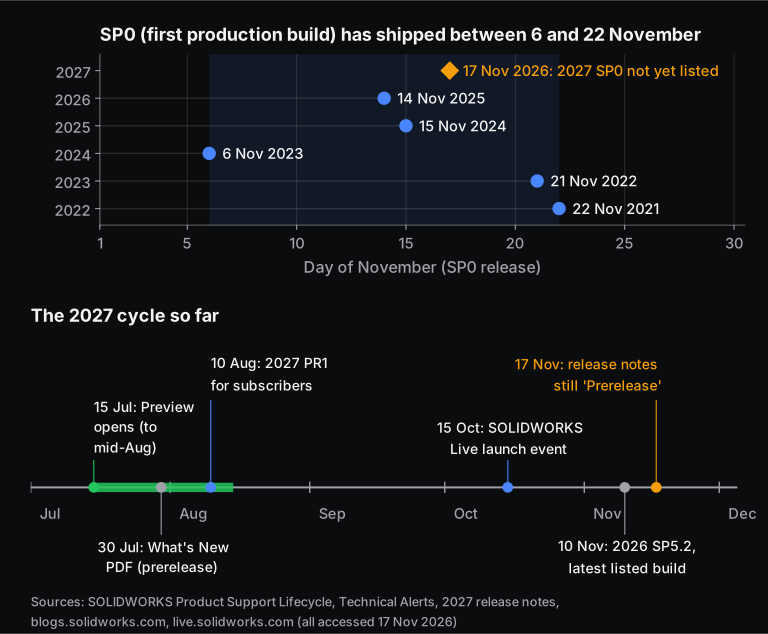
- Timing: the last five SP0 builds shipped between 6 and 22 November (14 Nov 2025 for SOLIDWORKS 2026). The 2027 pre-release build PR1 went to subscribers on 10 Aug 2026.
- Biggest desktop changes: chord-width sizing for Constant Size fillets, stamps across sheet metal bends, an in-place upgrade for legacy sheet metal parts, weld bead auto-select, a lock-rotation option on mates, ISO zone tolerances and areal surface symbols, E57 point cloud import (Premium only), and bolt preload over time in nonlinear Simulation.
- AI: the headline skills of LEO, Dassault's AI assistant, shipped in the 2026 FD01-FD03 updates, not with 2027. They need a connection to the 3DEXPERIENCE platform, and Dassault meters their use in tokens. They are not an offline desktop feature.
- Compatibility: SOLIDWORKS 2027 can save parts, assemblies and drawings back to 2026 and 2025 (active subscription required). Windows 10 support ended with SOLIDWORKS 2025 SP5.
What's new in SOLIDWORKS 2027? The 2027 release, now marketed as SOLIDWORKS Design 2027, mostly brings practical modelling and documentation changes. Constant Size fillets can now be sized by chord width, sheet metal stamps can cross bends, and weld beads can be auto-selected. Drawings get ISO-style tolerance and surface-texture options, and Simulation gets nonlinear bolt preload and spring connectors. The AI assistants are real, but they run through Dassault's cloud platform, not inside a plain offline install.
Every feature below is checked against Dassault's own documents (the 2027 What's New guide, online help, release notes and solidworks.com). Where a reseller is the only source, we say so. Features are grouped by the work you actually do, followed by release timing, file compatibility and system requirements.
Learning SOLIDWORKS? Compare Skill-Lync's SOLIDWORKS courses in one place: part design, FEA, CFD, mould design, multibody dynamics and the PG program, with fees and projects.
When is SOLIDWORKS 2027 released?
As of 17 November 2026, Dassault has not listed a production (SP0) build of SOLIDWORKS 2027. The pre-release PR1 went to subscription customers on 10 August 2026. Over the last five years SP0 has shipped between 6 and 22 November, so a late-November release would fit the pattern. That is our inference, not a Dassault date.
Here is what the primary sources show today:
- The Preview Program opened on 15 July 2026, and the What's New PDF, dated 30 July, is titled "PRERELEASE".
- Technical Alerts lists PR1 on 10 August 2026. The newest build it lists is SOLIDWORKS 2026 SP5.2, dated 10 November 2026.
- The release notes are still headed "SOLIDWORKS Design 2027 Prerelease Release Notes", and the Product Support Lifecycle table still ends at 2026 (SP0 on 14 Nov 2025, hotfixes until 31 Dec 2027).
Why the confusion? Dassault now ships five releases a year, with point releases in between from 2026. Platform-connected users get them as Functional Deliveries (FD01, FD02 and so on), and desktop users get service packs. So some features in the "2027" marketing first arrived during 2026. We flag those below.
What's new in SOLIDWORKS 2027 at a glance?
The table sorts the main changes by workflow and shows who actually gets each one. "What's New 2027" means the feature appears in Dassault's 2027 What's New guide. "2026 FD" means Dassault or a reseller dates it to a 2026 Functional Delivery.
| Area | Feature | Where it is documented | Who gets it |
|---|---|---|---|
| Part modelling | Chord Width option for Constant Size fillets | What's New 2027 | All desktop users |
| Sheet metal | Stamps across bends; upgrade legacy sheet metal architecture | What's New 2027 | All desktop users |
| Sheet metal | Edit bend radius per bend in Convert to Sheet Metal | solidworks.com; GoEngineer dates it to 2026 FD02 | All desktop users |
| Weldments | Weld Bead Auto-Select with Gap Tolerance | What's New 2027 | All desktop users |
| Assemblies | Lock rotation in coincident and cone mates | What's New 2027 | All desktop users |
| Configurations | Variability Tables, user-defined variability | Release notes: released in 2026 FD04, "not new for this release" | Not new in 2027 |
| Drawings | CZR zone tolerance, ISO 25178 areal symbols, editable general tolerance tables, locked sheet formats | What's New 2027 | All desktop users |
| Import | E57 point clouds in colour; Parasolid duplicate-body detection | What's New 2027 | E57 import needs Premium or higher |
| Simulation | Gradual bolt preload and general springs in nonlinear studies; mesh quality report | What's New 2027 | Separately bought Simulation licence |
| AI | LEO and AURA virtual companions: drawing generation, macros, STEP-to-parametric conversion and more | AI top-10 PDF titled "R2026x FD01, FD02, FD03" | Commercial SOLIDWORKS Design licences, connected to the 3DEXPERIENCE platform, metered in tokens |
What's new for part modelling in SOLIDWORKS 2027?
The main part-modelling change is a Chord Width method for Constant Size fillets. Until now chord width was only available in Face fillets. You can now pick edges, choose Symmetric, Asymmetric or Chord Width, and the fillet keeps a constant width instead of a constant radius. The 2027 What's New guide adds that it also handles cases Face fillets cannot, such as three filleted edges meeting at a vertex.
How is a chord-width fillet different from a radius fillet?
A radius fillet keeps the arc's radius fixed along the edge. A chord-width fillet keeps fixed the straight-line distance between the two lines where the fillet meets the faces. On a plain 90° edge the two are tied by a fixed ratio. On an edge where the angle between the faces changes, only one of them can stay constant.
Take two flat faces meeting at an angle , measured through the material (90° on a box edge). A circular fillet of radius tangent to both faces sweeps an arc of . Simple trigonometry on that arc gives the chord width and the setback , which is the distance from the virtual sharp edge to each tangent line:
Worked example. A 5 mm fillet on a 90° edge:
Now let that edge open up to 120° along its length. This happens where a flat top meets a side wall whose angle varies, as on many moulded housings and castings. If you hold the radius at 5 mm, the visible band shrinks by 29%:
If you hold the chord at 7.07 mm instead, the radius must grow by 41%:
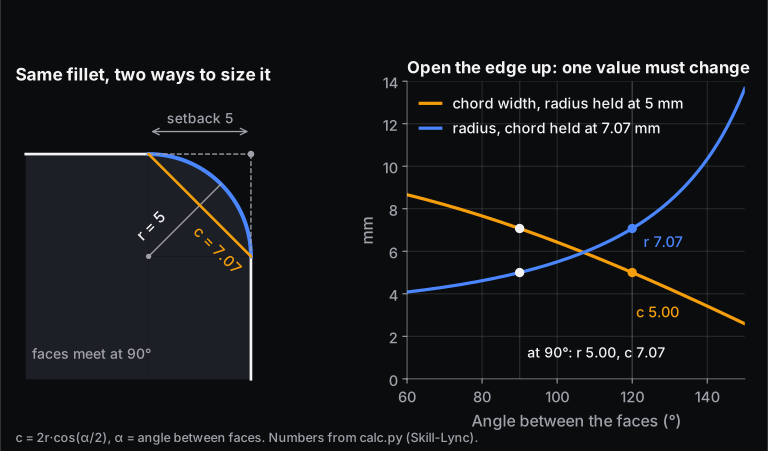
Which should you use? Use chord width when the visible band matters, for example a styling line or a constant land width. Use radius when the radius itself is the requirement, for example to match a cutter radius or a stress-concentration rule.
New to fillet and feature strategy? Skill-Lync's Part Design using SolidWorks course covers feature-based modelling from sketch to drawing.
What's new in sheet metal and weldments?
Sheet metal gets two changes in the 2027 What's New guide, and weldments get one:
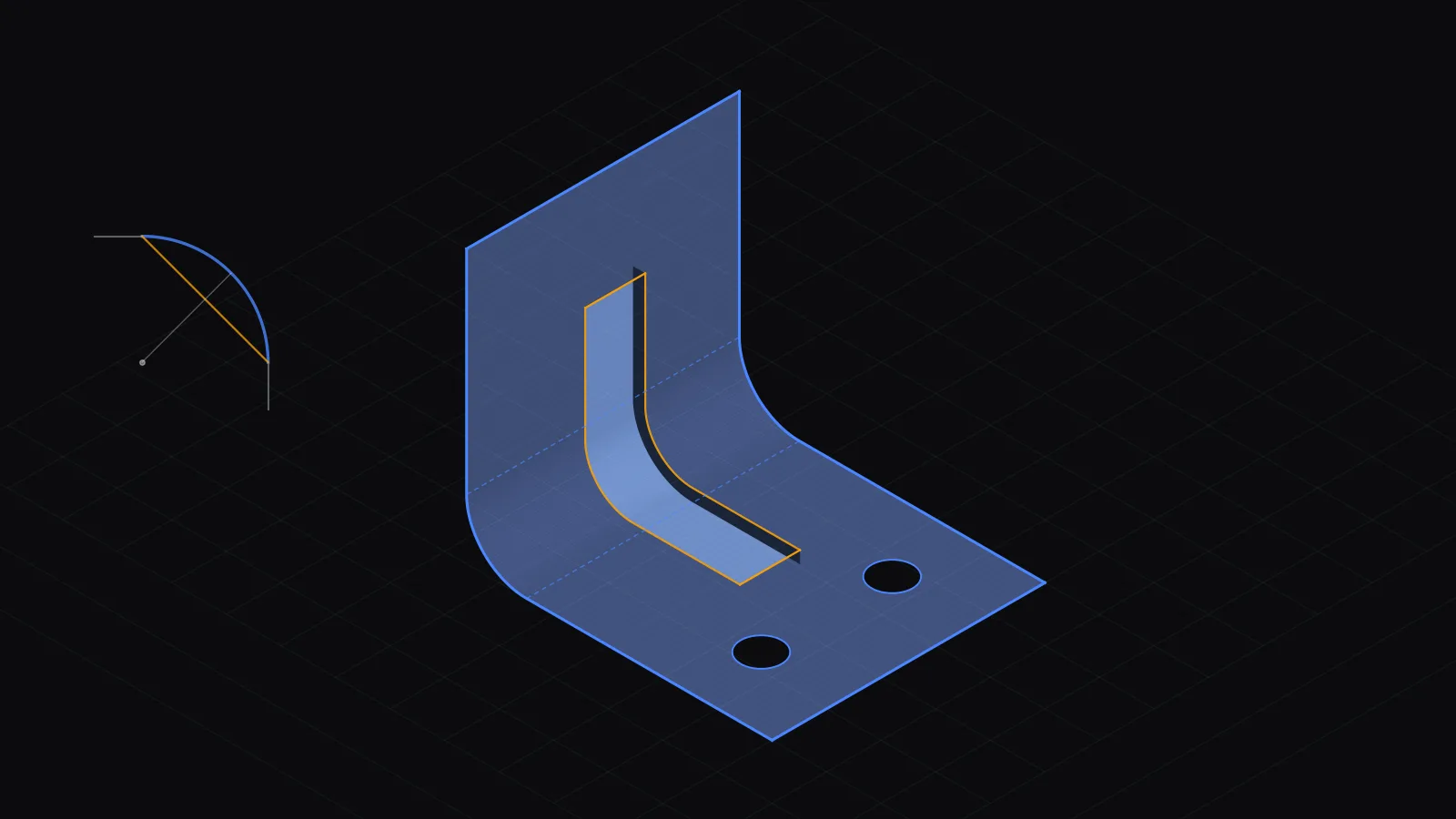
- Stamps across bends. The Stamp tool can now create stamped geometry across a bend, spanning several faces. GoEngineer notes that the stamp then follows the bend in both the formed model and the flat pattern. The documented limits matter: only planar faces are supported, multi-level stamps stop the part from folding, and later cuts or fillets on the stamp faces don't show up in the flat pattern.
- Upgrade legacy sheet metal. Parts built on the old sheet metal architecture can be converted in place. Right-click the top-level part or assembly and select Upgrade Sheet Metal features. GoEngineer describes these as parts from SOLIDWORKS 2008 or earlier. The conversion can't be undone, so keep a copy.
- Weld Bead Auto-Select. In multibody parts and assemblies, Auto-Select picks every weld face, and a Gap Tolerance adds beads where faces are within a set gap.
A related tool arrived earlier and is now part of the 2027 marketing: you can set the radius of each bend when converting an imported STEP solid to sheet metal (GoEngineer dates this to 2026 FD02). For the basics of structure members and cut lists, see our post on weldments in SOLIDWORKS.
What's new for assemblies and large designs?
The one assembly entry in the 2027 What's New guide is Lock rotation. Coincident mates between linear entities, coincident cones, and distance or limit-distance mates between cones can now be stopped from spinning. You can do this per mate, or for every mate at once from the Mates folder. That saves adding an extra mate just to stop a bolt or pin rotating.
Dassault's marketing top 10 for 2027 also lists:
- in-context editing in Large Design Review mode;
- background import of large STEP and IGES files and background drawing updates;
- performance indicators for graphics, mates and circular references;
- installing multiple versions of SOLIDWORKS Design side by side.
The solidworks.com Design page also describes grouping mated components without making a subassembly, and auto-detecting fastener clusters to build multi-component patterns.
These come from Dassault's own marketing but are not in the What's New guide dated 30 July. Treat them as "check in your build".
A correction worth knowing: the 2027 release notes say Variability Tables and User-Defined Variability "were released in the 2026 FD04 release. They are not new for this release." Dassault's own July preview blog and What's New guide had listed them as new.
New to mates? Start with our post on mechanical mates in SOLIDWORKS.
What's new in drawings, GD&T and MBD?
For engineers who produce drawings to ISO, 2027 fixes several long-standing gaps:
- Zone tolerances: in ISO and DIN drawings, geometric tolerance symbols now accept the CZR (combined zone, rotational) modifier, and CZ, SZ and CZR can be combined. Earlier, CZ and SZ could not be used together.
- Areal surface texture: surface finish symbols can show ISO 25178 areal symbols, which describe 3D surface texture rather than a single profile trace.
- General tolerance tables: you can add rows and columns and edit the tolerance class designations. Earlier tables had nine columns by default.
- Locked sheet formats stop people editing title blocks. You can also exclude drawing views from rebuild and set a centerline font.
The solidworks.com page adds three documentation items. You can give identical instances the same component reference number in one click. You can save favourite annotation symbols to a folder. And you can create ordinate dimensions in 3D MBD (model-based definition, where tolerances live on the 3D model instead of a 2D sheet).
If the tolerance symbols themselves are new to you, our GD&T symbols guide explains feature control frames and modifiers. The limits and fits calculator works out ISO 286 hole and shaft limits. Surface finish and limits are also covered in the free machining and metrology book.
What's new in SOLIDWORKS Simulation 2027?
Simulation 2027 is aimed at more realistic nonlinear joints and better mesh diagnostics. It is a separately purchased product (Standard, Professional or Premium). The changes:
- Bolt preload over time. In nonlinear studies, bolts can be tightened Gradually (between a start and end time) or Immediately (before the analysis starts). Old studies open with the Immediate method, so earlier results are preserved.
- General spring connectors now work in nonlinear static and dynamic studies. They take up to six stiffness values in a local coordinate system, and List Connector Forces reports axial, shear, bending and torque.
- Mesh quality report. The checker now flags high aspect ratio, zero-area and zero-volume elements as well as negative Jacobians. The Converged Volume Mesher is now the default volume filler for solid meshes.
- Bonded interface stresses. New BN (bonding normal) and BT (bonding tangential) stress plots show whether a bonded joint is in tension, compression or shear.
- Smaller fixes: heat power totals now balance heat flow between bonded or contacting bodies, beam shear stresses appear in List Beam Forces, and a new sensor sums a result over selected entities.
Dassault's Simulation page also highlights automatic sealing for internal flow in Flow Simulation and a multi-point result query in Plastics. To learn the FEA workflow these tools sit in, see Skill-Lync's FEA using SOLIDWORKS course or our beginner's guide to FEA in SOLIDWORKS.
What changed for import, point clouds and file formats?
SOLIDWORKS Design 2027 Premium and higher can import large E57 point clouds (an open, vendor-neutral format for 3D laser-scan data) as a point cloud feature in colour. Professional and Standard cannot import them. The cloud stays in a local repository and the model only stores a reference, so file size doesn't balloon. The limits:
- You can't snap to cloud points in other features.
- You can't save the cloud to the 3DEXPERIENCE platform.
- The cloud doesn't show in Large Design Review.
For Parasolid assemblies (X_T and X_B), a new option imports identical bodies as instances of one part instead of separate parts. Dassault says this keeps the copy relationships, stores fewer solids, cuts memory use and improves performance.
Which SOLIDWORKS 2027 AI features actually ship, and where do they run?
SOLIDWORKS AI is real and usable today, but it isn't an offline desktop feature. The 2027 release notes say AI functionality "requires a connection to the 3DEXPERIENCE platform", through either a SOLIDWORKS Design single-user licence or a device licence with Cloud Services. Dassault meters AI use in tokens, and its AI page says access comes with commercial SOLIDWORKS Design licences.
The online help lists the skills currently available through LEO, the "virtual companion" in the Task Pane:
| Skill (help name) | What it does |
|---|---|
| Convert to Geometry | Turns imported geometry (for example STEP) into parametric SOLIDWORKS features |
| Drawing Editor | Sheets, views, section and flat-pattern views, annotation styles, dimension transfer, export |
| Assembly Optimizer | Creates SpeedPak configurations to speed up large assemblies |
| Assembly Simplification: Threads | Finds and removes modelled threads in an assembly |
| Equations Assistant | Writes and validates equations in the Equation Manager |
| Sketch Doctor, Selection Agent | Finds sketch errors; selects contours, shapes, dimensions and drawing items by description |
| Hole Creator, Scaling Assistant, Material Appearances, Surface Area Analyzer, Model Insights | Narrow helpers for holes, scaling, appearances, area queries and PLM data |
Dassault's AI top-10 sheet adds automated assembly instructions, natural-language macro generation and change-impact analysis. It is titled "R2026x FD01, FD02, FD03", so these features arrived during 2026, not with the 2027 desktop release. A second companion, AURA, answers questions about your design and documents and is "available today with Cloud Services".
The honest summary: if your SOLIDWORKS isn't connected to the 3DEXPERIENCE platform, the 2027 AI features don't apply to you. If it is, check your token allowance. Dassault says its models are trained only on its own or synthetic data, not on customer designs, and that engineers stay responsible for approving changes. Dassault's AI page talks about commercial licences; it does not say student or education licences include these features, so check with your college or reseller.
Can SOLIDWORKS 2027 files be opened in older versions?
Yes, two releases back, if you save them that way. With an active subscription, SOLIDWORKS 2027 can save parts, assemblies and drawings as fully working 2026 or 2025 files using Save As and choosing the version. Pack and Go supports this too. Users one release back (2026 SP5) can also open 2027 parts and assemblies read-only. Anything older needs STEP or Parasolid.
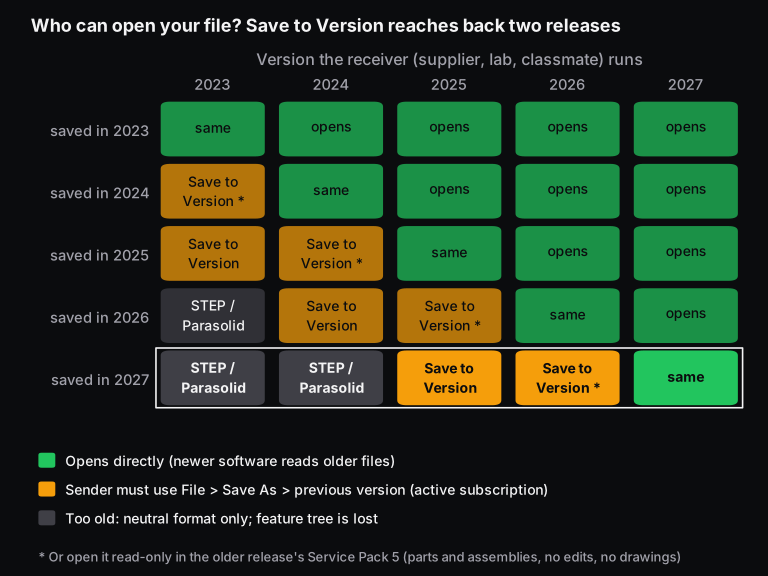
A typical case: you design on 2027 and a sheet metal vendor in Pune runs 2025. Save to the 2025 version and they get the full feature tree. If the Previous Release Check dialog flags items 2025 can't handle, fix them in a copy first, because Dassault warns the fix can significantly change the model.
If the vendor runs 2023, you're down to STEP or Parasolid, which carry geometry but no feature history. You can also set a default "Save to Version" so every save goes to the older release. Our post on Pack and Go explains how to bundle an assembly with all its references.
The read-only route has hard limits: the older release must be on Service Pack 5, you can measure and read properties but not edit features, and future-version drawings don't open at all.
What are the SOLIDWORKS 2027 system requirements?
Plan for Windows 11. Dassault's release notes say SOLIDWORKS 2025 SP5 was the last release to support Windows 10, and 2025 was the last to support Windows Server 2019. The same notes say SOLIDWORKS Design 2026 SP5 is the last release to support Microsoft Office 2021 (Word, Excel and PowerPoint) and SQL Server 2019. That matters for design tables and PDM servers.
For RAM, CPU and certified graphics cards, use Dassault's system requirements and hardware certification pages for your exact build. We didn't copy figures here because they change with each service pack.
For students, the practical point is simple: Windows 10 is not a supported platform for any SOLIDWORKS release after 2025, so check your laptop before installing 2026 or 2027.
Which SOLIDWORKS 2027 features matter for students and Indian design engineers?
For most learners, 2027 changes little about what to learn: sketching, features, assemblies, drawings and basic FEA are the same, and interviews test those. What matters depends on your role:
- Students and freshers: learn on whichever recent release your college or institute provides. Learn Save to Version and STEP export, because many labs and small shops lag a release or two behind. The fundamentals in our SOLIDWORKS interview questions still decide interviews.
- Sheet metal and fabrication engineers: stamps across bends, per-bend radius on imported parts and the legacy upgrade remove real workarounds. Weld Bead Auto-Select saves time on frames and skids.
- Design engineers sending ISO drawings to suppliers: CZR zones, areal surface symbols and editable general tolerance tables bring drawings closer to the standards you're asked to follow.
- Product and industrial designers: chord-width fillets give styling bands that stay the same width.
- Analysts: gradual bolt preload and nonlinear springs make joint studies more realistic. The new mesh report flags bad elements before you trust a result.
For a structured route, Skill-Lync's Post Graduate Program in SolidWorks Design and Analysis combines modelling, drafting and simulation projects. You can talk to a Skill-Lync counsellor from any course page.
Scope of this guide: it reflects Dassault's documents as of 17 November 2026, before SP0. Feature lists can change at release and during the 2027 service packs. We'll update this page when SP0 is listed.
Frequently asked questions
Is SOLIDWORKS 2027 out yet?
Not as a production build on 17 November 2026. The What's New pages are live and the launch event ran on 15 October 2026. The PR1 pre-release has been available to subscribers since 10 August 2026, but Dassault's release notes still say "Prerelease" and its lifecycle table has no 2027 SP0 row yet.
Is SOLIDWORKS 2027 the same as SOLIDWORKS Design 2027?
Broadly, yes. Dassault now uses "SOLIDWORKS Design" for the 3D CAD product, and "SOLIDWORKS 2027" for the whole portfolio, including PDM, Simulation, Electrical, Visualize and DraftSight. The help files call the CAD application SOLIDWORKS Design 2027.
Do I need the internet to use SOLIDWORKS 2027 AI?
Yes. The release notes say AI functionality requires a connection to the 3DEXPERIENCE platform, and usage is measured in tokens. The non-AI features in this guide, such as fillets, sheet metal, drawings and Simulation, work in the desktop product as before.
Can I open a SOLIDWORKS 2027 file in SOLIDWORKS 2024?
Not directly. Save to Version reaches back only to 2026 and 2025, and read-only future-version opening works only one release back on Service Pack 5. For 2024 or older, export STEP or Parasolid, which keeps the geometry but loses the feature tree.
Sources and further reading
- Dassault Systèmes SolidWorks Corp., What's New: SOLIDWORKS Products 2027 (Prerelease), PDF dated 30 Jul 2026 (accessed 17 Nov 2026), and the same content in 2027 online help
- SOLIDWORKS, SOLIDWORKS Design 2027 Prerelease Release Notes (accessed 17 Nov 2026)
- SOLIDWORKS, Product Support Lifecycle table and Technical Alerts & News (accessed 17 Nov 2026)
- SOLIDWORKS, What's New in SOLIDWORKS 2027, SOLIDWORKS Design 2027 and Simulation 2027 pages, plus the Design top 10 and AI top 10 (R2026x FD01-FD03) PDFs (accessed 17 Nov 2026)
- SOLIDWORKS, AI Built into SOLIDWORKS Design (accessed 17 Nov 2026)
- SOLIDWORKS 2027 online help: AI Functionality, Constant Size Fillets, Save SOLIDWORKS Documents as Previous Versions, Future Version Components in Earlier Releases (accessed 17 Nov 2026)
- Mariana St. Germain, SOLIDWORKS blog, SOLIDWORKS 2027 Preview is Live, 15 Jul 2026
- SOLIDWORKS Live, What's New in SOLIDWORKS 2027, event of 15 Oct 2026
- GoEngineer (SOLIDWORKS reseller, secondary source), SOLIDWORKS 2027 Parts, Weldments and Sheet Metal Updates, 10 Nov 2026
- Skill-Lync calculation script (calc.py) for the chord-width example, 17 Nov 2026