Ansys SimAI Explained: What It Can and Can't Replace in CFD and FEA
Ansys SimAI learns from your past simulation results and predicts new designs without rerunning the solver, but only inside what its data covers. Here is how the workflow runs, how much data it needs, what SimAI Pro and Premium changed in 2026 R1, and a worked test that shows where AI predictions break.

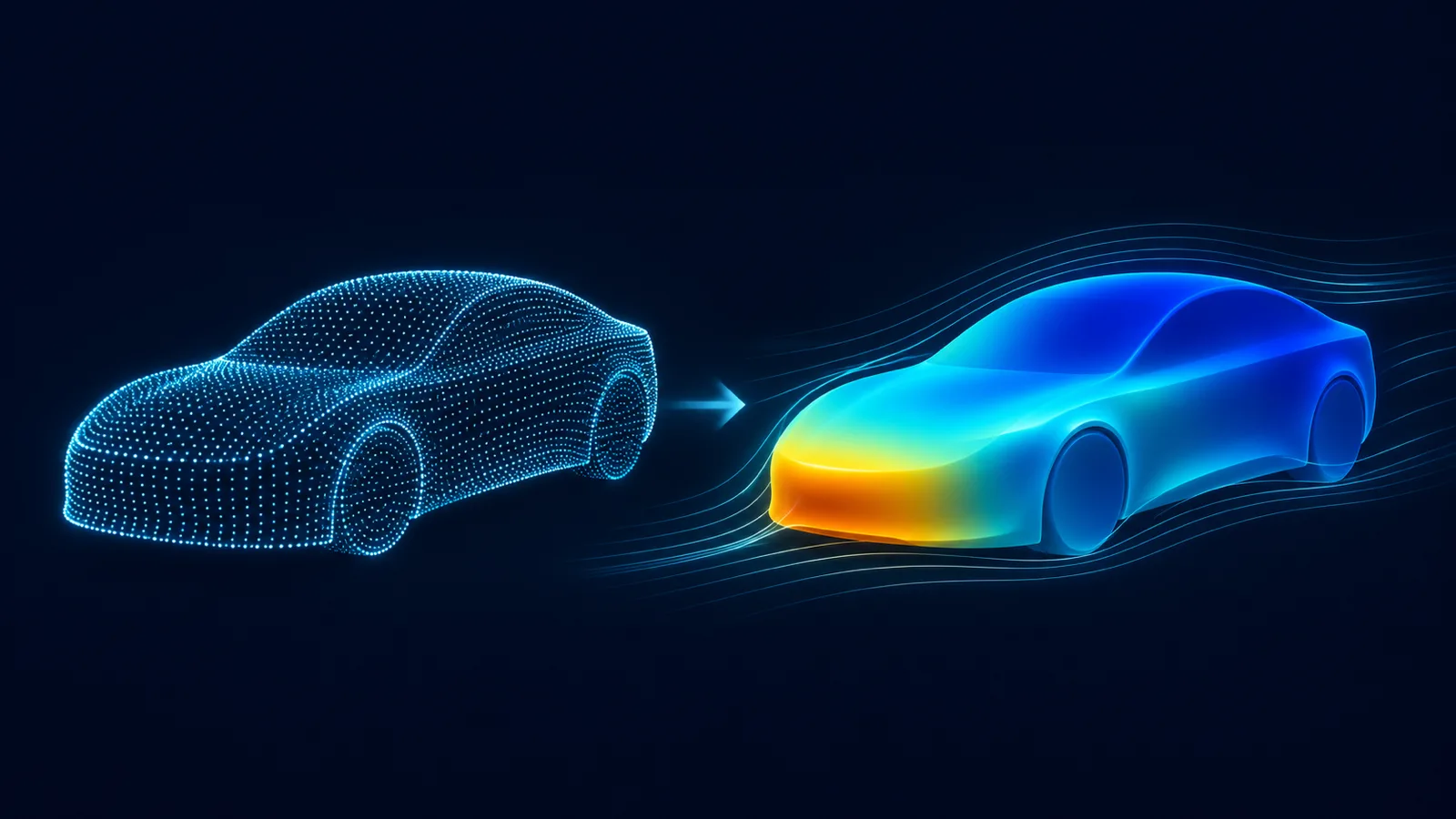
Ansys SimAI is an AI platform from Ansys, now part of Synopsys, that learns from your own past simulation results and the geometry behind them, then predicts the result for a new design without running the solver again. It can stand in for repeated CFD or FEA runs on designs similar to ones you have already simulated. It cannot replace the solver that makes its training data, or a check on designs and physics it has never seen.
This guide explains what SimAI is, how the workflow runs (with the real option names from Ansys' documentation), how much data it needs, what changed in Ansys 2026 R1, and where it can and cannot replace a solver. It ends with a small scripted experiment that shows, in numbers, why "inside the training data" is the phrase that matters most.
In short
- What it is: a "physics-agnostic" AI platform that takes the shape of a design as its input, not a list of parameters, and predicts 3D fields and global values such as drag. Ansys launched it on 9 Jan 2024 as a cloud (SaaS) product.
- Data: Ansys says a model typically needs 30 to 100 simulation results, from Ansys or non-Ansys solvers. Training is tuned for about 2 days, adjustable from 1 to 5 days (SimAI product page, accessed 20 Nov 2026).
- Versions: since Ansys 2026 R1 (11 Mar 2026) there are two tiers: SimAI Pro on a desktop workstation, and SimAI Premium in Ansys' cloud or hosted by the customer. As of 20 Nov 2026, 2026 R1 is still the latest release Ansys has announced.
- Trust signal: every prediction comes with a confidence score, which the Python SDK reports as just "high" or "low" (PySimAI 0.4.9, 9 Nov 2026).
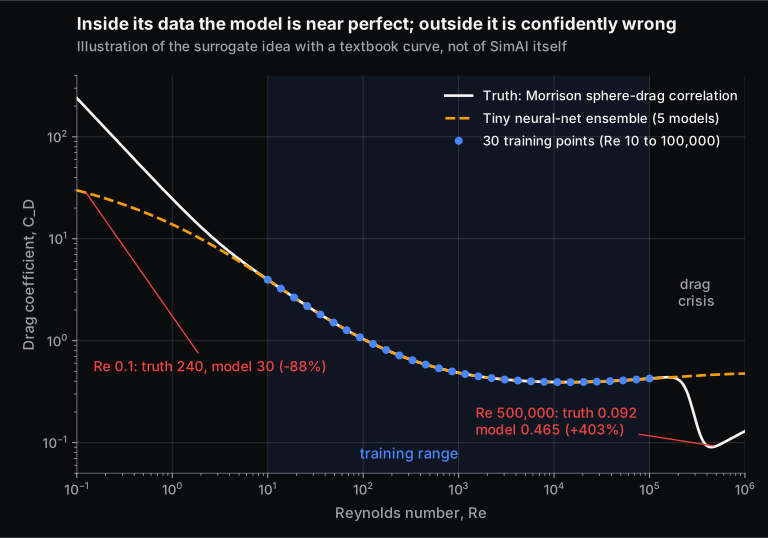
- Our illustration: a tiny neural network trained on sphere drag between Re 10 and 100,000 was within 0.3% inside that range, but wrong by +403% at Re 500,000, where the physics changes.
New to surrogate models in general? Our guide to AI surrogate models vs CFD and FEA solvers covers how they are built, what GM and others report, the break-even maths and a trust checklist. This post focuses on SimAI itself and does not repeat that ground.
What is Ansys SimAI?
Ansys SimAI is a deep-learning platform that is trained on a company's own simulation results and predicts the performance of new designs from their geometry. Ansys calls it physics-agnostic: the same method is used for fluids, structures, thermal or electromagnetics, because it learns from solver outputs, not from the governing equations. Ansys launched it in January 2024, and since Synopsys completed its acquisition of Ansys on 17 July 2025 it has been part of Synopsys' Ansys portfolio.
Three ideas set SimAI apart from a classic response-surface tool:
- The shape is the input. Ansys' launch release says SimAI "uses the shape of a design itself as the input" instead of geometric parameters. You do not need a parametric CAD tree in which every past design is a set of numbers. Noritaka Matsuoka of Sumitomo Riko, a Japanese rubber-component maker, said in a Synopsys release that SimAI suited his team because it removes "the need for parametrized geometries".
- It predicts fields, not just one number. An Ansys explainer describes an "implicit neural representation", a network that learns a continuous function for the pressure, velocity or stress field rather than storing values at fixed mesh points. You can ask for the field at any resolution, and global values such as a drag or lift coefficient are computed from the predicted field afterwards.
- It knows roughly how far from home it is. The same explainer says the confidence score measures the distance from a new geometry to the nearest geometry it was trained on, in a high-dimensional shape space. Think of it as the model checking how closely your new design resembles the nearest one it has already seen.
Ansys also says SimAI "will always generate a result". That is the honest heart of the matter: the platform will never refuse to answer, so deciding whether the answer is usable stays with you.
How does SimAI work, step by step?
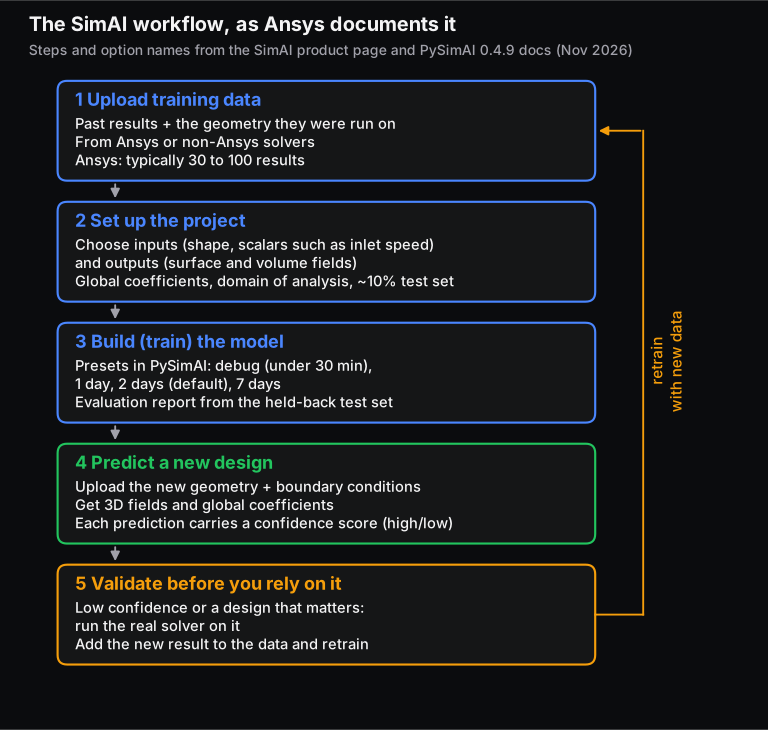
You upload past simulation results with their geometries, choose which inputs and outputs the model should learn, train it, and then upload a new geometry with its boundary conditions to get predicted fields and a confidence score. Ansys sums it up as "upload data, train AI model, and predict". In practice there is a fourth step: validate.
1. Upload training data
Each "training data" item is one past simulation: the geometry and its result files. Ansys says the data can come from Ansys or non-Ansys solvers. The results must be consistent: same outputs, same units, same kind of setup. A model learns whatever is in the files, including a badly converged run.
2. Set up the project
You group training data into a project and choose what the model learns. The PySimAI documentation names the settings:
- Inputs: the geometry, plus scalars such as inlet velocity (
Vxin Ansys' examples). - Outputs: surface fields (for example wall pressure) and volume fields (for example velocity in the domain).
- Global coefficients: single numbers computed from the fields, such as a force or a minimum value.
- Domain of analysis: the box around the part, in length, width and height, in which volume fields are predicted.
- Test subset: results held back from training and used only for the automatic model evaluation report. The docs recommend about 10% of your data.
3. Build the model
Training runs on Ansys' infrastructure (or on your own for the desktop and customer-hosted versions). In PySimAI the build presets are debug (under 30 minutes, using only a few data points, which makes it a quick test of the setup), 1_day, 2_days (the default) and 7_days. The product page describes the same idea as 2 days for most cases, adjustable from 1 to 5 days. When the build finishes, you get the evaluation report on the test subset: that is your first real accuracy number, measured on your data, not a brochure figure.
4. Predict
Upload a new geometry, set the boundary conditions, and run a prediction. You can download the predicted fields (volume results as VTU files, slices as images or VTP files) and export global coefficients as JSON, CSV or Excel. Each prediction carries a confidence score.
Engineers who script their work can drive all of this from Python with PySimAI, Ansys' open-source SDK. The loop below is adapted from the PySimAI 0.4.9 best-practice example. We have not run it, because it needs a SimAI licence:
import ansys.simai.core as asc

client = asc.from_config()                  # credentials and workspace from a config file
predictions = []
for geom in client.geometries.list():       # new designs already uploaded
    for vx in [12.2, 12.4, 12.6]:           # inlet speeds inside the trained range
        pred = geom.run_prediction(Vx=vx)
        pred.post.global_coefficients()     # request now, read later
        predictions.append(pred)
client.wait()                               # wait for every request at once
for pred in predictions:
    print(pred.confidence_score, pred.post.global_coefficients().data)
PySimAI's own documentation still marks model building through Python as experimental, so expect the API to change between versions.
5. Validate
Run the real solver on any design that comes back with low confidence, on a sample of the high-confidence ones, and on every design you are about to commit to. Add those results to the training data and retrain. Ansys' FAQ suggests exactly this for geometries that are "too far out": retrain the model with the new geometry.
How much data does SimAI need, and how long does training take?
Ansys says SimAI typically needs 30 to 100 simulation results to reach "sufficient accuracy", with training tuned so that about 2 days covers most cases (adjustable from 1 to 5 days). PySimAI's trainability check asks for at least 3 data points, and the docs recommend holding about 10% back as a test set.
"30 to 100" only works if the results cover the designs you will ask about: thirty runs spread across a product family teach more than a hundred near-identical variants. And the real cost is usually solver time, not training. If one CFD run takes six hours, 60 runs are 360 cluster-hours before training starts, which is why teams with an archive of past projects have a head start.
In our small experiment below, the same network trained on 4 points had a 17% average error inside the range; with 8 points it dropped to 0.25%. A one-variable curve is far easier than a 3D field over a changing shape, which is why real products need tens of results, but the lesson carries over: below some amount of data, no amount of training helps.
What is new in SimAI in Ansys 2026 R1?
Ansys 2026 R1, launched by Synopsys on 11 March 2026, split SimAI into two products: SimAI Premium SaaS, the original cloud product, and SimAI Pro, a new desktop version for local, component-level work. It also added SimAI connectors in optiSLang and several changes to Premium. As of 20 Nov 2026, no 2026 R2 release has been announced.
| SimAI Pro | SimAI Premium SaaS | SimAI Premium Customer Hosted | |
|---|---|---|---|
| Where it runs | Your workstation; a GPU is "strongly recommended" | Ansys' cloud | Your own hardware and Kubernetes, on premises or in a VPC |
| Intended for | A single component or a small dataset; first trials | Large archives, full-scale production use | Companies whose IT rules keep data and infrastructure in-house |
| What it predicts | Surface predictions for component-level studies | Full 3D fields | Same product as Premium |
| Data location | Stays on your machine | Private workspace in Ansys' cloud | Stays in your infrastructure |
Ansys says a Pro project's data and models can move up to Premium "without repeating data prep". Premium itself gained a build panel to track models as they train, non-parametric shape optimisation that can enforce axial symmetry (useful for turbomachinery and rotating parts), global coefficients on point variables, training on datasets larger than 15 TB, and Owner and Admin roles. New SimAI connectors in optiSLang, Ansys' design-exploration tool, let one workflow generate training runs, train, and then use the model inside an optimisation study.
2026 R1 also added AI features around SimAI rather than in it: GeomAI, which learns from reference designs and generates new geometry concepts that SimAI or a solver can then evaluate; Mesh Agent in Ansys Mechanical, which helps debug meshing failures and is marked "available for exploratory use"; and a Discovery Validation Agent, still in early customer evaluations. Our post on AI agents for mechanical engineering covers that agent side.
Why does "inside the training data" matter so much? A worked illustration
A model trained on past results is only reliable for designs and conditions like those results. Just outside them, it can be badly wrong while looking perfectly sure of itself. The experiment below shows this with a textbook curve. It illustrates the surrogate idea; it is not SimAI, which is a far larger model working on 3D shapes.
The setup
We let a known formula play the role of the solver: Faith Morrison's correlation for the drag coefficient of a sphere, which follows measured sphere data from creeping flow up to Re = 106:
The third term carries the drag crisis. Above a Reynolds number of about 200,000, the boundary layer on the front of a smooth sphere turns turbulent, stays attached further round the back, and leaves a much narrower wake, so the drag coefficient suddenly falls (Penn State's fluids lab notes describe the drop from 0.4-0.5 to just under 0.1). It drops from 0.426 at Re 100,000 to 0.092 at Re 500,000 in this correlation.
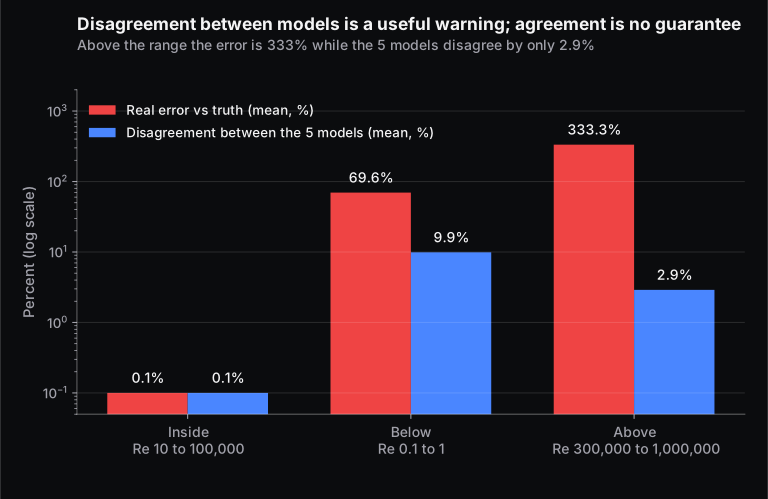
The "past simulations" are 30 points of that curve, evenly spaced (on a log scale) from Re 10 to Re 100,000. The "AI model" is an ensemble of five small neural networks, each with one hidden layer of 32 units, trained on log Re against log CD. Five networks started from different random weights let us measure how much they disagree, a common stand-in for model confidence. The whole experiment is a short NumPy script that runs in about ten seconds on a laptop.
The results
| Where we asked | Mean absolute error | Worst error | Disagreement between the 5 models |
|---|---|---|---|
| Inside: Re 10 to 100,000 (between training points) | 0.1% | 0.3% | 0.1% |
| Below: Re 0.1 to 1 | 69.6% | 87.5% | 9.9% |
| Above: Re 300,000 to 1,000,000 | 333.3% | 412.7% | 2.9% |
Inside the range the model is excellent: at Re 30,000 it predicts 0.398 against a true 0.397. Three things happen outside it.
- Errors start at the edge. At Re 200,000, only twice the largest training value, the error is already +6.5%.
- A small step past the edge can be a huge error. Re 500,000 is just 0.7 decades past the training range. The model predicts CD = 0.465 against a true 0.092, an error of +403%. Used for a real part, that would overestimate the drag force about five times. The model has never seen the drag crisis, so it simply carries the flat trend on.
- Agreement is not correctness. At Re 500,000 the five networks agree with each other within 2.6%. They are all wrong in the same way, because they all learned from the same data. Below the range, at Re 0.1, they disagree more (the true value is 240 from Stokes' law, 24/Re; the model says 30, an error of −87.5%), so the warning is louder there, though still far smaller than the error.
What this means for SimAI users
SimAI's confidence score is a smarter check than our ensemble: Ansys says it measures how far a new geometry is from the nearest training geometry. That catches designs that look new. But distance alone cannot tell you whether the physics changes inside that distance. Re 500,000 is "close" to Re 100,000; the drag crisis sits in between. The same thing can happen with a flow that separates, a part that starts to yield or buckle, or a contact that opens. Only an engineer who knows the physics can say where those cliffs might be, and only a solver run can confirm it.
What can SimAI replace, and what can't it?
SimAI can replace many repeat solver runs during design exploration, when the new designs and conditions sit inside what its training data covers. It cannot replace the solver runs that create that data, the judgement on new physics or new design families, or the verified results needed for sign-off.
| SimAI can take over | SimAI cannot take over |
|---|---|
| Hundreds of "what if" checks on variants of a product family you have already simulated | The 30 to 100 converged, consistent solver runs it needs to learn from |
| Fast screening inside an optimisation loop (for example through optiSLang) | The first study of a genuinely new product, where no history exists |
| Giving designers and project engineers a quick answer without setting up a CFD or FEA case | Designs flagged low-confidence, new topologies, or conditions beyond the trained range |
| Full-field results (pressure, velocity, stress) for quick visual comparison | A change of physics regime: laminar to turbulent, elastic to plastic, attached to separated flow |
| Reusing an archive of past projects that would otherwise sit unused | Final verification, certification and safety-factor sign-off, which need solver and test evidence |
On accuracy, Ansys claims "accuracy comparable to full-fidelity simulations" and a design cycle shortened "by 10-100X". Sumitomo Riko reported, through a Synopsys release, that initial tests on certain rubber bushes accelerated simulation cycles "over 10x". These are vendor and customer claims for specific cases, not independent benchmarks. The number that matters for your project is the evaluation report on your own held-back test data.
Is Ansys SimAI free? Licensing and access
No. Ansys does not publish a SimAI price; its product page says to contact an Ansys sales representative about licensing and pricing. SimAI is not listed on Ansys' student software pages (checked 20 Nov 2026), so it is not part of the free Ansys Student package.
Ansys says the customer-hosted version can be used for trials as well as production on a company's own hardware. In the cloud, each customer gets a private workspace and every new model starts from scratch, so one company's data does not train another's model.
For students, the useful move is to learn the method on tools you can get. Run a small set of cases in Ansys Student or OpenFOAM, train a surrogate in Python on the results, and test it inside and outside its range, as we did above. Our AI for mechanical engineers page lists the tools and a learning order.
When does SimAI make sense for a team?
SimAI fits teams that run many similar simulations of one product family, already have (or can afford to create) a few dozen consistent results, and will ask many more questions than they have runs. It fits poorly when every project is new, when cases run in minutes anyway, or when the archive mixes solver settings and quality.
Before you start a pilot, check:
- Is there a product family? Pumps of one type, one vehicle class, one kind of heat sink.
- Are the past runs consistent? Same solver settings, mesh quality and saved outputs. If old runs saved only surface pressure, the model cannot learn the volume velocity field.
- Where may the data live? Ansys' cloud, your own servers, or a workstation. Settle this with IT first.
- Will you use it enough? Our surrogate models guide walks through the break-even arithmetic.
What does SimAI mean for CFD and FEA engineers?
SimAI shifts the simulation engineer's work to before and after the prediction; it does not remove it. Someone still has to produce clean training runs, decide where the model may be used, read the evaluation report, and run the solver when confidence is low or the decision matters.
Three skills gain value:
- Solver fundamentals: meshing, convergence and validation, because every prediction inherits the quality of the runs behind it. The Post Graduate Program in Computational Fluid Dynamics and the Post Graduate Program in CAE build that base. You can also compare all Skill-Lync Ansys courses.
- Physics judgement: knowing where the drag crisis, separation or yield sits in your problem, so you know where a model's "close enough" breaks.
- Data handling in Python: train and test splits, error metrics and scripting tools such as PySimAI. Python for Mechanical Engineers and Machine Learning Fundamentals In Depth cover them.
Frequently asked questions
Is Ansys SimAI a replacement for Ansys Fluent or Mechanical?
No. SimAI learns from results that a solver such as Fluent or Mechanical (or a non-Ansys solver) has already produced, and predicts new cases similar to those. You still need the solver to create training data, to check low-confidence predictions, and to verify final designs.
What is the difference between SimAI Pro and SimAI Premium?
SimAI Pro, new in Ansys 2026 R1, runs on your own workstation and is aimed at single components and small datasets, with surface predictions. SimAI Premium is the full product for full 3D fields and large archives, either in Ansys' cloud (SaaS) or hosted on your own infrastructure. Ansys says projects can move from Pro to Premium without redoing data preparation.
Does SimAI work for structural (FEA) problems, or only CFD?
Both. Ansys describes SimAI as physics-agnostic and lists structural uses such as automotive crash and wire forming alongside aerodynamics, battery and inverter cooling, antennas and optics. Sumitomo Riko uses it for rubber anti-vibration parts. Accuracy for any one use depends on its own training data.
How is SimAI different from Ansys Discovery?
Ansys positions SimAI for predicting designs similar to an existing set of simulation results, without setting up new cases. Discovery is a fast, GPU-based simulation tool for exploring a new design or load case from CAD. Use SimAI when you have the history and Discovery when you don't.
Do I need to know machine learning to use SimAI?
To use it, no. Ansys designed the web app for engineers without coding or deep-learning experience. To use it well, you need to understand training and test data, what an evaluation report measures, and why extrapolation fails, which is basic machine-learning literacy rather than model-building skill.
Sources and further reading
- Ansys (part of Synopsys), Ansys SimAI product page and FAQ, accessed 20 Nov 2026.
- Synopsys, Synopsys Launches Ansys 2026 R1 to Re-Engineer Engineering with Joint Solutions and AI-Powered Products, press release, 11 Mar 2026.
- Ansys blog, Ilya Tolchinsky, 2026 R1: Introducing Ansys GeomAI Software and a Reimagined Ansys SimAI Portfolio, 11 Mar 2026.
- Ansys, Ansys 2026 R1 Product Release and Updates, accessed 20 Nov 2026.
- Ansys, Ansys Launches Ansys SimAI, press release, 9 Jan 2024.
- Ansys blog, Antoine Reverberi and Jennifer Procario, Explaining SimAI: How AI is Applied to Numerical Simulation In Practice, 13 May 2024.
- Ansys, Ansys 2025 R2 press release (optiSLang and SimAI integration), 29 Jul 2025.
- Synopsys, Synopsys Completes Acquisition of Ansys, 17 Jul 2025.
- Synopsys, Sumitomo Riko Leverages Ansys AI Technology to Accelerate Simulation Over 10x, 8 Oct 2025.
- Ansys, PySimAI documentation, release 0.4.9 (user guide and API reference), and ansys-simai-core on PyPI, accessed 20 Nov 2026.
- Faith A. Morrison, Data Correlation for Drag Coefficient for Sphere, Michigan Technological University, 10 Nov 2016.
- J. M. Cimbala, Drag on Spheres, ME 325 lab notes, Penn State University, revised 11 Jan 2012.