WORKDONE OF SHAPING MACHINE, MATHEMATICAL EQUATION, SPRING-MASS-DAMPER IN SIMULINK AND SIMSCAPE
SHAPING MACHINE
AIM:
To Create a simulink model of a Shaping Machine
OBJECTIVE:
- To determine the work done as the tool moves through a distance of 100 mm.
INTRODUCTION:
SHAPING MACHINE:
The shaper machine is a reciprocating type of machine basically used for producing the horizontal, vertical or flat surfaces. The shaper holds the single point cutting tool in ram and workpiece is fixed
in the table.
By using a quick return mechanism. During the forward stroke, the ram is holding the tool is reciprocating over the workpiece to cut into the required shape. During the return stroke, No metal is cutting. In the shaper machine, the rotary motion of the drive is converted into reciprocating motion of ram holding the tool.
GOVERNING EQUATION:
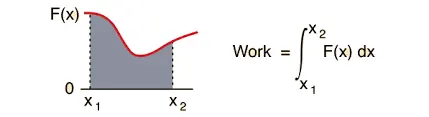
The workdone of a shapper tool is determined by,
Workdone = Force x Distance
With Respect to time,
BLOCKS USED IN MODELLING AND EXPLANATIONS:
SIGNAL BUILDER - The Signal Builder block allows to create interchangeable groups of piecewise linear signal sources and use them in a model. In the Signal Builder window, create signals and define the output waveforms.
The signals are created based on the input conditions;
The force extracted on a cutting tool of a shaping machine varies over the length of cut as follows:

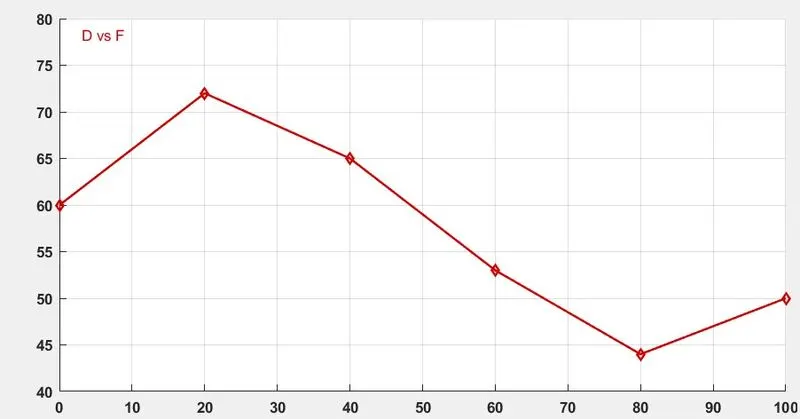
The time rage of the signals are assigned from 0 to 100 seconds and the signals are builded based on the distance ranges.
INTEGRATOR - The Integrator block outputs the value of the integral of its input signal with respect to time. The block also provides the solver with an initial condition for use in computing the block's initial state at the beginning of a simulation. The default value of the initial condition is 0. With respect to the initial simulation time the integrator block integrates distance and forces.
1-D LOOKUP TABLE - The block maps inputs to an output value by looking up or interpolating a table of values define with block parameters. With the known data points the distance and forces are mapped wit constant block and the workdone are calculated using product block.
CONSTANT - The Constant block generates a real or complex constant value signal.
PRODUCT - The Product block outputs the result of multiplying two inputs
DISPLAY - The converted signals are connected to display, inorder to identify the workdone value of the shaper machine.
Scope - Scope block display time domain signals, the scope displays simulation results for attached input signals.The resulted output of the input signal and workdone are plotted.
MODELLING OF SHAPER MACHINE:
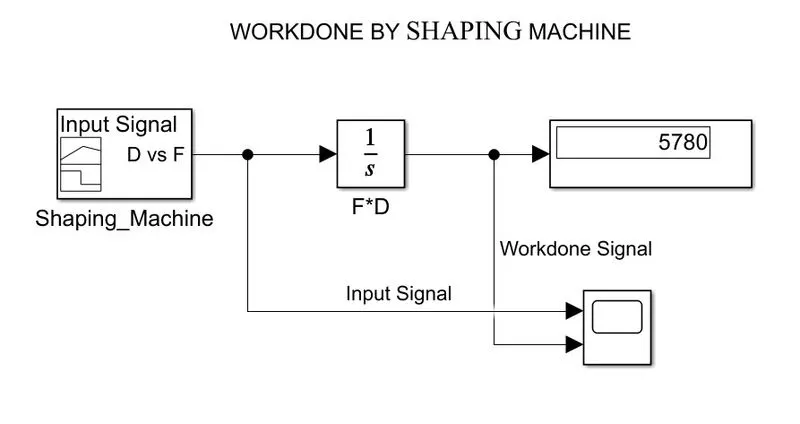
- The input signal is created using signal builder with the respective foce and distance.
- Then, the integrator is used to integrate the signals and outputted the workdone by the force at the distance for 100 mm and net workdone by the shaper machine is 5780 Nmm.
OUTPUT:
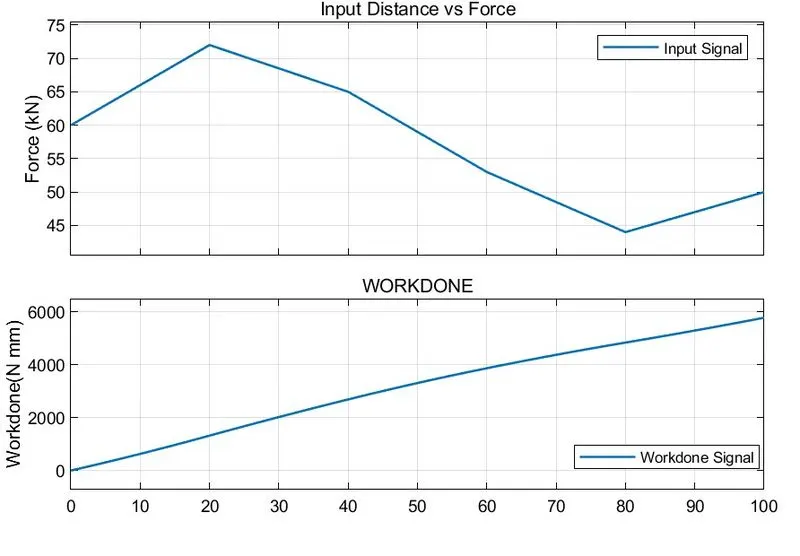
- For the Input Force and distance the workdone by the distance of 100 mm are determined.
WORKDONE FOR INDIVIDUAL FORCES:
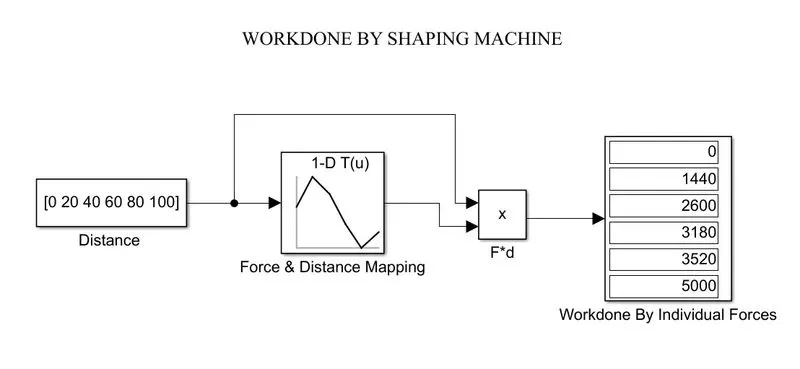
- The 1-D look table is used to mapp the known data points of input and output values by interpolation method. By utilizing the 1-D look up table the input constants are mapped and the respective output are obtained.
- The workdone is determined by using the product of force and distance.
- The individual force extracted by the distance are obtained. For 100mm distance the wordone is 5000 Nmm.
LINK OF THE SHAPING MACHINE:
- https://drive.google.com/file/d/1gx7f_tBq0QSaYHQvLFQAZ0HYuBglmxFk/view?usp=sharing
- https://drive.google.com/file/d/1ddtj1m4MN8-bEDBnj3bAcYK6Jqhy992r/view?usp=sharing
MODELLING A MATHEMATICAL EQUATION
AIM:
To plot the Mathematical Equation model using Simulink Blocks
OBJECTIVE:
- Implement the equation in simulink model z=3x2-5y+18 using Simulink blocks.
INTRODUCTION:
MATHEMATICAL MODEL:
A mathematical model is a representation of a physical system. Models are represented graphically in a Simulink as block diagrams. Simulink is able to numerically approximate the solutions to mathematical models.
THE BLOCKS USED IN SIMULINK AND EXPLANATIONS:
- Constant Block - The constant block is used to generates a real or complex constant value signal. By using this block to provide a constant signal input. In this three constant values are induced as (3),(5) & (18)
- Square Block - The square mathematical block is used to square the required functions and also it performs logarithmic, exponential, power and modulus functions.In this the one functions are squared (x).
- Product Block - It performs scalar or matrix multiplication. The block accepts one or more inputs, depending on the number of input parameter. The Number of inputs parameter also specifies the operation to perform on each input. In this the constants are mutiplies after performing square (3x2), (5y).
- Add Block - The add block performs addition or subtraction on its inputs. This block can add or subtract scalar, vector, or matrix inputs. By using the parameter with plus (+), minus (-), and spacer (|). The number of + and - characters equals the number of inputs. In this, after performing the product the constants are then been added and subtracted on respective operations.
- Display Block - The Display block shows the value/ Result of the input data. The total producted value are displayed.
- To file - The To File block writes input signal data into a MAT-file. The block writes to the output file incrementally, with minimal memory overhead during simulation.
COMMAND WINDOW:
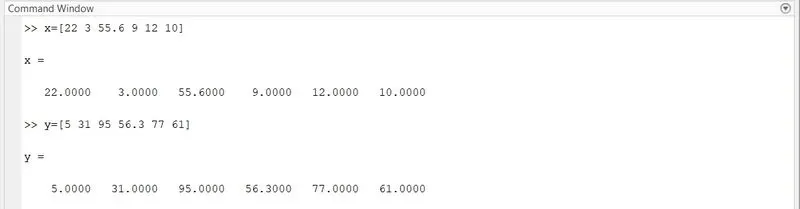
A two array data sets x = [22 3 55.6 9 12 10] and y = [5 31 95 56.3 77 61] are created in the command window.
SIMULINK MATHEMATICAL EQUATIONS:
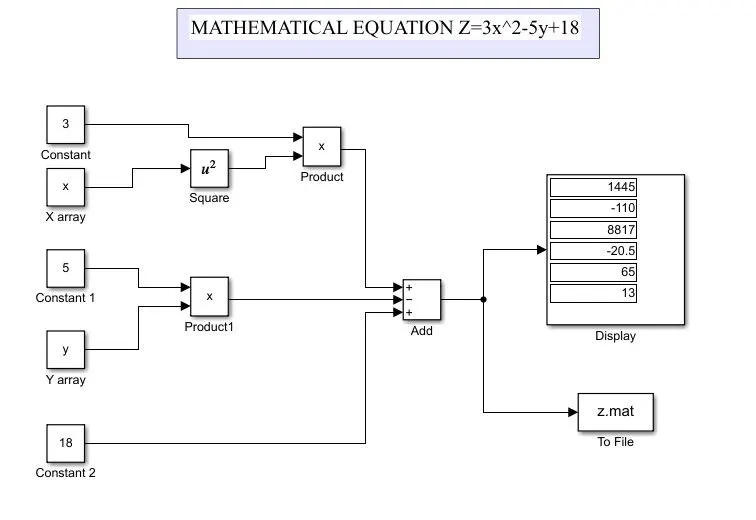
- The simulink model is created using the constant and the square blocks and resullts are saved using to file block
- The To File block writes input signal data into a MAT-file. The block writes to the output file incrementally, with minimal memory overhead during simulation. If the output file exists when the simulation starts, the block overwrites the file. The results of equations are saved in file.
RESULTS:
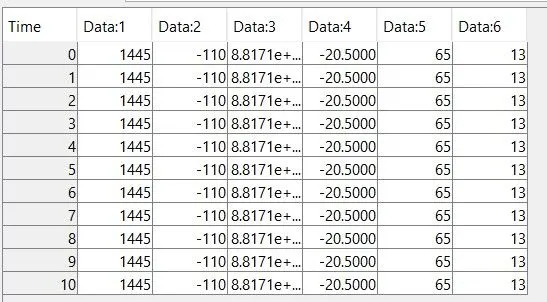
- The model is simulated for 10 seconds. In that the blocks are been computed at the sample time of 1 seconds.
- With the time step each blocks are solved at equal interval of time seconds and the results for the mathematical equations are obtained for Time series.
LINK OF MATHEMATICAL EQUATION:
MASS - SPRING - DAMPER IN SIMULINK AND SIMSCAPE
AIM:
To derive the governing equations and responce for spring -mass- damper in simulink and simscape model
OBJECTIVE:
- To Derive the governing equation for the model
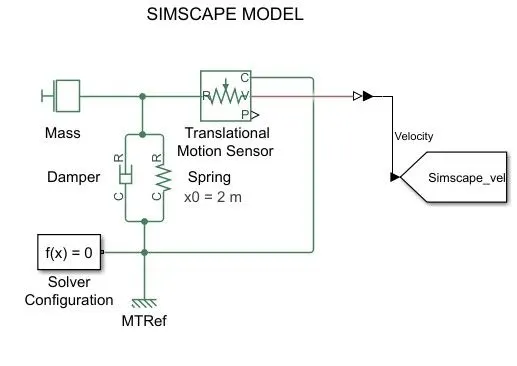
- By Changing the value of mass, damper, and spring for the Simscape model and plot the result.
- By Changing the value of Mass, displacement as x0=2 in the Simulink model, and plot the results.
INTRODUCTION:
SIMULINK:
Simulink is a MATLAB-based graphical programming environment for modeling, simulating and analyzing multidomain dynamical systems. Its primary interface is a graphical block diagramming tool and a customizable set of block libraries.
SIMSCAPE:
Simscape enables to rapidly create models of physical systems within the Simulink environment. With Simscape, to build physical component models based on physical connections that directly integrate with block diagrams and other modelings.
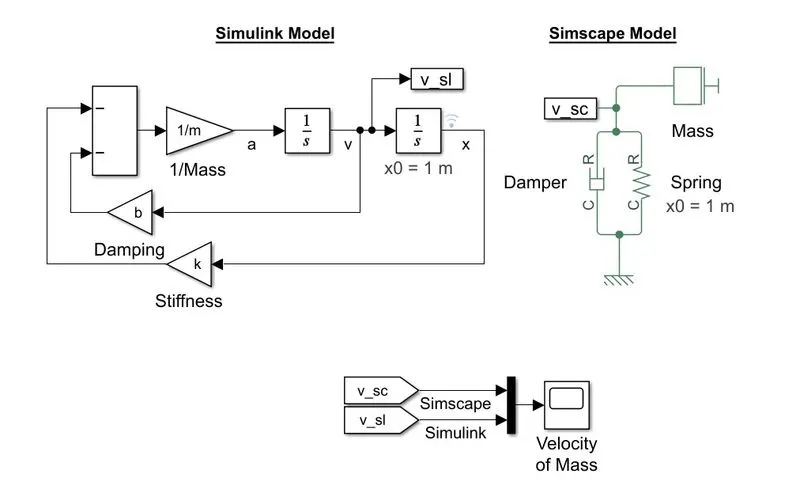
SPRING-MASS-DAMPER MODEL:
The mass-spring-damper model consists of discreate mass nodes distributed throughout an object and interconnected via a network of springs and dampers This model is well-suited for modelling object with complex materials.
RESPONSE PLOT FOR SPRING-MASS-DAMPER MODEL:
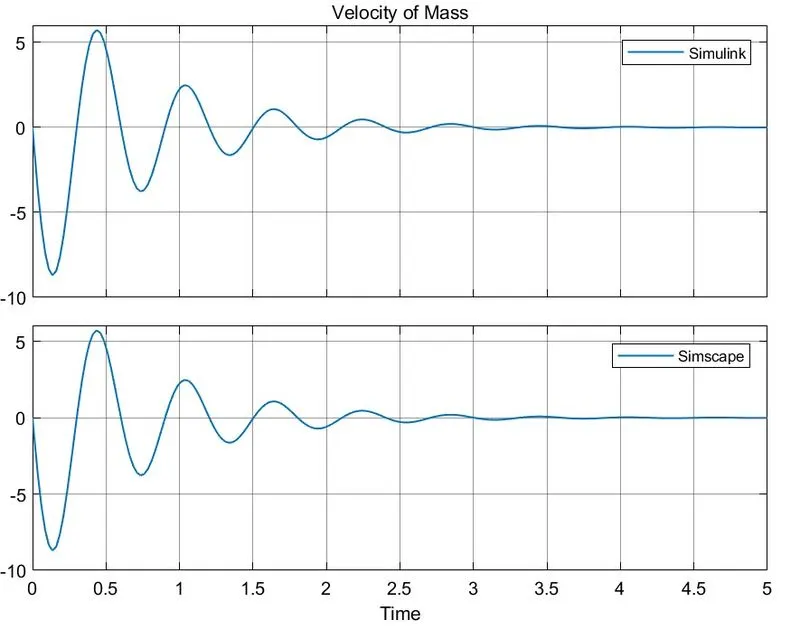
The original model parameters are mass(m) =3.6 kg , stiffness(k) = 400, Damping (b) = 10
GOVERNING EQUATION FOR SPRING-MASS-DAMPER:
Considering a spring-mass-damper system, a mass is suspended from one end of the spiral spring and the other end of which is fixed. A damper is provided between the mass and the rigid support.
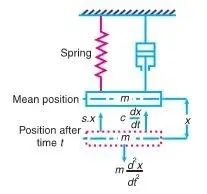
The motion of a body is resisted by frictional forces. In vibrating systems, the effect of friction is referred to as damping. In damped vibrations, the amplitude of the resulting vibration gradually diminishes. This is due to the reason that a certain amount of energy is always dissipated to overcome the frictional resistance.
According to Newton’s second law, the sum of the forces acting on a body equals the product of its mass and acceleration.
F=ma .................(1)
Damping force or frictional force on the mass acting in opposite direction to the motion of the
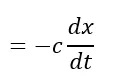 ...........(2)
spring force on the mass, acting in opposite direction to the motion of the mass,
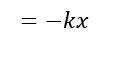 ............(3)
Accelerating force on the mass, acting along the motion of the mass
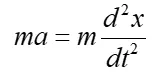 .........(4)
Substituting equations (2,3,4) in (1), Therefore the equation of motion becomes,
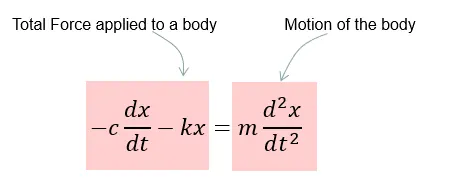
Let, m = Mass suspended from the spring,
k = Stiffness of the spring,
x= Displacement of the mass from the mean position at time t,
c = Damping coefficient or the damping force per unit velocity.
(Negative sign indicates that the force opposes the motion)
By Rearranging the equations,
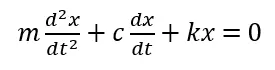
This is a differential equation of the second order.
MODEL EQUATIONS:
(1/m)*a= -b*v-k*d
Mass of the system makes an displacements (x),Then,
(1/m)*(d^2x/dt^2)= -b*(dx/dt)-k*x
CHANGING PARAMETERS:
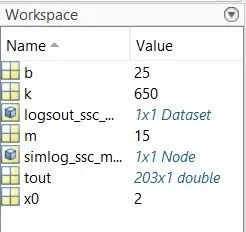
The parameters of mass, damper and spring stiffness are changed as,
SIMULINK MODEL BY CHANGING PARAMETERS:
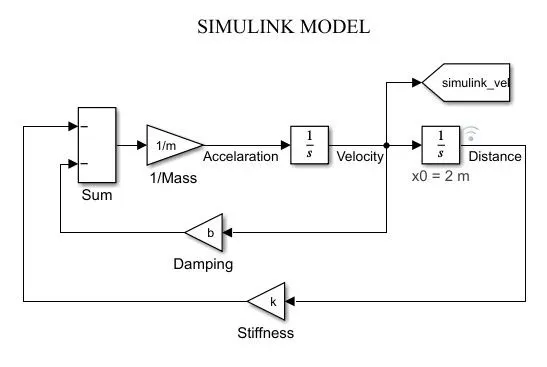
SIMSCAPE MODEL BY CHANGING PARAMETERS:
RESULTS:
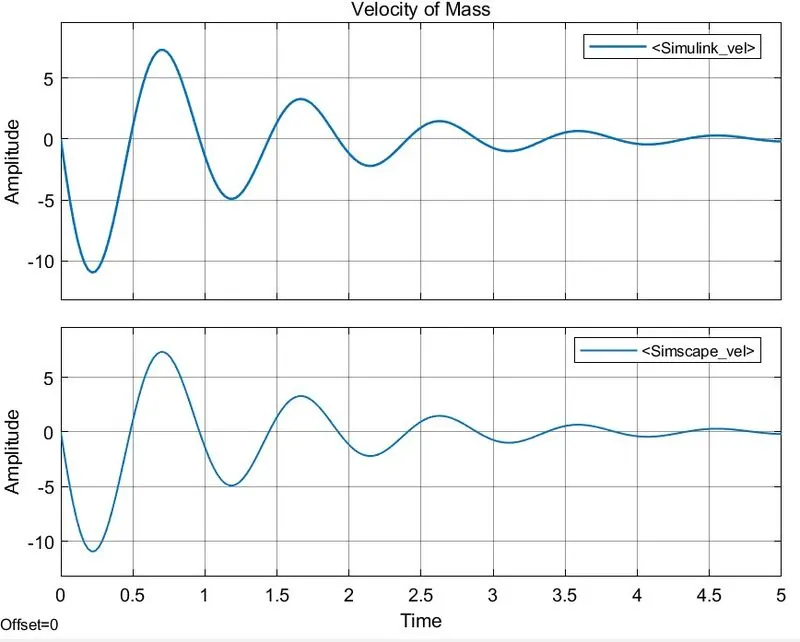
The simulink and simscape plots are plotted separately by changing the parameters of mass-spring and damper.
LINK OF MODEL:
CONCLUSION:
- The work done as the tool moves through a distance of 100 mm by shapping machine model is created and determined.
- The equation is implemented in simulink model z=3x2-5y+18 using Simulink blocks.
- The governing equation for the model are derived.
- By Changing the value of mass, damper, and spring for the Simscape model and results are plotted.
- By Changing the value of Mass, displacement as x0=2 in the Simulink model,and results are plotted.
REFERENCE: