Wiring harness design in CATIA V5 - 3D modeling Week 7 Challenge
In wiring harness design it is difficult to get one view like front view top view or any view of the harness assembly of all components in same plane, so to eliminate this problem the CATIA V5 indroduce another set of work bench called Ellectrical Harness Flatening.
FLATTENED VIEW OF THE HARNESS ASSY.
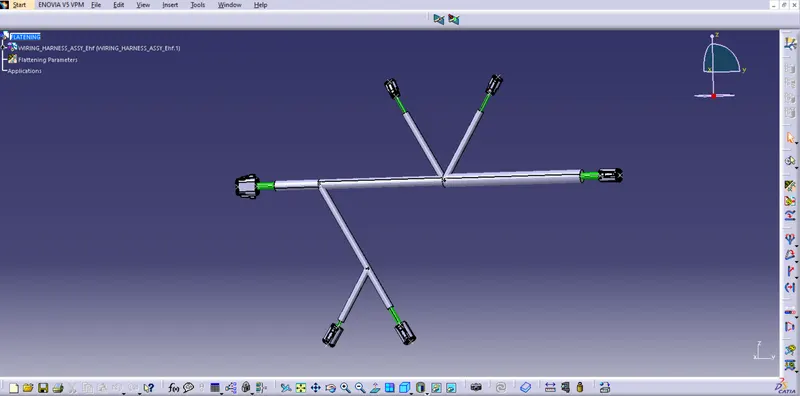
For Flatten the harness assembly first created a product file in "Ellectrical Harness Flatening" workbench and after that for activating all the necessry tool in the workbench, first click on the "Harness Flatening Parameters" tool and give all the inputs required for flatenging view of the harness. Saved the product file in a desired location. For which harness we need to flatten first bring the harness file to same location where the flatene product file locate. After that Extract the harness assy by arrange the 2 windows verticaly and smilutaneously open. After the extracted file we can arrange all the connectors and bundles in the manner look better. The bundle continuity is necessery for getting the complet drawing.
DRAWING OF THE FLATTENED HARNESS ASSY
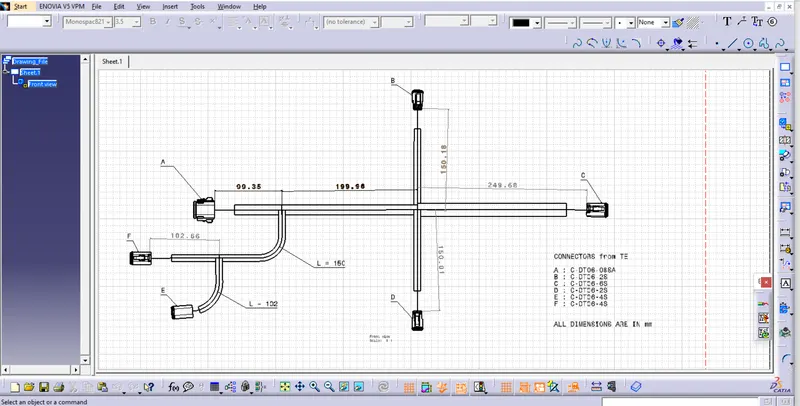
For Place the flattened view on drawing sheet first need to create "Drawing file" also set the sheet style like A3, A4 etc.. for of the drawing sheet. Arrange the flatten view and drawing sheet windows vertically. click on drawing sheet window and click on front view tool from tool bar and after that click on the top of the tree structure of the flattened harness file or product file. Then the front view of the flattened Harness assy is now comes to the drawing sheet and we can place the drawing correctly. After that give the required data like name of the connectors, dimension of the wirings bundles (length, diameter, etc..), the vendor details.