Wiring harness design in CATIA V5 - 3D modeling Week 4 Challenge
Q1. Route the following harness layout in Electrical workbench. Make assumption for harness bundle diameters. Use Following connectors as shown in layout diagram.
Add protective covering on all branches connected to DT06-2S & DT06-4S connectors. Keep end extremity at 30mm (from connectors end)
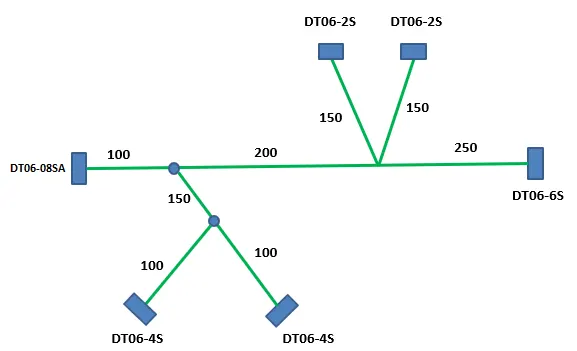
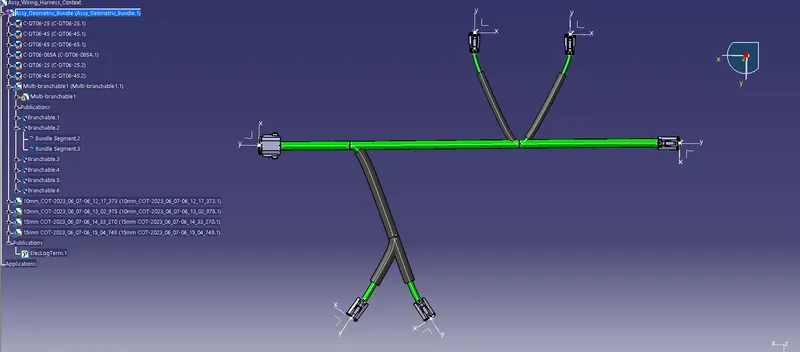
- Create a new product file and name it Assy_Wiring_Harness_context
- Then create a new product within the first one and call it Assy_geometrical_bundle.
- The first step is to define this product as an electrical geometric bundle using the command 'Geometric Command' in Wiring Harness Assembly Workbench.
- Then import all the downloaded files of the connectors given. (make sure all the connectors are defined appropriately).
- Now using different commands like manipulation in the assembly workbench place it accordingly (use pre-defined surrounding data like a plate with the definition of lengths to plot the connectors)
- After the connectors are placed in appropriate places as given in the fig. above start the wiring harness routing by using the command 'Multi-Branchable Document' in the wiring harness assembly.
- There use the command 'Branch Definition' and go to Route Definition to create the bundle
- Using the Add Branch Point add a sub-branch wherever necessary to create a wiring harness routing as in the given Diagram.