Week 9 - Parametric study on Gate valve.
In this project, a simulation of a gate valve will be conducted in ANSYS Fluent using Parameters.
A gate valve is a control valve used to control the rate of flow of fluid through a pipe. It is used mostly to shut off flow. It is controlled by turning a handwheel which is connected to a spindle, when the handwheel is turned, the spindle moves up or down. The spindle is connected to a gate which moves with the spindle when the handwheel is turned.
In this project, a gate valve will be opened from 10% to 80% of the full lift of the gate valve. Each step will increase the opening by 10% or 10mm, and the results will be analysed. The geometry will not be updated for each opening, instead the opening lift value will be parameterised.
Geometry
The geometry was imported into SpaceClaim as a .STEP file. A few operations were performed on the geometry, they are:
Extending outlet and inlet
The outlet face was selected using the pull tool and extended for a length of 800mm. The same was done for the inlet face in the other direction.
Moving the Gate Disk
The gate disk component was selected, it was moved upwards along the Z axis using the move tool, and length of the lift was parameterised by going to Groups -> Create Parameter -> Ruler dimension.
Extraction of Volume
Prepare -> Volume: Select the inlet, outlet and top edge loops and extract the required volume.
The gate valve components can be surpressed for physics.
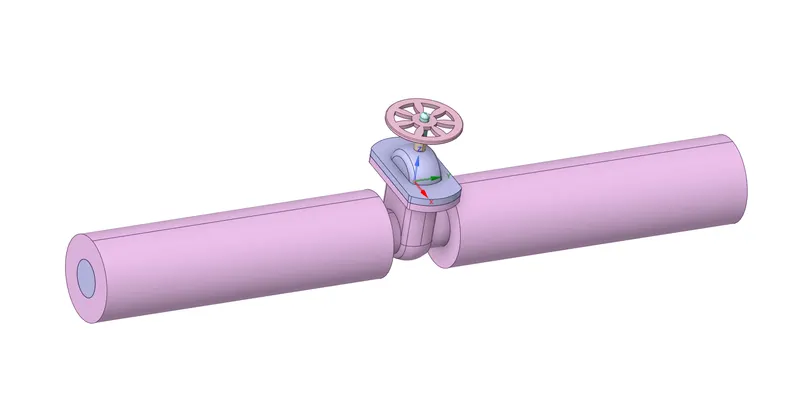
This is the final geometry in spaceclaim:
Zooming in and hiding the gate valve,
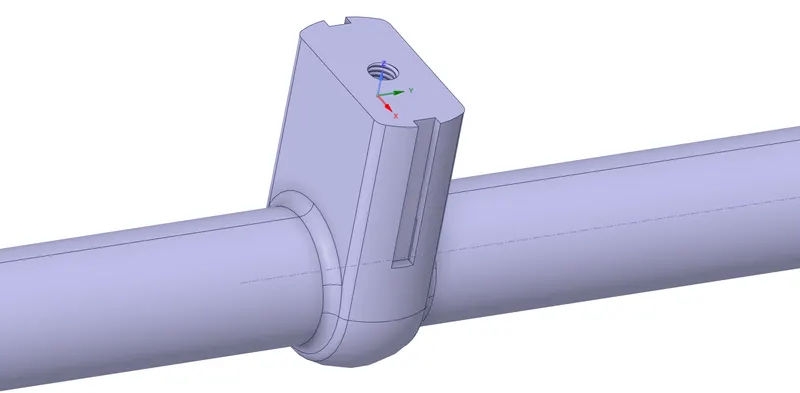
Due to a bug with ANSYS 2022 R1, for each parameter, the geometry module was opened, the extracted volume was updated for the current parameterised geometry.
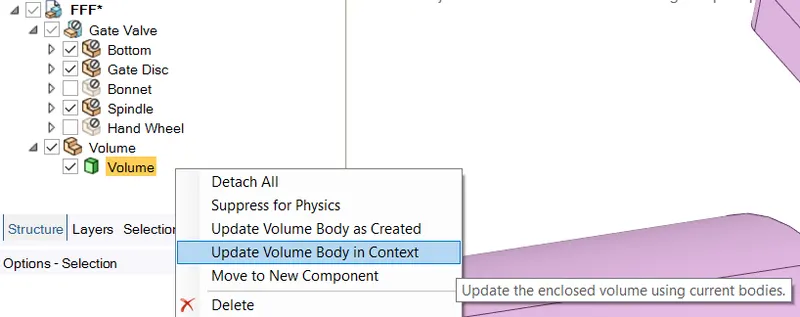
Note: The gate valve components should be visible but can be supressed when updating the volume.
Meshing
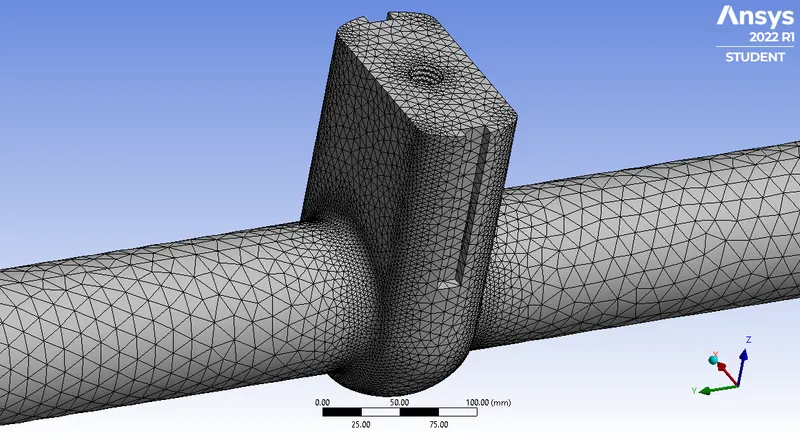
The default meshing method with a mesh size of 50mm was used.
An additional control was introduced to ensure more finer cells are present near the gate valve. It is a sphere of influence having a radius of 30 mm and centered at 0mm, 0mm, 150mm in cartesian coordinates. It is added by going to Mesh -> Controls -> Body Sizing -> Sphere of Influence. Note: This control was only applicable for 10%, 20% and 30% fill as this control proved infeasable beyond that due to restrictions on the ANSYS student license.
This is the final mesh:
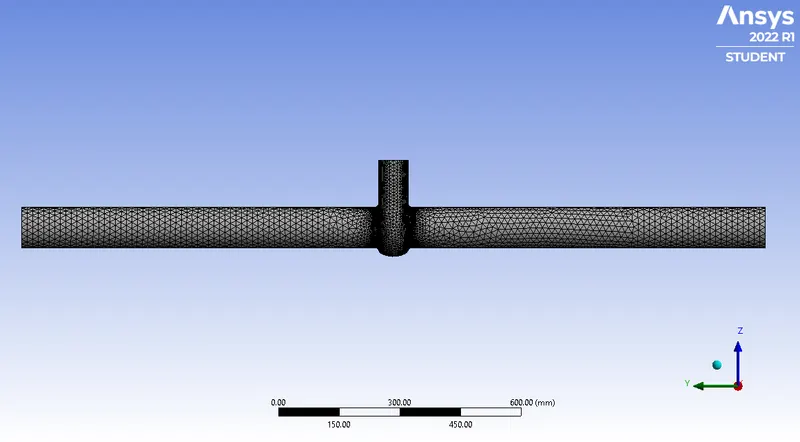
Zooming in,
Mesh Metrics
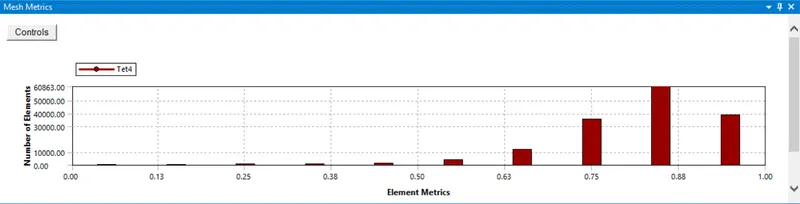
As seen from the metrics, most elements have a quality >=0.75, this implies that the mesh quality is satifactory.
The mesh is dynamically generated for each parameter, hence the number of nodes and elements vary accordingly. An output parameter was created for number of nodes and elements.
Simulation Setup
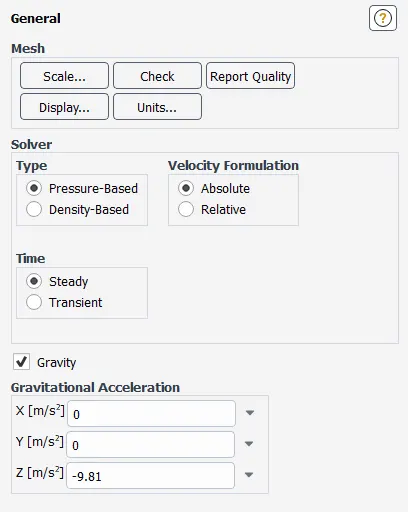
Solver - General
This simulation ran on a steady state, 3D and with gravity enabled.
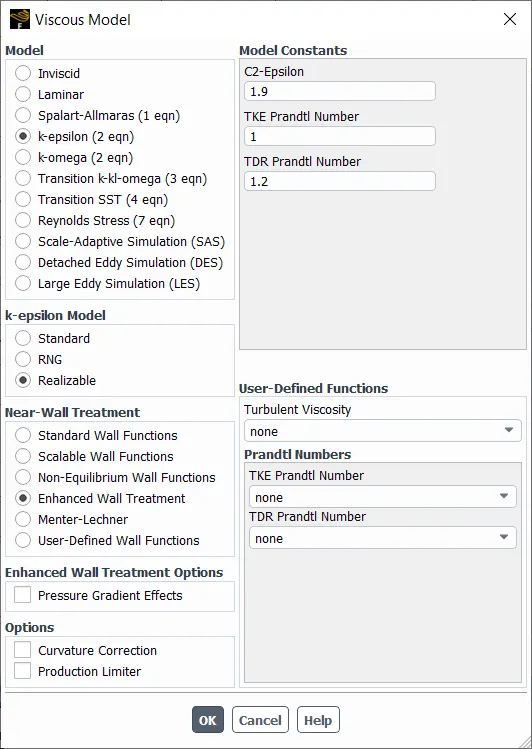
Turbulence Model
keps was the preffered turbulence model due to its excellence in this type of flow.
Materials
Water was added from the Fluent database and air was removed.
Properties of water are below:
Density of Air: `998.2 kg//m^3`
Viscosity of Air: `0.001003 kg//m.s`
Boundaries
inlet: pressure-inlet with a gauge pressure of 10Pa
outlet: pressure-outlet with a gauge pressure of 0Pa
Other boundaries were left untouched
Cell Zone Conditions
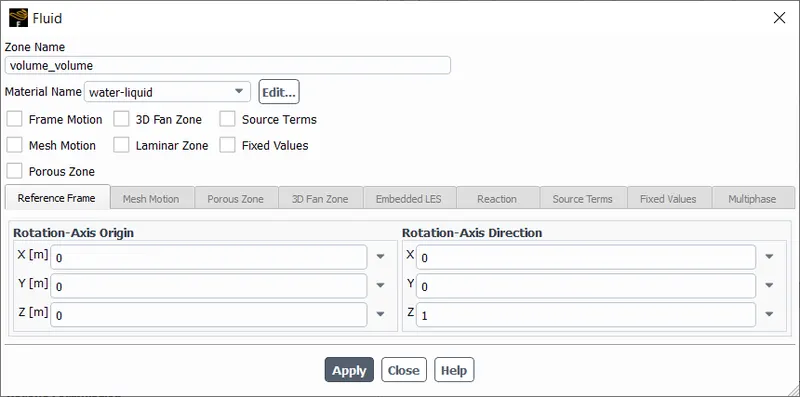
The interior volume was set to water-liquid material.
User Defined Field Functions
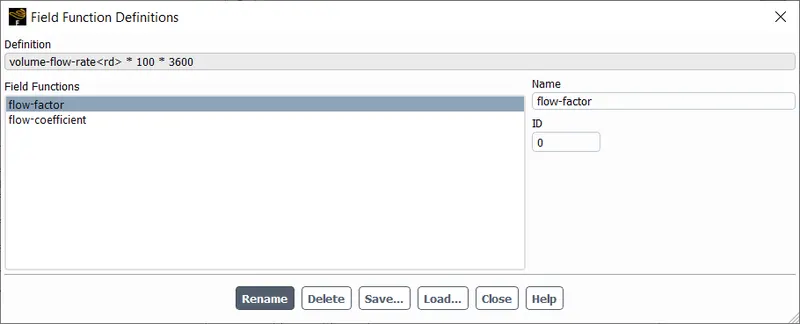
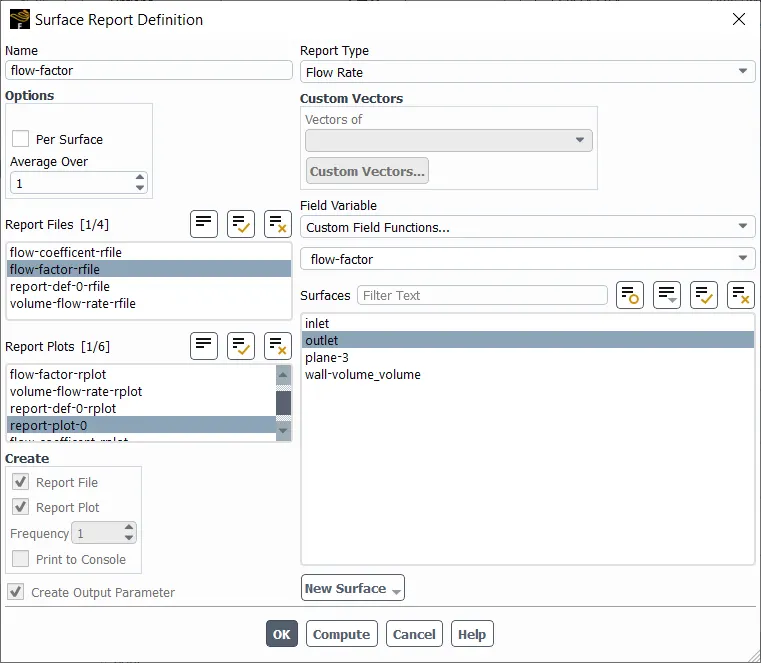
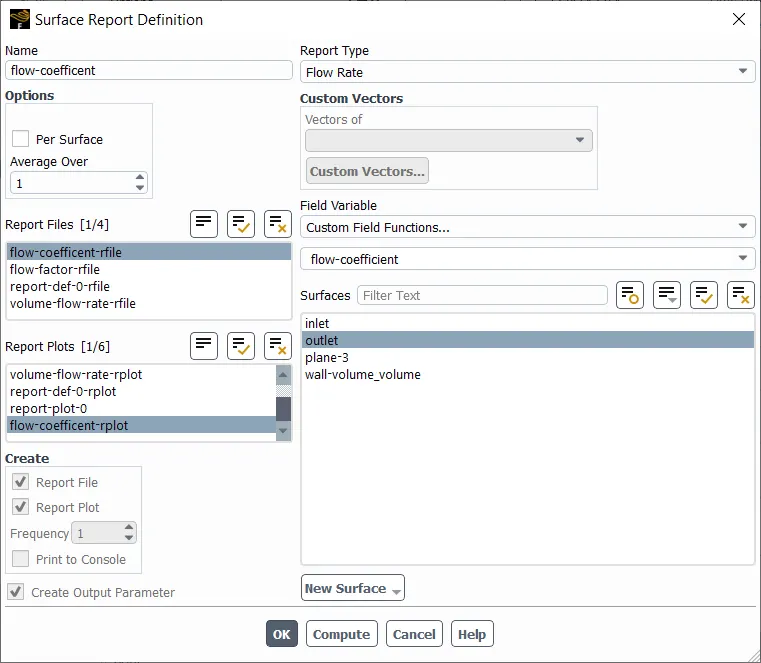
Two user defined functions were created for the major flow factor and flow coefficient.
Flow Factor
Flow Factor is a measure used to quantify the efficiency at allowing a fluid to pass through it. It is calculated using metric units.
Mathematically,
`K_v = Q *sqrt((SG)/(DeltaP))`
Where, `K_v` is the flow factor (`m^3//hr`), `Q` is the flowrate (`m^3//hr`), `SG` is the specific gravity of the fluid and `Delta P` is the pressure differential (`ba r`).
In this case, `Q` is calculated from the simulation (`m^3//s`), `SG = 1`, `Delta P = 10 Pa -= 0.0001 ba r`.
Simplifying,
`K_v = Q * sqrt(1/10^-4) * 3600`
`K_v = Q * 100 *3600`
This simplified formula is created as a custom user defined formula in ANSYS fluent.
Flow Coefficient
Flow Coefficient is a measure used to quantify the efficiency at allowing a fluid to pass through it. It is calculated using American units.
Mathematically,
`C_v = Q *sqrt((SG)/(DeltaP))`
Where, `C_v` is the flow factor, `Q` is the flowrate (`gal//min`), `SG` is the specific gravity of the fluid and `Delta P` is the pressure differential (`psi`).
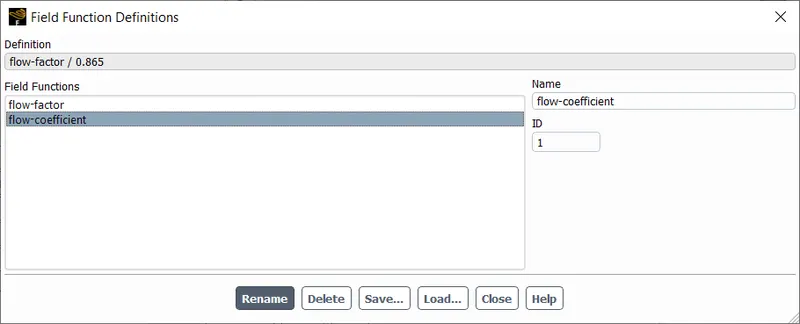
Instead of calculating all variables in non-metric units, `C_v` can be found by dividing `K_v` by `0.865`.
`C_v = K_v/0.865`
This simplified formula is created as a custom user defined formula in ANSYS fluent.
Reports
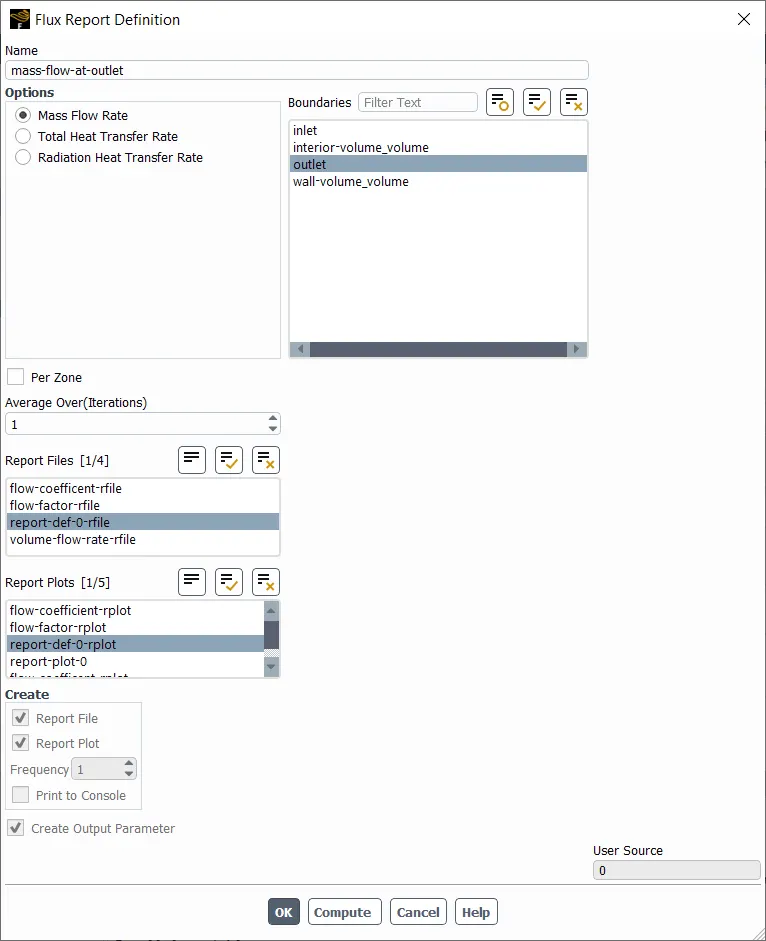
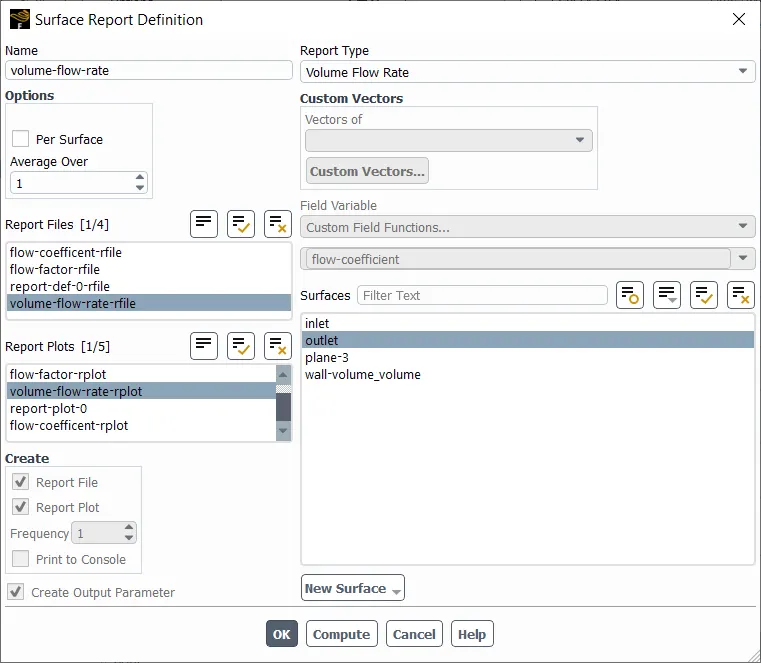
Four reports were generated for each simulation, all report parameters were selected as an output parameter. These reports were monitored during the simulation.
1. Mass Flow at Outlet
2. Volume Flow Rate at outlet
3. Flow Factor
4. Flow Coefficient
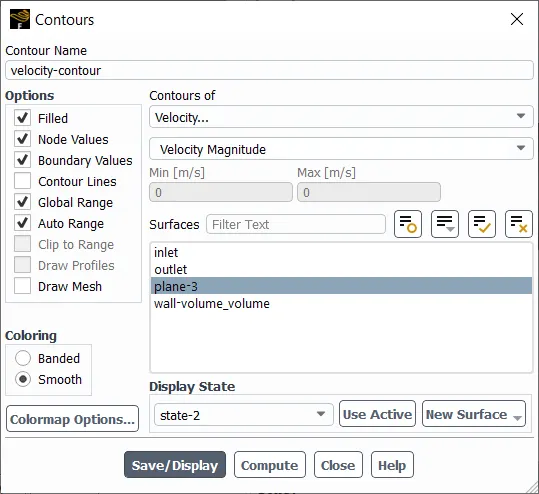
Contours
One contour for the velocity across the fluid volume (YZ plane) was created.
The simulation with this setup was performed for different values of opening lift. The simulation was conducted for 250 iterations or until the residuals dropped below a value of 0.0001.
Simulation Results
10mm/10% opening of gate valve
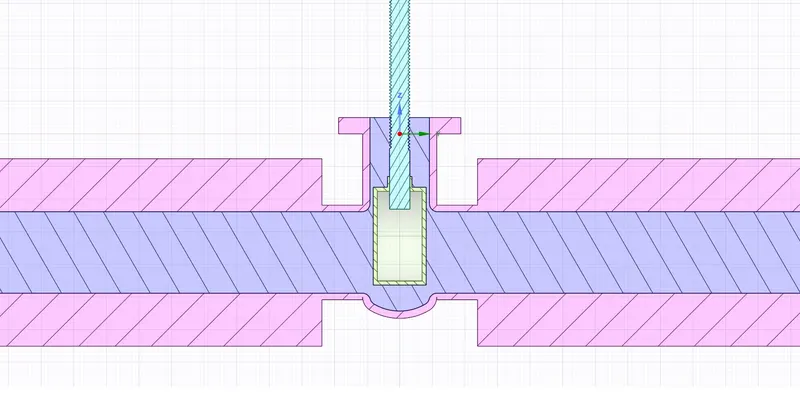
SpaceClaim Cross-Sectional View
Residuals
This was taken in Fluent.
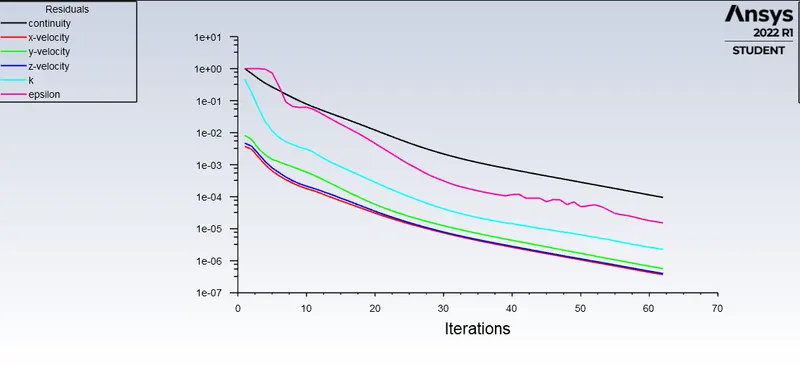
Residuals have droppped below 1e-4 in this case, hence we can say the solution has converged.
Velocity Contour
This was taken in Fluent.
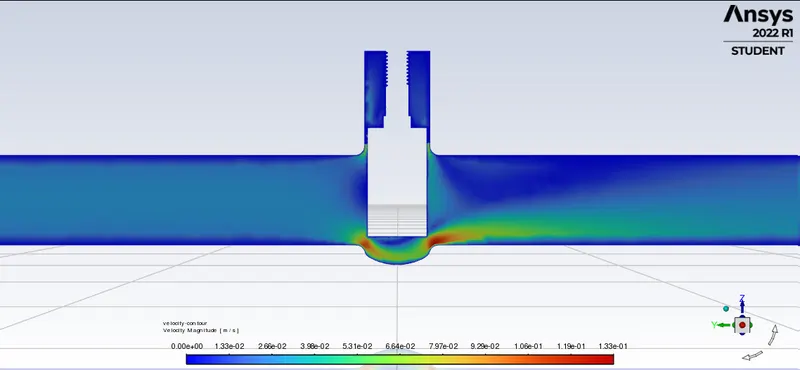
We can notice a high velocity region near the gate, as expected due to compression of flow.
Number of mesh nodes: 35145
Number of mesh elements: 169396
Number of iterations taken for this solution: 62 iterations
Mass flow rate at the outlet: 0.2086 `kg//s`
Flow Factor at outlet: 15.694 `m^3//hr`
Flow Coefficient at outlet: 18.143 `gal//min`
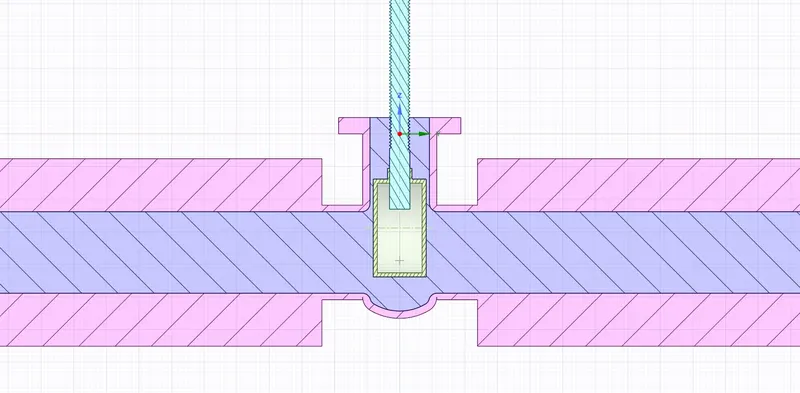
20mm/20% opening of gate valve
Residuals
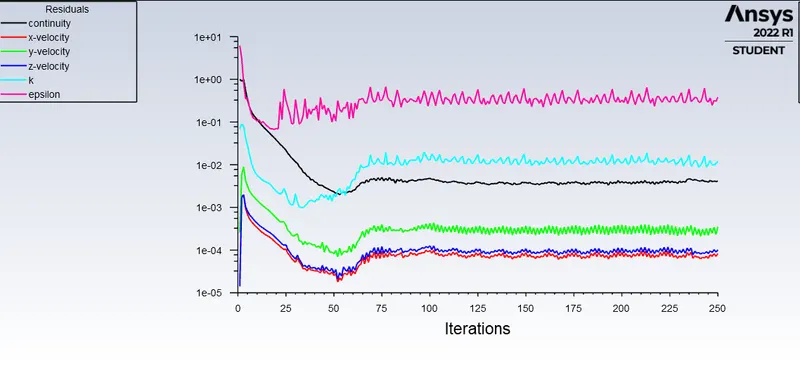
Residuals have not dropped below 1e-4 but they seem to be on a steady path and no further drop is expected, hence we can say the solution has converged. The residuals of turbulence values are ignored as turbulence is not the main focus of this simulation.
Velocity Contour
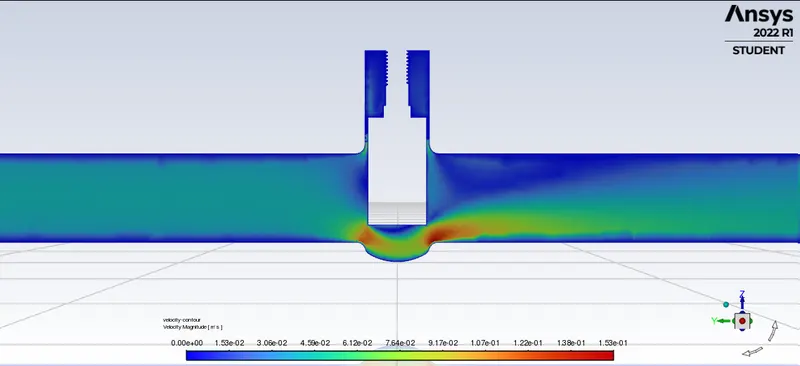
The increase in velocity near the gate valve is still visible.
Number of mesh nodes: 48281
Number of mesh elements: 241893
Number of iterations taken for this solution: 250 iterations
Mass flow rate at the outlet: 0.3116 `kg//s`
Flow Factor at outlet: 35.0304 `m^3//hr`
Flow Coefficient at outlet: 40.497 `gal//min`
30mm/30% opening of gate valve
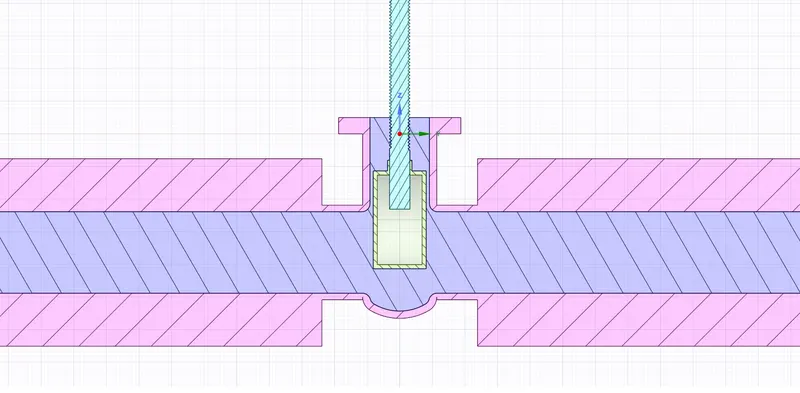
SpaceClaim Cross-Sectional View
Residuals
This was taken in Fluent.
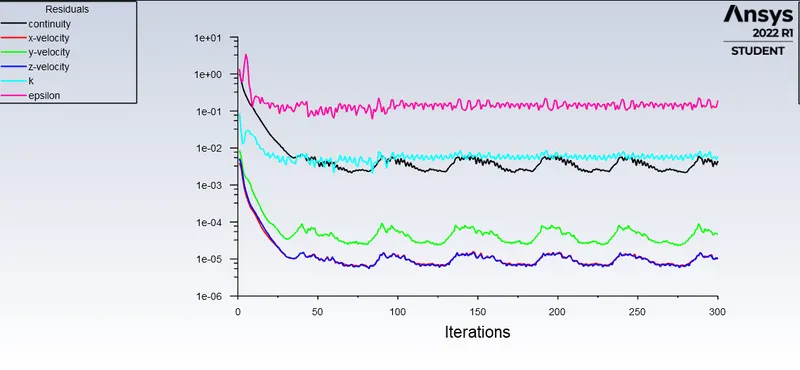
The residuals have entered a periodic behavior, while the reports generated show a steady-state behaviour, hence we can say the solution has converged.
Velocity Contour
This was taken in Fluent.
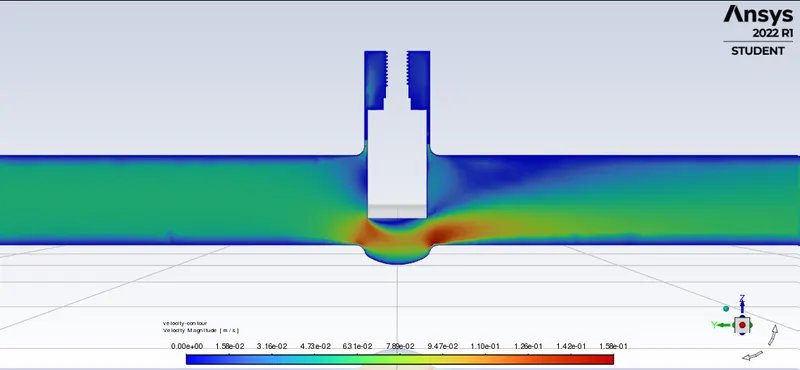
The increase in velocity near the gate valve is still visible.
Number of mesh nodes: 81795
Number of mesh elements: 438558
Number of iterations taken for this solution: 300 iterations
Mass flow rate at the outlet: 0.4144 `kg//s`
Flow Factor at outlet: 61.936 `m^3//hr`
Flow Coefficient at outlet: 71.603 `gal//min`
40mm/40% opening of gate valve
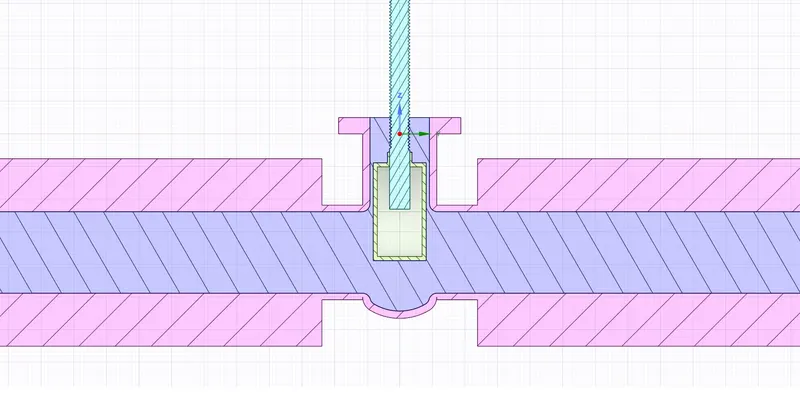
SpaceClaim Cross-Sectional View
Residuals
This was taken in Fluent.
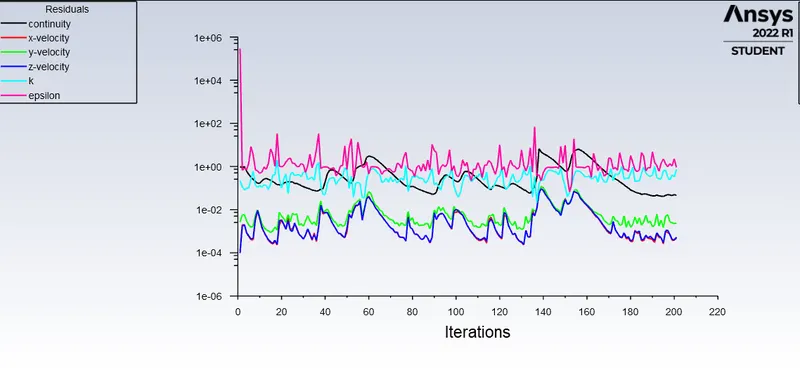
The residuals have entered an erratic behavior, but the reports generated show a steady-state behaviour, hence we can say the solution has converged.
Velocity Contour
This was taken in Fluent.
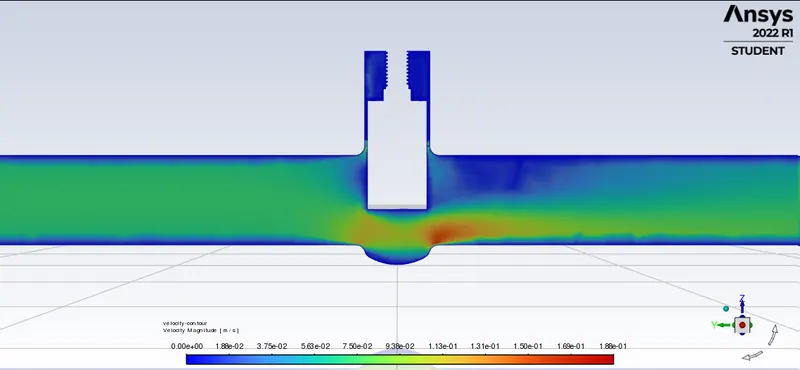
The increase in velocity near the gate valve is still visible but the intensity has decreased.
Number of mesh nodes: 28112
Number of mesh elements: 133673
Number of iterations taken for this solution: 202 iterations
Mass flow rate at the outlet: 0.5384 `kg//s`
Flow Factor at outlet: 104.552 `m^3//hr`
Flow Coefficient at outlet: 120.869 `gal//min`
50mm/50% opening of gate valve
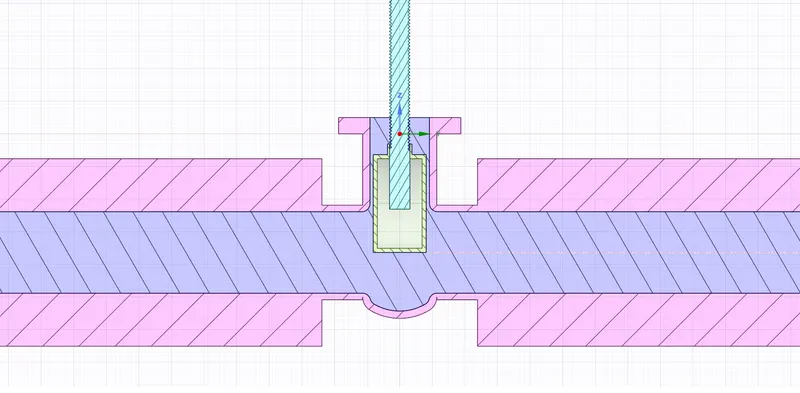
SpaceClaim Cross-Sectional View
Residuals
This was taken in Fluent.
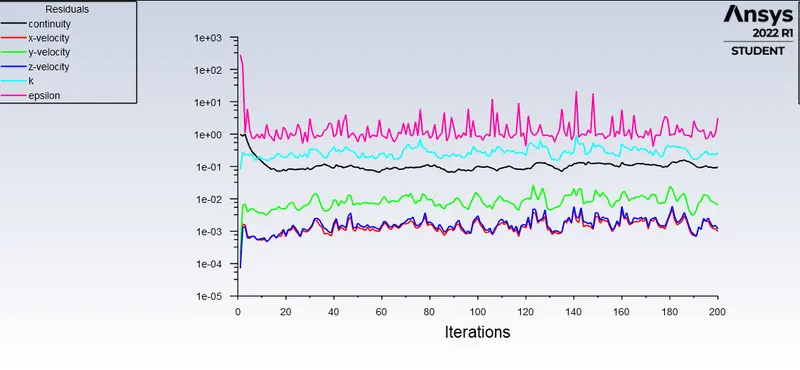
The residuals seem to be not dropping further, but the reports generated show a steady-state behaviour, hence we can say the solution has converged.
Velocity Contour
This was taken in Fluent.
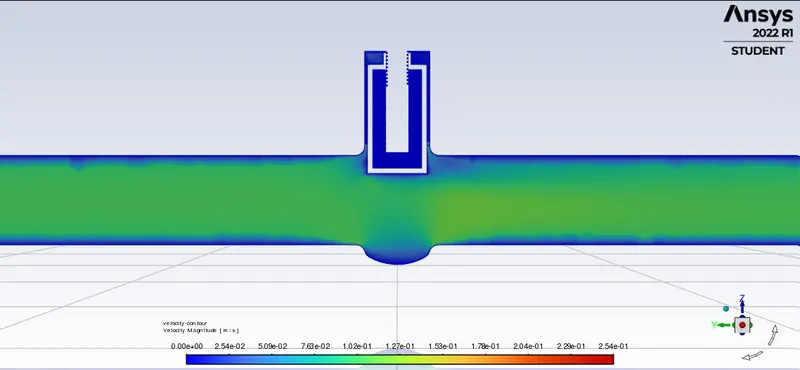
The increase in velocity is not visible as the velocity has fully dissipated throughout the valve.
Number of mesh nodes: 28074
Number of mesh elements: 133156
Number of iterations taken for this solution: 121 iterations
Mass flow rate at the outlet: 0.6251 `kg//s`
Flow Factor at outlet: 140.941 `m^3//hr`
Flow Coefficient at outlet: 162.937 `gal//min`
60mm/60% opening of gate valve
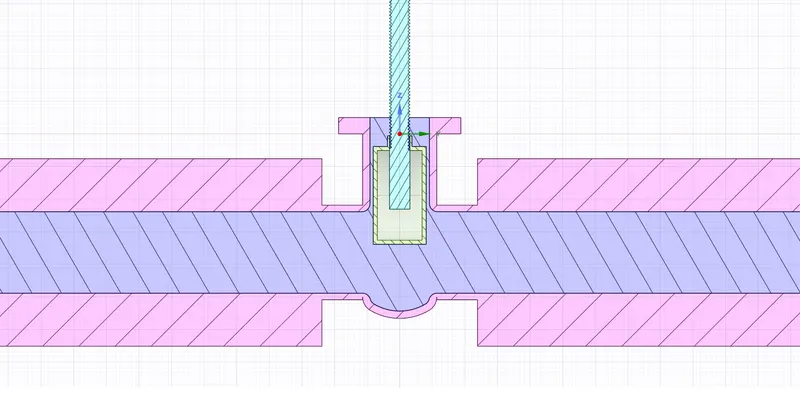
SpaceClaim Cross-Sectional View
Residuals
This was taken in Fluent.
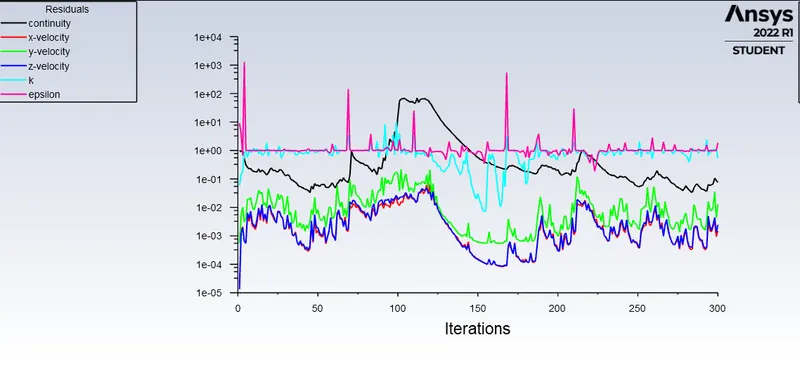
The residuals have entered an erratic behavior, but the reports generated show a steady-state behaviour, hence we can say the solution has converged.
Velocity Contour
This was taken in Fluent.
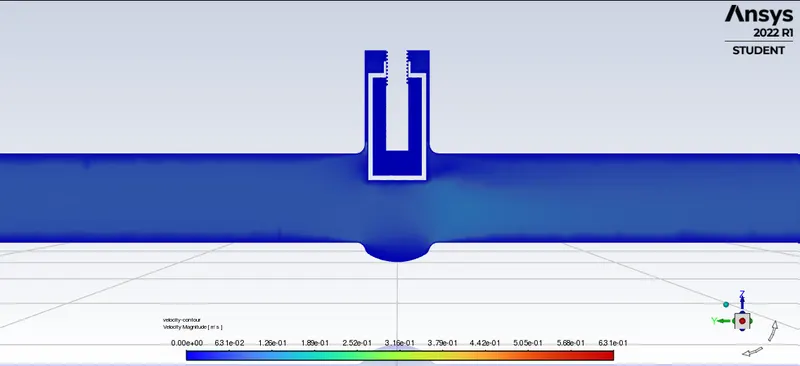
The increase in velocity is not visible as the velocity has fully dissipated throughout the valve.
Number of mesh nodes: 27761
Number of mesh elements: 130809
Number of iterations taken for this solution: 300 iterations
Mass flow rate at the outlet: 0.6826 `kg//s`
Flow Factor at outlet: 168.082 `m^3//hr`
Flow Coefficient at outlet: 194.315 `gal//min`
70mm/70% opening of gate valve
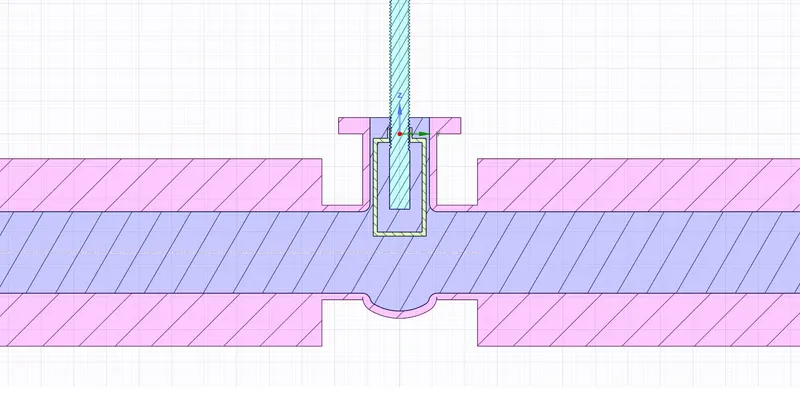
SpaceClaim Cross-Sectional View
Residuals
This was taken in Fluent.
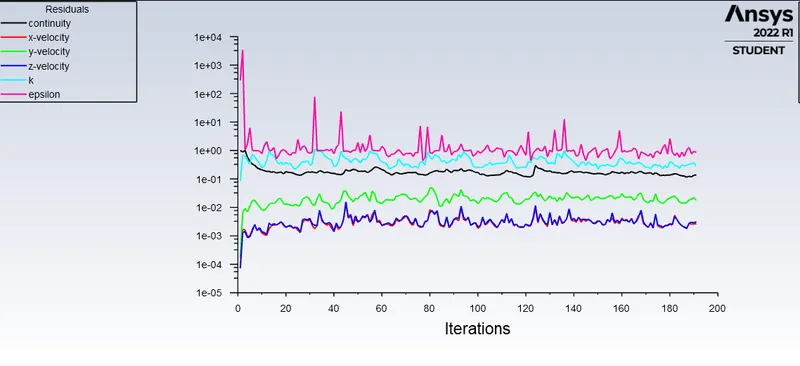
The residuals seem to be not dropping further, but the reports generated show a steady-state behaviour, hence we can say the solution has converged.
Velocity Contour
This was taken in Fluent.
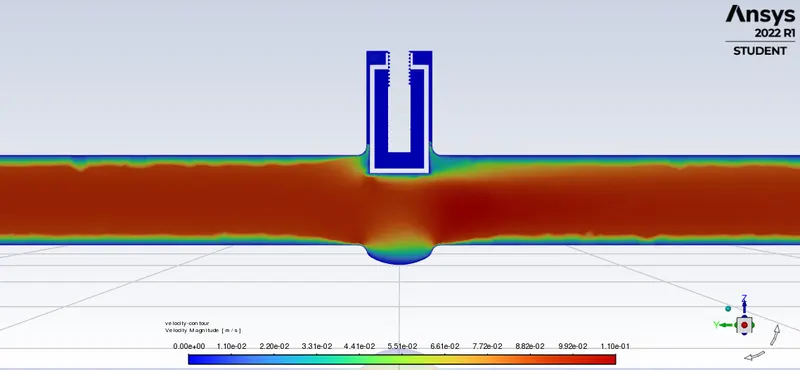
The increase in velocity is not visible as the velocity has fully dissipated throughout the valve.
Number of mesh nodes: 32092
Number of mesh elements: 151663
Number of iterations taken for this solution: 191 iterations
Mass flow rate at the outlet: 0.7487`kg//s`
Flow Factor at outlet: 202.210 `m^3//hr`
Flow Coefficient at outlet: 233.769 `gal//min`
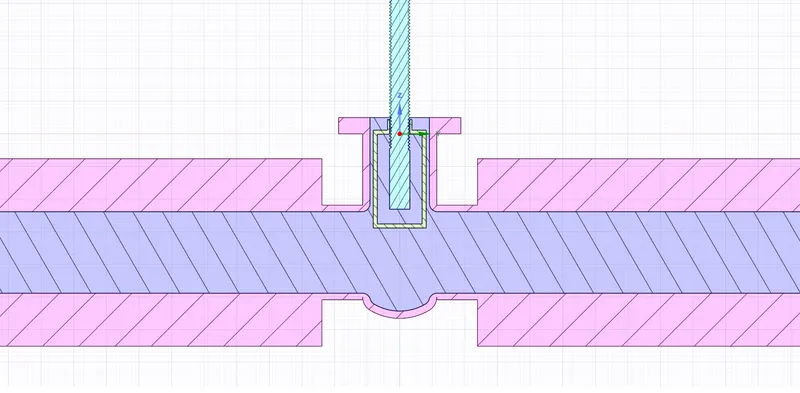
80mm/80% opening of gate valve
SpaceClaim Cross-Sectional View
Residuals
This was taken in Fluent.
The residuals seem to be not dropping further, but the reports generated show a steady-state behaviour, hence we can say the solution has converged.
Velocity Contour
This was taken in Fluent.
The increase in velocity is not visible as the velocity has fully dissipated throughout the valve.
Number of mesh nodes: 32163
Number of mesh elements: 152044
Number of iterations taken for this solution: 205 iterations
Mass flow rate at the outlet: 0.786684 `kg//s`
Flow Factor at outlet: 223.196 `m^3//hr`
Flow Coefficient at outlet: 258.0305 `gal//min`
General trends observed in the results
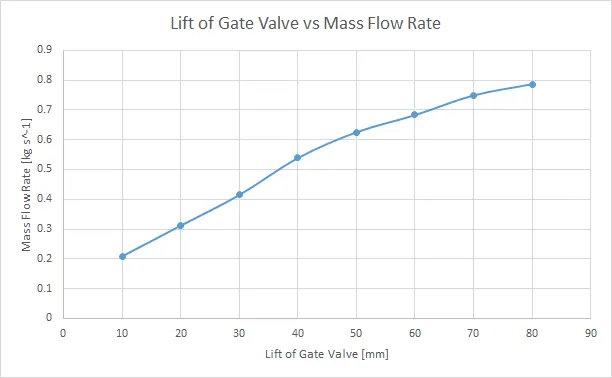
Mass Flow Rate
Mass flow rate increases as the gate valve is opened further. Opening the gate valve increases the cross sectional area at the valve and decreases the resitance offered to the fluid flow, hence this behaviour is in agreement with expected results.
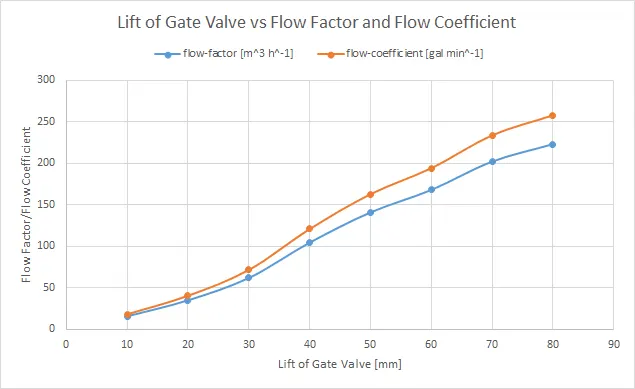
Flow Factor and Flow Coefficient
Both of the flow quantities increase as the gate valve is opened further. Opening the gate valve increases the cross sectional area at the valve and decreases the resitance offered to the fluid flow, this increases the efficieny of the flow as seen in these values. Hence, this behaviour is in agreement with expected results.
Summary Table
This table summarises all the numerical results from all the simulations conducted in this project.
| Sno. | Lift of Gate Valve (`mm`) | mass-flow-at-outlet-op (`kg//s`) | flow-factor (`m^3//hr`) | flow-coefficient (`gal//min`) | Mesh nodes | Mesh Elements |
| 1 | 10 | 0.20860554 | 15.694107 | 18.143476 | 35145 | 169396 |
| 2 | 20 | 0.31165964 | 35.03048 | 40.497664 | 48281 | 241893 |
| 3 | 30 | 0.41441225 | 61.936989 | 71.603457 | 81795 | 438558 |
| 4 | 40 | 0.53842437 | 104.55248 | 120.86992 | 28112 | 133673 |
| 5 | 50 | 0.62513845 | 140.941 | 162.93756 | 28074 | 133156 |
| 6 | 60 | 0.68268308 | 168.08278 | 194.31536 | 27761 | 130809 |
| 7 | 70 | 0.748786395 | 202.2108523 | 233.7697689 | 32092 | 151663 |
| 8 | 80 | 0.786684344 | 223.1964138 | 258.0305334 | 32163 | 152044 |
Conclusions
1. The simulation ran well and expected results were obtained. The mass flow rate does increase with opening %, same behaviour is observed with the flow coefficient and flow factor as well.
2. While the general trend may be visible, the solution often struggles to converge. This could be due to improper mesh settings, and more number of elements are required. (this would violate conditions of the academic license)
3. There are velocity hotspots near the partly closed/opened gate valve, which is expected as flow area contracts. This can be explained by the flow rate formula: `Q = V xx A`. The flow rate (`Q`) is constant, when the area (`A`) decreases, to compensate for decrease in area, velocity (`V`) has to increase.
4. This simulation also shows the advantages of using parameters in ANSYS, and how much time can be saved when conducting nearly similar simulations.
References