Week 9-Creation of 1D Connectors Challenge
OBJECTIVE : To create different FE connections to connect following parts of the meshed model :
1. Right_Rail_2 & Front_truss_1:- Seam-Quad(angled+capped+L)
2. Left_Rail_2 & Front_truss_1:- Quad elements
3. Front_truss_2, Front_truss_1 & Right_Rail_1:- Spot weld with 2 Layers and 5 mm Diameter
4. Front_truss_2, Front_truss_1 & Left_Rail_1:- Hexa (Adhesive)
5. Rear_truss_2 & Right_Rail_2:- Bolt Connector
6. Rear_truss_2 & Left_Rail_2:- Bolt Connector
7. Right_Rail_1 & Right_Rail_2:- Spot-weld with Rigid Elements
8. Left_Rail_1 & Left_Rail_2:- Spot-weld with Spring Elements
9. Rest all the component left Join them with suitable connectors.
Also the final model needs to be checked for the mesh quality as per the following criterion :
Target Element size - 5 Units
|
S.No. |
Quality Criteria |
Value |
|
1 |
Aspect Ratio |
5 |
|
2 |
Skewness |
45 |
|
3 |
Warping |
15 |
|
4 |
Taper |
0.5 |
|
5 |
Min. Length |
2 Units |
|
6 |
Max. Length |
8 Units |
|
7 |
Min angle Quad |
45 |
|
8 |
Max angle Quad |
135 |
|
9 |
Min angle Tria |
30 |
|
10 |
Max angle Tria |
110 |
|
10 |
Tria % |
15 |
PROCEDURE :
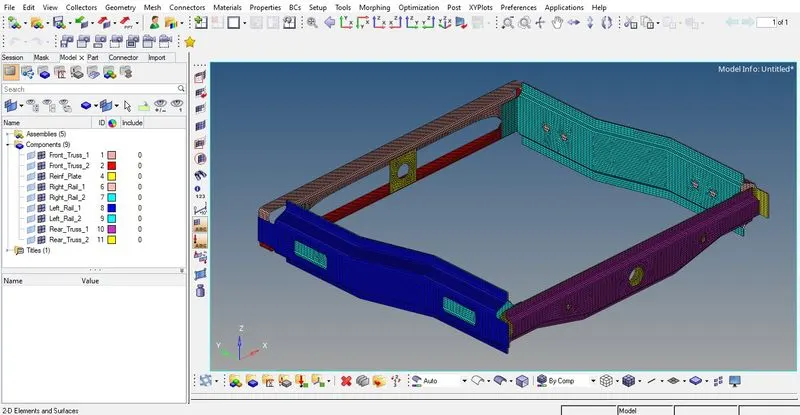
- Firstly all the components of the given model are 2D meshed one by one. The quality criteria need not to be worried about at this step and we only need to set the target element size & mesh type as 5mm & mixed respectively in the automesh panel.

The completely meshed model will look as shown below :
- 1. Right_Rail_2 & Front_truss_1 : Seam-Quad(angled+capped+L)
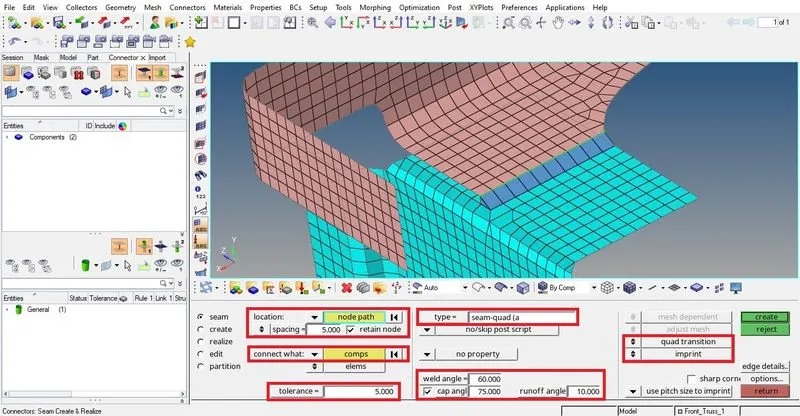
The mesh of above two components are isolated from the rest of the components. Then we locate the possible location for a feasible connection according to its given type. After figuring out the location, we need to follow the pathway : 1D > connectors > seam to create the connection.
Under seam we select location using node path to mark the line of seam weld over the finite elements through nodes. Also we set the spacing same as the target element size and tick the checkbox of retain nodes to retain the selected nodes in their original position when the weld gets generated. Under connect what option we select the components required to be connected. The tolerance is set to some suitable value (here taken as 5) so that the two components which are required to be connected lie within an imaginary spherical search space having its radius as tolerance value.
Then comes the option of type in which we select an appropriate seam weld connection type (in this case seam-quad(angled+capped+L)). The remaining options under seam depens on this selected type.
In seam-quad(angled+capped+L), we need to define the appropriate numeric values of weld angle, cap angle & run-off angle.
Weld angle is the angle between the normal projection of selected seam(nodes/line) and the generated quad direction.
Cap angle is measured between the normals of the cap element and the second-to-last element of the seam.
Run-off angle is measured between the normals of the last and the second-to-last last element of the seam.
The quad-transition option create quads to serve as a transition while the imprint option merge two meshes from two different link entities to create a transition mesh that matches up well with both. Finally we hit the create button to get the connection as shown below :
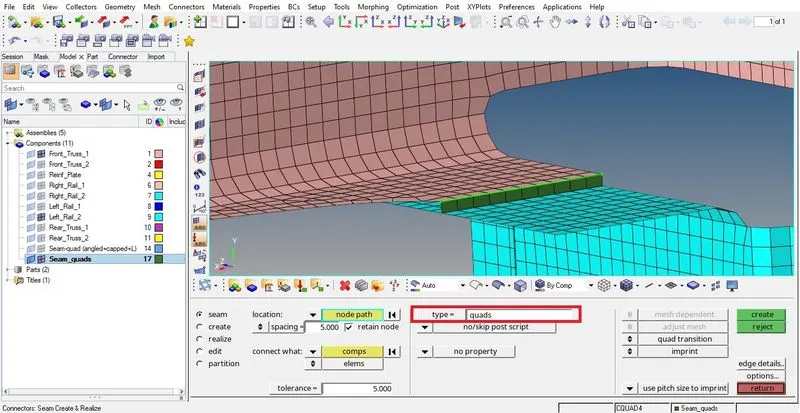
- 2. Left_Rail_2 & Front_truss_1 : Seam Quad elements
For these two components we follow the similar procedure as for the previous two components because it is also seam connection. This time around we only need to change the type as quad. Also under this quad type there are no such requirements of various types of angles that needs to defined because the generated connection elements are projected straight rather being slant as in the previous case.
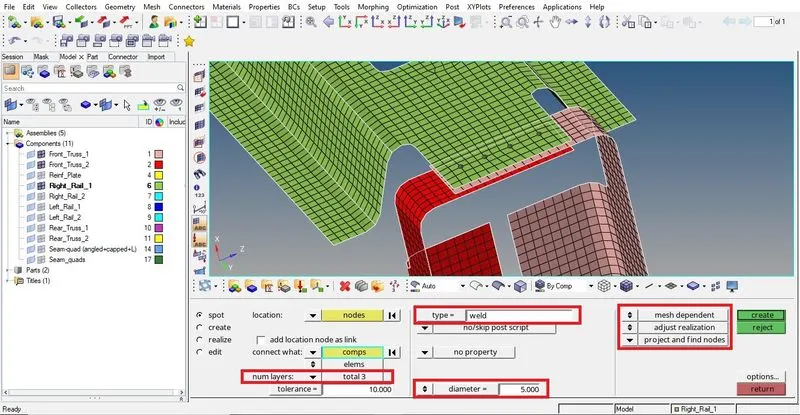
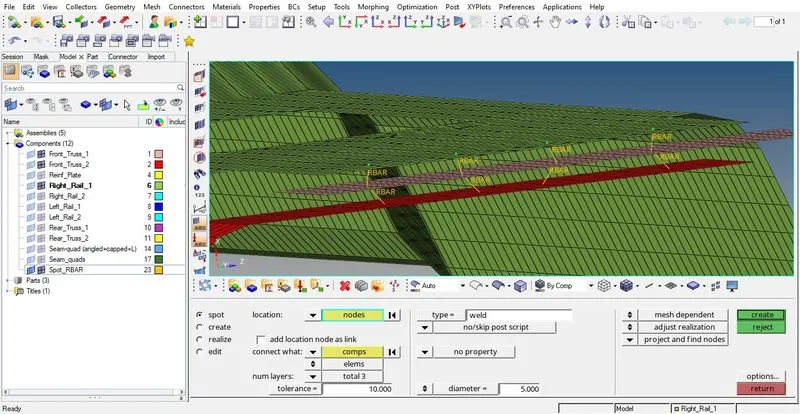
- 3. Front_truss_2, Front_truss_1 & Right_Rail_1 : Spot weld with 3 Layers and 5 mm Diameter
To create spot welds in between desired components we need to follow the pathway : 1D > connectors > spot.
Under spot we find most of the options similar to the seam except the type & its related options. Here specifically two new options namely num layers & diameter comes into picture. In num layers we select the number of layers (here 3) of components that need to be spot welded & diameter option defines the diameter (in this case 5mm) of each spot weld that is being generated.
In addition to this mesh dependent & adjust realization options are available to be used unlike in seam quad.
Mesh dependent means all those connections in which realization is purely dependent over mesh based node selection. It does'nt depend over solver-specific cards as in the case of mesh independent.
Adjust realization as the name suggests is for the adjustment of realization of connections itself. Example : allowing non-normal realizations for the sake of locating nodes to create the realization. It has 3 sub-options under it namely : project and find nodes, find nearest nodes, ensure projection. These options either project nodes or find nearest nodes or does both over the component which is required to be connected with one having those selection nodes. Here in this case we have selected project and find nodes.
Under type option we select weld which creates rigid bars to connect the selected components at the defined locations(nodes).
- 4. Front_truss_2, Front_truss_1 & Left_Rail_1 : Seam - Hexa (Adhesive)
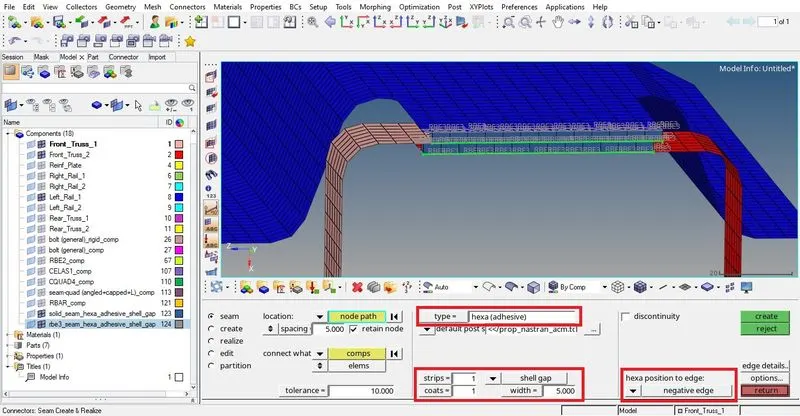
This connection again being a seam weld will be having similar options as explained in first two connections. Here only the type is being changed to hexa(adhesive) and thus few options related to it change. The most noticeable options related to it here are strips, coats & width.
Width is the distance of the continuous hexa weld in the direction perpendicular to the seam direction. Genarally kept the same as target element size to avoid mesh-mismatch (here kept as 5mm)
Strips define the number of hexa elements required along the width. (here taken as 1)
Coats defines the number of hexa elements required along the thickness. (here taken as 1)
One more important option under this type is hexa position to edge. This option decides whether the generated hexa(adhesive) connection finite elements will be positioned inside(negative) or outside(positive) or in the middle(midpoint) or offset with respect to the selected edge of nodes. One can select as per his need. Here we have selected negative edge. Also the created solid elements of hexa(adhesive) connection are connected to components required to be connected via RBE3 elements.
- 5. Rear_truss_2 & Right_Rail_2 : Bolt - bolt(general)
&
- 6. Rear_truss_2 & Left_Rail_2 : Bolt - bolt(general)
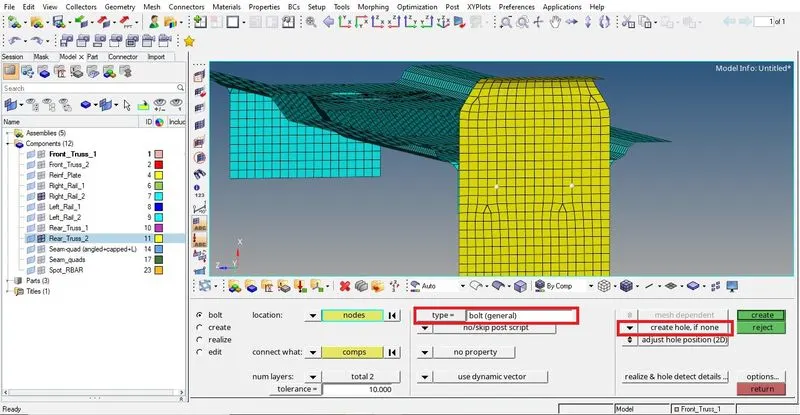
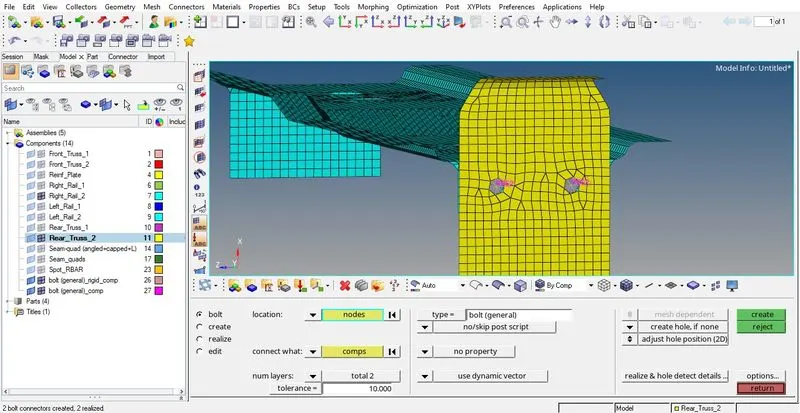
Bolt is an another way of connecting components with some stiffness added to them. Like panels of other types of connections bolt panel also have the same way of locating nodes, selecting components, providing tolerance, selecting layers and finally the type.
The options that are unique to this panel are related to hole where the bolting needs to done. These options are self explaining and can be used according to the requirement.
In a bolted connection, three RBE2 elements are present with two of them are in centre of spiders created over hole and the remaining one connects both. The presence of RBE2 elements indicate about the inherent stiffness that comes along with these type of connections.
At both the locations (5th & 6th) the holes were'nt present over the components. Therefore, create hole, if none option was selected.
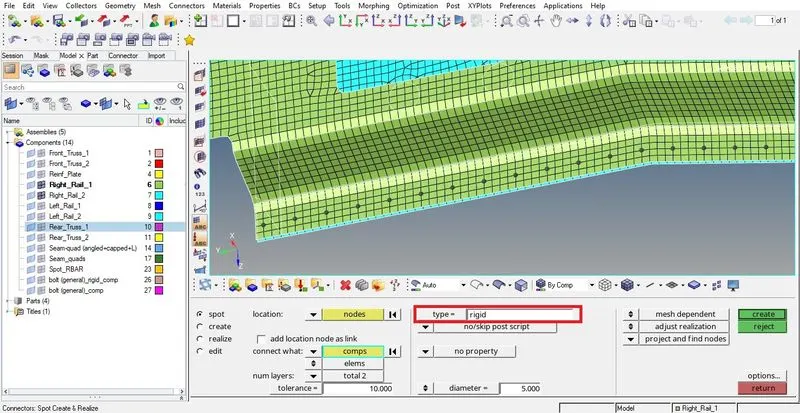
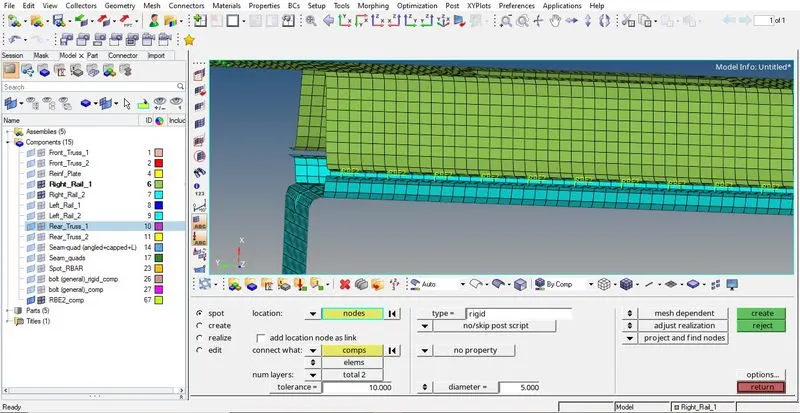
- 7. Right_Rail_1 & Right_Rail_2 : Spot-weld with Rigid Elements
Again as this is a spot weld we need to change only the type here as rigid. Rest of the options remains the same as we seen previously in a spot weld. As the name of the type suggests the created spot welds are rigid in nature i.e. they bring along with them more stiffness to the region of weld. Selecting rigid in type generates RBE2 elements as connections between the selected components.
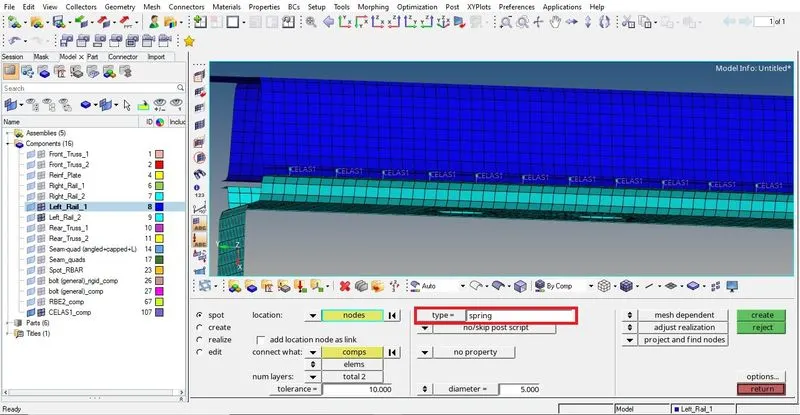
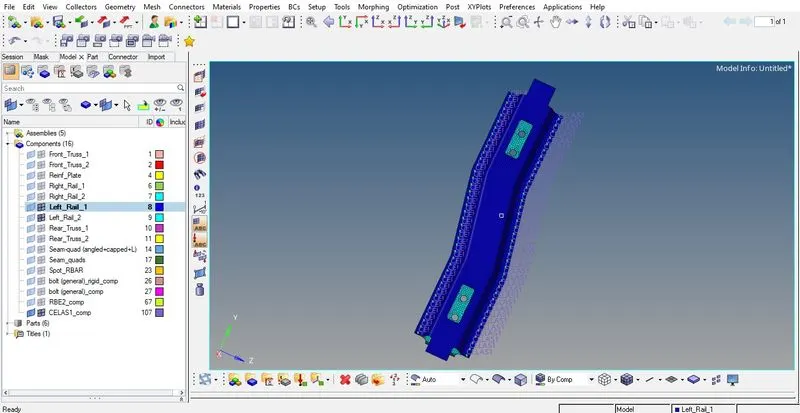
- 8. Left_Rail_1 & Left_Rail_2 : Spot-weld with Spring Elements
Similar to the 7th connection, here also type is set as spring which results in creating CELAS1 (elastic element) for connecting the given components.
- Left-over connections in the model, if any.
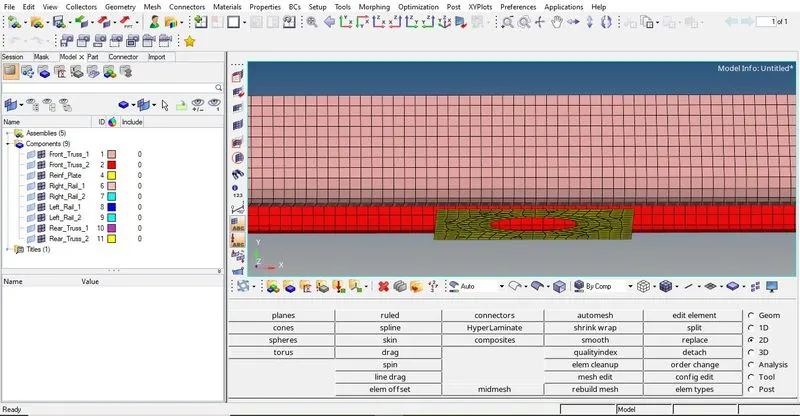
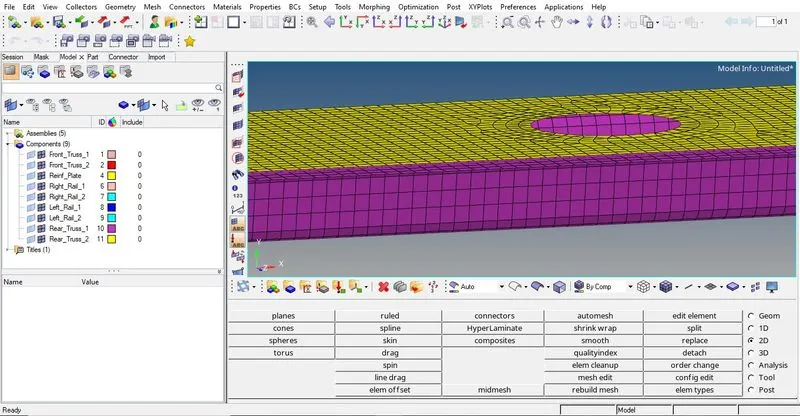
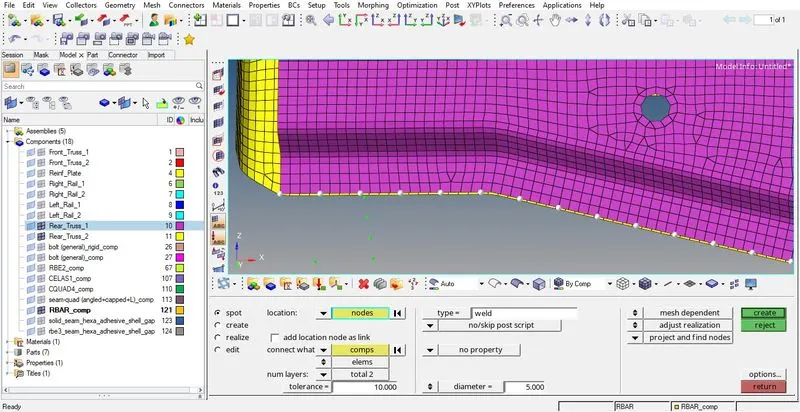
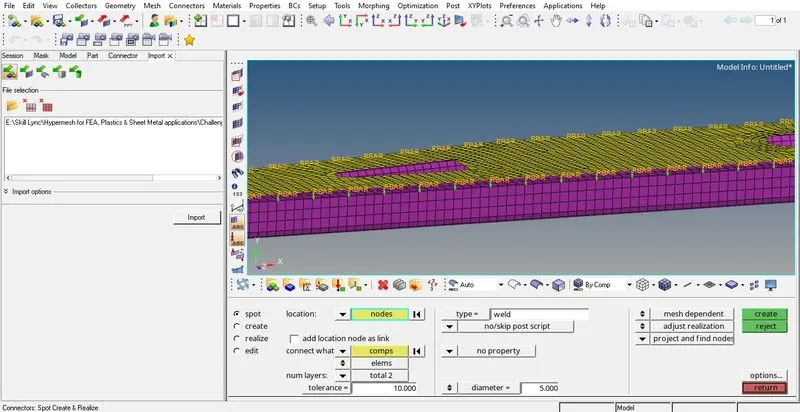
Two such locations were identified where the need of connection was felt as the components present there, though lying very close to each other, were not connected by any means.
(i) Reinf_Plate, Front_Truss_1 & Front_Truss_2 :
(ii) Rear_Truss_1 & Rear_Truss_2 :
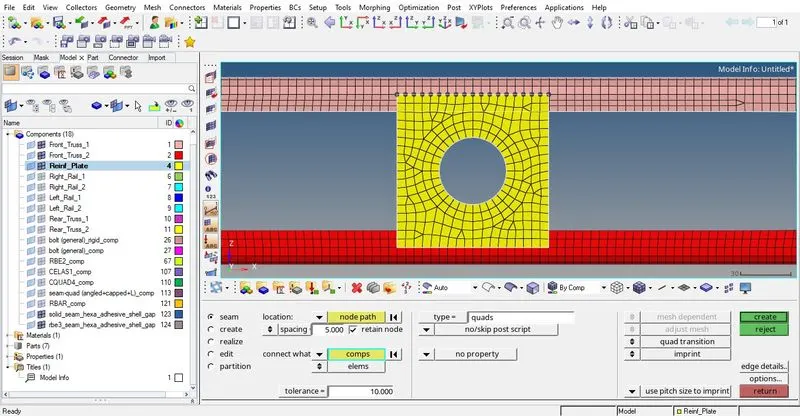
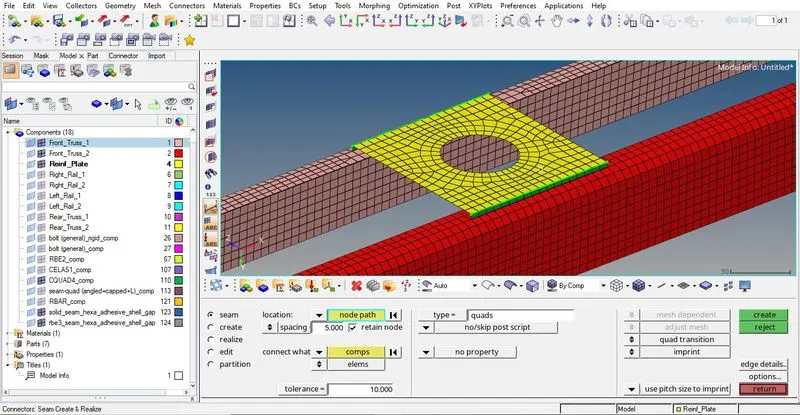
Suitable connections are created on the above locations as shown below :
(i)
(ii)
- Clearing the given Quality Criteria
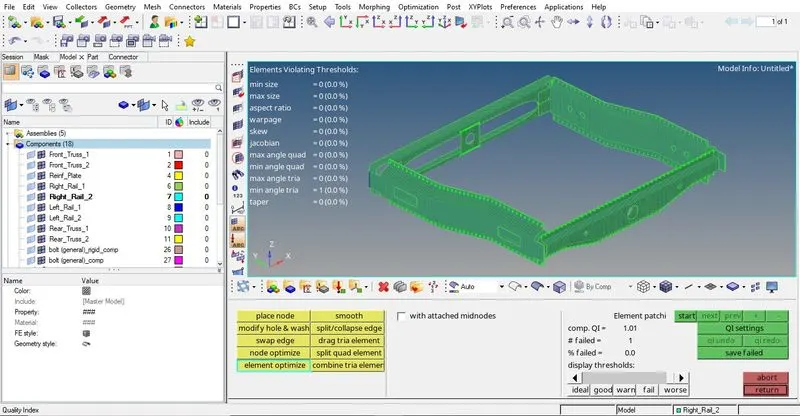
After realizing all the necessary connections, we finally go for clearing the quality criteria. This practice of clearing the quality criteria after connection creation is recommended as doing it at an earlier stage, most of the times results in many failed elements. This is due to the change or transition of mesh near the connections.
Here in our model we have successfully satisfied the given quality criteria. The only failed element was part of seam-quad(angled+capped+L) which failed due to minimum tria angle. This failed element is accepted as repairing it resulted in major disturbance in the surrounding mesh as well as some discrepancies. Thus we accept it as it is.
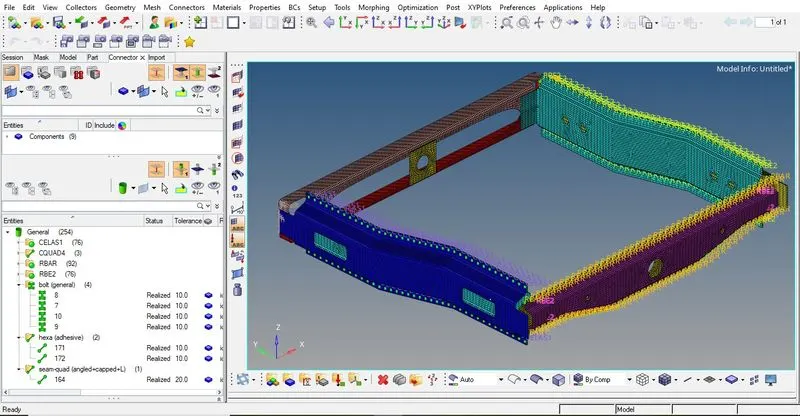
FINAL MODEL IMAGE :
All the given connections were successfully realized as can be seen below :
CONCLUSION :
Through this challenge we learned about various types of connections that are used to connect different components within a model. Also we learned about the suitability of a connection based on a given location.
Connections serves the purpose of transfering loads, defining constraints etc when we analyze our model in a solver.