| MATLAB | Solving Second Order ODEs (Week 3)
AIM : Write a program to solve the ordinary differential equation of Simple Pendulum in order to simulate its motion.
THEORY :
A pendulum is a weight suspended from a pivot so that it can swing freely. When a pendulum is displaced sideways from its resting, equilibrium position, it is subject to a restoring force due to gravity that will accelerate it back toward the equilibrium position. When released, the restoring force acting on the pendulum's mass causes it to oscillate about the equilibrium position, swinging back and forth. The time for one complete cycle, a left swing and a right swing, is called the period.
The simple gravity pendulum is an idealized mathematical model of a pendulum. This is a weight (or bob) on the end of a massless cord suspended from a pivot, without friction. When given an initial push, it will swing back and forth at a constant amplitude. Real pendulums are subject to friction and air drag, so the amplitude of their swings declines.
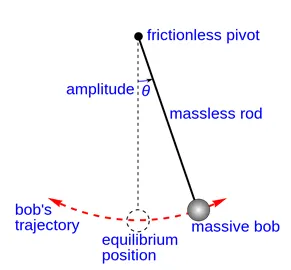
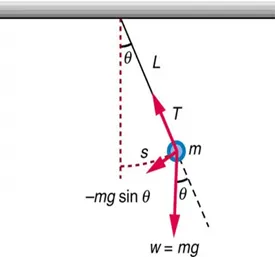
GOVERNING EQUATION :
Taking moments of all the forces about pivot point :
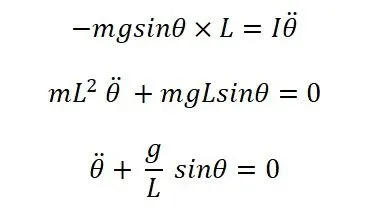
If damping is taken into consideration, the above second-order differential equation becomes :
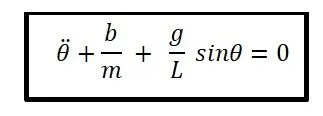
where, b = damping coefficient
g = acceleration due to gravity
m = mass of the bob (kg)
l = length of the string (m)
CALCULATIONS :
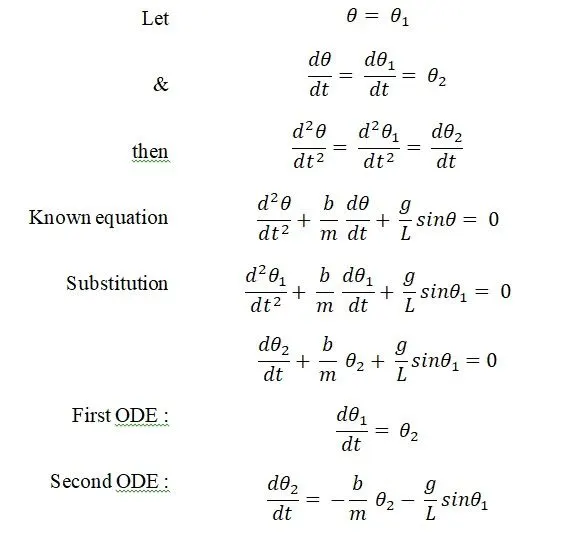

In general, an ODE of nth – order can be broken down into a system of n-first order ODEs with the help of newly defined variables.
CODES :
Function Code :
Under this, one second-order ODE for simple pendulum is splitted into two first-order ODEs using appropriate substitution as shown in calculations above. The purpose of this code is to store the differential equations which are needed to be numerically integrated using MATLAB’s in-built ode solvers (e.g. ode23 & ode45).
function [dtheta_dt] = ode_func(t,theta,m,l,g,b)
theta1 = theta(1);
theta2 = theta(2);
dtheta1_dt = theta2; % First ODE
dtheta2_dt = (-b/m)*theta2 - (g/l)*sin(theta1); % Second ODE
dtheta_dt = [dtheta1_dt ; dtheta2_dt]; % Both ODEs clubbed into
                                       % a column matrix
end
Main Code :
% Simulation of Motion of a Simple Pendulum %
clear all
close all
clc

% Input data
m = 1;     % mass of the ball(kg)
l = 1;       % length of string (m)
b = 0.05;    % damping coefficient
g = 9.81;    % acceleration due to gravity (m/s^2)

% Initial conditions at time t=0
theta0 = [0,3]; %[initial ang. displacement, initial ang. velocity]

% Time-span(linearly spaced)
t_span = linspace(0,20,400);

% Solving the simple-pendulum ODE
[t,k] = ode45(@(t,theta)ode_func(t,theta,m,l,g,b),t_span,theta0);

% Plotting
figure(1)
plot (t,k(:,1))  % time v/s angular displacement plot
hold on          % to avoid disappearance of previous plot after the
                 % plotting of most recent one.
plot (t,k(:,2))  % time v/s angular velocity plot
xlabel('time'), ylabel('Angular displacement & Angular velocity')
legend ('Angular displacement','Angular velocity')
grid on

% Animation
figure(2)
ct=1;
for i = 1:length(t_span)
    % Pivot point coordinates
    x0 = 0; y0 = 0;

    % Free end coordinates
    x1 = l*sin(k(i,1));
    y1 = -l*cos(k(i,1));
    % k(i,1)represents value of first column of vector k (displacement)
    % corresponding to each value of t_span vector.

    % Horizontal fixed line to which string is pivoted
    plot([-0.5,0.5],[0,0],'linewidth',3,'color','black')
    hold on

    % String
    plot([x0,x1],[y0,y1],'linewidth',2,'color','blue')

    % Bob tied at free end of string
    plot(x1,y1,'marker','o','markersize',15,'markerfacecolor','red')
    hold off

    % Adjustment of axes of plot
    axis([-1,1,-1.5,0.5])

    % Causing fractional pause of frames
    pause(0.005)

    % Storing each plot as a frame in an array M
    M(ct) = getframe(gcf);

    ct = ct+1;
end

% Playing the recorded frames as a movie
movie(M)

% Creation of a video file 'V' with name & specified format
V = VideoWriter('Simple_Pendulum','Uncompressed AVI');

% Opening of the above created videofile
open(V)

% Writing in the above opened videofile, the frames stored in array M
writeVideo(V,M)

% Closure of videofile
close(V)
Explanation :
Line 6 – 10 : Input data like mass of the bob, length of the string, damping coefficient & acceleration due to gravity are defined.
Line 12 – 13 : As it is required to solve two first-order ODEs (one for angular displacement & other for angular velocity), initial conditions for both these needs to be defined. Here the variable ‘theta0’ stores these values.
Line 15 – 16 : Time span represents the integration limits. It is defined as an array with linearly spaced values between initial (t0) & final (tf) time limits using linspace command. Here we have t0 = 0 & tf = 50 with 500 equally spaced values in between.
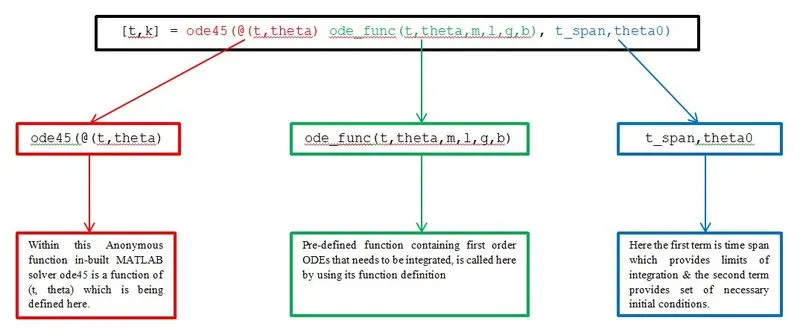
Line 18 – 19 : Here we provide an appropriate syntax to solve the set of ODEs using MATLAB’s inbuilt solver ode45. Two variables within the square brackets ( i.e. t & k) on the left hand side of the syntax stores the outputs of the anonymous function. There are 3 inputs to this anonymous function. These are – the function to be integrated, time span & initial conditions. Function that needs to be integrated is nothing but the function code we have defined already & hence it is called using the function definition. The numerical method which ode45 utilizes to solve ODEs is 4th order Runge-Kutta method.
ode45 syntax explanation :
Line 21 – 29 : The first graph is numbered as figure(1) in order to separate it from second graph (animation) numbered as figure(2). Output solution variable ‘k’ is a column vector with two columns. First column stores displacement values while second stores the values of velocity. Command hold on is used after first plot to avoid its disappearance after the plotting of most recent one within the same figure(1). Appropriate labeling of figure(1) is done for the axes using commands xlabel & ylabel. To make the figure(1) more informative and easy to read legend command is used & grid is made on.
Line 31 – 80 : In these lines a for loop is executed followed by set of movie & video related commands. The purpose of for loop is to plot different coordinates of pendulum for each position it acquires as a function of time. Since several positions are attained by pendulum with respect to time, therefore we get several plots also.
Command getframe returns a movie frame. The frame is a snapshot of the current figure. getframe is usually used in a for loop to assemble an array of movie frames for playback using command movie. getframe(gcf) gets a frame from current figure, where gcf is a handle to a current figure. The output of this command i.e. the different frames (figures) obtained as a result of execution of for loop through its loop counter ‘i’, is stored in an array M. Each frame is stored as a column vector of M and to play these frames on the screen, command movie(M) is used.
Command VideoWriter creates a video writer object to write video data in a specific file format (such as 'Uncompressed AVI'). Its syntax is VideoWriter(filename, profile) where filename & profile are strings enclosed in single quotation marks that specify the name & type respectively of the file to create. If filename does not include the extension, the VideoWriter constructor adds the extension. Some examples of profile that MATLAB can create are :
- 'Uncompressed AVI' - Uncompressed AVI file with RGB24 video.
- 'Indexed AVI' - Uncompressed AVI file with Indexed video.
- 'Grayscale AVI' - Uncompressed AVI file with Grayscale video.
- 'Motion JPEG AVI' - Compressed AVI file using Motion JPEG codec.
Other functions that sequentially follow are open, write and close.
OUTPUT :
Plot -
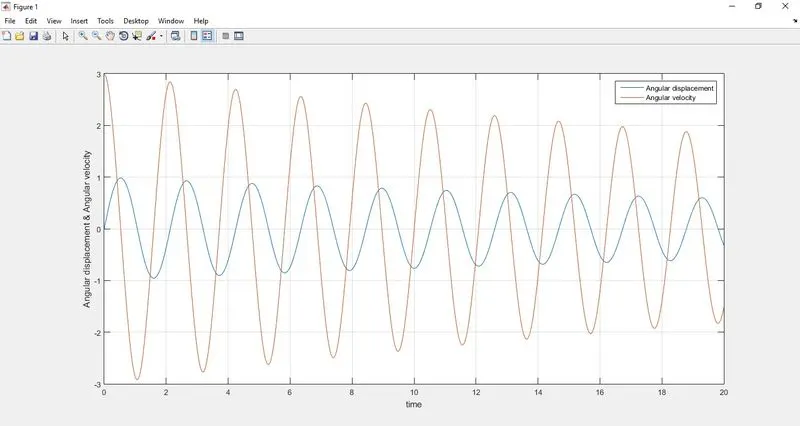
- From the above plot, it can be clearly seen that angular displacement starts from 0 while angular velocity starts from 3 rad/s.
- With the passage of time the amplitude of both displacement & velocity decrease and finally becomes zero after sometime. This is because of the damping, which is provided by air (medium) in which the pendulum swings.
Animation Video Link :
https://youtu.be/RzjXM9dZIro