Week 8 - Simulation of a backward facing step in OpenFOAM
Aim:
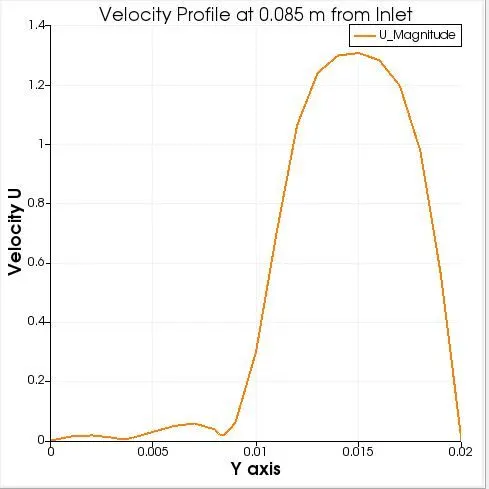
Simulate an incompressible-laminar-viscous flow through the backward facing step geometry with scaling factor 1 and 0.2. Also measure the velocity profile at 0.085 m from the inlet of the geometry for both case studies and compare using plot over line tool.
Given data:
The following datas are given in order to arrive at a solution.
- The domain specifications
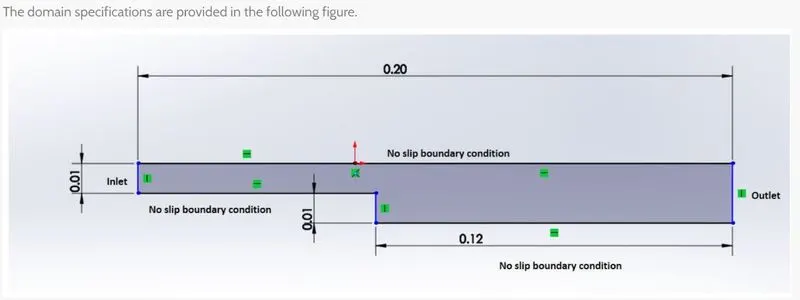
2. Mesh Specifications
- Number of cells along the x direction (longer dimension) = 200
- Number of cells along the longer y direction = 20;
3. All the dimenssions are in meters.
Methodology
- Since the problem deals with transient incompresssible Laminar Viscous flow, the solver named 'icoFoam' is chosen from the openFoam tutorial folder. From icoFoam solver folder we go into cavity folder and copied the cavity folder to our run directory.
- The next step is to create blockMesh. The blockMesh can be updated by accessing the file named 'blockMeshDict' located inside the system folder inside cavity folder. This file ccontains the information regarding the geometry.
In this blockmeshdict file we will define all the vertices, blocks, mesh and boundaries.
Blockmesh specifications: Number of blocks = 5
Arrangement of blocks:
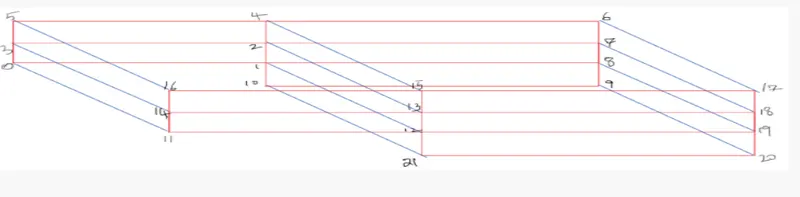
Case 1: Grading Factor = 1
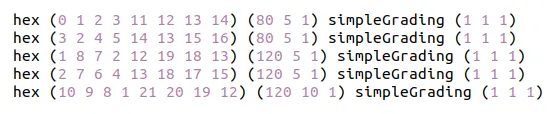
The following blockmesh Script represents case 1. Here we can see the grading factor is 1, which means that all the cells are of same size.
grading factor f = size of end cell/ size of starting cell
/*--------------------------------*- C++ -*----------------------------------*\
  =========                 |
  \\      /  F ield         | OpenFOAM: The Open Source CFD Toolbox
   \\    /   O peration     | Website:  https://openfoam.org
    \\  /    A nd           | Version:  8
     \\/     M anipulation  |
\*---------------------------------------------------------------------------*/
FoamFile
{
    version     2.0;
    format      ascii;
    class       dictionary;
    object      blockMeshDict;
}
// * * * * * * * * * * * * * * * * * * * * * * * * * * * * * * * * * * * * * //

convertToMeters 1;

vertices
(
    (0 0 0)
    (0.08 0 0)
    (0.08 0.005 0)
    (0 0.005 0)
    (0.08 0.01 0)
    (0 0.01 0)
    (0.2 0.01 0)
    (0.2 0.005 0)
    (0.2 0 0)
    (0.2 -0.01 0)
    (0.08 -0.01 0)
    (0 0 0.001)
    (0.08 0 0.001)
    (0.08 0.005 0.001)
    (0 0.005 0.001)
    (0.08 0.01 0.001)
    (0 0.01 0.001)
    (0.2 0.01 0.001)
    (0.2 0.005 0.001)
    (0.2 0 0.001)
    (0.2 -0.01 0.001)
    (0.08 -0.01 0.001)

);

blocks
(
    hex (0 1 2 3 11 12 13 14) (80 5 1) simpleGrading (1 1 1)
    hex (3 2 4 5 14 13 15 16) (80 5 1) simpleGrading (1 1 1)
    hex (1 8 7 2 12 19 18 13) (120 5 1) simpleGrading (1 1 1)
    hex (2 7 6 4 13 18 17 15) (120 5 1) simpleGrading (1 1 1)
    hex (10 9 8 1 21 20 19 12) (120 10 1) simpleGrading (1 1 1)
);

edges
(
);

boundary
(
    inlet
    {
        type patch;
        faces
        (
            (0 11 14 3)
            (3 14 16 5)
        );
    }
    outlet
    {
    	type patch;
    	faces
    	(
    	    (9 8 19 20)
    	    (8 7 18 19)
    	    (7 6 17 18)
    	);
    }
    noSlipWalls
    {
        type wall;
        faces
        (
            (16 15 4 5)
            (15 17 6 4)
            (11 0 1 12)
            (20 21 10 9)
            (10 21 12 1)
        );
    }
    frontAndBack
    {
        type empty;
        faces
        (
            (5 4 2 3)
            (3 2 1 0)
            (2 7 8 1)
            (4 6 7 2)
            (1 8 9 10)
            (16 14 13 15)
            (14 11 12 13)
            (15 13 18 17)
            (13 12 19 18)
            (12 21 20 19)
        );
    }
);

mergePatchPairs
(
);

// ************************************************************************* //
Case 2: Grading Factor = 0.2
The following blockmesh Script represents case 2. Here we can see the grading factor is 0.2, which means that the end cell is 0.2 times the starting cell.
It is alsso mentioned in the problem that the cells should be finer near the walls (includig the step wall). So, accordingly the blockmessh script is modified.

/*--------------------------------*- C++ -*----------------------------------*\
  =========                 |
  \\      /  F ield         | OpenFOAM: The Open Source CFD Toolbox
   \\    /   O peration     | Website:  https://openfoam.org
    \\  /    A nd           | Version:  8
     \\/     M anipulation  |
\*---------------------------------------------------------------------------*/
FoamFile
{
    version     2.0;
    format      ascii;
    class       dictionary;
    object      blockMeshDict;
}
// * * * * * * * * * * * * * * * * * * * * * * * * * * * * * * * * * * * * * //

convertToMeters 1;

vertices
(
    (0 0 0)
    (0.08 0 0)
    (0.08 0.005 0)
    (0 0.005 0)
    (0.08 0.01 0)
    (0 0.01 0)
    (0.2 0.01 0)
    (0.2 0.005 0)
    (0.2 0 0)
    (0.2 -0.01 0)
    (0.08 -0.01 0)
    (0 0 0.001)
    (0.08 0 0.001)
    (0.08 0.005 0.001)
    (0 0.005 0.001)
    (0.08 0.01 0.001)
    (0 0.01 0.001)
    (0.2 0.01 0.001)
    (0.2 0.005 0.001)
    (0.2 0 0.001)
    (0.2 -0.01 0.001)
    (0.08 -0.01 0.001)

);

blocks
(
    hex (0 1 2 3 11 12 13 14) (80 5 1) simpleGrading (0.2 5 1)
    hex (3 2 4 5 14 13 15 16) (80 5 1) simpleGrading (0.2 0.2 1)
    hex (1 8 7 2 12 19 18 13) (120 5 1) simpleGrading (5 5 1)
    hex (2 7 6 4 13 18 17 15) (120 5 1) simpleGrading (5 0.2 1)
    hex (10 9 8 1 21 20 19 12) (120 10 1) simpleGrading (5 5 1)
);

edges
(
);

boundary
(
    inlet
    {
        type patch;
        faces
        (
            (0 11 14 3)
            (3 14 16 5)
        );
    }
    outlet
    {
    	type patch;
    	faces
    	(
    	    (9 8 19 20)
    	    (8 7 18 19)
    	    (7 6 17 18)
    	);
    }
    noSlipWalls
    {
        type wall;
        faces
        (
            (16 15 4 5)
            (15 17 6 4)
            (11 0 1 12)
            (20 21 10 9)
            (10 21 12 1)
        );
    }
    frontAndBack
    {
        type empty;
        faces
        (
            (5 4 2 3)
            (3 2 1 0)
            (2 7 8 1)
            (4 6 7 2)
            (1 8 9 10)
            (16 14 13 15)
            (14 11 12 13)
            (15 13 18 17)
            (13 12 19 18)
            (12 21 20 19)
        );
    }
);

mergePatchPairs
(
);

// ************************************************************************* //
- The next step is to modify the start time, end time and the time step.. Time step is taken in such a way that the CFL number is less than 1. It can be accessed from controlDict file which is located inside the system folder inside the cavity folder. In both case 1 and case 2 the following controlDict script is used.
controlDict
/*--------------------------------*- C++ -*----------------------------------*\
  =========                 |
  \\      /  F ield         | OpenFOAM: The Open Source CFD Toolbox
   \\    /   O peration     | Website:  https://openfoam.org
    \\  /    A nd           | Version:  8
     \\/     M anipulation  |
\*---------------------------------------------------------------------------*/
FoamFile
{
    version     2.0;
    format      ascii;
    class       dictionary;
    location    "system";
    object      controlDict;
}
// * * * * * * * * * * * * * * * * * * * * * * * * * * * * * * * * * * * * * //

application     icoFoam;

startFrom       startTime;

startTime       0;

stopAt          endTime;

endTime         0.5;

deltaT          0.0001;

writeControl    timeStep;

writeInterval   20;

purgeWrite      0;

writeFormat     ascii;

writePrecision  6;

writeCompression off;

timeFormat      general;

timePrecision   6;

runTimeModifiable true;


// ************************************************************************* //
- Nest we need to define the initial values for the Pressure P and velocity U. These filees can be accessedd from folder 0 inside cavity folder. The following changes were made in these script files.
initial velocity = 1m/s
U
/*--------------------------------*- C++ -*----------------------------------*\
  =========                 |
  \\      /  F ield         | OpenFOAM: The Open Source CFD Toolbox
   \\    /   O peration     | Website:  https://openfoam.org
    \\  /    A nd           | Version:  8
     \\/     M anipulation  |
\*---------------------------------------------------------------------------*/
FoamFile
{
    version     2.0;
    format      ascii;
    class       volVectorField;
    object      U;
}
// * * * * * * * * * * * * * * * * * * * * * * * * * * * * * * * * * * * * * //

dimensions      [0 1 -1 0 0 0 0];

internalField   uniform (0 0 0);

boundaryField
{
    inlet
    {
        type            fixedValue;
        value           uniform (1 0 0);
    }

    outlet
    {
        type            zeroGradient;
    }

    noSlipWalls
    {
        type            noSlip;
    }

    frontAndBack
    {
        type            empty;
    }
}

// ************************************************************************* //
Pressure P
/*--------------------------------*- C++ -*----------------------------------*\
  =========                 |
  \\      /  F ield         | OpenFOAM: The Open Source CFD Toolbox
   \\    /   O peration     | Website:  https://openfoam.org
    \\  /    A nd           | Version:  8
     \\/     M anipulation  |
\*---------------------------------------------------------------------------*/
FoamFile
{
    version     2.0;
    format      ascii;
    class       volScalarField;
    object      p;
}
// * * * * * * * * * * * * * * * * * * * * * * * * * * * * * * * * * * * * * //

dimensions      [0 2 -2 0 0 0 0];

internalField   uniform 0;

boundaryField
{
    inlet
    {
        type            zeroGradient;
    }

    outlet
    {
        type            fixedValue;
        value	 	 uniform 0;
    }

    noSlipWalls
    {
        type            zeroGradient;
    }

    frontAndBack
    {
        type            empty;
    }
}

// ************************************************************************* //
- After making all these changes, next is to generate the bllockMesh by executing the command blockMesh in the command terminal, keeping the cavity folder open.
type blockMesh
- After blockmesh command open paraFoam to see the meshed geometry.
- If the geometry is fine, execute icoFoam in command terminal to perfoam mthe simulation.
The results will be discussed in the following section.
Results and Discussions:
The above methodology will result in the followiing results.
Case 1: Grading factor = 1
1. blockMesh
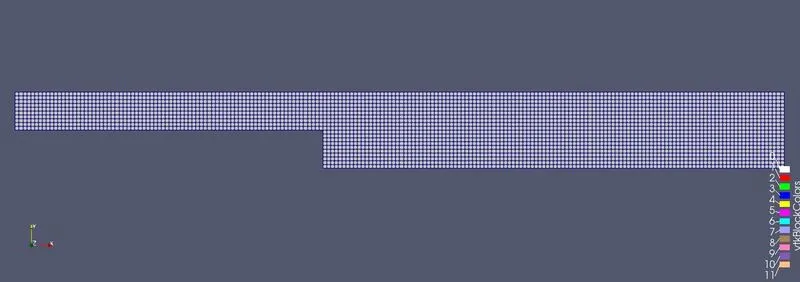
For grading factor of 1, we can observe uniform meshing throughout the geometry.
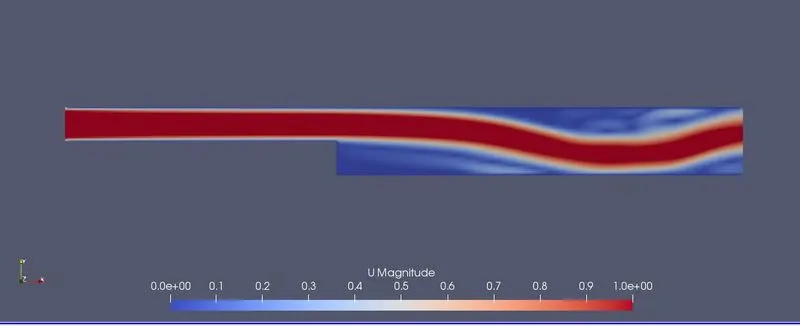
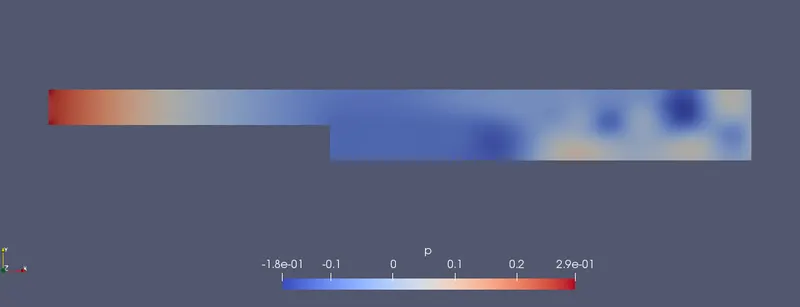
2. After simulation by executing icoFoam command
Velocity distribution
Pressure distributiion
3. velocity profile at 0.085 m from the inlet of the geometry when grading factor = 1
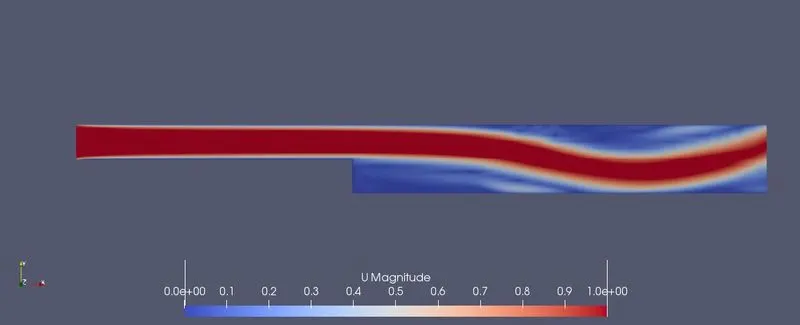
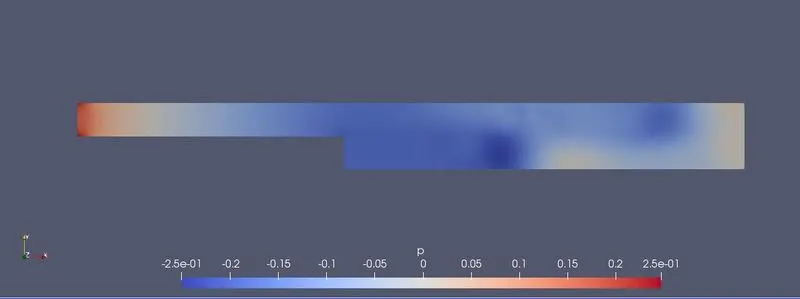
Case 2: Grading factor = 0.2
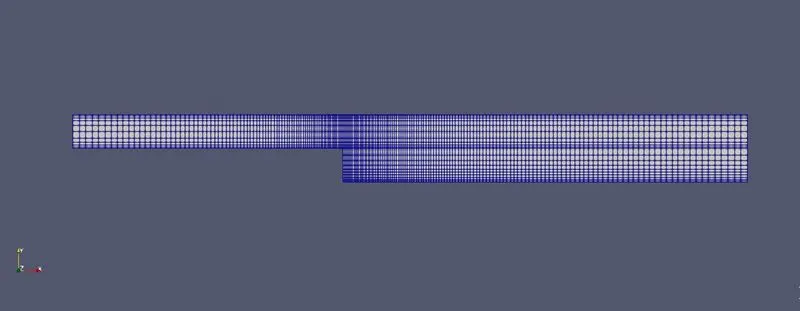
1. blockMesh
For grading factor of 0.2, we can observe finer mesh at near all the walls.
2. After simulation by executing icoFoam command
Velocity distribution
Pressure distributiion
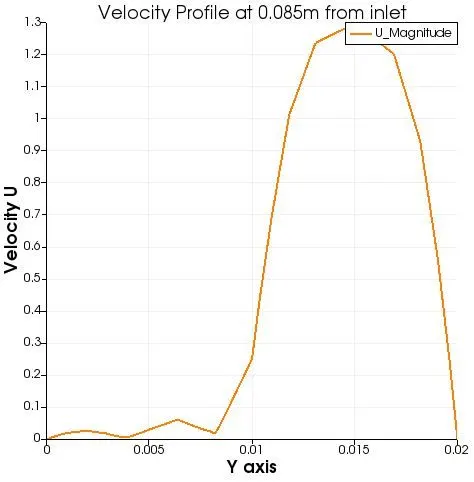
3. velocity profile at 0.085 m from the inlet of the geometry when grading factor = 0.2
Conclusion.
- From the Plots obtained, it is clear that the velocity curve is smooth when there is no grading factor.
- But near the wall, the cure is smooth when grading factor is 0.2. This is why because, we have created fine meshes using grading factor near the wallls...