Week 8 - Simulation of a backward facing step in OpenFOAM
For creating the geometry we are using 3 blocks ,
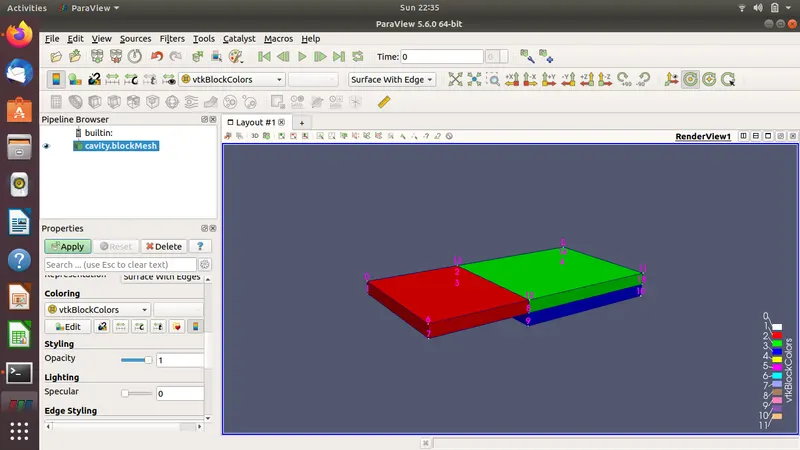
These blocks were created by editing the system/blockMeshDict file
/*--------------------------------*- C++ -*----------------------------------*\
  =========                 |
  \\      /  F ield         | OpenFOAM: The Open Source CFD Toolbox
   \\    /   O peration     | Website:  https://openfoam.org
    \\  /    A nd           | Version:  7
     \\/     M anipulation  |
\*---------------------------------------------------------------------------*/
FoamFile
{
    version     2.0;
    format      ascii;
    class       dictionary;
    object      blockMeshDict;
}
// * * * * * * * * * * * * * * * * * * * * * * * * * * * * * * * * * * * * * //

convertToMeters  1;

vertices
(
    (0 0 0)   //0
    (0 -0.01 0)  //1
    (0.08 -0.01 0) //2
    (0.08 -0.02 0) //3
    (0.2 -0.02 0) //4
    (0.2 0 0)  //5

    (0 0 0.1) //6
    (0 -0.01 0.1)  //7
    (0.08 -0.01 0.1) //8
    (0.08 -0.02 0.1)  //9
    (0.2 -0.02 0.1) //10
    (0.2 0 0.1)  //11
    (0.08 0 0.1 ) //12
    (0.08 0 0) //13
    (0.2 -0.01 0) //14
    (0.2 -0.01 0.1) //15

);

blocks
(
    hex (13 0 1 2 12 6 7 8) (80 10 1) simpleGrading (1 1 1)
    hex (5 13 2 14 11 12 8 15) (120 10 1) simpleGrading (1 1 1)
    hex (14 2 3 4 15 8 9 10) (120 10 1) simpleGrading (1 1 1)

);
in the above vertices of the geometry are provided
hex command creates the block
(80 10 1 ) is the mesh in x y and z direction in that block
similarly for the other two blocks
simpleGrading(1 1 1) gives no variation in the grid size
/*--------------------------------*- C++ -*----------------------------------*\
  =========                 |
  \\      /  F ield         | OpenFOAM: The Open Source CFD Toolbox
   \\    /   O peration     | Website:  https://openfoam.org
    \\  /    A nd           | Version:  7
     \\/     M anipulation  |
\*---------------------------------------------------------------------------*/
FoamFile
{
    version     2.0;
    format      ascii;
    class       dictionary;
    object      blockMeshDict;
}
// * * * * * * * * * * * * * * * * * * * * * * * * * * * * * * * * * * * * * //

convertToMeters  1;

vertices
(
    (0 0 0)   //0
    (0 -0.01 0)  //1
    (0.08 -0.01 0) //2
    (0.08 -0.02 0) //3
    (0.2 -0.02 0) //4
    (0.2 0 0)  //5

    (0 0 0.1) //6
    (0 -0.01 0.1)  //7
    (0.08 -0.01 0.1) //8
    (0.08 -0.02 0.1)  //9
    (0.2 -0.02 0.1) //10
    (0.2 0 0.1)  //11
    (0.08 0 0.1 ) //12
    (0.08 0 0) //13
    (0.2 -0.01 0) //14
    (0.2 -0.01 0.1) //15

);

blocks
(
    hex (13 0 1 2 12 6 7 8) (80 10 1) simpleGrading (1 1 1)
    hex (5 13 2 14 11 12 8 15) (120 10 1) simpleGrading (1 1 1)
    hex (14 2 3 4 15 8 9 10) (120 10 1) simpleGrading (1 1 1)

);

edges
(
);

boundary
(

 inlet
    {
        type patch;
        faces
        (
            (6 7 1 0)
        );
    }

 outlet
    {
        type patch;
        faces
        (
            (15 11 5 14)
            (10 15 14 4)
        );
    }

 step
    {
        type wall;
        faces
        (
            (8 9 3 2)

        );
    }

  topAndBottom
    {
        type wall;
        faces
        (
            (6 0 13 12)
            (11 12 13 5)
            (3 9 10 4)
        );
    }

stepBottom
    {
        type wall;
        faces
        (
            (1 7 8 2)

        );
    }

frontAndBack
    {
        type empty;
        faces
        (
            (13 0 1 2)
            (5 13 2 14)
            (14 2 3 4)
            (12 11 15 8)
            (9 8 15 10)
            (6 12 8 7)

        );
    }

);

mergePatchPairs
(
);

// ************************************************************************* //
In the boundary we have named the faces of each blocks , and mentioned the type of boundary the face is.
The face vertices are arranged in a right hand cork screw manner , so that the normal always points outside
for
- inlet / outlet as patch
- frontAndBack as empty
- stepBottom as wall
- step as wall
- topAndBottom as wall
once the values are entered , we go to the main directory and use the blockMesh command from the terminal , and blockMesh is created
/*---------------------------------------------------------------------------*\
  =========                 |
  \\      /  F ield         | OpenFOAM: The Open Source CFD Toolbox
   \\    /   O peration     | Website:  https://openfoam.org
    \\  /    A nd           | Version:  7
     \\/     M anipulation  |
\*---------------------------------------------------------------------------*/
Build  : 7-1ff648926f77
Exec   : blockMesh
Date   : May 02 2021
Time   : 22:56:56
Host   : "krishnakanth-Inspiron-5558"
PID    : 5263
I/O    : uncollated
Case   : /home/krishnakanth/krishnakanth-7/tutorials/incompressible/icoFoam/cavity/cavity
nProcs : 1
sigFpe : Enabling floating point exception trapping (FOAM_SIGFPE).
fileModificationChecking : Monitoring run-time modified files using timeStampMaster (fileModificationSkew 10)
allowSystemOperations : Allowing user-supplied system call operations

// * * * * * * * * * * * * * * * * * * * * * * * * * * * * * * * * * * * * * //
Create time

Creating block mesh from
    "/home/krishnakanth/krishnakanth-7/tutorials/incompressible/icoFoam/cavity/cavity/system/blockMeshDict"
Creating block edges
No non-planar block faces defined
Creating topology blocks
Creating topology patches

Creating block mesh topology

Check topology

	Basic statistics
		Number of internal faces : 2
		Number of boundary faces : 14
		Number of defined boundary faces : 14
		Number of undefined boundary faces : 0
	Checking patch -> block consistency

Creating block offsets
Creating merge list .

Creating polyMesh from blockMesh
Creating patches
Creating cells
Creating points with scale 1
    Block 0 cell size :
        i : 0.001 .. 0.001
        j : 0.001 .. 0.001
        k : 0.1
    Block 1 cell size :
        i : 0.001 .. 0.001
        j : 0.001 .. 0.001
        k : 0.1
    Block 2 cell size :
        i : 0.001 .. 0.001
        j : 0.001 .. 0.001
        k : 0.1

Writing polyMesh
----------------
Mesh Information
----------------
  boundingBox: (0 -0.02 0) (0.2 0 0.1)
  nPoints: 6842
  nCells: 3200
  nFaces: 13020
  nInternalFaces: 6180
----------------
Patches
----------------
  patch 0 (start: 6180 size: 10) name: inlet
  patch 1 (start: 6190 size: 20) name: outlet
  patch 2 (start: 6210 size: 10) name: step
  patch 3 (start: 6220 size: 320) name: topAndBottom
  patch 4 (start: 6540 size: 80) name: stepBottom
  patch 5 (start: 6620 size: 6400) name: frontAndBack

End
the above output appears ,which gives the mesh information and faces.
By using checkMesh command in the terminal we can check the quality of mesh
/*---------------------------------------------------------------------------*\
  =========                 |
  \\      /  F ield         | OpenFOAM: The Open Source CFD Toolbox
   \\    /   O peration     | Website:  https://openfoam.org
    \\  /    A nd           | Version:  7
     \\/     M anipulation  |
\*---------------------------------------------------------------------------*/
Build  : 7-1ff648926f77
Exec   : checkMesh
Date   : May 02 2021
Time   : 22:58:49
Host   : "krishnakanth-Inspiron-5558"
PID    : 5275
I/O    : uncollated
Case   : /home/krishnakanth/krishnakanth-7/tutorials/incompressible/icoFoam/cavity/cavity
nProcs : 1
sigFpe : Enabling floating point exception trapping (FOAM_SIGFPE).
fileModificationChecking : Monitoring run-time modified files using timeStampMaster (fileModificationSkew 10)
allowSystemOperations : Allowing user-supplied system call operations

// * * * * * * * * * * * * * * * * * * * * * * * * * * * * * * * * * * * * * //
Create time

Create polyMesh for time = 0

Time = 0

Mesh stats
    points:           6842
    internal points:  0
    faces:            13020
    internal faces:   6180
    cells:            3200
    faces per cell:   6
    boundary patches: 6
    point zones:      0
    face zones:       0
    cell zones:       0

Overall number of cells of each type:
    hexahedra:     3200
    prisms:        0
    wedges:        0
    pyramids:      0
    tet wedges:    0
    tetrahedra:    0
    polyhedra:     0

Checking topology...
    Boundary definition OK.
    Cell to face addressing OK.
    Point usage OK.
    Upper triangular ordering OK.
    Face vertices OK.
    Number of regions: 1 (OK).
the above is the result obtained from checkMesh command , and the mesh seems to be OK .
we now need to go for "0/U" folder for editing the velocity initial conditions
/*--------------------------------*- C++ -*----------------------------------*\
  =========                 |
  \\      /  F ield         | OpenFOAM: The Open Source CFD Toolbox
   \\    /   O peration     | Website:  https://openfoam.org
    \\  /    A nd           | Version:  7
     \\/     M anipulation  |
\*---------------------------------------------------------------------------*/
FoamFile
{
    version     2.0;
    format      ascii;
    class       volVectorField;
    object      U;
}
// * * * * * * * * * * * * * * * * * * * * * * * * * * * * * * * * * * * * * //

dimensions      [0 1 -1 0 0 0 0];

internalField   uniform (0 0 0);

boundaryField
{
    inlet
    {
        type            fixedValue;
        value           uniform (1 0 0);
    }

    topAndBottom
    {
        type                 noSlip;

    }

    frontAndBack
    {
        type            empty;
    }

    step
    {
        type            noSlip;
    }

   outlet
   {
       type     zeroGradient;
   }

   stepBottom

   {
     type             noSlip;
   }


}


// ************************************************************************* //
we have given velocity as 1 m/s at the inlet which is a dirichlet type of boundary condtion ,
we have used "noSlip " boundary condtion for topAndBottom , step & stepBottom walls
and outlet as zeroGradient , which is an von neumann boundary condition .
for the pressure inlet conditions are edited at "0/p"
/*--------------------------------*- C++ -*----------------------------------*\
  =========                 |
  \\      /  F ield         | OpenFOAM: The Open Source CFD Toolbox
   \\    /   O peration     | Website:  https://openfoam.org
    \\  /    A nd           | Version:  7
     \\/     M anipulation  |
\*---------------------------------------------------------------------------*/
FoamFile
{
    version     2.0;
    format      ascii;
    class       volScalarField;
    object      p;
}
// * * * * * * * * * * * * * * * * * * * * * * * * * * * * * * * * * * * * * //

dimensions      [0 2 -2 0 0 0 0];

internalField   uniform 1;

boundaryField
{

    inlet
     {

      type       zeroGradient;

     }

    outlet
      {

      type          fixedValue;
      value         uniform 0;

      }

    topAndBottom
    {
        type            zeroGradient;
    }

    frontAndBack
    {
        type            empty;
    }

    step

 {
     type               zeroGradient;

   }

stepBottom

   {
        type	          zeroGradient;
   }

}

// ************************************************************************* //
the pressure is uniform in all the walls and kept as zero gradient , except for frontAndBack we kept as empty , since we dont solve for front and back walls
now we need to enter the transport properties which is kinematic viscosity
/*--------------------------------*- C++ -*----------------------------------*\
  =========                 |
  \\      /  F ield         | OpenFOAM: The Open Source CFD Toolbox
   \\    /   O peration     | Website:  https://openfoam.org
    \\  /    A nd           | Version:  7
     \\/     M anipulation  |
\*---------------------------------------------------------------------------*/
FoamFile
{
    version     2.0;
    format      ascii;
    class       dictionary;
    location    "constant";
    object      transportProperties;
}
// * * * * * * * * * * * * * * * * * * * * * * * * * * * * * * * * * * * * * //

nu              [0 2 -1 0 0 0 0] 0.01;


// ************************************************************************* //
as 0.01 m2/s
the number of time steps and time step size is given in the controlDict file for 0.5 s and step size is 0.0001 s
now we solve the case by using a transient incompressible newtonian fluids solver , icofoam ,
solver can be called by using icoFoam command in the terminal
after running the icoFoam , the last time step solution is given below , its shown that courant number is below the threshold value so our condition is stable , and a lower step size is chosen to achieve this
Time = 0.5

Courant Number mean: 0.0642646 max: 0.163517
smoothSolver:  Solving for Ux, Initial residual = 1.22078e-08, Final residual = 1.22078e-08, No Iterations 0
smoothSolver:  Solving for Uy, Initial residual = 1.56884e-07, Final residual = 1.56884e-07, No Iterations 0
DICPCG:  Solving for p, Initial residual = 8.41357e-07, Final residual = 8.41357e-07, No Iterations 0
time step continuity errors : sum local = 1.32342e-09, global = -1.74211e-14, cumulative = -4.78681e-09
DICPCG:  Solving for p, Initial residual = 9.49273e-07, Final residual = 9.49273e-07, No Iterations 0
time step continuity errors : sum local = 1.49317e-09, global = -2.72619e-14, cumulative = -4.78684e-09
ExecutionTime = 29.41 s  ClockTime = 30 s

End
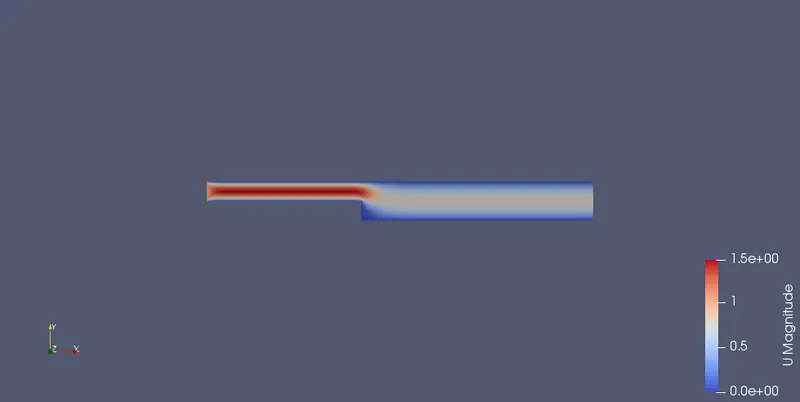
we can abserve the results by using the "paraview" post processing tool , which can be called by using "paraFoam"
by using the slice tool at the z normal plane we get the below figure
Now we change the grading at the side_bottom , topAndBottom walls as 0.2 , then we observe the mesh as
we can observe
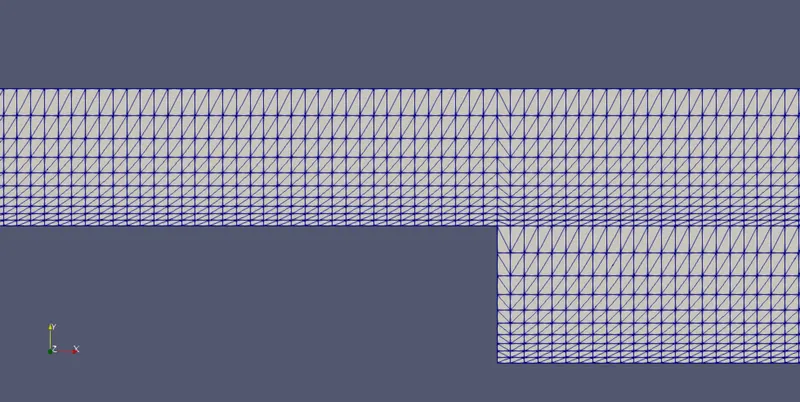
grid at the lower part of the blocks are of smaller size and gradually increasing
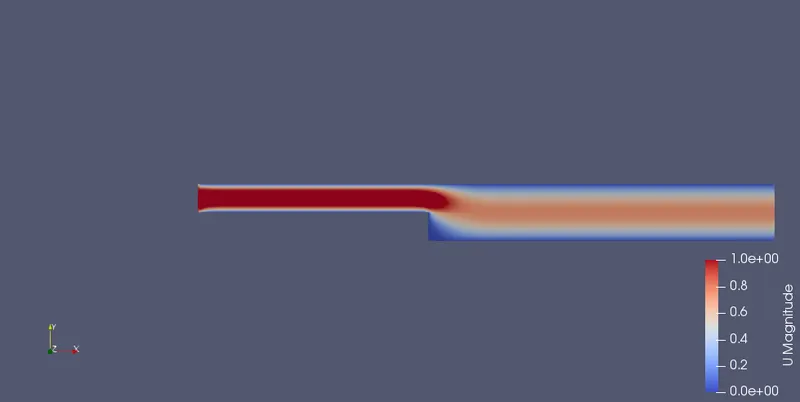
Velocity variation in the slice for the grading as 0.2 , we can observe the effect of the boundary more clearly due to finer grid
, the variation of plot over line at 0.085 m from the inlet for both the gradings is shown below
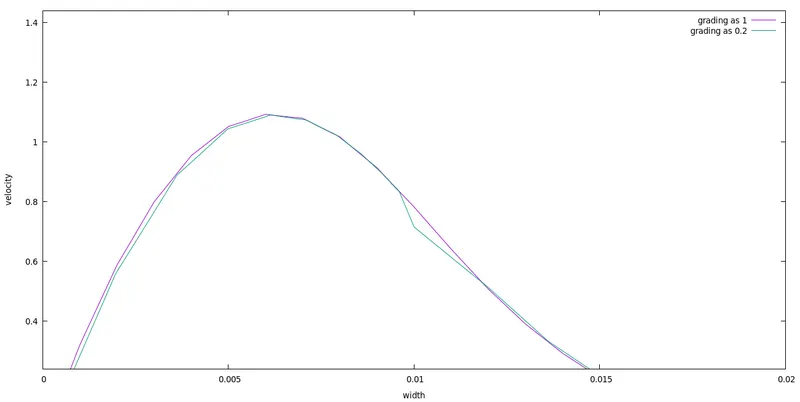
we can see that with finer grid the velocity variation and the viscosity effects are clearly observed with grading as 0.2
since grading gradually increasing the mesh size , at the bottom end the mesh is finer ,effect of the boundary was able to capture.