Week 8 - Simulation of a backward facing step in OpenFOAM
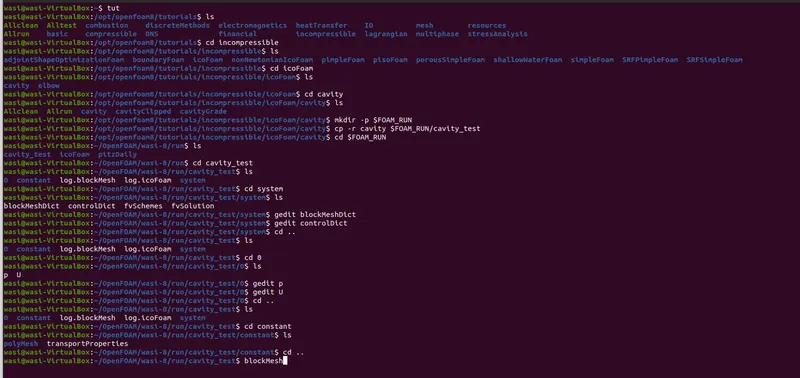
In OpenFoam to simulate we must first create a copy in the RUN folder by coping and renaming the solver from the tutorial.
In our simulation we are going to use Incompressible flow -> icoFoam -> cavity .
Steps :-
1) Open the terminal
2) Select the solver by going into tutorials. incompressible -> icoFoam -> cavity
3) Creat the run folder to be able to copy the solver file using (mkdir -p $FOAM_RUN)
4) Copy the solver file into the run folder using (cp -r)
5) Change the name of the copied file to run folder from cavity to cavity_test.
6) Go to the run folder and go into the cavity_test file.
7) Go into system and edit the blockMeshDict and controlDict.
8) Then go back and In '0' edit P and U.
9) Then run blockMesh and checkMesh.
10) When the above step succesfully ran then run icoFoam.
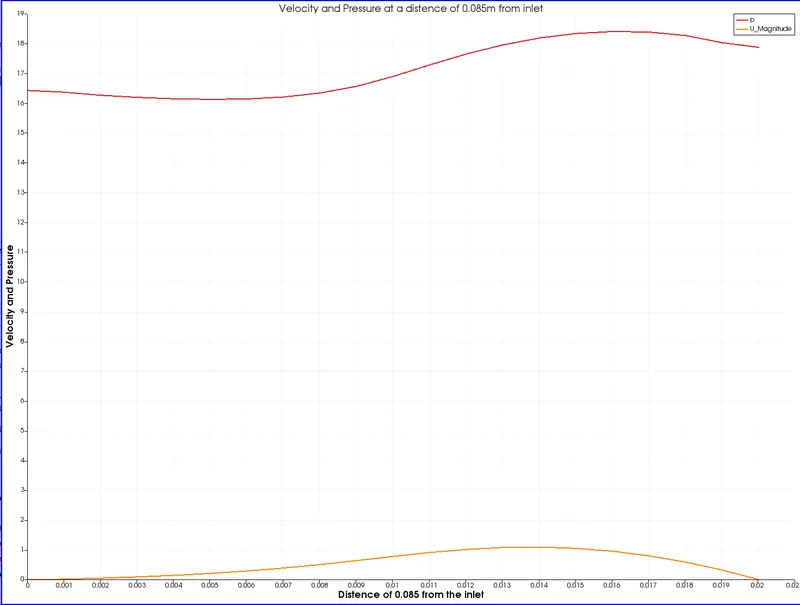
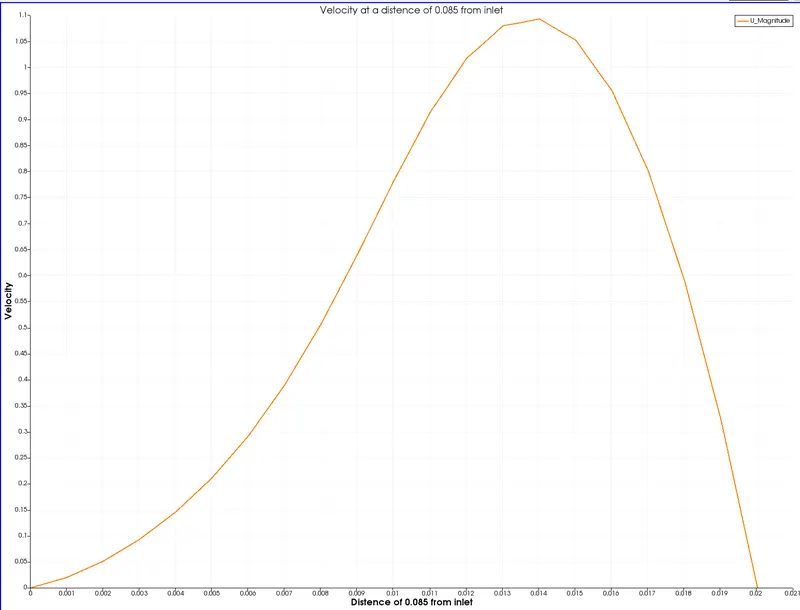
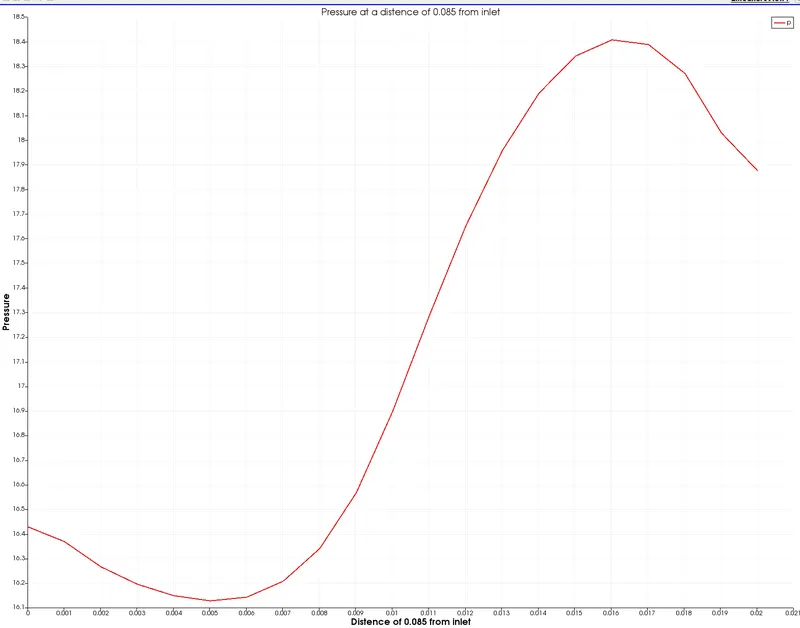
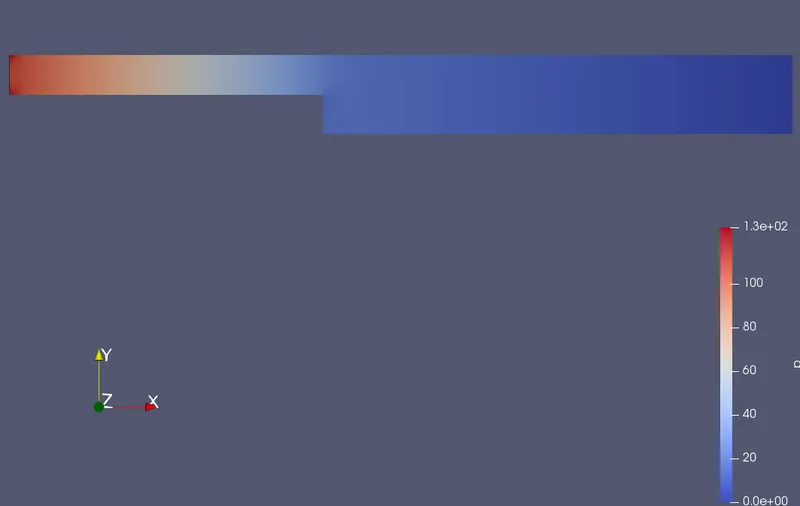
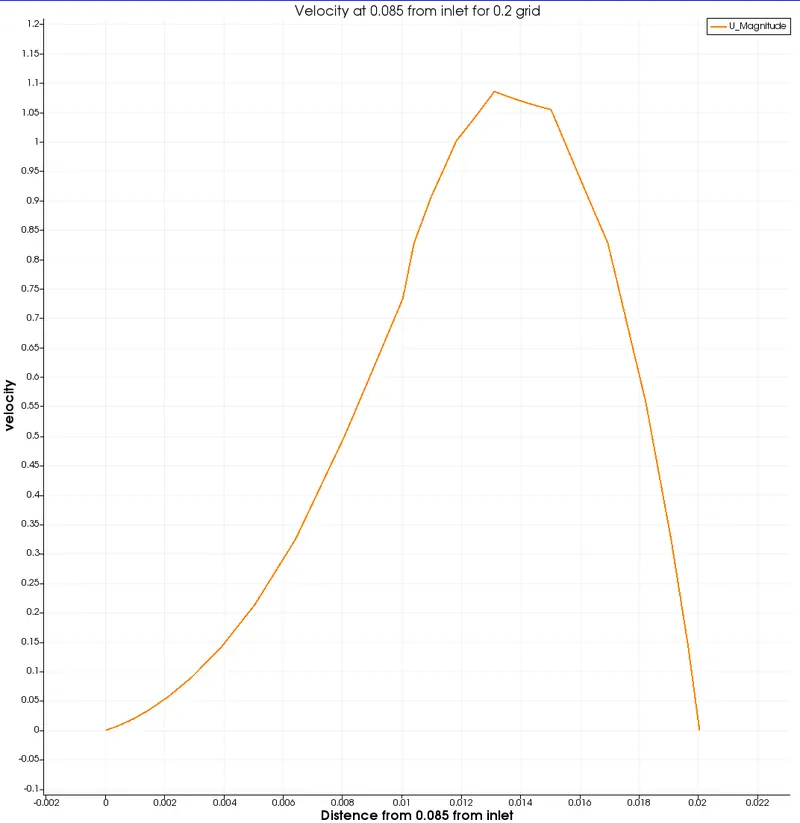
11) Open paraFoam and simulate P & U and plot their graphs at 0.085m from inlet.
12) To simulate the flow with different grading factor (0.2) go the blockMeshDict in system and and edit the samplegrading.
Below are the steps to achive this process
For gedit blockMeshDict edit the program
/*--------------------------------*- C++ -*----------------------------------*\
  =========                 |
  \\      /  F ield         | OpenFOAM: The Open Source CFD Toolbox
   \\    /   O peration     | Website:  https://openfoam.org
    \\  /    A nd           | Version:  8
     \\/     M anipulation  |
\*---------------------------------------------------------------------------*/
FoamFile
{
    version     2.0;
    format      ascii;
    class       dictionary;
    object      blockMeshDict;
}
// * * * * * * * * * * * * * * * * * * * * * * * * * * * * * * * * * * * * * //

convertToMeters 0.01;

vertices
(
    (0 0 0)         //0
    (8 0 0)         //1
    (8 0.5 0)       //2
    (0 0.5 0)       //3
    (8 1 0)         //4
    (0 1 0)         //5
    (20 1 0)        //6
    (20 0.5 0)      //7
    (20 0 0)        //8
    (20 -1 0)       //9
    (8 -1 0)        //10
    (0 0 0.1)       //11
    (8 0 0.1)       //12
    (8 0.5 0.1)     //13
    (0 0.5 0.1)     //14
    (8 1 0.1)       //15
    (0 1 0.1)       //16
    (20 1 0.1)      //17
    (20 0.5 0.1)    //18
    (20 0 0.1)      //19
    (20 -1 0.1)     //20
    (8 -1 0.1)      //21
);

blocks
(
    hex (0 1 2 3 11 12 13 14) (80 5 1) simpleGrading (1 1 1)
    hex (3 2 4 5 14 13 15 16) (80 5 1) simpleGrading (1 1 1)
    hex (10 9 8 1 21 20 19 12) (120 10 1) simpleGrading (1 1 1)
    hex (1 8 7 2 12 19 18 13) (120 5 1) simpleGrading (1 1 1)
    hex (2 7 6 4 13 18 17 15) (120 5 1) simpleGrading (1 1 1)
);

edges
(
);

boundary
(
    inlet
    {
        type patch;
        faces
        (
            (0 11 14 3)
            (3 14 16 5)
        );
    }
    outlet
    {
        type patch;
        faces
        (
            (9 20 19 8)
            (8 19 18 7)
            (7 18 17 6)
        );
    }
     fixedWalls
    {
        type wall;
        faces
        (
            (4 15 17 6)
            (1 10 21 12)
            (0 11 12 1)
            (10 21 20 9)
            (5 16 15 4)
        );
    }
    frontAndBack
    {
        type empty;
        faces
        (
            (0 1 2 3)
            (3 2 4 5)
            (10 9 8 1)
            (1 8 7 2)
            (2 7 6 4)
            (11 12 13 14)
            (14 13 15 16)
            (21 20 19 12)
            (12 19 18 13)
            (13 18 17 15)
        );
    }
);

mergePatchPairs
(
);

// ************************************************************************* //
For gedit controlDict
/*--------------------------------*- C++ -*----------------------------------*\
  =========                 |
  \\      /  F ield         | OpenFOAM: The Open Source CFD Toolbox
   \\    /   O peration     | Website:  https://openfoam.org
    \\  /    A nd           | Version:  8
     \\/     M anipulation  |
\*---------------------------------------------------------------------------*/
FoamFile
{
    version     2.0;
    format      ascii;
    class       dictionary;
    location    "system";
    object      controlDict;
}
// * * * * * * * * * * * * * * * * * * * * * * * * * * * * * * * * * * * * * //

application     icoFoam;

startFrom       startTime;

startTime       0;

stopAt          endTime;

endTime         0.5;

deltaT          0.0001;

writeControl    timeStep;

writeInterval   20;

purgeWrite      0;

writeFormat     ascii;

writePrecision  6;

writeCompression off;

timeFormat      general;

timePrecision   6;

runTimeModifiable true;


// ************************************************************************* //
For gedit P
/*--------------------------------*- C++ -*----------------------------------*\
  =========                 |
  \\      /  F ield         | OpenFOAM: The Open Source CFD Toolbox
   \\    /   O peration     | Website:  https://openfoam.org
    \\  /    A nd           | Version:  8
     \\/     M anipulation  |
\*---------------------------------------------------------------------------*/
FoamFile
{
    version     2.0;
    format      ascii;
    class       volScalarField;
    object      p;
}
// * * * * * * * * * * * * * * * * * * * * * * * * * * * * * * * * * * * * * //

dimensions      [0 2 -2 0 0 0 0];

internalField   uniform 0;

boundaryField
{
    inlet
    {
        type            zeroGradient;
    }

    outlet
    {
        type            fixedValue;
        value           uniform 0;
    }

    fixedWalls
    {
        type            zeroGradient;
    }

    frontAndBack
    {
        type            empty;
    }
}

// ************************************************************************* //
For gedit U
/*--------------------------------*- C++ -*----------------------------------*\
  =========                 |
  \\      /  F ield         | OpenFOAM: The Open Source CFD Toolbox
   \\    /   O peration     | Website:  https://openfoam.org
    \\  /    A nd           | Version:  8
     \\/     M anipulation  |
\*---------------------------------------------------------------------------*/
FoamFile
{
    version     2.0;
    format      ascii;
    class       volVectorField;
    object      U;
}
// * * * * * * * * * * * * * * * * * * * * * * * * * * * * * * * * * * * * * //

dimensions      [0 1 -1 0 0 0 0];

internalField   uniform (0 0 0);

boundaryField
{
    inlet
    {
        type            fixedValue;
        value           uniform (1 0 0);
    }

    outlet
    {
        type            zeroGradient;
    }

    fixedWalls
    {
        type            noSlip;
    }

    frontAndBack
    {
        type            empty;
    }
}

// ************************************************************************* //
After completing this try to run blockMesh . When the blockMesh is succesfully completed run checkMesh to check the Mesh.
When all this is completed without any error the run icoFoam
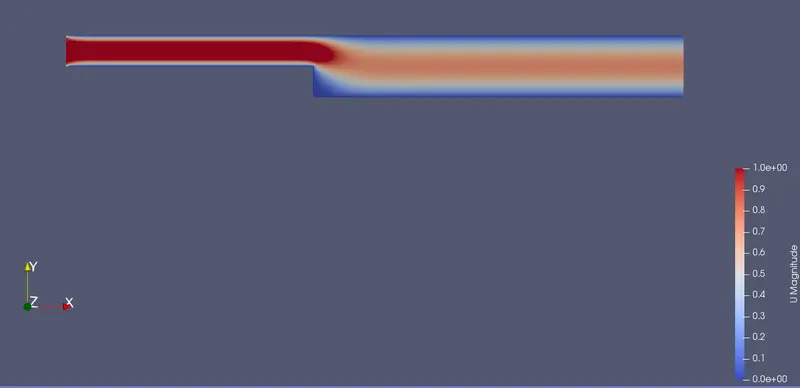
After completing the run, open paraFoam

For Velocity
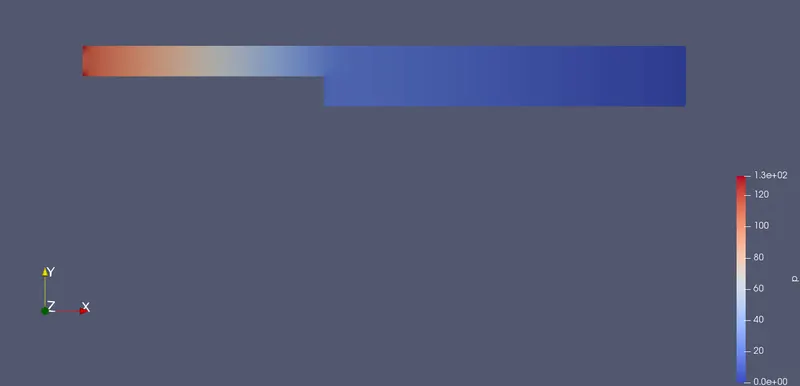
For Pressure
Plot for Velocity and Pressure
Plot for Velocity
Plot for Pressure
Case 2 :-
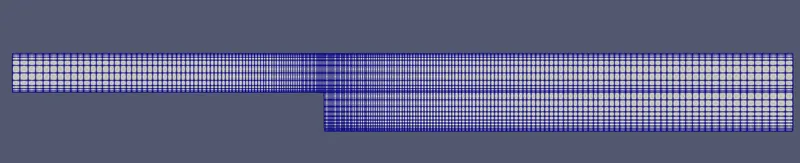
We now simulate the flow with grading factor of 0.2. For that we have to edit the blockMeshDict sample grading
/*--------------------------------*- C++ -*----------------------------------*\
  =========                 |
  \\      /  F ield         | OpenFOAM: The Open Source CFD Toolbox
   \\    /   O peration     | Website:  https://openfoam.org
    \\  /    A nd           | Version:  8
     \\/     M anipulation  |
\*---------------------------------------------------------------------------*/
FoamFile
{
    version     2.0;
    format      ascii;
    class       dictionary;
    object      blockMeshDict;
}
// * * * * * * * * * * * * * * * * * * * * * * * * * * * * * * * * * * * * * //

convertToMeters 0.01;

vertices
(
    (0 0 0)         //0
    (8 0 0)         //1
    (8 0.5 0)       //2
    (0 0.5 0)       //3
    (8 1 0)         //4
    (0 1 0)         //5
    (20 1 0)        //6
    (20 0.5 0)      //7
    (20 0 0)        //8
    (20 -1 0)       //9
    (8 -1 0)        //10
    (0 0 0.1)       //11
    (8 0 0.1)       //12
    (8 0.5 0.1)     //13
    (0 0.5 0.1)     //14
    (8 1 0.1)       //15
    (0 1 0.1)       //16
    (20 1 0.1)      //17
    (20 0.5 0.1)    //18
    (20 0 0.1)      //19
    (20 -1 0.1)     //20
    (8 -1 0.1)      //21
);

blocks
(
    hex (0 1 2 3 11 12 13 14) (80 5 1) simpleGrading (0.2 5 1)
    hex (3 2 4 5 14 13 15 16) (80 5 1) simpleGrading (0.2 0.2 1)
    hex (10 9 8 1 21 20 19 12) (120 10 1) simpleGrading (5 5 1)
    hex (1 8 7 2 12 19 18 13) (120 5 1) simpleGrading (5 5 1)
    hex (2 7 6 4 13 18 17 15) (120 5 1) simpleGrading (5 0.2 1)
);

edges
(
);

boundary
(
    inlet
    {
        type patch;
        faces
        (
            (0 11 14 3)
            (3 14 16 5)
        );
    }
    outlet
    {
        type patch;
        faces
        (
            (9 20 19 8)
            (8 19 18 7)
            (7 18 17 6)
        );
    }
     fixedWalls
    {
        type wall;
        faces
        (
            (4 15 17 6)
            (1 10 21 12)
            (0 11 12 1)
            (10 21 20 9)
            (5 16 15 4)
        );
    }
    frontAndBack
    {
        type empty;
        faces
        (
            (0 1 2 3)
            (3 2 4 5)
            (10 9 8 1)
            (1 8 7 2)
            (2 7 6 4)
            (11 12 13 14)
            (14 13 15 16)
            (21 20 19 12)
            (12 19 18 13)
            (13 18 17 15)
        );
    }
);

mergePatchPairs
(
);

// ************************************************************************* //
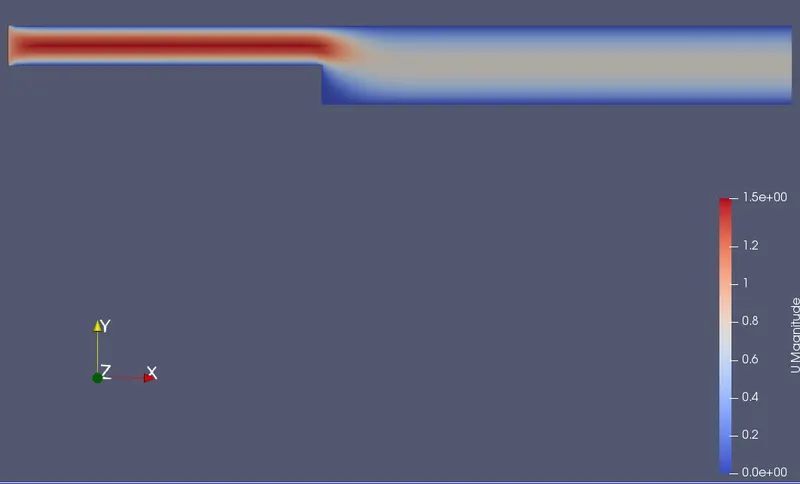
Then run blockMesh and checkMesh again, after completion run icoFoam . Open paraFoam
Mesh grid 0.2
For Velocity
For Pressure
Plot for Velocity
Plot for Pressure
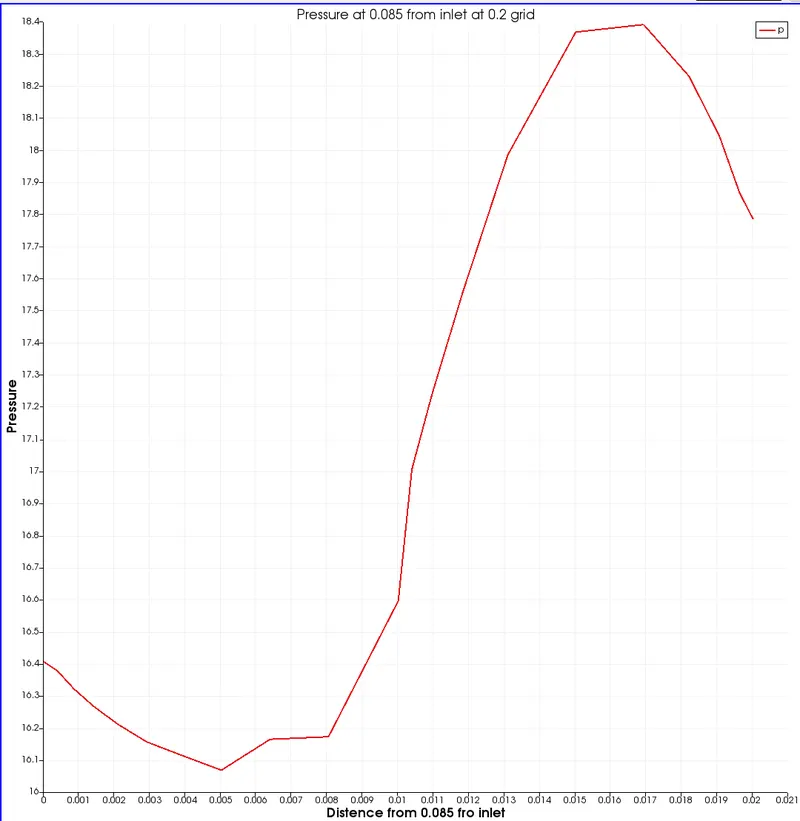
Conclusion :-
When we decrease the the grading factor the smoothness of the ploted graphs decreases. As the mesh size increses when we lower the grid size at the given points at those points you can see the smoothness being lower and the graph line appears to be sharp. We use finner mesh where we want our observation(case 2). We have also lowerd the value of delta from 0.001 to 0.0001 for much finner graph.