Week 8 - Simulation of a backward facing step in OpenFOAM
AIM
To simulate an incompressible-laminar-viscous flow through the backward facing step geometry.
OBJECTIVE
- To perform a transient simulation
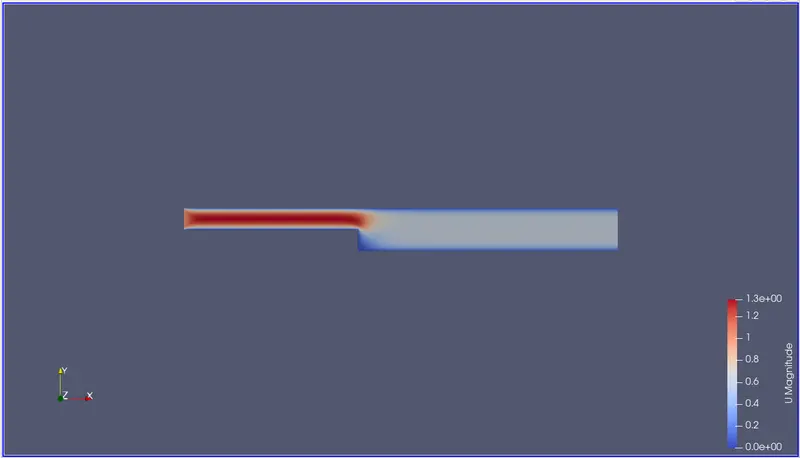
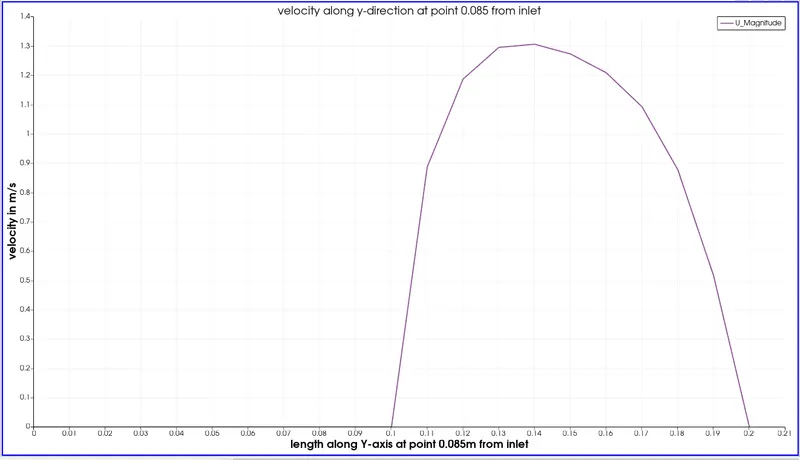
- Measure the velocity profile at 0.085 m from the inlet of the geometry for both case studies and compare.
- Explain why Grading/Growth factor is essential for meshing.
EXPLANATION
To perform a transient simulation we need to provide the boundary and initial conditions,type of fluid(compressible/incompressible),solver type,we also need to define th inlet and oulet cells , we also need to assign the vertices using the geometry given in the problem statement.
The tutorial cases describe the use of the meshing and pre-processing utilities, case setup and running OpenFOAM solvers and post-processing using ParaView.
Copies of all tutorials are available from the tutorials directory of the OpenFOAM installation. The tutorials are organised into a set of directories according to the type of flow and then subdirectories according to solver. For example, all the simpleFoam cases are stored within a subdirectory incompressible/simpleFoam, where incompressible indicates the type of flow. The user can copy cases from the tutorials directory into their local run directory as needed.
STEPS TO BE PERFORMED IN openFoam
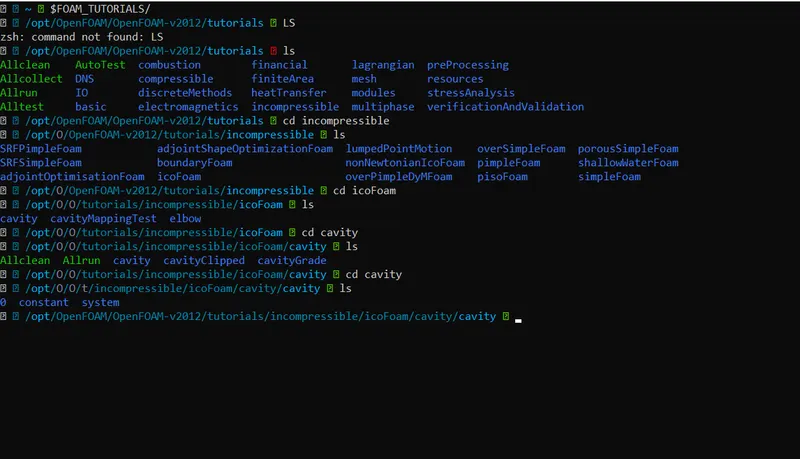
- To start simulation in OpenFoam, we first have to open ubuntu ,after opening the obuntu we have to type '$FOAM_TUTORIALS' to open the tutorial directory present in openfoam. this directory has all many directories based on type of flow and these have subdirectories according to type of solver
- 'cd'-command is used to open a particular directory eg cd icoFoam , this will open the icoFoam folder
- 'ls'-command is used to list the folders in the current directory
- In the tutorials folder ,incompressible folder is opened by 'cd incompressible', this folder is used because flow is of incompressible fluid
- ls command is used to list the incompresssible folder,this has many solver folder.for this problem statement,we use icoFoam solver
- then icoFoam is opened by using 'cd icoFoam',because it solves laminar-viscous flow (as given in problem statement)
-
icoFoam solves the incompressible laminar Navier-Stokes equations using the PISO algorithm. The code is inherently transient, requiring an initial condition (such as zero velocity) and boundary conditions. The icoFOAM code can take mesh non-orthogonality into account with successive non-orthogonality iterations. The number of PISO corrections and non-orthogonality corrections are controlled through user input.
-
icoFoam solves the incompressible laminar Navier-Stokes equations using the PISO algorithm. The code is inherently transient, requiring an initial condition (such as zero velocity) and boundary conditions. The icoFOAM code can take mesh non-orthogonality into account with successive non-orthogonality iterations. The number of PISO corrections and non-orthogonality corrections are controlled through user input.
- icoFoam is solver in openFoam which is use as transient solver for incompressible,laminar flow of newtonian fluids
- A fluid is said to be Newtonian if its viscosity, which is the measure or ability of a fluid to resist flow, only varies as a response to changes in temperature or pressure. A Newtonian fluid will take the shape of its container. Under conditions of constant temperature and pressure, the viscosity of a Newtonian fluid is the proportionality constant, or the relationship between the shear force formed in the fluid to resist the flow and the shear velocity applied to the fluid to induce the flow; the viscosity is the same for all shear velocities applied to the fluid.
- 'ls icoFoam' command is used to list icoFoam directory
- icoFoam directory has 2 sub folders,cavity and elbow.
- 'cd cavity' command is use dto create fluid domain and generate grid/mesh the given geometry
- next we open the cavity folder by using the 'ls'command is used to open the cavity
- this folder has another folder called cavity,this is used to run simulation
- but we cannot make change sto this folder as this is in tutorial directory
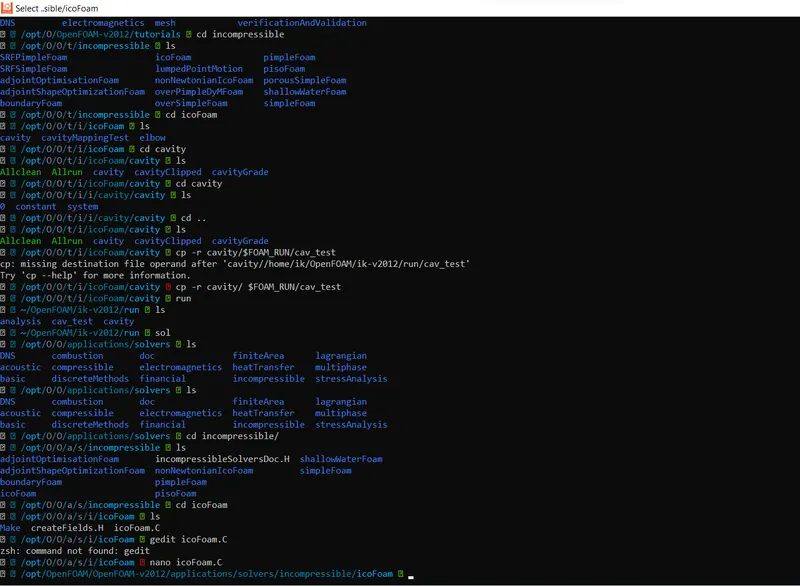
- so we have to copy the cavity folder to run folder by using 'cp -r cavity/ $FOAM_RUN/cav_test'
- using the above command line we saving the cavity file from tutorials to t=run folder and renaming the cavity file to cav_test
- now,we can make any changes in the cav_test folder without any changes in the original cavity folder in the tutorials directory
- now open the run directory by using the 'run' command
- then use 'ls' command to list the run directory
- to open cav_test folder the 'cd cav_test'is used
- inital conditions are changed by opening the '0' folder which has 'U' and 'p' in notepad
- mesh is created by opening the 'system' folder which has 'blockMeshDict' by assigning the vertices,inlet cellls, outlet cells and fixed walls
- then mesh generation is done by using 'blockMesh' command
- no of time steps and dt is given in the 'controlDict' folder and also provide the start and end time.while dt value is being selected,cfl value should be less than one
- 'icoFoam' command is used to sove the silmulation
- and 'paraView' is used to open paraview to plot velocity,pressure contours
CODE
VELOCITY PROFILE
/*--------------------------------*- C++ -*----------------------------------*\
| =========                 |                                                 |
| \\      /  F ield         | OpenFOAM: The Open Source CFD Toolbox           |
|  \\    /   O peration     | Version:  v2012                                 |
|   \\  /    A nd           | Website:  www.openfoam.com                      |
|    \\/     M anipulation  |                                                 |
\*---------------------------------------------------------------------------*/
FoamFile
{
    version     2.0;
    format      ascii;
    class       volVectorField;
    object      U;
}
// * * * * * * * * * * * * * * * * * * * * * * * * * * * * * * * * * * * * * //

dimensions      [0 1 -1 0 0 0 0];

internalField   uniform (0 0 0);

boundaryField
{
    inlet
    {
        type            fixedValue;
        value           uniform (1 0 0);
    }

    outlet
    {
        type            zeroGradient;
    }

    noslipwalls
    {
        type            noSlip;
    }
    frontAndBack
    {
        type            empty;
    }
}

// ************************************************************************* //
PRESSURE PROFILE
/*--------------------------------*- C++ -*----------------------------------*\
| =========                 |                                                 |
| \\      /  F ield         | OpenFOAM: The Open Source CFD Toolbox           |
|  \\    /   O peration     | Version:  v2012                                 |
|   \\  /    A nd           | Website:  www.openfoam.com                      |
|    \\/     M anipulation  |                                                 |
\*---------------------------------------------------------------------------*/
FoamFile
{
    version     2.0;
    format      ascii;
    class       volScalarField;
    object      p;
}
// * * * * * * * * * * * * * * * * * * * * * * * * * * * * * * * * * * * * * //

dimensions      [0 2 -2 0 0 0 0];

internalField   uniform 0;

boundaryField
{
    inlet
    {
        type            zeroGradient;
    }

    outlet
    {
        type            fixedValue;
        value           uniform 0;
    }
    noslipwalls
    {
        type            zeroGradient;
    }
    frontAndBack
    {
        type            empty;
    }
}

// ************************************************************************* //
controlDict
/*--------------------------------*- C++ -*----------------------------------*\
| =========                 |                                                 |
| \\      /  F ield         | OpenFOAM: The Open Source CFD Toolbox           |
|  \\    /   O peration     | Version:  v2012                                 |
|   \\  /    A nd           | Website:  www.openfoam.com                      |
|    \\/     M anipulation  |                                                 |
\*---------------------------------------------------------------------------*/
FoamFile
{
    version     2.0;
    format      ascii;
    class       dictionary;
    location    "system";
    object      controlDict;
}
// * * * * * * * * * * * * * * * * * * * * * * * * * * * * * * * * * * * * * //

application     icoFoam;

startFrom       startTime;

startTime       0;

stopAt          endTime;

endTime         0.5;

deltaT          0.001;

writeControl    timeStep;

writeInterval   20;

purgeWrite      0;

writeFormat     ascii;

writePrecision  6;

writeCompression off;

timeFormat      general;

timePrecision   6;

runTimeModifiable true;


// ************************************************************************* //
CASE-1
for grading factor
blockMesh
/*--------------------------------*- C++ -*----------------------------------*\
| =========                 |                                                 |
| \\      /  F ield         | OpenFOAM: The Open Source CFD Toolbox           |
|  \\    /   O peration     | Version:  v2012                                 |
|   \\  /    A nd           | Website:  www.openfoam.com                      |
|    \\/     M anipulation  |                                                 |
\*---------------------------------------------------------------------------*/
FoamFile
{
    version     2.0;
    format      ascii;
    class       dictionary;
    object      blockMeshDict;
}
// * * * * * * * * * * * * * * * * * * * * * * * * * * * * * * * * * * * * * //

convertToMeters   0.1;

vertices
(
    (0 0 0)
    (8 0 0)
    (8 0.5 0)
    (0 0.5 0)
    (8 1 0)
    (0 1 0)
    (20 1 0)
    (20 0.5 0)
    (20 0 0)
    (20 -1 0)
    (8 -1 0)
    (0 0 0.1)
    (8 0 0.1)
    (8 0.5 0.1)
    (0 0.5 0.1)
    (8 1 0.1)
    (0 1 0.1)
    (20 1 0.1)
    (20 0.5 0.1)
    (20 0 0.1)
    (20 -1 0.1)
    (8 -1 0.1)
);

blocks
(
    hex (0 1 2 3 11 12 13 14) (80 5 1) simpleGrading (1 1 1)
    hex (3 2 4 5 14 13 15 16) (80 5 1) simpleGrading (1 1 1)
    hex (10 9 8 1 21 20 19 12) (120 10 1) simpleGrading (1 1 1)
    hex (1 8 7 2 12 19 18 13) (120 5 1) simpleGrading (1 1 1)
    hex (2 7 6 4 13 18 17 15) (120 5 1) simpleGrading (1 1 1)
);

edges
(
);

boundary
(
    inlet
    {
        type patch;
        faces
        (
            (0 11 14 3)
            (3 14 16 5)
        );
    }
    outlet
    {
        type patch;
        faces
        (
            (9 8 19 20)
            (8 7 18 19)
            (7 6 17 18)
        );
    }
    frontAndBack
    {
        type empty;
        faces
        (
            (0 3 2 1)
            (3 5 4 2)
            (10 1 8 9)
            (1 2 7 8)
            (2 4 6 7)
            (11 12 13 14)
            (14 13 15 16)
            (21 20 19 12)
            (12 19 18 13)
            (13 18 17 15)
        );
    }
    noslipwalls
    {
        type wall;
        faces
        (
             (5 16 15 4)
             (4 15 17 6)
             (10 21 12 1)
             (0 1 12 11)
             (10 9 20 21)
        );
    }
);

mergePatchPairs
(
);

// ************************************************************************* //
CASE-2
for grading factor
blockMesh
/*--------------------------------*- C++ -*----------------------------------*\
| =========                 |                                                 |
| \\      /  F ield         | OpenFOAM: The Open Source CFD Toolbox           |
|  \\    /   O peration     | Version:  v2012                                 |
|   \\  /    A nd           | Website:  www.openfoam.com                      |
|    \\/     M anipulation  |                                                 |
\*---------------------------------------------------------------------------*/
FoamFile
{
    version     2.0;
    format      ascii;
    class       dictionary;
    object      blockMeshDict;
}
// * * * * * * * * * * * * * * * * * * * * * * * * * * * * * * * * * * * * * //

convertToMeters   0.1;

vertices
(
    (0 0 0)
    (8 0 0)
    (8 0.5 0)
    (0 0.5 0)
    (8 1 0)
    (0 1 0)
    (20 1 0)
    (20 0.5 0)
    (20 0 0)
    (20 -1 0)
    (8 -1 0)
    (0 0 0.1)
    (8 0 0.1)
    (8 0.5 0.1)
    (0 0.5 0.1)
    (8 1 0.1)
    (0 1 0.1)
    (20 1 0.1)
    (20 0.5 0.1)
    (20 0 0.1)
    (20 -1 0.1)
    (8 -1 0.1)
);

blocks
(
    hex (0 1 2 3 11 12 13 14) (80 5 1) simpleGrading (1 5 1)
    hex (3 2 4 5 14 13 15 16) (80 5 1) simpleGrading (1 0.2 1)
    hex (10 9 8 1 21 20 19 12) (120 10 1) simpleGrading (5 0.2 1)
    hex (1 8 7 2 12 19 18 13) (120 5 1) simpleGrading (5 5 1)
    hex (2 7 6 4 13 18 17 15) (120 5 1) simpleGrading (5 5 1)
);

edges
(
);

boundary
(
    inlet
    {
        type patch;
        faces
        (
            (0 11 14 3)
            (3 14 16 5)
        );
    }
    outlet
    {
        type patch;
        faces
        (
            (9 8 19 20)
            (8 7 18 19)
            (7 6 17 18)
        );
    }
    frontAndBack
    {
        type empty;
        faces
        (
            (0 3 2 1)
            (3 5 4 2)
            (10 1 8 9)
            (1 2 7 8)
            (2 4 6 7)
            (11 12 13 14)
            (14 13 15 16)
            (21 20 19 12)
            (12 19 18 13)
            (13 18 17 15)
        );
    }
    noslipwalls
    {
        type wall;
        faces
        (
             (5 16 15 4)
             (4 15 17 6)
             (10 21 12 1)
             (0 1 12 11)
             (10 9 20 21)
        );
    }
);

mergePatchPairs
(
);

// ************************************************************************* //
Mesh Generation
- generation of vertices in x,y,z direction
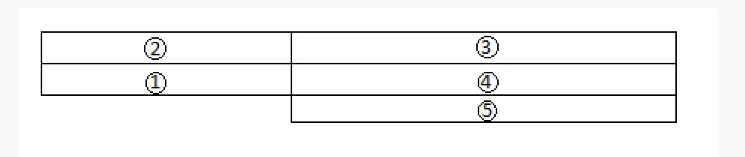
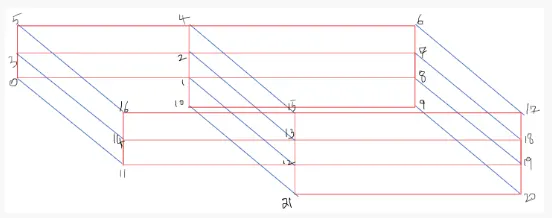
- these above geometries are in the text-help
- we have divide the given geomtry like the above geometry
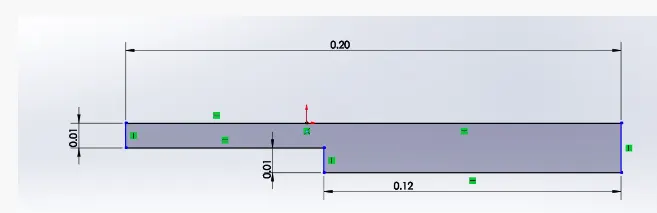 given geometry
- define blocks for meshing
- hex is used to define blocks ,which stands for hexahedral mesh
- we have to define the blocks by writing the vertices in an order which satisfies the right hand thumb rule
- thumb should be z-axis , order of vertices following the rotation of fingers
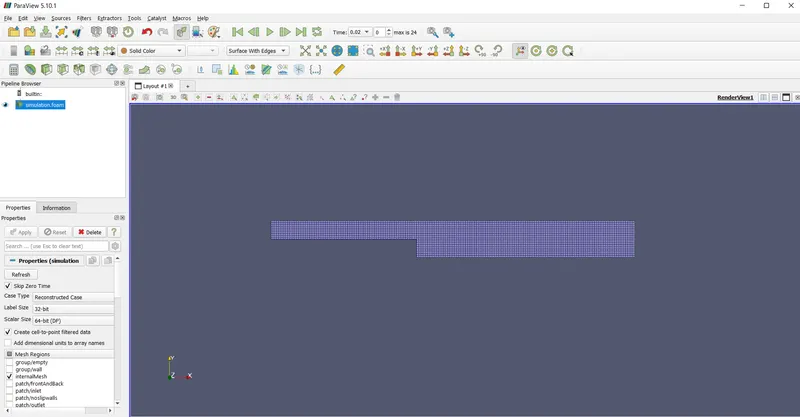
- we have to no of cells in x-axis(200) and y-axis(20)
- GRADING FACTOR
OUTPUTS
CASE-1
for GF=1
- velocity profile
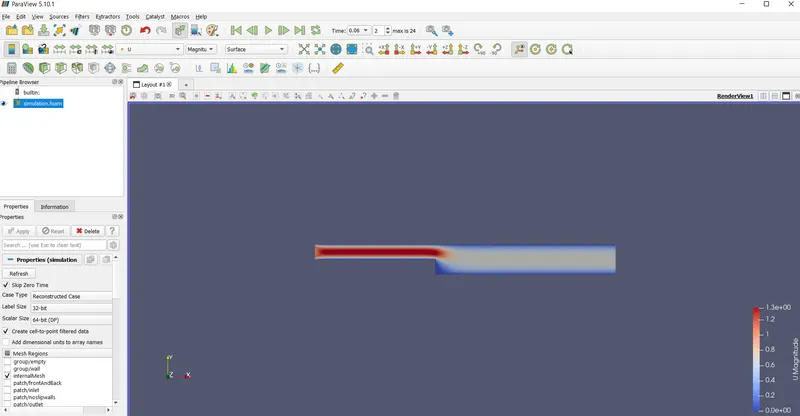
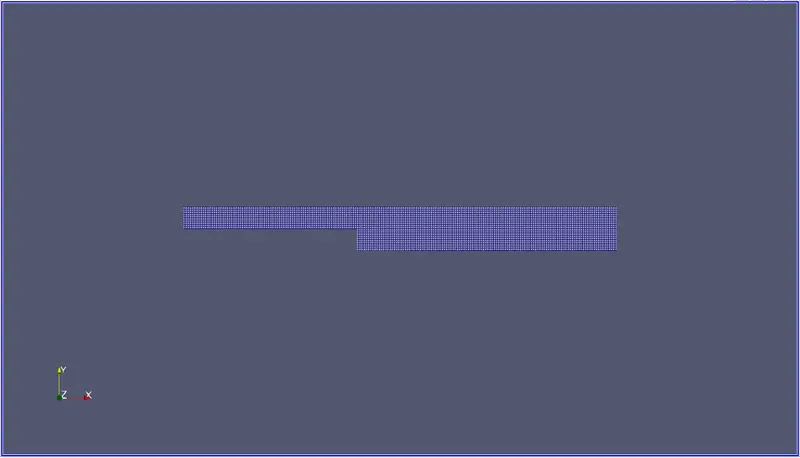
- surface with edges
- velocity profile along Y-axis at 0.085m from inlet
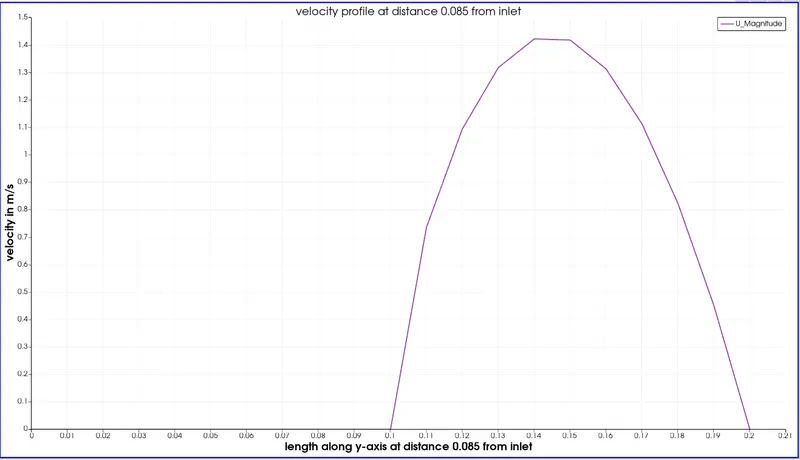
CASE-2
for GF=0.2
- velocity profile
- surface with edges
- velocity profile along Y-axis at 0.085m from inlet
RESULTS
by refining the mesh to gf=0.2 ,velocity near the boundary was more accurate than with gf=1.thus,a refinement at boundary leads more accurate results
GRADING FACTOR
grading factor in blockMesh is defined as the ratio of the last to first cell size, which is much better behaved that defining the number of cells and the geometric expansion ratio.
This is neccesary because it leads to more number of nodes/grid points leading to more cells.
number of nodes is directly proportional to accuracy of solution.
thus , leading more accuracy in the simulation
CONCLUSION
Though the overall velocity plot remains the same in both the cases , there is slight deviation at boundary where grading factor of gf=0.2 is applied.