Week 8 - Simulation of a backward facing step in OpenFOAM
1.In this challenge, you are going to simulate an incompressible-laminar-viscous flow through the backward facing step geometry. You should perform a transient simulation. The solver can be chosen based on the described physics of the flow. You need to explain the entire simulation procedure (how you set up the case). You should also provide explanations to every change you make inside the reference case files obtained from OpenFOAM tutorials. You can choose the inlet velocity shuch that the flow is laminar.
After that, you will perform 2 case studies as described below and compare the results.
Case 1 - Simulate the flow without using any grading factor (i.e., GF = 1)
Case 2 - Simulate the flow with grading factor of 0.2. The cells should be finer near the walls (includig the step wall).
You can use the following mesh parameters but you can feel free to modify these values.
Mesh specification
- Number of cells along the x direction (longer dimension) = 200
- Number of cells along the longer y direction = 20;
Boundary condition specification
The domain specifications are provided in the following figure.
SIMULATION GENERATION IN UBUNTU FOR THE WITHOUT GRADING FACTOR AND WITH GRADING FACTOR :
To start the simulation for the given problem,we need to open the terminal and in it we have to open ubuntu.
After the opening of Ubuntu we will get a Ubuntu page.
In it first of all we have to give a command to start the simulation,
1.run - by entering the run command and ls in ubuntu we will get the another option to get
cavity and Cavity_test
2.after it we have to use cd cavity- to open the cavity we use cd cavity command by entering
we use ls to get the list of the folders in the cavity
The following lists of cavity are
0 constant system
3.Then we use command cd 0 and ls
we get
U p
by giving a command of noteexpe.exe U
we get the c++ code of velocity, in we input the values of the simulation and we can save it
by using command noteexpe.exe p
we get the c++ code of the pressure ,in the code input values are given according to the simulation and save it.
4.cd .. - command is used for getting back from the 0 folder.
5.cd constant and ls - command is used for opening the constant folder,we get
transportProperties
by using noteexpe.exe transportProperties command we get the c++ code of transportProperties ,we input the values for the simulation and save it.
6.cd .. - command is used for getting back from constant folder
7.After cd system and ls- command is used and we get the list of folders of system
blockMeshDict controlDict fvScheme fvSolvers
noteexpe.exe blockMeshDict -command is used and we get the c++ code we input the values of blockMesh vertices,blocks,boundry and fixedWalls etc. and save it.
after blockMesh command ,noteexpe.exe controlDict command is used for giving the input values for start time ,deltaT and end time for the simulation.
fvScheme and fvSolvers are constant .
8.blockMesh - command is used for getting the solution for the simulation.
9.icoFoam - commmand is used for runnning the simulation for the required time given the controlDict.
10.paraviewWindows - command is used for ooprning the openfoam of the executed simulation and we see a apply option in it and we get the 3D view of the blockmesh.
By using the plot over line option we can plot the y-axis of the blockMesh of point 1-0.085 and point 2- 0.085.
The same procedure is used for the grading factor with 0.2 of the cavity_test.
Line diagram of BlockMesh :
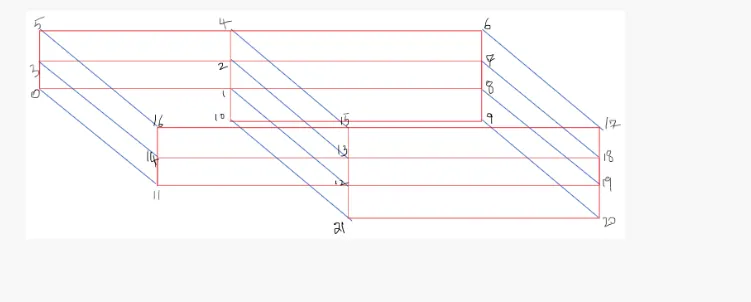
It have 21 vertices , 5 fixedwalls and 10 frontAndBack faces , it had 5 blocks and boundrys are inlet and outlet,inlet had 2 faces and outlet had 3 faces.
Grading factor :
The expansion ratios enables the mesh to be graded or refined, in specified directions .The ratio is the width of the end cell.
in simple format,
expansion ratio = (size of the end cell)/(size of the starting cell)
CODE FOR
BLOCKMESHDICT :
For without applying grading factor :
/*--------------------------------*- C++ -*----------------------------------*\
| =========                 |                                                 |
| \\      /  F ield         | OpenFOAM: The Open Source CFD Toolbox           |
|  \\    /   O peration     | Version:  v2112                                 |
|   \\  /    A nd           | Website:  www.openfoam.com                      |
|    \\/     M anipulation  |                                                 |
\*---------------------------------------------------------------------------*/
FoamFile
{
    version     2.0;
    format      ascii;
    class       dictionary;
    object      blockMeshDict;
}
// * * * * * * * * * * * * * * * * * * * * * * * * * * * * * * * * * * * * * //

scale   0.01;

vertices
(
    (0 0 0)			//0
    (8 0 0)			//1
    (8 0.5 0)           //2
    (0 0.5 0)           //3
    (8 1 0)             //4
    (0 1 0)             //5
    (20 1 0)            //6
    (20 0.5 0)          //7
    (20 0 0)            //8
    (20 -1 0)           //9
    (8 -1 0)            //10

    (0 0 0.6)           //11
    (8 0 0.6)           //12
    (8 0.5 0.6)         //13
    (0 0.5 0.6)         //14
    (8 1 0.6)           //15
    (0 1 0.6)           //16
    (20 1 0.6)          //17
    (20 0.5 0.6)        //18
    (20 0 0.6)          //19
    (20 -1 0.6)         //20
    (8 -1 0.6)          //21
);

blocks
(
     hex (0 1 2 3 11 12 13 14) (80 5 1) simpleGrading (1 1 1)
    hex (3 2 4 5 14 13 15 16) (80 5 1) simpleGrading (1 1 1)
    hex (2 7 6 4 13 18 17 15) (120 5 1) simpleGrading (1 1 1)
    hex (1 8 7 2 12 19 18 13) (120 5 1) simpleGrading (1 1 1)
    hex (10 9 8 1 21 20 19 12) (120 10 1) simpleGrading (1 1 1)
);

edges
(
);

boundary
(
    inlet
    {
        type wall;
        faces
        (
            (0 11 14 3)
            (3 14 16 5)
        );
    }
    outlet
    {
        type wall;
        faces
        (
            (9 8 19 20)
            (8 7 18 19)
            (7 6 17 18)
        );
    }
    frontAndBack
    {
        type empty;
        faces
        (
             (0 3 2 1)
            (11 12 13 14)
            (3 5 4 2)
            (13 15 16 14)
            (2 4 6 7)
            (13 18 17 15)
            (1 2 7 8)
            (12 19 18 13)
            (10 1 8 9)
            (21 20 19 12)
        );
    }
   fixedWalls
   {
          type wall;
          faces
     (
                  (4 5 16 15)
			(4 15 17 6)
			(0 1 12 11)
			(9 20 21 10)
			(1 10 21 12)

        );
    }
);


// ************************************************************************* //
BLOCKMESHDICT WITH APPLIED GRADING FACTOR 0.2 :
/*--------------------------------*- C++ -*----------------------------------*\
| =========                 |                                                 |
| \\      /  F ield         | OpenFOAM: The Open Source CFD Toolbox           |
|  \\    /   O peration     | Version:  v2112                                 |
|   \\  /    A nd           | Website:  www.openfoam.com                      |
|    \\/     M anipulation  |                                                 |
\*---------------------------------------------------------------------------*/
FoamFile
{
    version     2.0;
    format      ascii;
    class       dictionary;
    object      blockMeshDict;
}
// * * * * * * * * * * * * * * * * * * * * * * * * * * * * * * * * * * * * * //

scale   0.01;

vertices
(
    (0 0 0)			//0
    (8 0 0)			//1
    (8 0.5 0)           //2
    (0 0.5 0)           //3
    (8 1 0)             //4
    (0 1 0)             //5
    (20 1 0)            //6
    (20 0.5 0)          //7
    (20 0 0)            //8
    (20 -1 0)           //9
    (8 -1 0)            //10

    (0 0 0.6)           //11
    (8 0 0.6)           //12
    (8 0.5 0.6)         //13
    (0 0.5 0.6)         //14
    (8 1 0.6)           //15
    (0 1 0.6)           //16
    (20 1 0.6)          //17
    (20 0.5 0.6)        //18
    (20 0 0.6)          //19
    (20 -1 0.6)         //20
    (8 -1 0.6)          //21
);

blocks
(
    hex (0 1 2 3 11 12 13 14) (80 5 1) simpleGrading (0.2 5 1)
    hex (3 2 4 5 14 13 15 16) (80 5 1) simpleGrading (0.2 0.2 1)
    hex (2 7 6 4 13 18 17 15) (120 5 1) simpleGrading (5 0.2 1)
    hex (1 8 7 2 12 19 18 13) (120 5 1) simpleGrading (5 5 1)
    hex (10 9 8 1 21 20 19 12) (120 10 1) simpleGrading (5 5 1)

);

edges
(
);

boundary
(
    inlet
    {
        type patch;
        faces
        (
            (0 11 14 3)
            (3 14 16 5)
        );
    }
    outlet
    {
        type patch;
        faces
        (
            (9 8 19 20)
            (8 7 18 19)
            (7 6 17 18)
        );
    }
    frontAndBack
    {
        type empty;
        faces
        (
            (0 3 2 1)
            (11 12 13 14)
            (3 5 4 2)
            (13 15 16 14)
            (2 4 6 7)
            (13 18 17 15)
            (1 2 7 8)
            (12 19 18 13)
            (10 1 8 9)
            (21 20 19 12)
        );
    }
	fixedWalls
	{
		type wall;
		faces
		(
			(4 5 16 15)
			(4 15 17 6)
			(0 1 12 11)
			(9 20 21 10)
			(1 10 21 12)
		);
	}

);


// ************************************************************************* //
CONTROLDICT :
/*--------------------------------*- C++ -*----------------------------------*\
| =========                 |                                                 |
| \\      /  F ield         | OpenFOAM: The Open Source CFD Toolbox           |
|  \\    /   O peration     | Version:  v2112                                 |
|   \\  /    A nd           | Website:  www.openfoam.com                      |
|    \\/     M anipulation  |                                                 |
\*---------------------------------------------------------------------------*/
FoamFile
{
    version     2.0;
    format      ascii;
    class       dictionary;
    object      controlDict;
}
// * * * * * * * * * * * * * * * * * * * * * * * * * * * * * * * * * * * * * //

application     icoFoam;

startFrom       startTime;

startTime       0;

stopAt          endTime;

endTime         3;

deltaT          0.001;

writeControl    timeStep;

writeInterval   20;

purgeWrite      0;

writeFormat     ascii;

writePrecision  6;

writeCompression off;

timeFormat      general;

timePrecision   6;

runTimeModifiable true;


// ************************************************************************* //
PRESSURE FILE :
/*--------------------------------*- C++ -*----------------------------------*\
| =========                 |                                                 |
| \\      /  F ield         | OpenFOAM: The Open Source CFD Toolbox           |
|  \\    /   O peration     | Version:  v2112                                 |
|   \\  /    A nd           | Website:  www.openfoam.com                      |
|    \\/     M anipulation  |                                                 |
\*---------------------------------------------------------------------------*/
FoamFile
{
    version     2.0;
    format      ascii;
    class       volScalarField;
    object      p;
}
// * * * * * * * * * * * * * * * * * * * * * * * * * * * * * * * * * * * * * //

dimensions      [0 2 -2 0 0 0 0];

internalField   uniform 0;

boundaryField
{
    inlet
    {
        type            zeroGradient;
    }

    outlet
    {
        type            fixedValue;
        value           uniform 0;
    }

    frontAndBack
    {
        type            empty;
    }
    fixedWalls
    {
        type           zeroGradient;
     }
}


// ************************************************************************* //
VELOCITY FILE :
/*--------------------------------*- C++ -*----------------------------------*\
| =========                 |                                                 |
| \\      /  F ield         | OpenFOAM: The Open Source CFD Toolbox           |
|  \\    /   O peration     | Version:  v2112                                 |
|   \\  /    A nd           | Website:  www.openfoam.com                      |
|    \\/     M anipulation  |                                                 |
\*---------------------------------------------------------------------------*/
FoamFile
{
    version     2.0;
    format      ascii;
    class       volVectorField;
    object      U;
}
// * * * * * * * * * * * * * * * * * * * * * * * * * * * * * * * * * * * * * //

dimensions      [0 1 -1 0 0 0 0];

internalField   uniform (0 0 0);

boundaryField
{
    inlet
    {
        type            fixedValue;
        value           uniform (0.066 0 0);
    }

    outlet
    {
        type            zeroGradient;
    }

    frontAndBack
    {
        type            empty;
    }
    fixedWalls
    {
        type           noSlip;
    }
}


// ************************************************************************* //
TRANSPORT PROPERTIES :
/*--------------------------------*- C++ -*----------------------------------*\
| =========                 |                                                 |
| \\      /  F ield         | OpenFOAM: The Open Source CFD Toolbox           |
|  \\    /   O peration     | Version:  v2112                                 |
|   \\  /    A nd           | Website:  www.openfoam.com                      |
|    \\/     M anipulation  |                                                 |
\*---------------------------------------------------------------------------*/
FoamFile
{
    version     2.0;
    format      ascii;
    class       dictionary;
    object      transportProperties;
}
// * * * * * * * * * * * * * * * * * * * * * * * * * * * * * * * * * * * * * //

nu              [0 2 -1 0 0 0 0] 1e-3;


// ************************************************************************* //
OUTPUT FOR WITHOUT GRADING FACTOR :
without assigning any grading factor and the blockmesh with surface and edges is shown below
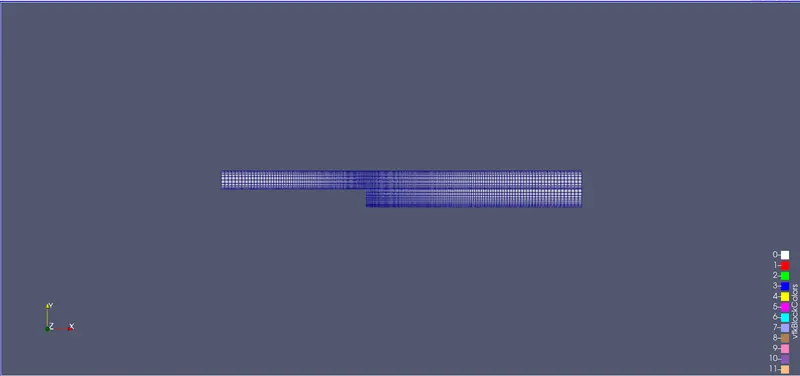
The pressure flow diagram without applying grading factor has no changes in it.
The veloocity flow diagram without applying grading factor :
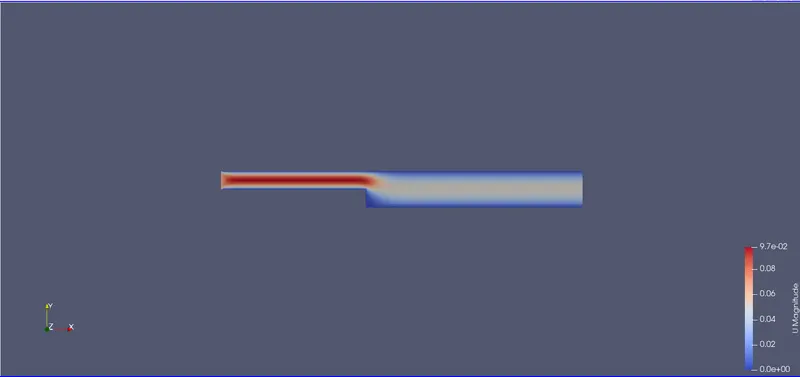
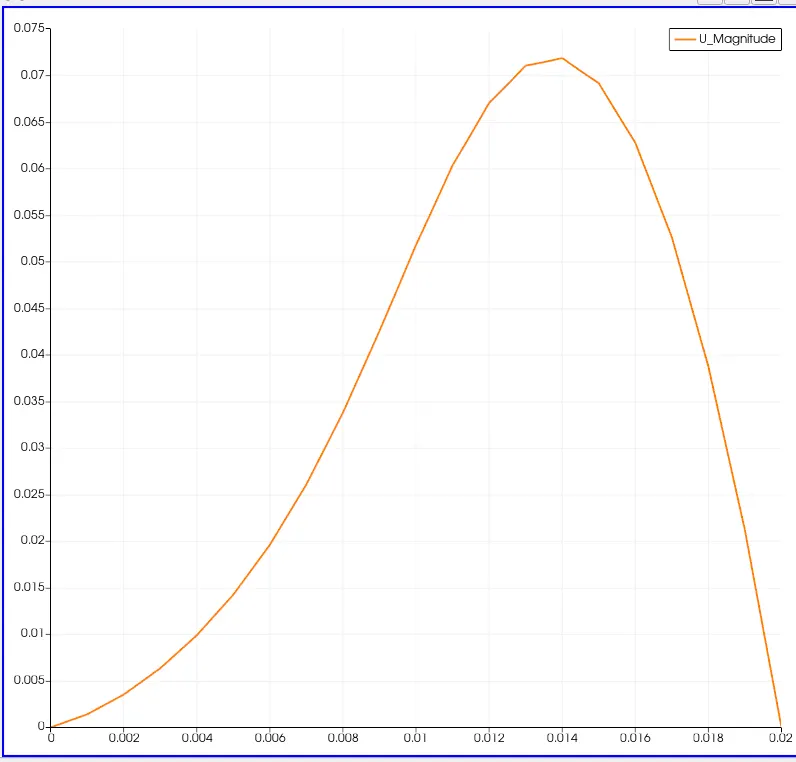
PLOT :
The plot for the velocity at 0.085 without applying the grading factor on y-axis.
OUTPUT FOR WITH GRADING FACTOR :
The pressure flow diagram with applying grading factor 0.2 has no changes in it.
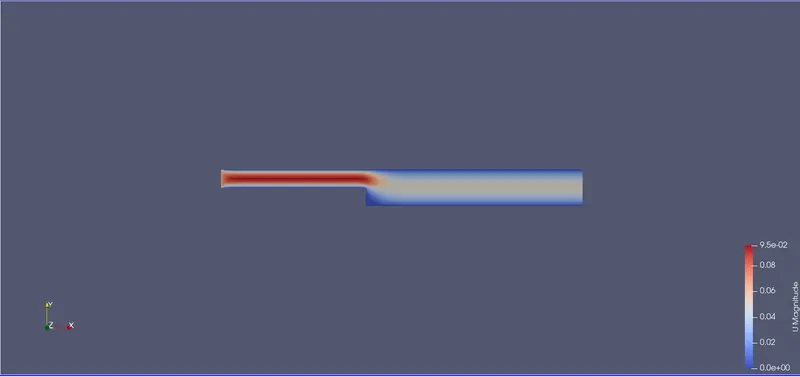
The velocity flow diagram for the garding factor 0.2.
PLOT :
The plot for the velocity at 0.085 for the given grading factor 0.2 on y-axis.
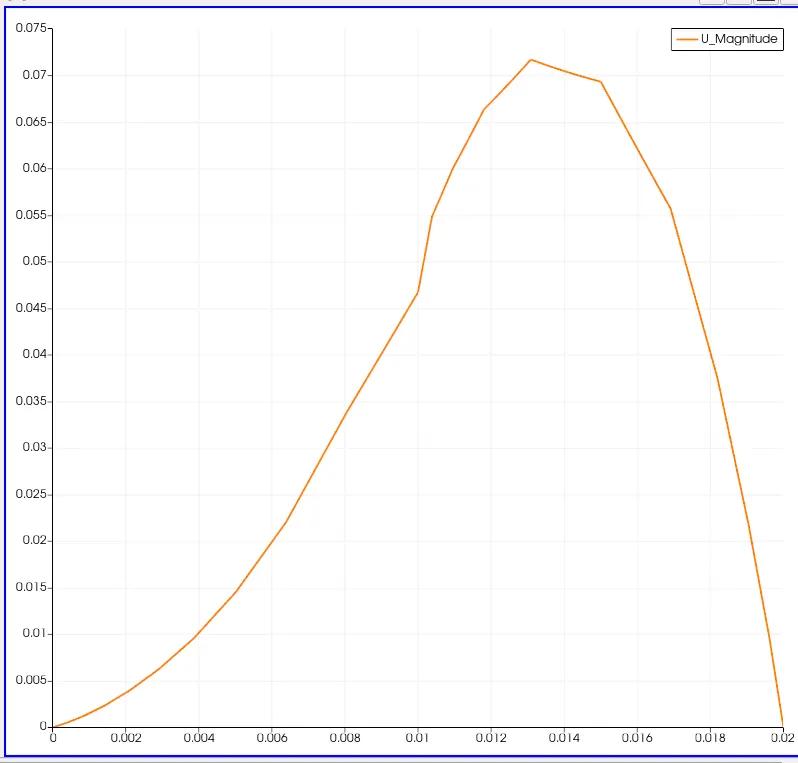
By changing the simple grading factor from the valuue of 0.2 to 1 the mesh becomes finer and the solution beccomes very accurate.
Overall the change in the size of simmple grading factor the results remains the same as approximately.
The execution time is lower for lower meshing grading factor.