Week 8 - Simulation of a backward facing step in OpenFOAM
Aim:
1.To simulate an incompressible-laminar-viscous flow through the backward facing step geometry.
2.To perform a transient simulation, The solver can be chosen based on the described physics of the flow.
Conditions:
Case 1 - Simulate the flow without using any grading factor (i.e., GF = 1)
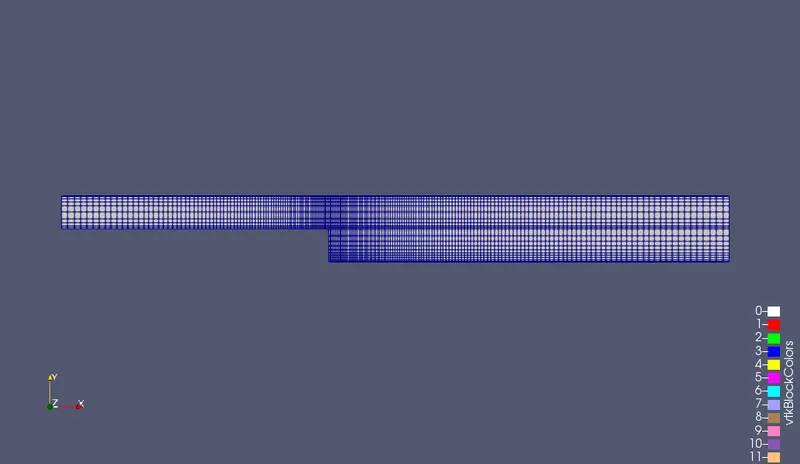
Case 2 - Simulate the flow with grading factor of 0.2. The cells should be finer near the walls (includig the step wall).
Mesh specification
- Number of cells along the x direction (longer dimension) = 200
- Number of cells along the longer y direction = 20;
- Velocity profile= 0.085 m/sec
Imcompressible-Laminar-Viscuss Flow
Incompressible Flow
Incompressible flow refers to a flow in which the density remains constant in any fluid parcel.
Laminar Flow
Laminar flow, type of fluid (gas or liquid) flow in which the fluid travels smoothly or in regular paths, in contrast to turbulent flow, in which the fluid undergoes irregular fluctuations and mixing.
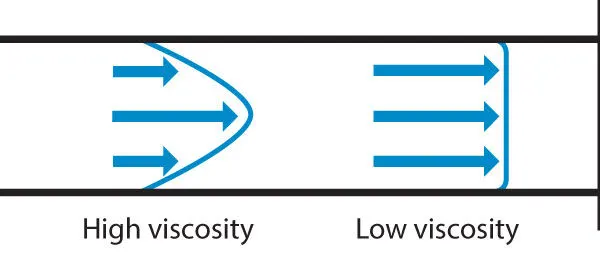
The laminar regime is ruled by momentum diffusion, while the momentum convection is less important. In more physical terms, it means that viscous forces are higher than inertial forces.
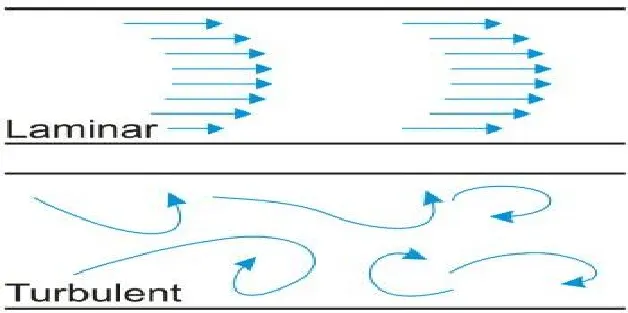
Reynolds number is the parameter to differentiate a flow as laminar or turbulent.
Whenever the Reynolds number is less than about 2000,flow in a pipe is generally laminar, where as at values greater than 2000, flow is usually turbulant.
Mathematically, Reynolds number is the ratio of inertial to the viscous force.
where,
- ρ is the density of the fluid (kg/m^3)
- u is the macroscopic velocity of the fluid(m/s)
- L is the characteristic length (m)
- μ is the dynamic viscosity of the fluid (Pa.s)
- ν is the kinematic viscosity of the fluid (m^2/s)
Viscous Flow
A type of fluid flow in which there is a continuous steady motion of the particles; the motion at a fixed point always remains constant. Also called streamline flow; laminar flow; steady flow.
Mesh Grading:
Mesh geading is a factor that is,
Grading factor =(Size of the last cell/Size of the first cell)
Procedure:
- First,we are creating the run folder in OpenFOAM in which we will be running our simulation.
- And then need to copy the cavity folder so that we can make the changes in the blockMeshDict,controlDict, and pressure and velocity files as to run our required simulation we copying the folder because we are not supposed to make any changes in the original floders in the OpenFoam
- Then will make the required changes in the blockMeshDict file that is naming the vertices for and then creating blocks we also need to specify the number of mesh points needed along the x,y and z-direction and also the simple grading should be done along the boundaries.
- Then, we need to assign the boundary condition here, we need to define all the faces in OpenFOAM refers to patches and giving them type that is the inlet and outlet will be the faces, for front and back type will be empty faces, for top and bottom which are the boundary conditions in this case type will be wall type and setting up these will constitute a particular boundary, then will save these changes in the blockMeshDict.
- And the controlDict file the simulation time and time step need be assigned in the way that the courant number should be less than 0.5
- And then creating the blockMesh and run the simulation using the respective solver after the completion of simulation open the paraview in the paraFoam and plot the velocity profile for the given value.
Code:
blockMeshDict (for applying without grading factor)
/*--------------------------------*- C++ -*----------------------------------*\
  =========                 |
  \\      /  F ield         | OpenFOAM: The Open Source CFD Toolbox
   \\    /   O peration     | Website:  https://openfoam.org
    \\  /    A nd           | Version:  9
     \\/     M anipulation  |
\*---------------------------------------------------------------------------*/
FoamFile
{
    format      ascii;
    class       dictionary;
    object      blockMeshDict;
}
// * * * * * * * * * * * * * * * * * * * * * * * * * * * * * * * * * * * * * //

convertToMeters 0.01;

vertices
(
    (0 0 0)
    (8 0 0)
    (8 0.5 0)
    (0 0.5 0)
    (8 1 0)
    (0 1 0)
    (20 1 0)
    (20 0.5 0)
    (20 0 0)
    (20 -1 0)
    (8 -1 0)
    (0 0 0.01)
    (8 0 0.01)
    (8 0.5 0.01)
    (0 0.5 0.01)
    (8 1 0.01)
    (0 1 0.01)
    (20 1 0.01)
    (20 0.5 0.01)
    (20 0 0.01)
    (20 -1 0.01)
    (8 -1 0.01)
);

blocks
(
    hex (0 1 2 3 11 12 13 14) (200 10 1) simpleGrading (1 1 1)
    hex (3 2 4 5 14 13 15 16) (200 10 1) simpleGrading (1 1 1)
    hex (2 7 6 4 13 18 17 15) (200 10 1) simpleGrading (1 1 1)
    hex (1 8 7 2 12 19 18 13) (200 10 1) simpleGrading (1 1 1)
    hex (10 9 8 1 21 20 19 12) (200 20 1) simpleGrading (1 1 1)
);

edges
(
);

boundary
(
    Inlet
    {
        type patch;
        faces
        (
            (0 11 14 3)
            (3 14 16 5)
        );
    }
    Outlet
    {
        type patch;
        faces
        (
            (9 8 19 20)
            (8 7 18 19)
            (7 6 17 18)
        );
    }
    frontAndBack
    {
        type empty;
        faces
        (
            (0 3 2 1)
            (11 12 13 14)
            (3 5 4 2)
            (13 15 16 14)
            (2 4 6 7)
            (13 18 17 15)
            (1 2 7 8)
            (12 19 18 13)
            (10 1 8 9)
            (21 20 19 12)
         );
     }
    Slipwalls
    {
        type wall;
        faces
        (
            (4 15 17 6)
            (4 5 16 15)
            (1 10 21 12)
            (0 1 12 11)
            (9 20 21 10)
        );
    }
);

mergePatchPairs
(
);
/*--------------------------------*- C++ -*----------------------------------*\
  =========                 |
  \\      /  F ield         | OpenFOAM: The Open Source CFD Toolbox
   \\    /   O peration     | Website:  https://openfoam.org
    \\  /    A nd           | Version:  9
     \\/     M anipulation  |
\*---------------------------------------------------------------------------*/
FoamFile
{
    format      ascii;
    class       dictionary;
    location    "system";
    object      controlDict;
}
// * * * * * * * * * * * * * * * * * * * * * * * * * * * * * * * * * * * * * //

application     icoFoam;

startFrom       startTime;

startTime       0;

stopAt          endTime;

endTime         3;

deltaT          1e-3;

writeControl    timeStep;

writeInterval   20;

purgeWrite      0;

writeFormat     ascii;

writePrecision  6;

writeCompression off;

timeFormat      general;

timePrecision   6;

runTimeModifiable true;


// ************************************************************************* //
/*--------------------------------*- C++ -*----------------------------------*\
========= |
\\ / F ield | OpenFOAM: The Open Source CFD Toolbox
\\ / O peration | Website: https://openfoam.org
\\ / A nd | Version: 9
\\/ M anipulation |
\*---------------------------------------------------------------------------*/
FoamFile
{
format ascii;
class dictionary;
location "constant";
object transportProperties;
}
// * * * * * * * * * * * * * * * * * * * * * * * * * * * * * * * * * * * * * //
nu [0 2 -1 0 0 0 0] 1e-5;
// ************************************************************************* ///*--------------------------------*- C++ -*----------------------------------*\
========= |
\\ / F ield | OpenFOAM: The Open Source CFD Toolbox
\\ / O peration | Website: https://openfoam.org
\\ / A nd | Version: 9
\\/ M anipulation |
\*---------------------------------------------------------------------------*/
FoamFile
{
format ascii;
class volScalarField;
object p;
}
// * * * * * * * * * * * * * * * * * * * * * * * * * * * * * * * * * * * * * //
dimensions [0 2 -2 0 0 0 0];
internalField uniform 0;
boundaryField
{
Inlet
{
type zeroGradient;
}
Outlet
{
type fixedValue;
value uniform 0;
}
Slipwalls
{
type zeroGradient;
}
frontAndBack
{
type empty;
}
}
// ************************************************************************* ///*--------------------------------*- C++ -*----------------------------------*\
========= |
\\ / F ield | OpenFOAM: The Open Source CFD Toolbox
\\ / O peration | Website: https://openfoam.org
\\ / A nd | Version: 9
\\/ M anipulation |
\*---------------------------------------------------------------------------*/
FoamFile
{
format ascii;
class volVectorField;
object U;
}
// * * * * * * * * * * * * * * * * * * * * * * * * * * * * * * * * * * * * * //
dimensions [0 1 -1 0 0 0 0];
internalField uniform (0 0 0);
boundaryField
{
Inlet
{
type fixedValue;
value uniform (0.085 0 0);
}
Outlet
{
type zeroGradient;
}
Slipwalls
{
type noSlip;
}
frontAndBack
{
type empty;
}
}
// ************************************************************************* //Explaination:
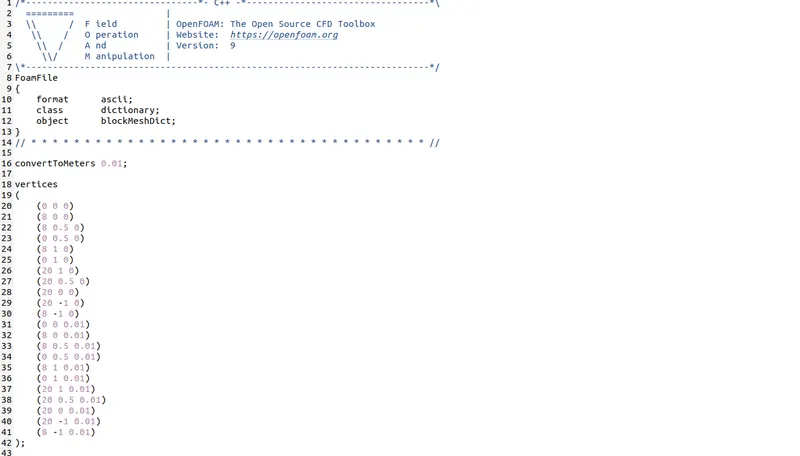
In this above image line 1 to 7 is Header, Line 8 indicates that this file corresponds to the software OpenFoam, Line 8 to 13 indicates that this is blockMeshDict file, Line 16 indicates the factory by which the dimensions have to multiplied to convert to meter. Line 19 to 41 indicates the vertices of the backward step.
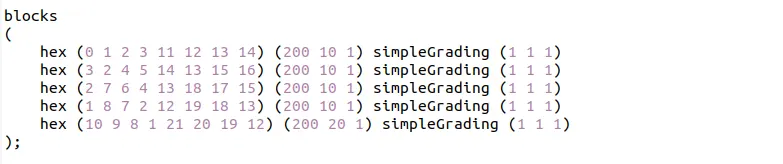
In this same blockMesh file go to the lines where we the word hex can be found. That is the line where we specify the faces of the blocks and also the number of cells in X,Y and Z direction.
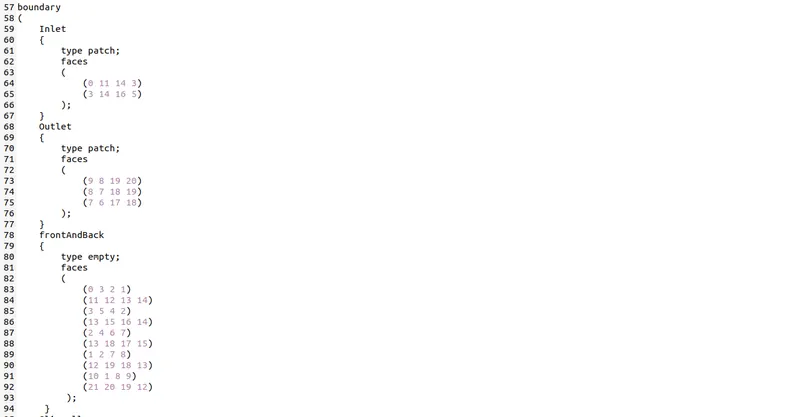
Line 59 to 66 Defines the faces which serves as the inlet,Line 68 to 75 Defines the faces which serves as the Outlet,Line 78 to 94 Defines the faces which serves as the FrontAndBack walls.
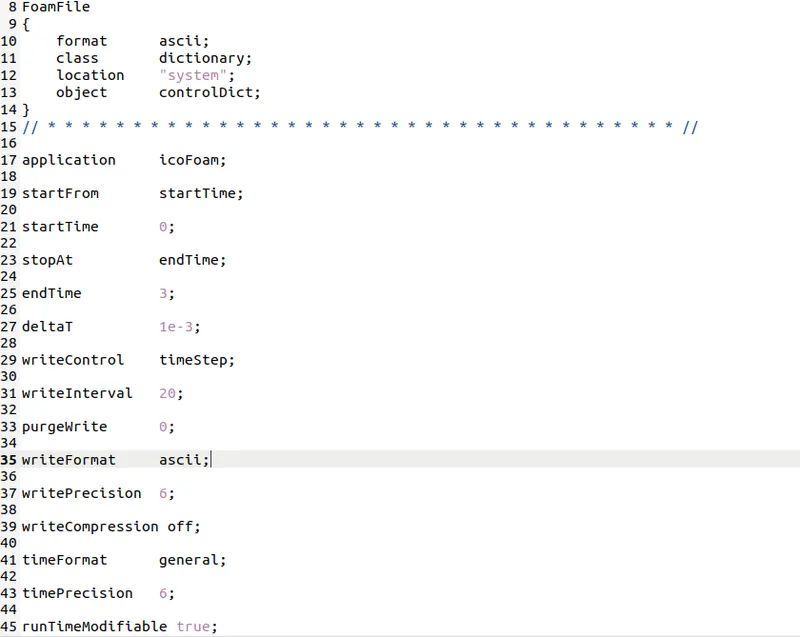
Line 17 indicates the type of solver we use to simulate the particular case, Line 25 is total time simulation, Line 27 this is a transient problem,we march forward in time to reach the steady state conditions.
BlockMesh:
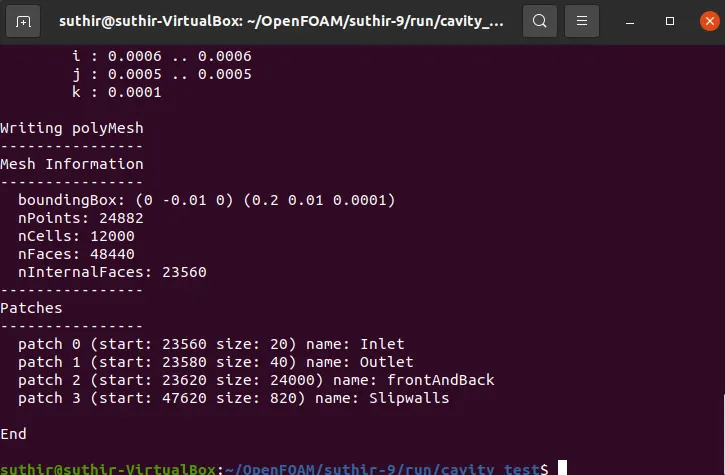
CheckMesh:
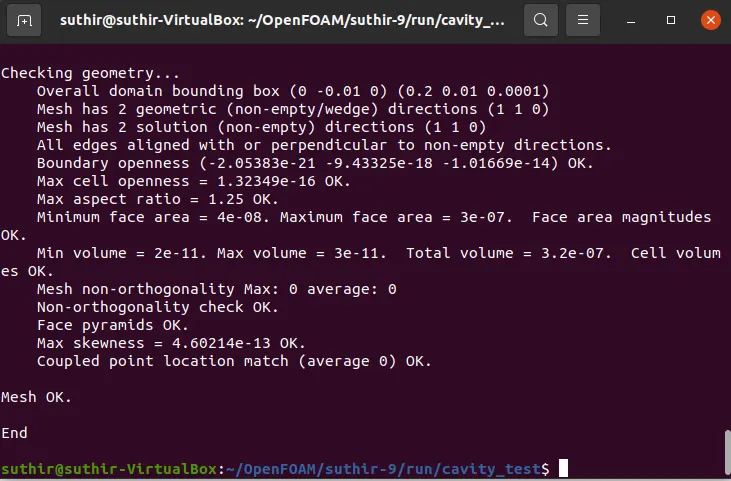
Output:
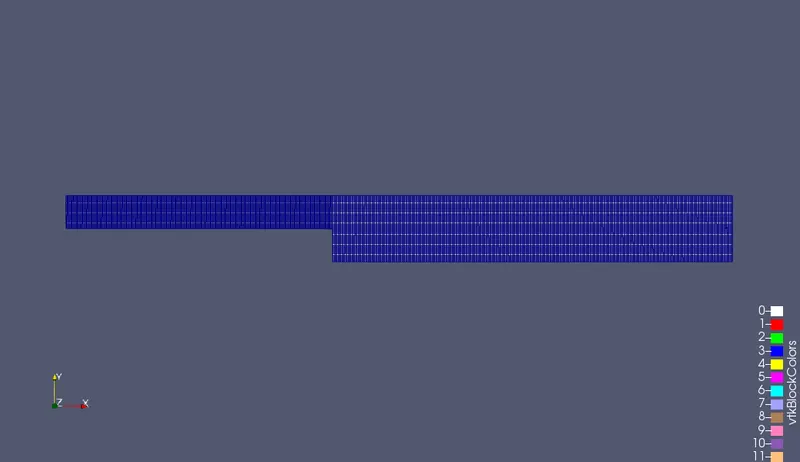
Without asigning any grading factor the blockMesh is as shown in figure
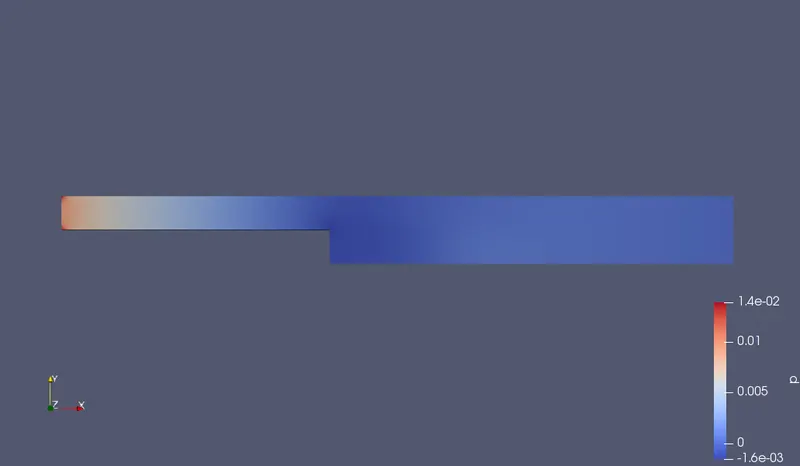
Pressure flow diagram without grading factor
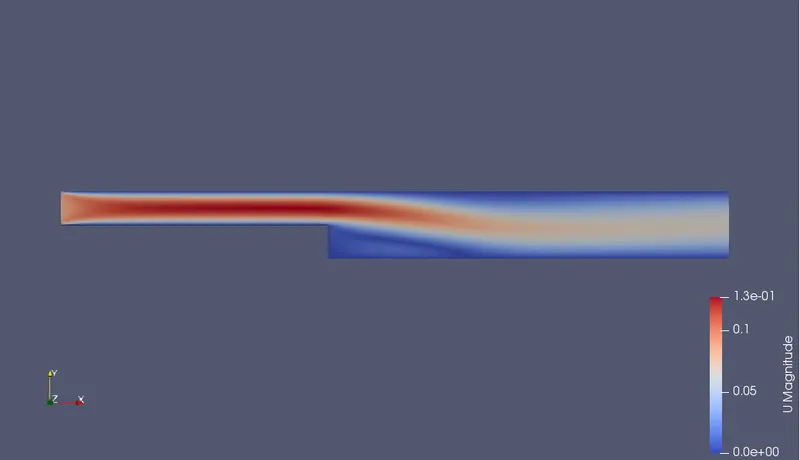
Velocity flow diagram without grading factor
Apply simple Grading condition 0.2:
/*--------------------------------*- C++ -*----------------------------------*\
  =========                 |
  \\      /  F ield         | OpenFOAM: The Open Source CFD Toolbox
   \\    /   O peration     | Website:  https://openfoam.org
    \\  /    A nd           | Version:  9
     \\/     M anipulation  |
\*---------------------------------------------------------------------------*/
FoamFile
{
    format      ascii;
    class       dictionary;
    object      blockMeshDict;
}
// * * * * * * * * * * * * * * * * * * * * * * * * * * * * * * * * * * * * * //

convertToMeters 0.01;

vertices
(
    (0 0 0)
    (8 0 0)
    (8 0.5 0)
    (0 0.5 0)
    (8 1 0)
    (0 1 0)
    (20 1 0)
    (20 0.5 0)
    (20 0 0)
    (20 -1 0)
    (8 -1 0)
    (0 0 0.01)
    (8 0 0.01)
    (8 0.5 0.01)
    (0 0.5 0.01)
    (8 1 0.01)
    (0 1 0.01)
    (20 1 0.01)
    (20 0.5 0.01)
    (20 0 0.01)
    (20 -1 0.01)
    (8 -1 0.01)
);

blocks
(
    hex (0 1 2 3 11 12 13 14) (200 10 1) simpleGrading (0.2 5 1)
    hex (3 2 4 5 14 13 15 16) (200 10 1) simpleGrading (0.2 0.2 1)
    hex (2 7 6 4 13 18 17 15) (200 10 1) simpleGrading (5 0.2 1)
    hex (1 8 7 2 12 19 18 13) (200 10 1) simpleGrading (5 5 1)
    hex (10 9 8 1 21 20 19 12) (200 20 1) simpleGrading (5 5 1)
);

edges
(
);

boundary
(
    Inlet
    {
        type patch;
        faces
        (
            (0 11 14 3)
            (3 14 16 5)
        );
    }
    Outlet
    {
        type patch;
        faces
        (
            (9 8 19 20)
            (8 7 18 19)
            (7 6 17 18)
        );
    }
    frontAndBack
    {
        type empty;
        faces
        (
            (0 3 2 1)
            (11 12 13 14)
            (3 5 4 2)
            (13 15 16 14)
            (2 4 6 7)
            (13 18 17 15)
            (1 2 7 8)
            (12 19 18 13)
            (10 1 8 9)
            (21 20 19 12)
         );
     }
    Slipwalls
    {
        type wall;
        faces
        (
            (4 15 17 6)
            (4 5 16 15)
            (1 10 21 12)
            (0 1 12 11)
            (9 20 21 10)
        );
    }
);

mergePatchPairs
(
);

// ************************************************************************* //
Explaination:
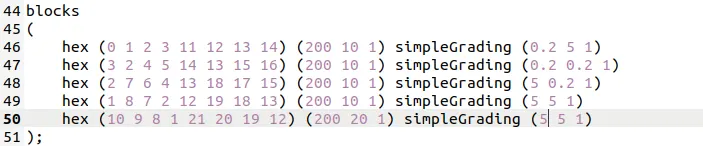
In this same blockMesh file go to the lines where we the word hex can be found. That is the line where we specify the faces of the blocks and also the number of cells in X,Y and Z direction with simple grading 0.2 by using the simple grading formula.
Output:
With asigning any grading factor 0.2 the blockMesh is as shown in figure
Velocity flow diagram with grading factor 0.2
Pressure flow diagram with grading factor 0.2
Conclusion:
By changing the simple grading factor from the value of 0.2 the mesh becomes finer and the solution become very accurate.
Overall the change in the size of simple grading factor (mesh size) the results remains the same as approximate.
The execution time is lower for lower meshing grading factor