Week 8 - Simulation of a backward facing step in OpenFOAM
OBJECTIVE.
To simulate an incompressible-laminar-viscous flow through the backwards-facing step geometry and perform a transient simulation.
Case 1 - To Simulate the flow without using any grading factor (i.e., GF = 1)
Case 2 - To Simulate the flow with a grading factor of 0.2. The cells should be finer near the walls (including the step wall).
Steps in OPENFOAM
STEP-1(Getting BLOCK MSEH DICT OF case-1)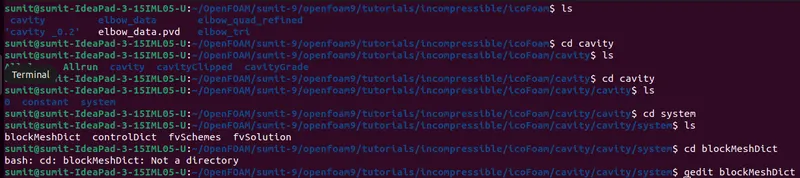 STEP-2 (EDIT BLOCKMESHDICT of flow without using any grading factor (i.e., GF = 1))
/*--------------------------------*- C++ -*----------------------------------*\
  =========                 |
  \\      /  F ield         | OpenFOAM: The Open Source CFD Toolbox
   \\    /   O peration     | Website:  https://openfoam.org
    \\  /    A nd           | Version:  9
     \\/     M anipulation  |
\*---------------------------------------------------------------------------*/
FoamFile
{
    format      ascii;
    class       dictionary;
    object      blockMeshDict;
}
// * * * * * * * * * * * * * * * * * * * * * * * * * * * * * * * * * * * * * //

convertToMeters 0.01;

vertices
(
(0 0 0)
(8 0 0)
(8 0.5 0)
(0 0.5 0)
(8 1 0)
(0 1 0)
(20 1 0)
(20 0.5 0)
(20 0 0)
(20 -1 0)
(8 -1 0)
(0 0 0.6)
(8 0 0.6)
(8 0.5 0.6)
(0 0.5 0.6)
(8 1 0.6)
(0 1 0.6)
(20 1 0.6)
(20 0.5 0.6)
(20 0 0.6)
(20 -1 0.6)
(8 -1 0.6)
);

blocks
(
   hex (0 1 2 3 11 12 13 14) (80 10 1) simpleGrading (1 1 1)
   hex (3 2 4 5 14 13 15 16) (80 10 1) simpleGrading (1 1 1)
   hex (2 7 6 4 13 18 17 15) (120 10 1) simpleGrading (1 1 1)
   hex (1 8 7 2 12 19 18 13) (120 10 1) simpleGrading (1 1 1)
   hex (10 9 8 1 21 20 19 12) (120 20 1) simpleGrading (1 1 1)
);

edges
(
);

boundary
(
inlet
{
type patch;
faces
(
(0 11 14 3)
(3 14 16 5)
);
}
outlet
{
type patch;
faces
(
(9 8 19 20)
(8 7 18 19)
(7 6 17 18)
);
}
frontAndBack
{
type empty;
faces
(
(0 3 2 1)
(11 12 13 14)
(3 5 4 2)
(13 15 16 14)
(2 4 6 7)
(13 18 17 15)
(1 2 7 8)
(12 19 18 13)
(10 1 8 9)
(21 20 19 12)
);
}
noslipwall
{
type wall;
faces
(
(4 5 16 15)
(4 15 17 6)
(0 1 12 11)
(9 20 21 10)
(1 10 21 12)
);
}
);

mergePatchPairs
(
);

// ************************************************************************* //
STEP-3(getting BLOCKMESHDICT OF CASE-2)
STEP-4(EDITING BLOCKMESHDICT OF CASE-2)
/*--------------------------------*- C++ -*----------------------------------*\
  =========                 |
  \\      /  F ield         | OpenFOAM: The Open Source CFD Toolbox
   \\    /   O peration     | Website:  https://openfoam.org
    \\  /    A nd           | Version:  9
     \\/     M anipulation  |
\*---------------------------------------------------------------------------*/
FoamFile
{
    format      ascii;
    class       dictionary;
    object      blockMeshDict;
}
// * * * * * * * * * * * * * * * * * * * * * * * * * * * * * * * * * * * * * //

convertToMeters 0.01;

vertices
(
(0 0 0)
(8 0 0)
(8 0.5 0)
(0 0.5 0)
(8 1 0)
(0 1 0)
(20 1 0)
(20 0.5 0)
(20 0 0)
(20 -1 0)
(8 -1 0)
(0 0 0.6)
(8 0 0.6)
(8 0.5 0.6)
(0 0.5 0.6)
(8 1 0.6)
(0 1 0.6)
(20 1 0.6)
(20 0.5 0.6)
(20 0 0.6)
(20 -1 0.6)
(8 -1 0.6)
);

blocks
(
    hex (0 1 2 3 11 12 13 14) (80 10 1) simpleGrading (0.2 5 1)
    hex (3 2 4 5 14 13 15 16) (80 10 1) simpleGrading (0.2 0.2 1)
    hex (2 7 6 4 13 18 17 15) (120 10 1) simpleGrading (5 0.2 1)
    hex (1 8 7 2 12 19 18 13) (120 10 1) simpleGrading (5 5 1)
    hex (10 9 8 1 21 20 19 12) (120 20 1) simpleGrading (5 5 1)
);

edges
(
);

boundary
(
inlet
{
type patch;
faces
(
(0 11 14 3)
(3 14 16 5)
);
}
outlet
{
type patch;
faces
(
(9 8 19 20)
(8 7 18 19)
(7 6 17 18)
);
}
frontAndBack
{
type empty;
faces
(
(0 3 2 1)
(11 12 13 14)
(3 5 4 2)
(13 15 16 14)
(2 4 6 7)
(13 18 17 15)
(1 2 7 8)
(12 19 18 13)
(10 1 8 9)
(21 20 19 12)
);
}
noslipwall
{
type wall;
faces
(
(4 5 16 15)
(4 15 17 6)
(0 1 12 11)
(9 20 21 10)
(1 10 21 12)
);
}
);
mergePatchPairs
(
);

// ************************************************************************* //
Step-5(Getting in to the CONTROLDICT in case-1 and case-2)
For case-1
For case-2

STEP-6(CONTROLDICT FILE for both case- 1 and case-2)
/*--------------------------------*- C++ -*----------------------------------*\
  =========                 |
  \\      /  F ield         | OpenFOAM: The Open Source CFD Toolbox
   \\    /   O peration     | Website:  https://openfoam.org
    \\  /    A nd           | Version:  9
     \\/     M anipulation  |
\*---------------------------------------------------------------------------*/
FoamFile
{
    format      ascii;
    class       dictionary;
    location    "system";
    object      controlDict;
}
// * * * * * * * * * * * * * * * * * * * * * * * * * * * * * * * * * * * * * //

application     icoFoam;

startFrom       startTime;

startTime       0;

stopAt          endTime;

endTime         200;

deltaT          0.005;

writeControl    timeStep;

writeInterval   20;

purgeWrite      0;

writeFormat     ascii;

writePrecision  6;

writeCompression off;

timeFormat      general;

timePrecision   6;

runTimeModifiable true;


// ************************************************************************* //
STEP-7 Getting in to pressure file
For case-1

For case-2

STEP-8 pressure file same for both case-1and 2
/*--------------------------------*- C++ -*----------------------------------*\
  =========                 |
  \\      /  F ield         | OpenFOAM: The Open Source CFD Toolbox
   \\    /   O peration     | Website:  https://openfoam.org
    \\  /    A nd           | Version:  9
     \\/     M anipulation  |
\*---------------------------------------------------------------------------*/
FoamFile
{
    format      ascii;
    class       volVectorField;
    object      U;
}
// * * * * * * * * * * * * * * * * * * * * * * * * * * * * * * * * * * * * * //

dimensions      [0 1 -1 0 0 0 0];

internalField   uniform (0 0 0);

boundaryField
{
    movingWall
    {
        type            fixedValue;
        value           uniform (1 0 0);
    }

    fixedWalls
    {
        type            noSlip;
    }

    frontAndBack
    {
        type            empty;
    }
}

// ************************************************************************* //
Similay for velociy files
STEP-9 velocity file same for both case-1and 2
/*--------------------------------*- C++ -*----------------------------------*\
  =========                 |
  \\      /  F ield         | OpenFOAM: The Open Source CFD Toolbox
   \\    /   O peration     | Website:  https://openfoam.org
    \\  /    A nd           | Version:  9
     \\/     M anipulation  |
\*---------------------------------------------------------------------------*/
FoamFile
{
    format      ascii;
    class       volVectorField;
    object      U;
}
// * * * * * * * * * * * * * * * * * * * * * * * * * * * * * * * * * * * * * //

dimensions      [0 1 -1 0 0 0 0];

internalField   uniform (0 0 0);

boundaryField
{
    movingWall
    {
        type            fixedValue;
        value           uniform (1 0 0);
    }

    fixedWalls
    {
        type            noSlip;
    }

    frontAndBack
    {
        type            empty;
    }
}

// ************************************************************************* //
STEP-10 transportProperties(nu) same for both case-1and 2
/*--------------------------------*- C++ -*----------------------------------*\
  =========                 |
  \\      /  F ield         | OpenFOAM: The Open Source CFD Toolbox
   \\    /   O peration     | Website:  https://openfoam.org
    \\  /    A nd           | Version:  9
     \\/     M anipulation  |
\*---------------------------------------------------------------------------*/
FoamFile
{
    format      ascii;
    class       dictionary;
    location    "constant";
    object      transportProperties;
}
// * * * * * * * * * * * * * * * * * * * * * * * * * * * * * * * * * * * * * //

nu              [0 2 -1 0 0 0 0] 1e-6;


// ************************************************************************* //
Step-11 Meshing
(a) Meshing

(b)Checking the mesh-

(c)Execute or Run program by icoFoam command

Here for case-1 of tep -11 is shown above.Similarly for case-2 can be done.
Case-1

Case-2

Step-12 Outputs
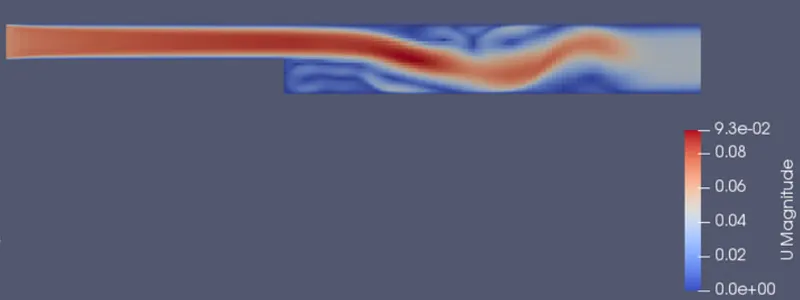
Case-1(velocity contours)
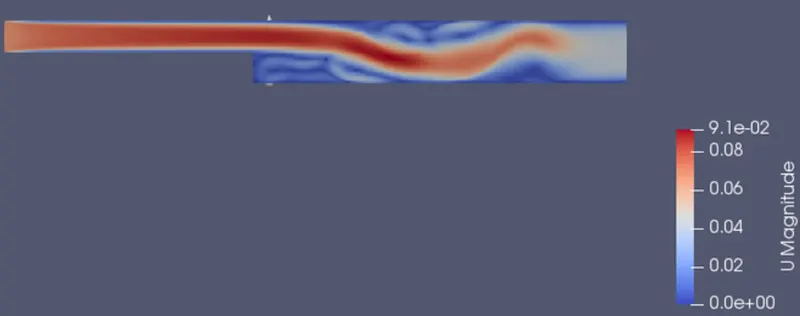
Case-2(velocity contours)
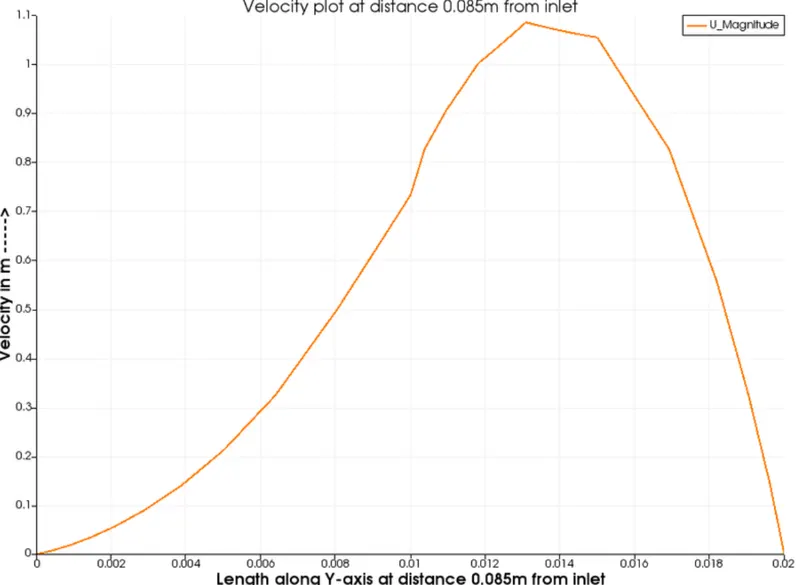
Case-1(Velocity plot for 0.085m from inlet)
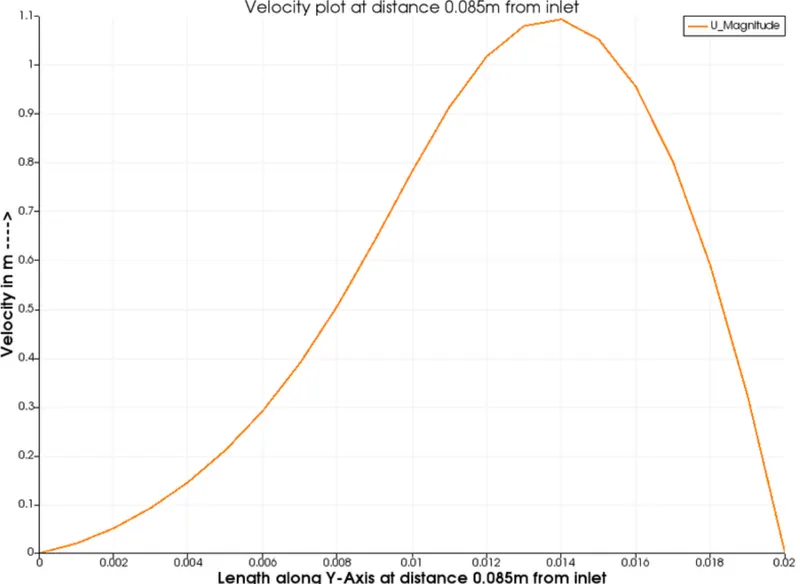
Case-2(Velocity plot at 0.085m from inlet)
CONCLUSION
From the above analysis it is clear that by changing the simple grading factor from the value of 0.2 to 1 the mesh becomes finer and the solution becomes very accurate.Overall the change in the size of simple grading factor (mesh size) the results remains the same as approximately.The execution time is lower for lower meshing grading factor.