Week 8 - Simulation of a backward facing step in OpenFOAM
Aim: To simulate incompressible laminar viscour flow through backward facing step geometry.
Preocedure:
- Open OpenFOAM tutorials and find suitable solver for the described physics of the flow.In this case icoFoam.
- Copy the required file to the OpenFOAm run folder so that any changes doesnt affect the original file.
- Got to the system folder
- Use the 'blockMeshDict' script file to create the required geometry.
- Use 'controlDict' script file to set up the time of simulations.
- In the '0' folder intialise the flow variables.In this case U and p.
- In 'constant' folder rchange the transport properties of the flow.
- Use blockMesh command to generate mesh and check it.
- Open the simulation file in paraview and plot the necessary.
- Repeat the above steps for grading factor 0.2.
Geometry:
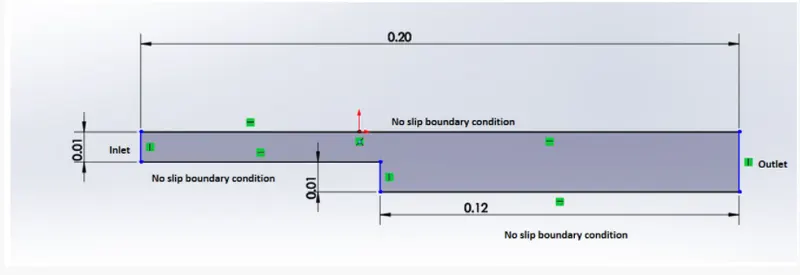
Mesh specifications:
- Number of cells along the x direction (longer dimension) = 200
- Number of cells along the longer y direction = 20
STEPS:
CASE 1: no grading factor
Find icoFoam folder in tutorials and copy the cavity file from the cavity folder and paste it in the OpenFOAM run folder.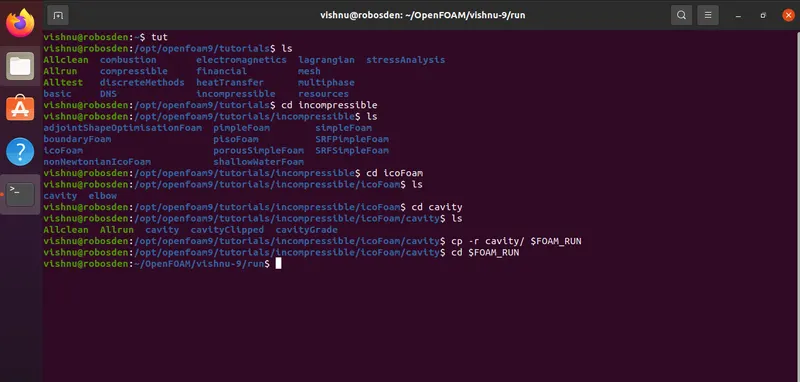
Edit the blockMeshDict file inside the system folder in cavity to create the geometry.

blockMeshDict script file:
/*--------------------------------*- C++ -*----------------------------------*\
  =========                 |
  \\      /  F ield         | OpenFOAM: The Open Source CFD Toolbox
   \\    /   O peration     | Website:  https://openfoam.org
    \\  /    A nd           | Version:  9
     \\/     M anipulation  |
\*---------------------------------------------------------------------------*/
FoamFile
{
    format      ascii;
    class       dictionary;
    object      blockMeshDict;
}
// * * * * * * * * * * * * * * * * * * * * * * * * * * * * * * * * * * * * * //

convertToMeters 1;

vertices
(
    //  vertices 0 t 10
    (0 0 0)
    (0.08 0 0)
    (0.08 0.005 0)
    (0 0.005 0)
    (0.08 0.01 0)
    (0 0.01 0)
    (0.2 0.01 0)
    (0.2 0.005 0)
    (0.2 0 0)
    (0.2 -0.01 0)
    (0.08 -0.01 0)

    //vertices 11 to 21
    (0 0 0.1)
    (0.08 0 0.1)
    (0.08 0.005 0.1)
    (0 0.005 0.1)
    (0.08 0.01 0.1)
    (0 0.01 0.1)
    (0.2 0.01 0.1)
    (0.2 0.005 0.1)
    (0.2 0 0.1)
    (0.2 -0.01 0.1)
    (0.08 -0.01 0.1)
);

blocks
(
    hex (0 1 2 3 11 12 13 14) (80 5 1) simpleGrading (1 1 1)
    hex (3 2 4 5 14 13 15 16) (80 5 1) simpleGrading (1 1 1)
    hex (2 7 6 4 13 18 17 15) (120 5 1) simpleGrading (1 1 1)
    hex (1 8 7 2 12 19 18 13) (120 5 1) simpleGrading (1 1 1)
    hex (10 9 8 1 21 20 19 12) (120 10 1) simpleGrading (1 1 1)
);

edges
(
);

boundary
(
    inlet
    {
        type patch;
        faces
        (
            (11 14 3 0)
            (14 16 5 3)
        );
    }

    outlet
    {
        type patch;
        faces
        (
            (6 17 18 7)
            (8 7 18 19)
            (9 8 19 20)
        );
    }

    noslip
    {
        type wall;
        faces
        (
            (15 4 5 16)
            (15 17 6 4)
            (21 12 1 10)
            (11 0 1 12)
            (21 10 9 20)
        );
    }
    frontAndBack
    {
        type empty;
        faces
        (
            (0 3 2 1)
            (3 5 4 2)
            (2 4 6 7)
            (1 2 7 8)
            (10 1 8 9)
            (13 15 16 14)
            (12 13 14 11)
            (20 19 12 21)
            (19 18 13 12)
            (18 17 15 13)
        );
    }
);

mergePatchPairs
(
);

// ************************************************************************* //
controlDict script file:
/*--------------------------------*- C++ -*----------------------------------*\
  =========                 |
  \\      /  F ield         | OpenFOAM: The Open Source CFD Toolbox
   \\    /   O peration     | Website:  https://openfoam.org
    \\  /    A nd           | Version:  9
     \\/     M anipulation  |
\*---------------------------------------------------------------------------*/
FoamFile
{
    format      ascii;
    class       dictionary;
    location    "system";
    object      controlDict;
}
// * * * * * * * * * * * * * * * * * * * * * * * * * * * * * * * * * * * * * //

application     icoFoam;

startFrom       startTime;

startTime       0;

stopAt          endTime;

endTime         0.5;

deltaT          0.001;

writeControl    timeStep;

writeInterval   20;

purgeWrite      0;

writeFormat     ascii;

writePrecision  6;

writeCompression off;

timeFormat      general;

timePrecision   6;

runTimeModifiable true;


// ************************************************************************* //
now head back to 0 folder and change the velocity and pressure values for initial conditions
U:
/*--------------------------------*- C++ -*----------------------------------*\
  =========                 |
  \\      /  F ield         | OpenFOAM: The Open Source CFD Toolbox
   \\    /   O peration     | Website:  https://openfoam.org
    \\  /    A nd           | Version:  9
     \\/     M anipulation  |
\*---------------------------------------------------------------------------*/
FoamFile
{
    format      ascii;
    class       volVectorField;
    object      U;
}
// * * * * * * * * * * * * * * * * * * * * * * * * * * * * * * * * * * * * * //

dimensions      [0 1 -1 0 0 0 0];

internalField   uniform (0.1 0 0);

boundaryField
{
    inlet
    {
        type            fixedValue;
        value           uniform (0.2 0 0);
    }

    outlet
    {
        type zeroGradient;
    }


    frontAndBack
    {
        type            empty;
    }

    noslip
    {
        type            noSlip;
    }
}

// ************************************************************************* //
p :
/*--------------------------------*- C++ -*----------------------------------*\
  =========                 |
  \\      /  F ield         | OpenFOAM: The Open Source CFD Toolbox
   \\    /   O peration     | Website:  https://openfoam.org
    \\  /    A nd           | Version:  9
     \\/     M anipulation  |
\*---------------------------------------------------------------------------*/
FoamFile
{
    format      ascii;
    class       volScalarField;
    object      p;
}
// * * * * * * * * * * * * * * * * * * * * * * * * * * * * * * * * * * * * * //

dimensions      [0 2 -2 0 0 0 0];

internalField   uniform 0;

boundaryField
{
    inlet
    {
        type            zeroGradient;
    }

    outlet
    {
        type            fixedValue;
        value uniform 0;
    }


    frontAndBack
    {
        type            empty;
    }

    noslip
    {
        type            zeroGradient;
    }
}

// ************************************************************************* //
Now head back to constant folder and change the viscosity of the fluid in transportProperties scrip file.
transportProperties :
/*--------------------------------*- C++ -*----------------------------------*\
  =========                 |
  \\      /  F ield         | OpenFOAM: The Open Source CFD Toolbox
   \\    /   O peration     | Website:  https://openfoam.org
    \\  /    A nd           | Version:  9
     \\/     M anipulation  |
\*---------------------------------------------------------------------------*/
FoamFile
{
    format      ascii;
    class       dictionary;
    location    "constant";
    object      transportProperties;
}
// * * * * * * * * * * * * * * * * * * * * * * * * * * * * * * * * * * * * * //

nu              [0 2 -1 0 0 0 0] 1e-5;


// ************************************************************************* //
Inorder to execute the mesh, we need to type 'blockMesh' in the command line .

We get the information as the mesh is created.To view the geometry we use paraview .To set up paraview , type 'paraFoam' in command line ,press enter , and click apply .

Our geometry looks as shown below.
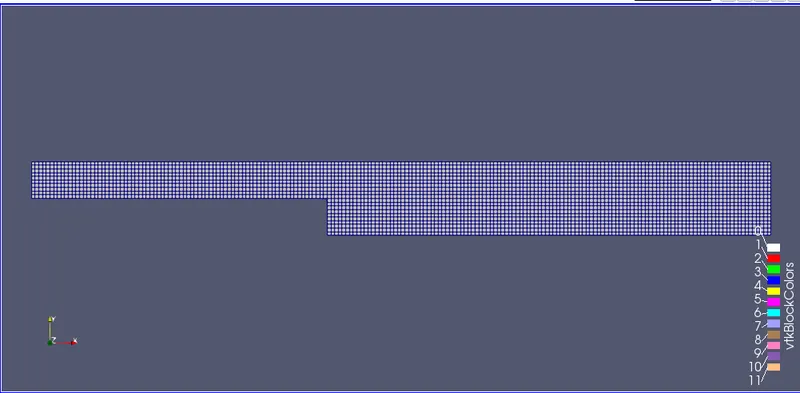
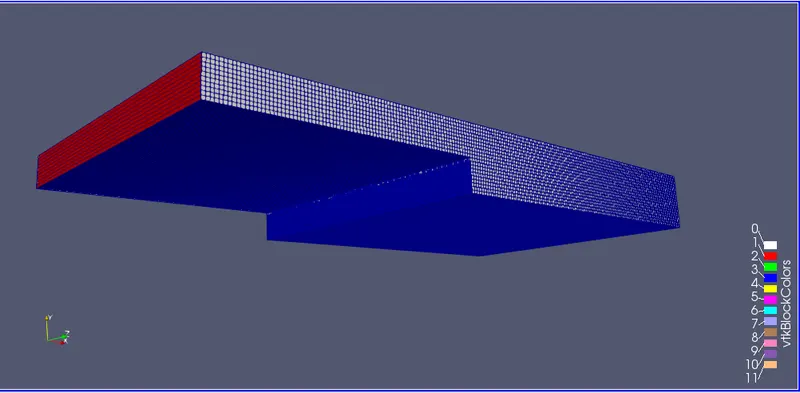
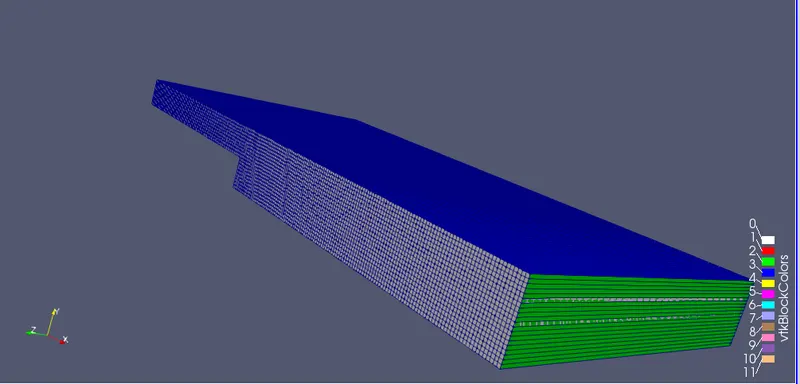
Now close the paraview and type 'icoFoam' in command line to execute the simulation.

To see the results we can go to paraview as tried earlier .Now we will be able to simulate the flow and see the post processing results.
Post processing results:
velocity contour
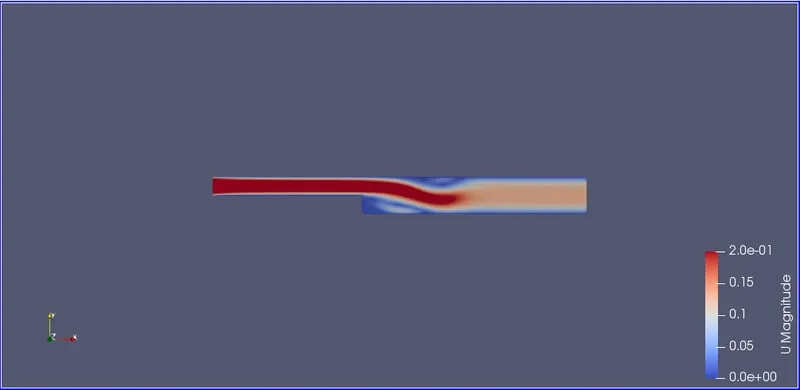
Pressure Contour:
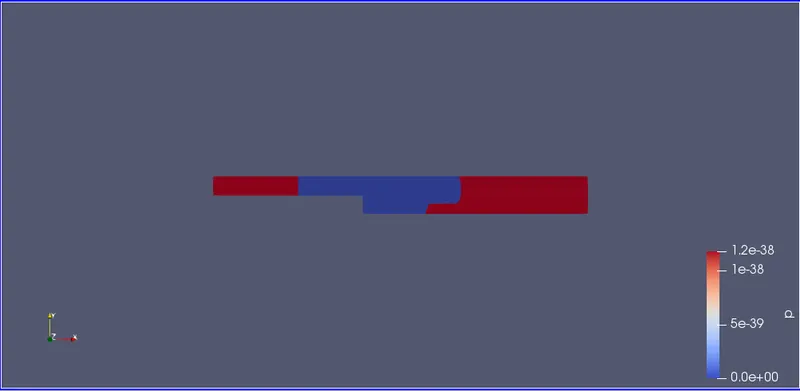
Velocity profile:
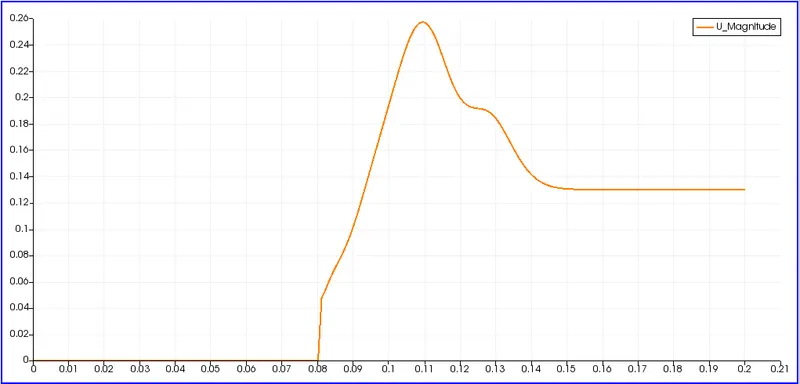
CASE 2: grading factor 0.2.The cells should be finer near the walls (includig the step wall).
Since only the mesh is going to change ,we only have to intefere with the 'blockMesh.Dict' script file.
case2 blockmeshDict script file:
/*--------------------------------*- C++ -*----------------------------------*\
  =========                 |
  \\      /  F ield         | OpenFOAM: The Open Source CFD Toolbox
   \\    /   O peration     | Website:  https://openfoam.org
    \\  /    A nd           | Version:  9
     \\/     M anipulation  |
\*---------------------------------------------------------------------------*/
FoamFile
{
    format      ascii;
    class       dictionary;
    object      blockMeshDict;
}
// * * * * * * * * * * * * * * * * * * * * * * * * * * * * * * * * * * * * * //

convertToMeters 1;

vertices
(
    //  vertices 0 t 10
    (0 0 0)
    (0.08 0 0)
    (0.08 0.005 0)
    (0 0.005 0)
    (0.08 0.01 0)
    (0 0.01 0)
    (0.2 0.01 0)
    (0.2 0.005 0)
    (0.2 0 0)
    (0.2 -0.01 0)
    (0.08 -0.01 0)

    //vertices 11 to 21
    (0 0 0.1)
    (0.08 0 0.1)
    (0.08 0.005 0.1)
    (0 0.005 0.1)
    (0.08 0.01 0.1)
    (0 0.01 0.1)
    (0.2 0.01 0.1)
    (0.2 0.005 0.1)
    (0.2 0 0.1)
    (0.2 -0.01 0.1)
    (0.08 -0.01 0.1)
);

blocks
(
    hex (0 1 2 3 11 12 13 14) (80 5 1) simpleGrading (0.2 5 1)
    hex (3 2 4 5 14 13 15 16) (80 5 1) simpleGrading (0.2 0.2 1)
    hex (2 7 6 4 13 18 17 15) (120 5 1) simpleGrading (5 0.2 1)
    hex (1 8 7 2 12 19 18 13) (120 5 1) simpleGrading (5 5 1)
    hex (10 9 8 1 21 20 19 12) (120 10 1) simpleGrading (5 5 1)
);

edges
(
);

boundary
(
    inlet
    {
        type patch;
        faces
        (
            (11 14 3 0)
            (14 16 5 3)
        );
    }

    outlet
    {
        type patch;
        faces
        (
            (6 17 18 7)
            (8 7 18 19)
            (9 8 19 20)
        );
    }

    noslip
    {
        type wall;
        faces
        (
            (15 4 5 16)
            (15 17 6 4)
            (21 12 1 10)
            (11 0 1 12)
            (21 10 9 20)
        );
    }
    frontAndBack
    {
        type empty;
        faces
        (
            (0 3 2 1)
            (3 5 4 2)
            (2 4 6 7)
            (1 2 7 8)
            (10 1 8 9)
            (13 15 16 14)
            (12 13 14 11)
            (20 19 12 21)
            (19 18 13 12)
            (18 17 15 13)
        );
    }
);

mergePatchPairs
(
);

// ************************************************************************* //
To view the mesh we need to type 'blockMesh' in the command line and then 'paraFoam' and click apply in the paraview window.

The mesh looks as shown below.
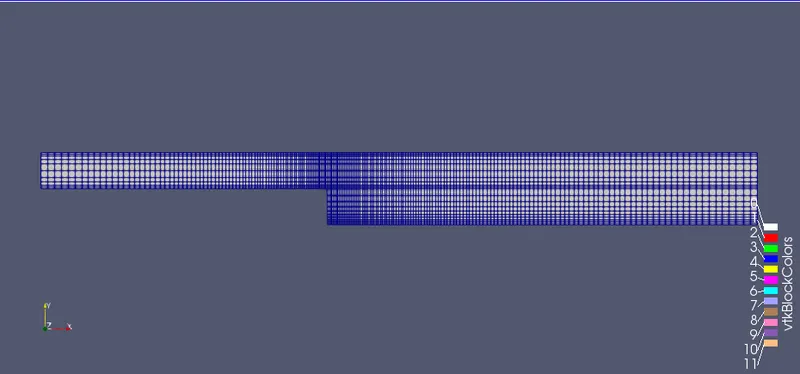
the fineness of the mesh near the boundary can be observed by zooming in.
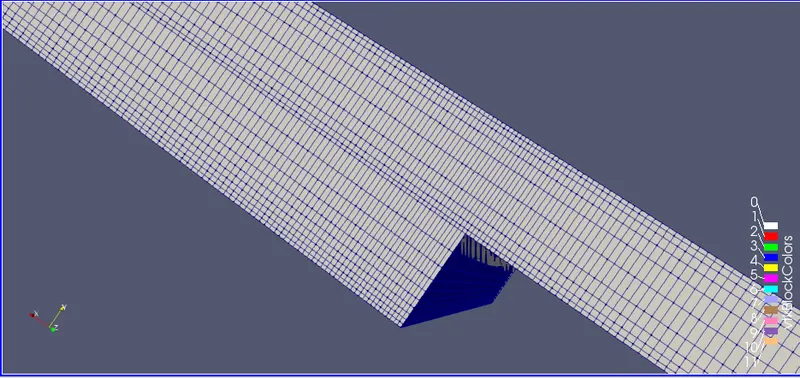
If the mesh seems correct then we can proceed to simulate using the 'icoFoam' command.
To view the simulation go forward with the 'paraFoam command.
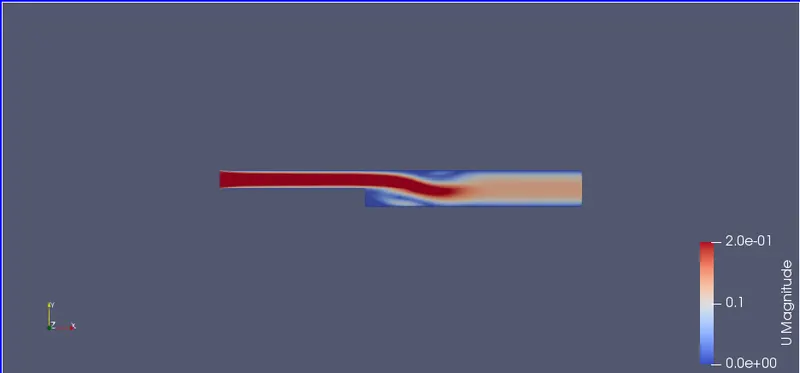
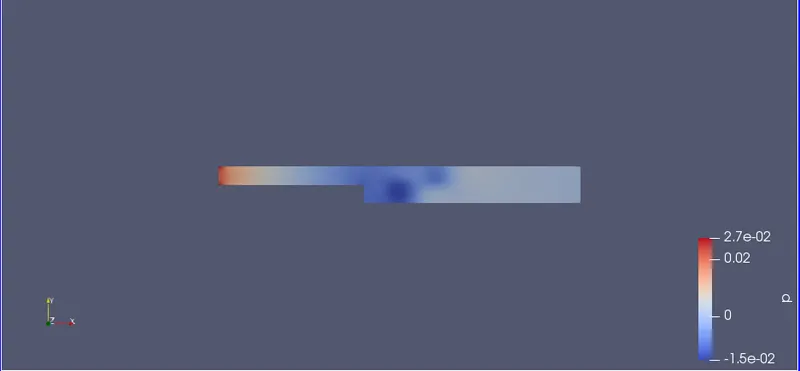
Post processing results:
velocity contour:
Pressure Contour:
velocity profile:
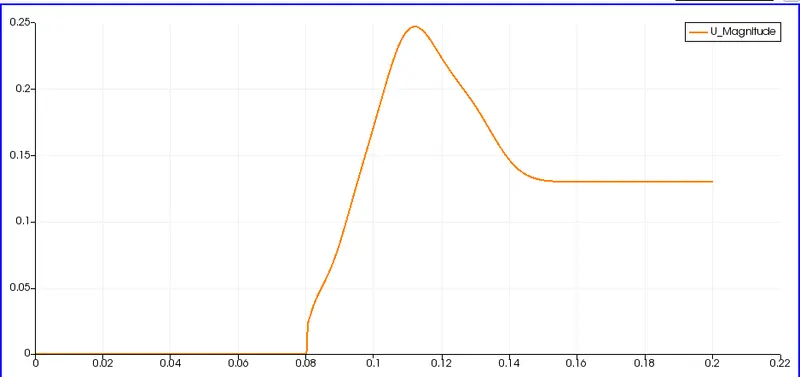
Observations and Conclusions:
At a distance of 0.085 m along x axis from the inlet the velocity of 0.05m/s approximately same for both cases.Clearly it is visible that the flow is laminar till the step and then it varies.
Grading makes the mesh near th ewalls finer leading to more soother solutions as seen in change in pressure in case 2 sompared to case 1.
The velocity profile is more smooth in case 1 without any grading. This is beacuase in case 1 the mesh is evenly distributed but in case 2 the meshes are corase in either directions at certain positions.Overall the meshes are finear at walls and courser at centre.In order to capture the effective variations of properties (which have large variations) we need to have finer mesh at our point of interest to get more accurate values.