Week 8 - Simulation of a backward facing step in OpenFOAM
Aim:
To simulate flow over a backward facing step in OpenFoam and to evaluate velocity profile at entry and step regions with/without grading factor.
Theory:
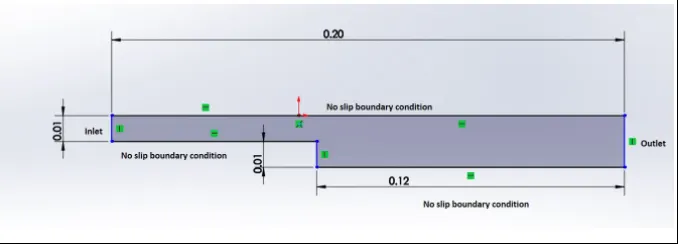
Here, we have considered an incompressible-laminar-viscous flow. The transient simulation has to be performed. OpenFoam has built-in tutorials which are categorized as per the type of flow, mode of heat transfer, type of solver, etc. As we have incompressible flow, here we have selected 'icoFoam' tutorial to get the required simulation data. As far as laminar flow is concerned, the velocity calculation can be done considering Reynold's number for internal flow. The schematic diagram of the problem is given below (fig. 1),
Steps to be followed:
- Copy the 'icoFoam' folder from tutorials to $FOAM_RUN directory.
- Edit 'blockMeshDict' file from system folder as per the geometry
- Run 'blockMesh' command to execute meshing and consecutively check the same in paraFoam
- If previous step gets succeded, then add boundaries to the geometry and again execute 'blockMesh' command
- Setup the initial and boundary values of pressure and velocity located in '0' folder as per the boundaries
- Run the solver 'icoFoam'
- Post-processing of results
Objectives:
- To simulate flow over a backward facing step
- To calculate the inlet velocity such that the flow is laminar
- To perform 2 case studies viz. without grading factor (i.e. GF = 1) and with grading factor of 0.2 near the walls (including the step wall)
- To plot velocity profile at 0.085 m from the inlet of the geometry for both case studies and compare them.
Procedure to be followed in OpenFoam:
Creating the geometry
The wireframe model of given problem is given below (fig. 2),
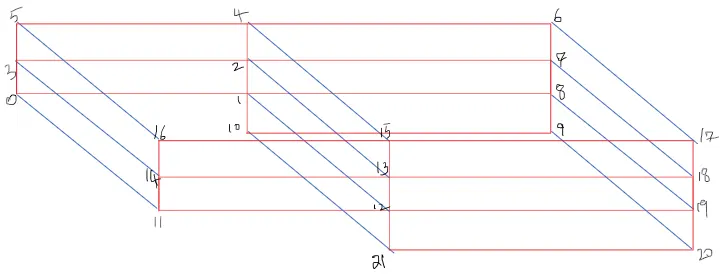
To create above geometry in OpenFoam, one needs to edit 'blockMeshDict' file in 'icoFoam' folder. The following code will give the idea,
#Case 1
/*--------------------------------*- C++ -*----------------------------------*\
  =========                 |
  \\      /  F ield         | OpenFOAM: The Open Source CFD Toolbox
   \\    /   O peration     | Website:  https://openfoam.org
    \\  /    A nd           | Version:  9
     \\/     M anipulation  |
\*---------------------------------------------------------------------------*/
FoamFile
{
    format      ascii;
    class       dictionary;
    object      blockMeshDict;
}
// * * * * * * * * * * * * * * * * * * * * * * * * * * * * * * * * * * * * * //

// Note: this file is a Copy of $FOAM_TUTORIALS/resources/blockMesh/pitzDaily

convertToMeters 1;

vertices
(
    (0 0 0)		//0
    (0.08 0 0)		//1
    (0.08 0.005 0)	//2
    (0 0.005 0)	        //3
    (0.08 0.01 0)	//4
    (0 0.01 0)		//5
    (0.2 0.01 0)	//6
    (0.2 0.005 0)	//7
    (0.2 0 0)		//8
    (0.2 -0.01 0)	//9
    (0.08 -0.01 0)	//10
    (0 0 0.001)	        //11
    (0.08 0 0.001)	//12
    (0.08 0.005 0.001)	//13
    (0 0.005 0.001)	//14
    (0.08 0.01 0.001)	//15
    (0 0.01 0.001)	//16
    (0.2 0.01 0.001)	//17
    (0.2 0.005 0.001)	//18
    (0.2 0 0.001)	//19
    (0.2 -0.01 0.001)	//20
    (0.08 -0.01 0.001)	//21
);


blocks
(
    hex (0 1 2 3 11 12 13 14)
    (80 7 1)
    simpleGrading (1 1 1)

    hex (3 2 4 5 14 13 15 16)
    (80 7 1)
    simpleGrading (1 1 1)

    hex (2 7 6 4 13 18 17 15)
    (120 7 1)
    simpleGrading (1 1 1)

    hex (1 8 7 2 12 19 18 13)
    (120 7 1)
    simpleGrading (1 1 1)

    hex (10 9 8 1 21 20 19 12)
    (120 6 1)
    simpleGrading (1 1 1)
);

edges
(
);

boundary
(
    inlet
    {
        type patch;
        faces
        (
            (0 11 14 3)
            (3 14 16 5)
        );
    }
    outlet
    {
        type patch;
        faces
        (
            (9 8 19 20)
            (8 7 18 19)
            (7 6 17 18)
        );
    }
    noslipwalls
    {
        type wall;
        faces
        (
            (16 15 4 5)
            (15 17 6 4)
            (10 21 12 1)
            (11 0 1 12)
            (21 10 9 20)
        );
    }
    frontAndBack
    {
        type empty;
        faces
        (
            (0 3 2 1)
            (3 5 4 2)
            (10 1 8 9)
            (1 2 7 8)
            (2 4 6 7)
            (11 12 13 14)
            (14 13 15 16)
            (21 20 19 12)
            (12 19 18 13)
            (13 18 17 15)
        );
    }
);
mergePatchPairs
(
);
// ************************************************************************* //
#Case 2
/*--------------------------------*- C++ -*----------------------------------*\
  =========                 |
  \\      /  F ield         | OpenFOAM: The Open Source CFD Toolbox
   \\    /   O peration     | Website:  https://openfoam.org
    \\  /    A nd           | Version:  9
     \\/     M anipulation  |
\*---------------------------------------------------------------------------*/
FoamFile
{
    format      ascii;
    class       dictionary;
    object      blockMeshDict;
}
// * * * * * * * * * * * * * * * * * * * * * * * * * * * * * * * * * * * * * //

// Note: this file is a Copy of $FOAM_TUTORIALS/resources/blockMesh/pitzDaily

convertToMeters 1;

vertices
(
    (0 0 0)		//0
    (0.08 0 0)		//1
    (0.08 0.005 0)	//2
    (0 0.005 0)	//3
    (0.08 0.01 0)	//4
    (0 0.01 0)		//5
    (0.2 0.01 0)	//6
    (0.2 0.005 0)	//7
    (0.2 0 0)		//8
    (0.2 -0.01 0)	//9
    (0.08 -0.01 0)	//10
    (0 0 0.001)	//11
    (0.08 0 0.001)	//12
    (0.08 0.005 0.001)	//13
    (0 0.005 0.001)	//14
    (0.08 0.01 0.001)	//15
    (0 0.01 0.001)	//16
    (0.2 0.01 0.001)	//17
    (0.2 0.005 0.001)	//18
    (0.2 0 0.001)	//19
    (0.2 -0.01 0.001)	//20
    (0.08 -0.01 0.001)	//21
);


blocks
(
    hex (0 1 2 3 11 12 13 14)
    (80 7 1)
    simpleGrading (0.2 5 1)

    hex (3 2 4 5 14 13 15 16)
    (80 7 1)
    simpleGrading (0.2 0.2 1)

    hex (2 7 6 4 13 18 17 15)
    (120 7 1)
    simpleGrading (5 0.2 1)

    hex (1 8 7 2 12 19 18 13)
    (120 7 1)
    simpleGrading (5 5 1)

    hex (10 9 8 1 21 20 19 12)
    (120 6 1)
    simpleGrading (5 5 1)
);

edges
(
);

boundary
(
    inlet
    {
        type patch;
        faces
        (
            (0 11 14 3)
            (3 14 16 5)
        );
    }
    outlet
    {
        type patch;
        faces
        (
            (9 8 19 20)
            (8 7 18 19)
            (7 6 17 18)
        );
    }
    noslipwalls
    {
        type wall;
        faces
        (
            (16 15 4 5)
            (15 17 6 4)
            (10 21 12 1)
            (11 0 1 12)
            (21 10 9 20)
        );
    }
    frontAndBack
    {
        type empty;
        faces
        (
            (0 3 2 1)
            (3 5 4 2)
            (10 1 8 9)
            (1 2 7 8)
            (2 4 6 7)
            (11 12 13 14)
            (14 13 15 16)
            (21 20 19 12)
            (12 19 18 13)
            (13 18 17 15)
        );
    }
);
mergePatchPairs
(
);
// ************************************************************************* //
Here, first vertices are defined as per the wireframe model. Then, the blocks are defined using these vertices. 'hex' mesh is used for meshing with given mesh specifications. As far as the first case is concerned, grading factor is 1. Then, boundaries are defined such as inlet, outlet, no-slip walls, front and back walls. For defining the faces, strickly right-hand rule is used. 'mergePatchPairs' merges the common faces of blocks. After applying boundary conditions, the geometry looks as follows (fig. 3),

After meshing (fig. 4),
#Case 1

#Case 2

Editing simulation parameters
Here, one can set different simulation parameters in 'controlDict' file. As far as the problem is concerned, we need to modify the total simulation time and deltaT value.
#Case 1
/*--------------------------------*- C++ -*----------------------------------*\
  =========                 |
  \\      /  F ield         | OpenFOAM: The Open Source CFD Toolbox
   \\    /   O peration     | Website:  https://openfoam.org
    \\  /    A nd           | Version:  9
     \\/     M anipulation  |
\*---------------------------------------------------------------------------*/
FoamFile
{
    format      ascii;
    class       dictionary;
    location    "system";
    object      controlDict;
}
// * * * * * * * * * * * * * * * * * * * * * * * * * * * * * * * * * * * * * //

application     icoFoam;

startFrom       startTime;

startTime       0;

stopAt          endTime;

endTime         0.5;

deltaT          0.0005;

writeControl    timeStep;

writeInterval   20;

purgeWrite      0;

writeFormat     ascii;

writePrecision  6;

writeCompression off;

timeFormat      general;

timePrecision   6;

runTimeModifiable true;


// ************************************************************************* //
#Case 2
/*--------------------------------*- C++ -*----------------------------------*\
  =========                 |
  \\      /  F ield         | OpenFOAM: The Open Source CFD Toolbox
   \\    /   O peration     | Website:  https://openfoam.org
    \\  /    A nd           | Version:  9
     \\/     M anipulation  |
\*---------------------------------------------------------------------------*/
FoamFile
{
    format      ascii;
    class       dictionary;
    location    "system";
    object      controlDict;
}
// * * * * * * * * * * * * * * * * * * * * * * * * * * * * * * * * * * * * * //

application     icoFoam;

startFrom       startTime;

startTime       0;

stopAt          endTime;

endTime         0.5;

deltaT          0.00005;

writeControl    timeStep;

writeInterval   20;

purgeWrite      0;

writeFormat     ascii;

writePrecision  6;

writeCompression off;

timeFormat      general;

timePrecision   6;

runTimeModifiable true;


// ************************************************************************* //
Setting up the initial conditions
Here, initial conditions are pressure and velocity values at t = 0. These values are stored in 'p' and 'U' folder respectively. Both cases have same files. These files are given as follows,
For pressure,
/*--------------------------------*- C++ -*----------------------------------*\
  =========                 |
  \\      /  F ield         | OpenFOAM: The Open Source CFD Toolbox
   \\    /   O peration     | Website:  https://openfoam.org
    \\  /    A nd           | Version:  9
     \\/     M anipulation  |
\*---------------------------------------------------------------------------*/
FoamFile
{
    format      ascii;
    class       volScalarField;
    object      p;
}
// * * * * * * * * * * * * * * * * * * * * * * * * * * * * * * * * * * * * * //

dimensions      [0 2 -2 0 0 0 0];

internalField   uniform 0;

boundaryField
{
    inlet
    {
        type            zeroGradient;
    }

    outlet
    {
        type            fixedValue;
        value	         uniform 0;
    }
    noslipwalls
    {
    	type 		zeroGradient;
    }
    frontAndBack
    {
        type            empty;
    }
}

// ************************************************************************* //
Here, at inlet, 'zeroGradient' function creates a volume field with zero-gradient boundary conditions from another volume field. Similarly, it is applied to no-slip walls. At outlet, gauge pressure is considered as zero. So, it is open to atmosphere.
For velocity,
/*--------------------------------*- C++ -*----------------------------------*\
  =========                 |
  \\      /  F ield         | OpenFOAM: The Open Source CFD Toolbox
   \\    /   O peration     | Website:  https://openfoam.org
    \\  /    A nd           | Version:  9
     \\/     M anipulation  |
\*---------------------------------------------------------------------------*/
FoamFile
{
    format      ascii;
    class       volVectorField;
    object      U;
}
// * * * * * * * * * * * * * * * * * * * * * * * * * * * * * * * * * * * * * //

dimensions      [0 1 -1 0 0 0 0];

internalField   uniform (0 0 0);

boundaryField
{
    inlet
    {
        type            fixedValue;
        value		 uniform (1.2 0 0);
    }

    outlet
    {
        type            zeroGradient;
    }
    noslipwalls
    {
    	type 		noSlip;
    }
    frontAndBack
    {
        type            empty;
    }
}

// ************************************************************************* //
Here, at inlet, uniform velocity in x-direction is defined. It is calculated based on Reynold's number formula (i.e. `Re=(rho.v.L_c)/mu`).
After this, one can run simulation in OpenFoam by using 'icoFoam' command in terminal. Run command changes with different types of solver. The outcomes from simulation can be viewed in 'ParaFoam'. Also, post-processing is done in the same.
OpenFoam outputs:
#Case 1
Velocity contour
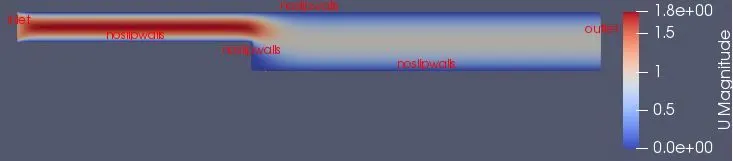
This velocity contour shows the behaviour of the fluid as it proceeds from inlet to outlet. Due to velocity boundary layer phenomenon, at walls, velocity is zero. As we go away from walls, the velocity increases and attains maximum value at middle plane of geometry. After overcoming the initial resistance at entrance, the velocity profile looks as follows,
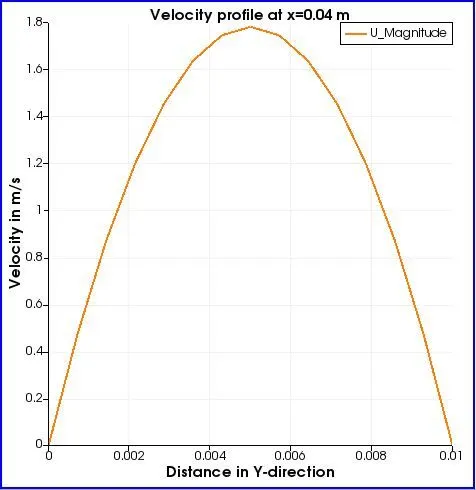
It is parabolic in shape. Due to no-slip condition at walls, velocity is zero there. One can see the maximum velocity achieved by the flow is around 1.8 m/s. This is at distance of x=0.04 m from inlet.
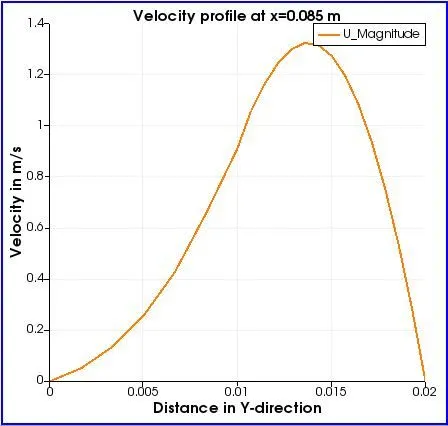
Above figure shows the velocity profile at x=0.085 m. As it's the area just after the step, there is a change in velocity profile. The maximum value of velocity decreases to some extent due to sudden change in area ( i.e. from 1.8 m/s to 1.3 m/s).
#Case 2
Velocity contour
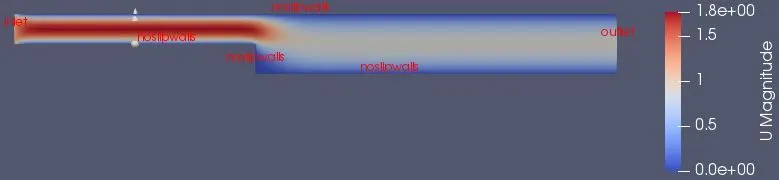
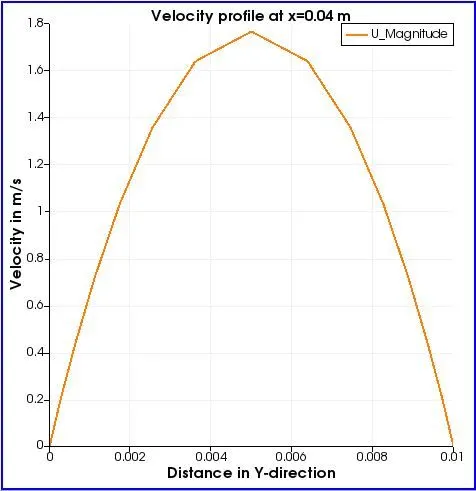
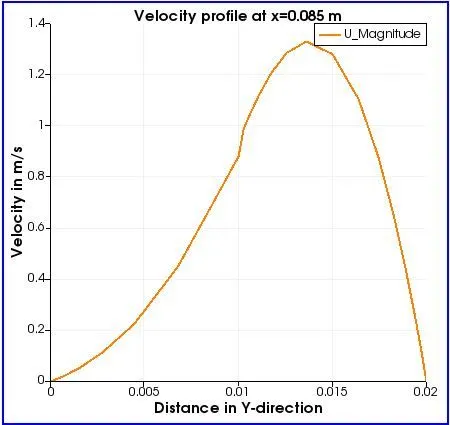
When we introduce a grading factor, the mesh becomes finer at specific regions. This helps in getting more accurate results in dominant areas, such as, boundary layer, re-circultion zone, turbulant zone etc. So, as we go on reducing grading factor from 1 to 0, the mesh becomes more finer. So, to get optimum values of flow-field variables, we choose respective setting of grading factor. Along with simple grading, we can use multi grading as well. Here, multi grading is used.
As far as this problem is concerned, the velocity magnitude gives similar results with or without grading factor, but with grading factor its observed that more accurate results are obtained.