Week - 8 - Creating component and property
Aim:
To create a macro for creating components and property
Procedure:
1) Ask the user to enter name of a component and its thickness
set addsub .window
catch {destroy $addsub}
toplevel $addsub -class toplevel
wm title $addsub "Creating_Components"
wm geometry $addsub 500x500+200+200; update
wm resizable $addsub 0 0
wm deiconify $addsub
label $addsub.01 -text "Component" -bg yellow -font {times 10 bold}; place $addsub.01 -x 20 -y 20 -width 100 -height 40
label $addsub.02 -text "Thickness" -bg green -font {times 10 bold}; place $addsub.02 -x 20 -y 100 -width 100 -height 40
entry $addsub.03 -textvariable r; place $addsub.03 -x 150 -y 20 -width 200 -height 40
entry $addsub.04 -textvariable s; place $addsub.04 -x 150 -y 100 -width 200 -height 40
button $addsub.05 -text "Create" -command {create $r $s } -bg red -font {times 20 bold}; place $addsub.05 -x 80 -y 200 -width 150 -height 60
2) Write a code that will automatically create components and assign thickness to it
*createentity comps includeid=0 name=pshell_1.0;
*createentity props cardimage=PSHELL includeid=0 name=pshell_1.0;
*setvalue props id=1 STATUS=1 95=5;
*setvalue comps id=1 propertyid={props 1}
3) The code should decide on its own what type of collector should be created depending on the user profile/deck
proc nastranmsc {a t} {
set n $a$t
*createentity comps includeid=0 name=$n;
*createmark comps 1 $n
set compid [hm_getmark comps 1]
*createentity props cardimage=PSHELL includeid=0 name=$n;
*createmark props 2 $n
set propid [hm_getmark props 2]
*setvalue props id=$propid STATUS=1 95=$t;
*setvalue comps id=$compid propertyid={props $propid};
}
Challenge_8 complete code has copied below:
set addsub .window
catch {destroy $addsub}
toplevel $addsub -class toplevel
wm title $addsub "Creating_Components"
wm geometry $addsub 500x500+200+200; update
wm resizable $addsub 0 0
wm deiconify $addsub
label $addsub.01 -text "Component" -bg yellow -font {times 10 bold}; place $addsub.01 -x 20 -y 20 -width 100 -height 40
label $addsub.02 -text "Thickness" -bg green -font {times 10 bold}; place $addsub.02 -x 20 -y 100 -width 100 -height 40
entry $addsub.03 -textvariable r; place $addsub.03 -x 150 -y 20 -width 200 -height 40
entry $addsub.04 -textvariable s; place $addsub.04 -x 150 -y 100 -width 200 -height 40
button $addsub.05 -text "Create" -command {create $r $s } -bg red -font {times 20 bold}; place $addsub.05 -x 80 -y 200 -width 150 -height 60
puts z
proc create {a t} {
set nastran [hm_info templatetype]
if {$nastran == "nastran"} {
set c $a
set d $t
*createmark comps 1 $c
if {[hm_marklength components 1 $c] !=0} {
puts [tk_messageBox -message "The component already exists" -icon warning -type ok -title prompt]
} else {
*createentity comps includeid=0 name=$c;
*createmark comps 1 $c
set compid [hm_getmark comps 1]
*createentity props cardimage=PSHELL includeid=0 name=$c;
*createmark props 2 $c
set propid [hm_getmark props 2]
*setvalue props id=$propid STATUS=1 95=$t;
*setvalue comps id=$compid propertyid= $propid;
}
}
}
Snippets:
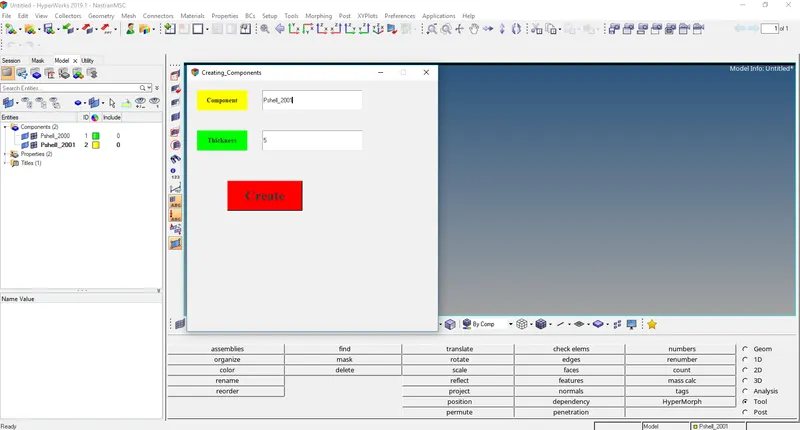
GUI after allowing the code to run in hypermesh.
Conclusion:
Creating components and assigning thickness to the component by creating a property is now on a click of a button.