Week - 6 - Creating the GUI for final checks
Aim:
Creating TK GUI for final checks.
Procedure:
1) Create buttons to delete displayed geometric entities:
set a .window
catch {destroy $a}
toplevel $a -class toplevel
wm title $a "GUI For Final Checks"
wm geometry $a 500x500+200+200; update
wm resizable $a 0 0
wm deiconify $a
button $a.01 -text "Delete surfaces" -command "delete surfaces" -bg yellow -font {times 10 bold}; place $a.01 -x 20 -y 50 -width 100 -height 25
button $a.02 -text "Delete Points" -command "delete points" -bg gray -font {times 10 bold}; place $a.02 -x 140 -y 50 -width 100 -height 25
button $a.03 -text "Delete Lines" -command "delete lines" -bg blue -font {times 10 bold}; place $a.03 -x 260 -y 50 -width 100 -height 25
button $a.04 -text "Delete Solids" -command "delete solids" -bg green -font {times 10 bold}; place $a.04 -x 380 -y 50 -width 100 -height 25
proc delete {a} {
*deleteelementsmode 0
*createmark $a 1 "displayed"
if {[hm_marklength $a 1] !=0} {*deletemark $a 1}
}
2) Create buttons to delete empty entities:
set a .window
catch {destroy $a}
toplevel $a -class toplevel
wm title $a "GUI For Final Checks"
wm geometry $a 500x500+200+200; update
wm resizable $a 0 0
wm deiconify $a
button $a.05 -text "Empty Comps" -command "empty comps" -bg gray -font {times 10 bold}; place $a.05 -x 20 -y 100 -width 100 -height 25
button $a.06 -text "Empty Assy" -command "empty assemblies" -bg green -font {times 10 bold}; place $a.06 -x 140 -y 100 -width 100 -height 25
button $a.07 -text "Empty Loadcol" -command "empty loadcol" -bg blue -font {times 10 bold}; place $a.07 -x 260 -y 100 -width 100 -height 25
button $a.08 -text "Empty Loadstep" -command "empty loadstep" -bg yellow -font {times 10 bold}; place $a.08 -x 380 -y 100 -width 100 -height 25
button $a.09 -text "Empty Groups" -command "empty groups" -bg yellow -font {times 10 bold}; place $a.09 -x 20 -y 150 -width 100 -height 25
button $a.10 -text "Empty Vectcols" -command "empty vectcols" -bg gray -font {times 10 bold}; place $a.10 -x 140 -y 150 -width 100 -height 25
button $a.11 -text "Empty Beamcols" -command "empty beamsectcols" -bg blue -font {times 10 bold}; place $a.11 -x 260 -y 150 -width 100 -height 25
button $a.12 -text "Empty Contacts" -command "empty contactsurfs" -bg green -font {times 10 bold}; place $a.12 -x 380 -y 150 -width 100 -height 25
proc empty {b} {
*EntityPreviewEmpty $b 1
if {[hm_marklength $b 1] !=0} {*deletemark $b 1}
}
3) Create button to re-order and re-number entities:
set a .window
catch {destroy $a}
toplevel $a -class toplevel
wm title $a "GUI For Final Checks"
wm geometry $a 500x500+200+200; update
wm resizable $a 0 0
wm deiconify $a
button $a.17 -text "Reorder Comps" -command {reorder comps} -bg yellow -font {times 10 bold}; place $a.17 -x 20 -y 250 -width 100 -height 25
button $a.18 -text "Reorder Props" -command {reorder props} -bg blue -font {times 10 bold}; place $a.18 -x 140 -y 250 -width 100 -height 25
button $a.19 -text "Reorder Mats" -command {reorder mats} -bg green -font {times 10 bold}; place $a.19 -x 260 -y 250 -width 100 -height 25
button $a.20 -text "Reorder Assy" -command {reorder assems} -bg yellow -font {times 10 bold}; place $a.20 -x 380 -y 250 -width 100 -height 25
proc reorder {d} {
*clearmarkall 1
*createmark $d 1 "all"
if {[hm_marklength $d 1] !=0} {*collectormarkmove $d 1 1 1}
}
button $a.21 -text "Renumber Comps" -command {renumber comps} -bg yellow -font {times 10 bold}; place $a.21 -x 20 -y 300 -width 100 -height 25
button $a.22 -text "Renumber Props" -command {renumber props} -bg blue -font {times 10 bold}; place $a.22 -x 140 -y 300 -width 100 -height 25
button $a.23 -text "Renumber Mats" -command {renumber mats} -bg green -font {times 10 bold}; place $a.23 -x 260 -y 300 -width 100 -height 25
button $a.24 -text "Renumber Assy" -command {renumber assems} -bg yellow -font {times 10 bold}; place $a.24 -x 380 -y 300 -width 100 -height 25
proc renumber {e} {
*clearmarkall 1
*createmark $e 1 "all"
if {[hm_marklength $e 1] !=0} {*renumber $e 1 1 1 0 0}
}
4) Create a master button in red that will execute all above scripts in proper order to keep only the fea entities. Name the button master:
set a .window
catch {destroy $a}
toplevel $a -class toplevel
wm title $a "GUI For Final Checks"
wm geometry $a 500x500+200+200; update
wm resizable $a 0 0
wm deiconify $a
button $a.25 -text "Master" -command {master} -bg red -font {times 20 bold}; place $a.25 -x 225 -y 400 -width 100 -height 50
proc master {} {
delete surfaces;
delete points;
delete lines;
empty comps;
empty assemblies;
unused props;
unused mats;
*nodecleartempmark
}
master ;
snippets:
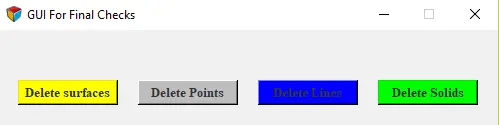
Delete Entities
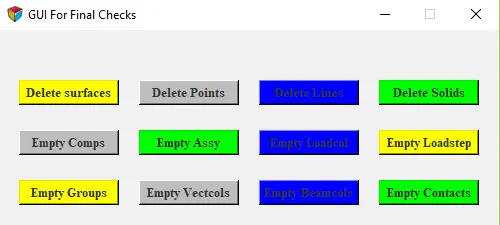
Delete and Empty Entities
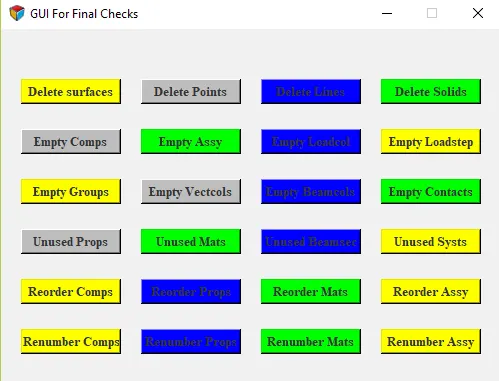
Delete Entities, Empty Entities, Reorder and Renumber Entities
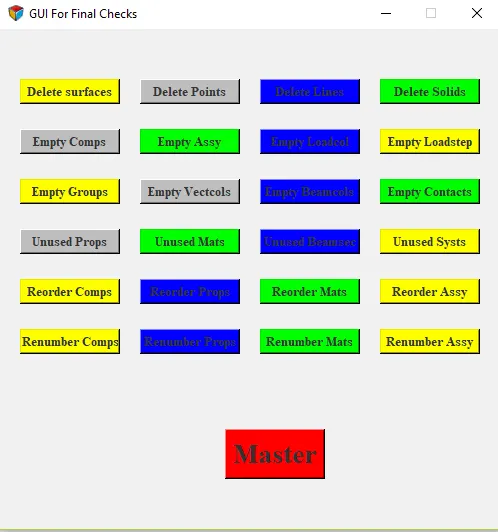
Master Key With all Final Checks
- I have attached complete TCL file below.
Conclusion:
Successfully created GUI for final checks.