Week - 8 - Creating component and property
AIM:
To Create the component and property using TCL/TK commands.
OBJECTIVE:
- Ask the user to enter name of a component and its thickness.
- Write a code that will automatically create components and assign thickness to it.
- The code should decide on its own what type of collector should be created depending on the user profile/deck.
- According to deck the code should decide , whether a property needs to be created or not.
- Auto color the created component and property.
PROCEDURE:
- *createentity comp : used to create the component
- *createentity prop : used to create the property
- *setvalue props : used to update the thickness of the individual property.
- *propertyupdate : used to update the property of the component.
- hm_info templatetype : used to get information on which solver we are currently working on. Code is written for only Optistruct and Radioss Solvers only.
CODE:
set ::c_name {}
set ::T {}
proc optistruct {} {
*createentity comps includeid=0 name= $::c_name
set prop $::c_name
append prop _$::T
*createentity props cardimage=PSHELL includeid=0 name=$prop
*setvalue props name=$prop STATUS=1 95=$::T
*createmark components 1 "$::c_name"
*propertyupdate components 1 "$prop"
}
proc radioss {} {
*createentity comps cardimage=Part includeid=0 name=$::c_name
set prop $::c_name
append prop _$::T
*createentity props cardimage=P1_SHELL includeid=0 name=$prop
*setvalue props name=$prop STATUS=1 431=$::T
*createmark components 1 "$::c_name"
*propertyupdate components 1 "$prop"
}
proc create {} {
set a1 radioss
set b1 optistruct
set c1 [hm_info templatetype]
if {$a1==$c1} {
radioss
} else {
optistruct
}
}
set a .component_info
catch {destroy $a}
toplevel $a
wm geometry $a 600x60+200+200
wm resizable $a 0 0
wm deiconify $a
label $a.01 -text "Component_name" -bg "grey"
place $a.01 -x 10 -y 10 -width 100 -height 40
entry $a.02 -textvariable ::c_name
place $a.02 -x 120 -y 10 -width 140 -height 40
label $a.03 -text "Thickness" -bg "grey"
place $a.03 -x 270 -y 10 -width 100 -height 40
entry $a.04 -textvariable ::T
place $a.04 -x 380 -y 10 -width 140 -height 40
button $a.1 -text "Create" -bg "green" -command create
place $a.1 -x 530 -y 10 -width 60 -height 40
OUTPUT:
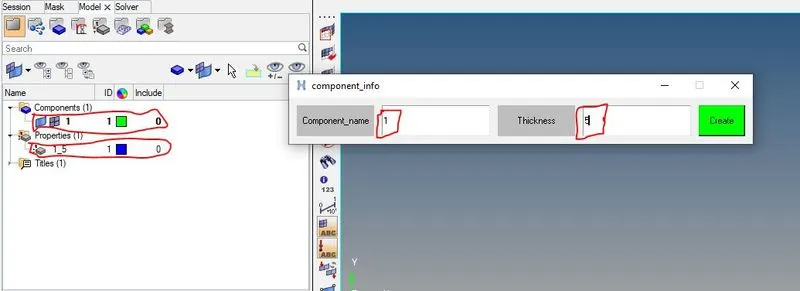
RESULTS:
- Written the code to create the Component and Property on users input for Optistruct and Radioss Solver.