Draft Analysis on a Fan Cover
Aim - Create the tooling axis for the given Fan cover model meeting the requirements of the draft angle and perform the Draft analysis on the model.
Procedure -
- Before starting to work on the part we have to see the connecetivity of class A surface by using join command .
- We have to observe which is the best way to creat the part . so that we have to create the tooling axis .
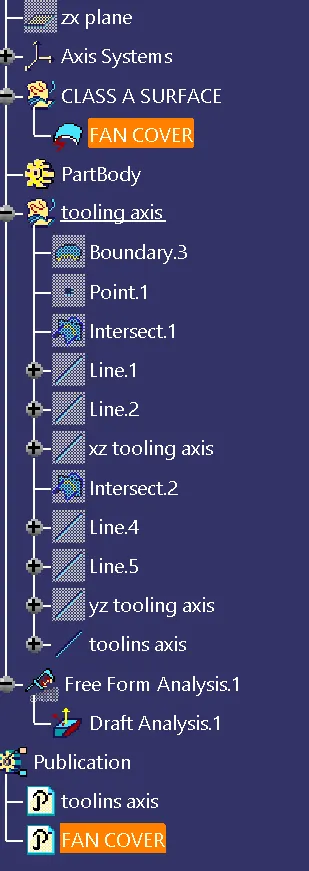
- In order to create the tooling axis we have to create lines in x-direction and y-direction and we have to bisect them to get the tooling axis .
- We have to take the axis at the center of the surface (class A) and we have to intersect them . we get a line in between the class a surface , now we have to hide the class a surface and we need to draw the lines in the angle which we get feom the intersect and we have to do the same for the opposite side , since we get two lines we need to bisect them , then we get a axis in the xz direction .
- Now we have to repeat the same procedure for the yz direction then we get another line so we need to bisect them there fore we get a new line that line is known as tooling axis .
- After getting the tooling axis we need to publish the tooling axis and the class A surface , this is to ensure they are available for ease of use .
- Now we have to do the draft analysis .
- In order to do the draft analysis we need to change the material , so go to view tool bar , click on the cylinder , click last cylinder then a window will open ,then click on material option and click on ok .
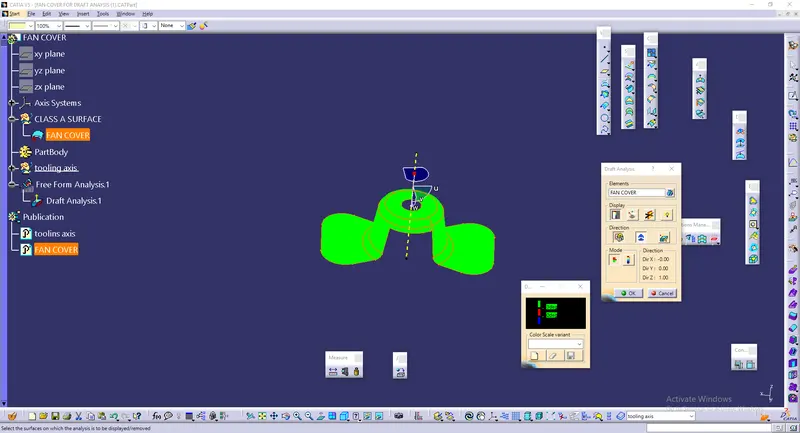
- To open draft analysis go to insert and click on the analysis and click on the draft analysis .
- After opening the draft analysis tool , we have to click on the compass icon which is present in draft analysis table and find the compass , then drag it towards the tooling axis and align them .
- After that click on the lock icon then an X symbole will arise , go to the abject and click on them .
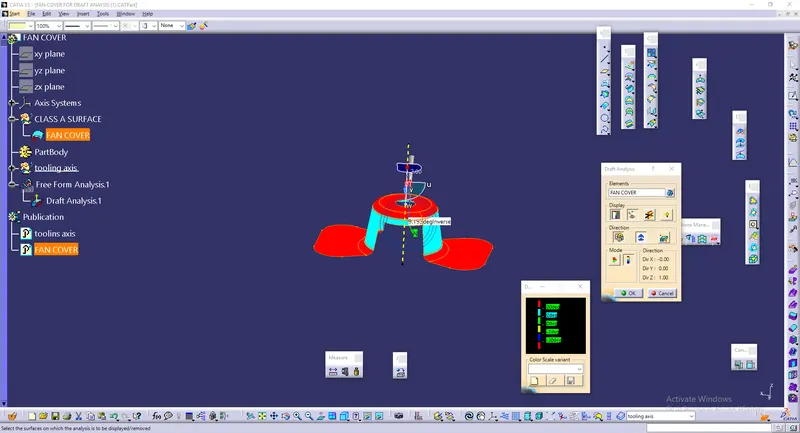
- We can measure the angle of the object by clicking on the eye symbol which is present on the display .
- We can get the results by clicking on the options which are present on the mode . there by draftg analysis is completed .
images -