Week 8 - Challenge 1 - Draft Analysis on a Fan Cover
Draft Analysis on a Fan Cover:
- From the FAN COVER.catpart we analyse the class A surface.
- We first check the continuity of Class A Surface using boundry
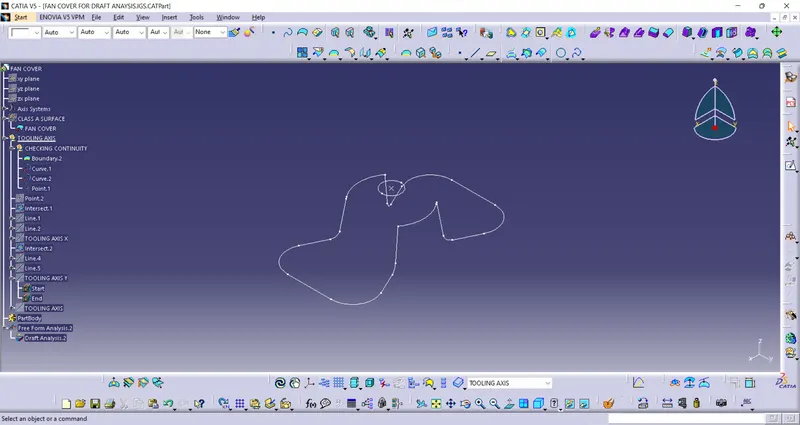
- To create the tooling axis we created the tooling axis line X & tooling axis line Y.
- These lines are created as follows:
- Take a point on a circle midpoint,and place the axis on the point.
- Know,create the intersection by ZX plane and Surface.
- Look for the lines where draft is necessary and create the lines.
- Know,Biscect the lines using line command with proper point selection and get a Tooling axis line in x
- Similarlly,Create intersection by YZ plane and surface and follow the above process to get the Tooling axis in Y
- Biscect the Tooling axis line X & Y to get the required Tooling axis line.
4.From the insert option get the Feature draft analysis command and alline compass on the Tooling axis and set the angle.(Make sure the it is in customise mode).
Thus,we can analysis the given Class A Surface.
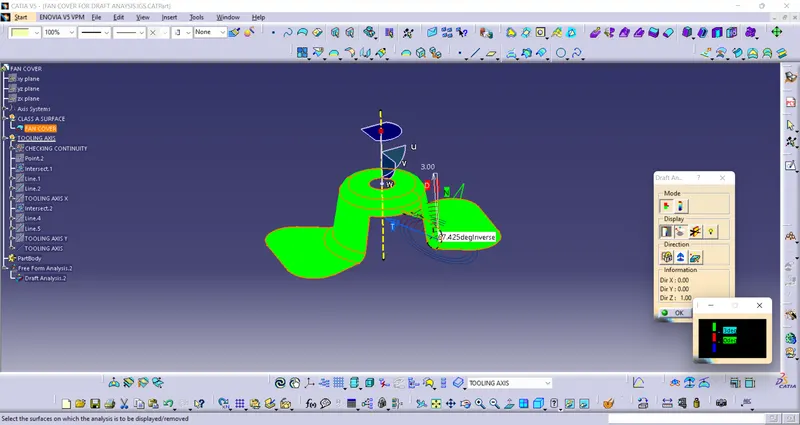
WE are using 3 deg as it is a mentioned standard and color green indicates its more than 3 degrees.