Week 2- 2R Robotic Arm Challenge
Forward kinematics of a 2R Robotic Arm
Step wise explaination of the code:
1.Use command named close all:Erases all the graphs which are used in the previously
clear all:To erase all the previously programmed workspace , clc:to clear the command window.
2.Assigning the values of the length of the link.(l1 &l2).
3.Assigning the range values of the angle of both the links(ta1&ta2) using the command
linspace:This function provides the range of values which are linearly spaced
4.Use for loop function for a repetition of structure and write the code in the loop that needs to be executed for a
required number of times.
5.For plotting the the graph of the executed values use plot command and assigne the coordinates,linewidth in it
6.Use axis command to set the axis of the graph & use pause command for the pause required after execution of every figure.
7.M(ct) function is used to get the frame
8.Increment every frame using ct=ct+1 and complete the for loops using end commands.
9.To make a movie use command movie(M) and use videowriter to form a videofile.
10.Use the 'open' command to open the file and write the movie files in it.
11.Finally close the video using close command.
CODE:
close all
clear all
clc
%forward kinematic of a robart arm
l1=1;                   %length of arm 1&2
l2=0.5;
ta1=linspace(0,90,10);  % assining the angles range
ta2=linspace(0,90,10);
ct=1;
for i=1:length(ta1);
    TA1=ta1(i);
    for j=1:length(ta2);
        TA2=ta2(j);
        x0=0;        %starting coordinates
        y0=0;        %
    x1=l1*cosd(TA1);  %link 1 x coordinates
    y1=l2*sind(TA1);   %link2 y coordinates

    x2=x1+l1*cosd(TA2); %link2 x coordinates
    y2=y1+l2*sind(TA2); %link2 y coordinates

    %plotting the graph
    plot([x0 x1],[y0 y1],[x1 x2],[y1 y2],'LineWidth',3)
    axis([-0.5 2 0 2]);  %setting axis
    pause(0.09)          %setting time pause

    M(ct)=getframe(gcf); %frames
    ct=ct+1;             %increment the frame
    end
end
movie(M);
videofile=VideoWriter('forward_robotic','Uncompressed AVI');
open(videofile)          %opening the videofile
writeVideo(videofile,M)  %writing the videofile
close(videofile)         %closing the movie file
Errors during execution and steps taken to overcome it:
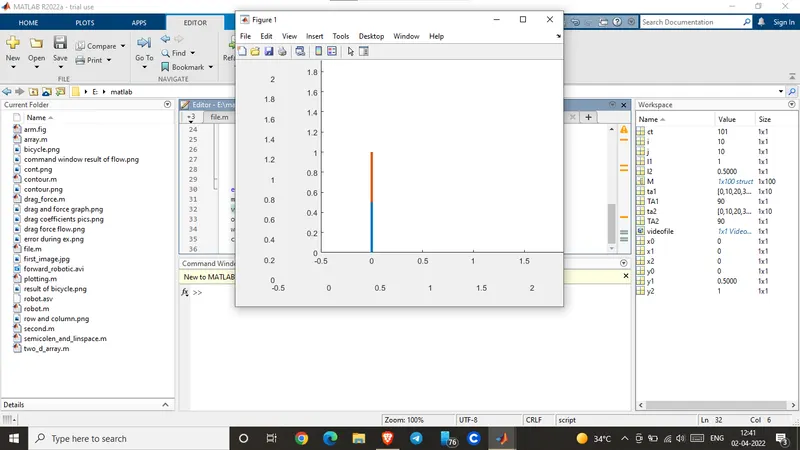
During execution of program got the error as mentioned in the image 1.After observation it was rectified by removing the space between video&file.
image1Screenshot of error occured during execution
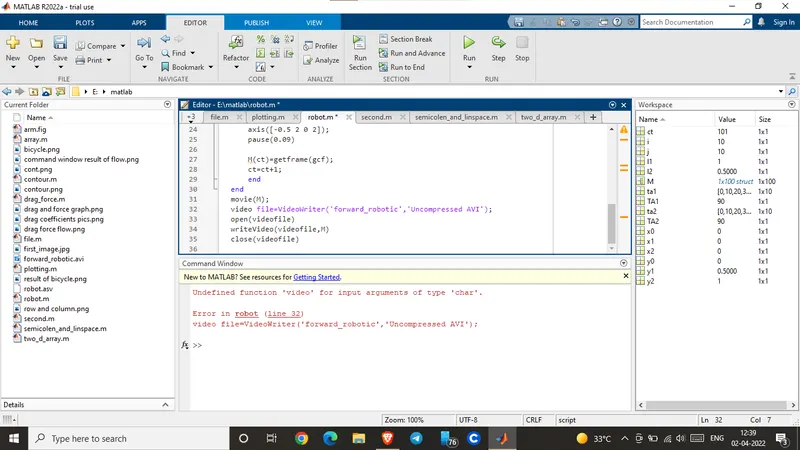
image2 Screenshot after error rectified
Final video link after execution: https://drive.google.com/file/d/1goJpPXPmHLJFhJxFNhyhFMu7-11ZAPAq/view?usp=sharing