Week 8 - BlockMesh Drill down challenge
Aim:
The main aim of this project is to mesh and stimulate the flow according to the problem using the OpenFOAM software and also carry out post-processing in Paraview software to find pressure and velocity profile for given conditions.
Introduction:
OpenFOAM (Open-source Field Operation And Manipulation) is a C++ toolbox for the development of customized numerical solvers, and pre-/post-processing utilities for the solution of continuum mechanics problems, most prominently including computational fluid dynamics (CFD).
It mainly has 3 main structures and additional directories can be created as per need:
- system/:
- controlDict
- fvSchemes
- fvSolution
- fvOptions (optional)
- (other dictionaries(configuration files in OpenFOAM))
- constant
- polyMesh/
- (other dictionaries)
- 0/ (or another initial time directory)
- (field files)
Mesh grading
It is the process of structuring the mesh. It is the ratio of the size of the end cell to the size of the starting cell. A value of 1 produces the most uniform mesh as all cells are of equal size. A value greater than 1 means more finer mesh near starting cells and then gradually becomes coarse as we move towards the end cell. It's vice versa for a value less than 1.
ParaView is an open-source multiple-platform application for interactive, scientific visualizations. It has a client-server architecture to facilitate remote visualization of datasets and generates level of detail (LOD) models to maintain interactive frame rates for large datasets
Mesh specifications:
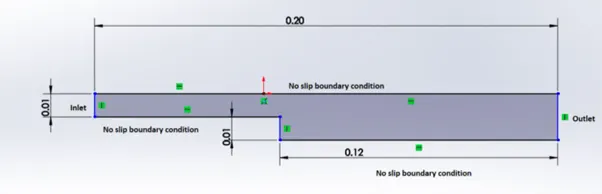
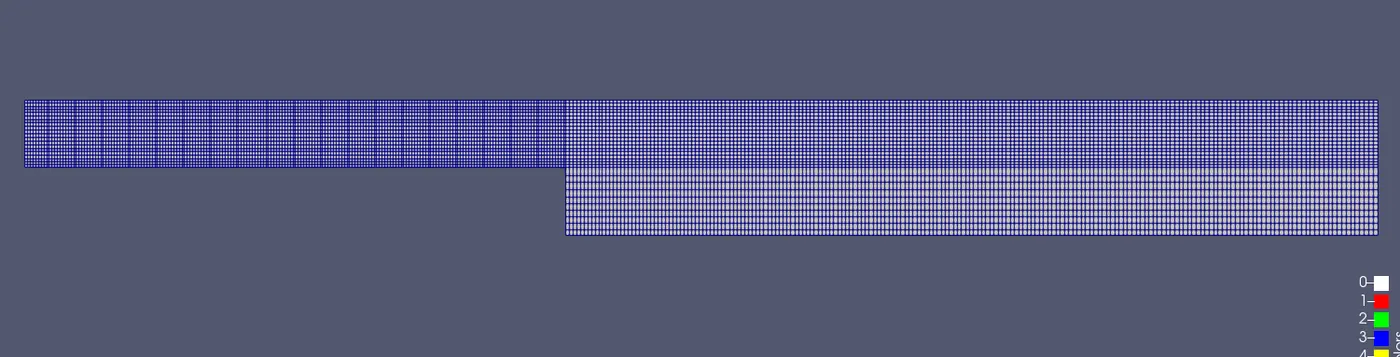
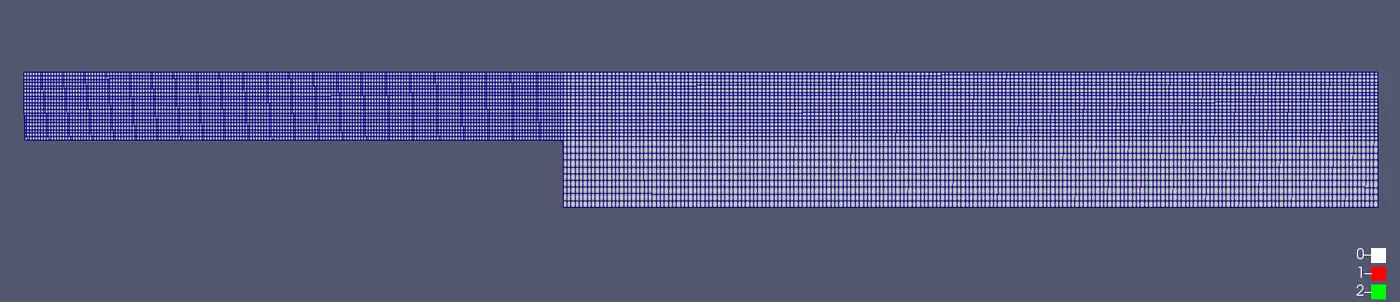
- Number of cells along the x-direction (longer dimension) = 200
- Number of cells along the y-direction = 10
- Use a graded mesh. The grading factor near all walls should be 0.2, 0.5, 0.8, 1
Boundary condition specification
Steps:
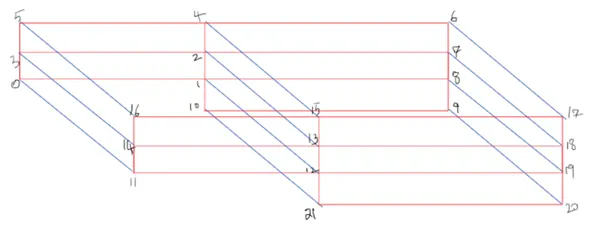
To create the geometry as shown above, we divide the geometry into 5 blocks,

In 2D isometric view these blocks look like the figure below after numbering its vertices,
Simulation steps:
- Open the terminal in Linux operating system and follow the following command,
- “tut” , it takes to in-build tutorial files of the OpenFOAM software.
- “ls” , to list all files inside it.
- “ cd incompressible” , takes to incompressible directory.
- “cd icoFoam” , takes to icoFoam directory.
- “cd cavity” , takes to cavity directory.
- “ cp -r cavity/ $FOAM_RUN/” , these copies the cavity directory to the local directory. This is done as running simulation directly there in the tutorial file may harm or corrupt the entire tutorial file in case of any mistakes which may lead to reinstalling all of the software again.
- “cd $FOAM_RUN” , this takes you to the local directory.
- “cd cavity” , takes to copied cavity directory.
- “ls” , lists all the files inside it. (system, constant, 0)
- “cd system” , opens the system directory. There we have 4 files blockMeshDict, controlDict, fvschemes, fvsolutions. We need to edit each of these files according to the boundary conditions given in problem.
- “gedit blockMeshDict”, opens the blockmesh file in a separate window to edit the blockmesh as per our requirements. Here we apply for grid numbers and according to the number we describe blocks, edges, boundary nodes etc. also mesh grading is to be mentioned here. After editing save the file and close that window.
- Likewise “gedit controlDict” , gives limits to time like start time, end time, time interval etc.
- “cd ..” this takes back to cavity directory.
- “cd 0” takes you to 0 folder where initial conditions are meant to be applied. We p and U folders inside it. Edit this using gedit command and save the files.
- After editing all 4 files come back to the cavity folder using “cd ..”
- “blockMesh” mesh is generated using this command.
- “checkMesh” it checks the mesh and displays the message ‘Mesh ok’ if there is no problem and mesh is stable and good.
- “icoFoam” it simulates and runs the calculation based upon the input.
- After successfully completing the simulation Paraview software is used for post-processing which can be opened by typing “paraFoam”.
Edited Files :
blockMeshDict -
/*--------------------------------*- C++ -*----------------------------------*\
  =========                 |
  \\      /  F ield         | OpenFOAM: The Open Source CFD Toolbox
   \\    /   O peration     | Website:  https://openfoam.org
    \\  /    A nd           | Version:  8
     \\/     M anipulation  |
\*---------------------------------------------------------------------------*/
FoamFile
{
    version     2.0;
    format      ascii;
    class       dictionary;
    object      blockMeshDict;
}
// * * * * * * * * * * * * * * * * * * * * * * * * * * * * * * * * * * * * * //

convertToMeters 0.01;

vertices
(
    (0 0 0) //vertices 0
    (8 0 0)  //vertices 1
    (8 0.5 0) //vertices 2
    (0 0.5 0) //vertices 3
    (8 1 0)  //vertices 4
    (0 1 0)  //vertices 5
    (20 1 0)  //vertices 6
    (20 0.5 0)  //vertices 7
    (20 0 0)  //vertices 8
    (20 -1 0)  //vertices 9
    (8 -1 0)  //vertices 10

    (0 0 0.1)  //vertices 11
    (8 0 0.1)  //vertices 12
    (8 0.5 0.1)  //vertices 13
    (0 0.5 0.1)  //vertices 14
    (8 1 0.1)  //vertices 15
    (0 1 0.1)  //vertices 16
    (20 1 0.1)  //vertices 17
    (20 0.5 0.1)  //vertices 18
    (20 0 0.1)  //vertices 19
    (20 -1 0.1)  //vertices 20
    (8 -1 0.1)  //vertices 21
);

blocks
(
    hex (0 1 2 3 11 12 13 14) (200 10 1) simpleGrading (1 5 1)
    hex (3 2 4 5 14 13 15 16) (200 10 1) simpleGrading (1 0.2 1)
    hex (2 7 6 4 13 18 17 15) (200 10 1) simpleGrading (5 0.2 1)
    hex (1 8 7 2 12 19 18 13) (200 10 1) simpleGrading (5 5 1)
    hex (10 9 8 1 21 20 19 12) (200 10 1) simpleGrading (5 5 1)
);

edges
(
);

boundary
(
    inlet
    {
        type wall;
        faces
        (
            (0 11 14 3)
            (3 14 16 5)
        );
    }
    outlet
    {
        type wall;
        faces
        (
            (9 8 19 20)
            (8 7 18 19)
            (7 6 17 18)
        );
    }
    fixedWalls
    {
        type wall;
        faces
        (
            (4 5 16 15)
            (6 4 15 17)
            (0 1 12 11)
            (21 10 9 20)
            (1 10 21 12)
        );
    }
    frontAndBack
    {
        type empty;
        faces
        (
            (0 3 2 1)
            (3 5 4 2)
            (2 4 6 7)
            (1 2 7 8)
            (1 8 9 10)
            (11 12 13 14)
            (14 13 15 16)
            (13 18 17 15)
            (12 19 18 13)
            (21 20 19 12)
        );
    }
);

mergePatchPairs
(
);

// ************************************************************************* //
controlDict -
/*--------------------------------*- C++ -*----------------------------------*\
  =========                 |
  \\      /  F ield         | OpenFOAM: The Open Source CFD Toolbox
   \\    /   O peration     | Website:  https://openfoam.org
    \\  /    A nd           | Version:  8
     \\/     M anipulation  |
\*---------------------------------------------------------------------------*/
FoamFile
{
    version     2.0;
    format      ascii;
    class       dictionary;
    location    "system";
    object      controlDict;
}
// * * * * * * * * * * * * * * * * * * * * * * * * * * * * * * * * * * * * * //

application     icoFoam;

startFrom       startTime;

startTime       0;

stopAt          endTime;

endTime         0.6;

deltaT          0.00001;

writeControl    timeStep;

writeInterval   20;

purgeWrite      0;

writeFormat     ascii;

writePrecision  6;

writeCompression off;

timeFormat      general;

timePrecision   6;

runTimeModifiable true;


// ************************************************************************* //
Pressure(p) -
/*--------------------------------*- C++ -*----------------------------------*\
  =========                 |
  \\      /  F ield         | OpenFOAM: The Open Source CFD Toolbox
   \\    /   O peration     | Website:  https://openfoam.org
    \\  /    A nd           | Version:  8
     \\/     M anipulation  |
\*---------------------------------------------------------------------------*/
FoamFile
{
    version     2.0;
    format      ascii;
    class       volScalarField;
    object      p;
}
// * * * * * * * * * * * * * * * * * * * * * * * * * * * * * * * * * * * * * //

dimensions      [0 2 -2 0 0 0 0];

internalField   uniform 0;

boundaryField
{
    inlet
    {
        type            zeroGradient;
    }

    outlet
    {
        type            fixedValue;
        value           uniform 0;
    }


    fixedWalls
    {
        type            zeroGradient;
    }

    frontAndBack
    {
        type            empty;
    }
}

// ************************************************************************* //
Velocity (U) -
/*--------------------------------*- C++ -*----------------------------------*\
  =========                 |
  \\      /  F ield         | OpenFOAM: The Open Source CFD Toolbox
   \\    /   O peration     | Website:  https://openfoam.org
    \\  /    A nd           | Version:  8
     \\/     M anipulation  |
\*---------------------------------------------------------------------------*/
FoamFile
{
    version     2.0;
    format      ascii;
    class       volVectorField;
    object      U;
}
// * * * * * * * * * * * * * * * * * * * * * * * * * * * * * * * * * * * * * //

dimensions      [0 1 -1 0 0 0 0];

internalField   uniform (0 0 0);

boundaryField
{
    inlet
    {
        type            fixedValue;
        value           uniform (1 0 0);
    }

    outlet
    {
        type            zeroGradient;
    }

    fixedWalls
    {
        type            noSlip;
    }

    frontAndBack
    {
        type            empty;
    }
}

// ************************************************************************* //
Results :-
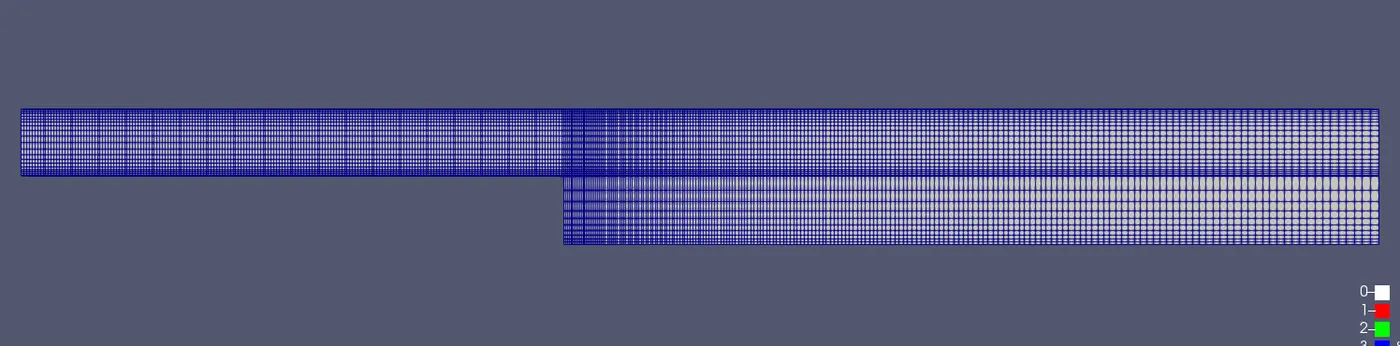
For Grading factor: 0.2
Mesh:
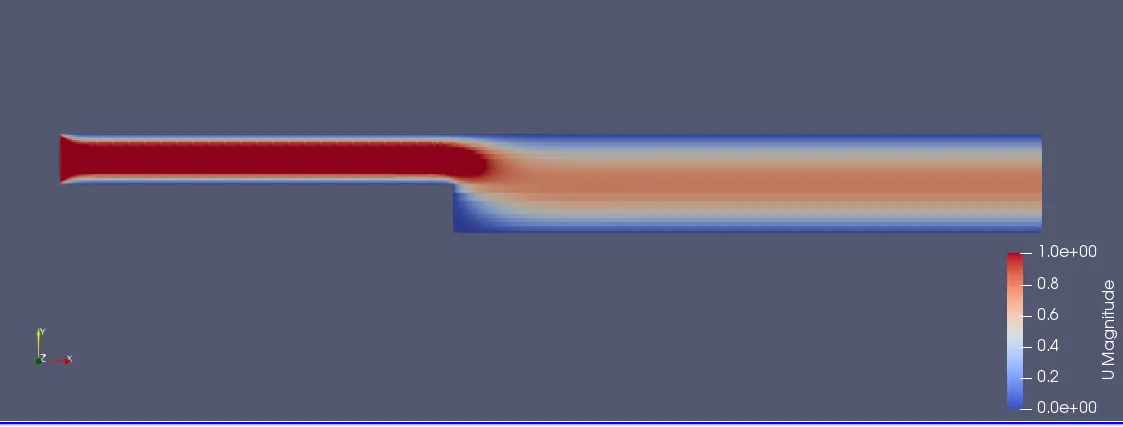
Velocity flow:
Pressure flow:
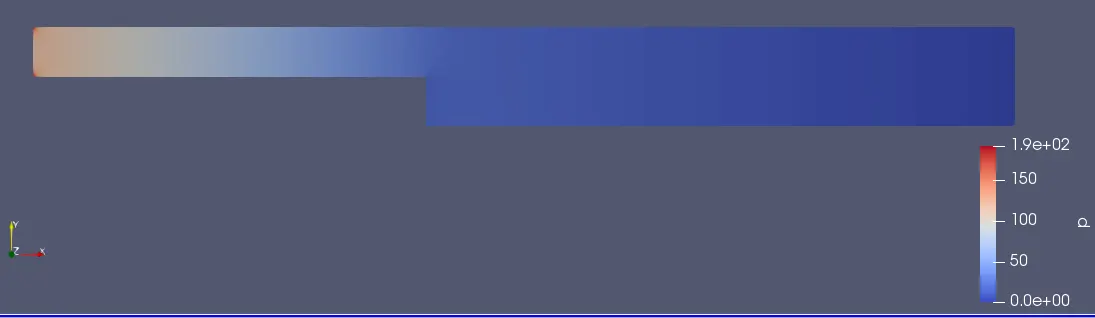
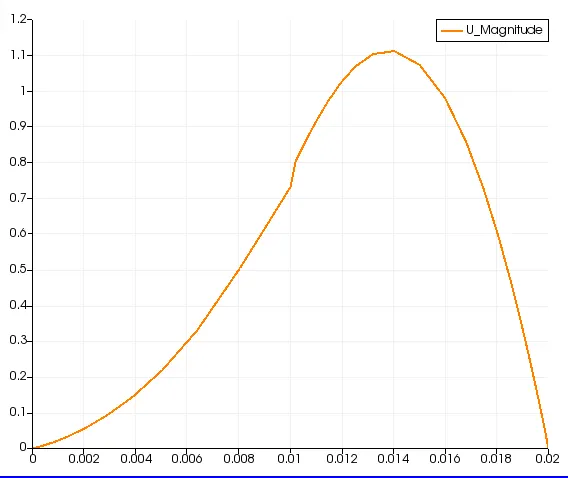
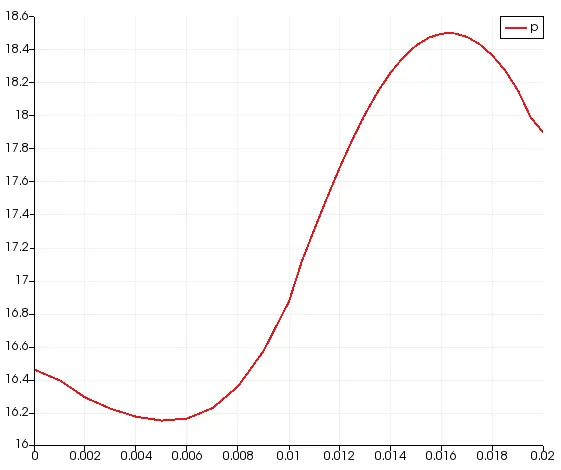
Velocity profile at 0.085m from the inlet:
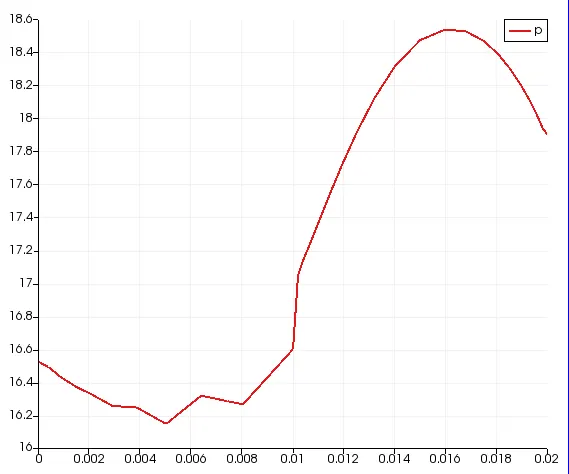
Pressure profile at 0.085 m from the inlet:
For grading factor 0.5
changes in blockMeshDict
blocks
(
    hex (0 1 2 3 11 12 13 14) (200 10 1) simpleGrading (1 2 1)
    hex (3 2 4 5 14 13 15 16) (200 10 1) simpleGrading (1 0.5 1)
    hex (2 7 6 4 13 18 17 15) (200 10 1) simpleGrading (2 0.5 1)
    hex (1 8 7 2 12 19 18 13) (200 10 1) simpleGrading (2 2 1)
    hex (10 9 8 1 21 20 19 12) (200 10 1) simpleGrading (2 2 1)
);
Mesh:
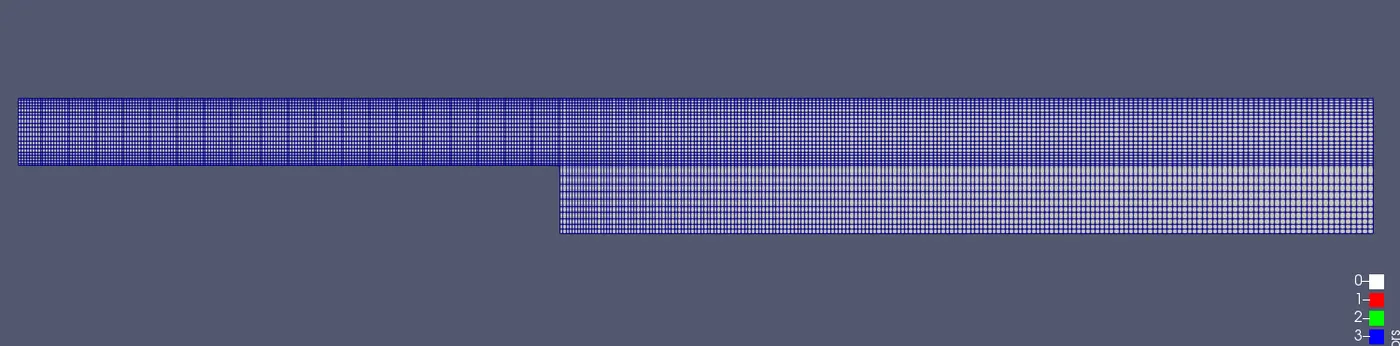
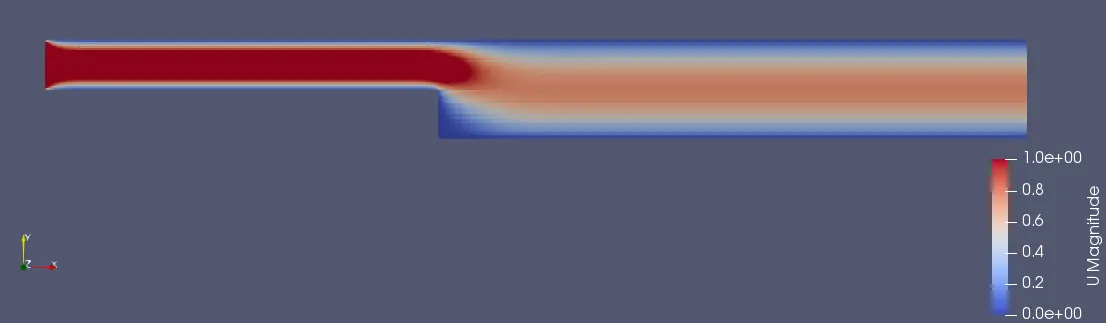
Velocity flow:
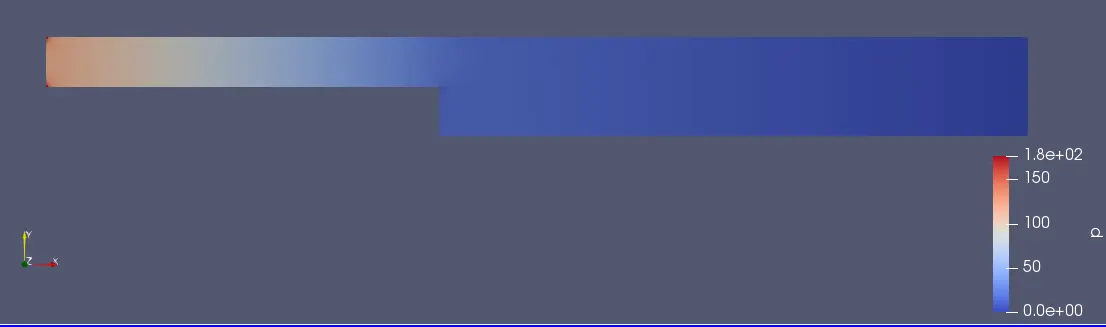
Pressure flow:
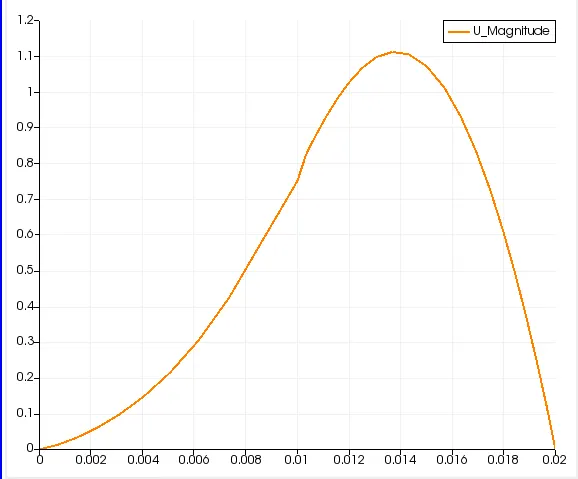
Velocity profile at 0.085m from the inlet:
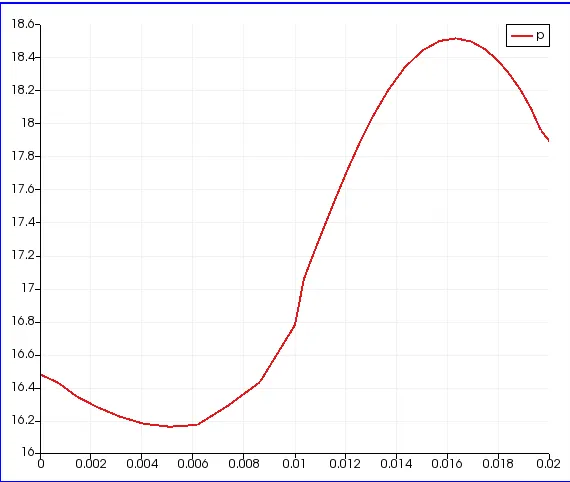
Pressure profile at 0.085 m from the inlet:
For Grading factor = 0.8
change in blockMeshDict
blocks
(
    hex (0 1 2 3 11 12 13 14) (200 10 1) simpleGrading (1 1.25 1)
    hex (3 2 4 5 14 13 15 16) (200 10 1) simpleGrading (1 0.8 1)
    hex (2 7 6 4 13 18 17 15) (200 10 1) simpleGrading (1.25 0.8 1)
    hex (1 8 7 2 12 19 18 13) (200 10 1) simpleGrading (1.25 1.25 1)
    hex (10 9 8 1 21 20 19 12) (200 10 1) simpleGrading (1.25 1.25 1)
);
Mesh:
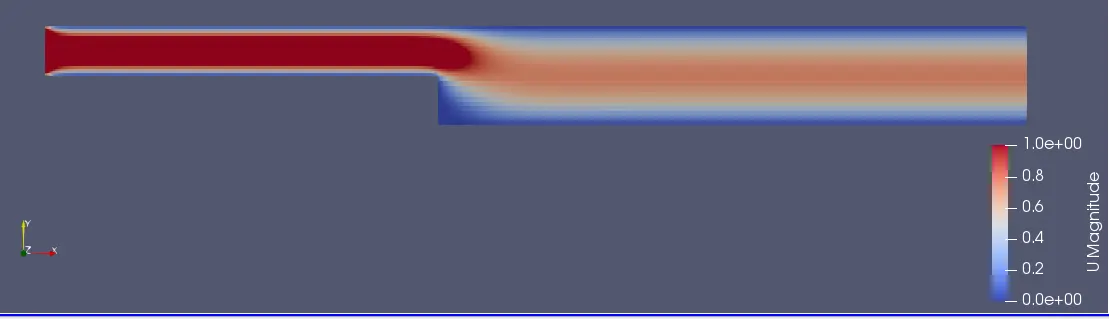
Velocity flow:
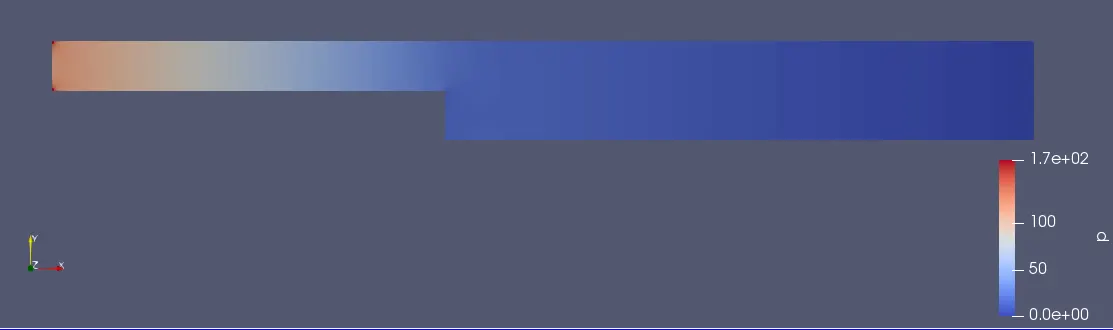
Pressure flow:
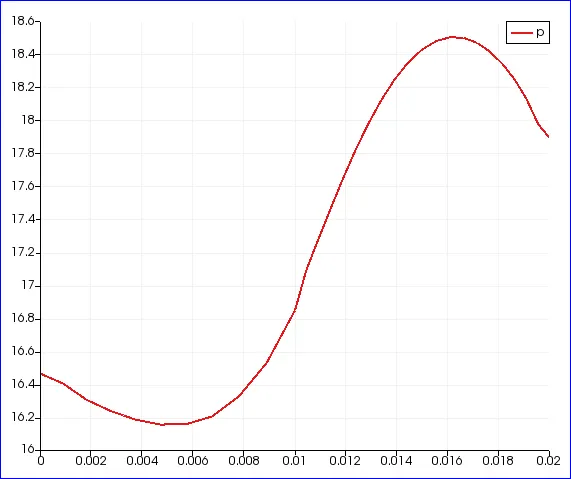
Velocity profile at 0.085m from the inlet:
Pressure profile at 0.085 m from the inlet:
For grading factor=1
change in blockMeshDict file
blocks
(
    hex (0 1 2 3 11 12 13 14) (200 10 1) simpleGrading (1 1 1)
    hex (3 2 4 5 14 13 15 16) (200 10 1) simpleGrading (1 1 1)
    hex (2 7 6 4 13 18 17 15) (200 10 1) simpleGrading (1 1 1)
    hex (1 8 7 2 12 19 18 13) (200 10 1) simpleGrading (1 1 1)
    hex (10 9 8 1 21 20 19 12) (200 10 1) simpleGrading (1 1 1)
);
Mesh:
Velocity flow:
Pressure flow:
Velocity profile at 0.085m from the inlet:
Pressure profile at 0.085 m from the inlet:
Conclusion :-
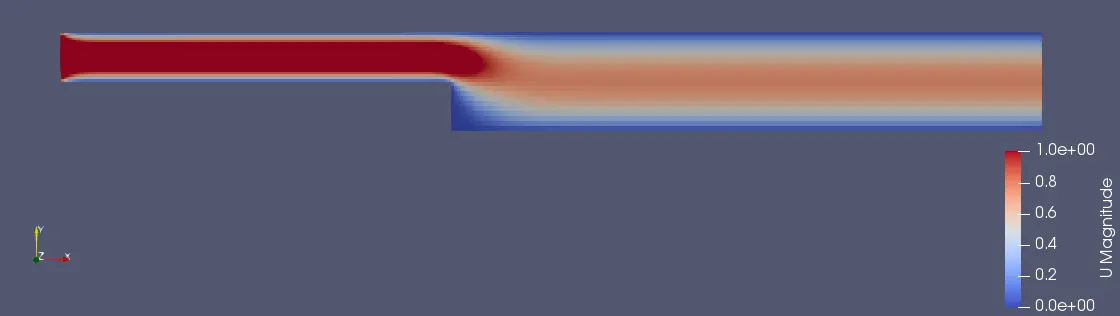
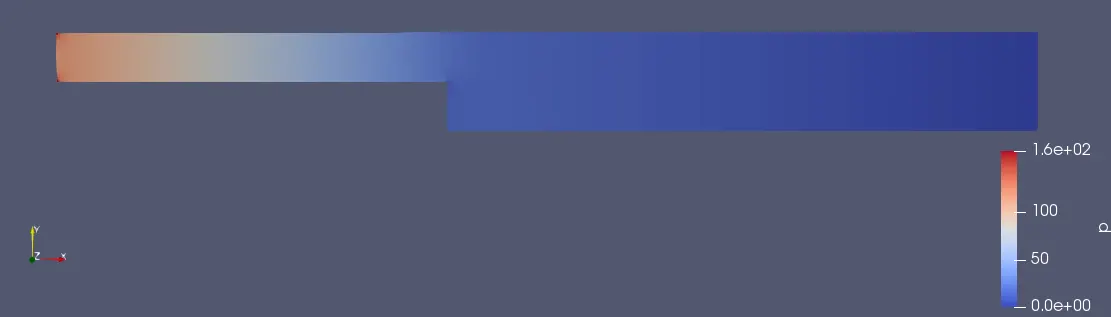
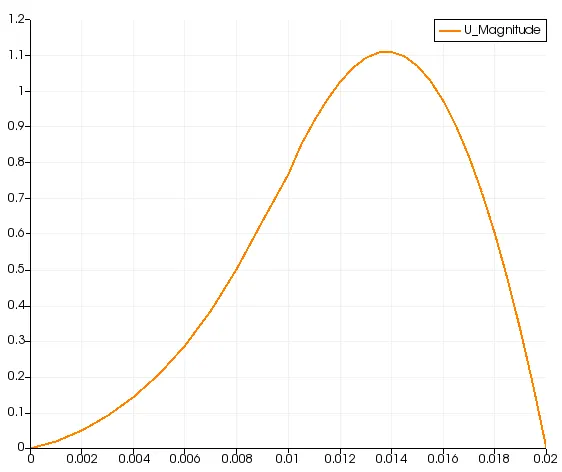
We have performed simulation by changing mesh grading from 0.2 , 0.5, 0.8 and 1. Almost similar results were obtained. Although difference is seen when we zoom the graph, there was small changes in maximum velocity and pressure in the profile graphs at 0.085m from inlet.
| Mesh grading factor | Max Velocity | Max Pressure |
| 0.2 | 1.1120 | 18.5396 |
| 0.5 | 1.1121 | 18.5147 |
| 0.8 | 1.1049 | 18.0504 |
| 1 | 1.1094 | 18.4987 |
We can observe that velocity profile is bent slightly towards right , that is because we had considered the profile in vertical direction to the flow and the flow is more at the center of the pipe exit i.e 0.13 to 0.14 m from bottom of the plane.
Iintially the pressure is more which decreases at end.