Week 8 - BlockMesh Drill down challenge
Aim: To simulate an incompressible-laminar-viscous flow through the backward facing step geometry using paraFoam.
Given Inputs:
Boundary condition specification
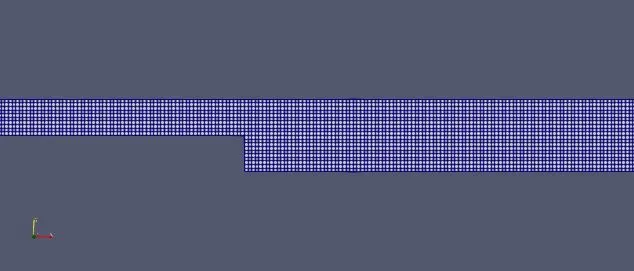
Mesh specification
- Number of cells along the x direction (longer dimension) = 200
- Number of cells along the longer y direction = 20;
Desired output
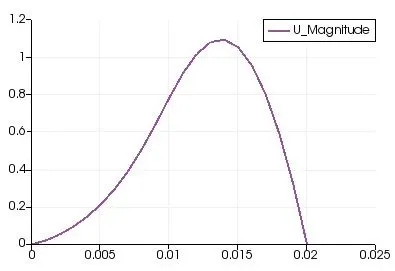
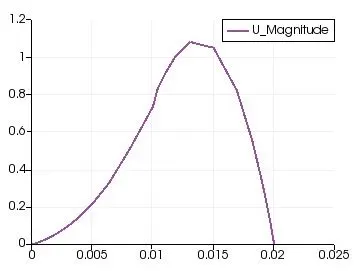
- Measure the velocity profile at 0.085 m from the inlet of the geometry for both case studies and compare.
- Explain why Grading/Growth factor is essential for meshing.
Introduction:
- OpenFoam is an open source software to perform various simulations,the simulations performed can be views in the paraFoam.
- It consists of several tutorials which helps us to know about different solvers present in the openFoam.
- Run folder need to be created to run any solver present.
- There are many solvers available we just need to change the geomenty of the profile to run the desired simulation.
- For incompressible Flow there is a folder with incompressible flow having solvers to solve incompresssible flows.
Steps followed in the case set up:
- launch openFoam software by opening the terminal and typing openFoam ,go to Tutorials folder by typing shortcut tut which will direct to tutorials folder.
- Go into the incomplessible folder by cd incompressible ,there you can see icoFoam folder go into it.
- icoFoam is the solver used to solve the incompressible flows problems.now type cd cavity to enter into it.
- Type cp -r cavity/ $FOAM_RUN/cavity_test to create a copy of cavity folder in the run folder.because we should run the solver only in the run folder or else the original files get corrupted which is not advisable.
- in the run folder cavity_test will be created.type cd cavity_test and perform allrun command by typing ./Allrun .
- open cavity folder cd cavity and in here you will have system folder in which blockMeshdict ,controlDict,fvschems etc are present.Type cd system.
- we need to change the geomenty as per our need it can be performed inside the blockMeshDict. Type gedit blockMeshDict a file will be opened here we need to change the dimensions and click save and close.
- Type gedit controlDict and in this file we need to set the time limit and time step and it should satisfy (CFL <1).
- Now type cd .. to come back and type cd 0 .we can see P and U files present.
- Open both files by gedit and perform some changes.gedit p and gedit U.Now come back by typing cd ..
- Now perfom blockmesh command by typing blockMesh .This will create a Mesh.
- Now type icoFoam to start the,solver it will take some time to complete the simulation .now type checkMesh and everything is fine.
- Type ParaFoam to visulize the simulation.
blockMeshDict file:
/*--------------------------------*- C++ -*----------------------------------*\
  =========                 |
  \\      /  F ield         | OpenFOAM: The Open Source CFD Toolbox
   \\    /   O peration     | Website:  https://openfoam.org
    \\  /    A nd           | Version:  8
     \\/     M anipulation  |
\*---------------------------------------------------------------------------*/
FoamFile
{
    version     2.0;
    format      ascii;
    class       dictionary;
    object      blockMeshDict;
}
// * * * * * * * * * * * * * * * * * * * * * * * * * * * * * * * * * * * * * //

convertToMeters 0.01;

vertices
(
    (0 0 0)
(8 0 0)
(8 0.5 0)
(0 0.5 0)
(8 1 0)
(0 1 0)
(20 1 0)
(20 0.5 0)
(20 0 0)
(20 -1 0)
(8 -1 0)
(0 0 0.1)
(8 0 0.1)
(8 0.5 0.1)
(0 0.5 0.1)
(8 1 0.1)
(0 1 0.1)
(20 1 0.1)
(20 0.5 0.1)
(20 0 0.1)
(20 -1 0.1)
(8 -1 0.1)
);

blocks
(
    hex (0 1 2 3 11 12 13 14) (80 5 1) simpleGrading (1 1 1)
    hex (3 2 4 5 14 13 15 16) (80 5 1) simpleGrading (1 1 1)
    hex (2 7 6 4 13 18 17 15) (120 5 1) simpleGrading (1 1 1)
    hex (1 8 7 2 12 19 18 13) (120 5 1) simpleGrading (1 1 1)
    hex (10 9 8 1 21 20 19 12) (120 10 1) simpleGrading (1 1 1)
);

edges
(
);

boundary
(
    inlet
    {
        type patch;
        faces
        (
            (0 11 14 3)
             (3 14 16 5)
        );
    }
    outlet
    {
        type patch;
        faces
        (
            (9 8 19 20)
            (8 7 18 19)
            (7 6 17 18)
        );
    }
    frontAndBack
    {
        type empty;
        faces
        (
            (0 3 2 1)
            (3 5 4 2)
            (10 1 8 9)
            (1 2 7 8)
            (2 4 6 7)
            (11 12 13 14)
            (14 13 15 16)
            (21 20 19 12)
            (12 19 18 13)
            (13 18 17 15)
        );
    }
Noslipwalls
{
type wall;
faces
(
(5 16 15 4)
(4 15 17 6)
(0 1 12 11)
(10 21 12 1)
(10 9 20 21)
);
}
);
mergePatchPairs
(
);

// ************************************************************************* //
controlDict file:
/*--------------------------------*- C++ -*----------------------------------*\
  =========                 |
  \\      /  F ield         | OpenFOAM: The Open Source CFD Toolbox
   \\    /   O peration     | Website:  https://openfoam.org
    \\  /    A nd           | Version:  8
     \\/     M anipulation  |
\*---------------------------------------------------------------------------*/
FoamFile
{
    version     2.0;
    format      ascii;
    class       dictionary;
    location    "system";
    object      controlDict;
}
// * * * * * * * * * * * * * * * * * * * * * * * * * * * * * * * * * * * * * //

application     icoFoam;

startFrom       startTime;

startTime       0;

stopAt          endTime;

endTime         0.5;

deltaT          1e-4;

writeControl    timeStep;

writeInterval   20;

purgeWrite      0;

writeFormat     ascii;

writePrecision  6;

writeCompression off;

timeFormat      general;

timePrecision   6;

runTimeModifiable true;


// ************************************************************************* //
Velocity File:
/*--------------------------------*- C++ -*----------------------------------*\
  =========                 |
  \\      /  F ield         | OpenFOAM: The Open Source CFD Toolbox
   \\    /   O peration     | Website:  https://openfoam.org
    \\  /    A nd           | Version:  8
     \\/     M anipulation  |
\*---------------------------------------------------------------------------*/
FoamFile
{
    version     2.0;
    format      ascii;
    class       volVectorField;
    object      U;
}
// * * * * * * * * * * * * * * * * * * * * * * * * * * * * * * * * * * * * * //

dimensions      [0 1 -1 0 0 0 0];

internalField   uniform (0 0 0);

boundaryField
{
    inlet
    {
        type            fixedValue;
        value           uniform (1 0 0);
    }

    outlet
    {
        type            zeroGradient;
    }
    Noslipwalls
    {
        type            noSlip;

    }
    frontAndBack
    {
        type            empty;
    }
}

// ************************************************************************* //
Pressure File:
/*--------------------------------*- C++ -*----------------------------------*\
  =========                 |
  \\      /  F ield         | OpenFOAM: The Open Source CFD Toolbox
   \\    /   O peration     | Website:  https://openfoam.org
    \\  /    A nd           | Version:  8
     \\/     M anipulation  |
\*---------------------------------------------------------------------------*/
FoamFile
{
    version     2.0;
    format      ascii;
    class       volScalarField;
    object      p;
}
// * * * * * * * * * * * * * * * * * * * * * * * * * * * * * * * * * * * * * //

dimensions      [0 2 -2 0 0 0 0];

internalField   uniform 0;

boundaryField
{
    inlet
    {
        type            zeroGradient;
    }
    outlet
    {
        type            fixedValue;
        value            uniform 0;

    }
    Noslipwalls
    {
        type            zeroGradient;
    }

    frontAndBack
    {
        type            empty;
    }
}

// ************************************************************************* //
Mesh of a backward step profile:
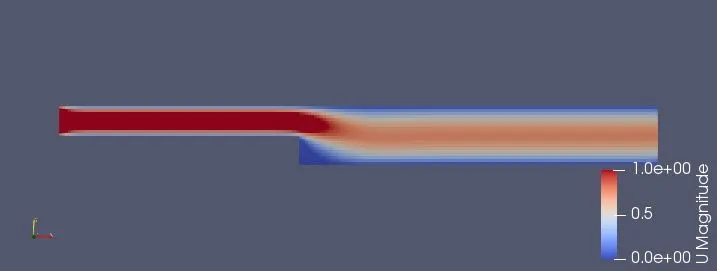
Velocity variation
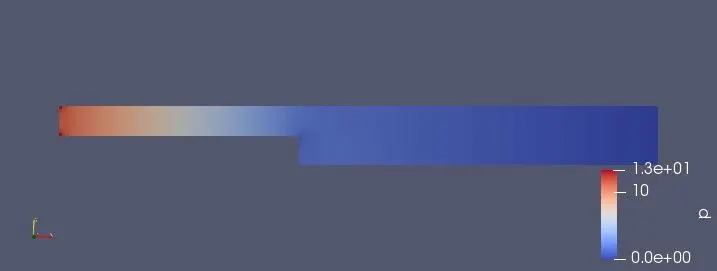
pressure variation:
velocity profile:
Gradingfactor:
- Grading factor is the ratio of size of end cell to the size of starting cell .
- This helps in getting more detailing at some positions as per the grading factor.
- GF helps us to increase the cell number at start or end of the block.
- The change can be seen clearly with proper gradingfactor.
Simulate the flow with grading factor of 0.2
- There is no change in the controlDict file,P,U files there is only a small change in the grading in the blockMeshDict file.which is presented below.
- There is no change in the blockMesh file exept the folling block.
blocks
(
    hex (0 1 2 3 11 12 13 14) (80 5 1) simpleGrading (5 5 1)
    hex (3 2 4 5 14 13 15 16) (80 5 1) simpleGrading (5 0.2 1)
    hex (2 7 6 4 13 18 17 15) (120 5 1) simpleGrading (5 0.2 1)
    hex (1 8 7 2 12 19 18 13) (120 5 1) simpleGrading (5 5 1)
    hex (10 9 8 1 21 20 19 12) (120 10 1) simpleGrading (5 5 1)
);
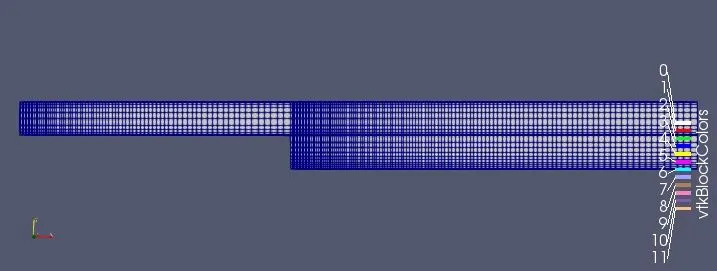
Mesh in the backward step:
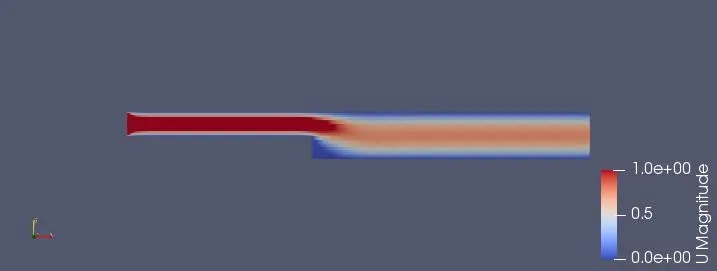
Velocity variation:
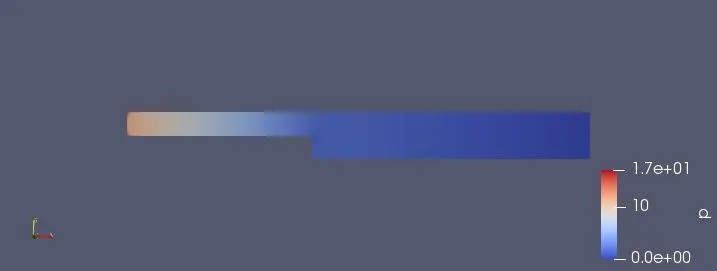
pressure profile:
Velocity Profile:
Conclusion:
- There will not be a much difference in simulation after grading the curve and simulation looks a slight rough.
- Fine mesh gives more smoother simulations and graphs.
- the detailing at the more cells position will be more .