Week 7 State of charge estimation
1. Simulation of the 3 test cases from harness dashboard,
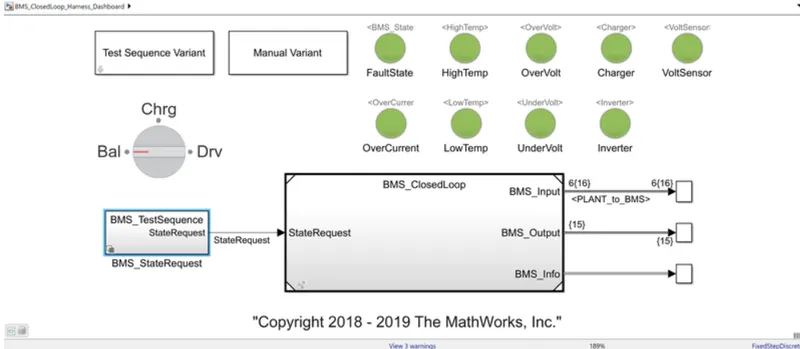
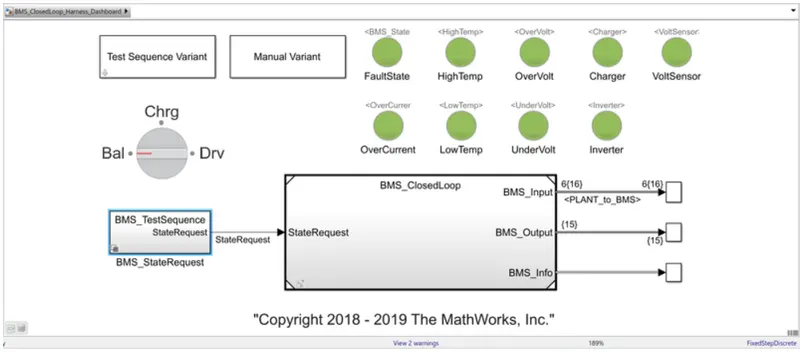
The BMS Closedloop Harness Dashboard model is,
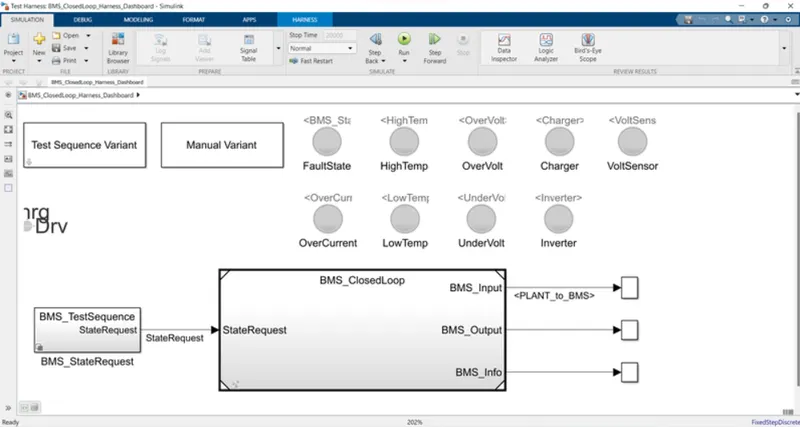
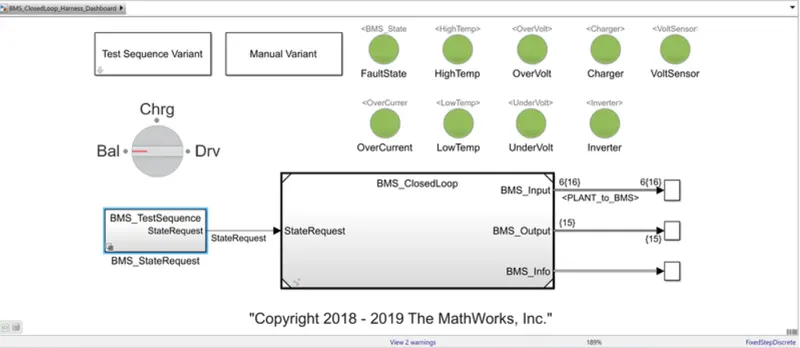
Here in the model we have different blocks and they are
- Test sequence variant (it has 3 different test condition)
- Manual variant (selection)
- BMS state request subsystem to provide the state request commands.
- indicating lamps are there to show any fault state, high temp, overvoltage, charger, voltage sensor, overcurrent, low temp, under voltage, inverter state, of a battery. green light tell us that all states ar ok and battery is good to charge and discharge and red indication will indicate the fault state.
- Rotating switch for manual variant to change the position during simulation run time.
- BMS Closed loop: This subsystem contain BMS ECU and plant as two main subsystem.
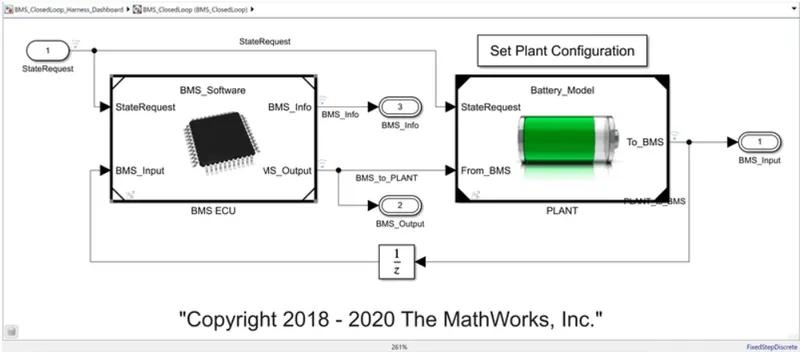
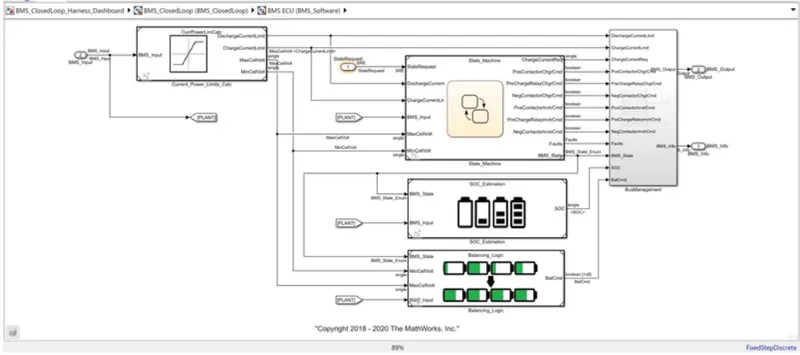
- BMS ECU: The BMS ECU have two input which are BMS input which is feedback from the plant model and the state request is coming from the state machine. This is generating ouput as BMS output and info which have current power limit calculation in state machine.
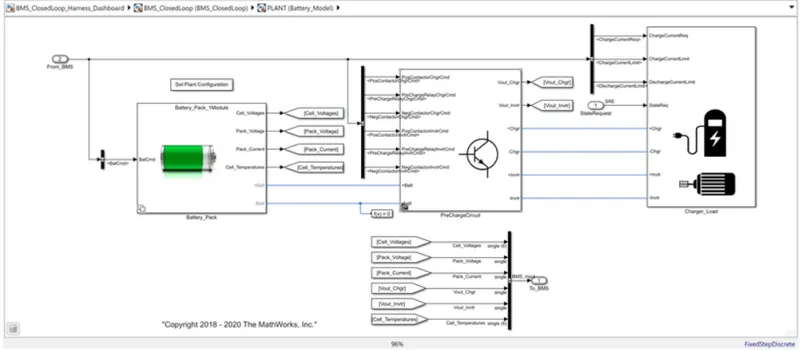
- Plant: This subsystem contain battery pack, precharge circuit and charger / loads.
Here we selected 1 module for simple calculation and less simulation time.
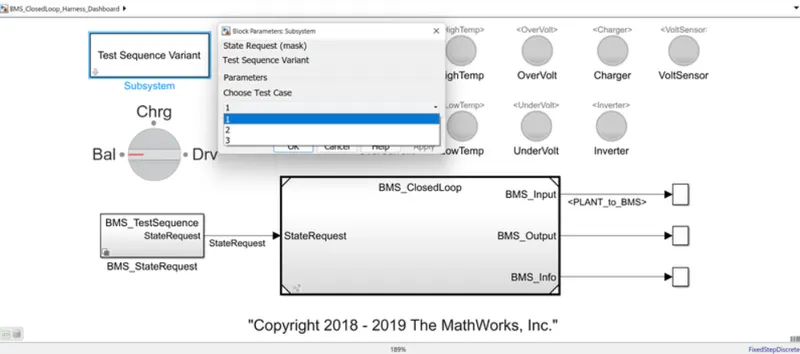
Now we have to test the 3 cases for that we have to go to the test sequence variant and select there test case one by one.
1.Test case 1:
First we have to select the test case as 1, as shown below,
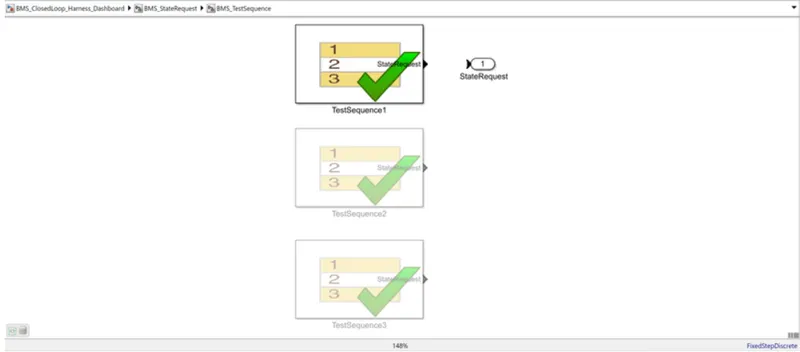
Then this test case 1 will be appeared in the test sequence and it shows as the below image,
By double clicking the test sequence we see as,
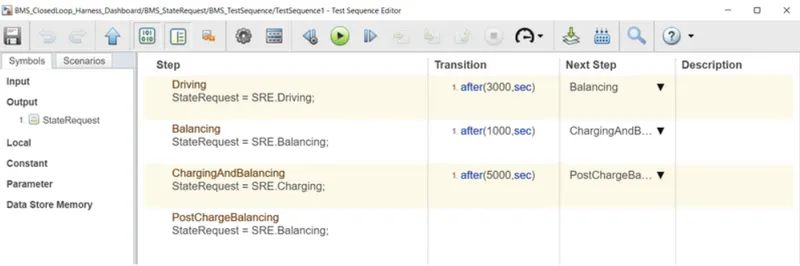
Form here we get the idea that ,
- Driving is done for first 3000 sec.
- Then the driving balancing of cell occurs for the next 1000 sec duration.
- After the balancing charging and balancing occur for next 5000sec.
- Post charge balancing is occuring after 9000sec till 20000sec.
Result of test case 1:
Simulation ran for 20000sec,
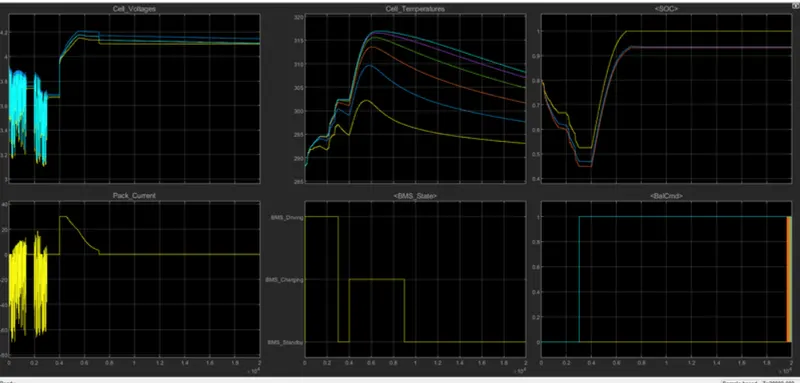
- Driving mode (0-3000sec): All the cells for the first 3000 sec are in driving mode so the discharge of all the cell occurs and it varies in the range of 3.1 to 3.9V min and max respectively. Cell temperature increases from 288K to 302K. Soc also reduces from 80% to 45% for EKF technique.
- Balancing mode (3000-4000sec): After 3000sec for 1000sec, cell balancing occur and the modules are in standby mode and they are having constant voltage near about 3.7V. Cell temperature reduces slowly as no current flow through the cells during balancing. SOC is also constant during this period for 45% for EKF tecnique.
- Charging and Balancing (4000-9000sec): After 4000sec the charging occurs and the cell voltages increased from 3.7 to nearly about 4.2V in constant current mode with current of nearly 30A and then the constant voltage charging starts and current reduces from 30A to 2.6A charging and balancing of cells occur till 9000sec. Cell temperature also start to increase exponentially upto constant current region and reduces as current flow reduces in constant voltage mode. SOC also increases from 45% to 94% in this mode for EKF tecnique.
- Post charging balancing: After 9000 sec the post cell balancing starts under standby mode. Cell temperature reduces in this mode and tries to reach the ambient temperature. SOC remains constant to 94%
2.Test case 2:
Here in the test case 2 we select the test case 2, In the first case we choose 1 instead of that we choose 2 here in this case and this test case 2 will be appeared in the test sequence and by double clicking the test sequence,
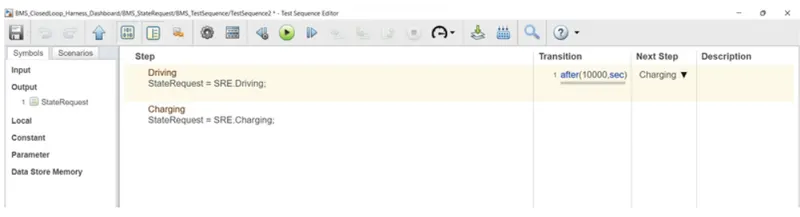
- Driving is done for the first 1000sec.
- Then charging is done for next 10000sec.
Result for test case 2:
Simulation ran for 20000sec,
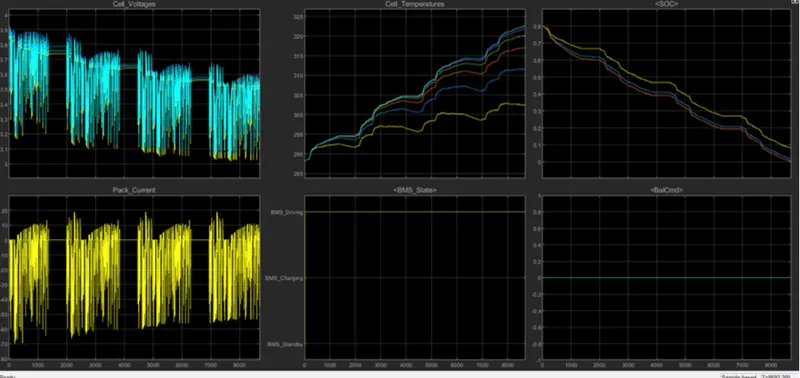
- Driving mode (0-10000sec): The cell voltage varies from 3.9v to 3.05V which is cut off voltage of cell and the entire cell is drained upto 8692sec. Cell temperatures varies from 288K to 322.5K. Soc reduced from 80% to 0% in the drive mode under 8692sec.
- Charging mode (10000-2000sec): The cell got drained earlier before reaching this mode.
3.Test case 3:
Here in the test case 3 we select the test case as 3, In the first case we choose 1 instead of that we choose 3 here in this case and this test case 2 will be appeared in the test sequence and by double clicking the test sequence,
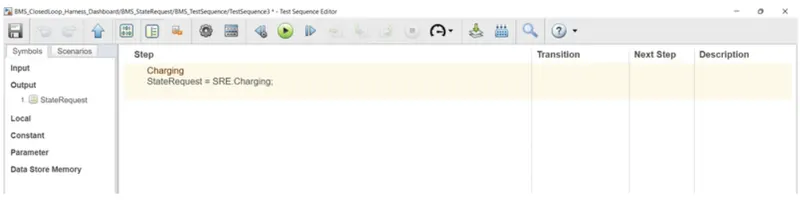
- Charging is done for entire simulation period for 20000sec.
Result for test case 3:
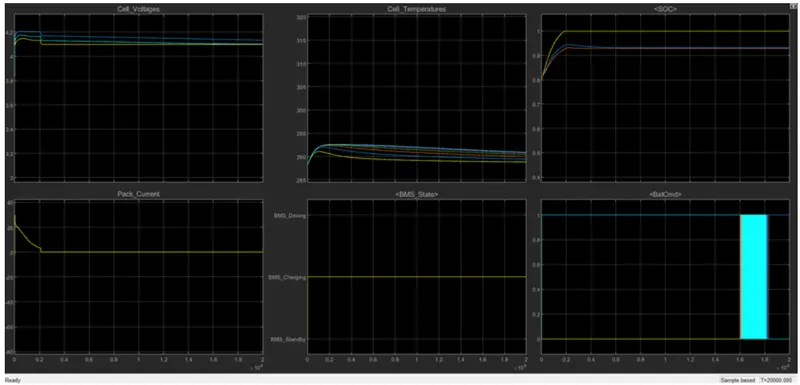
- Charging (0-2000sec) : Cell voltages increases from there initial values and after 2000sec they got constant. Pack current initially start from 0 to 30A and then start decreasing when the constant voltage mode is there to 2.5A and got full charged upto 2000sec. SOC was initially 80% and in 2000sec it got fully charged that is 100%. Cell temperture starts to increases initially and when battery got fully charged then decrease down to the ambient temperature.
2. Coulomb counting: SOC (State of charge) is defined as the rate of available capacity to its maximum capacity when a battery is fully charged and describes the remaining percentage of the battery capacity. To find this SOC% we are using coulomb counting method. The coulomb counting method measures the discharging current of the battery and integrates the discharging current over time in order to estimate SOC. Which can be estimated from discharging current (l(t)), previously estimated SOC values (SOC(t-1). The relation can be given as,
SOC(t) = SOC (t - 1) + I(t)/Qn Δt
Modified Coulomb counting: In this technique discharge current is corrected with a function and corrected current is found out for accurate SOC estimation.
The funtion can be given as,
Ic (t) = K2 I(t)^2 + K1 I(t) + K0..... (K0,K1,K2 are the constant values)
SOC(t) = SOC(t-1) + Ic(t)/Qn Δt
SOC estimation in BMS model,
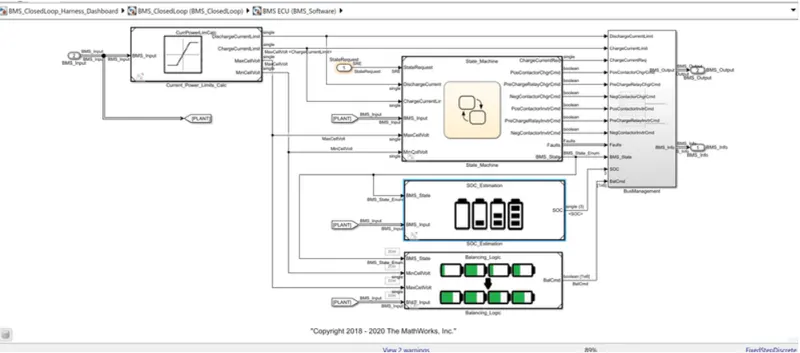
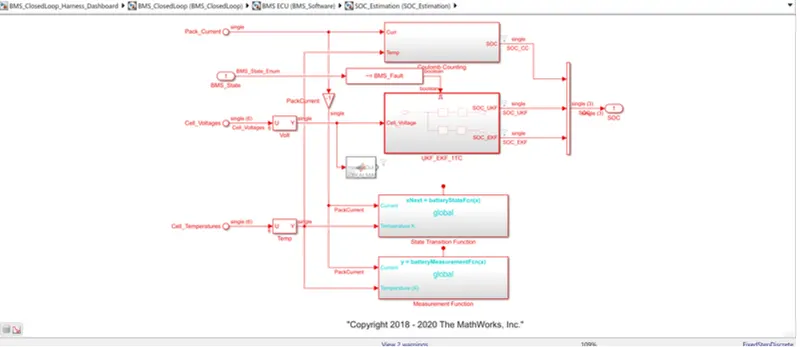
Here the discharge current from the battery given to gain with the values as 1/3600 to convert current to Ahr.
The value is divided by capacity due to temperature change. Then integrated with a gain value of 1 with sample time -1 as we are using discrete integrator.The saturation limits are 0 to 1.
Then we will get the SOC values from 0 to 1 multiplied with 100 to get in percentage of SOC.