Week 7- Meshing of Backdoor Challenge
Aim
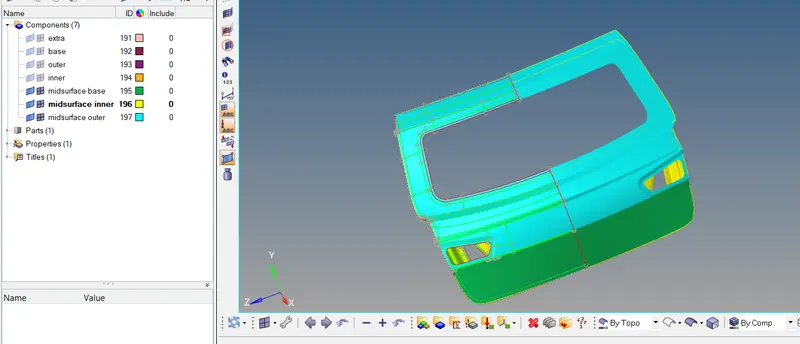
For this challenge, you will have to mesh the backdoor geometry of a car that is provided below. Provided below are the quality parameters that you have to follow.
Target Element size - 5 Units
| S.N | Quality Criteria | Value |
| 1 | Aspect Ratio | 5 |
| 2 | Skewness | 45 |
| 3 | Warping | 015 |
| 4 | Taper | 0.5 |
| 5 | Min. Length | 3 Units |
| 6 | Max. Length | 7 Units |
| 7 | Min angle Quad | 45 |
| 8 | Max angle Quad | 135 |
| 9 | Min angle Tria | 30 |
| 10 | Max angle Tria | 110 |
| 10 | Tria % | 15 |
cad model
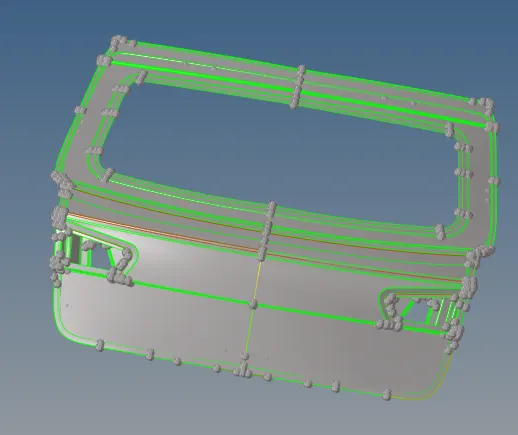
procedure
- create 3 components base,inner and outer pannel and select surfaces and assign it to corresponding surfaces
- TOOL>ORGANISE >surface>dest comp (selection by faces for easy organising,layer by layer) select surfaces and add them to corresponding component

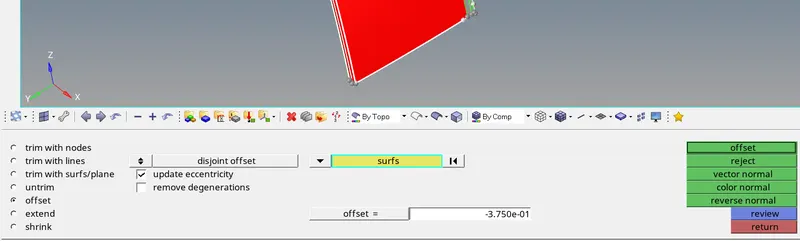
- after catagorising to inner ,outer and base create midsurface by manual method(offset)
- create new component for midsurface
- geom>surface edit>by face>color normal>duplicate>offset (acc to thickness)
- use geom>quickedit>toggle to remove unnecessary triple cone (right click)and stitch edges
- input quality criteria
- preferences>criteria file setting>enter values >save file
- split components for meshing using geom>quick edit>node to node
- mesh components avoiding element failure using 2d>quality index>clean up tools
- to reflect component
- tools >reflect>elements>select all elements)>duplicate(onto requireq component)>z axis>base point>reflect

- create property and input parent geometry thickness and assign thickness to all mid surface component
final model