Week 6 - Data analysis
Aim:
1) To write a pyhton script for Data visualizer.
2) To write a pyhton script to perfome Compatability check.
3) To write a pyhton script for basic perfomance calculation for area under the graph, power output for the engine, specific fuel consumption
Formula:
specific fuel consumption = `((m_f)xx(3600))/((BP)xx(0.08))`
Power = `Areaxx1000xx(RPM)/60`
Coding:
import math
import matplotlib.pyplot as plt
import numpy as np

#Compatability check
try:
	data=open('file_data.out')
	print("Given Data file is recognized")
except:
	print("File not recognized. Please provide a valid CONVERGE output file")

#Data visualizer
column1=[]
column2=[]
i=int(input("Enter first column number:"))
j=int(input("Enter second column number:"))

#Getting Title
count=0
for line in open('file_data.out'):
	if count==2:
		title1=line.split()[i+1]
		title2=line.split()[j+1]
	count=count+1
#Getting data
	if'#' not in line:
		column1.append(float(line.split()[i]))
		column2.append(float(line.split()[j]))

#Plotting
filename=title1+' vs '+title2
plt.figure()
plt.plot(column1,column2)
plt.xlabel(title1)
plt.ylabel(title2)
plt.title(filename)
plt.savefig(filename)
plt.show()

# Calculating area under the graph, power output for the engine, specific fuel consumption
pressure=[]
volume=[]
for line in open('file_data.out'):
	if'#' not in line:
		pressure.append(float(line.split()[1]))
		volume.append(float(line.split()[7]))

area= np.trapz(pressure,volume)
print("Area under the curve - ",area)


# rpm - revolution per minute, rps - revolution per second, sfc - specific fuel consumption
rpm=1500
rps=rpm/60
power=area*rps*1000
print("power of engine - ",power)

sfc=(20*pow(10,-6)*3600)/(0.08*power)
print("specific fuel consumption - ",sfc)
Explanation:
Case1: Compatability check
Here try and except commnd is used to find whether the given data file is correct or not, if its correct it will execute try block ("Given Data file is recognized"), if not i will excecute except block ("File not recognized. Please provide a valid CONVERGE output file").
Case2: Data visualizer
Two empty array is column1, column2 is created. Then input number for first column is got from user by using REPL method. The same procedure is followed for getting second column number. Then the title of the data is got by using for loop. In for loop the data file is opened and the if condition is given to skip first two lines then the correct title for respective data is got. Now the data of the title is got by using if condition and the output values are appended in column1 and column2 array. Then file name of the folder is intialized. Now plotting is done between two output column array, xlabel, ylabel, tile of the graph is also given and the graph is saved and executed.
Case3: Basic perfomance calculation for area under the graph, power output for the engine, specific fuel consumption
Here two empty array pressure and volume is created. Now the data of pressure and volume are got by using if condition and the output values are appended in pressure and volume array. Then to find the area under the graph of pressure and volume, trapz command is used from numpy module and the output is printed. Now the calculation for power output of engine is done and excecuted. Now the calculation for specific fuel consumption done and excecuted.
Output:
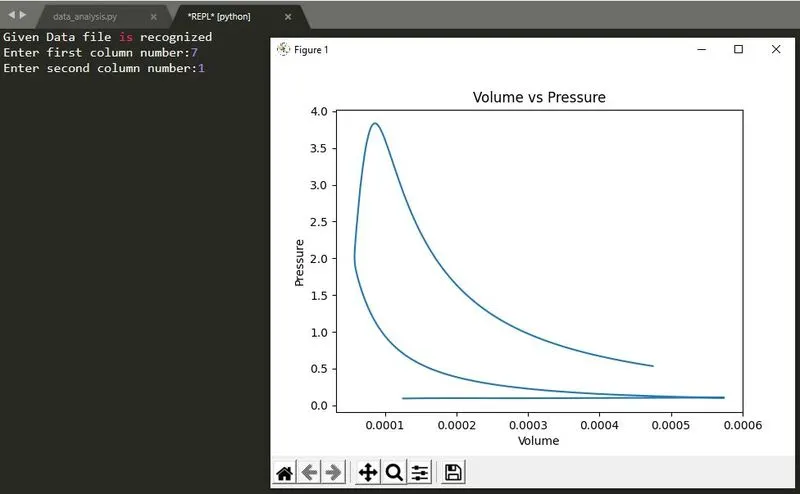
This is the output of data visualizer case, First the given file name is recognized and here i taken two column one is volume and other is pressure and the output is also plotted
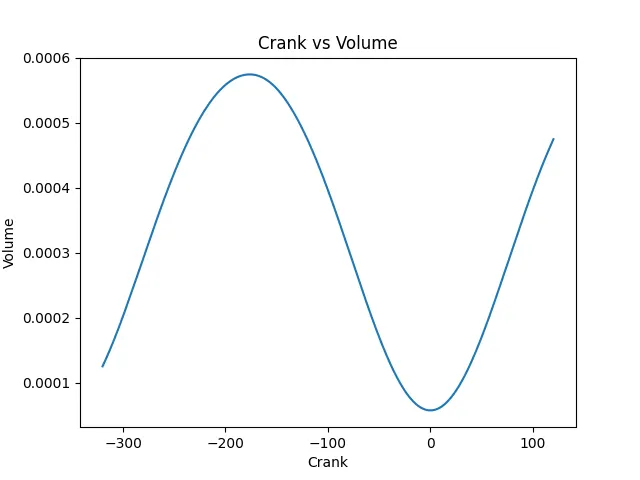
Here i taken two column one is volume and other is crank and the output is also plotted
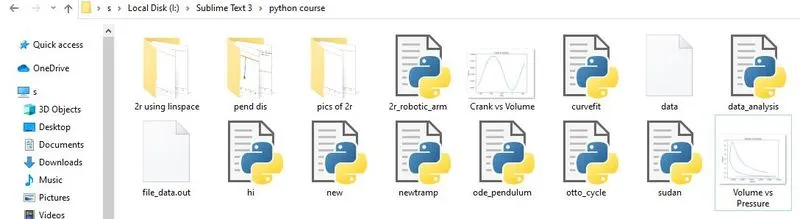
Here we can see the executed plots are saved in a folder were python scipt is present and the plots are saved in their title.
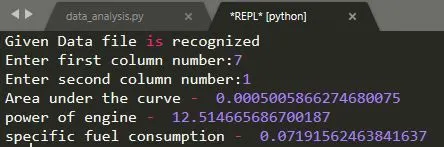
This is the final output of Basic perfomance calculation for area under the graph, power output for the engine, specific fuel consumption.
If the given file name is not correct it will execute, except block command.
