Week - 6 - Creating the GUI for final checks
AIM:
To create a tk GUI for all the final checks/operations.
OBJECTIVE:
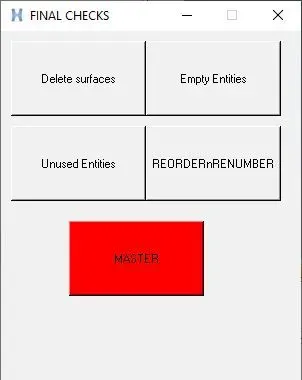
- Create buttons to delete displayed geometric entities (be careful about advanced remesh)
- Create buttons to delete empty entities.
- Create button to re-order and re-number entities by name.
- Create a master button in red that will execute all above scripts in proper order to keep only the fea entities. Name the button master.
PROCEDURE:
- *createmark - Places entities on a mark based on user-supplied options.
- *deletemark - Deletes entities from the database.
- *EntityPreviewUnused - Searches the specified entities for any unused entities, and stores them in the outputmark.
- *EntityPreviewEmpty - Searches the entities specified and stores any empty entities in the outputmark
- *collectormarkmove - Moves and/or sorts the entities on a mark.
CODE:
set a .finalcheck
catch {destroy $a}
toplevel $a
wm deiconify $a
wm title $a "FINAL CHECKS"
wm geometry $a 300x350+250+250
wm resizable $a 0 0
proc delete {} {
*createmark surfaces 1 "displayed"
if {[hm_marklength surfaces 1]!= 0} {*deletemark surfaces 1}
}
proc unused {} {
set b {material property loadcollector }
foreach x $b {
*EntityPreviewUnused $x 2
if {[hm_marklength $x 2] != 0} {*deletemark $x 2
} else {tk_messageBox -message "zero unused $x " -icon info
}
}
}
proc Empty {} {
set c { component assembly }
foreach y $c {
*EntityPreviewEmpty $y 1
if {[hm_marklength $y 1] != 0} {*deletemark $y 1
} else {tk_messageBox -message "zero unused $y " -icon info
}
}
}
proc reorder_n_renumber {} {
set c {component assembly material property loadcollector}
foreach x $c {
*createmark $x 1 "all"
if {[hm_marklength $x 1]!= 0} {*collectormarkmove $x 1 1 1}
}
}
proc all {} {
delete
unused
Empty
reorder_n_renumber
}
button $a.01 -text "Delete surfaces" -command {delete}
place $a.01 -x 10 -y 10 -width 120 -height 60
button $a.02 -text "Empty Entities" -command {Empty}
place $a.02 -x 145 -y 10 -width 120 -height 60
button $a.03 -text "Unused Entities" -command {unused}
place $a.03 -x 10 -y 95 -width 120 -height 60
button $a.04 -text "REORDERnRENUMBER" -command {reorder_n_renumber}
place $a.04 -x 145 -y 95 -width 120 -height 60
button $a.05 -text "MASTER" -background red -command {all}
place $a.05 -x 67.5 -y 190 -width 135 -height 75
OUTPUT:
RESULTS:
- Buttons have been created to delete displayed geometric entities,empty entities,to re-order and re-number entities by name and Master button is created in red that will execute all above scripts in proper order to keep fea entities.