Exercise on Simulink Modeling & Stateflow
Que. 1
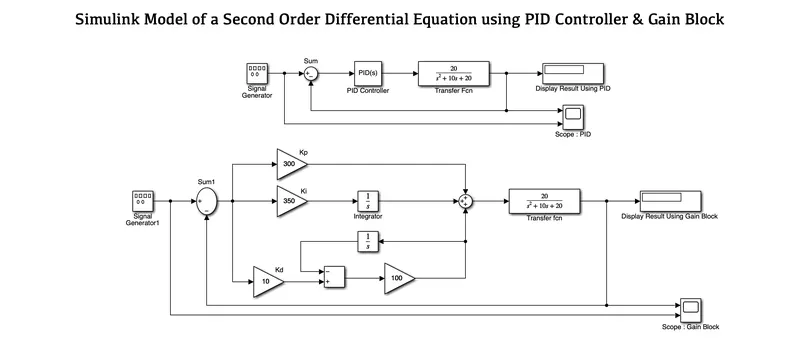
AIM: To develop a PID Controller for a Second Order Differential Equation along with individual gain blocks for P-I-D.
OBJECTIVES :
- To develop a model using both PID Library block and also using individual gain blocks for P-I-D.
CONDITIONS :
- Transfer Function is `20/(s^2 + 10s + 20) ` where Kp = 300, Ki = 350 & Kd = 10.
SIMULINK MODEL :
BLOCKS USED :
- Signal Generator
- Sum
- PID Controller
- Transfer Fcn
- Display
- Scope
- Gain
- Integrator
- Add
EXPLANATION :
- Before starting we first sorted out all the required blocks.
- Here we have two models one is using a PID controller and the other one is using a gain block.
- In PID Controlled Model, we have a Signal Generator whose waveform is of square type and connected to the PID controller using a Sum block and further to a Transfer Function. Here PID values are given to us.
- Through this, the function is processed and gives us the desired output.
- In Gain Block Model, we used a Signal Generator of the same square type. This block is connected with three different individual blocks represented as Kp, Ki & Kd.
- As these values are already given to us, so we connected them to a sum block. Here Ki is Integrated before connecting to a Sum block whereas Kd, goes on further to perform its integrator using a filter coefficient to get the accurate variables at the end.
- Finally, these three individual blocks are connected to a sum block which further passes the signal to a Transfer Function and we get the desired result.
RESULTS :
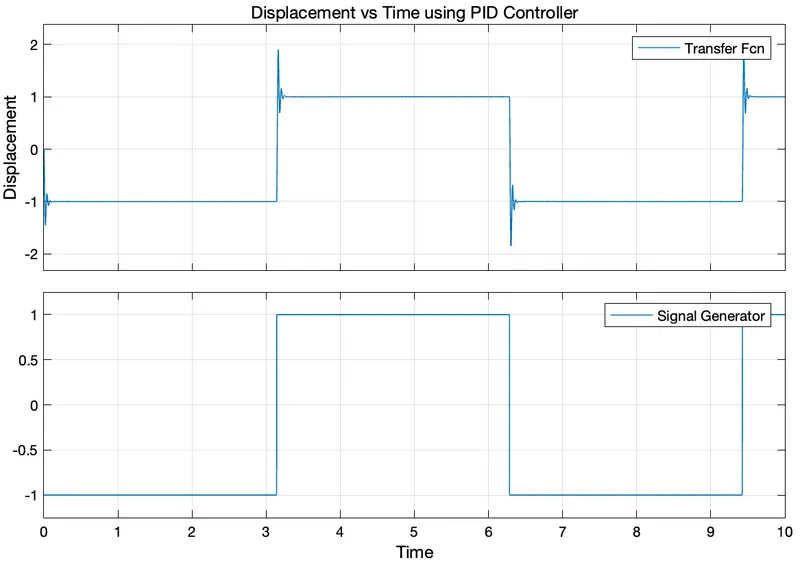
Model using both PID Library block & individual Gain blocks for P-I-D.
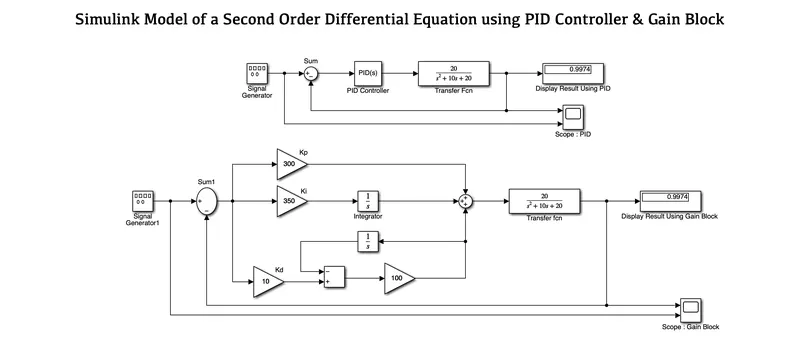
1. Scope: Model using PID Controller
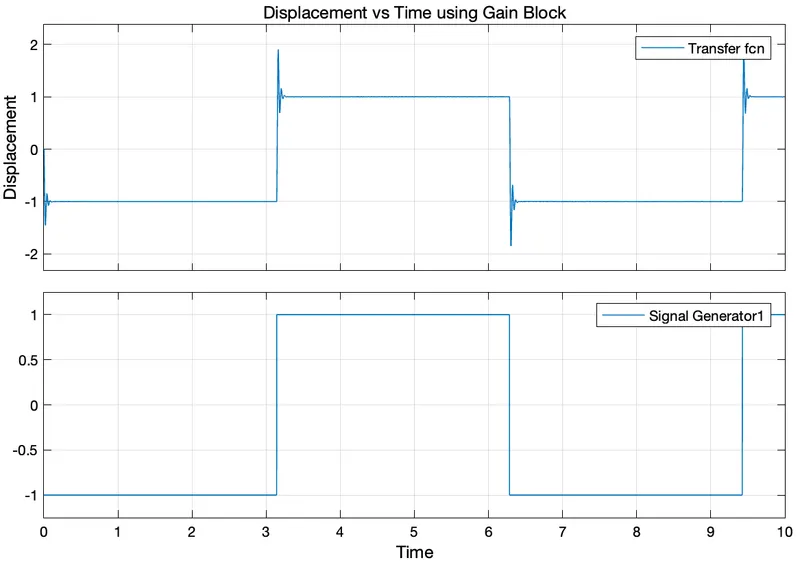
2. Scope: Model using Gain Block
CONCLUSION :
As a result, we constructed a Simulink model for P-I-D using both the PID Library block and individual Gain blocks. We have an equivalent output for both, which is shown using the appropriate Display blocks.
Que. 2
AIM: To create a Simulink model for a Mass-Damper System which is governed by a second-order differential equation.
OBJECTIVES :
- To make a responsive system for a Mass-Damper System.
EQUATION :
`x¨(t) = 1/m [ f(t) - cx˙(t) - kx(t)]`
| where, | |
| x¨ | Acceleration of the Mass (m) |
| x˙ | Frequency |
| x | Displacement |
| f(t) | Forcing Function |
| c | Damping Coefficient |
| k | Spring Constant |
SIMULINK MODEL :
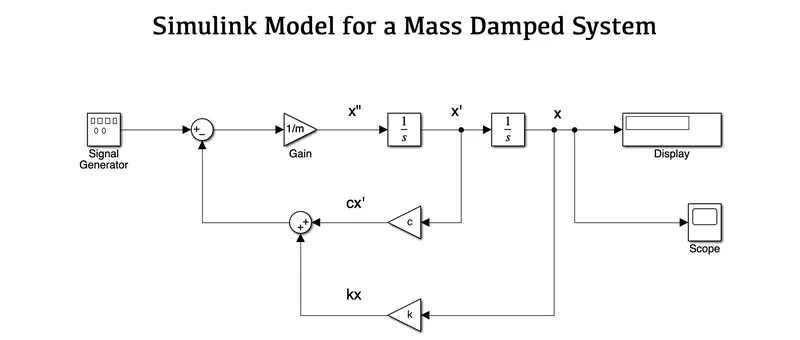
BLOCKS USED :
- Signal Generator
- Sum
- Gain
- Integrator
- Display
- Scope
EXPLANATION :
- First, we sorted out all the required blocks.
- Here we have used a Signal Generator block as a function with a Sine waveform which is connected to a sum block that leads to a second-order differential equation.
- The Damping Coefficient 'c' with x' gives the cx' is added along with the spring constant k as kx and connected further to the sum block.
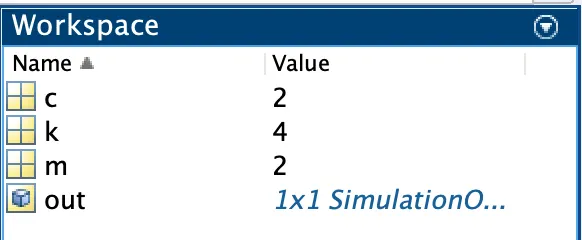
- Later we derived the values of c, k and m using the command window in MATLAB.
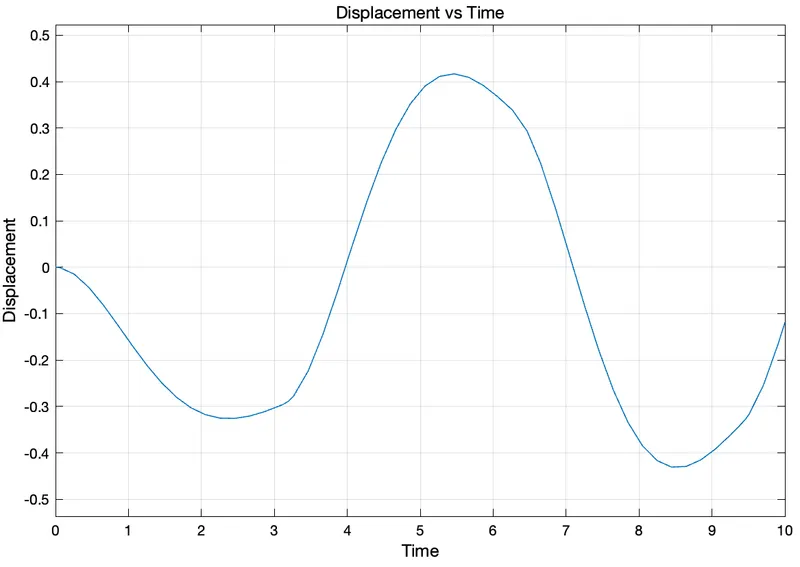
- Once it takes the values then it follows the Integrator process to give the desired results which are shown in the Display Block along with its Scope.
RESULTS :
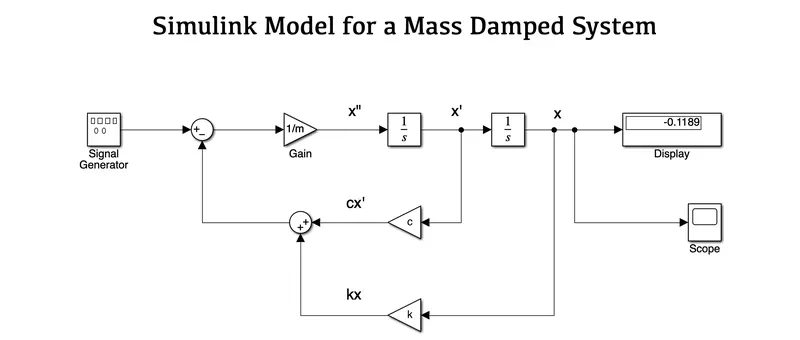
Specified Value: Workspace
Scope: Displacement for a Sine Waveform
CONCLUSION :
As a result, we developed a responsive Mass Damper System for a Second-Order System that reflects the specified equation using the workspace values.
Que. 3
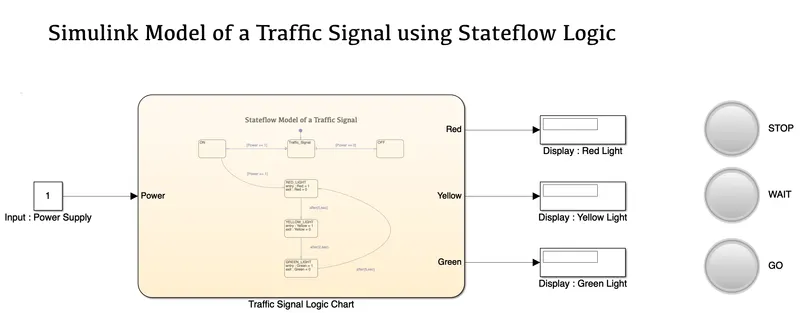
AIM: To create a Simulink model for a Traffic Signal Control Logic using Stateflow charts.
OBJECTIVES :
- To make use of the Stateflow chart to perform a traffic signal operation.
CONDITIONS :
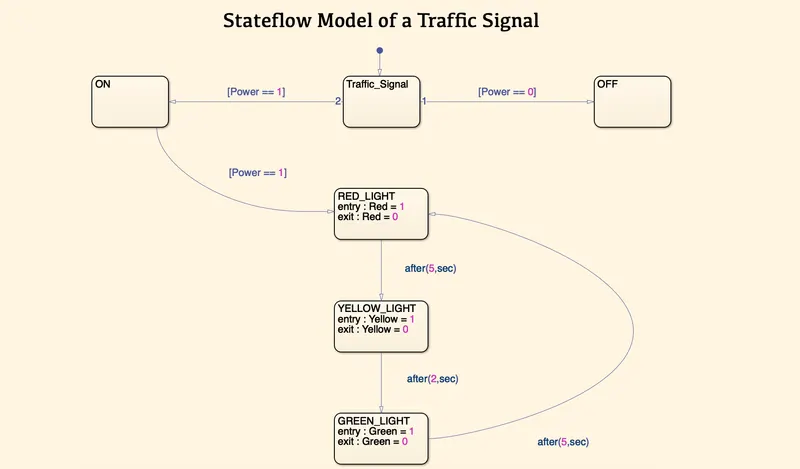
- RED light is the default entry state (Entry value at RED state is 1 & Exit Value is 0).
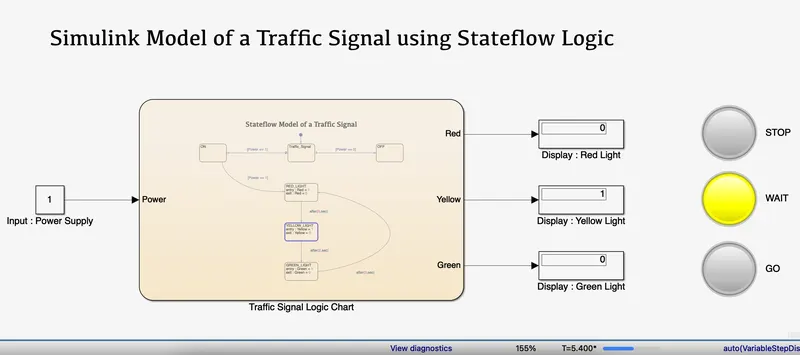
- YELLOW light becomes active after 5 seconds (Entry value at YELLOW state is 1 & Exit Value is 0.
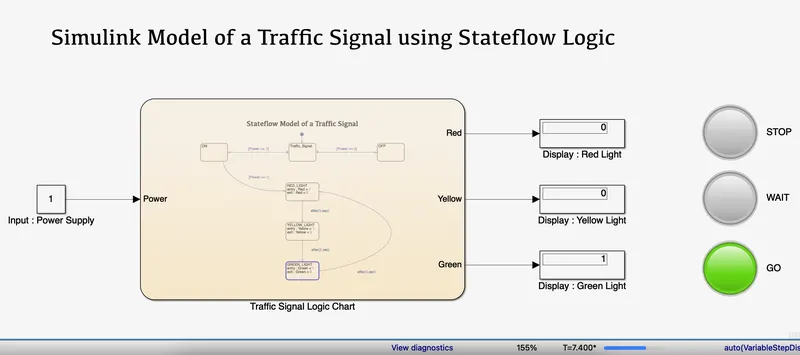
- GREEN light becomes active after 2 seconds (Entry value at GREEN state is 1 & Exit Value is 0).
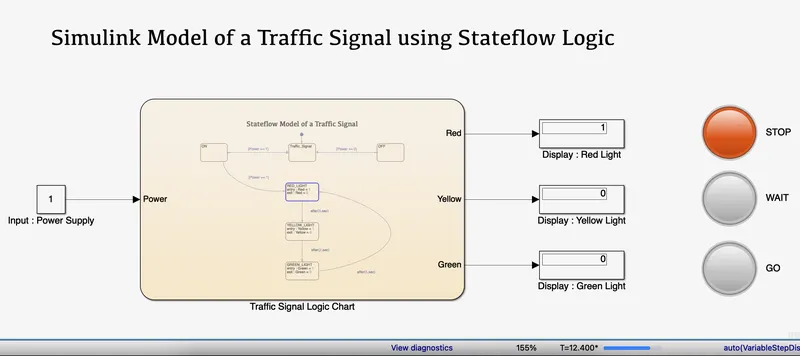
- Signal Exits GREEN state to RED state after 5 seconds.
SIMULINK MODEL :
STATEFLOW CHART :
BLOCKS USED :
- Chart
- State
- Transition
- Constant
- Displays
- Lamps
INPUT & OUTPUT PORTS:
EXPLANATION :
- First, we sorted out all the required blocks that we will use. They are mentioned above.
- Using the Stateflow chart, we first gave its power supply to function as per the requirement.
- If the power is ON then it will show Red Light as its default entry state.
- After 5 seconds it will turn ON the Yellow Lamp and again after 2 seconds it will turn ON the Green Lamp.
- Once the operation is done, the Signal Exits the GREEN state and moves to the RED state after 5 seconds. This operation will keep on happening based on the stop time.
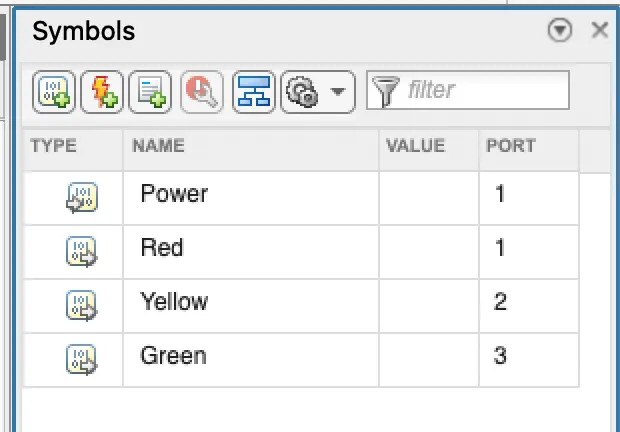
- Later we define the input and output ports using the symbols pane.
- In Simulink, we gave an input value to the power supply and Display at the Output along with their respective lamps. These will be ON/OFF based on the input conditions.
RESULTS :
CONDITION 1: RED light is the default entry state (Entry value at RED state is 1 & Exit Value is 0).
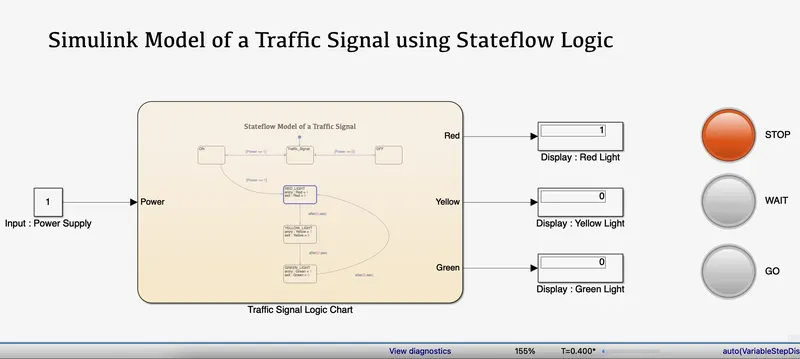
CONDITION 2: YELLOW light becomes active after 5 seconds (Entry value at YELLOW state is 1 & Exit Value is 0).
CONDITION 3: GREEN light becomes active after 2 seconds (Entry value at GREEN state is 1 & Exit Value is 0).
CONDITION 4: Signal Exits GREEN state to RED state after 5 seconds.
CONCLUSION :
As a result, we constructed a Simulink model for a Traffic Signal that uses the Stateflow chart to switch the lamps ON and OFF based on the given conditions.