MATLAB Program to solve Second Order Differential Equation for a Simple Pendulum
AIM :
To create a MATLAB program that solves the following Ordinary Differential Equation for a simple pendulum with damping.
OBJECTIVES :
- To write a program that solves the simple pendulum's ODE.
- To animate the to and fro motion of the simple pendulum.
THEORY :
An Ordinary Differential Equation (ODE) is a differential equation containing one or more functions of one independent variable and the derivatives of those functions.
It is represent as
1st order O.D.E
`(dy)/(dx) = f (x)`
if `x = (y/x)`
`(dy)/(dx) = f(y/x)`
then, 2nd order O.D.E
`(d^2y)/(dx^2) = f(y)`
Now, equation for 2nd order Ordinary Differential Equation for a simple pendulum with damping
`(d^2theta)/(dt^2) + (b/m)((d theta)/dt) + (g/L).sin theta = 0`
if `theta = theta_1`
`(d^2theta_1)/(dt^2) + (b/m)((d theta_1)/dt) + (g/L).sin theta_1 = 0`
and `(d theta_1)/dt = theta_2`
`(d theta_2)/(dt^2) + (b/m).theta_2 + (g/L).sin theta_1 = 0`
finally
`(d theta_2)/(dt^2) = - (b/m).theta_2 - (g/L).sin theta_1`
In Matrix Form
`(d/dt) [[ theta_1] , [theta_2]] = [(theta_2), (-(b/m).theta_2 - (g/L).sintheta_1)]`
where
b = Damping Coefficient,
m = Mass of the ball in kg,
g = Gravity in `m/s^2`,
L = Length of the pendulum in m,
Solve the Simple Pendulum Equation using given data
b = 0.05,
m = 1,
g = 9.81,
L = 1,
PROGRAMS :
Functional Program
function [dtheta_dt] = ode_func(t,theta,b,g,L,m)

theta1 = theta (1);
theta2 = theta (2);

dtheta1_dt = theta2;
dtheta2_dt = (-b/m)*theta2 - (g/L)*sin(theta1);

dtheta_dt = [dtheta1_dt ; dtheta2_dt];
Final Program
% A program to solve ODE for a simple pendulum with damping

clear
close all
clc

% Step I : Given Inputs

% Damping coefficien
b = 0.05;

% Mass of the ball in kg
m = 1;

% Gravity in m/s^2
g = 9.81;

% length of the pendulum in m
L = 1;

% Step II : Initial Conditions
theta_0 = [0;3];

% Time Points
t_span = linspace (0,20,500);

% Step III : Solving ODE

[t , results] = ode45(@(t,theta) ode_func(t,theta,b,g,L,m), t_span, theta_0);

theta_1 = results (:,1);
theta_2 = results (:,2);

% Step IV : Plotting
figure (1)
plot (t, theta_1)
hold on
plot (t, theta_2)

xlabel ('Time')
ylabel ('Plot')
title ('Motion of Damped Pendulum')
legend ('Change in Angular Displacement', 'Change in Angular Velocity')
hold off

figure (2)
plot (theta_1,theta_2)
xlabel ('Position')
ylabel ('Angular Velocity')

ct = 1;
for i = 1 : length(results (:,1))

    % Step V : Plot using Start & End Points
        x0 = 0;
        y0 = 0;

        x1 = L*sin(results(i,1));
        y1 = -L*cos(results (i,1));

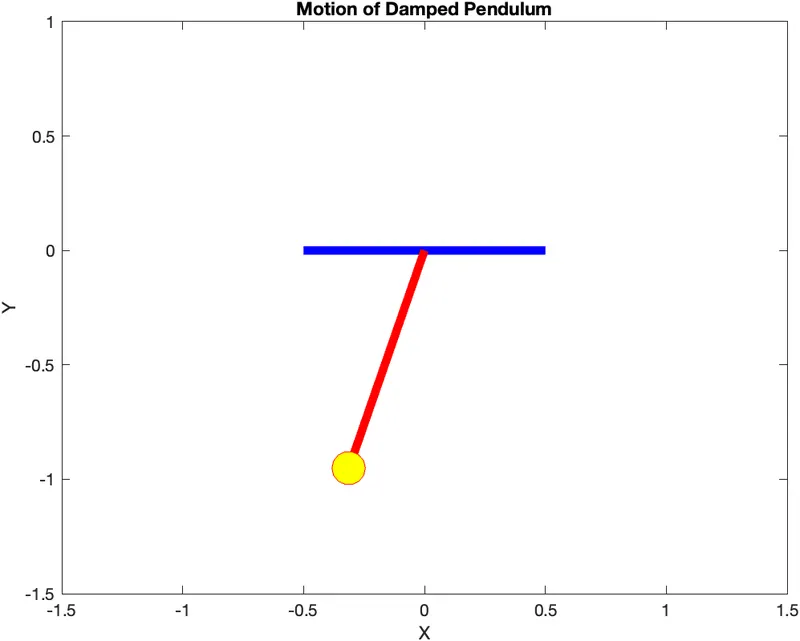
        figure (3)
        plot ([-0.5 0.5], [0 0], 'LineWidth', 5, 'Color', 'b')
        hold on
        plot ([x0 x1], [y0 y1], 'LineWidth', 5, 'Color', 'r')
        axis([-1.5 1.5 -1.5 1])
        plot (x1,y1, 'o', 'MarkerSize', 20, 'MarkerEdgeColor','r', 'MarkerFaceColor','y')
        xlabel('X')
        ylabel('Y')
        title ('Motion of Damped Pendulum')
        pause(0.0003)
        M(ct) = getframe(gcf);
        hold off
        ct = ct+1;
end

% Step VI : Animation
movie(M)
videofile = VideoWriter('simple_pendulum','Uncompressed AVI');
open(videofile)
writeVideo(videofile,M)
close(videofile)
PLOTS :
Figure (1)
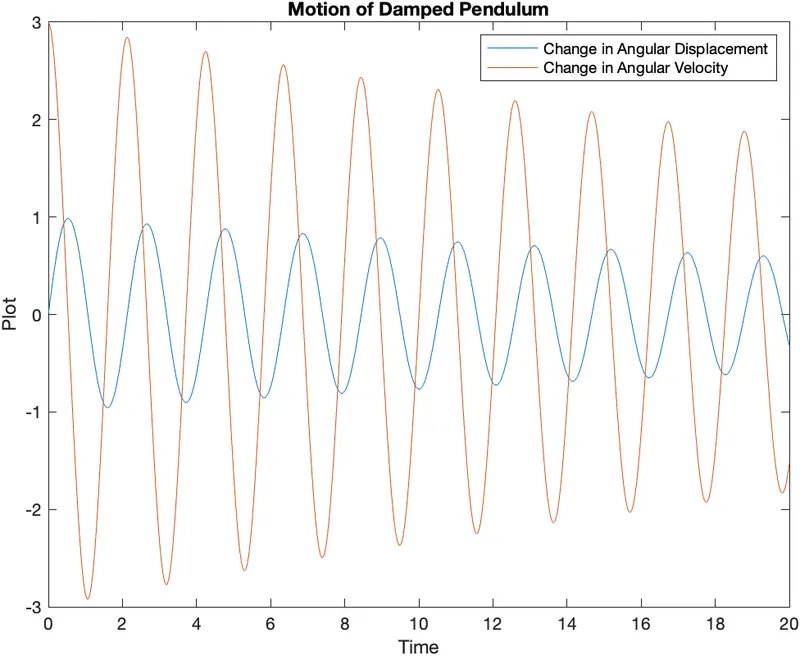
Figure (2)
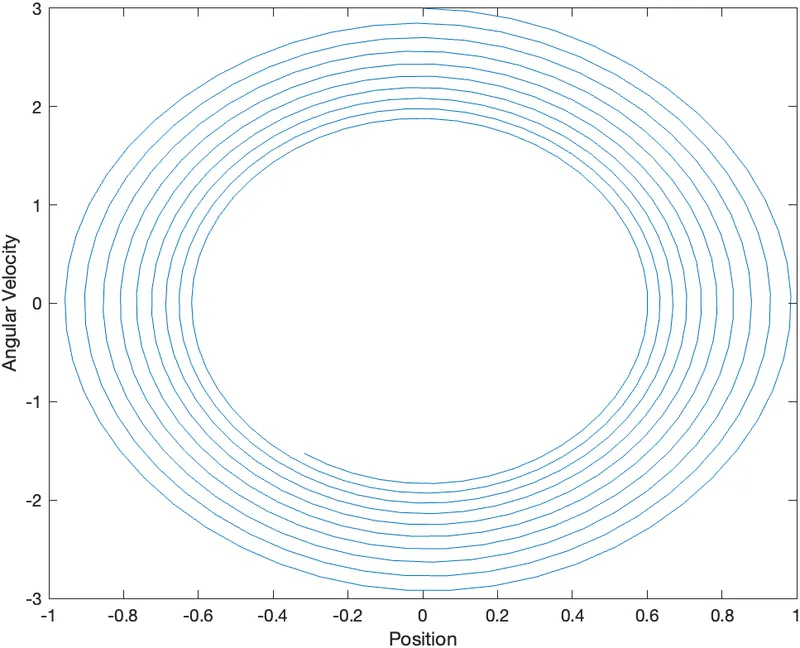
Figure (3)
ANIMATION LINK :
< https://drive.google.com/file/d/1LD5pRqg0eLj9AF6KFselblNidBHjlPM7/view?usp=sharing >
CONCLUSION :
Hence, the damped motion of a simple pendulum is shown above in the form of animation.