Week 5 Challenge : Surface wrap on Automotive Assembly
Aim- To create a surface wrap with 3mm target length for the whole model.
Procedure-
1. To download all the models from the challenges section of course.
2. At first, open engine model of the engine and transmission assembly. The model is extremely messy so
the first task is to clean the model, solve all the single cons and delete unnecessary surfaces which are there in the large number.
3. Then move on to opening either transmission or gear box model.
4. After opening either one of them clean the model and make it free of any single cons and unnecessary surface.
5. Again open the engine model and close all the holes that are available on the external surface of the model so that during surface wrapping meshes do not enter the volume of the engine assembly model. Try not to miss any hole on the external surface of the model.
6. Go to file and select merge option there and then open both gear box and transmission models one by one.
7. Then close all the holes on the external surfaces on those two models that we merged earlier.
8. To close holes one is free to use appropriate options such as fill hole or new to create new surface. I here mostly used the later one.
9. After ensuring all the holes are closed go to 'Classic Mesh' section of ANSA v23.1.1 there at the bottom we can find 'wrap' option under surface section.
10. Click and hold on it and release the click on constant length option. Double click on the status section, this opens another dialogue box 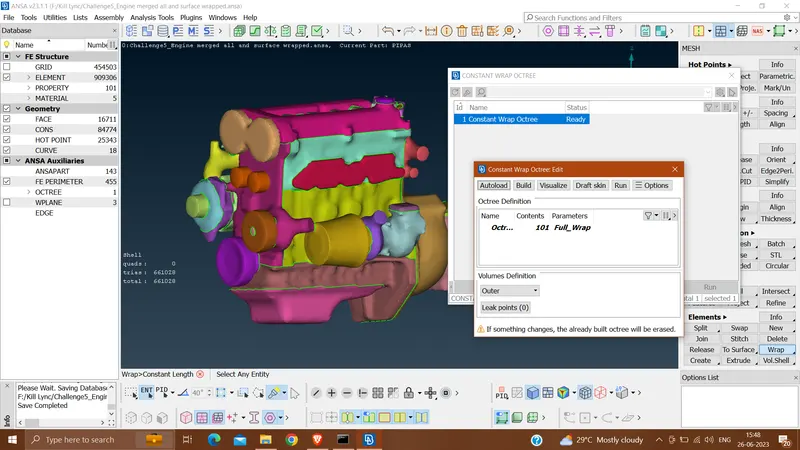
11. Click on parameters and give target length 3mm and chose option for Wrap mode as Nodes out of structure and Property assignment as Assign properties from structure.
12. Double click on the contents, before that delete all unnecessary PIDs using compress option. Then select remaining PIDs and click on Move selected on the Octree Scenario.
13. Click on the Run option of the Constant Wrap Octree edit window.
14. After some time, surface wrap will be completed.
15. To check about correctness of the wrap, hide extreme entities of the model and try seesing through it to the other end and it should be hollow without any surface in between.
In that case wrapping is correct.
Learning Outcome-
I learned to performe surface wrapping.
Result-
I was able to surface wrap my set of models.
Conclusion-
As I was able to see through my model upon hiding two extreme ends of the model without any surface in between. So it s safe to conclude that wrapping was correct.