Week 5 Challenge : Surface wrap on Automotive Assembly
Surface wrap on Automotive Assembly
Aim:
To surface wrap on given automotive assembly.
Objective:
Surface wrapping for the following component
- Engine
- Gearbox
- Transmission
Procedure:
- Topo Clean up:
- Open the file from the location where we have saved it on our Computer by using the “Ctrl+O” Command.
- Go to the Tool in the ansa
- Select the check
- Left click on geometry check
- Select the following check-in geometry check
- Single cons
- Cracks,
- Overlap faces
- Needle faces
- Trible cons
- Collapsed cons
- Unchecked faces
- Delete the unwanted surface.
- Remove single cons by creating a new surface.
- Delete the overlapped surface by Delete the Surface which is overlapped.
- Remove the extended surface by deleting the extended entities and creating a new surface.
- Eliminate void surface by creating the new surface in ansa.
- Check the single Cons by using wireframe mode in ansa by using the combination of the Ctrl+Shift keys.
- Close the open hole by creating a new surface.
- Delete the tube connection.
- Creating PID
- Go to the PID manager
- Create new PID
- Assign the color for each surface according to the PID we created.
- Apply the PID to the Surface.
- Edit the PID according to the given name.
- Compress the unwanted PID.
3.2D mesh:
- Go to the mesh deck and give the perimeter value, and macro value as a target length.
- Assign the mesh parameter value
- Go to the quality Criteria and give the minimum and maximum values.
- Go to the mesh deck,
- Pick the spot mesh. Then select the component by using the select command in PID mode.
- Generate the mesh for the given component.
- Do the same procedure for various target lengths that they are given.
- Check the unmeshed surface
- Regenerate the mesh.
- Surface wrapping:
- Go to mesh deck.
- select the element by right click on the mouse.
- Click on the wrap option by clicking on the left-click option with the mouse.
- Double Click on the Wrap oct tree.
Learning Outcomes:
Geometry cleans up:
- Removal of the extended surface.
- Creating a Complicated surface
- Deleting intersected surface
PID creation for a part
- Compress the unwanted PID
- Creating the New PID 2D mesh
- Creating 2D mesh
- Find the unmeshed surface and fix that.
Surface Wrapping:
- Combine different fil:s in one file
- Creating Surface wrapping
Result:
- Surface wrapping
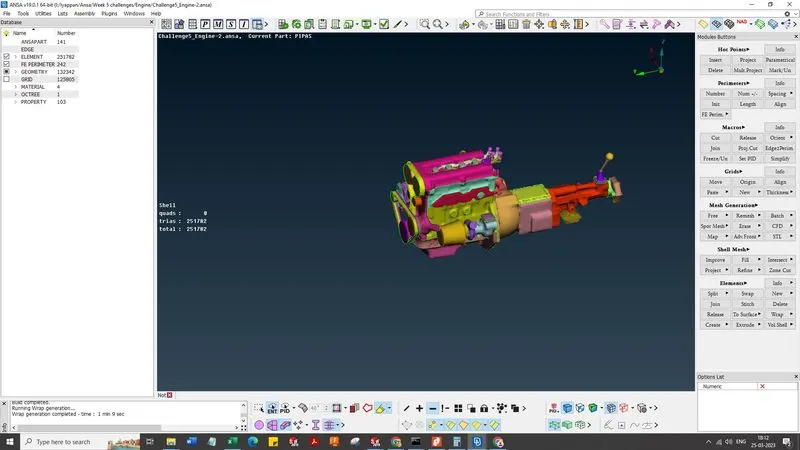
Fig: Surface wrapping.
Conclusion:
Thus, surface wrapping on the given model is done successfully.