Week 5 Challenge- Creating a test case in OpenFOAM
AIM: 1. Create a .cpp file starting with:
#include "fvCFD.H"
int main( int argc, char *argv[] )
{
Foam::argList::noBanner();
Foam::argList args(argc, argv);
...
}
Copy the cavity problem from $FOAM_TUTORIALS/incompressible/icoFoam. Find the value assigned to: transportModel & kinematic viscosity (nu) stored in a dictionary file transportProperties.
Rename the file transportProperties to thermalProperties
- Add variable T in the dictionary and assign a value to it
- Print the value of all the constituent variables in thermalProperties file
Solution:
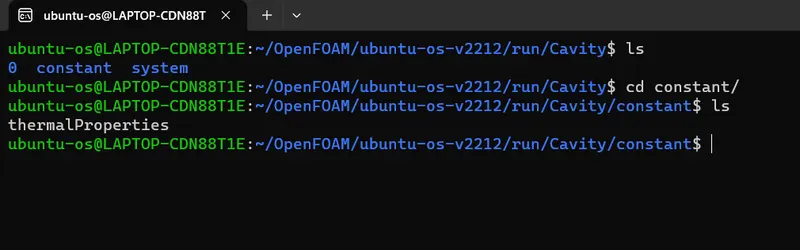
1. First step is to create a directory for this challange and then copy the system and constant folder from the cavity tutorial into this folder.
Navigate to tut/incompressible/icoFoam/cavity and copy the folders you need.

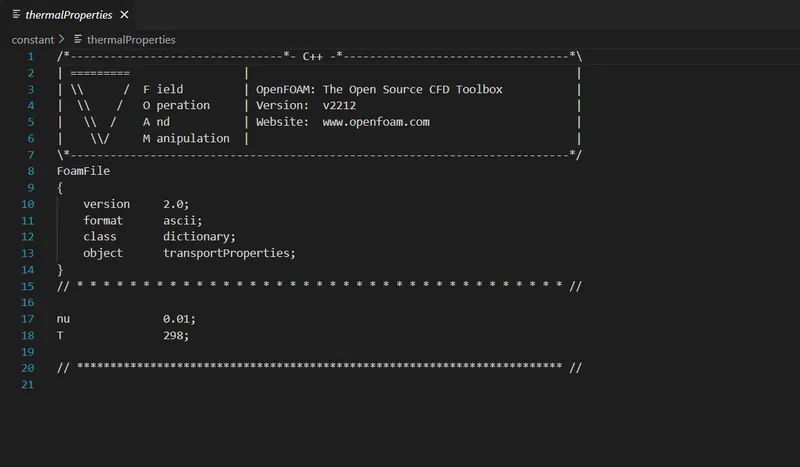
2. Then as mentioned in the aim we have to change the name of the "transportProperties" file name to "thermalProperties" and then we have to add a new variable 'T' inside here also assign a value to it.
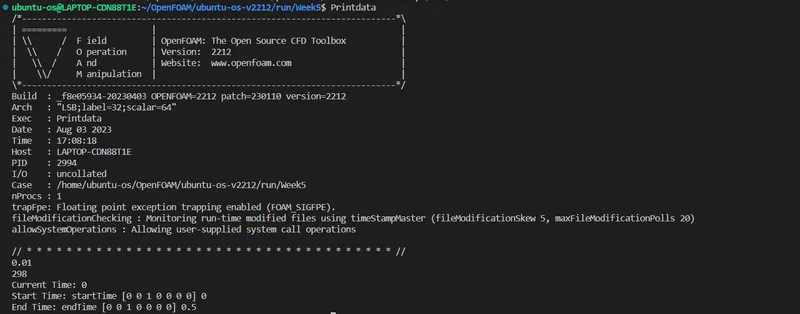
3. Now we have to write a code that will suppress the OpenFOAM banner that can be seen in the above image and then also printout the information of variable T and nu from the modiefied transportProperties file.
/*Code for printing the data from modified transportProperties.*/

#include "fvCFD.H"

int main(int argc, char *argv[]){

    //Foam::argList::noBanner();             //To suppres OpenFoam Banner
    Foam::argList args(argc, argv);

    Foam::Time runTime
    (                                          //Time constructor
        Foam::Time::controlDictName,                   //Details to read from controlDict
        args.rootPath(),                               //Path of the case
        args.caseName()                               //Name of the case
    );

    IOdictionary ioDictobj                //Class IOdicitonary object ioDictobj
    (
        IOobject                         //IOobject Class
        (                                //IOobject Constructor to initialize the ioDictobj
            "thermalProperties",                //name of the dictionary.
            "constant",                          //where to read it from.
            runTime,                            //what objectRegistry to read it from.
            IOobject::MUST_READ,
            IOobject::NO_WRITE
        )
    );

    //To print out the data of nu and T.
    scalar nu = readScalar(ioDictobj.lookup("nu"));
    scalar T = readScalar(ioDictobj.lookup("T"));

    Info<<nu<<"\n";
    Info<<T<<"\n";

    //Printing the Time values
    Info<<"Current Time: "<<runTime.timeName()<<"\n";
    Info<<"Start Time: "<<runTime.startTime()<<"\n";
    Info<<"End Time: "<<runTime.endTime()<<"\n";

    return 0;
}
Code Explanation: 1. #include 'fvCFD' is the header file that gives us the access to the OpenFoam options like Info that allows to print out the values.
2. Inside the main, the noBanner option supresses the banner but if you are using a v2212 like version than this may cause some compilation errors that is why I have suppressed this line. The next line argList allows to add arguments with executable.
3. Next, Time class object "runTime" is created which will initialize the objectRegistry this will help us to read the properties of file that lies under this objectRegistry. The contructor of Time is called for initializing the runTime, that will read the data from controlDict for creation of runTime.
4. Now to read the data from the thermalProperties dictionary. IOdicitionary class object ioDictobj is created which is initialized using IOobject class constructor. Under this contructor we provided the name of the dicitionary that has to be read, where to read it from and under which objectRegistry to read from. The IOobject:: MUST_READ and NO_WRITE options are the action that are taken on the dictionary.
5. scalar nu and T are the variables which is used to look up for the "nu" and "T" values from the thermalProperties dictionary the readScalar option helps to read the scalar value of the lookup object.
6. Then we use the Info for printing the values of nu and T and also we can print the values of current time, start and end time.
Results: