Week 4 - Genetic Algorithm
Aim: write a MATLAB code to optimize the stalagmite func and global maxima of the function
Objective: we are going to find a global maxima values by using a genetic algorithm concept in mat lab and we are going to code a program for that.
Theory: Genetic algorithm (GA) is one of the optimization processes. Basically, optimization is a process to figure out the best for a design by varying a variable.
So, GA is an analytical theory which was introduced by Charles Darwin. GA works by taking a random variable value and gives an optimized value.
For examples GA deals with how to maximize or minimize a function. Here comes the stalagmite function it helps to find a local maxima and minima.
Syntax for GA:
In mat lab we are having different syntax here listed those
x = ga(fun,nvars,A,b,Aeq,beq,lb,ub)
x = ga(fun,nvars,A,b,Aeq,beq,lb,ub,nonlcon)
x = ga(fun,nvars,A,b,Aeq,beq,lb,ub,nonlcon,options)
x = ga(fun,nvars,A,b,[],[],lb,ub,nonlcon,IntCon)
x = ga(fun,nvars,A,b,[],[],lb,ub,nonlcon,IntCon,options)
[x,fval,exitflag,output] = ga(___)
[x,fval,exitflag,output,population,scores] = ga(___)
Where
x= optimum solution
Nvaras=no.of variables
A,b= linear inequality constrains
Aeq,beq= linear equlity constrains
Lb,up= lower bound and upper bounds
Nonclon= for nonliner constrains
Intcon= to get solution integer
Options=minimize with non-default options
Step wise explanation of code:
As a basic we are starting with clear all close all clc command
Then we are providing a search space by using linspace command for x and y axis, then we are creating a 2d space by using a mesh grid command
And then we need to provide a stalagmite function calculation by providing a no of cases as 50. Here we are going to code a function command for a stalagmite to get a F maximum values by using a mathematical formula as given in the video.
Then by using a for loop we are going to calculate the stalagmite function and store the values in f.
Then by using a Radom sampling we are going to plot 3 study cases by using different GA syntax
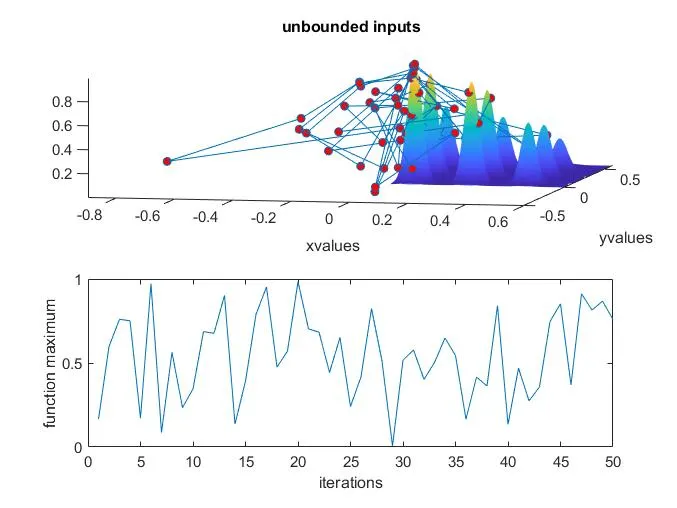
Study1 by using a for loop AN ga syntax by providing a function and no of variables. From this we will get a as a result optimum values of x and y and f
By using tis values we are going to plot a figure to show the function maxima and minima values for no of iterations.
For this study we are going to calculate the study tin=me by using tic and toc command
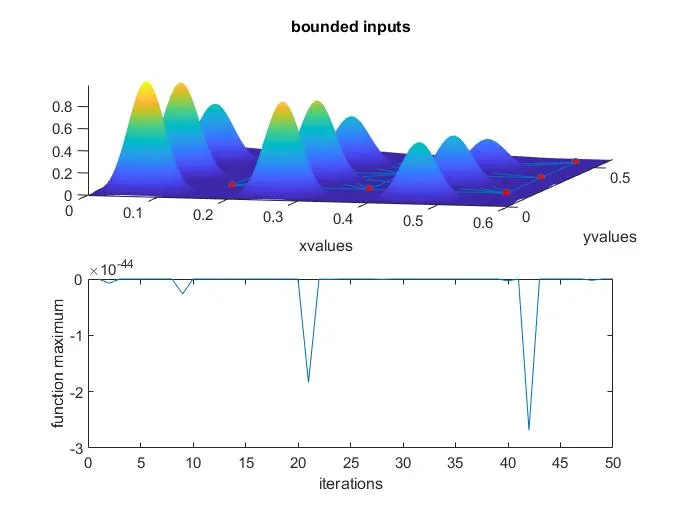
Then in same way we are going to do a 2nd study by using another GA syntax here we are adding lower bounds and upper bounds to find the maxima values within the search space,
In the same way of study 1 we are using the same command except GA syntax, then we will get a different plot now the maxima values will be in with in the search space. In same way we are going to calculate the study time, but this time it takes a little bit more time.
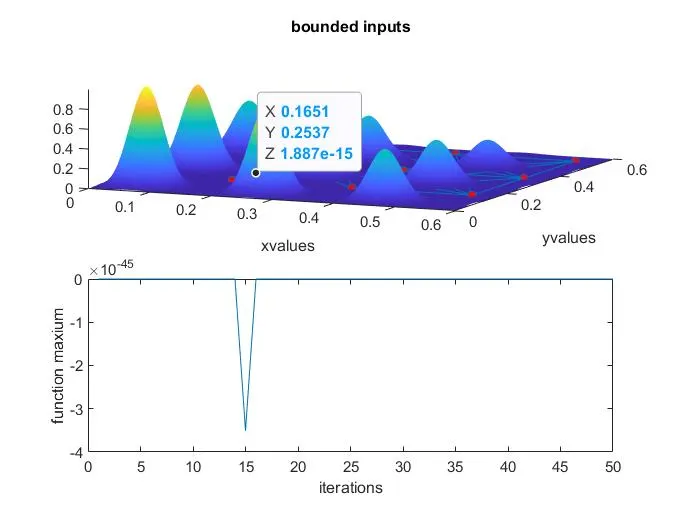
Still we are not getting an optimized value so in study 3 we are going to use another syntax which will minimizes with the default optimization parameters replaced by values in options here we are going to provide a population size for the option to reduce the optimal maxima values. Finally, we will get an optimal value, but for study 3 it takes more operating time because of options.
Conclusion: by using a GA syntax we will be able to get an optimized maximum and minimum values, it will be use full to find stress analysis, aerodynamic foils.
i havent faced any errors during coding ecept some mathematical calculation, it leads to my output fiure mismatch so i figured it out.
clear all
close all
clc

%defining our search space

x=linspace(0,0.6,150);
y=linspace(0,0.6,150);
num_spaces=50;

%creating a 2-D mesh

[xx, yy]=meshgrid(x,y);

%evaluvating the stalagmite function

for i=1:length(xx)
    for j=1:length(yy)

       input_vector(1)=xx(i,j);
       input_vector(2)=yy(i,j);

      f(i,j)=stalgamite(input_vector);

    end

end


%studty 1-statastical behaviour unbounded

tic

for i=1:num_spaces

    [inputs, fopt(i)]=ga(@stalgamite,2);
    xopt(i)=inputs(1);
    yopt(i)=inputs(2);

end

study_time=toc;
figure(1)
subplot(2,1,1)
hold on
surfc(xx,yy,-f)
shading interp
title('unbounded inputs')
xlabel('xvalues')
ylabel('yvalues')
plot3(xopt,yopt,-fopt,'marker','o','markersize',5,'markerfacecolor','r')
subplot(2,1,2)
plot(-fopt)
xlabel('iterations')
ylabel('function maximum')

% study-02 Statistical behaviour with upper and lower bounds
tic
for i=1:num_spaces

    [inputs, fopt(i)]=ga(@stalagmite,2,[],[],[],[],[0;0],[0.6;0.6]);
    xopt(i)=inputs(1);
    yopt(i)=inputs(2);
end
stdudy2_time=toc;

figure(2)
subplot(2,1,1)
hold on
surfc(xx,yy,-f)
shading interp
title('bounded inputs')
xlabel('xvalues')
ylabel('yvalues')
plot3(xopt,yopt,-fopt,'marker','o','markersize',5,'markerfacecolor','r')
subplot(2,1,2)
plot(-fopt)
xlabel('iterations')
ylabel('function maximum')

%study 3 increasing GA iterations

options=optimoptions('ga');
options=optimoptions(options,'populationsize',170);

tic

for i=1:num_spaces
    [inputs, fopt(i)]=ga(@stalagmite,2,[],[],[],[],[0;0],[0.6;0.6],[],[],options);
     xopt(i)=inputs(1);
     yopt(i)=inputs(2);

end

study3_time=toc;

figure(3)
subplot(2,1,1)
hold on
surfc(xx,yy,-f)
shading interp
title('bounded inputs')
xlabel('xvalues')
ylabel('yvalues')
plot3(xopt,yopt,-fopt,'marker','o','markersize',5,'markerfacecolor','r')
subplot(2,1,2)
plot(-fopt)
xlabel('iterations')
ylabel('function maxium')
max_value=fopt


function [f]=stalgamite(input_vector)


% describing the input variables x,y i


       x= input_vector(1);
       y= input_vector(2);

       %calculating the variables as given in the equation


        f1_x=(sin((5.1*pi*x) +0.5).^6);
        f1_y=(sin((5.1*pi*y) +0.5).^6);

        f2_x=exp((-4*log(2)*((x-0.0667).^2))/(0.64));
        f2_Y=exp((-4*log(2)*((y-0.0667).^2))/(0.64));
        f = -(f1_x* f1_y* f2_x* f2_Y);


        end