Week-4 Challenge WOT Condition Part-2
1. What is the difference between mapped and dynamic model of engine, motor and generator? How can you change model type?
MAPPED MODELS:
Mapped models are used when the behavior of a particular model is not of our interest and can be modelled with predefined values in the form of lookup tables.
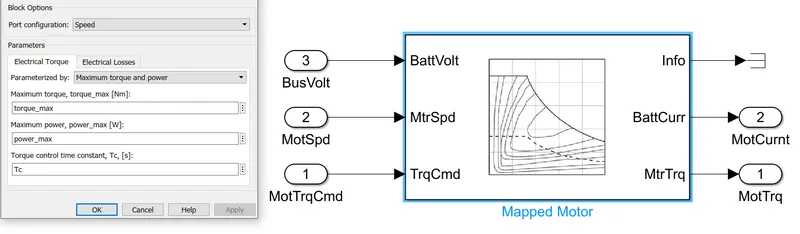
Implements mapped motor and drive electronics operating in torque control mode. we have to specify electrical torque range with a torque speed envelope or maximum motor power and torque.
Output torque tracks a torque reference demand and includes a motor and drive response time constant. Also have to Specify electrical losses as a single operating point that estimates loss across the operating range measured loss or measured efficiency.
DYNAMIC model:
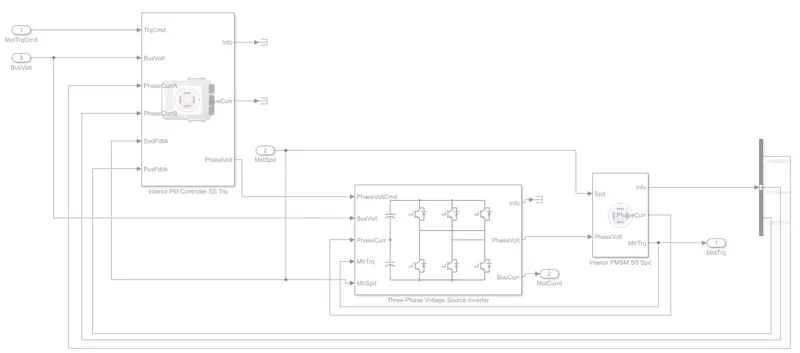
Dynamic models are used when the internal response to a model with respect to its components is needed.
eg. motor model:
in the below model motor components such as inverter phase controller feedback circuits are also modelled.
2. How does the model calculate miles per gallon? Which factors are considered to model fuel flow?
vehicle speed data is used to calculate the distance travelled in meters which is then converted to miles Battery power data is used to find power used in kWh which is then converted to gasoline-equivalent using US EPA value by dividing with 33.7
note: As per the US environmental protection agency (EPA) 1 gallon of gasoline is equal to 33.7 kWh
Dividing distance travelled in miles by the number of gallons, we can get miles per gallon.
For HEV this gallon (gasoline-equivalent of battery power) is added with gallon used by IC engine then miles per gallon is calculated.
3. Run the HEV ReferenceApplication with WOT drive cycle. Change the grade and wind velocity in the environment block. Comment on the results.
Open MATLAB and go to search box and search Hybrid electric vehicle multimode reference application
Click on autoblkhevstart (wait till its create and open a working copy of Hybrid Electric Vehicle reference application project).
Double click to Open the passenger car block and again open the Electric Plant and here we will find the three main blocks are battery, generator, and motor.
Generator and motor blocks contain both mapped model and dynamic model which are named as GenMapped / GenDynamic and MotMapped / MotDynamic.
Open generator block from toolstrip bar open modelling and expand design tab and click variant manager.
A new window will open for variant manager. Here from model hierarchy expand motor and generator.
Set MotDynamic and GenDynamic active by selecting "set as level mode active choice" which will activate the Dynamic model.
Set MotMapped and GenMapped active by selecting "set as level mode active choice" which will activate the Mapped model.
BLOCKS EXPLANATIONS:
Drive Cycle Source:
The Drive Cycle Source block generates a standard or user-specified longitudinal drive cycle. The block output is the vehicle longitudinal reference speed as a function of time along with gear shift schedule if applicable.
Environment Block:
Simulink is a graphical programming environment used to model, simulate, and analyze dynamic systems enabling users to pose questions about a system, model it, and observe its behavior.
Longitudinal Driver:
The longitudinal driver model works with the lateral driver model by using the same desired path parameters to model the driver's velocity control based on the relative velocity and relative distance to the preceding vehicle.
Controllers:
Motor controller is a combination of Power electronics and embedded micro-computing elements which make the efficient conversion of energy stored in batteries of an electric vehicle to generate motion.
Passenger Car:
The Passenger Car block in Simulink, often found in toolboxes like the Vehicle Dynamics Block set or Powertrain Block set is used to simulate the behavior of a passenger vehicle within a model.
It provides a predefined set of components and dynamics that represent the physical characteristics and responses of a car. The block is especially useful for engineers who want to simulate real-world conditions and optimize vehicle performance.
Visualization Block:
The Visualization blocks in Simulink are used to visually display simulation data in real-time or post-processing mode. They help you monitor analyze and debug your models by providing graphical feedback on the simulation’s behavior.